# The Tin Summer
[](https://travis-ci.org/vmchale/tin-srummer)
If you do a significant amount of programming, you'll probably end up with
build artifacts scattered about. `sn` is a tool to help you find those
artifacts.
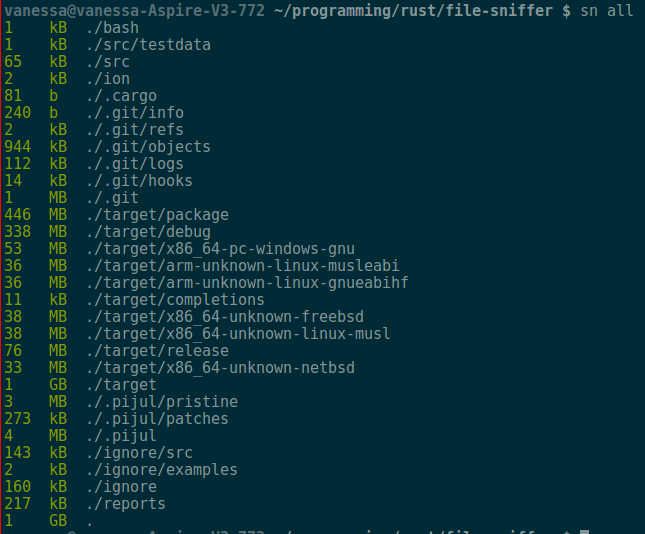
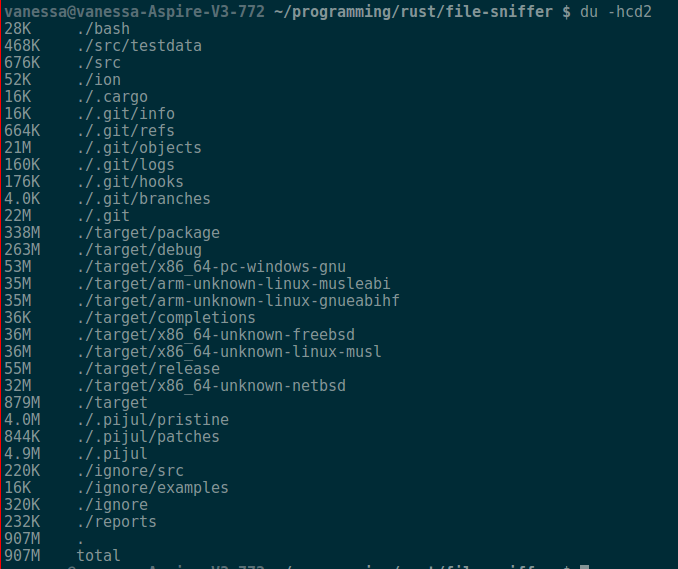
`sn` is also a replacement for `du`. It has far nicer
output, saner commands and defaults, and it even runs faster on big directories
thanks to multithreading.
## Installation
### Binary install
The easiest way to install is to download a binary from the [releases
page](https://github.com/vmchale/tin-summer/releases).
### Cargo
If your platform doesn't have binaries, get [cargo](https://rustup.rs/). Then:
```bash
$ cargo install tin-summer
```
Make sure you are on nightly; otherwise
```bash
$ rustup run nightly cargo install tin-summer
```
#### Shell completions
After setting `BASH_COMPLETIONS_DIR` or `FISH_COMPLETIONS_DIR`, you can install the
`bash` or `fish` features like so:
```bash
$ cargo install --features fish tin-summer
```
Note that this might need to be run as root, depending on your setup.
## Use
To list directory and file sizes for the current directory:
```
$ sn all -f
```
To get a list of directory sizes concurrently, excluding version control:
```
```bash
$ sn ar -t200M
```
### Accessibility
To turn off colorized output:
```bash
export CLICOLOR=0
```
### Comparison
#### Reasons to use `du`
* Reads disk usage, not file sizes
* Optionally dereferences symlinks
* Slightly faster on small directories
* Well-supported
#### Reasons to use `sn`
* Faster on large directories
* Uses [regex](https://github.com/rust-lang/regex) for exclusions, making it
dramatically faster than `du` when used with the `--exclude` flag.
* Defaults to human-readable output
* Colorized output
* Nicer help via [clap](https://github.com/kbknapp/clap-rs)
* Provides Sorted output
* Finds build artifacts
* Reads file sizes, not disk usage
* Extensible in Rust
* Benefits from upstream improvements in Rust ecosystem
#### Screenshots (alacritty + solarized dark)
##### The Tin Summer
##### du
### Heuristic for build artifacts
Currently, `sn` looks for files that either have an extension associated with
build artifacts, or executable files that are ignored by version control. It also looks for "build
directories", like `.stack-work`, `elm-stuff`, etc. and it considers *all* their
contents to be build artifacts.
#### Languages Supported
The following is a list of languages `sn artifacts` has been tested with.
The *intent* is to support basically anything, so feel free to open a PR or start an issue.
- [x] Haskell (incl. GHCJS)
- [x] rust
- [x] julia
- [x] python
- [x] Elm
- [x] nim
- [x] Vimscript
- [x] Idris
- [x] FORTRAN
- [ ] C