# TestProxy - Tool for end-to-end testing of proxy servers
[](https://crates.io/crates/testproxy)
[](https://app.travis-ci.com/github/sonertari/TestProxy)
Copyright (C) 2019-2022, [Soner Tari](https://github.com/sonertari).
https://github.com/sonertari/TestProxy
## Overview
TestProxy is designed to be used for end-to-end testing of any program, such
as a proxy server, which runs in between a client and a server, and
communicates with them over networking packets.
A proxy server accepts connections from a client on the one side, and
transfers the packets between that client and a server on the other side (it
may or may not modify the packets it transfers). So, TestProxy acts as both
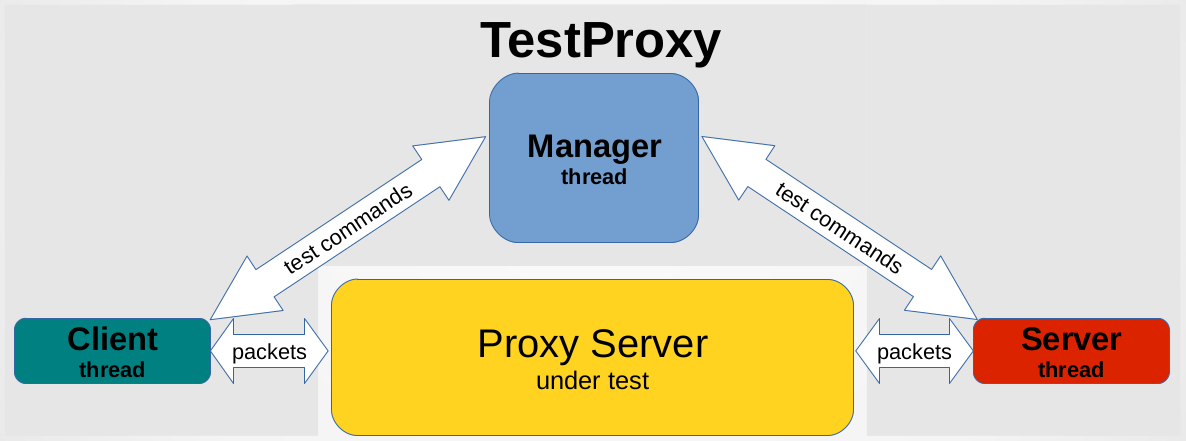
the client and the server to simulate this environment. It starts a manager
thread to run the tests, and in turn the manager thread starts a client and a
server thread for each test. The manager sends commands to these client/server
pairs to execute the tests it is started for.
The [SSLproxy](https://github.com/sonertari/SSLproxy) project uses TestProxy
in its end-to-end tests. See the testproxy test sets in the SSLproxy sources
to learn how to use TestProxy.
TestProxy test steps are composed of a test end, a command, and a payload. For
example, a test can instruct a client to send an HTTP request to the proxy
server under test using the `send` command with a payload such as `GET /
HTTP/1.1\r\nHost: example.com\r\n\r\n`. The next step of the same test can
instruct the pairing server to receive this HTTP request from the proxy using
the `recv` command with the same payload `GET / HTTP/1.1\r\nHost:
example.com\r\n\r\n`, assuming the proxy is not expected to modify the
payload. These send and receive steps of the test are called `states`, and are
executed in the order they are numbered, as below.
```
"states": {
"1": {
"testend": "client",
"cmd": "send",
"payload": "GET / HTTP/1.1\r\nHost: example.com\r\n\r\n"
},
"2": {
"testend": "server",
"cmd": "recv",
"payload": "GET / HTTP/1.1\r\nHost: example.com\r\n\r\n",
}
}
```
This test becomes successful if both of these commands succeed, but it fails
if either of the commands fails or the received payload does not match the
expected payload of the `recv` command. Such tests may contain assertions too.
See the sample tests under the `examples` folder in the sources to learn more
about possible assertions.
Such tests can be saved in a JSON file to form a test set. The protocol and
test ends of the test set are configured in the beginning of the file. The
test set can be executed using multiple configuration. For example, the
following test set specifies two configuration, which means that the tests in
the test set will be executed twice, once for each configuration. Note that
the first configuration is for TCP and the second is for SSL tests, and that
the client and the server ports are different in each configuration. The proxy
server under test should have been configured to accept connections on those
client ports and to forward packets to those server ports.
```
"comment": "Tests for HTTP request/response",
"configs": {
"1": {
"proto": {
"proto": "tcp"
},
"client": {
"ip": "127.0.0.1",
"port": "8181"
},
"server": {
"ip": "127.0.0.1",
"port": "9181"
}
},
"2": {
"proto": {
"proto": "ssl",
"crt": "server.crt",
"key": "server.key"
},
"client": {
"ip": "127.0.0.1",
"port": "8444"
},
"server": {
"ip": "127.0.0.1",
"port": "9444"
}
}
},
"tests": {
"1": {
"comment": "Sends an HTTP request",
"states": {
...
}
},
"2": {
"comment": "Receives an HTTP response",
"states": {
...
}
}
}
```
Furthermore, such test sets can be bundled to form a test harness. For
example, a sample test harness may be as follows:
```
{
"comment": "Proxy end-to-end tests",
"testharnesses": {
"1": {
"comment": "HTTP tests",
"testsets": {
"1": "http_testset_1.json",
"2": "http_testset_2.json"
}
}
}
}
```
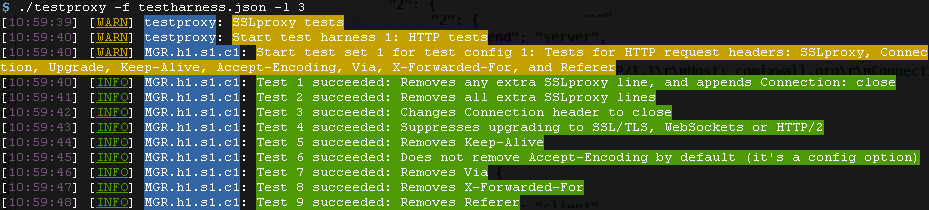
One or more test harnesses can be saved in a JSON file. This is the file that
the testproxy executable should be started with using the `-f` option. For
example, the following is the screenshot of testproxy output when started with
a `testharness.json` file and the debug level of 3 (which is the default, but
TestProxy can produce detailed debug logs and very verbose trace logs as well):
In summary, the main test harnesses file may be composed of multiple test
harnesses. Test harnesses may be divided into multiple test sets, which may be
composed of tests defined in a test set file. Each test may contain multiple
steps called states, and may contain assertions.
TestProxy runs multithreaded. Test harnesses are run serially, starting from
the first one, but TestProxy starts a manager thread for each test set in the
test harness. Manager thread runs the tests in its test set serially, but it
starts a client and a server thread for each test in the test set. Manager
thread communicates with those client and server threads over messaging
channels, and expects execution results back.
TestProxy currently supports the TCP and SSL protocols.
## License
TestProxy is provided under the GPLv3 license.