# termint
[](https://crates.io/crates/termint)
[](https://docs.rs/termint/latest/termint/)
[](https://crates.io/crates/termint)
**termint** is high-performance, structural TUI (Terminal User Interface)
library and framework for Rust.
## Table of Contents
- [How to get it](#how-to-get-it)
- [With cargo](#with-cargo)
- [In Cargo.toml](#in-cargotoml)
- [Features](#features)
- [Examples](#examples)
- [Framework Mode](#framework-mode)
- [Manual Mode](#manual-mode)
- [Colored printing](#colored-printing)
- [TUI examples](#tui-examples)
- [Usage](#usage)
- [Projects](#projects)
- [Links](#links)
## How to get it
This crate is available on [crates.io](https://crates.io/crates/termint).
### With cargo
```terminal
cargo add termint
```
### In Cargo.toml
```toml
[dependencies]
termint = "0.7.0"
```
### Features
- `backend-crossterm`: Enables [Crossterm](https://crates.io/crates/crossterm)
as the event-reading backend.
- `backend-termal`: Enables [Termal](https://crates.io/crates/termal) as the
event-reading backend.
- `serde`: Enables serialization and deserialization of some structs.
- `all`: Enables all features.
`backend-crossterm` is enabled by default. If both `backend-crossterm` and
`backend-termal` are enabled, Termint defaults to **Crossterm**, unless
specified otherwise via `Term::<Backend>::init()`.
## Examples
### Framework Mode
> **Note:** To use `Framework mode`, you must enable either the
> `backend-crossterm` or `backend-termal` feature.
Termint provides the `Application` trait to manage the UI lifecycle. You can
then use `Term::run`, which runs the main loop, handles the input events and
efficient rendering all using the given `Application` implementation.
```rust
use termint::prelude::*;
struct MyApp;
impl Application for MyApp {
fn view(&self, _frame: &Frame) -> Element {
let mut main = Block::vertical().title("Termint App");
main.push("Hello from the Application trait!".fg(Color::Cyan), 0..);
main.into()
}
fn event(&mut self, event: Event) -> Action {
match event {
Event::Key(k) if k.code == KeyCode::Char('q') => Action::QUIT,
_ => Action::NONE,
}
}
}
fn main() -> Result<(), Error> {
Term::default().setup()?.run(&mut MyApp)
}
```
### Manual Mode
If you prefer to manage you own loop, you can use the manual mode, where
`Term` manages only terminal state and rendering. Everything else, such as the
main loop, event handling and so on, you have to implement yourself.
```rust
use termint::prelude::*;
fn main() -> Result<(), Error> {
let mut term = Term::default().setup()?;
loop {
// 1. Custom event handling
// 2. Logic updates
let mut main = Block::vertical().title("Termint App");
main.push("Hello from the Manual mode!".fg(Color::Red), 0..);
// 3. Render on demand
term.render(main)?;
}
}
```
### Colored printing
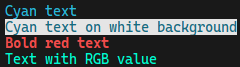
Colored printing is really easy, you can do it by using any `Text` widget.
Here is an example of using `Span` widget:
```rust
use termint::prelude::*;
println!("{}", "Cyan text".fg(Color::Cyan));
println!("{}", "Cyan text on white".fg(Color::Cyan).bg(Color::White));
println!("{}", "Bold red text".fg(Color::Red).modifier(Modifier::BOLD));
println!("{}", "Text with RGB value".fg(Color::Rgb(0, 249, 210)));
```
You can also use re-exported `termal` crate to print colored text:
```rust
use termint::termal::printcln;
printcln!("{'yellow italic}Yellow Italic text{'reset}");
printcln!("{'y i}{}{'_}", "Yellow Italic text");
printcln!("{'#dd0 i}{}{'_}", "Custom Yellow Italic text");
```
### TUI examples


## Usage
Code blocks above are just examples of the usage. To see more about functions,
Widgets and more, please visit the
[documentation](https://docs.rs/termint/latest/termint/).
You can also check the `examples` directory of this repository for more
examples of how to use this crate for creating TUIs.
## Projects
Here is a list of some projects using termint:
- [2048](https://github.com/Martan03/2048)
- [futoshiki](https://github.com/Martan03/futoshiki)
- [loopover](https://github.com/Martan03/loopover)
- [minesweeper](https://github.com/Martan03/minesweeper)
- [rsTimer](https://github.com/Martan03/rsTimer)
- [tictactoe](https://github.com/Martan03/tictactoe)
## Links
- **Author:** [Martan03](https://github.com/Martan03)
- **GitHub repository:** [termint](https://github.com/Martan03/termint)
- **Package**: [crates.io](https://crates.io/crates/termint)
- **Documentation**: [docs.rs](https://docs.rs/termint/latest/termint/)
- **Author website:** [martan03.github.io](https://martan03.github.io)