# termint
[](https://crates.io/crates/termint)
[](https://docs.rs/termint/latest/termint/)
[](https://crates.io/crates/termint)
Rust library for colored printing and Terminal User Interfaces
## Table of Contents
- [How to get it](#how-to-get-it)
- [With cargo](#with-cargo)
- [In Cargo.toml](#in-cargotoml)
- [Features](#features)
- [Examples](#examples)
- [Printing colored text](#printing-colored-text)
- [Terminal User Interface (TUI)](#terminal-user-interface-tui)
- [TUI examples](#tui-examples)
- [Usage](#usage)
- [Links](#links)
## How to get it
This crate is available on [crates.io](https://crates.io/crates/termint).
### With cargo
```terminal
cargo add termint
```
### In Cargo.toml
```toml
[dependencies]
termint = "0.6.0"
```
### Features
- `serde`: Enables serialization and deserialization of some structs.
- `all`: Enables all features.
## Examples
### Printing colored text
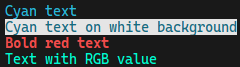
Printing colored text is really easy, you can do it by using any `Text`
widget. Here is an example of using `Span` widget:
```rust
println!("{}", "Cyan text".fg(Color::Cyan));
println!("{}", "Cyan text on white".fg(Color::Cyan).bg(Color::White));
println!("{}", "Bold red text".fg(Color::Red).modifier(Modifier::BOLD));
println!("{}", "Text with RGB value".fg(Color::Rgb(0, 249, 210)));
```
You can also use re-exported `termal` crate to print colored text:
```rust
printcln!("{'yellow italic}Yellow Italic text{'reset}");
printcln!("{'y i}{}{'_}", "Yellow Italic text");
printcln!("{'#dd0 i}{}{'_}", "Custom Yellow Italic text");
```
### Terminal User Interface (TUI)
The main purpose of this crate is to create Terminal User Interfaces (TUIs).
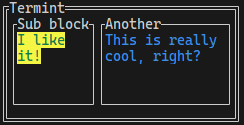
Example below shows minimal example of creating a TUI using `Block` widget
and rendering it using `Term`. You can find more examples in the `examples`
directory of this repository.
```rust
// Creates main block and sets its properties
let mut main = Block::horizontal()
.title("Termint")
.border_type(BorderType::Double);
// Creates block1 and adds span as its child
let mut block1 = Block::vertical().title("Sub block");
let span1 = "I like it!".fg(Color::Green).bg(Color::Yellow);
block1.push(span1, Constraint::Percent(100));
// Adds block1 as child of main block
main.push(block1, Constraint::Min(0));
// Creates block2 and adds span as its child
let mut block2 = Block::vertical().title("Another");
let span2 = "This is really cool, right?".fg(Color::Blue);
block2.push(span2, Constraint::Percent(100));
// Adds block2 as child of main block
main.push(block2, Constraint::Fill(1));
// Renders the main block which renders all the children using Buffer
let mut term = Term::new();
term.render(main)?;
```
### TUI examples


## Usage
Code blocks above are just examples of the usage. To see more about functions,
Widgets and more, please visit the
[documentation](https://docs.rs/termint/latest/termint/).
You can also check the `examples` directory of this repository for more
examples of how to use this crate for creating TUIs.
## Projects
Here is a list of some projects using termint:
- [2048](https://github.com/Martan03/2048)
- [futoshiki](https://github.com/Martan03/futoshiki)
- [loopover](https://github.com/Martan03/loopover)
- [minesweeper](https://github.com/Martan03/minesweeper)
- [rsTimer](https://github.com/Martan03/rsTimer)
- [tictactoe](https://github.com/Martan03/tictactoe)
## Links
- **Author:** [Martan03](https://github.com/Martan03)
- **GitHub repository:** [termint](https://github.com/Martan03/termint)
- **Package**: [crates.io](https://crates.io/crates/termint)
- **Documentation**: [docs.rs](https://docs.rs/termint/latest/termint/)
- **Author website:** [martan03.github.io](https://martan03.github.io)