
Terminal Control
Control, inspect, test, and capture real terminal applications for agents and TUI review.


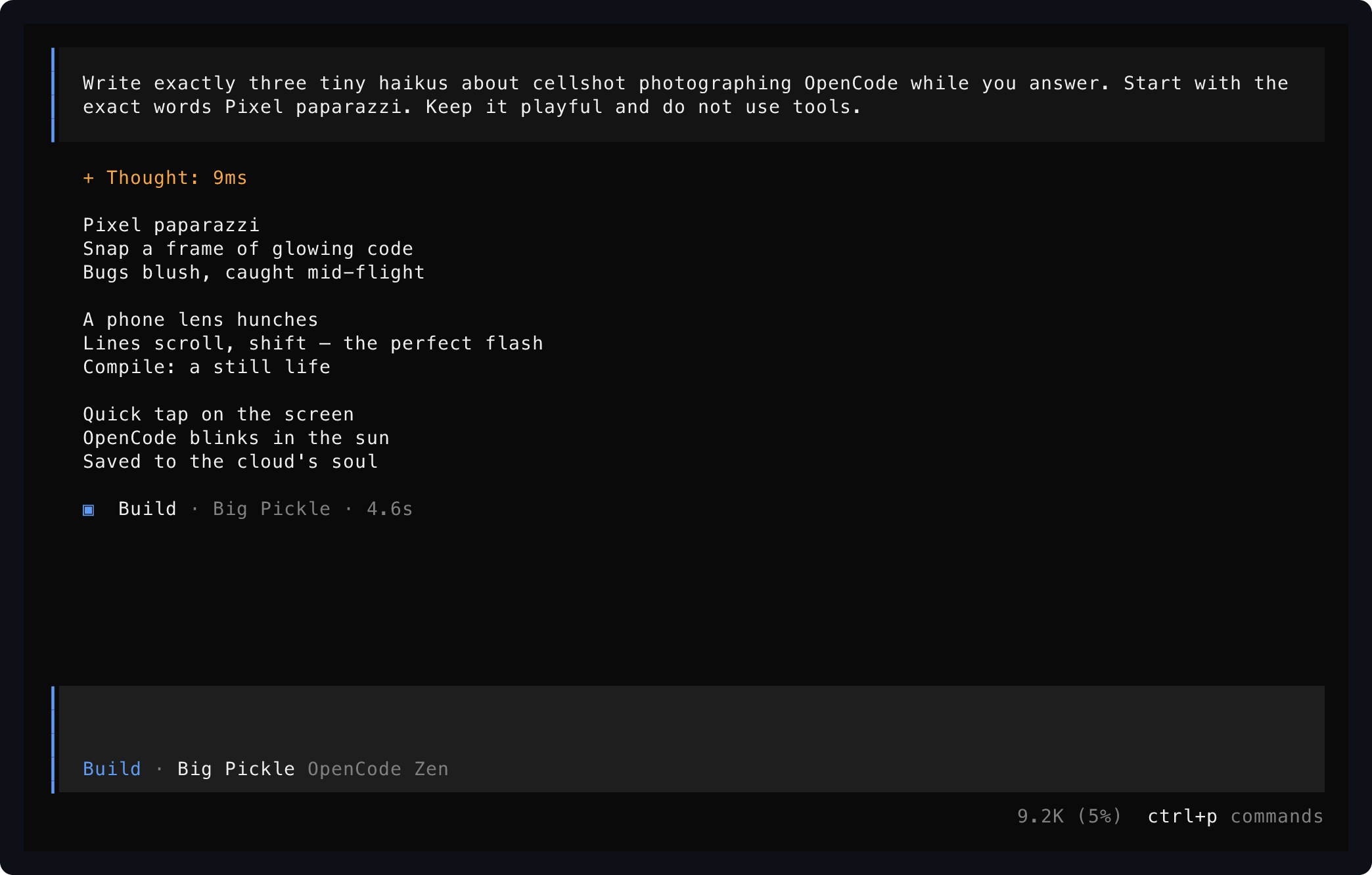
Saved from one live OpenCode session using start, send, and save.
Install
Requires Rust 1.93 or newer. Video export also requires ffmpeg.
Install the current repository head instead of the latest crate release:
Show A Terminal Screen
Run a program in a PTY and print its visible terminal state:
Show is the routine observation command: it prints visible text to standard output and creates no files. Request a different stdout-readable representation explicitly:
Wait for an application to mount, then interact before reading its screen:
OpenTUI applications such as OpenCode require the opt-in host handshake:
Save Evidence
Write only the artifact formats you request:
The second command writes captures/model.png and captures/model.txt. ANSI stream artifacts can contain sensitive terminal data and are only produced when explicitly requested with --format ansi.
Control A Live TUI
Use a named session when several observations or interactions should target the same running application:
status reports running or exited, the effective working directory, command, viewport, and recording path. An exited session retains its final screen for show until it is stopped. list distinguishes unavailable stale sockets from incompatible older session protocols.
send accepts ctrl-a through ctrl-z, keys such as enter, escape, arrows, tab, shift-tab, backspace, delete, home, end, page-up, and page-down, plus typed input as text:<value>. Use ctrl-c to interrupt work or pipe exact prompt bytes with --stdin:
|
resize controls the terminal viewport and records geometry changes in .termctrl timelines when recording is enabled. A session whose retained ANSI transcript has already been truncated cannot be resized because its current screen cannot be replayed at a new size safely.
For normal-screen tools and long-running log processes, inspect retained scrollback directly:
Full-screen alternate-screen TUIs do not provide useful terminal logs; read their visible screen with show or retain a recording timeline instead. Status exposes logs_truncated after raw retained ANSI reaches --max-bytes; the session continues running and retains its most recent transcript bytes.
Restart a single named owner safely when deploying updated code:
restart NAME reuses the prior command, effective working directory, viewport, host profile, color policy, and recording path by default. Supply options or a replacement command only when deliberately changing the launch.
Record A Video
Record a session timeline and replay it as an MP4:
Video export trims startup frames before non-whitespace text by default, while still preserving recordings that only paint terminal backgrounds. Use --include-startup to keep all startup frames, or --max-idle-ms 600 to intentionally shorten quiet gaps.
Recordings are JSON Lines files containing terminal output, client input, and automatic host input; they can include prompts or secrets. Treat them as sensitive artifacts.
Sources And Formats
Repeat --format to export only what you need:
Read a current visible screen directly for agent inspection, or select JSON/ANSI/SVG explicitly:
For commands whose useful output is piped, use --pipe. Pipe reads force color by default; pass --color never for plain output:
One-off show and save operations own disposable command processes: once the visible screen is read or saved, the launched process tree is terminated. Use start for long-running applications.
Render an existing ANSI/VT terminal stream without launching a process. An .ansi file is a conventionally named byte stream of terminal output and escape sequences, not a separate container format:
|
|
Rust Library And Formats
The crate also exposes the shot engine, live sessions, and artifact model to Rust callers. The CLI is built on the same terminal_control::shot, terminal_control::session, terminal_control::frame, terminal_control::render, and terminal_control::recording modules:
let shot = from_ansi?;
assert_eq!;
let svg = svg;
A library session keeps one PTY-backed application in process for fast test interaction without repeatedly invoking the CLI:
use Duration;
let mut session = start?;
session.wait_for_text?;
let status = session.status?;
session.send?;
session.wait_for_idle?;
let capture = session.capture?;
let shot = capture.shot;
let exit = session.wait_for_exit?;
session.stop?;
Structured output is versioned for external tools:
- A
save --format jsoncapture is aFrameobject withversion: 1, described byschemas/frame-v1.schema.json. - A
.termctrlrecording is JSON Lines: its first line is a versioned header and subsequent lines are timed output, input, or resize entries, each described byschemas/recording-entry-v1.schema.json. - Recording byte arrays contain the original terminal or input bytes as integers from
0to255; recordings can contain sensitive text or input.
session::Session is the embedded lifecycle interface; the flat named-session CLI commands and the external driver are adapters over the same implementation.
External Driver
External agent tooling can keep multiple embedded sessions alive through a versioned JSON Lines protocol over stdin/stdout:
The driver writes a hello message with protocol and Terminal Control versions, then accepts typed operations including launch, status, send, waitForText, waitForIdle, waitForExit, capture, logs, recording, resize, stop, and shutdown. It is intended for clients such as a TypeScript TUI test or agent-control library, while the shell-facing flat commands remain convenient for individual workflows.
A driver capture response contains a structured visible frame, derived text, and a completion reason: idle, deadline, exited, or outputclosed. Raw ANSI is omitted by default; request includeAnsi: true for retained transcript bytes or includeSvg: true for rendered visual evidence. A test client should normally require idle or exited instead of accepting a deadline fallback as a stable snapshot. Driver input is intentionally exact: text, raw bytes, known key values, and single-letter control input are supported without claiming unimplemented key chords.
TypeScript Client
@kitlangton/terminal-control exposes the driver as isolated typed test sessions. It deliberately separates the visible screen from readable retained logs and the exact ANSI/VT transcript. Its npm distribution includes an optional native package for macOS or GNU/Linux on arm64 or x64, so consumers do not need a Rust toolchain or separate termctrl installation.
After the initial npm publication:
import { TerminalControl } from "@kitlangton/terminal-control"

await using terminal = await TerminalControl.make({
  artifacts: {
    directory: ".termctrl-artifacts",
    onFailure: true,
    includeTranscript: false,
    includeRecording: true,
  },
})
await using session = await terminal.launch({
  command: ["/absolute/path/to/my-terminal-app"],
  viewport: { cols: 100, rows: 30 },
  inheritEnv: false,
  env: { TERM: "xterm-256color", HOME: "/tmp/test-home" },
  record: "on-failure",
})

await session.screen.waitForText(/Ready/)
await session.keyboard.type("help")
await session.keyboard.press("Enter")

const text = await session.screen.text()
const frame = await session.screen.frame()
const logs = await session.logs.text()
const transcript = await session.transcript.ansi()

expect(text).toMatchSnapshot()
expect(frame).toMatchSnapshot()

const exit = await session.waitForExit({ timeoutMs: 5_000 })
expect(exit).toMatchObject({ reason: "exited", exit: { code: 0 } })
When working directly from this repository before installing the npm artifacts, pass binaryPath: "./target/release/termctrl" or set TERMCTRL_BINARY.
session.screen.text() and session.screen.frame() wait for a settled capture and reject deadline or output-closed fallback by default. A test that intentionally needs an intermediate frame can request it explicitly:
const capture = await session.screen.capture({ allowIncomplete: true })
console.log(capture.reason, capture.text, capture.frame)
This makes ordinary text or frame snapshots stable by default while retaining explicit access to live, incomplete terminal state.
Keyboard presses are typed as the sequences Terminal Control encodes exactly, such as "Enter", "ArrowDown", or "Control+C". Use session.keyboard.write(bytes) when a test deliberately needs exact terminal bytes outside that supported key set.
Vitest users can add a screen-aware assertion that writes configured artifacts on failure. Standard toMatchSnapshot() and toMatchInlineSnapshot() remain the simplest snapshot format because visible text is reviewable in source control:
import { expect } from "vitest"
import { extendTerminalControlMatchers } from "@kitlangton/terminal-control/vitest"

extendTerminalControlMatchers(expect)

await expect(session).toHaveScreenText("Ready\n\nChoose an option")
await expect(session.screen.text()).resolves.toMatchInlineSnapshot()
session.writeArtifacts(name) and failing toHaveScreenText(...) assertions can write screen.txt, screen.json, screen.svg, logs.txt, and metadata.json. Environment variable values are redacted in metadata. transcript.ansi and recording.termctrl are opt-in because terminal streams and typed input may contain secrets. Wrap ordinary snapshot assertions when evidence should be saved on any thrown assertion:
await session.withArtifactsOnFailure("settings-snapshot", async () => {
  await expect(session.screen.text()).resolves.toMatchSnapshot()
})
Enable a recording with record: true or record: "on-failure"; a test may explicitly save it before disposing the session:
await session.resize({ cols: 120, rows: 40 })
await session.saveRecording("artifacts/navigation.termctrl")
Agent Skill
This repository publishes an agent skill that teaches coding agents to inspect and drive terminal applications through termctrl instead of guessing at interactive state. Install it from the repository with the Skills CLI:
The skill covers one-off visible reads, named live-session workflows, OpenTUI startup, explicit evidence capture, recording handling, and the sensitivity of terminal transcripts and input.
npm Release
The npm workspace publishes @kitlangton/terminal-control with fixed-version platform packages: @kitlangton/terminal-control-darwin-arm64, @kitlangton/terminal-control-darwin-x64, @kitlangton/terminal-control-linux-arm64-gnu, and @kitlangton/terminal-control-linux-x64-gnu. The client is compiled to ESM JavaScript with declarations; each native package receives the release Rust executable during the npm release workflow.
The initial unpublished npm packages are prepared at 0.1.0. For subsequent user-facing npm changes, create a Changeset with bunx changeset, commit the generated release metadata, and apply version changes before running the workflow. Run the workflow with publish: false to assemble packages only, or publish: true to publish assembled tarballs after its clean Bun and Node/Vitest consumer validation passes.
Notes
- Persistent sessions use owner-only local Unix sockets and are supported on macOS and Linux.
--host opentuianswers startup probes needed by current OpenTUI applications; Kitty graphics are reported unavailable because the current renderer does not decode image payloads.- The current renderer uses a pure-Rust
vt100terminal backend and exports PNG, SVG, JSON, text, and raw ANSI stream artifacts. - Run
termctrl <command> --helpfor dimensions, timing, color, rendering, and output options.