= tc(1)
Rémi Thebault
v1.0, 2024-09-01
:doctype: manpage
:manmanual: TC
:mansource: TC

== NAME

tc - a simple Terminal Calculator

== SYNOPSYS

tc [_OPTION_]... [_EXPR_]...

== OPTIONS

*-i*, *--interactive*::
 Force to enter interactive mode

*-s*, *--strip*::
 Strip output of evaluations to minimum

*-f*, *--functions*::
 Print the list of supported functions

*-g*, *--grammar*::
 Print the EBNF grammar reference

*-h*, *--help*::
 Print help (see a summary with *-h*)

*-V*, *--version*::
 Print version

== DESCRIPTION

*tc* is a simple Terminal Calculator. It can be provided expressions to
evaluate on the command line, or it can enter in interactive shell mode.

If expressions are provided on the command line, they will be evaluated
in order, and program will exit unless *--interactive*
is specified.

If no expression argument is provided, program will enter interactive
mode regardless of the *--interactive* switch.

The *--strip* option is only used for evaluation of expressions on the
command line. If provided, *tc* will print the bare result of evaluation
and exit. This is useful to parse *tc*'s output from scripts.

=== Interactive shell usage

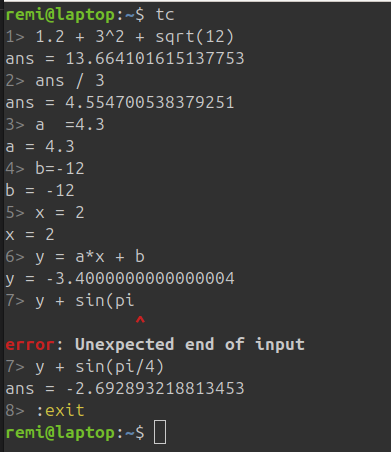
When prompted, user can type expressions (with or without assignment).
The expression is evaluated when ENTER is pressed.

Up and Down keys navigate in the expression history.
Left and Right keys move the cursor in the expression.

A set of special ':' prefixed commands are available in the interactive shell:

* *:quit*, *:q*, *:exit*: exit the program
* *:functions*: page the list of supported functions
* *:grammar*: print the EBNF grammar reference
* *:copy* _[ARG]_, *:cp* _[ARG]_: copy to clipboard
    ** _ARG_ can be a variable name or evaluation history index
    ** the last evaluated value if no _ARG_

Pressing _Ctrl-C_ or _ESC_ key will exit the shell.

=== Grammar

Whitespaces are ignored and comments can be entered,
starting from `#` and spanning until the end of the line.

Each evaluation consists of one line which is either an expression or an
assignment.  All expressions are evaluated in double precision floating point.

Expression grammar is what you would generally expect for ASCII arithmetic
expressions (see the *Expression examples* hereunder for a quick tuto).

Assignment grammar is `variable = expression`.
Once a variable is assigned, it can be reused in latter expressions.
Variables `pi` and `e` are initialized at the start.
Expressions that are not assigned to a user variable, are assigned to
the special `ans` variable, which can also be reused in latter expressions
like any other variable.

The following operators are supported, listed in precedence order:

* *^*
* *+*, *-* (unary)
* ***, */*, *%*
* *+*, *-*

A set of mathematical functions are provided, such as _sin_, _sqrt_, or _ln_.
Trigonometric functions accept angles in radians only.
Functions _rads_ and _degs_ convert to degrees to radians and radians to degrees
respectively.
The *:functions* command or *--functions* option print the full list of supported
functions.

=== Expression examples

* *4 + 3.5*
* *0.124 * (ans + 12) / 3*
* *4 * sin(2*pi/3)*
* *12 * sin(rads(33))*
* *angle = asin(-0.15)*
* *tan(angle)*
* *e^(pi/3)*
* *exp(pi/3)* (same result as previous expression)
* *pow(e, pi/3)* (again same result)

== COPYING

Copyright (C) 2024 {author}. +
Free use of this software is granted under terms of UNLICENSE or MIT LICENSE.