# term-bench
[![made-with-rust][rust-logo]][rust-src-page] [![crates.io][crates-badge]][crates-page] [![MIT licensed][mit-license-badge]][mit-license-page] [![Apache 2.0 licensed][apache-2.0-license-badge]][apache-2.0-license-page]
`term-bench` is a small, render-heavy benchmark that repeatedly renders a colorful noise field to the terminal and records statistics about frames, frame time, and cell updates.
It's useful for comparing terminal backends, drivers, or clients and for estimating rendering throughput on different systems.
Used in [term-wm](https://crates.io/crates/term-wm) for comparing window manager rendering performance to native terminal rendering.
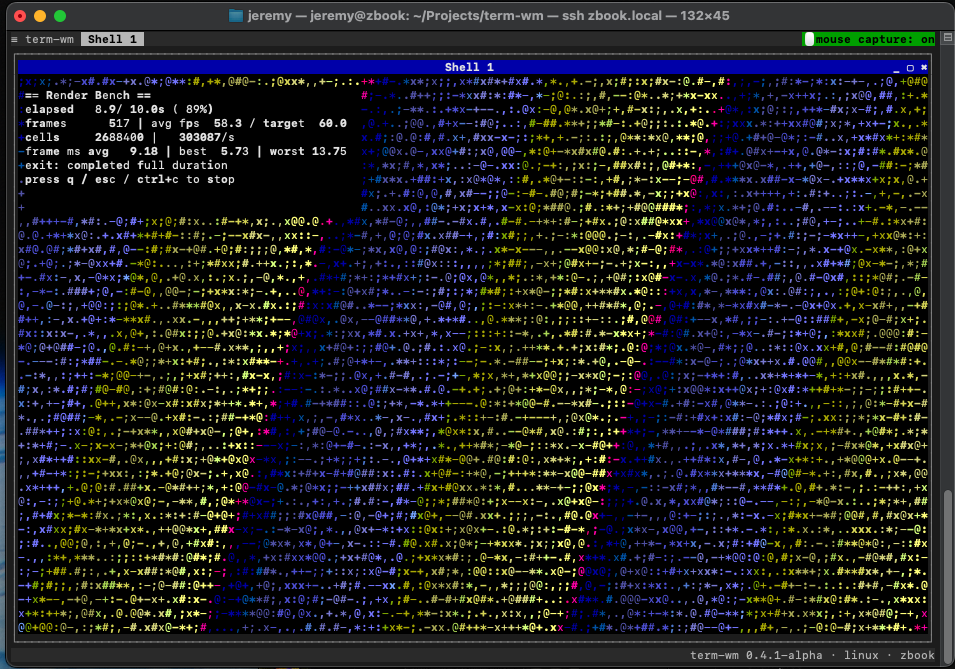
_[term-bench](https://github.com/jzombie/term-wm/tree/main/crates/term-bench) 0.4.1-alpha Linux running in [term-wm](https://crates.io/crates/term-wm) over SSH on macOS_
## Requirements
- A terminal supporting alternate-screen and raw mode (most modern terminals).
_If building from source:_
- [Rust toolchain (stable)](https://rust-lang.org/tools/install/) for building from source.
## Build
From the workspace root you can build or run the crate directly:
```bash
cargo build -p term-bench --release
cargo run -p term-bench --release -- --duration 10.0 --fps 60.0
```
Note: when using `cargo run` pass `--` before CLI args so cargo does not treat them as cargo flags.
## Usage
Assuming `term-bench` is built from source with Cargo:
```bash
cargo run -p term-bench --release -- <OPTIONS>
```
Otherwise, if running a binary:
```bash
# Unix
./term-bench <OPTIONS>
# Windows
term-bench.exe <OPTIONS>
```
Options:
- `-d, --duration <SECONDS>`: How long to run the benchmark (default: `10.0`). Valid range: `0.5` — `600.0` seconds.
- `-f, --fps <FPS>`: Target frames per second to pace rendering (default: `60.0`). Valid range: `1.0` — `240.0`.
Stopping keys: press `q`, `Esc`, or `Ctrl-C` to stop early.
## Output
When the run completes the tool prints a summary report to stdout with:
- Exit status (completed or stopped by user)
- Duration
- Frames rendered and average FPS
- Average / best / worst frame times (ms)
- Total cell updates and approximate updates/sec
Example final report:
```
Render bench completed full duration.
Duration: 10.00s (target 10.00s)
Cell updates: 1234567 total (~123456/s)
```
## Examples
- Run for 30 seconds at 120 FPS:
```bash
cargo run -p term-bench --release -- --duration 30.0 --fps 120.0
```
- Run a quick 5-second debug run:
```bash
cargo run -p term-bench -- --duration 5.0
```
## Troubleshooting
- If the program cannot enter the alternate screen or behaves oddly, ensure your terminal emulator supports ANSI/VT sequences and that `TERM` is set appropriately.
- If you see very low FPS or large frame times, try a release build to avoid instrumentation overhead: `cargo build -p term-bench --release`.
## License
`term-bench` is primarily distributed under the terms of both the MIT license and the Apache License (Version 2.0).
See [LICENSE-APACHE](../../LICENSE-APACHE) and [LICENSE-MIT](../../LICENSE-MIT) for details.
[rust-src-page]: https://www.rust-lang.org/
[rust-logo]: https://img.shields.io/badge/Made%20with-Rust-black?logo=Rust
[crates-page]: https://crates.io/crates/term-bench
[crates-badge]: https://img.shields.io/crates/v/term-bench.svg
[mit-license-page]: ../../LICENSE-MIT
[mit-license-badge]: https://img.shields.io/badge/license-MIT-blue.svg
[apache-2.0-license-page]: ../../LICENSE-APACHE
[apache-2.0-license-badge]: https://img.shields.io/badge/license-Apache%202.0-blue.svg