# telescreen
`telescreen` is a Slack bot to forward messages between channels by simple routing definition file.
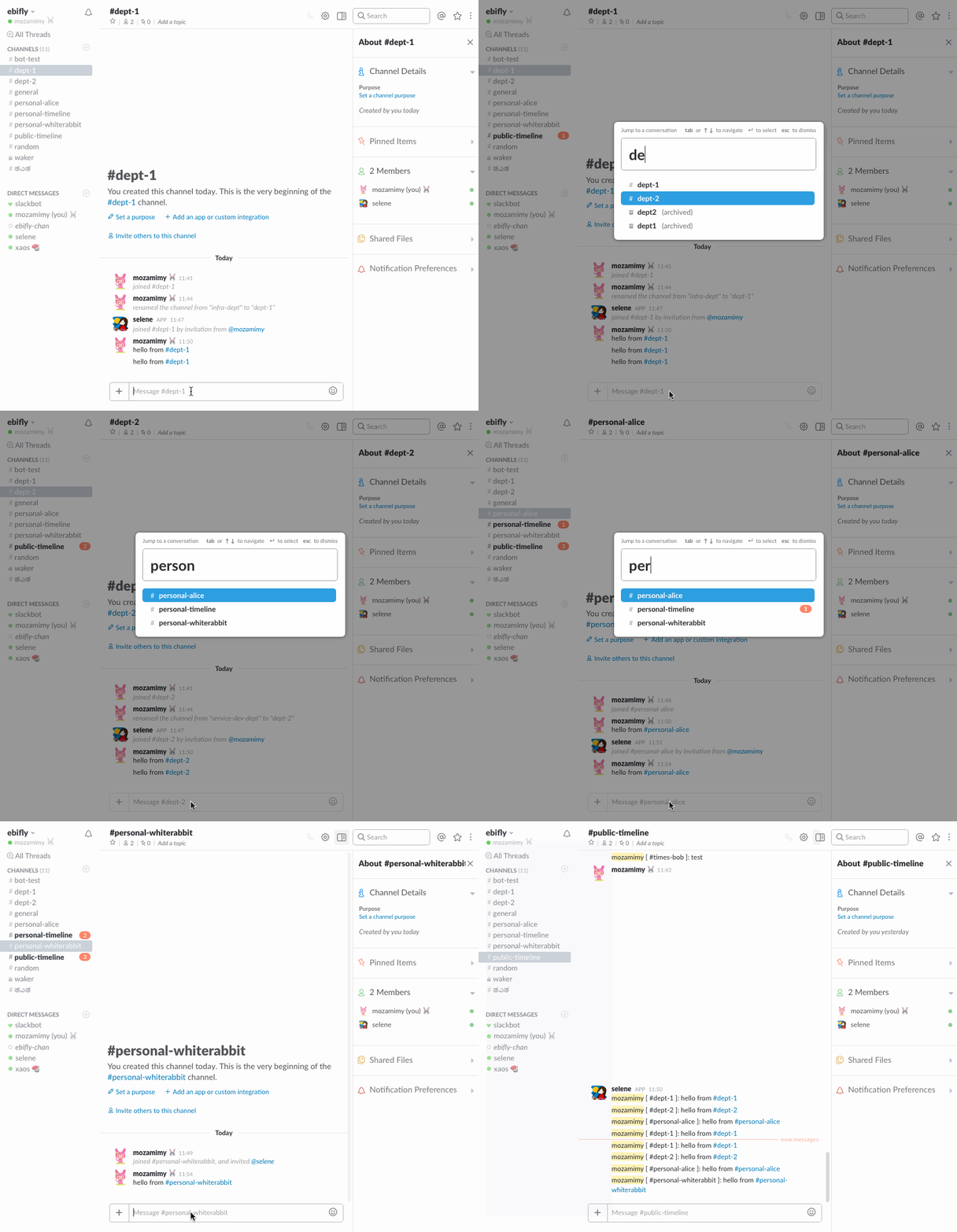
This screen shot shows the behavior when you use following config.
```yaml
- match: 'personal-.+'
destinations:
- personal-timeline
- match: '.*'
destinations:
- public-timeline
```
## Quick start
### :wrench: Pre-built binary
You can download a pre-built binary from [the GitHub release page](https://github.com/mozamimy/telescreen/releases) for Linux and macOS. The binary for only Linux version is linked statically.
### :seedling: Build on your environment
If you are Rust programmer, you can build on your own environment,
```
$ git clone git@github.com:mozamimy/telescreen.git
$ cd telescreen
$ cargo build --release
$ ./target/release/telescreen --help
Usage: ./target/debug/telescreen [options]
Options:
-a, --api-key API_KEY
Slack API key for bot integration
-c, --config FILE Path to config file
-h, --help Print this help menu
```
In addition, you can build a static linked binary with [muslrust](https://github.com/clux/muslrust) Docker image.
```
$ docker pull clux/muslrust
$ ./exec_with_muslrust cargo build --release
```
### :page_with_curl: Create a config file
Routing rules are configurable with a file formatted as YAML. The file consits an array contains hashes like `{ match: regex, destinations: [channel1, channel2, ... ] }`.
For example, following config sends all messages to #public-timeline channel.
```yaml
- match: '.*'
destinations:
- public-timeline
```
On the other hand, following example also sends all messages to #public-timeline channel and sends messages posted to channels that has `personal-` prefix to #personal-timeline channel.
```yaml
- match: 'personal-.+'
destinations:
- personal-timeline
- match: '.*'
destinations:
- public-timeline
```
### :rocket: Run
You can run telescreen like following command,
```
$ telescreen --api-key=[API_KEY] --config=/path/to/your/config
```
### :whale: Run with Docker
The image is hosted in [Docker Hub mozamimy/telescreen](https://hub.docker.com/r/mozamimy/telescreen/).
```
$ git clone git@github.com:mozamimy/telescreen.git
$ cd telescreen
$ API_KEY=[API_KEY] DEST_CHANNEL=your-channel docker-compose up
$ docker-compose down
```
You can configure through environment variables,
- `API_KEY`: Slack API key of Bot integration (required)
- `DEST_CHANNEL`: Destination channel (default: general)
It behaves just collect messages and send to `DEST_CHANNEL`, simply. You should create your own config and use it in the container if you want to use more complicated config.
## Contributing
Bug reports and pull requests are welcome on GitHub at https://github.com/mozamimy/telescreen.
## License
The program is available as open source under the terms of the [MIT License](http://opensource.org/licenses/MIT).