<div align="center">
<p align="center">
<img src="assets/tbdflow-logo.png" alt="tbdflow logo" width="200"/>
</p>
<p align="center">
<i><b>Keep your code flowing</b></i><br/>
</p>
[](https://crates.io/crates/tbdflow)
[](https://crates.io/crates/tbdflow)
</div>
## The problem
Many teams say they practise Trunk-Based Development but in day2day reality things deviate:
- **Commit messages become inconsistent.** Everyone formats them a little differently.
- **Branches that were meant to live for hours** stick around for days.
- **Merging back to main** turns into a manual sequence people half-remember.
- **Two people change the same file** and nobody notices until a push fails.
- **The Definition of Done exists,** but it lives in a document no one looks at during the work.
None of this breaks the build immediately, but it makes integration harder than it needs to be, and the trunk stops
feeling safe to work in.
## The solution
`tbdflow` is a lightweight CLI that **codifies your team's Trunk-Based workflow** and makes the safe path the easiest
path.
```bash
cargo install tbdflow
```
`tbdflow` is a lightweight command-line tool that helps you (and your team) stay in flow with Trunk-Based Development (
TBD).
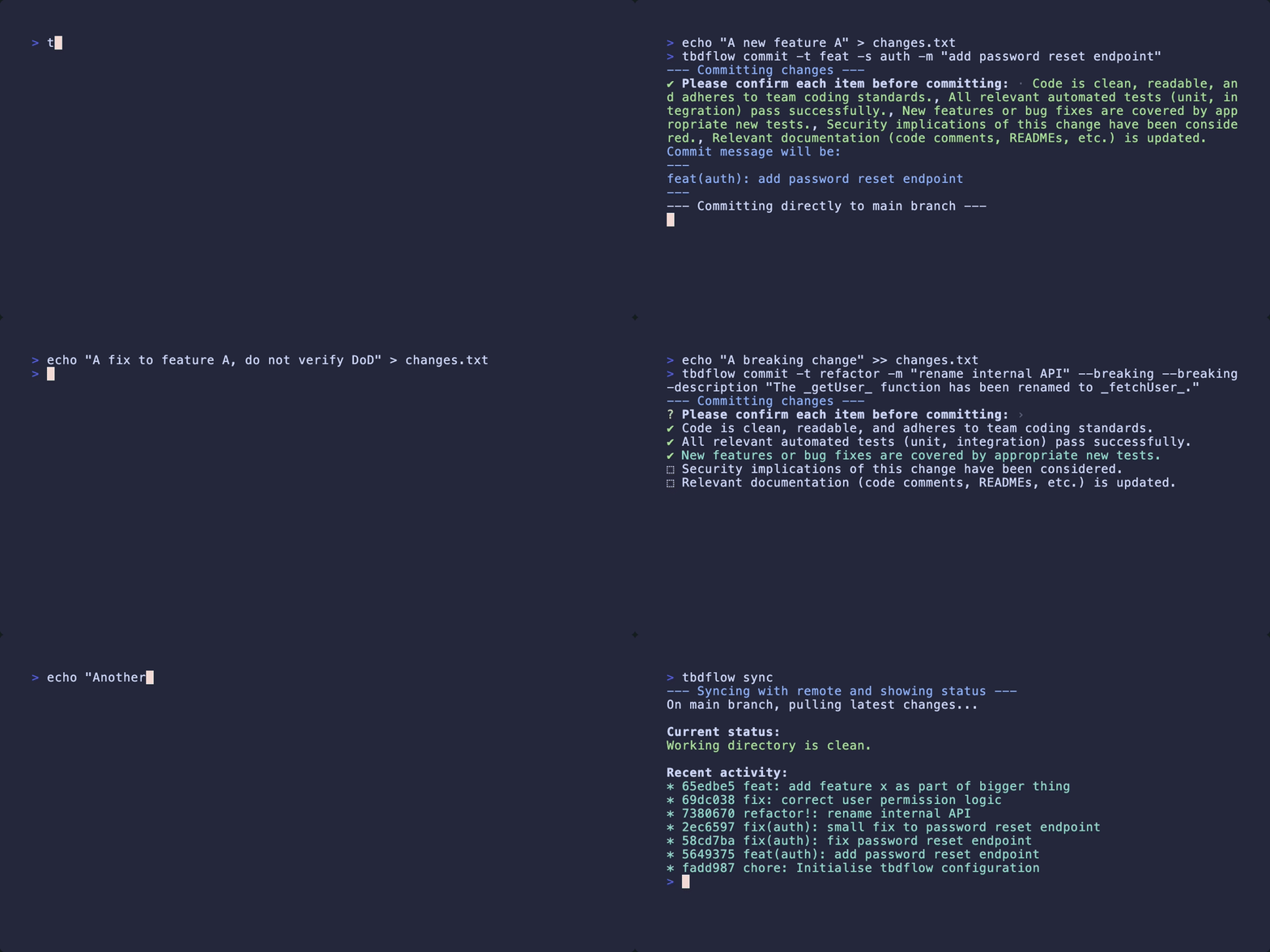
## What it does
| Inconsistent commits | `tbdflow commit` enforces Conventional Commits with built-in linting |
| Long-lived branches | `tbdflow branch` + `tbdflow complete` with stale-branch warnings |
| "Did I pull before pushing?" | `tbdflow sync` + auto-rebase before every commit to main |
| Pulling a broken trunk | `tbdflow sync` pre-flight CI check warns before pulling a red build |
| Merge conflicts you didn't see | `tbdflow radar` shows who else is touching the same files, before you push |
## Philosophy
This tool is built around a specific philosophy of Trunk-Based Development:
* **Main is the default.** The `commit` command is your everyday go-to. It automates pulling the latest changes,
committing, and pushing directly to `main`, promoting small, frequent integrations.
* **Branches are the exception.** While branches are supported, they’re treated as short-lived exceptions and not the
norm.
* **Cleanup is automatic.** The complete command enforces branch short-livedness by merging and automatically tagging (
release) and deleting completed branches, helping keep your repo tidy.
* **Conventional Commits encouraged.** Commit messages
follow [Conventional Commits](https://www.conventionalcommits.org/) for clarity and consistency.
* **Collaboration is visible.** The `radar` command shows who else is touching the same files, turning potential merge
conflicts into conversations before they become problems.
### Why not just use Git?
This CLI isn’t a replacement for Git. You’ll still reach for raw `git` when doing advanced work like rebasing,
cherry-picking, or running `git bisect`.
This tool is as a **workflow assistant**, `tbdflow` encapsulates a repeatable, opinionated process to support your
day-to-day development.
It offers three main benefits:
1. **Consistency across the team**
Everyone follows the same steps for common tasks. Commits, branches, and releases are handled the same way every
time, keeping your Git history clean and predictable.
2. **Less to remember**
No need to recall the exact flags or sequences (like `pull --rebase`, `merge --no-ff`, or commit message formats).
The CLI handles that, so you can stay focused on writing code.
3. **It supports "the TBD way"**
This tool makes the preferred approach easy by providing a smooth, safe, and efficient path for 80% of everyday
tasks. For the other 20%, you can always use Git directly.
### Installation
You need [Rust and Cargo](https://www.rust-lang.org/tools/install) installed.
#### Installing from crates.io
The easiest way to install `tbdflow` is to download it from [crates.io](https://crates.io/crates/tbdflow). You can do it
using the following command:
```bash
cargo install tbdflow
```
If you want to update `tbdflow` to the latest version, execute the following command:
```bash
tbdflow update
```
#### Building from source
Alternatively you can build `tbdflow` from source using Cargo:
```bash
git clone https://github.com/cladam/tbdflow.git
cd tbdflow
sudo cargo install --path . --root /usr/local
```
### Monorepo Support
`tbdflow` is "monorepo-aware." It understands that in a monorepo, you often want commands to be scoped to a specific
project or subdirectory.
When you run `tbdflow commit`, `tbdflow sync` or `tbdflow status` from the root of a configured monorepo, the tool will
intelligently ignore project subdirectories, making sure you only commit changes to root-level files (like `README.md`,
`LICENSE`, or `CI configuration`). When run from within a project subdirectory, the commands are automatically scoped to
just that directory (**N.B.** you need to run `tbdflow init` from within the subdirectory for this to work).
This is configured in your root `.tbdflow.yml` file:
```
# in .tbdflow.yml
monorepo:
enabled: true
# A list of all directories that are self-contained projects.
# These will be excluded from root-level commits and status checks.
project_dirs:
- "frontend"
- "backend-api"
- "infra"
```
For an overview and to inspect your current configuration, you can run `tbdflow info`.
#### Handling Cross-Cutting Changes
For "vertical slice" changes that intentionally touch multiple project directories, you can use the `--include-projects`
flag.
This flag overrides the default safety mechanism and stages all changes from all directories, allowing you to create a
single, cross-cutting commit.
### Interactive Wizard Mode
To make `tbdflow` even more user-friendly, the core commands (`branch`, `commit`, `complete`, `changelog`) now feature
an interactive "wizard" mode.
If you run one of these commands without providing the required flags, `tbdflow` will automatically launch a
step-by-step guide.
This is perfect for new users who are still learning the workflow, or for complex commits where you want to be sure
you've covered all the options.
For power users, the original flag-based interface is still available for a faster, scripted experience.
### Configuration
`tbdflow` is configurable via two optional files in the root of your repository. To get started quickly, run
`tbdflow init` to generate default versions of these files.
`.tbdflow.yml`
This file controls the core workflow of the tool. You can customise:
- The name of your main branch (e.g. main, trunk).
- Allowed branch types and their prefixes (e.g feat/, chore/)
- A strategy for handling issue references ("branch-name" or "commit-scope")
- The threshold for stale branch warnings.
- Automatic tagging formats.
- Commit message linting rules.
> **Note:** `main_branch_name` configures which branch is your trunk (typically `main` or `master`).
> tbdflow assumes this branch accepts direct commits. For protected branches, use short-lived feature branches with
`tbdflow branch`.
`.dod.yml`
This file controls the interactive Definition of Done checklist for the commit command.
### Features
#### The Definition of Done (DoD) Check
To move beyond just automating process, `tbdflow` integrates an _optional_ pre-commit quality check. If a `.dod.yml`
file
is present in your repository, the commit command will present an interactive checklist to ensure your work meets the
team's agreed-upon standards.
**Example** `.dod.yml`:
```
# .dod.yml in your project root
checklist:
- "All relevant automated tests pass successfully."
- "New features or fixes are covered by new tests."
- "Security implications of this change have been considered."
- "Relevant documentation (code comments, READMEs) is updated."
```
If you try to proceed without checking all items, the tool will offer to add a TODO list to your commit message footer,
ensuring the incomplete work is tracked directly in your Git history.
#### Commit Message Linting
If a `.tbdflow.yml` file is present and contains a lint section, the commit command will automatically validate your
commit message against the configured rules before the DoD check. This provides immediate feedback on stylistic and
structural conventions.
**Default linting rules:**
```yaml
lint:
conventional_commit_type:
enabled: true
allowed_types:
- build
- chore
- ci
- docs
- feat
- fix
- perf
- refactor
- revert
- style
- test
issue_key_missing:
enabled: false
pattern: ^[A-Z]+-\d+$
scope:
enabled: true
enforce_lowercase: true
subject_line_rules:
max_length: 72
enforce_lowercase: true
no_period: true
body_line_rules:
max_line_length: 80
leading_blank: true
```
---
## Global options
| --verbose | Prints the underlying Git commands as they are executed. | No |
| --dry-run | Simulate the command without making any changes. | No |
## Commands
### 1. `commit`
This is the primary command for daily work.
Commits staged changes using a Conventional Commits message. This command is context-aware:
* **On `main`:** It runs the full TBD workflow: pulls the latest changes with rebase, commits, and pushes.
* **On any other branch:** It simply commits and pushes, allowing you to save work-in-progress.
**Usage:**
```bash
tbdflow commit [options]
```
**Options:**
| -t | --type | The type of commit (e.g., feat, fix, chore). | Yes |
| -s | --scope | The scope of the changes (e.g., api, ui). | No |
| -m | --message | The descriptive commit message (subject line). | Yes |
| | --body | Optional multi-line body for the commit message. | No |
| -b | --breaking | Mark the commit as a breaking change. | No |
| | --breaking-description | Provide a description for the 'BREAKING CHANGE:' footer. | No |
| | --tag | Optionally add and push an annotated tag to this commit. | No |
| | --issue | Optionally add an issue reference to the footer. | No |
| | --no-verify | Bypass the interactive DoD checklist. | No |
**Example:**
```bash
# A new feature
tbdflow commit -t feat -s auth -m "add password reset endpoint"
# A bug fix with a breaking change
tbdflow commit -t fix -m "correct user permission logic" -b
tbdflow commit -t refactor -m "rename internal API" --breaking --breaking-description "The `getUser` function has been renamed to `fetchUser`."
# A bug fix with a new tag
tbdflow commit -t fix -m "correct user permission logic" --tag "v1.1.1"
```
### 2. `branch`
Creates and pushes a new, short-lived branch from the latest version of `main`. This is the primary command for starting
new work that isn't a direct commit to `main`.
**Usage:**
```bash
tbdflow branch --type <type> --name <name> [--issue <issue-id>] [--from_commit <commit hash>]
```
**Options (release):**
| -t, --type | The type of branch (e.g. feat, fix, chore). See .tbdflow.yml for allowed types. | Yes |
| -n, --name | A short, desriptive name for the branch. | Yes |
| --issue | Optional issue reference to include in the branch name or commit scope. | No |
| -f, --from_commit | Optional commit hash on `main` to branch from. | No |
**Examples:**
```bash
# Create a simple feature branch named "feat/new-dashboard"
tbdflow branch -t feat -n "new-dashboard"
# Create a fix branch with an issue reference in the name
# (This will be named "fix/PROJ-123-login-bug" by default)
tbdflow branch -t fix -n "login-bug" --issue "PROJ-123"
# Create a release branch from a specific commit
tbdflow branch -t release -v "2.1.0" -f "39b68b5"
```
### 3. `complete`
Merges a short-lived branch back into main, then deletes the local and remote copies of the branch.
**Automatic Tagging:**
* When completing a release branch, a tag (e.g. v2.1.0) is automatically created and pushed.
**Usage:**
```bash
tbdflow complete --type <branch-type> --name <branch-name>
```
**Options:**
| -t | --type | The type of branch: feature, release, or hotfix. | Yes |
| -n | --name | The name or version of the branch to complete. | Yes |
**Examples:**
```bash
# Complete a feature branch
tbdflow complete -t feat -n "user-profile-page"
# Complete a release branch (this will be tagged v2.1.0)
tbdflow complete -t release -n "2.1.0"
```
### 4. `changelog`
Generates a changelog in Markdown format from your repository's Conventional Commit history. See `tbdflow` repo for a
CHANGELOG.md generated by this command.
**Usage:**
```bash
tbdflow changelog [options]
```
**Options:**
| --unreleased | Generate a changelog for all commits since the last tag. |
| --from | Generate a changelog for commits from a specific tag. |
| --to | Generate a changelog for commits up to a specific tag (defaults to HEAD). |
**Examples:**
```bash
# Generate a changelog for a new version
tbdflow changelog --from v0.12.0 --to v0.13.0
# See what will be in the next release
tbdflow changelog --unreleased
```
### 5. `review`
Manages non-blocking post-commit reviews for trunk-based development. In TBD, code is committed to trunk first and
reviewed asynchronously, this command facilitates that workflow by creating GitHub issues for review tracking.
**Philosophy:**
In Trunk-Based Development, reviews are for **course correction** and **knowledge sharing**, not gatekeeping.
Code is already in trunk; reviewers focus on Intent, Impact, and Insight.
**Usage:**
```bash
tbdflow review [sha] [options]
```
**Options:**
| \<sha\> | Trigger a review for a specific commit (positional argument). |
| --trigger | Create a review request for the current HEAD commit. |
| --digest | Generate a digest of commits needing review. |
| --approve \<hash\> | Mark a commit as approved (closes issue with `review-accepted`). |
| --concern \<hash\> | Raise a concern on a commit (keeps issue open, adds `review-concern`). |
| --dismiss \<hash\> | Dismiss a review (closes issue with `review-dismissed`). |
| -m, --message | Message for concern or dismiss (required with --concern/--dismiss). |
| --since \<time\> | Time range for digest (default: "1 day ago"). |
| --reviewers \<users\> | Override default reviewers (comma-separated GitHub usernames). |
**Examples:**
```bash
# Create a review issue for a specific commit
tbdflow review abc1234
# Create a review issue for the latest commit (HEAD)
tbdflow review --trigger
# See commits from the last 3 days that may need review
tbdflow review --digest --since "3 days ago"
# Mark a commit as reviewed (closes the associated GitHub issue)
tbdflow review --approve abc1234
# Raise a concern on a commit (keeps issue open, notifies author)
tbdflow review --concern abc1234 -m "Potential thread safety issue"
# Dismiss a review without fixing (closes issue)
tbdflow review --dismiss abc1234 -m "Won't fix, out of scope"
```
#### Review Labels (Nuanced Statuses)
`tbdflow` uses configurable labels to track review status throughout the lifecycle:
| `review-pending` | Review awaiting attention (default on creation) | Open |
| `review-concern` | Concern raised - needs attention from author | Open |
| `review-accepted` | Review approved | Closed |
| `review-dismissed` | Review dismissed (won't fix) | Closed |
**Concern Workflow:**
When you raise a concern with `--concern`:
1. The issue label changes from `review-pending` to `review-concern`
2. A comment is added to the issue with the concern message
3. A checklist item is appended to the issue body: `- [ ] <concern>`
4. (Optional) A commit status is set based on `concern_blocks_status` config
This is **always non-blocking**, concerns are informational and encourage fix-forward patterns.
**Configuration:**
Enable the review system in your `.tbdflow.yml`:
```yaml
review:
enabled: true
strategy: github-issue # or "github-workflow" or "log-only"
default_reviewers:
- teammate-username
- another-reviewer
# Optional: Customise label names (defaults shown)
labels:
pending: "review-pending"
concern: "review-concern"
accepted: "review-accepted"
dismissed: "review-dismissed"
# Optional: Set commit status to 'failure' when concern is raised
# If false (default), status is 'pending' with description
concern_blocks_status: false
```
**Commit Status Behaviour:**
When `concern_blocks_status` is configured:
| `false` (default) | `pending` | "Awaiting fix-forward for concern: [message]" |
| `true` | `failure` | "Audit Concern: [message]" |
#### Targeted Review Rules
For teams that need specific reviewers for certain files or directories, you can configure **review rules** with glob
patterns. When rules are configured, reviews are **automatically triggered** after a commit if any changed files match
a rule pattern. The appropriate reviewers are assigned based on the matching rules.
This allows:
- **Opt-in by Default**: Without rules, `tbdflow review --trigger` is manual
- **Auto-trigger with Rules**: When rules are configured and files match, reviews are triggered automatically after
commit
- **Smart Routing**: Database changes go to the DB expert, infrastructure changes go to DevOps, etc.
```yaml
review:
enabled: true
strategy: github-issue
default_reviewers:
- cladam
rules:
# Database changes get reviewed by the DB expert
- pattern: "migrations/**"
reviewers: [ "db-expert" ]
# Targeted review for infrastructure changes
- pattern: "infra/*.tf"
reviewers: [ "devops-lead" ]
# Targeted review for critical security modules
- pattern: "src/auth/**"
reviewers: [ "security-officer" ]
```
**Rule Options:**
| `pattern` | Glob pattern for files that trigger this rule (e.g., `src/auth/**`) | Yes |
| `reviewers` | List of reviewers specifically for these files (uses default if not set) | No |
**Strategies:**
| `github-issue` | CLI creates GitHub issues directly | Small teams, simple setup |
| `github-workflow` | CLI triggers GitHub Actions for server-side management | Regulated environments, audit trails |
| `log-only` | Local logging only, no external integration | Offline or air-gapped environments |
> **Note:** Both `github-issue` and `github-workflow` strategies require the [GitHub CLI (
`gh`)](https://cli.github.com/)
> to be installed and authenticated.
#### Server-Side Reviews with GitHub Actions
For teams that need **commit status gates**, **full audit trails**, or **multi-reviewer orchestration**, use the
`github-workflow` strategy. This triggers a GitHub Actions workflow that:
1. Creates review issues (even if someone bypasses the CLI)
2. Sets commit statuses (`pending` → `success`) for deploy gating
3. Handles multi-reviewer consensus automatically
To set up:
1. Copy `.github/workflows/nbr-review.yml.example` to `.github/workflows/nbr-review.yml`
2. Configure your `.tbdflow.yml`:
```yaml
review:
enabled: true
strategy: github-workflow
workflow: nbr-review.yml
default_reviewers:
- teammate-username
```
3. Run `tbdflow review --trigger` and the workflow handles the rest
### 6. `radar`
Scans active remote branches for overlapping work that may cause merge conflicts with your local changes. This is the
**social coding safety net** for Trunk-Based Development, it makes the invisible visible by showing who else is
touching the same files before you push.
In TBD, everyone integrates frequently. The biggest fear is two people editing the same lines simultaneously. Standard
Git won't warn you until you try to push. Radar warns you *before* you commit.
**Usage:**
```bash
tbdflow radar
```
**Detection Levels** (configurable in `.tbdflow.yml`):
| `file` | Same files touched (default) | ~5ms/branch |
| `line` | Overlapping line ranges in same files | ~50ms/branch |
**Example output:**
```
⚠️ OVERLAP DETECTED with 1 active branch(es):
feat/API-42-user-auth (by @alice, 2 commits ahead)
├── src/auth/handler.rs ⚡ LINE OVERLAP
└── src/auth/middleware.rs 📁 SAME FILE
✅ 3 other active branch(es) have no overlap with your changes.
Hint: Coordinate with the overlapping author(s) before pushing.
```
**Integration:**
Radar is also integrated into other commands:
* **`tbdflow sync`** automatically shows a one-liner warning if overlap is detected.
* **`tbdflow commit`** optionally warns or prompts for confirmation before committing (configurable).
**Configuration:**
```yaml
radar:
enabled: true
on_commit: warn # off | warn | confirm
ignore_patterns: # Files to exclude from overlap detection
- "*.lock"
- "*-lock.*"
- "CHANGELOG.md"
```
### 7. Pre-flight CI check
When enabled, `tbdflow sync` checks the CI status of the trunk (via the `gh` CLI) **before** pulling.
If the trunk is red or pending, you get a prompt instead of blindly pulling a broken build.
**Configuration:**
```yaml
ci_check:
enabled: true # default: false
```
**Behaviour:**
| Green | Silent proceed — prints a brief "✓" confirmation |
| Failed | Warns and prompts: "Continue with sync? (y/N)" |
| Pending | Informs and prompts: "Pull anyway? (y/N)" |
| Unknown | Proceeds silently (e.g. `gh` not installed, no CI runs) |
> Requires the [GitHub CLI](https://cli.github.com/) (`gh`) to be installed and authenticated.
### 8. Utility commands
`tbdflow` has a couple of commands that can be beneficial to use but they are not part of the workflow, they are for
inspecting the state of the repository.
**Examples:**
```bash
# Does a pull, shows latest changes to main branch, and warns about stale branches.
# If ci_check is enabled, checks trunk CI status first.
tbdflow sync
# Inspect your current configuration
tbdflow info
# Checks the status of the working dir
tbdflow status
# Shows the current branch name
tbdflow current-branch
# Explicitly checks for local branches older than one day.
tbdflow check-branches
# Checks for a new version of tbdflow and updates it if available.
tbdflow update
```
#### `undo`
In TBD, the rule is simple: if the trunk breaks, fix it or revert it immediately. `tbdflow undo` is a smart wrapper
around `git revert` that syncs with the remote, verifies the commit is on the trunk, cleanly reverts it, and pushes,
all in one command.
**Usage:**
```bash
tbdflow undo <sha> [options]
```
**Options:**
| --no-push | Create the revert commit locally without pushing. | No |
**Examples:**
```bash
# Revert a specific commit on the trunk
tbdflow undo abc1234
# Revert locally without pushing (e.g. to inspect the result first)
tbdflow undo abc1234 --no-push
# Preview what would happen without making changes
tbdflow --dry-run undo abc1234
```
#### Preview what would happen without making changes
```bash
tbdflow --dry-run undo abc1234
```
### 8. Advanced Usage
#### Shell Completion
To make `tbdflow` even faster to use, you can enable shell completion. Add one of the following lines to your shell's
configuration file.
For Zsh (`~/.zshrc`):
```bash
eval "$(tbdflow generate-completion zsh)"
```
For Bash (`~/.bashrc`):
```bash
eval "$(tbdflow generate-completion bash)"
```
For Fish (`~/.config/fish/config.fish`):
```bash
#### Man Page Generation
You can generate a man page for `tbdflow` by running the following command:
```bash
tbdflow generate-man-page > tbdflow.1 && man tbdflow.1
```
## IDE support
`tbdflow` comes with IDE support for:
- [IntelliJ](https://github.com/cladam/tbdflow/tree/main/plugins/intellij)
- [VS Code](https://github.com/hekonsek/tbdflow-vscode-extension)
## Contributing
First off, thank you for considering contributing to `tbdflow`! ❤️
Please feel free to open an issue or submit a pull request.