# Tauri Plugin permission-flow
[](https://github.com/veecore/permission-flow/actions/workflows/ci.yml)
[](https://crates.io/crates/tauri-plugin-permission-flow)
[](https://docs.rs/tauri-plugin-permission-flow)
Tauri bindings for the `permission-flow` macOS permission UI.
The plugin is designed for macOS, but it compiles in cross-platform Tauri
workspaces too. Outside macOS, controller creation still succeeds, flow
commands become no-ops, and host-app status resolves to `unknown`.
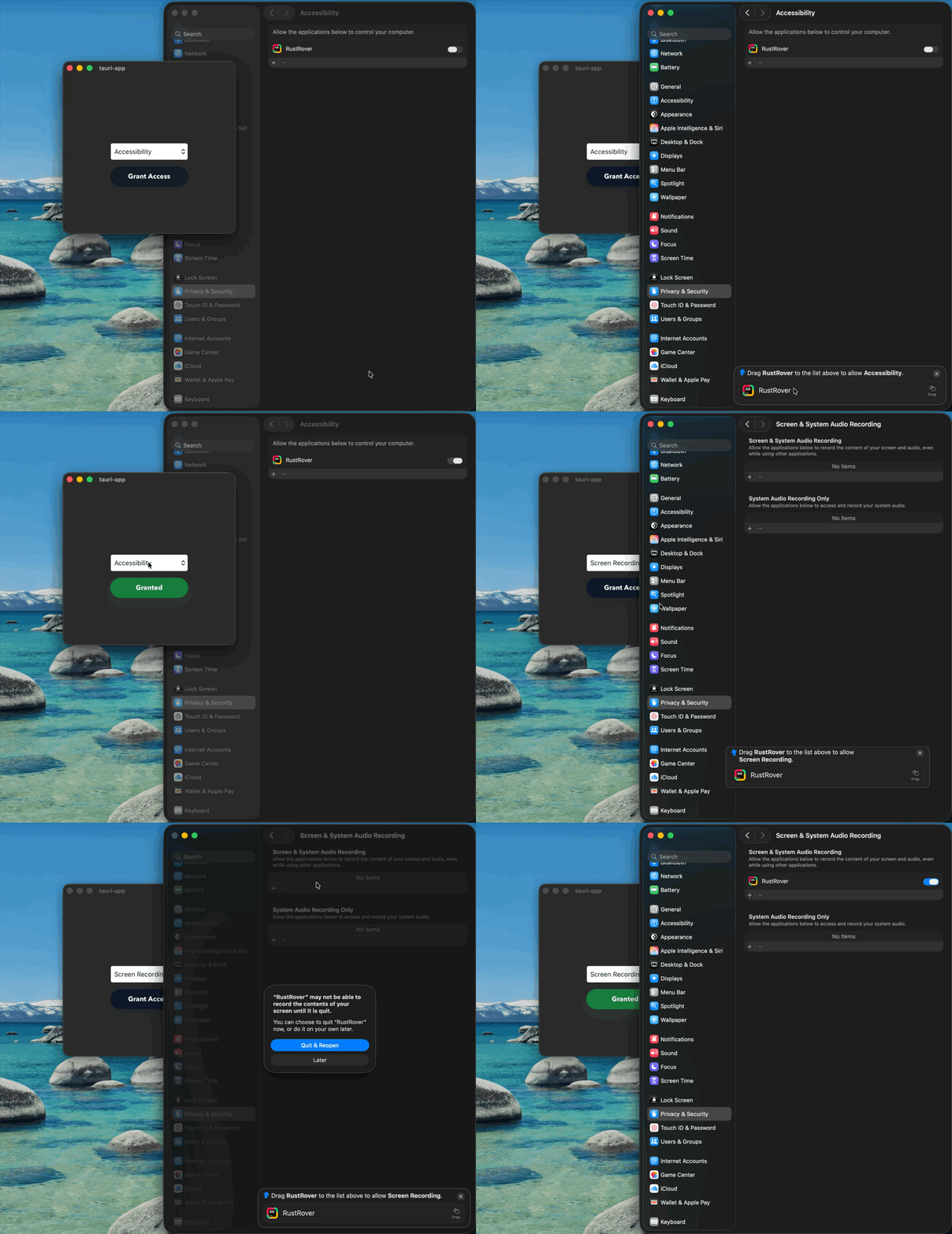
## What you get
The Tauri package gives you two layers:
- `PermissionFlow`: a handle-backed controller for opening the floating
permission guidance UI
- `authorizationState(...)` and `watchAuthorizationStatus(...)`: host-app
status helpers for reflecting permission state in your frontend
Use the controller when you want to start the flow. Use the status helpers when
you want your UI to react to the current host app's permission state.
## Install
Add the Rust plugin in your Tauri app's `src-tauri/Cargo.toml`:
```toml
[dependencies]
tauri-plugin-permission-flow = "0.1.40"
```
Register it in your Tauri builder:
```rust
tauri::Builder::default()
.plugin(tauri_plugin_permission_flow::init())
```
Add the JavaScript package:
```json
{
"dependencies": {
"@veecore/tauri-plugin-permission-flow-api": "0.1.40"
}
}
```
Because the final macOS executable links the Swift runtime, add this to your
app's `src-tauri/build.rs`:
```rust
fn main() {
tauri_build::build();
if std::env::var("CARGO_CFG_TARGET_OS").as_deref() == Ok("macos") {
println!("cargo:rustc-link-arg=-Wl,-rpath,/usr/lib/swift");
}
}
```
## Quick start
```ts
import {
Permission,
PermissionFlow,
suggestedHostAppPath,
watchAuthorizationStatus,
} from '@veecore/tauri-plugin-permission-flow-api'
const flow = await PermissionFlow.create()
const appPath = await suggestedHostAppPath()
if (appPath) {
await flow.startFlow({
permission: Permission.Accessibility,
appPath,
})
}
const stopWatching = watchAuthorizationStatus(
Permission.Accessibility,
(state) => {
console.log('Current host-app status:', state)
}
)
stopWatching()
await flow.close()
```
## API shape
`startFlow` accepts:
- `permission`: one of `Permission.Accessibility`, `Permission.InputMonitoring`, `Permission.ScreenRecording`, `Permission.AppManagement`, `Permission.Bluetooth`, `Permission.DeveloperTools`, `Permission.FullDiskAccess`, or `Permission.MediaAppleMusic`
- `appPath`: the app bundle path to suggest inside the permission flow
- `useClickSourceFrame`: optional, defaults to `true`
`suggestedHostAppPath()`:
- returns a best-effort `.app` bundle path for the current launch context
- is a good default for examples, dev builds, IDE-integrated terminals, and
bundled Tauri apps
- returns `null` when there is no meaningful host app bundle to infer
`watchAuthorizationStatus`:
- immediately publishes the current host-app status by default, even if it was already granted before your app started
- then republishes only when the status actually changes
- refreshes on window focus, on visibility changes, and on a light interval by default
- returns a cleanup function you can call when your UI unmounts
## Example app
The repo includes a tiny demo app under
`crates/tauri-plugin-permission-flow/examples/tauri-app`.
It intentionally stays minimal:
- one permission picker
- one button
- button state driven by the host-app authorization watcher
## Notes
- This plugin is intended for macOS.
- `PermissionFlow` is a Tauri resource handle. It owns one native controller on Tauri's main thread and marshals calls there internally.
- The JS wrapper now adds best-effort garbage-collection cleanup through `FinalizationRegistry`, but `close()` is still the deterministic and recommended cleanup path.
- `authorizationState(...)` and `watchAuthorizationStatus(...)` are host-app status helpers. On macOS, the public permission-status APIs used by `permission-flow` describe the current host app or host process, not an arbitrary `.app` bundle path.
- In other words, `appPath` controls which app bundle appears in the floating guidance flow, but it should not be confused with an authoritative "does that target app already have permission?" check.
## Maintainer Note
The guest package is published from GitHub Actions through npm trusted
publishing. The repository workflow lives at
`.github/workflows/publish-npm.yml`.