
tauri-plugin-gpui
Render GPUI views inside ordinary Tauri windows, with no WebView.
Tauri/TAO keeps ownership of the application lifecycle, the event loop and native windows. The plugin permanently attaches GPUI as the content renderer of an existing Tauri window. Every attached window shares one GPUI App that runs on Tauri's event-loop thread. GPUI-backed windows and ordinary WebView windows can run side by side in the same app. See PRD.md for the design.
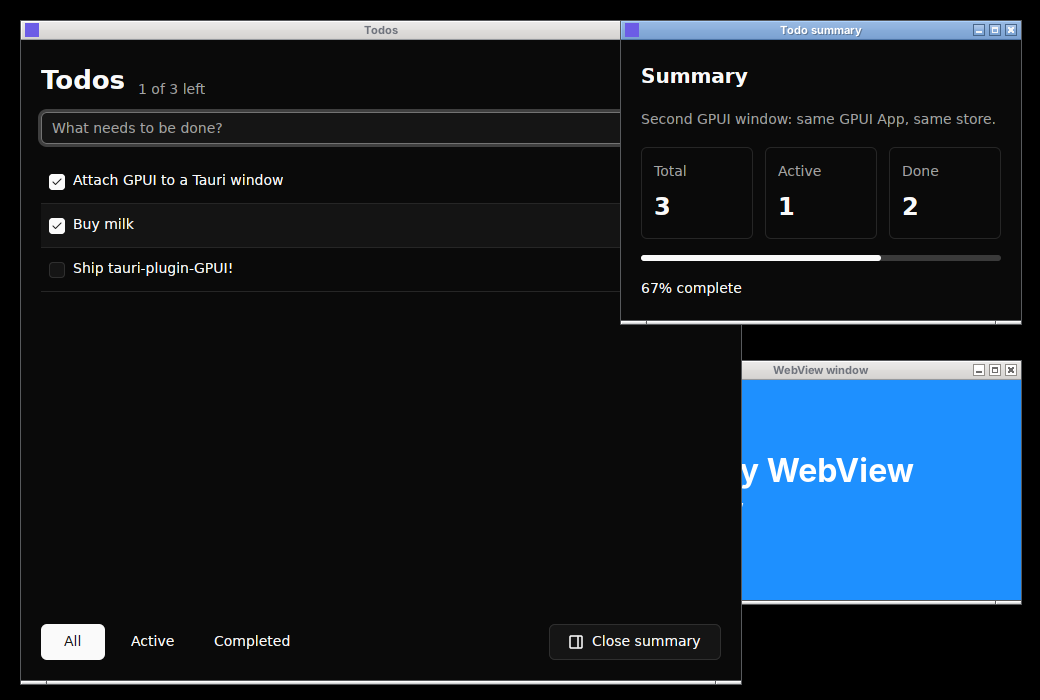
Taken by tauri-plugin-screenshots during the automated demo run. Todos and Todo summary are Tauri windows rendered by GPUI with gpui-kit components, sharing one to-do store; WebView window is a normal Tauri/Wry window.
Features
- No WebView: GPUI renders straight into native Tauri windows via wgpu (Vulkan/GL, Metal, DX12).
- Tauri stays in charge: lifecycle, event loop and windows remain Tauri/TAO's; GPUI never runs its own loop.
- Mix and match: GPUI-backed windows and ordinary WebView windows run side by side in one app.
- One shared
App: every attached window shares a single GPUIApp, so entities, globals and state are shared. - Component libraries work: gpui-kit / gpui-component via
attach_gpui_view. - Full input: mouse, wheel, keyboard with repeat, modifiers, input methods (composition in place on Linux, see Input methods), file drops from other apps, focus, resize and scale-factor changes.
- Screen readers (desktop): GPUI's AccessKit tree (
role,aria_label, …) reaches AT-SPI, VoiceOver and UI Automation. See Accessibility. - Demand-driven redraw: an idle app uses 0% CPU.
- Clean teardown: destroying a Tauri window tears down its GPUI root, renderer and surface.
Quickstart
[]
= { = "2.12", = ["unstable"] } # `unstable` enables tauri::WindowBuilder
= "0.1"
Requires Rust 1.88+. On Linux, install the usual Tauri prerequisites plus a Vulkan driver.
use ;
;
tauri_plugin_gpui::init(app)/init_with(app, GpuiConfig)is called fromsetupinstead of going throughBuilder::plugin. The plugin needs raw TAO events, and Tauri only exposes those throughApp::wry_plugin.GpuiConfiglets you set a fallback font, a GPUIAssetSourceand anon_launch(|cx| …)hook for app-level GPUI setup (globals, key bindings, fonts). Insideon_launchthe plugin API behaves as it does in any GPUI code:attach_gpuicompletes once the hook returns, andwith_appreturnsReentrant.window.attach_gpui(|cx| …)/attach_gpui_with(GpuiOptions, …)is a one-way call for the life of the window. A second call returnsGpuiError::AlreadyAttached. A window that hosts a WebView returnsGpuiError::NotEligible. You can call it from inside GPUI code, such as a click handler that builds a new Tauri window; the mount then finishes as soon as the current GPUI update returns.attach_gpui_view(GpuiOptions, |window, cx| …)also passes the GPUIWindowto the root builder. Component libraries need it to wrap content in their root view, for example gpui-kit'sbase::Root::new(view, window, cx).tauri_plugin_gpui::with_app(|cx| …)gives main-thread code outside GPUI access to the sharedApp. It returnsGpuiError::Reentrantinstead of panicking when theAppis already borrowed.- To open more windows, use Tauri: build the window with
tauri::WindowBuilder, then callattach_gpui. GPUI'scx.open_window(…)returnsunsupported operation: open_window …. - When a Tauri window is destroyed, its GPUI root, renderer and surface are destroyed with it. If GPUI removes a window itself (
window.remove_window()), the plugin asks Tauri to destroy the native window (notclose, so a Tauriprevent_closehandler cannot leave a blank window behind). Closing the last GPUI window leaves the sharedApprunning, and a later window can attach to it again. - Close requests (the window manager's close button or
tauri::Window::close()) consult GPUI'swindow.on_window_should_close(…)first; returningfalsecancels the close before Tauri sees it. Otherwise Tauri's ownCloseRequested/prevent_closeflow runs as usual.destroy()bypasses both.
How it works
| Concern | Implementation |
|---|---|
| Event loop | A tauri_runtime_wry::Plugin taps TAO events on Tauri's thread. GPUI never runs a loop of its own. |
GPUI App |
Application::with_platform(TauriPlatform) plus run_embedded: one App per Tauri app, deliberately leaked so it lives until the process exits. |
| Task scheduling | A custom PlatformDispatcher. Main-thread runnables go into a queue that is drained from the TAO callback. Wakeups are posted through the TAO event-loop proxy. Background work runs on a worker pool and timers on their own thread. |
| Window creation | Platform::open_window only accepts the surface attach_gpui prepared. Every other call fails explicitly. |
| Rendering | gpui_wgpu::WgpuRenderer is built on the Tauri window's raw window and display handles (Vulkan/GL on Linux, Metal on macOS, DX12 on Windows). Text uses gpui_wgpu::CosmicTextSystem. |
| Redraw | Demand-driven. GPUI's frame_waker/schedule_frame set a per-window flag and wake TAO. Pending frames are delivered at MainEventsCleared. TAO RedrawRequested (expose, resize) forces a present. An idle app uses 0% CPU. |
| Input | TAO WindowEvent is translated to GPUI PlatformInput (see below). |
| Accessibility | GPUI builds an AccessKit tree while assistive technology is listening. The window hands it to accesskit_unix (Linux), accesskit_macos (macOS) or accesskit_windows (Windows). See Accessibility. |
| Window management from GPUI | set_title, activate, minimize, zoom, toggle_fullscreen, resize and cursor styles are forwarded to the Tauri Window API and run outside GPUI updates. |
Event coverage
Handled: resize, scale-factor change, move, focus, minimize/restore (reported to GPUI as window visibility; minimized windows get no frames), cursor enter/leave/move, mouse buttons with click counting (back/forward buttons map to GPUI navigation; other extra buttons are ignored), mouse wheel (line and pixel deltas), keyboard down/up with repeat, modifier and caps-lock state, IME commit text (and, on Linux, IME composition), files dragged in from other apps, theme change (including GTK's application-wide theme change, which TAO reports without a window id), close requests (GPUI can veto) and destroy (teardown).
RedrawRequested forces a present.
Files dragged onto a window from another app reach GPUI's on_drop::<ExternalPaths> and on_drag_move::<ExternalPaths> handlers. On Linux the window is a GTK drag destination for text/uri-list, so GPUI sees the pointer move while files hover. On macOS and Windows TAO reports the drag without positions, so the plugin reads the pointer position when the files enter and when they are dropped, and drop targets do not see moves in between.
TAO has no maximize/fullscreen events, so that state is re-read from Tauri at attach and on every resize and move; GPUI's is_maximized, is_fullscreen and window_bounds follow changes made through Tauri or the window manager.
Keystrokes follow GPUI naming (enter, left, f5, lowercase characters). key_char comes from TAO's shift-aware logical key. When a TAO backend sends the same typed character twice (once as a key press, once as an IME commit, in either order), it is inserted once, through the key press. Option on macOS and AltGr on Windows (reported as Ctrl+Alt) type characters; Ctrl, Cmd/Super and (outside macOS) Alt make a key a shortcut.
Input methods
TAO reports only the text an input method commits, and Tauri keeps TAO's window (and with it TAO's set_ime_position) private, so the plugin talks to the native input method itself where it can:
| OS | Composition | Candidate window |
|---|---|---|
| Linux | While a GPUI text input has focus, keys go to a GtkIMMulticontext on the window first, so the system input method (IBus, Fcitx, XIM, or GTK's compose tables, Ctrl+Shift+U and dead keys) composes in place: its preedit becomes GPUI marked text (replace_and_mark_text_in_range, with the caret inside it), its commit replaces that, and the end of a composition calls unmark_text. Keys the input method takes never reach TAO. Keys it passes on, and plain characters it would only type, go through TAO as before, so GPUI key bindings see them. |
Placed at GPUI's caret (update_ime_position, and after every preedit change). |
| Windows | The IME draws its own composition window; GPUI receives the committed text. | The composition and candidate windows are placed at GPUI's caret through IMM32 on the window's HWND. |
| macOS | TAO's view composes marked text without reporting it; GPUI receives the committed text. | Not supported: TAO's view answers firstRectForCharacterRange: with a position only tao::Window::set_ime_position can set, so candidates appear at the window's top-left corner. |
GTK chooses the input method as usual (GTK_IM_MODULE, then the desktop's setting). Without a focused GPUI text input, keys go straight to TAO.
Native menus
GPUI's own menu API (cx.set_menus) is unsupported; give the window a Tauri menu (app.set_menu, window.set_menu or WindowBuilder::menu) instead. On macOS the menu is global and on Windows it sits in the non-client area, so GPUI's content is unaffected.
On Linux, Tauri packs a GTK menu bar into the window's own client area. On X11, GPUI then renders into a GtkDrawingArea below the menu bar, with its own native X11 window, instead of into the toplevel window. GPUI's size, mouse positions and webview_frame placements start below the menu bar, and PlatformWindow::resize adds the menu bar's height back. This also works when the menu is added after attach_gpui: the surface moves into the drawing area then. Windows without a menu keep rendering into the toplevel window. On Wayland, the menu bar is still covered.
Minimal platform adapter: Phase 0 findings
The spike's central question was whether GPUI can render into an existing Tauri/TAO window without forking either project. The answer is yes. The plugin builds on gpui-pre 0.3.8 and gpui-pre-wgpu, crates.io snapshots of zed's GPUI and the same crates gpui-kit and gpui-component use, renamed to gpui/gpui_wgpu in Cargo.toml. That GPUI exposes Platform, PlatformWindow, PlatformDispatcher, Application::with_platform and Application::run_embedded, and gpui-pre-wgpu exposes a renderer that accepts raw window handles. The crates.io gpui 0.2.x keeps Platform crate-private, so it cannot be used.
The pin is exact (=0.3.8), because every crate in a GPUI app must share one GPUI version. If you use gpui-kit, use a release built on the same gpui-pre (gpui-kit 0.7.1 is).
What GPUI needs for rendering and interaction:
- Platform: executors and dispatcher, text system,
run(returns immediately),open_window, displays (Tauri's monitors, queried live; each window reports the monitor it is on), window appearance (from Tauri's window theme),active_window, cursor style, keyboard layout and mapper (US layout and the dummy mapper). - PlatformWindow: geometry, scale factor and appearance getters; the input handler; the
on_*callback registrations;draw,sprite_atlasandframe_waker/schedule_frame.
Everything else does one of three things:
- System clipboard: text and images via
arboard, including the Linux primary selection. Images are converted to and from RGBA (pasted images arrive as PNG, encoded for speed since it runs during the paste; SVG cannot be copied). GPUI string metadata is kept in-process and reattached while the clipboard still holds the same text. - Delegated to Tauri:
quit,restart, and the window title, focus, minimize, maximize, fullscreen and resize operations. - Explicitly unsupported: these return
GpuiError::UnsupportedOperationthroughanyhow, or are logged at debug level when the GPUI signature has no error channel.- Windows:
open_windowoutsideattach_gpui, non-normal window kinds, blurred backgrounds (they render as transparent). For a transparent window, build the Tauri window withtransparent(true)and attach withGpuiOptions::default().transparent(true); pixels GPUI leaves unpainted then show through where the desktop composites windows. - System integration: credentials, GPUI menus and dock menus (use a Tauri menu, see Native menus), path prompts (use
tauri-plugin-dialog),open_url(usetauri-plugin-opener), URL schemes,reveal_path/open_with_system, app hide/unhide, idle-sleep prevention. - Input: IME candidate positioning on macOS.
- Windows:
- Handled by GPUI's built-in fallback: prompts (
PlatformWindow::promptreturnsNone).
Accessibility
GPUI builds an AccessKit tree from the roles, labels, values and actions views declare (.role(Role::Button), .aria_label(…), .on_a11y_action(…); see GPUI's examples/a11y.rs), but only while assistive technology is listening. The plugin passes the tree to the OS accessibility API of each attached window, using the AccessKit adapter versions GPUI's own platforms use:
| OS | Adapter | How it hooks into the Tauri window | Status |
|---|---|---|---|
| Linux | accesskit_unix 0.22 (AT-SPI over D-Bus) |
No native hook; the adapter registers the window on the AT-SPI bus from its own thread. The plugin reports the window's outer and inner screen rectangles (read from Tauri after every move and resize) so element positions are correct, and its focus. | Verified on X11 by scripts/a11y-test.sh (below). Wayland builds; there AT-SPI cannot know where the window is. |
| macOS | accesskit_macos 0.26 (NSAccessibility) |
SubclassingAdapter on TAO's content NSView, restored when the window is destroyed. Focus follows TAO's Focused events. |
Compiles (CI clippy); not run against VoiceOver yet. |
| Windows | accesskit_windows 0.34 (UI Automation) |
A comctl32 window subclass (SetWindowSubclass) on TAO's HWND answers WM_GETOBJECT. AccessKit's own SubclassingAdapter is not used because it refuses windows that are already visible. |
Compiles (CI clippy); not run against Narrator/NVDA yet. |
| Android, iOS | none | Not supported. |
Actions a screen reader requests (click, focus, increment, …) are queued to GPUI like any other task and wake the event loop. The window's accessible name is its Tauri title at attach time, and GPUI's window.set_window_title keeps it current; titles set through Tauri afterwards are not seen. AccessKit is always compiled in on desktop: gpui-kit apps already build the same adapters through GPUI's own platform crates.
examples/basic labels its heading, counter and button. The check runs it on Xvfb inside a private session D-Bus with the AT-SPI bus, then reads the tree with PyGObject's Atspi, checks the button's screen position before and after moving the window, and clicks it through AT-SPI:
# needs: Xvfb, openbox, xdotool, dbus, at-spi2-core, python3-gi with gir1.2-atspi-2.0, a Vulkan driver
Embedding a webview in a GPUI window (experimental)
For incremental migrations, a GPUI-backed window can host the screens that are still web UI. Add a Tauri child webview after attaching GPUI and place it with webview_frame, a GPUI element that keeps the webview on top of its layout box:
let window = new.build?;
window.attach_gpui?;
let reports = window.add_child?;
reports.hide?; // `webview_frame` shows it from its first frame
// In the shell's render:
div.flex_1.child
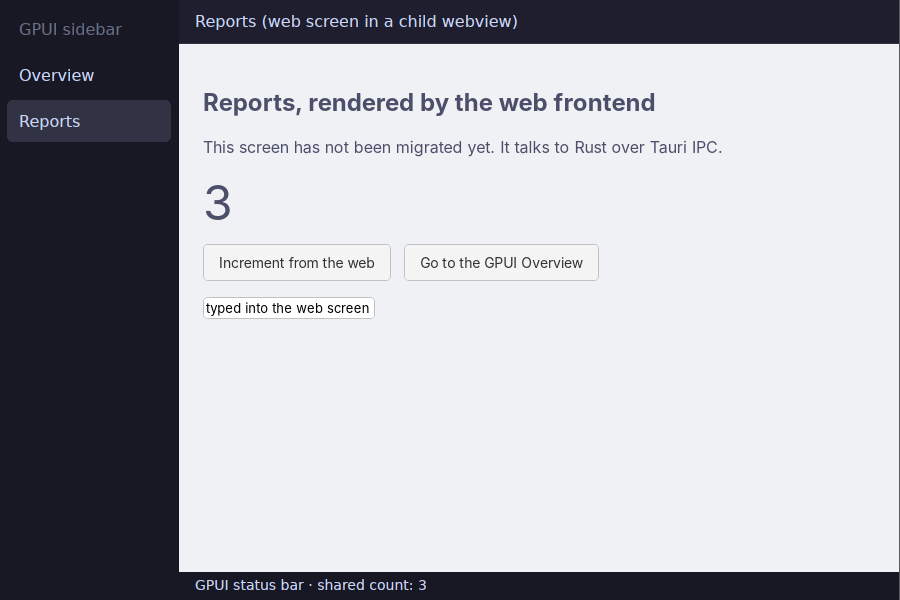
- The webview keeps Tauri IPC, so the web screen calls commands and listens to events as before. Shared state lives in Rust; GPUI reads it directly.
- The webview is shown while its frame is painted and hidden in any frame that leaves it out, so switching GPUI screens needs no bookkeeping.
- On Linux the webview is moved into its own X11 child window so it stacks above GPUI, and keyboard focus moves between the two on click. Hiding the webview while it has focus gives focus back to GPUI. Wayland is not supported.
focus_webviewmoves focus into a webview from code, for a GPUI control that opens something there to type into. - Tauri menu accelerators fire whether GPUI or the webview has keyboard focus. On Linux the webview's X11 window is a GTK window of its own, so the plugin attaches the Tauri window's accelerator groups to it.
- The webview follows its frame through cached views (
AnyView::cached), which reuse the previous frame without running the element again. - Render each webview in at most one frame. A webview created to replace a closed one needs a new label, because frames track webviews by label.
- Limits: the webview always draws above GPUI, so GPUI popovers, menus and tooltips that overlap it are hidden; clipping by scrolling ancestors is rectangular. GPUI keeps the hover state it had when the pointer moves straight from a GPUI element into the webview. Desktop only; Tauri child webviews are not available on mobile.
- Run it with
cargo run -p embedded-webview. Verified on Linux (X11); macOS and Windows use Tauri's native child views and are untested. - The example has a Tauri menu (View > Overview, Ctrl+1; Reports, Ctrl+2).
EMBEDDED_WEBVIEW_MENU=lateadds it after GPUI is attached and=noneleaves it out. examples/embedded-webview/scripts/chaos.shstresses it on a virtual X display (rapid screen switches, re-renders around a cached view, resizes, maximize, webview replacement, teardown while shown) and checks every screenshot's pixels. It runs three times: with the menu, with the menu added late, and without one. With a menu it also checks that the menu bar is visible above GPUI, that a click opens the View menu and its item works, that the accelerators fire with GPUI focused and with the webview focused, and that clicks reach GPUI below the menu bar. On Linux, GTK logs_gdk_frame_clock_*criticals and agdk_window_set_user_timewarning when a webview's X11 window is created; they are harmless.
Platform status
| Target | Status |
|---|---|
| Linux (X11) | Verified end to end by the screenshot test below (Xvfb, Mesa lavapipe Vulkan). |
| Linux (Wayland) | GPUI renders into its own wl_subsurface over the window's content area, so GTK's client-side decorations stay visible, hiding and showing the window is safe, and GPUI gets the content size (TAO's inner_size includes the decorations there). CI runs the chaos suite on headless Weston; checks that need a seat (input, focus, clipboard, file drops) skip there and are untested on a real compositor. |
| macOS, Windows | Implemented against the same cross-platform APIs. CI builds them and runs the unit tests (clippy, cargo test --lib), but they have not been run against a real window yet. On Windows, tauri-runtime-wry paints window-only windows with softbuffer, which may conflict with the DX12 swapchain. |
Android (mobile feature) |
Builds for aarch64/x86_64. CI drives examples/android-demo on an emulator (taps, scrolling, soft keyboard, background and resume). See Android. |
iOS (mobile feature) |
Builds for aarch64-apple-ios and the simulator. CI runs examples/ios-demo on an iPhone simulator (rendering, safe area, dark mode, background and resume, keyboard inset animation). Not yet run on a physical device. See iOS. |
Android
Enable the mobile feature. The Android dependencies are target-gated, so desktop builds are unaffected:
= { = "0.1", = ["mobile"] }
The app code is the same as on desktop: call init in setup, build a tauri::WindowBuilder window (no WebView) and attach GPUI to it. Mark the entry point with #[cfg_attr(mobile, tauri::mobile_entry_point)] as usual.
Tauri's Android activity has no native surface, so the plugin ships a small Android library (android/, picked up by tauri android build). It installs GpuiView, a SurfaceView, as the activity's content view. GPUI renders into its surface through wgpu (Vulkan, or GLES as a fallback).
| Concern | Implementation |
|---|---|
| Threads | View callbacks run on the Android UI thread. TAO, and with it GPUI, runs on its own thread. Each callback is queued and the TAO loop is woken. surfaceDestroyed blocks until the renderer has released the surface. |
| Surface lifecycle | The mount waits for the first surface. When the app goes to the background the surface is unconfigured, and when it returns the surface is replaced. The device, atlas and GPUI window survive. |
| Touch | Raw MotionEvents become GPUI PlatformInput::Touch. GPUI's gesture arena turns them into taps (clicks), pans and flings (scrolling with Android OverScroller physics) and long presses. |
| Keyboard | Focus on a GPUI text input shows the soft keyboard; losing focus hides it. Typed characters arrive as key presses, so key bindings still see them. Longer commits and composition go through GPUI's input handler. Hardware keys map to GPUI key names. |
| Selection toolbar and Autofill | GPUI draws its text inputs, so GpuiView stands in for them. When the focused input has a selection, or on a long press in it, the floating Android toolbar offers Cut, Copy, Paste, Select all and Autofill. Actions are sent to the input as its ctrl-x/c/v/a shortcuts, so they use its own bindings and GPUI's clipboard. The focused input is also exposed to Android Autofill as one virtual field, and autofilled text replaces the input's content. |
| Selection handles | The platform's own drag handles replace any that an app draws: both ends of a selection, or one under the caret after a long press. Dragging one sends the point under it to the focused input, which places the selection through GPUI's InputHandler::set_selected_text_range, so an input that does not implement it ignores the drag. The handles never cross, and the toolbar hides while one is held. Apps should not draw their own. |
| Tauri plugins | Tauri only calls Plugin.load when a WebView exists, and there is none. Once the first GPUI window mounts, GpuiView loads the registered plugins itself (such as tauri-plugin-biometric) with a stand-in WebView that is never initialised or shown, so Chromium is not started. Plugins registered later are not loaded. |
| Insets | The app draws edge to edge. System bars, display cutouts and the keyboard are reported as WindowInsets; use window.fully_visible_bounds() to keep content clear of them. |
| Back | set_back_enabled(true) routes the back button and gesture to GPUI's back handler; otherwise back moves the app to the background. |
| Appearance, fonts, clipboard | Dark mode follows the system. Roboto, Droid Sans Mono and Noto Color Emoji are loaded from /system/fonts. Plain-text clipboard. |
One GPUI window per app is supported on Android.
Debug builds must embed GPUI assets, because the device cannot read the build machine's files. When using gpui-kit, enable the debug-embed feature of rust-embed.
iOS
Enable the same mobile feature; the iOS dependencies are target-gated too. The app code is the same as on desktop and Android: call init in setup, build a tauri::WindowBuilder window (no WebView), attach GPUI to it, and mark the entry point with #[cfg_attr(mobile, tauri::mobile_entry_point)].
Unlike Android, TAO already gives each iOS window a native UIView, so no Swift code is needed. GPUI renders into a CAMetalLayer that wgpu adds to that view, and TAO's own events drive it. The plugin lays a transparent GpuiInputView over TAO's view for what TAO does not cover. That view never receives touches.
| Concern | Implementation |
|---|---|
| Threads | UIKit, TAO and GPUI share the main thread. UIKit callbacks are queued and drained by the event loop, because UIKit calls back synchronously, sometimes from inside a GPUI update. Keyboard edits and text queries are the exception: they drain the queue and reach GPUI's input handler right away, unless GPUI is mid-update, in which case edits are queued and queries are answered from what the keyboard last saw. |
| Surface | The view fills the window; the Metal layer follows its bounds and scale. While the app is in the background no frames are rendered (iOS terminates apps that use the GPU there). |
| Touch | TAO's touches become GPUI PlatformInput::Touch. GPUI's gesture arena turns them into taps, pans and flings (with UIScrollView deceleration) and long presses. |
| Keyboard | Focus on a GPUI text input makes GpuiInputView the first responder, which shows the software keyboard; losing focus hides it. Typed characters arrive as key presses, so key bindings still see them. While a text input has focus, a hardware keyboard also delivers navigation and function keys and command/control shortcuts as keystrokes, except during composition, when every key goes to the IME. |
| IME composition | GpuiInputView implements UITextInput over GPUI's input handler (UTF-16 offsets on both sides), so Chinese, Japanese and Korean keyboards compose marked text in place: setMarkedText: maps to replace_and_mark_text_in_range, unmarkText to unmark_text, and firstRectForRange: to bounds_for_range for the candidate bar. GPUI draws the text, caret and marked-text underline itself. When GPUI changes the text or selection on its own (a key binding, a tap, another input taking focus), the keyboard is told through its inputDelegate, which also drops a composition GPUI ended. |
| Text assistance | Follows the focused input's TextInputConfiguration: autocorrection (and smart quotes and dashes with it), suggestions, autocapitalization and the return key type. GPUI's default turns all of them off. |
| Insets | The safe area (notch, Dynamic Island, home indicator) and the keyboard are reported as WindowInsets; use window.fully_visible_bounds() to keep content clear of them. The keyboard inset moves with the keyboard: UIKit animates a hidden view with the keyboard's own duration and curve, and a CADisplayLink reports its height every frame (at up to 120 Hz on ProMotion iPhones when the app's Info.plist sets CADisableMinimumFrameDurationOnPhone, as examples/ios-demo/Info.ios.plist does). |
| Lifecycle | UIApplication notifications map to GPUI's Inactive, Background, Foreground and Active phases, and the window turns hidden and visible with them. |
| Appearance, fonts, clipboard | Dark mode follows the system. Helvetica Neue (the default), SF, Menlo and Apple Color Emoji are loaded from /System/Library/Fonts. Plain-text clipboard through UIPasteboard. |
examples/ios-demo is a touch-first gpui-kit app (taps, scrolling, the keyboard, safe area, dark mode). On a Mac with Xcode:
scripts/ios-smoke.sh is the CI check: it installs a simulator build, then asserts on the app's console while switching dark mode, backgrounding the app, and relaunching it with --focus-input to check that the keyboard inset animates. It then relaunches the app with IOS_DEMO_IME=1, which drives the input view through setMarkedText:/unmarkText the way a Japanese keyboard does (a simulator cannot be made to type through one).
One GPUI window per app is supported on iOS. There is no system back action, so on_back/set_back_enabled do nothing.
As on Android, debug builds must embed GPUI assets (rust-embed's debug-embed with gpui-kit).
Build the app's library as staticlib (plus rlib for desktop), without cdylib: GPUI's core-video dependency asks rustc to link the OpenGL framework, which iOS lacks. The plugin stubs the three CGL symbols that end up referenced, so Xcode's link of the static library succeeds.
gpui_wgpu only creates Vulkan and GL instances, so on iOS and macOS the plugin creates the shared GPU context on Metal before the first renderer. GPU device-loss recovery still goes through gpui_wgpu's Vulkan/GL instance and will fail on both.
libc 0.2.190 made the _dyld_* functions macOS-only, which breaks backtrace (and with it GPUI) on iOS. Until that is fixed upstream, keep libc at 0.2.189 in iOS apps:
Example and screenshot testing
examples/basic is the smallest app: one Tauri window rendered by plain GPUI (tauri_plugin_gpui::gpui, no component library) with a click counter. It is part of the plugin's workspace.
examples/gpui-demo is the PRD's sample application: a to-do list built with gpui-kit components (Input, Checkbox, Button, Progress, light/dark theme). It contains:
- a GPUI-backed
mainwindow with the to-do list: add, check off, delete and filter, plus a theme toggle; - a
summarywindow that a GPUI click handler creates, closes and recreates. It shows live stats from the same store; - an ordinary WebView window.
Headless UI tests follow the gpui-kit testing guide: the demo's views render in gpui-kit test windows (no Tauri, no display server), clicks and keystrokes go through GPUI's event dispatch, and assertions read element state (checked, value, focused, bounds, labels) and the shared store. They live in src/tests.rs and use gpui-kit's test-support feature as a dev-dependency. The demo is a standalone Cargo workspace, so gpui-kit is never a dependency of the plugin itself.
The screenshot test below drives the real Tauri app end to end:
# needs: Xvfb, openbox (or another EWMH WM), xdotool, a Vulkan driver (mesa-vulkan-drivers)
With GPUI_DEMO_AUTOTEST=<dir> set, the demo:
- drives real X11 input with
xdotool(X11 → GTK → TAO → plugin → GPUI); - asserts on GPUI state for each PRD success criterion;
- captures every window with
tauri-plugin-screenshots; - writes
report.jsonand exits non-zero if any check fails.
Capturing a window's frame
With the test-support feature, GPUI's Window::render_to_image works in Tauri windows (desktop only). It returns the window's current frame without a screen grab, so it works with the window hidden or covered, and on Wayland. Screenshot and visual-test tools that use it, such as gpui-visual-test (capture::window_shot) and gpui-playwright, then work in tauri-gpui apps:
[]
= { = "0.1", = ["test-support"] }
The feature opens a second, offscreen GPU device per window and stores every glyph and image in both renderers' sprite atlases. Leave it out of release builds. After the GPU device is lost, that window can't be captured.
Chaos and integration tests
tests/chaos.rs runs a real Tauri (Wry) event loop with tauri-plugin-clipboard-manager installed and hammers the plugin from a driver thread, asserting on what GPUI and Tauri observe:
- API contract:
NotInitialized,AlreadyInitialized,NotMainThread,AlreadyAttached,NotEligible(WebView windows),Reentrant, andopen_windowrejection; - randomized create/attach/close/destroy/
remove_windowstorms, attach-then-teardown in one turn, 10 concurrent windows torn down at once, label reuse; every GPUI root must be released; - resize storms, hide/show cycles, and window state in both directions (title, maximize, fullscreen, focus, minimize, position, theme);
- close handling (Tauri
prevent_close,destroy) andcx.quit()routed through Tauri'sExitRequested; - Tauri events, managed state,
on_window_event,async_runtimeandrun_on_main_threadused together with GPUI; GPUI timers, background tasks and floods of 20k foreground tasks; - the clipboard shared with
tauri-plugin-clipboard-manager; Window::render_to_image(test-support) capturing a window's frame, glyphs included;- 600 cross-thread calls while windows churn, and random real X11 keyboard/mouse input via
xdotool(typed text must arrive exactly once); - input-method composition through GTK's built-in input method (selected unless
GTK_IM_MODULEis set): a Ctrl+Shift+U preedit must reach GPUI as marked text, its commit replace it, Escape cancel it, a dead key compose once, and plain keys and shortcuts still arrive as keys.
# needs: Xvfb, openbox, xdotool, a Vulkan driver; prints its seed
CHAOS_SEED=42 CHAOS_ONLY=lifecycle_storm,clipboard
# GTK's Wayland backend on headless Weston (needs: weston)
CHAOS_ONLY=ime_pinyin types pinyin through a real IBus engine and is not part of the default run: start ibus-daemon, select ibus engine libpinyin and set GTK_IM_MODULE=ibus first.
Without a display, cargo test skips the suite.
Releasing
- Bump
versioninCargo.toml, runcargo checkto updateCargo.lock, and merge tomain. - Tag the merge commit and push the tag:
git tag v0.2.0 && git push origin v0.2.0.
.github/workflows/release.yml checks that the tag matches the crate version and is on main, publishes to crates.io through trusted publishing, and creates a GitHub release with generated notes. Re-running it skips whatever is already done. One-time setup: add this repository with workflow release.yml and environment release as a trusted publisher in the crate's settings on crates.io.
Remaining open questions
- GPUI versioning: the crate tracks the
gpui-presnapshots, the same ones gpui-kit tracks, until upstream publishes agpuiwith a publicPlatform. - Input methods on macOS and Windows: showing the composition inside GPUI (and, on macOS, placing the candidate window) needs TAO to report preedit and Tauri to expose IME positioning. The Linux path is verified under Xvfb (GTK's built-in input method and IBus with libpinyin), the Windows path only compile-checked, and Wayland is untested.
- Accessibility on macOS and Windows: implemented and compiled, but not yet tried with VoiceOver, Narrator or NVDA.
- Building and testing on macOS and Windows.
- Android: IME composition beyond committed text, multiple GPUI windows, and accessibility.
- iOS: running on a physical device, a real IME keyboard (CI scripts the
UITextInputcalls instead), CJK fonts (only the UI, monospace and emoji fonts are loaded, so CJK text needs an app-supplied font), multiple GPUI windows, and accessibility.