
taria




ARIA for terminals. ARIA is the set of attributes a web page uses to tell screen readers what each element is and does. taria brings that idea to terminal user interfaces (TUIs), with AI agents as the readers. A TUI app declares its live widget tree, focus state, and available actions through a small protocol. A bridge serves that tree to any agent harness, the program that runs a model and hands it tools (Claude Code, OpenCode, Cursor), over MCP, the Model Context Protocol that harnesses use to call tools. The harness drives the app through ordinary MCP tools, with no taria-specific code of its own.
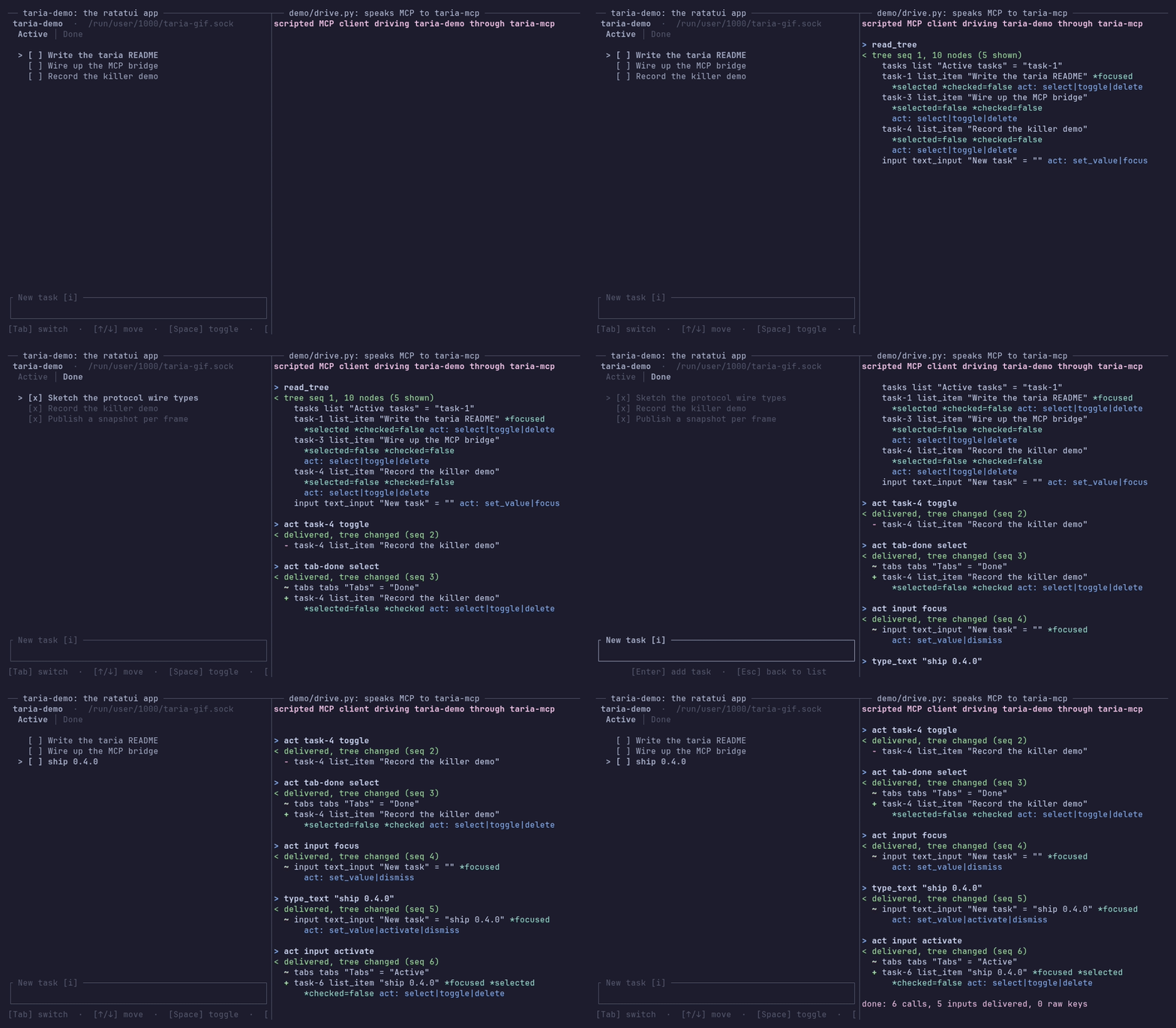
The client on the right is a script, demo/drive.py, not a model: it makes
six fixed tool calls through the real taria-mcp bridge.
Try it: cargo run -p taria-demo in a clone of this repository, then the
Quick start. In your app: one dependency, a publish after
each draw, and a drain in your event loop.
Agents today reach TUIs by scraping rendered screens through tmux or headless terminals and guessing at structure. taria works on the other side of the terminal: the app publishes what is on screen semantically, the way a GUI app hands its accessibility tree to screen readers and test tools.
Status: alpha, at 0.4.0. The wire format is frozen at
PROTOCOL_VERSION1, so an app and a bridge built months apart still work together. The Rust API may still change in a 0.x minor release, and each such change gets an upgrade note in CHANGELOG.md. CI tests Linux, macOS and Windows.
Why taria
- The app answers, not the screen. An agent names a widget by the id your app gave it, not by where it sits on screen, and picks one of the actions the app offers for it right now. The app says what it did with each input: took it, ignored it, or dropped it because its queue was full. When the input changed something, the agent gets the new tree with the answer.
- Partial coverage still works. Describe three widgets and stop. An agent reaches the rest with raw key presses and typed text, which your app takes through its own input handling, as it takes a person's.
- Safe to ship. Each app gets its own socket, or a named pipe on Windows, that only your user can open. The message format between app and bridge is frozen and only grows, so their versions can differ. The library returns errors instead of panicking, and if it cannot start, your app runs as before.
In a benchmark on 2026-10-12, at commit 3e66fbb, shortly before 0.3.0, Claude Haiku 5.5 passed 30 of 30 runs reading taria's JSON tree, with a median of 14,045 tokens read and 3 tool calls per run, and 29 of 30 reading the screen through tmux, with 26,722 tokens and 6.5 tool calls. On Sonnet 5.5 the two were close: tmux used 7.7% fewer tokens than taria's JSON tree, and 1.7% more than its outline format. Method and caveats: bench/RESULTS.md.
In your app
A ratatui app publishes nodes after it draws and takes agent input in its event loop, beside its terminal events:
use ;
use ;
// Never fails: if taria cannot bind, the layer does nothing.
let mut layer = bind_or_disabled;
loop
docs/integration-guide.md walks through adding taria to an app you already have, including the loop's timing rules.
Install
Two sides, two different things to install.
Writing a TUI app that agents should be able to use. One dependency:
It re-exports the protocol crate, so taria::{Action, IdSpace, Node, Role}
is reachable as taria_ratatui::taria::{...} without a second dependency.
Driving an app that already speaks taria. Install the bridge binary:
Or take a prebuilt build from the
releases page: a tag builds
taria-mcp as a tarball for x86_64 and aarch64 Linux and for both macOS
architectures, and as a .zip for x86_64 Windows
(taria-mcp-x86_64-pc-windows-msvc.zip, holding taria-mcp.exe), each with
its sha256. On macOS, if Gatekeeper (the check macOS runs on downloaded
programs) blocks the binary, clear its quarantine flag with
xattr -d com.apple.quarantine taria-mcp. Then point your harness at it,
with the app's label:
On Windows both sides work the same way, from the same commands: the app and
the bridge meet over a named pipe (Windows' local IPC channel) instead of a
Unix socket, and neither needs a cfg or a flag of its own. Put
taria-mcp.exe somewhere on your PATH, or give the harness its full path.
The quick start below uses the demo app in this repository instead, which needs nothing installed.
Quick start
Prerequisites: a Rust toolchain (1.88 or newer) and, for step 2, the
claude CLI. Three steps, two terminals. The commands are written for Linux
and macOS. On Windows, steps 1 and 3 are the same, and step 2 says what
changes.
-
Run the demo app in one terminal. It prints its taria socket path on startup and then behaves like a normal task-manager TUI:
-
Register the bridge with your agent harness. Build it first, then for Claude Code:
On Windows, run the same build, then give
claude mcp addthe full path oftarget\debug\taria-mcp.exein place of$(pwd)/target/debug/taria-mcp.Working inside this repo, you can skip
claude mcp add: the committed.mcp.jsonregisters the same server, and Claude Code picks it up here once you approve it. -
Ask the agent to drive the app: "read the tree, add a task called ship v0, mark it done, then delete it". The agent works through the
read_tree,act,type_text, andkeytools while the TUI reacts in the first terminal.
Running the demo headless
On Linux and macOS, backgrounding the demo with plain & fails. Give it a
terminal with tmux instead:
Windows has no tmux. There, run the demo in one terminal and start the harness in another.
How it works
The app publishes a semantic snapshot of its widget tree over a Unix domain socket, or a named pipe on Windows, one JSON object per line (ndjson), on every meaningful change. The bridge holds the latest snapshot and exposes it, plus input back into the app, as MCP tools. Agent input reaches the app's event loop like any other input source, and the app acknowledges each input by id, so the bridge can tell an input the app acted on from one it never saw. The bridge connects on its first tool call and lets the app go after 60 s with no tool calls by default, so an idle agent session does not keep the app from another.
+---------------+   Unix socket  +-----------+  MCP over stdio  +---------------+
|    TUI app    | <------------> | taria-mcp | <--------------> | agent harness |
| taria-ratatui |  or Windows    |  bridge   |                  | (Claude Code) |
|               |  named pipe    |           |                  |               |
|               |    (ndjson)    |           |                  |               |
+---------------+                +-----------+                  +---------------+
What an app can say about a widget is a fixed vocabulary: 29 roles (list,
tree, table, text_input, select, dialog, log, chart,
scrollbar, terminal and the rest) and 7 actions (activate, focus,
select, toggle, scroll, set_value, dismiss), plus a custom action
for anything an app names itself. Both vocabularies are open: a peer that
meets a role or an action it does not know degrades that one field instead of
failing the tree, which is what lets either grow inside a frozen format. A
node can also carry typed state: whether it is selected, checked, expanded
or disabled, a number and its bounds, and where it sits in a list or a
table.
MCP tools
| Tool | What it does |
|---|---|
read_tree |
Returns the app's current semantic tree as JSON: node ids, roles, labels, values, focus, typed state such as selected, checked or disabled, the actions each node advertises, and a relayed mark on any node whose text came from outside the app, which the agent reads as data. The app's own snapshot minus its type key and its input stamp, every other field kept, so a role or field this bridge has never heard of arrives under its real name. With --tree-format outline, the same snapshot comes as one indented line per node instead, which for the demo's first tree is about half the characters. |
act |
Invokes an advertised action on a node by id, with an optional value (e.g. for set_value), up to 4096 characters. The node id and the action are checked against the latest tree before anything is sent, and an act on a node marked disabled is refused. |
key |
Sends a raw key press ("q", "enter", "ctrl+c"), up to 64 times with repeat. A key that does not match the grammar is rejected here rather than swallowed by the app. A fallback for parts of the UI without semantic coverage. |
type_text |
Types a literal string in one call instead of one key call per character, up to 4096 characters. It goes where the app puts typing, never through the app's key bindings, so move the keyboard to the target first: act on its advertised focus action, or on set_value, which many apps focus as a side effect. An app accepting no typing reports it ignored rather than acting on the characters. |
The three input tools wait for the app's answer and report what actually
happened: the updated tree, an input the app deliberately ignored (with the
current tree to re-plan from), an input the app acknowledged and did not
survive (an advertised quit, working), or an error for an input that was
dropped, never applied, or left unaccounted for by an app that went away
before acknowledging it. A taria-ratatui 0.4.0 app stamps each tree with the
newest input it took, so the answer is the tree published after that input:
up to 3 s for a slow handler, and "did not change" within a frame for an
input that changed nothing. Against an app that does not stamp, the wait is
500 ms, as before.
taria-mcp CLI
The bridge takes exactly one of --socket <path> or --app <label>. With
--app, it resolves the socket path the same way the app-side adapter does
when binding. --tree-format outline serves the tree as an indented outline
instead of JSON. --idle-release <SECS> sets how long the bridge waits with
no tool calls before it lets the app go: 60 by default, 0 for never. The
flags, the environment variables, the resolution order, the rule on labels
and the outline's grammar:
docs/cli.md.
Workspace layout
crates/taria          Core protocol types (widget tree, actions, snapshots)
crates/taria-ratatui  Ratatui adapter: publish semantics alongside rendering
crates/taria-mcp      MCP bridge binary for agent harnesses
examples/demo-app     Demo ratatui app driven by an agent through taria
scripts/              Python verification harnesses (e2e, adversarial)
docs/                 Protocol spec, architecture, integration guide,
                      comparison, landscape research
bench/                Benchmark harness and results: taria against tmux
demo/                 The GIF above and the scripted client that records it
In docs/:
protocol.md
specifies the wire format message by message,
architecture.md
explains why it is shaped that way, and
landscape.md
is the research behind both.
Development
CONTRIBUTING.md covers the rest: the setup, the CI gate, the commit style, and what a change has to clear while version 1 of the wire format is frozen.
Compatibility
See docs/compatibility.md for the full list. The three that decide whether taria fits at all:
- Linux, macOS and Windows: a Unix socket on the first two, a named pipe on Windows, and CI runs the Rust suites on all three. Windows has no stopped-app detection, and the Python e2e and adversarial scripts run on Linux and macOS only. Limitations.
- One bridge client per app at a time: the adapter serves one, so two agents cannot drive the same app at once. They can take turns: an idle bridge lets the app go after 60 s by default. Limitations.
- The wire format is frozen at
PROTOCOL_VERSION1: changes within version 1 are additive, so a version difference costs a degraded field rather than the whole tree. What the freeze promises.
How taria compares
FAQ
License
Dual-licensed under MIT or Apache-2.0, at your option.
MCP registry
The MCP registry reads the line
below to check that the taria-mcp crate belongs to this server.
mcp-name: io.github.y0sif/taria-mcp