# Tarminal
**Tarminal** installs Linux application tarballs as proper desktop apps.








Instead of asking users to extract a `.tar.xz` somewhere and run a random binary manually, Tarminal can install the app into a standard location, create a command, create a desktop menu entry, install an icon, track state, and remove it cleanly later.
The project is split into two Cargo packages:
```text
tar-install = reusable library/core package
tarminal = CLI frontend powered by tar-install
```
`tar-install` also ships a small hint command. If someone runs `tar-install ...`, it tells them to install or use `tarminal`.
## Install
### Debian / Ubuntu / Zorin
```bash
sudo apt update
sudo apt install tarminal
```
> **Optional:** If you prefer packages built by Launchpad for Ubuntu **Jammy** or **Noble**, you can install from the PPA instead:
```bash
sudo add-apt-repository ppa:tamkungz/stable
sudo apt update
sudo apt install tarminal
```
### Fedora / RPM
```bash
sudo tee /etc/yum.repos.d/tamkungz-packages.repo >/dev/null <<'EOF'
[tamkungz-packages]
name=TamKungZ Packages
baseurl=https://packages.tamkungz.me/rpm/$basearch/
enabled=1
gpgcheck=0
repo_gpgcheck=1
gpgkey=https://packages.tamkungz.me/gpg.key
EOF
sudo dnf makecache
sudo dnf install tarminal
```
### openSUSE Tumbleweed
Packages built by Open Build Service are available for openSUSE Tumbleweed:
```bash
sudo zypper ar https://download.opensuse.org/repositories/home:/TamKungZ_/openSUSE_Tumbleweed/home:TamKungZ_.repo
sudo zypper refresh
sudo zypper install tarminal
```
### Alpine APK
```bash
sudo mkdir -p /etc/apk/keys
sudo apk update
sudo apk add tarminal
```
### Void XBPS
<details>
```bash
sudo mkdir -p /etc/xbps.d
sudo tee /etc/xbps.d/tamkungz.conf >/dev/null <<'EOF'
repository=https://packages.tamkungz.me/xbps/$XBPS_ARCH
EOF
sudo xbps-install -S
sudo xbps-install tarminal
```
</details>
### Arch Linux
<details>
```bash
sudo tee -a /etc/pacman.conf >/dev/null <<'EOF'
[tamkungz]
Server = https://packages.tamkungz.me/arch/$arch
SigLevel = DatabaseRequired PackageOptional
EOF
sudo pacman -Sy
sudo pacman -S tarminal
```
</details>
`gpgcheck=0` is currently used because the repository metadata is signed, while embedded RPM package signing may be added later.
### GitHub Releases
Release artifacts are also published on GitHub:
- standalone Linux binaries
- `.deb`
- `.rpm`
- `.tar.xz`
- `SHA256SUMS`
- detached GPG signatures (`.asc`)
### Developer Packages
For developers who want to build on the installer core directly:
- Python: [`tar-install` on PyPI](https://pypi.org/project/tar-install/) provides bindings around the shared library, so Python applications and tools can reuse and extend the installer behavior.
- Rust: `tar-install` is published as a Cargo crate, allowing Rust applications to use the API directly instead of shelling out to the `tarminal` CLI.
## Usage
Inspect a tarball before installing:
```bash
tarminal inspect ./myapp-1.2.0-linux-x64.tar.xz
```
Install with automatic detection:
```bash
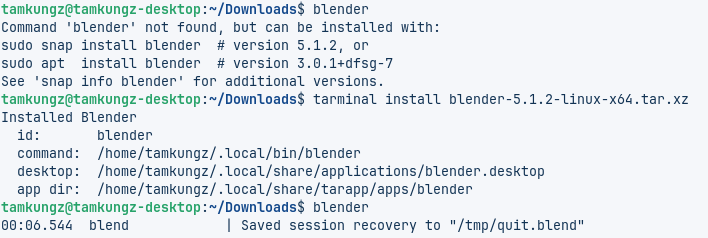
tarminal install ./myapp-1.2.0-linux-x64.tar.xz
```
Install with manual configuration prompts:
```bash
tarminal install ./myapp.tar.xz --config
```
Install using a recipe:
```bash
tarminal install ./myapp.tar.xz --recipe ./myapp.tarapp.yml
```
System-wide install:
```bash
sudo tarminal install ./myapp.tar.xz --system
```
List installed apps:
```bash
tarminal list
```
Remove an app:
```bash
tarminal remove myapp
```
Check an installed app:
```bash
tarminal doctor myapp
```
<div style="text-align:center;"><img src="https://pub-df28fb9f69aa4326a1c6e10fb1f2abdc.r2.dev/assets-image/tarminal/Screenshot_Tarminal--help.png" alt="Tarminal Command --help" style="width:60%;height:auto;"></div>
## What Tarminal does
For a normal user install, Tarminal installs files here:
```text
App files: ~/.local/share/tarapp/apps/<app-id>/
Command: ~/.local/bin/<command>
Desktop: ~/.local/share/applications/<app-id>.desktop
Icon: ~/.local/share/icons/hicolor/256x256/apps/<app-id>.*
State DB: ~/.local/state/tarapp/apps.json
```
For a system install:
```text
App files: /opt/<app-id>/
Command: /usr/local/bin/<command>
Desktop: /usr/share/applications/<app-id>.desktop
Icon: /usr/share/icons/hicolor/256x256/apps/<app-id>.*
State DB: /var/lib/tarapp/apps.json
```
## Supported archive formats
Current prototype support:
- `.tar.xz`, `.txz`
- `.tar.gz`, `.tgz`
- `.tar.bz2`, `.tbz2`
- `.tar`
## Detection behavior
Tarminal first tries to infer app metadata from common file names such as:
```text
<app>-<version>-<os>-<architecture>.tar.xz
<app>_<version>_<os>_<architecture>.tar.xz
```
Then it inspects the archive and looks for likely executable files, including names that match:
```text
<app>
<app>-<architecture>
<app>_<architecture>
bin/<app>
```
If detection is not good enough, use:
```bash
tarminal install ./app.tar.xz --config
```
or provide a recipe.
## Recipe format
A recipe can be supplied externally:
```bash
tarminal install ./app.tar.xz --recipe ./app.tarapp.yml
```
Example:
```yaml
id: com.example.myapp
name: My App
version: 1.0.0
exec: MyApp
command: myapp
icon: assets/icon.png
desktop:
categories:
- Utility
terminal: false
```
A recipe can also be embedded inside the archive as one of:
```text
tarapp.yml
tarapp.yaml
.tarapp.yml
.tarapp.yaml
manifest.yml
manifest.yaml
```
Recipes are optional, but they are the recommended way for communities or app authors to make tarball installs reliable.
## Safety behavior
Tarminal refuses to install archives with unsafe entries such as:
- absolute paths
- `..` path traversal
- symlink entries
- hard-link entries
The symlink rule is intentionally strict for now. Later versions may support safe symlinks that resolve inside the install directory.
## Build
Build all packages:
```bash
cargo build --workspace
```
Build release binaries:
```bash
cargo build --release -p tar-install --bin tar-install
cargo build --release -p tarminal
```
Build packages separately:
```bash
cargo build -p tar-install --lib
cargo build -p tar-install --bin tar-install
cargo build -p tarminal
```
CLI binary:
```text
target/release/tarminal
```
Library crate:
```rust
use tar_install::install_archive;
```
## Package locally
Install package tools:
```bash
cargo install cargo-deb cargo-generate-rpm
```
Build `.deb` packages:
```bash
cargo deb -p tar-install
cargo deb -p tarminal
```
Build `.rpm` packages:
```bash
cargo build --release -p tar-install --bin tar-install
cargo build --release -p tarminal
cargo generate-rpm -p crates/tar-install
cargo generate-rpm -p crates/tarminal
```
Inspect package contents:
```bash
for deb in target/debian/*.deb; do
dpkg -I "$deb"
dpkg -c "$deb"
done
for rpm in target/generate-rpm/*.rpm; do
rpm -qpi "$rpm"
rpm -qpl "$rpm"
rpm -qpR "$rpm"
done
```
## Release
Releases are handled by GitHub Actions when pushing a version tag:
```bash
git tag v0.1.0
git push origin v0.1.0
```
The release workflow builds packages, signs artifacts, creates GitHub Release files, and publishes package repository files to:
```text
https://packages.tamkungz.me/
```
Repository layout:
```text
/gpg.key
/apt
/rpm/x86_64
/apps/tarminal
/maven
```
`/apps/tarminal` is only the landing/documentation page. Package managers install from `/apt` and `/rpm/$basearch`.
## Project shape
```text
crates/
tar-install/
src/lib.rs library exports
src/main.rs hint command
src/archive.rs inspect tarball, detect binary/icon/manifest
src/filename.rs parse <app>-<version>-<os>-<arch>
src/install.rs install/remove/doctor logic
src/desktop.rs .desktop generation
src/paths.rs user/system install targets
src/recipe.rs manifest/recipe schema
src/state.rs installed apps database
tarminal/
src/main.rs CLI frontend
```
## Status
This is an early prototype designed for iteration.
The important architecture is already separated:
- `tar-install` can be reused by other GUIs or tools
- `tarminal` is only a CLI wrapper
- recipes are optional but first-class
- `--config` lets users fix bad filename/archive detection
- package publishing is automated for GitHub Releases and `packages.tamkungz.me`
## License
MIT