
Tarminal
Tarminal installs Linux application tarballs as proper desktop apps.








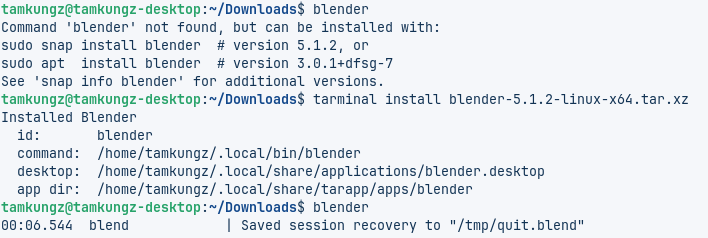
Instead of asking users to extract a .tar.xz somewhere and run a random binary manually, Tarminal can install the app into a standard location, create a command, create a desktop menu entry, install an icon, track state, and remove it cleanly later.
The project is split into two Cargo packages:
tar-install  = reusable library/core package
tarminal     = CLI frontend powered by tar-install
tar-install also ships a small hint command. If someone runs tar-install ..., it tells them to install or use tarminal.
Install
Debian / Ubuntu / Zorin
| \
| \
Optional: If you prefer packages built by Launchpad for Ubuntu Jammy or Noble, you can install from the PPA instead:
Fedora / RPM
openSUSE Tumbleweed
Packages built by Open Build Service are available for openSUSE Tumbleweed:
Alpine APK
| \
| \
Void XBPS
Arch Linux
|
||
gpgcheck=0 is currently used because the repository metadata is signed, while embedded RPM package signing may be added later.
GitHub Releases
Release artifacts are also published on GitHub:
- standalone Linux binaries
.deb.rpm.tar.xzSHA256SUMS- detached GPG signatures (
.asc)
Developer Packages
For developers who want to build on the installer core directly:
- Python:
tar-installon PyPI provides bindings around the shared library, so Python applications and tools can reuse and extend the installer behavior. - Rust:
tar-installis published as a Cargo crate, allowing Rust applications to use the API directly instead of shelling out to thetarminalCLI.
Usage
Inspect a tarball before installing:
Install with automatic detection:
Install with manual configuration prompts:
Install using a recipe:
System-wide install:
List installed apps:
Remove an app:
Check an installed app:
What Tarminal does
For a normal user install, Tarminal installs files here:
App files:   ~/.local/share/tarapp/apps/<app-id>/
Command:     ~/.local/bin/<command>
Desktop:     ~/.local/share/applications/<app-id>.desktop
Icon:        ~/.local/share/icons/hicolor/256x256/apps/<app-id>.*
State DB:    ~/.local/state/tarapp/apps.json
For a system install:
App files:   /opt/<app-id>/
Command:     /usr/local/bin/<command>
Desktop:     /usr/share/applications/<app-id>.desktop
Icon:        /usr/share/icons/hicolor/256x256/apps/<app-id>.*
State DB:    /var/lib/tarapp/apps.json
Supported archive formats
Current prototype support:
.tar.xz,.txz.tar.gz,.tgz.tar.bz2,.tbz2.tar
Detection behavior
Tarminal first tries to infer app metadata from common file names such as:
<app>-<version>-<os>-<architecture>.tar.xz
<app>_<version>_<os>_<architecture>.tar.xz
Then it inspects the archive and looks for likely executable files, including names that match:
<app>
<app>-<architecture>
<app>_<architecture>
bin/<app>
If detection is not good enough, use:
or provide a recipe.
Recipe format
A recipe can be supplied externally:
Example:
id: com.example.myapp
name: My App
version: 1.0.0
exec: MyApp
command: myapp
icon: assets/icon.png
desktop:
  categories:
    - Utility
  terminal: false
A recipe can also be embedded inside the archive as one of:
tarapp.yml
tarapp.yaml
.tarapp.yml
.tarapp.yaml
manifest.yml
manifest.yaml
Recipes are optional, but they are the recommended way for communities or app authors to make tarball installs reliable.
Safety behavior
Tarminal refuses to install archives with unsafe entries such as:
- absolute paths
..path traversal- symlink entries
- hard-link entries
The symlink rule is intentionally strict for now. Later versions may support safe symlinks that resolve inside the install directory.
Build
Build all packages:
Build release binaries:
Build packages separately:
CLI binary:
target/release/tarminal
Library crate:
use install_archive;
Package locally
Install package tools:
Build .deb packages:
Build .rpm packages:
Inspect package contents:
for; do
done
for; do
done
Release
Releases are handled by GitHub Actions when pushing a version tag:
The release workflow builds packages, signs artifacts, creates GitHub Release files, and publishes package repository files to:
https://packages.tamkungz.me/
Repository layout:
/gpg.key
/apt
/rpm/x86_64
/apps/tarminal
/maven
/apps/tarminal is only the landing/documentation page. Package managers install from /apt and /rpm/$basearch.
Project shape
crates/
  tar-install/
    src/lib.rs          library exports
    src/main.rs         hint command
    src/archive.rs      inspect tarball, detect binary/icon/manifest
    src/filename.rs     parse <app>-<version>-<os>-<arch>
    src/install.rs      install/remove/doctor logic
    src/desktop.rs      .desktop generation
    src/paths.rs        user/system install targets
    src/recipe.rs       manifest/recipe schema
    src/state.rs        installed apps database

  tarminal/
    src/main.rs         CLI frontend
Status
This is an early prototype designed for iteration.
The important architecture is already separated:
tar-installcan be reused by other GUIs or toolstarminalis only a CLI wrapper- recipes are optional but first-class
--configlets users fix bad filename/archive detection- package publishing is automated for GitHub Releases and
packages.tamkungz.me
License
MIT