# The Quipu stack — shared knowledge with rules and history
The Quipu stack is built around a governed, bitemporal knowledge store: shared
facts, decisions and work history your agents can query. Quipu can check writes
against your rules, records where each fact came from, and answers what was true
when. *Bitemporal* means keeping both when a fact was recorded and, when supplied,
when it was true.
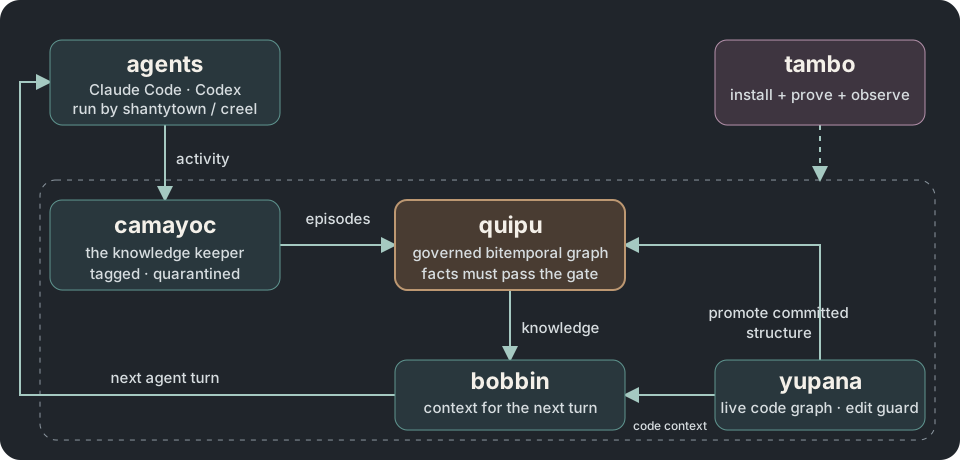
**Tambo installs and configures this stack**, then proves the selected tools
work. [Quipu](https://intigraph.github.io/quipu/) holds the knowledge. Camayoc
prepares knowledge and vocabulary for it. Bobbin searches code and can include
knowledge from Quipu; Yupana shows code impact and can read policies from Quipu.
Desire Path turns agent mistakes into feature requests and also works on its
own. Seeds tracks work items in the Quipu knowledge base. You can use the tools
separately or connect them around the same store.
Write refusal is configurable, not automatic in every installation: enable
Quipu's write checks for the rules you want enforced. See
[Quipu's configuration reference](https://intigraph.github.io/quipu/getting-started/configuration.html)
for the settings and their defaults.
Choose a starting set in [tools for your use case](personas.md). The guide maps
developers, crew leads, knowledge curators, service operators and individual
planners to the parts they need.
## Three ways in
### 1. Try it in your browser
**[Open Quipu Explore — no installation](https://intigraph.github.io/quipu/explore/).**
The real store runs as WebAssembly in your browser. Use the SPARQL box, edit
a fact, and export a knowledge pack.
### 2. Start in Claude Code
Add the Camayoc plugin, then run its bootstrap:
```text
/plugin marketplace add intigraph/camayoc
/plugin install camayoc@camayoc
/camayoc:bootstrap
```
Camayoc brings its own Quipu, loads the ontology, and proves the write gate
with probes that must be refused. See the
[Camayoc setup guide](https://github.com/intigraph/camayoc#install).
### 3. Install the whole kit
[Install Tambo](installing.md), then start its guided interview:
```bash
tambo init --guided
```
Review the generated plan before applying it. The
[getting-started guide](getting-started.md) walks through installation,
verification, and recovery; [profiles](profiles.md) let you choose how much
of the stack to install.
## Around the stack
Explore [Shuttle](https://github.com/scbrown/shuttle),
[Creel](https://github.com/scbrown/creel),
[Shanty](https://github.com/scbrown/shanty),
[Desire Path](https://github.com/scbrown/desire-path) for turning hallucinations
into feature requests, and
[Yupana](https://github.com/scbrown/yupana) for policy enforcement and code impact.
[Seeds](https://github.com/scbrown/seeds) tracks work items in the Quipu knowledge base.
Agents can run under [Shantytown](https://github.com/scbrown/shantytown) or Creel.
Track work with Seeds: `sd ready` lists unblocked items, `sd show <id>` reads one,
`sd create`, `sd update` and `sd comments add` record work, and `sd close` finishes it.
See [the stack](stack.md) for the component and dependency list.