//! Effects in tachyonfx operate on terminal cells after widgets have been rendered to the
//! screen. When an effect is applied, it modifies properties of the already-rendered
//! cells - like their colors, characters, or visibility. This means that the typical flow
//! is:
//!
//! 1. Render your widget to the screen
//! 2. Apply effects to transform the rendered content
//!
//! ## Color Effects
//! Color effects are used to modify or transition between colors, either for foreground
//! text, background, or both. These are ideal for highlighting changes, drawing
//! attention, or creating smooth visual transitions between states.
//!
//! | Effect | Description | Example |
//! |---------------------|-------------|----------|
//! | [`fade_from()`] | Fades from specified colors | [fade_from](https://junkdog.github.io/tachyonfx-ftl/?example=fade_from), [fire](https://junkdog.github.io/tachyonfx-ftl/?example=fire) |
//! | [`fade_from_fg()`] | Fades from specified foreground color | [fade_from_fg](https://junkdog.github.io/tachyonfx-ftl/?example=fade_from_fg), [prolong_start](https://junkdog.github.io/tachyonfx-ftl/?example=prolong_start), [parallel](https://junkdog.github.io/tachyonfx-ftl/?example=parallel), [sequence](https://junkdog.github.io/tachyonfx-ftl/?example=sequence) |
//! | [`fade_to()`] | Fades to specified colors | [fade_to](https://junkdog.github.io/tachyonfx-ftl/?example=fade_to), [explode_patterned](https://junkdog.github.io/tachyonfx-ftl/?example=explode_patterned) |
//! | [`fade_to_fg()`] | Fades to specified foreground color | [fade_to_fg](https://junkdog.github.io/tachyonfx-ftl/?example=fade_to_fg), [prolong_end](https://junkdog.github.io/tachyonfx-ftl/?example=prolong_end), [never_complete](https://junkdog.github.io/tachyonfx-ftl/?example=never_complete), [repeat_times](https://junkdog.github.io/tachyonfx-ftl/?example=repeat_times), [freeze_at](https://junkdog.github.io/tachyonfx-ftl/?example=freeze_at), [remap_alpha](https://junkdog.github.io/tachyonfx-ftl/?example=remap_alpha), [with_duration](https://junkdog.github.io/tachyonfx-ftl/?example=with_duration), [timed_never_complete](https://junkdog.github.io/tachyonfx-ftl/?example=timed_never_complete) |
//! | [`hsl_shift()`] | Changes hue, saturation, and lightness | [hsl_shift](https://junkdog.github.io/tachyonfx-ftl/?example=hsl_shift), [hsl_shift_2](https://junkdog.github.io/tachyonfx-ftl/?example=hsl_shift_2) |
//! | [`hsl_shift_fg()`] | Changes foreground HSL values | [hsl_shift_fg](https://junkdog.github.io/tachyonfx-ftl/?example=hsl_shift_fg), [hsl_shift_2](https://junkdog.github.io/tachyonfx-ftl/?example=hsl_shift_2), [repeat_forever](https://junkdog.github.io/tachyonfx-ftl/?example=repeat_forever) |
//! | [`paint()`] | Paints foreground and/or background | [paint](https://junkdog.github.io/tachyonfx-ftl/?example=paint) |
//! | [`paint_fg()`] | Paints foreground color | [paint_fg](https://junkdog.github.io/tachyonfx-ftl/?example=paint_fg) |
//! | [`paint_bg()`] | Paints background color | [paint_bg](https://junkdog.github.io/tachyonfx-ftl/?example=paint_bg), [explode_patterned](https://junkdog.github.io/tachyonfx-ftl/?example=explode_patterned) |
//!
//! ## Text/Character Effects
//! Text effects modify the actual characters or their placement in the terminal. These
//! are perfect for transitions, reveals, and dynamic text animations.
//!
//! | Effect | Description | Example |
//! |------------------------|-------------|----------|
//! | [`coalesce()`] | Reforms dissolved foreground | [coalesce](https://junkdog.github.io/tachyonfx-ftl/?example=coalesce), [ping_pong](https://junkdog.github.io/tachyonfx-ftl/?example=ping_pong), [parallel](https://junkdog.github.io/tachyonfx-ftl/?example=parallel) |
//! | [`coalesce_from()`] | Reforms dissolved foreground | [coalesce_from](https://junkdog.github.io/tachyonfx-ftl/?example=coalesce_from) |
//! | [`evolve()`] | Transforms characters through symbol sets | [evolve](https://junkdog.github.io/tachyonfx-ftl/?example=evolve), [fire](https://junkdog.github.io/tachyonfx-ftl/?example=fire) |
//! | [`evolve_into()`] | Evolves into underlying content | [evolve_into](https://junkdog.github.io/tachyonfx-ftl/?example=evolve_into) |
//! | [`evolve_from()`] | Evolves from underlying content | [evolve_from](https://junkdog.github.io/tachyonfx-ftl/?example=evolve_from), [translate](https://junkdog.github.io/tachyonfx-ftl/?example=translate), [fire](https://junkdog.github.io/tachyonfx-ftl/?example=fire) |
//! | [`explode()`] | Explodes content outward | [explode](https://junkdog.github.io/tachyonfx-ftl/?example=explode), [explode_patterned](https://junkdog.github.io/tachyonfx-ftl/?example=explode_patterned) |
//! | [`dissolve()`] ️ | Dissolves foreground content | [dissolve](https://junkdog.github.io/tachyonfx-ftl/?example=dissolve), [delay](https://junkdog.github.io/tachyonfx-ftl/?example=delay), [sequence](https://junkdog.github.io/tachyonfx-ftl/?example=sequence) |
//! | [`dissolve_to()`] ️ | Dissolves foreground content | [dissolve_to](https://junkdog.github.io/tachyonfx-ftl/?example=dissolve_to) |
//! | [`slide_in()`] | Slides content with gradient | [slide_in](https://junkdog.github.io/tachyonfx-ftl/?example=slide_in) |
//! | [`slide_out()`] | Slides content with gradient | [slide_out](https://junkdog.github.io/tachyonfx-ftl/?example=slide_out) |
//! | [`sweep_in()`] | Sweeps content with color | [sweep_in](https://junkdog.github.io/tachyonfx-ftl/?example=sweep_in) |
//! | [`sweep_out()`] | Sweeps content with color | [sweep_out](https://junkdog.github.io/tachyonfx-ftl/?example=sweep_out) |
//!
//! ## Timing and Control Effects
//! Control effects modify how other effects behave over time. They're essential for
//! creating complex animations and controlling the flow of multiple effects.
//!
//! | Effect | Description | Example |
//! |---------------------|-------------|----------|
//! | [`consume_tick()`] | Consumes a single tick | N/A |
//! | [`delay()`] | Delays effect by specified duration | [delay](https://junkdog.github.io/tachyonfx-ftl/?example=delay), [explode_patterned](https://junkdog.github.io/tachyonfx-ftl/?example=explode_patterned)|
//! | [`freeze_at()`] | Freezes another effect at a specific alpha (transition) value | [freeze_at](https://junkdog.github.io/tachyonfx-ftl/?example=freeze_at) |
//! | [`never_complete()`] | Makes effect run indefinitely | [never_complete](https://junkdog.github.io/tachyonfx-ftl/?example=never_complete) |
//! | [`ping_pong()`] | Plays effect forward then backward | [ping_pong](https://junkdog.github.io/tachyonfx-ftl/?example=ping_pong), [repeat_forever](https://junkdog.github.io/tachyonfx-ftl/?example=repeat_forever)|
//! | [`prolong_start()`] | Extends effect duration | [prolong_start](https://junkdog.github.io/tachyonfx-ftl/?example=prolong_start), [fire](https://junkdog.github.io/tachyonfx-ftl/?example=fire)|
//! | [`prolong_end()`] | Extends effect duration | [prolong_end](https://junkdog.github.io/tachyonfx-ftl/?example=prolong_end)|
//! | [`remap_alpha()`] | Remaps an effect's alpha progression to operate within a smaller range | [remap_alpha](https://junkdog.github.io/tachyonfx-ftl/?example=remap_alpha), [hsl_shift_2](https://junkdog.github.io/tachyonfx-ftl/?example=hsl_shift_2) |
//! | [`repeat()`] | Repeats effect by count or duration | [repeat_times](https://junkdog.github.io/tachyonfx-ftl/?example=repeat_times) |
//! | [`repeating()`] | Repeats an effect indefinitely | [repeat_forever](https://junkdog.github.io/tachyonfx-ftl/?example=repeat_forever), [hsl_shift_2](https://junkdog.github.io/tachyonfx-ftl/?example=hsl_shift_2) |
//! | [`run_once()`] | Ensures wrapped effect runs exactly once | N/A |
//! | [`sleep()`] | Pauses for specified duration | N/A |
//! | [`timed_never_complete()`] | Makes effect run indefinitely with time limit | [timed_never_complete](https://junkdog.github.io/tachyonfx-ftl/?example=timed_never_complete) |
//! | [`with_duration()`] | Applies duration limit to effect | [with_duration](https://junkdog.github.io/tachyonfx-ftl/?example=with_duration) |
//!
//!
//! ## Geometry Effects
//! Geometry effects modify the position or size of content. These are useful for creating
//! dynamic layouts and transitions.
//!
//! | Effect | Description | Example |
//! |------------------------|-------------|----------|
//! | [`expand()`] | Expands bidirectionally from center | [expand](https://junkdog.github.io/tachyonfx-ftl/?example=expand) |
//! | [`resize_area()`] | Resizes effect area | N/A |
//! | [`stretch()`] | Stretches unidirectionally using block chars | [stretch](https://junkdog.github.io/tachyonfx-ftl/?example=stretch) |
//! | [`translate()`] | Moves effect area | [translate](https://junkdog.github.io/tachyonfx-ftl/?example=translate), [fire](https://junkdog.github.io/tachyonfx-ftl/?example=fire) |
//! | [`translate_buf()`] | Moves buffer contents | N/A |
//!
//! ## Combination Effects
//! Combination effects allow multiple effects to be composed together. These are crucial
//! for creating complex animations.
//!
//! | Effect | Description | Example |
//! |---------------------|-------------|----------|
//! | [`parallel()`] ⫽ | Runs effects simultaneously | [parallel](https://junkdog.github.io/tachyonfx-ftl/?example=parallel), [hsl_shift_2](https://junkdog.github.io/tachyonfx-ftl/?example=hsl_shift_2), [explode_patterned](https://junkdog.github.io/tachyonfx-ftl/?example=explode_patterned), [fire](https://junkdog.github.io/tachyonfx-ftl/?example=fire) |
//! | [`sequence()`] ⟶ | Runs effects sequentially | [sequence](https://junkdog.github.io/tachyonfx-ftl/?example=sequence), [fire](https://junkdog.github.io/tachyonfx-ftl/?example=fire) |
//!
//! ## Other Effects
//! Advanced effects for custom behaviors or quick one-off effects.
//!
//! | Effect & Description | Preview | Example |
//! |---------------------|---------|----------|
//! | [`dispatch_event()`] | Dispatches events when effects start | N/A |
//! | [`dynamic_area()`] | Wraps effects for responsive layouts | N/A |
//! | [`effect_fn()`] | Custom effects with cell iterator | 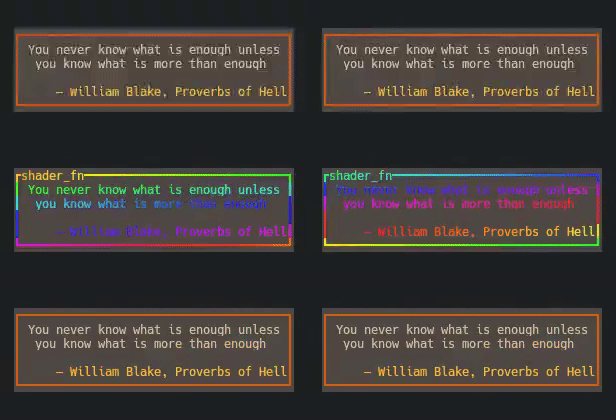 |
//! | [`effect_fn_buf()`] | Custom effects with buffer | 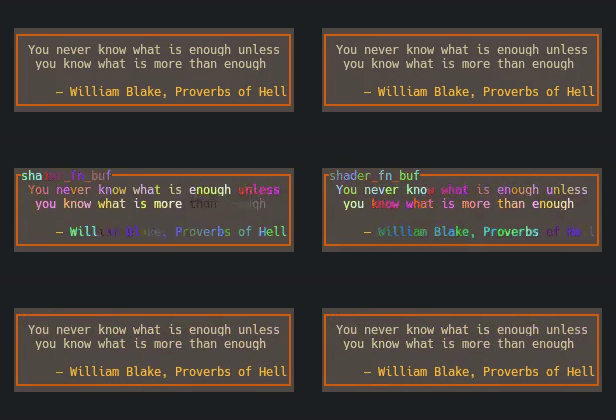 |
//! | [`offscreen_buffer()`] | Renders to separate buffer | N/A |
//!
//! ## Interpolation & Timing
//! Most effects support timing control through the [`EffectTimer`] which combines
//! duration with [`crate::Interpolation`] functions to determine how animations progress
//! over time. The interpolation enum provides 32 easing functions for creating natural,
//! smooth animations.
//!
//!
//! | Category | Functions | Description |
//! |-----------------|-------------------------------------------|-------------------------------------------------|
//! | **Basic** | `Linear` (default), `Reverse` | Constant-rate and inverted progression |
//! | **Back** | `BackIn`, `BackOut`, `BackInOut` | Slight overshoot before settling |
//! | **Bounce** | `BounceIn`, `BounceOut`, `BounceInOut` | Ball-dropping physics simulation |
//! | **Circular** | `CircIn`, `CircOut`, `CircInOut` | Smooth circular arc progression |
//! | **Cubic** | `CubicIn`, `CubicOut`, `CubicInOut` | Third-power curves with moderate acceleration |
//! | **Elastic** | `ElasticIn`, `ElasticOut`, `ElasticInOut` | Bouncy, spring-like animations |
//! | **Exponential** | `ExpoIn`, `ExpoOut`, `ExpoInOut` | Rapid acceleration/deceleration |
//! | **Quadratic** | `QuadIn`, `QuadOut`, `QuadInOut` | Second-power curves with gentle acceleration |
//! | **Quartic** | `QuartIn`, `QuartOut`, `QuartInOut` | Fourth-power curves with sharper acceleration |
//! | **Quintic** | `QuintIn`, `QuintOut`, `QuintInOut` | Fifth-power curves with very sharp acceleration |
//! | **Sine** | `SineIn`, `SineOut`, `SineInOut` | Smooth sinusoidal curves |
//!
//! Effects can be timed using various `EffectTimer` creation methods:
//!
//! ```rust
//! use tachyonfx::{fx, EffectTimer, Interpolation, Duration};
//! use ratatui_core::style::Color;
//!
//! fx::fade_to_fg(Color::Red, 1000); // 1 second, linear (shorthand)
//! fx::fade_to_fg(Color::Red, (1000, Interpolation::BounceOut)); // 1 second, bouncy
//! fx::fade_to_fg(Color::Red, EffectTimer::from_ms(1000, Interpolation::Linear)); // explicit
//! fx::fade_to_fg(Color::Red, Duration::from_secs(2)); // 2 seconds, linear
//! ```
//!
//! ## Spatial Patterns
//! Effects can be enhanced with spatial patterns that control how animations progress
//! across the screen area. These patterns transform global alpha values into
//! position-specific values, creating various spatial progressions.
//!
//! | Pattern | Description |
//! |--------------------------------------------------------------|----------------------------------|
//! | [`BlendPattern`](crate::pattern::BlendPattern) | Crossfade between two patterns |
//! | [`CheckerboardPattern`](crate::pattern::CheckerboardPattern) | Alternating cell activation |
//! | [`CoalescePattern`](crate::pattern::CoalescePattern) | Reform pattern for text effects |
//! | [`DiagonalPattern`](crate::pattern::DiagonalPattern) | Diagonal sweep progression |
//! | [`DissolvePattern`](crate::pattern::DissolvePattern) | Dissolve pattern for text effects|
//! | [`RadialPattern`](crate::pattern::RadialPattern) | Circular progression from center |
//! | [`SweepPattern`](crate::pattern::SweepPattern) | Directional sweep |
//! | [`WavePattern`](crate::pattern::WavePattern) | Wave interference pattern |
//!
//! Example showing a sweeping dissolve effect:
//! ```rust
//! use tachyonfx::{fx, pattern::SweepPattern, EffectTimer, Interpolation};
//!
//! // Text dissolves outward from center in a circular pattern
//! let effect = fx::dissolve(EffectTimer::from_ms(2000, Interpolation::QuadOut))
//! .with_pattern(SweepPattern::left_to_right(25));
//! ```
//!
//! ## Cell Filtering
//! Effects can be selectively applied to specific cells using [`crate::CellFilter`]. This
//! allows precise control over which parts of the terminal receive effects.
//!
//! Basic filtering example:
//! ```rust
//! use tachyonfx::{fx, CellFilter};
//! use ratatui_core::style::Color;
//!
//! // Apply fade effect only to text cells (non-whitespace)
//! fx::fade_to_fg(Color::Yellow, 1000)
//! .with_filter(CellFilter::Text);
//! ```
//!
//! Complex filtering with logical operators:
//! ```rust
//! use tachyonfx::{fx, CellFilter, EffectTimer, Interpolation};
//! use ratatui_core::{style::Color, layout::Margin};
//!
//! let timer = EffectTimer::from_ms(1000, Interpolation::Linear);
//! // Apply effect to inner area, excluding borders and black text
//! fx::hsl_shift_fg([180.0, 50.0, 0.0], timer)
//! .with_filter(CellFilter::AllOf(vec![
//! CellFilter::Inner(Margin::new(1, 1)), // Skip border cells
//! CellFilter::Text, // Only text cells
//! CellFilter::FgColor(Color::Black).negated() // Exclude black text
//! ]));
//! ```
//!
//! Additional effects can be created by implementing the [Shader](crate::Shader) trait.
pub use direction::*;
pub use evolve::EvolveSymbolSet;
pub use expand::ExpandDirection;
pub use glitch::Glitch;
use ping_pong::PingPong;
use prolong::{Prolong, ProlongPosition};
use ratatui_core::{
buffer::{Buffer, Cell},
layout::{Offset, Size},
style::{Color, Style},
};
pub use repeat::RepeatMode;
pub use shader_fn::*;
use slide::SlideCell;
pub use temporary::IntoTemporaryEffect;
use crate::{
effect::{Effect, IntoEffect},
effect_timer::EffectTimer,
fx::{
ansi256::Ansi256,
consume_tick::ConsumeTick,
containers::{ParallelEffect, SequentialEffect},
dissolve::Dissolve,
evolve::Evolve,
fade::FadeColors,
hsl_shift::HslShift,
never_complete::NeverComplete,
paint::Paint,
repeat::Repeat,
resize::ResizeArea,
run_once::RunOnce,
sleep::Sleep,
sweep_in::SweepIn,
temporary::TemporaryEffect,
translate_buffer::TranslateBuffer,
},
CellIterator, ColorSpace, Duration, Motion, RefCount, RefRect, ThreadSafetyMarker,
};
mod alpha_xform;
mod ansi256;
mod consume_tick;
pub(crate) mod containers;
mod direction;
mod dissolve;
mod dynamic_area;
mod evolve;
mod expand;
mod explode;
mod fade;
mod glitch;
mod hsl_shift;
mod lighten;
mod never_complete;
mod offscreen_buffer;
mod paint;
mod ping_pong;
mod prolong;
mod repeat;
mod resize;
mod run_once;
mod saturate;
mod shader_fn;
mod sleep;
mod slide;
pub(crate) mod sliding_window_alpha;
mod stretch;
mod sweep_in;
mod temporary;
mod translate;
mod translate_buffer;
pub(crate) mod unique;
/// Creates a custom effect using a user-defined function.
///
/// This function allows you to define custom effects by providing a closure that will be
/// called with the current state, `ShaderFnContext`, and a cell iterator. You can use
/// this closure to apply custom transformations or animations to the terminal cells. The
/// function also takes an initial state that can be used to maintain state across
/// invocations.
///
/// # Arguments
/// * `state` - An initial state that will be passed to the closure on each invocation.
/// * `timer` - An `EffectTimer` instance to control the duration and timing of the
/// effect.
/// * `f` - A closure that defines the custom effect. The closure takes three parameters:
/// * `state`: A mutable reference to the state provided during the creation of the
/// effect.
/// * `context`: A `ShaderFnContext` instance containing timing and area information.
/// * `cell_iter`: An iterator over the terminal cells.
///
/// # Returns
/// * An `Effect` instance that can be used with other effects or applied directly to
/// terminal cells.
///
/// # Examples
///
/// ```no_run
/// use ratatui_core::style::Color;
/// use tachyonfx::*;
///
/// let timer = EffectTimer::from_ms(1000, Interpolation::CubicInOut);
/// let no_state = (); // no state to keep track of
///
/// fx::effect_fn(no_state, timer, |_state, context, cell_iter| {
/// let alpha = context.alpha();
/// let mut fg_cache: LruCache<Color, Color, 4> = LruCache::default();
///
/// for (_pos, cell) in cell_iter {
/// // context.timer.progress() is already interpolated, so we can linearly lerp to the target color
/// let color = fg_cache.memoize(&cell.fg, |c| c.lerp(&Color::Indexed(35), alpha));
/// cell.set_fg(color);
/// }
/// }).filter(CellFilter::FgColor(Color::DarkGray));
/// ```
///
/// In this example, the custom effect function interpolates the foreground color of each
/// cell to a new color over the specified duration. The effect is only applied to cells
/// with a foreground color of `Color::DarkGray`.
///
/// Example from `examples/effect-showcase.rs`
///
/// 
///
/// ```no_run
/// use std::time::Instant;
/// use ratatui_core::style::Color;
/// use tachyonfx::{color_from_hsl, fx};
///
/// fx::effect_fn(Instant::now(), 1000, |state, _ctx, cell_iter| {
/// let cycle: f32 = (state.elapsed().as_millis() % 3600) as f32;
/// cell_iter
/// .filter(|(_, cell)| cell.symbol() != " ")
/// .enumerate()
/// .for_each(|(i, (_pos, cell))| {
/// let hue = (2.0 * i as f32 + cycle * 0.2) % 360.0;
/// let color = color_from_hsl(hue, 100.0, 50.0);
/// cell.set_fg(color);
/// });
/// });
/// ```
///
/// This example creates an effect that runs indefinitely and cycles the color of each
/// foreground cell based on the elapsed time. Each cell's color is slightly offset by
/// the cell's position.
pub fn effect_fn<F, S, T>(state: S, timer: T, f: F) -> Effect
where
S: Clone + ThreadSafetyMarker + 'static,
T: Into<EffectTimer>,
F: FnMut(&mut S, ShaderFnContext, CellIterator) + ThreadSafetyMarker + 'static,
{
ShaderFn::with_iterator()
.name("shader_fn")
.state(state)
.code(f)
.timer(timer)
.call()
.into_effect()
}
/// Creates a custom effect using a user-defined function that operates on a buffer.
///
/// This function allows you to define custom effects by providing a closure that will be
/// called with the current state, `ShaderFnContext`, and a mutable buffer. You can use
/// this closure to apply custom transformations or animations to the terminal buffer. The
/// function also takes an initial state that can be used to maintain state across
/// invocations.
///
/// # Arguments
/// * `state` - An initial state that will be passed to the closure on each invocation.
/// * `timer` - An `EffectTimer` instance to control the duration and timing of the
/// effect.
/// * `f` - A closure that defines the custom effect. The closure takes three parameters:
/// * `state`: A mutable reference to the state provided during the creation of the
/// effect.
/// * `context`: A `ShaderFnContext` instance containing timing and area information.
/// * `buffer`: A mutable reference to the terminal buffer.
///
/// # Returns
/// * An `Effect` instance that can be used with other effects or applied directly to
/// terminal cells.
///
/// # Examples
///
/// Example from `examples/effect-showcase.rs`
///
/// 
///
/// ```no_run
/// use ratatui_core::style::Color;
/// use tachyonfx::*;
///
/// let timer = EffectTimer::from_ms(1000, Interpolation::Linear);
/// let no_state = (); // no state to keep track of
///
/// fx::effect_fn_buf(no_state, timer, |_state, context, buf| {
/// let offset = context.timer.remaining().as_millis() as usize;
///
/// let filter = context.filter();
/// let cell_pred = filter.map(FilterProcessor::validator);
///
/// for (i, pos) in buf.area.positions().enumerate() {
/// let cell = &mut buf[pos];
/// if cell_pred.as_ref().is_some_and(|p| p.is_valid(pos, &cell)) {
/// cell.set_fg(Color::Indexed(((offset + i) % 256) as u8));
/// }
/// }
/// }).filter(CellFilter::Text);
/// ```
///
/// This example creates an effect that runs for 1s and cycles the color of the
/// text based on the elapsed time. Each cell's color is slightly offset by
/// the cell's position.
pub fn effect_fn_buf<F, S, T>(state: S, timer: T, f: F) -> Effect
where
S: Clone + ThreadSafetyMarker + 'static,
T: Into<EffectTimer>,
F: FnMut(&mut S, ShaderFnContext, &mut Buffer) + ThreadSafetyMarker + 'static,
{
ShaderFn::with_buffer()
.name("shader_fn_buf")
.state(state)
.code(f)
.timer(timer)
.call()
.into_effect()
}
/// changes the hue, saturation, and lightness of the foreground and background colors.
///
/// # Examples
///
/// Interactive examples:
/// - <https://junkdog.github.io/tachyonfx-ftl/?example=hsl_shift>
/// - <https://junkdog.github.io/tachyonfx-ftl/?example=hsl_shift_2>
///
/// <div data-tachyonfx-demo="hsl_shift"
/// data-dsl="let timer = (1000, Interpolation::Linear);
/// let fg_shift = [120.0, 25.0, 25.0];
/// let bg_shift = [-20.0, -50.0, 15.0];
/// fx::hsl_shift(Some(fg_shift), Some(bg_shift), timer)
/// .with_pattern(SweepPattern::left_to_right(80))"> </div>
///
/// ```no_run
/// // shift the hue of the entire area
/// use tachyonfx::{fx, Interpolation};
///
/// let timer = (1000, Interpolation::Linear);
/// let fg_shift = [120.0, 25.0, 25.0];
/// let bg_shift = [-20.0, -50.0, 15.0];
/// fx::hsl_shift(Some(fg_shift), Some(bg_shift), timer);
/// ```
pub fn hsl_shift<T: Into<EffectTimer>>(
hsl_fg_change: Option<[f32; 3]>,
hsl_bg_change: Option<[f32; 3]>,
timer: T,
) -> Effect {
if hsl_fg_change.is_none() && hsl_bg_change.is_none() {
panic!("At least one of the foreground or background color must be changed");
}
HslShift::builder()
.maybe_hsl_mod_fg(hsl_fg_change)
.maybe_hsl_mod_bg(hsl_bg_change)
.timer(timer.into())
.build()
.into_effect()
}
/// Shifts the foreground color by the specified hue, saturation, and lightness
/// over the specified duration.
///
/// # Examples
///
/// Interactive examples:
/// - <https://junkdog.github.io/tachyonfx-ftl/?example=hsl_shift_fg>
/// - <https://junkdog.github.io/tachyonfx-ftl/?example=hsl_shift_2>
/// - <https://junkdog.github.io/tachyonfx-ftl/?example=repeat_forever>
///
/// <div data-tachyonfx-demo="hsl_shift_fg"
/// data-dsl="let timer = (1000, Interpolation::Linear);
/// let fg_shift = [120.0, 25.0, 25.0];
/// fx::hsl_shift(Some(fg_shift), None, timer)"></div>
///
/// ```no_run
/// use tachyonfx::{fx, Interpolation};
///
/// // shift the hue of the entire area
/// let timer = (1000, Interpolation::Linear);
/// let fg_shift = [120.0, 25.0, 25.0];
/// fx::hsl_shift(Some(fg_shift), None, timer);
/// ```
pub fn hsl_shift_fg<T: Into<EffectTimer>>(hsl_fg_change: [f32; 3], timer: T) -> Effect {
hsl_shift(Some(hsl_fg_change), None, timer)
}
/// Returns an effect that downsamples to 256 color mode.
///
/// <div data-tachyonfx-demo="term256_colors"
/// data-dsl="fx::term256_colors()"></div>
#[deprecated(since = "0.16.0", note = "not considered widely useful")]
pub fn term256_colors() -> Effect {
Ansi256::default().into_effect()
}
/// Creates an explosion effect where content disperses outward from the center.
///
/// This effect simulates an explosion by moving cells away from the center of the
/// specified area, with their appearance changing over time to represent debris.
///
/// The original cells are replaced with the `Color::Black` for both foreground and
/// background. No modifiers are retained.
///
/// # Arguments
///
/// * `force` - Base explosion force determining how far cells move outward. Higher values
/// create more dramatic explosions with cells moving farther from the center.
///
/// * `force_rng_factor` - Randomization factor for explosion force. Higher values create
/// more varied and chaotic explosions, with some cells moving faster than others. Set
/// to 0.0 for uniform movement.
///
/// * `timer` - Controls the duration and interpolation of the effect.
///
/// # Returns
///
/// * An `Effect` that creates an explosion animation when processed.
///
/// # Examples
///
/// Interactive examples:
/// - <https://junkdog.github.io/tachyonfx-ftl/?example=explode>
/// - <https://junkdog.github.io/tachyonfx-ftl/?example=explode_patterned>
///
/// <div data-tachyonfx-demo="explode"
/// data-dsl="let content_area = Rect::new(1, 1, 38, 5);
/// fx::explode(10.0, 3.0, 800)
/// .with_area(content_area)"></div>
///
/// ```no_run
/// use tachyonfx::{fx, Interpolation::Linear};
/// use ratatui_core::layout::Rect;
/// use ratatui_core::style::Color;
///
/// let timer = (1000, Linear);
///
/// fx::parallel(&[
/// fx::fade_to_fg(Color::from_u32(0x404040), timer),
/// fx::explode(15.0, 2.0, timer),
/// ]);
/// ```
pub fn explode(force: f32, force_rng_factor: f32, timer: impl Into<EffectTimer>) -> Effect {
let mut replacement_cell = Cell::default();
replacement_cell.set_fg(Color::Black);
replacement_cell.set_bg(Color::Black);
Explode::new(force, force_rng_factor, replacement_cell, timer.into()).into_effect()
}
/// Freezes an effect at a specific alpha (transition) value.
///
/// # Arguments
///
/// * `alpha` - The alpha value to freeze the effect at (between 0.0 and 1.0)
/// * `set_raw_alpha` - If true, bypasses interpolation and sets raw alpha
/// * `fx` - The effect to freeze
///
/// # Returns
///
/// An `Effect` that shows the inner effect frozen at the specified alpha
///
/// # Examples
///
/// Interactive example: <https://junkdog.github.io/tachyonfx-ftl/?example=freeze_at>
///
/// <div data-tachyonfx-demo="freeze_at"
/// data-dsl="let fade_effect = fx::dissolve(1000);
/// fx::freeze_at(0.5, false, fade_effect)"></div>
///
/// ```no_run
/// use tachyonfx::fx;
///
/// let fade_effect = fx::dissolve(1000);
/// fx::freeze_at(0.5, false, fade_effect);
/// ```
pub fn freeze_at(alpha: f32, set_raw_alpha: bool, effect: Effect) -> Effect {
FreezeAt::new(alpha, set_raw_alpha, effect).into_effect()
}
/// Remaps an effect's alpha progression to operate within a smaller range.
///
/// This is useful for:
/// - Creating partially completed effects
/// - Skipping uninteresting parts of a transition
/// - Focusing on the most visually appealing portion of an effect
/// - Creating sequential effects that join seamlessly at specific transition points
///
/// # Arguments
///
/// * `alpha_start` - The lower bound of the alpha range (0.0-1.0). Values less than 0.0
/// are clamped to 0.0.
/// * `alpha_end` - The upper bound of the alpha range (0.0-1.0). Values greater than 1.0
/// are clamped to 1.0.
/// * `effect` - The effect to remap.
///
/// # Returns
///
/// A new effect that remaps the original effect's alpha progression to the specified
/// range.
///
/// # Examples
///
/// Interactive examples:
/// - <https://junkdog.github.io/tachyonfx-ftl/?example=remap_alpha>
/// - <https://junkdog.github.io/tachyonfx-ftl/?example=hsl_shift_2>
///
/// <div data-tachyonfx-demo="remap_alpha"
/// data-dsl="let fade_effect = fx::fade_to_fg(Color::Cyan, 3000)
/// .with_color_space(ColorSpace::Rgb);
/// fx::remap_alpha(0.1, 0.5, fade_effect)"></div>
///
/// ```no_run
/// use tachyonfx::{fx, ColorSpace};
/// use ratatui_core::style::Color;
///
/// let fade_effect = fx::fade_to_fg(Color::Cyan, 3000)
/// .with_color_space(ColorSpace::Rgb);
/// fx::remap_alpha(0.1, 0.5, fade_effect);
/// ```
pub fn remap_alpha(alpha_start: f32, alpha_end: f32, effect: Effect) -> Effect {
let range = alpha_start.max(0.0)..alpha_end.min(1.0);
RemapAlpha::new(range, effect).into_effect()
}
/// Repeat the effect indefinitely or for a specified number of times or duration.
///
/// # Arguments
/// * `effect` - The effect to repeat
/// * `mode` - Controls how the effect repeats:
/// - `RepeatMode::Forever` - Repeats indefinitely
/// - `RepeatMode::Times(n)` - Repeats n times
/// - `RepeatMode::Duration(d)` - Repeats for duration d
///
/// # Examples
///
/// Interactive examples:
/// - <https://junkdog.github.io/tachyonfx-ftl/?example=repeat_times>
/// - <https://junkdog.github.io/tachyonfx-ftl/?example=repeat_forever>
///
/// <div data-tachyonfx-demo="repeat"
/// data-dsl="let fade = fx::fade_to_fg(Color::Red, (1000, Interpolation::CubicOut));
/// fx::repeat(fade, RepeatMode::Times(3))">
/// </div>
///
/// ```no_run
/// use tachyonfx::{fx, fx::RepeatMode, Duration, EffectTimer, Interpolation};
/// use ratatui_core::style::Color;
///
/// // Repeat a fade effect 3 times
/// let fade = fx::fade_to_fg(Color::Red, EffectTimer::from_ms(1000, Interpolation::CubicOut));
/// let repeated = fx::repeat(fade, RepeatMode::Times(3));
/// ```
pub fn repeat(effect: Effect, mode: RepeatMode) -> Effect {
Repeat::new(effect, mode).into_effect()
}
/// Plays the effect forwards and then backwards, creating a ping-pong animation effect.
///
/// This is useful for creating oscillating animations where an effect needs to smoothly
/// reverse back to its starting state. The total duration will be twice the original
/// effect's duration.
///
/// # Arguments
/// * `effect` - The effect to play forwards and backwards
///
/// # Examples
///
/// Interactive examples:
/// - <https://junkdog.github.io/tachyonfx-ftl/?example=ping_pong>
/// - <https://junkdog.github.io/tachyonfx-ftl/?example=repeat_forever>
///
/// <div data-tachyonfx-demo="ping_pong"
/// data-dsl="fx::ping_pong(fx::coalesce((1500, QuintIn)))"></div>
///
/// ```no_run
/// use tachyonfx::{fx, Interpolation};
///
/// let timer = (500, Interpolation::CircOut);
/// fx::ping_pong(fx::coalesce(timer));
/// ```
pub fn ping_pong(effect: Effect) -> Effect {
PingPong::new(effect).into_effect()
}
/// Repeat the effect indefinitely.
///
/// This is a convenience wrapper around `repeat(effect, RepeatMode::Forever)`.
///
/// # Arguments
/// * `effect` - The effect to repeat indefinitely
///
/// # Examples
///
/// Interactive examples:
/// - <https://junkdog.github.io/tachyonfx-ftl/?example=repeat_forever>
/// - <https://junkdog.github.io/tachyonfx-ftl/?example=hsl_shift_2>
///
/// <div data-tachyonfx-demo="repeating"
/// data-dsl="let fade = fx::fade_to_fg(Color::Red, (1000, Interpolation::Linear));
/// fx::repeating(fade)"></div>
///
/// ```no_run
/// use ratatui_core::style::Color;
/// use tachyonfx::{fx, Interpolation};
///
/// let fade = fx::fade_to_fg(Color::Red, (1000, Interpolation::Linear));
/// let endless = fx::repeating(fade);
/// ```
pub fn repeating(effect: Effect) -> Effect {
repeat(effect, RepeatMode::Forever)
}
/// Creates an effect that sweeps out from a specified color with optional randomness.
///
/// Interactive example: <https://junkdog.github.io/tachyonfx-ftl/?example=sweep_out>
///
/// <div data-tachyonfx-demo="sweep_out"
/// data-dsl="fx::sweep_out(
/// Motion::LeftToRight,
/// 10,
/// 0,
/// Color::Black,
/// (1200, Interpolation::QuadOut)
/// )"></div>
///
/// ```no_run
/// use ratatui::prelude::Color;
/// use tachyonfx::{fx, Interpolation, Motion};
///
/// fx::sweep_out(Motion::LeftToRight, 10, 0, Color::Black, (1200, Interpolation::QuadOut));
/// ```
///
/// Refer to [`sweep_in`](fn.sweep_in.html) for more information.
pub fn sweep_out<T: Into<EffectTimer>, C: Into<Color>>(
direction: Motion,
gradient_length: u16,
randomness: u16,
faded_color: C,
timer: T,
) -> Effect {
sweep_in(
direction.flipped(),
gradient_length,
randomness,
faded_color,
timer,
)
.reversed()
}
/// Creates an effect that sweeps in from a specified color with optional randomness.
///
/// This function generates a sweeping effect that transitions from a specified color
/// to the original content. The sweep can be applied in any of the four cardinal
/// directions and includes options for gradient length and randomness to create more
/// dynamic effects.
///
/// # Arguments
///
/// * `direction` - The direction of the sweep effect. Can be one of:
/// - `Motion::LeftToRight`
/// - `Motion::RightToLeft`
/// - `Motion::UpToDown`
/// - `Motion::DownToUp`
///
/// * `gradient_length` - The length of the gradient transition in cells. This determines
/// how smooth the transition is between the faded color and the original content.
///
/// * `randomness` - The maximum random offset applied to each column or row of the
/// effect. Higher values create a more irregular, "noisy" transition. Set to 0 for a
/// uniform sweep.
///
/// * `faded_color` - The color from which the content sweeps in.
///
/// * `timer` - Controls the duration and timing of the effect.
///
/// # Returns
///
/// Returns a sweep `Effect`.
///
/// # Examples
///
/// Interactive example: <https://junkdog.github.io/tachyonfx-ftl/?example=sweep_in>
///
/// <div data-tachyonfx-demo="sweep-in"
/// data-dsl="fx::sweep_in(Motion::LeftToRight, 10, 0, Color::Black, (1200,
/// Interpolation::QuadOut))"> </div>
///
/// ```no_run
/// use ratatui::prelude::Color;
/// use tachyonfx::*;
/// let c = Color::from_u32(0x1d2021);
/// let timer = (1000, Interpolation::Linear);
/// fx::sweep_in(Motion::LeftToRight, 10, 0, c, timer);
/// ```
///
/// Sweep in from the left with a gradient length of 10 and no randomness.
///
/// Basic usage:
/// ```
/// use tachyonfx::{fx, EffectTimer, Interpolation, Motion};
/// use ratatui_core::style::Color;
///
/// let sweep_effect = fx::sweep_in(
/// Motion::LeftToRight,
/// 10,
/// 0,
/// Color::Blue,
/// EffectTimer::from_ms(1000, Interpolation::Linear)
/// );
/// ```
///
/// With randomness:
/// ```
/// use tachyonfx::{fx, EffectTimer, Interpolation, Motion};
/// use ratatui_core::style::Color;
///
/// let sweep_effect = fx::sweep_in(
/// Motion::UpToDown,
/// 15,
/// 5,
/// Color::Cyan,
/// EffectTimer::from_ms(2000, Interpolation::QuadOut)
/// );
/// ```
///
/// # See Also
///
/// * [`sweep_out`](fn.sweep_out.html) - For the reverse effect.
pub fn sweep_in<T: Into<EffectTimer>, C: Into<Color>>(
direction: Motion,
gradient_length: u16,
randomness: u16,
faded_color: C,
timer: T,
) -> Effect {
SweepIn::new(
direction,
gradient_length,
randomness,
faded_color.into(),
timer.into(),
)
.into_effect()
}
/// Creates an effect that slides terminal cells in from a specified direction with a
/// gradient.
///
/// This function creates a sliding effect that moves terminal cells in from a specified
/// direction. The effect can include a gradient length and a color behind the cells. The
/// effect duration and timing are controlled by the provided timer.
///
/// # Arguments
/// * `direction` - The direction from which the cells slide in.
/// * `gradient_length` - The length of the gradient used for the sliding effect.
/// * `color_behind_cells` - The color behind the sliding cells.
/// * `timer` - An `EffectTimer` instance to control the duration and timing of the
/// effect.
///
/// # Returns
/// * An `Effect` instance that applies the sliding-in effect.
///
///
/// # Examples
///
/// Interactive example: <https://junkdog.github.io/tachyonfx-ftl/?example=slide_in>
///
/// <div data-tachyonfx-demo="slide-in-1"
/// data-dsl="let c = Color::from_u32(0xffaf00);
/// let timer = (1000, Interpolation::Linear);
/// fx::slide_in(Motion::UpToDown, 5, 0, c, timer)"></div>
///
///
/// ```no_run
/// use ratatui::prelude::Color;
/// use tachyonfx::*;
///
/// let c = Color::from_u32(0xffaf00);
/// let timer = (1000, Interpolation::Linear);
/// fx::slide_in(Motion::UpToDown, 5, 0, c, timer);
/// ```
/// Slides in from the top, with no randomness
pub fn slide_in<T: Into<EffectTimer>, C: Into<Color>>(
direction: Motion,
gradient_length: u16,
randomness: u16,
color_behind_cells: C,
timer: T,
) -> Effect {
slide_out(
direction.flipped(),
gradient_length,
randomness,
color_behind_cells,
timer,
)
.reversed()
}
/// Creates an effect that slides terminal cells out to a specified direction with a
/// gradient.
///
/// This function creates a sliding effect that moves terminal cells out to a specified
/// direction. The effect can include a gradient length and a color behind the cells. The
/// effect duration and timing are controlled by the provided timer.
///
/// # Arguments
/// * `direction` - The direction in which the cells slide out.
/// * `gradient_length` - The length of the gradient used for the sliding effect.
/// * `color_behind_cells` - The color behind the sliding cells.
/// * `timer` - An `EffectTimer` instance to control the duration and timing of the
/// effect.
///
/// # Returns
/// * An `Effect` instance that applies the sliding-out effect.
///
/// # Examples
///
/// Interactive example: <https://junkdog.github.io/tachyonfx-ftl/?example=slide_out>
///
/// <div data-tachyonfx-demo="slide_out"
/// data-dsl="let c = Color::from_u32(0xffaf00);
/// let timer = (1000, Interpolation::Linear);
/// fx::slide_out(Motion::UpToDown, 10, 0, c, timer)"></div>
///
///
/// ```no_run
/// use ratatui::prelude::Color;
/// use tachyonfx::{fx, Interpolation, Motion};
///
/// let c = Color::from_u32(0xffaf00);
/// let timer = (1000, Interpolation::Linear);
/// fx::slide_out(Motion::UpToDown, 10, 0, c, timer);
/// ```
pub fn slide_out<T: Into<EffectTimer>, C: Into<Color>>(
direction: Motion,
gradient_length: u16,
randomness: u16,
color_behind_cells: C,
timer: T,
) -> Effect {
let timer: EffectTimer = timer.into();
SlideCell::builder()
.timer(if direction.flips_timer() { timer.mirrored() } else { timer })
.color_behind_cell(color_behind_cells.into())
.gradient_length(gradient_length)
.randomness_extent(randomness)
.direction(direction)
.build()
.into_effect()
}
/// Creates a stretch effect that expands or shrinks rectangular areas using block
/// characters.
///
/// This effect creates a stretching animation that uses block characters (like ▏▎▍▌▋▊▉█)
/// to simulate smooth expansion or contraction in terminal interfaces. The effect fills
/// the area with the specified style and places partial block characters at the leading
/// edge.
///
/// # Arguments
///
/// * `direction` - The direction of the stretch effect:
/// - `Motion::LeftToRight` - Stretches from left edge rightward
/// - `Motion::RightToLeft` - Stretches from right edge leftward
/// - `Motion::UpToDown` - Stretches from top edge downward
/// - `Motion::DownToUp` - Stretches from bottom edge upward
///
/// * `style` - The visual style applied to the stretched area (colors, modifiers)
///
/// * `timer` - Controls the duration and timing of the stretch effect
///
/// # Returns
///
/// An `Effect` that creates a stretching animation when processed.
///
/// # Examples
///
/// Interactive example: <https://junkdog.github.io/tachyonfx-ftl/?example=stretch>
///
/// <div data-tachyonfx-demo="stretch"
/// data-dsl="fx::stretch(
/// Motion::UpToDown,
/// Style::default().bg(Color::Black),
/// (1000, Interpolation::BounceOut)
/// )"></div>
///
/// ```no_run
/// use ratatui_core::style::{Color, Style};
/// use tachyonfx::{fx, Interpolation, Motion};
///
/// fx::stretch(
/// Motion::UpToDown,
/// Style::default().bg(Color::Black),
/// (1000, Interpolation::BounceOut)
/// );
/// ```
pub fn stretch<T: Into<EffectTimer>>(direction: Motion, style: Style, timer: T) -> Effect {
stretch::Stretch::builder()
.direction(direction)
.style(style)
.timer(timer)
.build()
.into_effect()
}
/// Creates an evolve effect that progressively transforms characters through symbol sets.
///
/// This effect transforms text characters through a progression of symbols. Without a
/// pattern, all cells transform synchronously. For more interesting effects, combine with
/// spatial patterns using `.with_pattern()` to control the progression across the screen
/// area.
///
/// # Arguments
/// * `symbols` - The symbol set configuration, either:
/// - `EvolveSymbolSet` - Plain symbol set without styling
/// - `(EvolveSymbolSet, Style)` - Symbol set with custom styling
/// * `timer` - Controls the duration and interpolation of the effect
///
/// # Examples
///
/// Interactive examples:
/// - <https://junkdog.github.io/tachyonfx-ftl/?example=evolve>
/// - <https://junkdog.github.io/tachyonfx-ftl/?example=fire>
///
/// <div data-tachyonfx-demo="evolve"
/// data-dsl="let p = RadialPattern::center().with_transition_width(10.0);
/// fx::evolve(EvolveSymbolSet::CircleFill, 500)
/// .with_pattern(p)"></div>
///
/// ```no_run
/// use tachyonfx::{fx, fx::EvolveSymbolSet, Interpolation};
/// use tachyonfx::pattern::RadialPattern;
///
/// let p = RadialPattern::center().with_transition_width(10.0);
/// fx::evolve(EvolveSymbolSet::CircleFill, 500)
/// .with_pattern(p);
/// ```
#[allow(private_bounds)]
pub fn evolve<T>(symbols: impl Into<EvolveSymbolConfig>, timer: T) -> Effect
where
T: Into<EffectTimer>,
{
Evolve::new(symbols, timer.into()).into_effect()
}
/// Creates an evolve effect that reveals underlying content at completion.
///
/// This variant of [`evolve`] transforms characters through a symbol progression, but
/// stops updating the buffer when alpha reaches 1.0, allowing the underlying content to
/// show through. This creates a smooth transition into existing text or graphics. Use
/// with spatial patterns for progressive revelation across the screen area.
///
/// # Arguments
/// * `symbols` - The symbol set configuration (same as [`evolve`])
/// * `timer` - Controls the duration and interpolation of the effect
///
/// # Examples
///
/// Interactive example: <https://junkdog.github.io/tachyonfx-ftl/?example=evolve_into>
///
/// <div data-tachyonfx-demo="evolve_into"
/// data-dsl="let p = RadialPattern::with_transition((0.5, 0.5), 5.0);
/// fx::evolve_into(
/// EvolveSymbolSet::Circles,
/// (1000, Interpolation::SineOut)
/// ).with_pattern(p)"></div>
///
/// ```no_run
/// use tachyonfx::{fx, fx::EvolveSymbolSet, Interpolation};
/// use tachyonfx::pattern::RadialPattern;
///
/// let p = RadialPattern::with_transition((0.5, 0.5), 5.0);
/// fx::evolve_into(
/// EvolveSymbolSet::Circles,
/// (1000, Interpolation::SineOut)
/// ).with_pattern(p);
/// ```
#[allow(private_bounds)]
pub fn evolve_into<T>(symbols: impl Into<EvolveSymbolConfig>, timer: T) -> Effect
where
T: Into<EffectTimer>,
{
Evolve::new(symbols, timer.into())
.with_mode(EvolveMode::Into)
.into_effect()
}
/// Creates an evolve effect that reveals underlying content at the start.
///
/// This variant of [`evolve`] begins by showing the underlying buffer content when alpha
/// is 0.0, then progressively evolves through the symbol set. This creates a smooth
/// transition from existing text or graphics into the evolved symbols. Use with spatial
/// patterns for progressive transformation across the screen area.
///
/// # Arguments
/// * `symbols` - The symbol set configuration (same as [`evolve`])
/// * `timer` - Controls the duration and interpolation of the effect
///
/// # Examples
///
/// Interactive examples:
/// - <https://junkdog.github.io/tachyonfx-ftl/?example=evolve_from>
/// - <https://junkdog.github.io/tachyonfx-ftl/?example=translate>
/// - <https://junkdog.github.io/tachyonfx-ftl/?example=fire>
///
/// <div data-tachyonfx-demo="evolve_from"
/// data-dsl="let timer = (1500, Interpolation::QuadOut);
/// fx::evolve_from(EvolveSymbolSet::Quadrants, timer)
/// .with_pattern(DissolvePattern::new())"></div>
///
/// ```no_run
/// use tachyonfx::{fx, fx::EvolveSymbolSet, Interpolation};
/// use tachyonfx::pattern::DissolvePattern;
///
/// let timer = (1500, Interpolation::QuadOut);
/// fx::evolve_from(EvolveSymbolSet::Quadrants, timer)
/// .with_pattern(DissolvePattern::new());
/// ```
#[allow(private_bounds)]
pub fn evolve_from<T>(symbols: impl Into<EvolveSymbolConfig>, timer: T) -> Effect
where
T: Into<EffectTimer>,
{
Evolve::new(symbols, timer.into())
.with_mode(EvolveMode::From)
.into_effect()
}
/// Creates an expand effect that stretches/expands bidirectionally using block
/// characters.
///
/// This effect creates an expansion animation that grows outward from the center in both
/// directions (horizontal or vertical) simultaneously. It uses two opposing stretch
/// effects internally to create the bidirectional expansion.
///
/// # Arguments
///
/// * `direction` - The expand direction:
/// - `ExpandDirection::Horizontal` - Expands left and right from the center
/// - `ExpandDirection::Vertical` - Expands up and down from the center
///
/// * `style` - The visual style applied to the expanded area (colors, modifiers)
///
/// * `timer` - Controls the duration and timing of the expand effect
///
/// # Returns
///
/// An `Effect` that creates a bidirectional expansion animation when processed.
///
/// # Examples
///
/// Interactive example: <https://junkdog.github.io/tachyonfx-ftl/?example=expand>
///
/// <div data-tachyonfx-demo="expand"
/// data-dsl="fx::expand(
/// ExpandDirection::Horizontal,
/// Style::default().bg(Color::Blue),
/// (1000, Interpolation::Linear)
/// )"></div>
///
/// ```no_run
/// use ratatui_core::style::{Color, Style};
/// use tachyonfx::{fx, fx::ExpandDirection, Interpolation};
///
/// fx::expand(
/// ExpandDirection::Horizontal,
/// Style::default().bg(Color::Blue),
/// (1000, Interpolation::Linear)
/// );
/// ```
pub fn expand<T: Into<EffectTimer>>(direction: ExpandDirection, style: Style, timer: T) -> Effect {
Expand::new(direction, style, timer.into()).into_effect()
}
/// Translates an effect by a specified amount over a specified duration.
///
/// This function creates a translation effect that moves an existing effect by a given
/// amount of rows and columns over the specified duration. If no effect is provided, only
/// the translation is applied.
///
/// # Arguments
/// * `fx` - An optional `Effect`, receives the .
/// * `translate_by` - A tuple specifying the number of rows and columns to translate the
/// effect by.
/// * `timer` - An `EffectTimer` instance to control the duration and timing of the
/// translation.
///
/// # Returns
/// * An `Effect` instance that applies the translation to the given effect or as a
/// standalone effect.
///
/// # Usage Notes
/// This effect should be applied before rendering any affected `ratatui` widgets. Other
/// effects, such as `fx::dissolve` or `fx::slide_in`, are applied after rendering. You
/// can manually retrieve the currently recalculated draw area using the `area()` function
/// of the effect.
///
/// # Examples
///
/// Interactive examples:
/// - <https://junkdog.github.io/tachyonfx-ftl/?example=translate>
/// - <https://junkdog.github.io/tachyonfx-ftl/?example=fire>
///
/// <div data-tachyonfx-demo="translate"
/// data-dsl="let style = Style::default()
/// .bg(Color::from_u32(0x32302F))
/// .fg(Color::from_u32(0x1D2021));
/// let timer = (1000, QuadIn);
/// let inner = fx::evolve_from((EvolveSymbolSet::Quadrants, style), timer)
/// .with_pattern(DissolvePattern::new());
/// fx::translate(inner, Offset { x: 0, y: -8 }, timer)"></div>
///
/// ```no_run
/// use ratatui_core::layout::{Offset, Rect};
/// use ratatui_core::style::{Color, Style};
/// use tachyonfx::{fx, fx::EvolveSymbolSet, Interpolation};
/// use tachyonfx::pattern::DissolvePattern;
///
/// let content_area = Rect::new(0, 0, 80, 24);
/// let style = Style::default()
/// .bg(Color::from_u32(0x32302F)) // content area bg
/// .fg(Color::from_u32(0x1D2021)); // screen area bg
///
/// let timer = (1000, Interpolation::QuadIn);
/// let inner_effect = fx::evolve_from((EvolveSymbolSet::Quadrants, style), timer)
/// .with_pattern(DissolvePattern::new());
///
/// fx::translate(inner_effect, Offset { x: 0, y: -8 }, timer)
/// .with_area(content_area);
/// ```
pub fn translate<T: Into<EffectTimer>>(fx: Effect, translate_by: Offset, timer: T) -> Effect {
translate::Translate::new(fx, translate_by, timer.into()).into_effect()
}
/// Creates an effect that translates the contents of an auxiliary buffer onto the main
/// buffer.
///
/// This function creates a `TranslateBuffer` shader, which efficiently translates
/// pre-rendered content without re-rendering it on every frame. It's particularly useful
/// for large or complex content that doesn't change frequently.
///
/// # Arguments
///
/// * `translate_by` - An `Offset` specifying the final translation amount.
/// * `timer` - Specifies the duration and interpolation of the translation effect. Can be
/// any type that implements `Into<EffectTimer>`.
/// * `aux_buffer` - A shared reference to the auxiliary buffer containing the
/// pre-rendered content to be translated.
///
/// # Returns
///
/// Returns an `Effect` that can be used with other effects or applied directly to a
/// buffer.
pub fn translate_buf<T: Into<EffectTimer>>(
translate_by: Offset,
aux_buffer: RefCount<Buffer>,
timer: T,
) -> Effect {
TranslateBuffer::new(aux_buffer, translate_by, timer.into()).into_effect()
}
/// Resizes the area of the wrapped effect to the specified dimensions over a specified
/// duration.
///
/// This function creates a resizing effect that changes the dimensions of an existing
/// effect's rendering area over the specified duration. If no effect is provided, only
/// the resizing is applied.
///
/// # Arguments
/// * `fx` - An optional `Effect`, receives the resized area.
/// * `initial_size` - A `Size` instance specifying the initial dimensions of the effect
/// area.
/// * `timer` - An `EffectTimer` instance to control the duration and timing of the
/// resizing.
///
/// # Returns
/// * An `Effect` instance that applies the resizing to the given effect or as a
/// standalone effect.
///
/// # Usage Notes
/// This effect should be applied before rendering any affected `ratatui` widgets. Most
/// other effects, such as `fx::dissolve` or `fx::slide_in`, are applied after rendering.
/// You can manually retrieve the currently recalculated draw area using the `area()`
/// function of the effect.
///
/// # Examples
///
/// ```no_run
/// use ratatui_core::layout::Size;
/// use ratatui_core::style::Color;
/// use tachyonfx::*;
///
/// let timer = EffectTimer::from_ms(2, Interpolation::CubicInOut);
/// let effect = fx::fade_to_fg(Color::Blue, timer);
/// fx::resize_area(Some(effect), Size::new(20, 10), timer);
/// ```
///
/// This example creates a resizing effect that changes the dimensions of a fade-to-blue
/// effect's rendering area to 20 by 10 over two seconds.
#[deprecated(
since = "0.19.0",
note = "fx::resize_area has poor design and functionality issues. No replacement planned."
)]
pub fn resize_area<T: Into<EffectTimer>>(
fx: Option<Effect>,
initial_size: Size,
timer: T,
) -> Effect {
ResizeArea::new(fx, initial_size, timer.into()).into_effect()
}
/// Creates an effect that renders to an offscreen buffer.
///
/// This function wraps an existing effect and redirects its rendering to a separate
/// buffer, allowing for complex effects to be computed without affecting the main render
/// buffer. The offscreen buffer can then be composited onto the main buffer as needed.
///
/// # Arguments
/// * `fx` - The effect to be rendered offscreen.
/// * `render_target` - A shared, mutable reference to the offscreen `Buffer`.
///
/// # Returns
/// * An `Effect` that renders to the specified offscreen buffer.
///
/// # Examples
///
///
/// ```no_run
/// use std::cell::RefCell;
/// use std::rc::Rc;
/// use ratatui::prelude::{Buffer, Color, Rect};
/// use tachyonfx::{fx, ref_count, Duration, Effect, EffectTimer, Interpolation, Shader};
///
/// let duration = Duration::from_millis(16);
/// let mut main_buffer = Buffer::empty(Rect::new(0, 0, 80, 24));
///
/// let area = Rect::new(0, 0, 80, 24);
/// let offscreen_buffer = ref_count(Buffer::empty(area));
///
/// let fade_effect = fx::fade_to_fg(Color::Red, EffectTimer::from_ms(1000, Interpolation::Linear));
/// let mut offscreen_effect = fx::offscreen_buffer(fade_effect, offscreen_buffer.clone());
///
/// // Later, in your rendering loop
/// offscreen_effect.process(duration, &mut main_buffer, area);
/// // Composite the offscreen buffer onto the main buffer as needed
/// ```
///
/// This example creates an offscreen buffer and applies a fade effect to it. The effect
/// can be processed independently of the main render buffer, allowing for more complex or
/// performance-intensive effects to be computed separately.
pub fn offscreen_buffer(fx: Effect, render_target: RefCount<Buffer>) -> Effect {
offscreen_buffer::OffscreenBuffer::new(fx, render_target).into_effect()
}
/// Runs the effects in sequence, one after the other. Reports completion
/// once the last effect has completed.
///
/// # Examples
///
/// Interactive examples:
/// - <https://junkdog.github.io/tachyonfx-ftl/?example=sequence>
/// - <https://junkdog.github.io/tachyonfx-ftl/?example=fire>
///
/// <div data-tachyonfx-demo="sequence"
/// data-dsl="let style = Style::default()
/// .fg(Color::from_u32(0xfbf1c7))
/// .bg(Color::from_u32(0xfbf1c7));
/// let dissolve_effect = fx::dissolve_to(style, 1000)
/// .with_pattern(SweepPattern::left_to_right(35));
/// let fade_effect = fx::fade_from(
/// Color::from_u32(0xfbf1c7),
/// Color::from_u32(0xfbf1c7),
/// 1000
/// );
/// fx::sequence(&[dissolve_effect, fade_effect])"></div>
///
///
/// ```no_run
/// use ratatui::prelude::{Color, Style};
/// use tachyonfx::{fx, pattern::SweepPattern};
///
/// let style = Style::default()
/// .fg(Color::from_u32(0xfbf1c7))
/// .bg(Color::from_u32(0xfbf1c7));
/// let dissolve_effect = fx::dissolve_to(style, 1000)
/// .with_pattern(SweepPattern::left_to_right(35));
/// let fade_effect = fx::fade_from(
/// Color::from_u32(0xfbf1c7),
/// Color::from_u32(0xfbf1c7),
/// 1000
/// );
/// fx::sequence(&[dissolve_effect, fade_effect]);
/// ```
pub fn sequence(effects: &[Effect]) -> Effect {
SequentialEffect::new(effects.into()).into_effect()
}
/// Runs the effects in parallel, all at the same time. Reports completion
/// once all effects have completed.
///
/// # Examples
///
/// Interactive examples:
/// - <https://junkdog.github.io/tachyonfx-ftl/?example=parallel>
/// - <https://junkdog.github.io/tachyonfx-ftl/?example=hsl_shift_2>
/// - <https://junkdog.github.io/tachyonfx-ftl/?example=explode_patterned>
/// - <https://junkdog.github.io/tachyonfx-ftl/?example=fire>
///
/// <div data-tachyonfx-demo="parallel"
/// data-dsl="let timer = (1800, Interpolation::QuadOut);
/// let p = RadialPattern::center().with_transition_width(8.0);
/// fx::parallel(&[
/// fx::coalesce(timer).with_pattern(p),
/// fx::hsl_shift_fg([240.0, 30.0, 15.0], timer).reversed()
/// ])"></div>
///
/// ```no_run
/// use tachyonfx::{fx, Interpolation};
/// use tachyonfx::pattern::RadialPattern;
///
/// let timer = (1800, Interpolation::QuadOut);
/// fx::parallel(&[
/// fx::coalesce(timer)
/// .with_pattern(RadialPattern::center().with_transition_width(8.0)),
/// fx::hsl_shift_fg([240.0, 30.0, 15.0], timer).reversed(),
/// ]);
/// ```
pub fn parallel(effects: &[Effect]) -> Effect {
ParallelEffect::new(effects.into()).into_effect()
}
/// Dissolves the current text into the new text over the specified duration. The
/// `cycle_len` parameter specifies the number of cell states are tracked before
/// it cycles and repeats.
///
/// # Randomization
///
/// This effect uses randomness to determine which cells dissolve at different times,
/// creating an organic scattered appearance. Use [`Effect::with_rng()`] to control
/// the random pattern for reproducible animations.
///
/// # Examples
///
/// Interactive examples:
/// - <https://junkdog.github.io/tachyonfx-ftl/?example=dissolve>
/// - <https://junkdog.github.io/tachyonfx-ftl/?example=delay>
/// - <https://junkdog.github.io/tachyonfx-ftl/?example=sequence>
///
/// <div data-tachyonfx-demo="dissolve"
/// data-dsl="fx::dissolve(1000)"></div>
///
///
/// ```no_run
/// use tachyonfx::fx;
///
/// fx::dissolve(1000);
/// ```
///
/// With reproducible randomness:
/// ```no_run
/// use tachyonfx::{fx, SimpleRng};
///
/// fx::dissolve(1000).with_rng(SimpleRng::new(42));
/// ```
pub fn dissolve<T: Into<EffectTimer>>(timer: T) -> Effect {
Dissolve::new(timer.into()).into_effect()
}
/// Dissolves both the text and background to the specified style over the specified
/// duration.
///
/// Interactive example: <https://junkdog.github.io/tachyonfx-ftl/?example=dissolve_to>
///
/// <div data-tachyonfx-demo="dissolve_to"
/// data-dsl="fx::dissolve_to(Style::default(), 1000)"></div>
///
/// This is similar to [`dissolve()`] but also transitions the background to match the
/// target style.
///
/// # Arguments
/// * `timer` - Controls the duration and interpolation of the effect
/// * `style` - The target style to dissolve to
///
/// ```no_run
/// use ratatui_core::style::Style;
/// use tachyonfx::fx;
///
/// fx::dissolve_to(Style::default(), 1000);
/// ```
pub fn dissolve_to<T: Into<EffectTimer>>(style: Style, timer: T) -> Effect {
Dissolve::with_style(style, timer.into()).into_effect()
}
/// The reverse of [dissolve()].
///
/// # Examples
///
/// Interactive examples:
/// - <https://junkdog.github.io/tachyonfx-ftl/?example=coalesce>
/// - <https://junkdog.github.io/tachyonfx-ftl/?example=ping_pong>
/// - <https://junkdog.github.io/tachyonfx-ftl/?example=parallel>
///
/// <div data-tachyonfx-demo="coalesce"
/// data-dsl="fx::coalesce((1500, Interpolation::QuintIn))"></div>
///
///
/// ```no_run
/// use tachyonfx::{fx, Interpolation};
///
/// fx::coalesce((1500, Interpolation::QuintIn));
/// ```
pub fn coalesce<T: Into<EffectTimer>>(timer: T) -> Effect {
Dissolve::new(timer.into().mirrored()).into_effect()
}
/// Reforms both the text and background to the specified style over the specified
/// duration. The reverse of [dissolve_to()].
///
/// This is similar to [`coalesce`] but also transitions the background to match the
/// target style.
///
/// # Arguments
/// * `timer` - Controls the duration and interpolation of the effect
/// * `style` - The target style to dissolve to
///
/// /// # Examples
///
/// Interactive example: <https://junkdog.github.io/tachyonfx-ftl/?example=coalesce_from>
///
/// <div data-tachyonfx-demo="coalesce_from"
/// data-dsl="let c = Color::from_u32(0x1d2021);
/// let style = Style::default().bg(c);
/// fx::coalesce_from(style, (1000, Interpolation::ExpoInOut))"></div>
///
///
/// ```no_run
/// use ratatui::prelude::{Color, Style};
/// use tachyonfx::{fx, Interpolation};
///
/// let c = Color::from_u32(0x1d2021);
/// let style = Style::default().bg(c);
/// fx::coalesce_from(style, (1000, Interpolation::ExpoInOut));
/// ```
pub fn coalesce_from<T: Into<EffectTimer>>(style: Style, timer: T) -> Effect {
Dissolve::with_style(style, timer.into().mirrored()).into_effect()
}
/// Fades the foreground color to the specified color over the specified duration.
///
/// # Examples
///
/// Interactive examples:
/// - <https://junkdog.github.io/tachyonfx-ftl/?example=fade_to_fg>
/// - <https://junkdog.github.io/tachyonfx-ftl/?example=prolong_end>
/// - <https://junkdog.github.io/tachyonfx-ftl/?example=never_complete>
/// - <https://junkdog.github.io/tachyonfx-ftl/?example=repeat_times>
/// - <https://junkdog.github.io/tachyonfx-ftl/?example=freeze_at>
/// - <https://junkdog.github.io/tachyonfx-ftl/?example=remap_alpha>
/// - <https://junkdog.github.io/tachyonfx-ftl/?example=with_duration>
/// - <https://junkdog.github.io/tachyonfx-ftl/?example=timed_never_complete>
///
/// <div data-tachyonfx-demo="fade_to_fg"
/// data-dsl="let c = Color::from_u32(0x504945);
/// fx::fade_to_fg(c, (1000, Interpolation::CircOut))"></div>
///
///
/// ```no_run
/// use ratatui::prelude::Color;
/// use tachyonfx::{fx, Interpolation};
///
/// let c = Color::from_u32(0x504945);
/// fx::fade_to_fg(c, (1000, Interpolation::CircOut));
/// ```
pub fn fade_to_fg<T: Into<EffectTimer>, C: Into<Color>>(fg: C, timer: T) -> Effect {
fade(Some(fg), None, timer.into(), false)
}
/// Fades the foreground color from the specified color over the specified duration.
///
/// # Examples
///
/// Interactive examples:
/// - <https://junkdog.github.io/tachyonfx-ftl/?example=fade_from_fg>
/// - <https://junkdog.github.io/tachyonfx-ftl/?example=prolong_start>
/// - <https://junkdog.github.io/tachyonfx-ftl/?example=parallel>
/// - <https://junkdog.github.io/tachyonfx-ftl/?example=sequence>
///
/// <div data-tachyonfx-demo="fade_from_fg"
/// data-dsl="let c = Color::from_u32(0x504945);
/// fx::fade_from_fg(c, (1000, Interpolation::QuadInOut))"></div>
///
///
/// ```no_run
/// use ratatui::prelude::Color;
/// use tachyonfx::{fx, Interpolation};
///
/// let c = Color::from_u32(0x504945);
/// fx::fade_from_fg(c, (1000, Interpolation::QuadInOut));
/// ```
pub fn fade_from_fg<T: Into<EffectTimer>, C: Into<Color>>(fg: C, timer: T) -> Effect {
fade(Some(fg), None, timer.into(), true)
}
/// Paints the foreground and/or background colors.
///
/// This is a static effect that immediately applies the specified colors without any
/// animation. It's useful for instantly changing the appearance of cells without
/// transitions.
///
/// # Arguments
/// * `fg` - The foreground color to apply
/// * `bg` - The background color to apply
/// * `timer` - Timer controlling the effect duration
///
/// # Examples
///
/// Interactive example: <https://junkdog.github.io/tachyonfx-ftl/?example=paint>
///
/// <div data-tachyonfx-demo="paint"
/// data-dsl="fx::paint(Color::Cyan, Color::DarkGray, 1000)"></div>
///
/// ```no_run
/// use ratatui::prelude::Color;
/// use tachyonfx::fx;
///
/// fx::paint(Color::Cyan, Color::DarkGray, 1000);
/// ```
pub fn paint<T: Into<EffectTimer>, C: Into<Color>>(fg: C, bg: C, timer: T) -> Effect {
Paint::new(Some(fg.into()), Some(bg.into()), timer.into()).into_effect()
}
/// Paints only the foreground color.
///
/// This is a static effect that immediately applies the specified foreground color
/// without any animation.
///
/// # Arguments
/// * `fg` - The foreground color to apply
/// * `timer` - Timer controlling the effect duration
///
/// # Examples
///
/// Interactive example: <https://junkdog.github.io/tachyonfx-ftl/?example=paint_fg>
///
/// <div data-tachyonfx-demo="paint_fg"
/// data-dsl="fx::paint_fg(Color::Red, 100)"></div>
///
/// ```no_run
/// use ratatui::prelude::Color;
/// use tachyonfx::fx;
///
/// fx::paint_fg(Color::Red, 100);
/// ```
pub fn paint_fg<T: Into<EffectTimer>, C: Into<Color>>(fg: C, timer: T) -> Effect {
Paint::new(Some(fg.into()), None, timer.into()).into_effect()
}
/// Paints only the background color.
///
/// This is a static effect that immediately applies the specified background color
/// without any animation.
///
/// # Arguments
/// * `bg` - The background color to apply
/// * `timer` - Timer controlling the effect duration
///
/// # Examples
///
/// Interactive examples:
/// - <https://junkdog.github.io/tachyonfx-ftl/?example=paint_bg>
/// - <https://junkdog.github.io/tachyonfx-ftl/?example=explode_patterned>
///
/// <div data-tachyonfx-demo="paint_bg"
/// data-dsl="fx::paint_bg(Color::Blue, 100)"></div>
///
/// ```no_run
/// use ratatui::prelude::Color;
/// use tachyonfx::fx;
///
/// fx::paint_bg(Color::Blue, 100);
/// ```
pub fn paint_bg<T: Into<EffectTimer>, C: Into<Color>>(bg: C, timer: T) -> Effect {
Paint::new(None, Some(bg.into()), timer.into()).into_effect()
}
/// Adjusts the saturation of foreground and/or background colors.
///
/// The factor is a relative adjustment applied over the effect's duration,
/// scaled by the timer's alpha and any active pattern. A factor of `0.0`
/// leaves saturation unchanged, negative values desaturate (toward grayscale),
/// and positive values boost saturation.
///
/// # Arguments
/// * `fg` - Optional foreground saturation factor (e.g. `-0.5` to halve, `0.5` to boost
/// 50%)
/// * `bg` - Optional background saturation factor
/// * `timer` - Timer controlling the effect duration
///
/// # Panics
/// Panics if both `fg` and `bg` are `None`.
///
/// This effect supports spatial patterns via
/// [`.with_pattern()`](crate::Effect::with_pattern).
///
/// # Examples
///
/// <div data-tachyonfx-demo="saturate"
/// data-dsl="fx::prolong_end(2000, fx::saturate(Some(-1.0), Some(-1.0),
/// 1000))"></div>
///
/// ```no_run
/// use tachyonfx::fx;
/// use tachyonfx::pattern::SweepPattern;
///
/// // desaturate fg, boost bg saturation
/// fx::saturate(Some(-0.5), Some(0.3), 1000);
///
/// // desaturate with a sweep pattern
/// fx::saturate(Some(-0.5), None, 1000)
/// .with_pattern(SweepPattern::left_to_right(25));
/// ```
pub fn saturate<T: Into<EffectTimer>>(fg: Option<f32>, bg: Option<f32>, timer: T) -> Effect {
saturate::Saturate::new(fg, bg, timer.into()).into_effect()
}
/// Adjusts the saturation of the foreground color.
///
/// Convenience wrapper around [`saturate()`] that only affects the foreground.
///
/// # Arguments
/// * `fg` - Foreground saturation factor (e.g. `-0.5` to halve, `0.5` to boost 50%)
/// * `timer` - Timer controlling the effect duration
///
/// # Examples
///
/// <div data-tachyonfx-demo="saturate_fg"
/// data-dsl="fx::saturate_fg(-0.8, 1000)
/// .with_pattern(SweepPattern::left_to_right(20))"></div>
///
/// ```no_run
/// use tachyonfx::fx;
///
/// // desaturate foreground by 50%
/// fx::saturate_fg(-0.5, 1000);
/// ```
pub fn saturate_fg<T: Into<EffectTimer>>(fg: f32, timer: T) -> Effect {
saturate(Some(fg), None, timer)
}
/// Increases the lightness of foreground and/or background colors.
///
/// The lightness amount is applied over the effect's duration, scaled by the
/// timer's alpha and any active pattern. An amount of `0.0` leaves the color
/// unchanged, while `1.0` shifts fully to white.
///
/// This effect supports spatial patterns via
/// [`.with_pattern()`](crate::Effect::with_pattern).
///
/// # Arguments
/// * `fg` - Optional foreground lightness amount (`0.0..=1.0`)
/// * `bg` - Optional background lightness amount (`0.0..=1.0`)
/// * `timer` - Timer controlling the effect duration
///
/// # Panics
/// Panics if both `fg` and `bg` are `None`.
///
/// # Examples
///
/// <div data-tachyonfx-demo="lighten"
/// data-dsl="fx::lighten(None, Some(0.6), (1500, Interpolation::CubicIn))"></div>
///
/// ```no_run
/// use tachyonfx::fx;
/// use tachyonfx::pattern::SweepPattern;
///
/// // lighten both fg and bg
/// fx::lighten(Some(0.5), Some(0.3), 1000);
///
/// // lighten with a sweep pattern
/// fx::lighten(Some(0.5), None, 1000)
/// .with_pattern(SweepPattern::left_to_right(25));
/// ```
pub fn lighten<T: Into<EffectTimer>>(fg: Option<f32>, bg: Option<f32>, timer: T) -> Effect {
lighten::Lighten::new(fg, bg, timer.into()).into_effect()
}
/// Increases the lightness of the foreground color.
///
/// Convenience wrapper around [`lighten()`] that only affects the foreground.
///
/// # Arguments
/// * `fg` - Foreground lightness amount (`0.0..=1.0`)
/// * `timer` - Timer controlling the effect duration
///
/// # Examples
///
/// <div data-tachyonfx-demo="lighten_fg"
/// data-dsl="fx::repeating(fx::ping_pong(fx::lighten_fg(0.8, (1000,
/// Interpolation::SineInOut))))"></div>
///
/// ```no_run
/// use tachyonfx::fx;
///
/// fx::lighten_fg(0.5, 1000);
/// ```
pub fn lighten_fg<T: Into<EffectTimer>>(fg: f32, timer: T) -> Effect {
lighten(Some(fg), None, timer)
}
/// Decreases the lightness of foreground and/or background colors.
///
/// The darkness amount is applied over the effect's duration, scaled by the
/// timer's alpha and any active pattern. An amount of `0.0` leaves the color
/// unchanged, while `1.0` shifts fully to black.
///
/// This effect supports spatial patterns via
/// [`.with_pattern()`](crate::Effect::with_pattern).
///
/// # Arguments
/// * `fg` - Optional foreground darkness amount (`0.0..=1.0`)
/// * `bg` - Optional background darkness amount (`0.0..=1.0`)
/// * `timer` - Timer controlling the effect duration
///
/// # Panics
/// Panics if both `fg` and `bg` are `None`.
///
/// # Examples
///
/// <div data-tachyonfx-demo="darken"
/// data-dsl="fx::darken(Some(0.6), Some(0.4), (1200, Interpolation::QuadOut))
/// .with_pattern(SweepPattern::left_to_right(10))"></div>
///
/// ```no_run
/// use tachyonfx::fx;
/// use tachyonfx::pattern::SweepPattern;
///
/// // darken both fg and bg
/// fx::darken(Some(0.5), Some(0.3), 1000);
///
/// // darken with a sweep pattern
/// fx::darken(Some(0.5), None, 1000)
/// .with_pattern(SweepPattern::left_to_right(25));
/// ```
pub fn darken<T: Into<EffectTimer>>(fg: Option<f32>, bg: Option<f32>, timer: T) -> Effect {
lighten::Lighten::new(fg.map(|v| -v), bg.map(|v| -v), timer.into()).into_effect()
}
/// Decreases the lightness of the foreground color.
///
/// Convenience wrapper around [`darken()`] that only affects the foreground.
///
/// # Arguments
/// * `fg` - Foreground darkness amount (`0.0..=1.0`)
/// * `timer` - Timer controlling the effect duration
///
/// # Examples
///
/// <div data-tachyonfx-demo="darken_fg"
/// data-dsl="fx::ping_pong(fx::darken_fg(0.7, (800,
/// Interpolation::SineInOut)))"></div>
///
/// ```no_run
/// use tachyonfx::fx;
///
/// fx::darken_fg(0.5, 1000);
/// ```
pub fn darken_fg<T: Into<EffectTimer>>(fg: f32, timer: T) -> Effect {
darken(Some(fg), None, timer)
}
/// Fades to the specified the background and foreground colors over the specified
/// duration.
///
/// ## Example
///
/// Interactive examples:
/// - <https://junkdog.github.io/tachyonfx-ftl/?example=fade_to>
/// - <https://junkdog.github.io/tachyonfx-ftl/?example=explode_patterned>
///
/// <div data-tachyonfx-demo="fade_to"
/// data-dsl="let c = Color::from_u32(0x1d2021);
/// fx::fade_to(c, c, (1000, Interpolation::CircOut))"></div>
///
///
/// ```no_run
/// use ratatui::prelude::Color;
/// use tachyonfx::{fx, Interpolation};
///
/// let c = Color::from_u32(0x1d2021);
/// fx::fade_to(c, c, (1000, Interpolation::CircOut));
/// ```
pub fn fade_to<T: Into<EffectTimer>, C: Into<Color>>(fg: C, bg: C, timer: T) -> Effect {
fade(Some(fg), Some(bg), timer.into(), false)
}
/// Fades from the specified the background and foreground colors over the specified
/// duration.
///
/// # Examples
///
/// Interactive examples:
/// - <https://junkdog.github.io/tachyonfx-ftl/?example=fade_from>
/// - <https://junkdog.github.io/tachyonfx-ftl/?example=fire>
///
/// <div data-tachyonfx-demo="fade_from"
/// data-dsl="let c = Color::from_u32(0x1d2021);
/// fx::fade_from(c, c, (1000, Interpolation::CircOut))"></div>
///
///
/// ```no_run
/// use ratatui::prelude::Color;
/// use tachyonfx::{fx, Interpolation};
///
/// let c = Color::from_u32(0x1d2021);
/// fx::fade_from(c, c, (1000, Interpolation::CircOut));
/// ```
pub fn fade_from<T: Into<EffectTimer>, C: Into<Color>>(fg: C, bg: C, timer: T) -> Effect {
fade(Some(fg), Some(bg), timer.into(), true)
}
/// Creates an effect that pauses for the specified duration.
///
/// This function creates an effect that does nothing for the given duration,
/// effectively creating a pause or delay in a sequence of effects.
///
/// <div data-tachyonfx-demo="sleep"
/// data-dsl="fx::sleep(1000)"></div>
///
/// # Arguments
///
/// * `duration` - The duration of the sleep effect. This can be any type that can be
/// converted into an `EffectTimer`.
///
/// # Returns
///
/// An `Effect` that, when processed, will pause for the specified duration.
///
/// ```no_run
/// use tachyonfx::fx;
///
/// fx::sleep(1000);
/// ```
pub fn sleep<T: Into<EffectTimer>>(duration: T) -> Effect {
Sleep::new(duration).into_effect()
}
/// Creates an effect that delays the execution of another effect.
///
/// This function creates a sequence of two effects: a sleep effect followed by
/// the provided effect. This effectively delays the start of the provided effect
/// by the specified duration.
///
/// # Arguments
///
/// * `duration` - The duration of the delay. This can be any type that can be converted
/// into an `EffectTimer`.
/// * `effect` - The effect to be delayed.
///
/// # Returns
///
/// An `Effect` that, when processed, will first pause for the specified duration
/// and then apply the provided effect.
///
/// # Example
///
/// Interactive examples:
/// - <https://junkdog.github.io/tachyonfx-ftl/?example=delay>
/// - <https://junkdog.github.io/tachyonfx-ftl/?example=explode_patterned>
///
/// <div data-tachyonfx-demo="delay"
/// data-dsl="fx::delay(800, fx::dissolve(200))"></div>
///
///
/// ```no_run
/// use tachyonfx::fx;
///
/// fx::delay(800, fx::dissolve(200));
/// ```
pub fn delay<T: Into<EffectTimer>>(duration: T, effect: Effect) -> Effect {
sequence(&[sleep(duration), effect])
}
/// Creates an effect that prolongs the start of another effect.
///
/// This function wraps the given effect with additional duration at its beginning.
/// The original effect will not progress until the additional duration has elapsed.
/// During this time, the wrapped effect will be processed with zero duration.
///
/// # Arguments
///
/// * `duration` - The additional duration to add before the effect starts. This can be
/// any type that can be converted into an `EffectTimer`.
/// * `effect` - The original effect to be prolonged.
///
/// # Returns
///
/// A new `Effect` that includes the additional duration at the start.
///
/// # Examples
///
/// Interactive examples:
/// - <https://junkdog.github.io/tachyonfx-ftl/?example=prolong_start>
/// - <https://junkdog.github.io/tachyonfx-ftl/?example=fire>
///
/// <div data-tachyonfx-demo="prolong_start"
/// data-dsl="let c = Color::from_u32(0x504945);
/// let timer = (500, Interpolation::CircOut);
/// fx::prolong_start(1000, fx::fade_from_fg(c, timer))"></div>
///
///
/// ```no_run
/// use ratatui::prelude::Color;
/// use tachyonfx::{fx, Interpolation};
///
/// let c = Color::from_u32(0x504945);
/// let timer = (500, Interpolation::CircOut);
/// fx::prolong_start(1000, fx::fade_from_fg(c, timer));
/// ```
pub fn prolong_start<T: Into<EffectTimer>>(duration: T, effect: Effect) -> Effect {
Prolong::new(ProlongPosition::Start, duration.into(), effect).into_effect()
}
/// Creates an effect that prolongs the end of another effect.
///
/// This function wraps the given effect with additional duration at its end.
/// The original effect will complete its normal progression, then the additional
/// duration will keep the effect in its final state for the specified time.
///
/// # Arguments
///
/// * `duration` - The additional duration to add after the effect completes. This can be
/// any type that can be converted into an `EffectTimer`.
/// * `effect` - The original effect to be prolonged.
///
/// # Returns
///
/// A new `Effect` that includes the additional duration at the end.
///
/// # Examples
///
/// Interactive example: <https://junkdog.github.io/tachyonfx-ftl/?example=prolong_end>
///
/// <div data-tachyonfx-demo="prolong_end"
/// data-dsl="let c = Color::from_u32(0x504945);
/// let timer = (500, Interpolation::CircOut);
/// fx::prolong_end(timer, fx::fade_to_fg(c, timer))"></div>
///
///
/// ```no_run
/// use ratatui::prelude::Color;
/// use tachyonfx::{fx, Interpolation};
///
/// let c = Color::from_u32(0x504945);
/// let timer = (500, Interpolation::CircOut);
/// fx::prolong_end(timer, fx::fade_to_fg(c, timer));
/// ```
pub fn prolong_end<T: Into<EffectTimer>>(duration: T, effect: Effect) -> Effect {
Prolong::new(ProlongPosition::End, duration.into(), effect).into_effect()
}
/// Creates an effect that consumes a single tick of processing time.
///
/// This function creates an effect that does nothing but mark itself as complete
/// after a single processing tick. It can be useful for creating very short pauses
/// or for synchronizing effects in complex sequences.
///
/// <div data-tachyonfx-demo="consume_tick"
/// data-dsl="fx::consume_tick()"></div>
///
/// # Returns
///
/// An `Effect` that completes after a single processing tick.
///
/// ```no_run
/// use tachyonfx::fx;
///
/// fx::consume_tick();
/// ```
pub fn consume_tick() -> Effect {
ConsumeTick::default().into_effect()
}
/// Creates an effect that wraps another effect and ensures it runs exactly once before
/// reporting completion.
///
/// This function is particularly useful for zero-duration effects that need to be
/// included in sequences or parallel compositions. Without this wrapper, zero-duration
/// effects would be skipped entirely in such compositions.
///
/// The wrapped effect will execute once, regardless of its completion status, after which
/// the RunOnce effect will report completion.
///
/// # Arguments
///
/// * `effect` - The effect to wrap and run exactly once
///
/// # Returns
///
/// An `Effect` that ensures the wrapped effect runs exactly once before completing.
///
/// # Examples
///
/// <div data-tachyonfx-demo="run_once"
/// data-dsl="fx::run_once(fx::dissolve(1000))"></div>
///
/// ```no_run
/// use ratatui_core::style::Color;
/// use tachyonfx::fx;
///
/// fx::sequence(&[
/// fx::fade_to_fg(Color::Red, 1000),
/// fx::run_once(fx::dissolve(500)),
/// fx::fade_to_fg(Color::Blue, 1000),
/// ]);
/// ```
pub fn run_once(effect: Effect) -> Effect {
RunOnce::new(effect).into_effect()
}
/// An effect that forces the wrapped effect to never report completion,
/// effectively making it run indefinitely.
///
/// Once the wrapped effect reaches its end state, it will:
/// - Continue processing without advancing its internal timer
/// - Maintain its final visual state
/// - Never report completion
/// - Continue consuming processing ticks
///
/// This is useful for:
/// - Creating persistent visual states
/// - Preventing effect chains from advancing
/// - Maintaining effects that need to run indefinitely
///
/// # Arguments
/// * `effect` - The effect to run indefinitely
///
/// # Examples
///
/// Interactive example: <https://junkdog.github.io/tachyonfx-ftl/?example=never_complete>
///
/// <div data-tachyonfx-demo="never_complete"
/// data-dsl="let fade = fx::fade_to_fg(Color::Red, (1000, Interpolation::Linear));
/// fx::never_complete(fade)"></div>
///
/// ```no_run
/// use ratatui_core::style::Color;
/// use tachyonfx::{fx, Interpolation};
///
/// let fade = fx::fade_to_fg(Color::Red, (1000, Interpolation::Linear));
/// let permanent = fx::never_complete(fade);
/// ```
pub fn never_complete(effect: Effect) -> Effect {
NeverComplete::new(effect).into_effect()
}
/// Wraps an effect and enforces a maximum duration on it. Once the duration has
/// elapsed or the wrapped effect has finished, the effect will be marked as complete.
///
/// Interactive example: <https://junkdog.github.io/tachyonfx-ftl/?example=with_duration>
///
/// <div data-tachyonfx-demo="with_duration"
/// data-dsl="fx::with_duration(Duration::from_millis(1000),
/// fx::dissolve(2000))"></div>
///
/// ```no_run
/// use tachyonfx::{fx, Duration};
///
/// fx::with_duration(Duration::from_millis(1000), fx::dissolve(2000));
/// ```
pub fn with_duration(duration: Duration, effect: Effect) -> Effect {
effect.with_duration(duration)
}
/// Creates an effect that runs indefinitely but has an enforced duration,
/// after which the effect will be marked as complete.
///
/// Interactive example: <https://junkdog.github.io/tachyonfx-ftl/?example=timed_never_complete>
///
/// <div data-tachyonfx-demo="timed_never_complete"
/// data-dsl="let d = Duration::from_millis(1000);
/// fx::timed_never_complete(d, fx::dissolve(2000))"></div>
///
/// ```no_run
/// use tachyonfx::{fx, Duration};
///
/// fx::timed_never_complete(Duration::from_millis(1000), fx::dissolve(2000));
/// ```
pub fn timed_never_complete(duration: Duration, effect: Effect) -> Effect {
TemporaryEffect::new(never_complete(effect), duration).into_effect()
}
/// Creates a dynamic area effect that adapts to changing rectangular areas.
///
/// This function wraps an effect with dynamic area capabilities, allowing the effect
/// to operate on an area that can be changed during execution. This is particularly
/// useful for responsive layouts where widget areas change due to window resizing
/// or dynamic content.
///
/// # Arguments
///
/// * `area` - A shared reference to the rectangular area where the effect will be applied
/// * `effect` - The effect to wrap with dynamic area capabilities
///
/// # Returns
///
/// An `Effect` that will apply the inner effect to the dynamically changing area
///
/// # Examples
///
/// ```no_run
/// use ratatui_core::layout::Rect;
/// use tachyonfx::{fx, RefRect, EffectTimer, Interpolation};
/// use ratatui_core::style::Color;
///
/// // Create a shared area reference
/// let area_ref = RefRect::new(Rect::new(0, 0, 20, 5));
///
/// // Create an effect that adapts to area changes
/// let fade_effect = fx::fade_to_fg(Color::Red, EffectTimer::from_ms(1000, Interpolation::Linear));
/// let dynamic_effect = fx::dynamic_area(area_ref.clone(), fade_effect);
///
/// // Later, update the area and the effect will use the new area
/// area_ref.set(Rect::new(0, 0, 30, 8));
/// ```
pub fn dynamic_area(area: RefRect, effect: Effect) -> Effect {
dynamic_area::DynamicArea::new(area, effect).into_effect()
}
/// Creates an effect that dispatches an event as soon as it starts.
///
/// This utility function allows effects to trigger application events,
/// enabling coordination between the visual effect system and application logic.
/// The event is sent through the provided channel sender immediately when the
/// effect begins processing.
///
/// # Type Parameters
///
/// * `T` - Event type that must implement `Clone`, `std::fmt::Debug`, and be thread-safe
///
/// # Arguments
///
/// * `sender` - Channel sender for dispatching the event
/// * `event` - Event to be dispatched when the effect starts
///
/// # Returns
///
/// An `Effect` that dispatches the specified event immediately when started
///
/// # Examples
///
/// ```no_run
/// use std::sync::mpsc;
/// use tachyonfx::{fx, Effect};
///
/// #[derive(Clone, Debug)]
/// enum AppEvent {
/// EffectStarted,
/// EffectCompleted,
/// }
///
/// let (tx, rx) = mpsc::channel();
///
/// // Create an effect that sends an event when it starts
/// let notify_effect = fx::dispatch_event(tx.clone(), AppEvent::EffectStarted);
///
/// // Combine with other effects in a sequence
/// let sequence = fx::sequence(&[
/// notify_effect,
/// fx::fade_to_fg(ratatui_core::style::Color::Red, 1000),
/// fx::dispatch_event(tx, AppEvent::EffectCompleted),
/// ]);
/// ```
///
/// This is particularly useful for:
/// - Triggering application state changes when effects start or complete
/// - Coordinating between visual effects and business logic
/// - Implementing effect-driven UI updates
/// - Creating reactive effect chains
#[cfg(feature = "std")]
pub fn dispatch_event<T>(sender: std::sync::mpsc::Sender<T>, event: T) -> Effect
where
T: Clone + core::fmt::Debug + ThreadSafetyMarker + 'static,
{
run_once(effect_fn_buf(Some(event), 0, move |e, _, _| {
if let Some(e) = e.take() {
let _ = sender.send(e);
}
}))
}
fn fade<C: Into<Color>>(fg: Option<C>, bg: Option<C>, timer: EffectTimer, mirror: bool) -> Effect {
if fg.is_none() && bg.is_none() {
panic!("At least one of fg or bg must be provided");
}
FadeColors::builder()
.maybe_fg(fg.map(Into::into))
.maybe_bg(bg.map(Into::into))
.timer(if mirror { timer.mirrored() } else { timer })
.color_space(ColorSpace::default())
.build()
.into_effect()
}
#[cfg(feature = "sendable")]
macro_rules! invoke_fn {
// Arc<Mutex<F>> for sendable
($f:expr, $($args:expr),* $(,)?) => {
$f.lock().unwrap()($($args),*)
};
}
#[cfg(not(feature = "sendable"))]
macro_rules! invoke_fn {
// Rc<Arc<F>> for non-sendable
($f:expr, $($args:expr),* $(,)?) => {
$f.borrow_mut()($($args),*)
};
}
pub(crate) use invoke_fn;
use crate::fx::{
alpha_xform::{FreezeAt, RemapAlpha},
evolve::{EvolveMode, EvolveSymbolConfig},
expand::Expand,
explode::Explode,
};
#[cfg(test)]
mod tests {
use ratatui_core::{buffer::Buffer, layout::Rect, style::Color};
use super::*;
const DIRECTIONS: [Motion; 4] =
[Motion::DownToUp, Motion::UpToDown, Motion::LeftToRight, Motion::RightToLeft];
#[test]
fn test_name_fade() {
assert_eq!(fade_to(Color::Red, Color::Green, 1000).name(), "fade_to");
assert_eq!(fade_from_fg(Color::Red, 1000).name(), "fade_from");
assert_eq!(
fade_to(Color::Red, Color::Green, 1000)
.reversed()
.name(),
"fade_from"
);
assert_eq!(fade_from_fg(Color::Red, 1000).reversed().name(), "fade_to");
}
#[test]
fn test_name_sweep() {
let c = Color::Red;
DIRECTIONS.iter().for_each(|dir| {
assert_eq!(
sweep_out(*dir, 1, 0, c, 1000).name(),
"sweep_out",
"testing for direction={dir:?}",
);
});
DIRECTIONS.iter().for_each(|dir| {
assert_eq!(
sweep_out(*dir, 1, 0, c, 1000).reversed().name(),
"sweep_in",
"testing reversed() for direction={dir:?}",
);
});
DIRECTIONS.iter().for_each(|dir| {
assert_eq!(
sweep_in(*dir, 1, 0, c, 1000).name(),
"sweep_in",
"testing for direction={dir:?}",
);
});
DIRECTIONS.iter().for_each(|dir| {
assert_eq!(
sweep_in(*dir, 1, 0, c, 1000).reversed().name(),
"sweep_out",
"testing reversed() for direction={dir:?}",
);
});
}
#[test]
fn test_name_slide() {
let c = Color::Red;
let directions =
[Motion::DownToUp, Motion::UpToDown, Motion::LeftToRight, Motion::RightToLeft];
directions.iter().for_each(|dir| {
assert_eq!(
slide_out(*dir, 1, 0, c, 1000).name(),
"slide_out",
"testing for direction={dir:?}",
);
});
directions.iter().for_each(|dir| {
assert_eq!(
slide_out(*dir, 1, 0, c, 1000).reversed().name(),
"slide_in",
"testing reversed() for direction={dir:?}",
);
});
directions.iter().for_each(|dir| {
assert_eq!(
slide_in(*dir, 1, 0, c, 1000).name(),
"slide_in",
"testing for direction={dir:?}",
);
});
directions.iter().for_each(|dir| {
assert_eq!(
slide_in(*dir, 1, 0, c, 1000).reversed().name(),
"slide_out",
"testing reversed() for direction={dir:?}",
);
});
}
/// Verifies that effect(t) == effect.reversed()(T - t) for sampled time points.
fn assert_reversal_symmetry(
name: &str,
make_effect: impl Fn() -> Effect,
area: Rect,
init_buffer: impl Fn() -> Buffer,
total_ms: u32,
sample_points: &[u32],
) {
for &t in sample_points {
let mut normal_fx = make_effect();
let mut reversed_fx = make_effect();
reversed_fx.reverse();
let mut buf_normal = init_buffer();
let mut buf_reversed = init_buffer();
normal_fx.process(Duration::from_millis(t as _), &mut buf_normal, area);
reversed_fx.process(
Duration::from_millis((total_ms - t) as _),
&mut buf_reversed,
area,
);
for y in area.y..area.bottom() {
for x in area.x..area.right() {
let nc = &buf_normal[(x, y)];
let rc = &buf_reversed[(x, y)];
assert_eq!(
(nc.symbol(), nc.fg, nc.bg),
(rc.symbol(), rc.fg, rc.bg),
"{name}: mismatch at ({x}, {y}), \
normal@{t}ms vs reversed@{}ms",
total_ms - t,
);
}
}
}
}
/// Reversed delay should place the sleep at the end of the sequence,
/// mirroring the original timeline: `delay(500, fade(500))` reversed
/// at time `t` must match the normal effect at time `1000 - t`.
#[test]
fn test_reversed_delay_timing() {
let area = Rect::new(0, 0, 1, 1);
let total_ms = 1000u32;
let make_effect = || delay(500, fade_to_fg(Color::Red, 500));
let init_buffer = || {
let mut buf = Buffer::empty(area);
buf[(0, 0)].fg = Color::White;
buf
};
assert_reversal_symmetry(
"delay(500, fade_to_fg(Red, 500))",
make_effect,
area,
init_buffer,
total_ms,
// sample across both the sleep and fade phases
&[100, 250, 500, 750, 900],
);
}
/// Minimal reproduction from the tachyonfx-ftl explode_patterned example:
/// a parallel containing a delayed effect should maintain correct timing
/// when the entire parallel is reversed.
#[test]
fn test_reversed_parallel_with_delay() {
let area = Rect::new(0, 0, 4, 1);
let total_ms = 1500u32;
let screen_bg = Color::from_u32(0x1d2021);
let make_effect = || {
parallel(&[
// continuous fade running for the full duration
fade_to(screen_bg, screen_bg, total_ms).with_color_space(ColorSpace::Rgb),
// delayed fade: 800ms sleep, then 700ms of actual work
delay(800, fade_to_fg(Color::Red, 700)),
])
};
let init_buffer = || {
let mut buf = Buffer::empty(area);
for x in 0..area.width {
buf[(x, 0)].fg = Color::White;
buf[(x, 0)].bg = Color::Black;
}
buf
};
assert_reversal_symmetry(
"parallel([fade_to, delay(800, fade_to_fg)])",
make_effect,
area,
init_buffer,
total_ms,
// sample in the delay phase, around the transition, and in the active phase
&[200, 500, 800, 1000, 1200],
);
}
/// Two children with different durations: the shorter one should be
/// right-aligned (delayed) when reversed, producing mirror-image output.
#[test]
fn test_reversed_parallel_different_durations() {
let area = Rect::new(0, 0, 1, 1);
let total_ms = 1000u32;
let make_effect =
|| parallel(&[fade_to_fg(Color::Red, 500), fade_to_fg(Color::Blue, 1000)]);
let init_buffer = || {
let mut buf = Buffer::empty(area);
buf[(0, 0)].fg = Color::White;
buf
};
assert_reversal_symmetry(
"parallel([fade_to_fg 500ms, fade_to_fg 1000ms])",
make_effect,
area,
init_buffer,
total_ms,
&[0, 100, 250, 500, 750, 900, 1000],
);
}
/// A parallel containing a `never_complete` (infinite) child alongside
/// timed children. Infinite children get zero offset; timed children
/// are right-aligned normally. The parallel never reports done().
#[test]
fn test_reversed_parallel_with_infinite_child() {
let area = Rect::new(0, 0, 1, 1);
// 500ms fade + 1000ms fade + infinite child
let mut fx = parallel(&[
fade_to_fg(Color::Red, 500),
fade_to_fg(Color::Blue, 1000),
never_complete(fade_to_fg(Color::Green, 300)),
]);
fx.reverse();
let mut buf = Buffer::empty(area);
buf[(0, 0)].fg = Color::White;
// process several ticks without panicking
for _ in 0..10 {
fx.process(Duration::from_millis(100), &mut buf, area);
}
// never done because of infinite child
assert!(
!fx.done(),
"parallel with never_complete child should never be done"
);
// timed children should have completed after 1000ms total
// (the 500ms child was delayed 500ms, so finishes at 1000ms)
}
/// Reversal symmetry holds for the timed children within a parallel
/// even when an infinite child is present, as long as we compare only
/// the timed sub-parallel.
#[test]
fn test_reversed_parallel_three_timed_children() {
let area = Rect::new(0, 0, 1, 1);
let total_ms = 1000u32;
let make_effect = || {
parallel(&[
fade_to_fg(Color::Red, 300),
fade_to_fg(Color::Blue, 700),
fade_to_fg(Color::Green, 1000),
])
};
let init_buffer = || {
let mut buf = Buffer::empty(area);
buf[(0, 0)].fg = Color::White;
buf
};
assert_reversal_symmetry(
"parallel([fade 300ms, fade 700ms, fade 1000ms])",
make_effect,
area,
init_buffer,
total_ms,
&[0, 100, 300, 500, 700, 900, 1000],
);
}
#[test]
#[ignore = "ignored during cell filter optimization"]
#[cfg(target_pointer_width = "64")]
#[cfg(not(feature = "std-duration"))]
fn assert_sizes() {
let verify_size = |actual: usize, expected: usize| {
assert_eq!(actual, expected);
};
use crate::fx::{offscreen_buffer::OffscreenBuffer, translate::Translate};
verify_size(size_of::<EffectTimer>(), 12);
verify_size(size_of::<Ansi256>(), 10);
verify_size(size_of::<ConsumeTick>(), 1);
verify_size(size_of::<ParallelEffect>(), 56);
// Size differs between std and no-std builds due to different underlying types
#[cfg(feature = "std")]
verify_size(size_of::<Dissolve>(), 96);
#[cfg(not(feature = "std"))]
verify_size(size_of::<Dissolve>(), 88);
verify_size(size_of::<FadeColors>(), 80);
verify_size(size_of::<Glitch>(), 112);
verify_size(size_of::<HslShift>(), 104);
verify_size(size_of::<NeverComplete>(), 16);
verify_size(size_of::<OffscreenBuffer>(), 24);
verify_size(size_of::<PingPong>(), 72);
verify_size(size_of::<Prolong>(), 32);
verify_size(size_of::<Repeat>(), 32);
verify_size(size_of::<ResizeArea>(), 56);
verify_size(size_of::<SequentialEffect>(), 32);
verify_size(size_of::<ShaderFn<()>>(), 112);
verify_size(size_of::<Sleep>(), 12);
verify_size(size_of::<SlideCell>(), 80);
verify_size(size_of::<SweepIn>(), 80);
verify_size(size_of::<TemporaryEffect>(), 32);
verify_size(size_of::<Translate>(), 72);
verify_size(size_of::<TranslateBuffer>(), 32);
}
}