


tachyonfx





An effects and animation library for Ratatui applications. Build complex animations by composing and layering simple effects, bringing smooth transitions and visual polish to the terminal.

Try exabind - experience tachyonfx in your browser without installing anything!
Features
- 40+ unique effects — color transformations, text animations, geometric distortions, plus support for custom effects
- Spatial patterns — control effect timing and distribution with radial, diagonal, checkerboard, and organic patterns
- Effect composition — chain and combine effects for sophisticated animations
- Cell-precise targeting — apply effects to specific regions or cells matching custom criteria
- WebAssembly & no_std support — run in browsers and embedded environments
- Interactive browser editor — iterate on effects in real-time with TachyonFX FTL using the built-in DSL
Quick Start
Add tachyonfx to your Cargo.toml:
Create your first effect:
use ;
use ;
use ;
Examples
Explore the examples to see effects in action:
# Basic effects showcase
# Minimal setup example
# Interactive effect registry demo
# Complete effect showcase
# Tweening examples
Getting Started
Try it in your browser
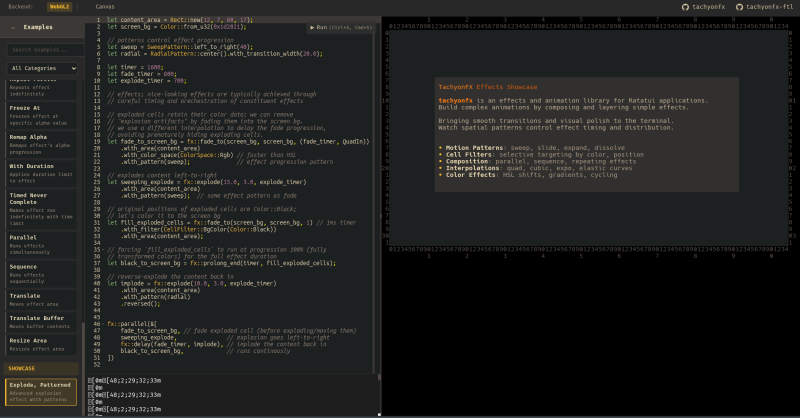
TachyonFX FTL is a browser-based editor for creating and tweaking effects in real-time, using the Effect DSL (don't worry, it mimics rust syntax).
Basic Concepts
- Effects are stateful — Create once, apply every frame
- Effects transform rendered content — Apply after widgets render
- Effects compose — Build complex animations from simple pieces
Simple Example: Fade In
// Create a fade-in effect
let mut fade = fade_from;
// Apply to red text only
fade.set_cell_filter;
// In your render loop
fade.process;
Combining Effects
// Run multiple effects in parallel
let effects = parallel;
// Or sequence them
let effects = sequence;
Using Patterns
Apply spatial patterns to control how effects spread:
// Radial dissolve from center
let effect = dissolve
.with_pattern;
// Diagonal fade with transition width
let effect = fade_to_fg
.with_pattern;
Using the DSL
Create effects from strings at runtime:
use EffectDsl;
let effect = new
.compiler
.compile
.expect;
Effect Reference
Below is a non-exhaustive list of built-in effects.
Color Effects
Transform colors over time for smooth transitions.
fade_from/fade_to— Transition colorsfade_from_fg/fade_to_fg— Foreground color transitionshsl_shift/hsl_shift_fg— Animate through HSL color spaceterm256_colors— Downsample to 256-color mode
Text & Motion Effects
Animate text and cell positions for dynamic content.
coalesce/coalesce_from— Text materialization effectsdissolve/dissolve_to— Text dissolution effectsevolve/evolve_into/evolve_from— Character evolution through symbol setsslide_in/slide_out— Directional sliding animationssweep_in/sweep_out— Color sweep transitionsexplode— Particle dispersion effectexpand— Bidirectional expansion from centerstretch— Unidirectional stretching with block characters
Control Effects
Fine-tune timing and behavior.
parallel— Run multiple effects simultaneouslysequence— Chain effects one after anotherrepeat/repeating— Loop effects with optional limits or indefinitelyping_pong— Play forward then reversedelay/sleep— Add pauses before or during effectsprolong_start/prolong_end— Extend effect durationfreeze_at— Freeze effect at specific transition pointremap_alpha— Remap effect progress to smaller rangerun_once— Ensure effect runs exactly oncenever_complete/timed_never_complete— Run indefinitely (with optional time limit)consume_tick— Minimal single-frame delaywith_duration— Override effect duration
Spatial Patterns
Control how effects spread and progress across the terminal.
RadialPattern— Expand outward from center pointDiagonalPattern— Sweep across diagonallyCheckerboardPattern— Alternate cell-by-cell in grid patternSweepPattern— Linear progression in cardinal directionsCoalescePattern/DissolvePattern— Organic, randomized reveals
Geometry Effects
Transform positions and layout.
translate— Move content by offsetresize_area— Scale effect boundstranslate_buf— Copy and move buffer content
Advanced Features
Cell Filtering
Apply effects selectively:
// Only apply to cells with specific colors
dissolve
.with_filter
// Target specific regions
let filter = AllOf;
Custom Effects
Create your own effects:
effect_fn
Alternatively, implement the Shader trait and use it together with .into_effect().
Effect DSL
The DSL supports:
- Most built-in effects (excludes:
effect_fn,effect_fn_buf,glitch,offscreen_buffer,resize_area,translate,translate_buf) - All spatial patterns with method chaining
- Variable bindings
- Method chaining
- Complex compositions
let expr = r#"
    let duration = 300;
    fx::sequence(&[
        fx::fade_from(black, white, duration),
        fx::dissolve(duration)
            .with_pattern(RadialPattern::center())
    ])
"#;
Configuration
Features
std— Standard library support (enabled by default)dsl— Effect DSL support (enabled by default)sendable— Make effectsSend(but notSync)std-duration— Usestd::time::Durationinstead of 32-bit custom typewasm— WebAssembly compatibility
Contributing
Contributions welcome! Please check existing issues or create new ones to discuss changes.
License
MIT License - see LICENSE for details.