<div class="oranda-hide">
# Syndicationd
</div>
[![CI][workflow-ci-badge]][workflow-ci-url]
[![Release][workflow-release-badge]][workflow-release-url]
[![Audit][workflow-audit-badge]][workflow-audit-url]
[![Coverage][coverage-badge]][coverage-url]
[crates-badge]: https://img.shields.io/crates/v/synd-term?style=for-the-badge&logo=rust
[crates-url]: https://crates.io/crates/synd-term
[license-badge]: https://img.shields.io/badge/license-MIT%2FApache--2.0-blue?style=for-the-badge
[workflow-ci-badge]: https://img.shields.io/github/actions/workflow/status/ymgyt/syndicationd/ci.yaml?style=for-the-badge&logo=github&label=CI
[workflow-ci-url]: https://github.com/ymgyt/syndicationd/actions/workflows/ci.yaml
[workflow-release-badge]: https://img.shields.io/github/actions/workflow/status/ymgyt/syndicationd/release.yml?style=for-the-badge&logo=github&label=Release
[workflow-release-url]: https://github.com/ymgyt/syndicationd/actions/workflows/release.yml
[workflow-audit-badge]: https://img.shields.io/github/actions/workflow/status/ymgyt/syndicationd/audit.yaml?style=for-the-badge&logo=github&label=Audit
[workflow-audit-url]: https://github.com/ymgyt/syndicationd/actions/workflows/audit.yaml
[coverage-badge]: https://img.shields.io/codecov/c/github/ymgyt/syndicationd?token=W1A93WSPEE&style=for-the-badge&logo=codecov&color=brightgreen
[coverage-url]: https://app.codecov.io/github/ymgyt/syndicationd
[grafana-badge]: https://img.shields.io/badge/Grafana-Dashboard-orange?style=for-the-badge&logo=grafana
[grafana-url]: https://ymgyt.grafana.net/public-dashboards/863ebddd82c44ddd9a28a68eaac848ff?orgId=1&refresh=1h&from=now-1h&to=now
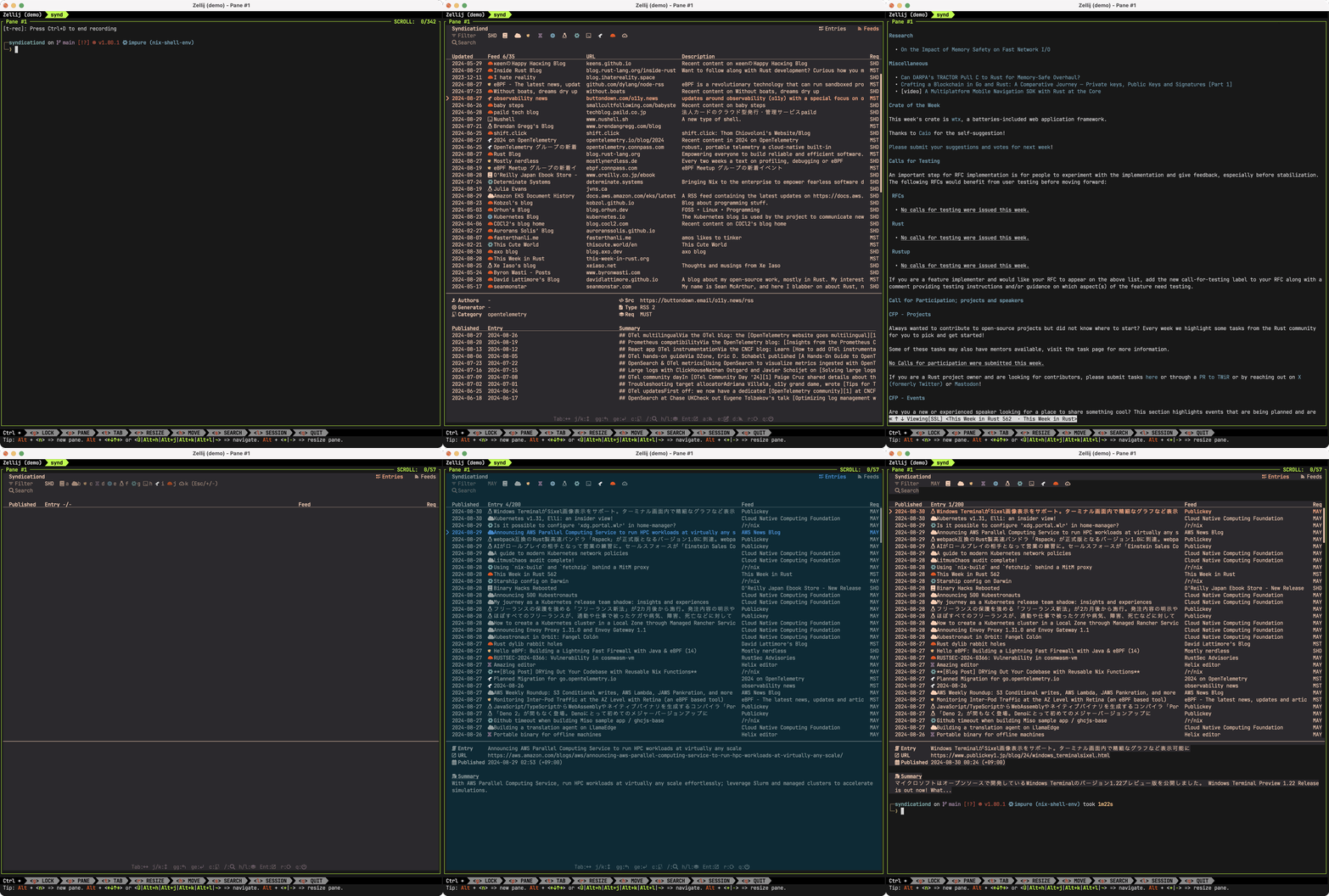
Syndicationd is a project for simple feed management on the terminal, and the following components are beging developed
* synd-term(`synd`): A TUI feed viewer based on [ratatui](https://github.com/ratatui-org/ratatui)
* synd-api: A GraphQL api server utilizing [feed-rs](https://github.com/feed-rs/feed-rs)
**Table of Contents:**
- [Features](#features)
- [Installation](#installation)
- [Overview](#overview)
- [Configuration](#configuration)
- [Usage](#usage)
- [Authentication](#authentication)
- [Keymap](#keymap)
- [Subscribe Feed](#subscribe-feed)
- [Open Feed Entry](#open-feed-entry)
- [Export Feeds](#export-subscribed-feeds)
- [Import Feeds](#import-feeds)
- [GitHub Notifications](#github-notifications)
- [Theme](#theme)
- [Backend API](#backend-api)
- [Log](#log)
- [Clean](#remove-cache-and-logs)
- [Development](#development)
- [Project Goals](#project-goals)
- [License](#license)
## Features
* Subscribe RSS/Atom feeds
* Open feed entries in your preferred text or web browser
* Filter feed entries based on category, keyword, and importance
* Handle [GitHub notifications](https://github.com/notifications) (optional)
* Unsubscribe or Done a notification from the terminal
* Filter notifications based on reason, repository, and status
* OpenTelemetry compatible
* Export traces, metrics, and logs using OTLP
* A Grafana dashboard is provided
## Installation
### nix
```sh
nix profile install github:ymgyt/syndicationd/synd-term-v0.3.2
```
### arch linux
```sh
pacman -S syndicationd
```
### brew
```sh
brew install ymgyt/homebrew-syndicationd/synd-term
```
### shell
```sh
curl --proto '=https' --tlsv1.2 -LsSf https://github.com/ymgyt/syndicationd/releases/download/synd-term-v0.3.2
```
### cargo
```sh
cargo install synd-term --locked
```
### npm
```sh
npm install @syndicationd/synd-term
```
### powershell
```sh
powershell -c "irm https://github.com/ymgyt/syndicationd/releases/download/synd-term-v0.3.2
```
### docker
```sh
docker run -it ghcr.io/ymgyt/synd-term
```
### pre-build binaries
Pre-built binaries are available in [GitHub releases](https://github.com/ymgyt/syndicationd/releases).
### source
```sh
cargo install --git https://github.com/ymgyt/syndicationd/ synd-term
```
> [!NOTE]
> `synd` requires [Nerd Fonts](https://www.nerdfonts.com/) to be installed on your system for rendering icons.
## Overview
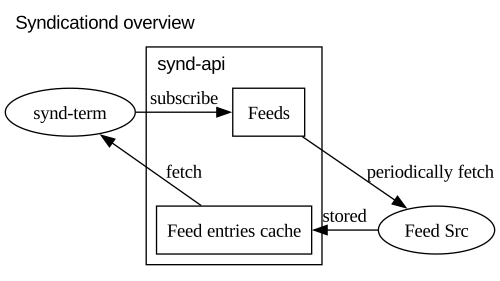
The subscribed feeds are stored in synd-api. synd-api periodically fetches the feeds to retrieve the latest entries.
When the user views the feed list in synd, it retrieves the latest entries from synd-api's cache.
This project hosts the synd-api, but it can also be self-hosted.
## Configuration
Settings can be configured in the following ways(in order of priority)
* Command line flag
* Environment variables
* Configuration file
* Default value
The location of the configuration file can be specified using `--config` or the environment variable `SYND_CONFIG_FILE`.
By default, `synd` will search the following locations depending on the platform
| Linux | `$XDG_CONFIG_HOME/syndicationd/config.toml`<br>`$HOME/.config/syndicationd/config.toml` |
| macOS | `$HOME/Library/Application Support/syndicationd/config.toml` |
|Windows | `{FOLDERID_RoamingAppData}/syndicationd/config.toml` |
`synd` does not automatically create configuration files.
When creating a configuration file, you can use the following command
```sh
synd config init > config.toml
```
### Settings
| `--config` | `SYND_CONFIG_FILE` | \- | see [configuration](#configuration) | Configuration file path |
| `--log` | `SYND_LOG_FILE` | `[log.path]` | see `synd check` | Log file path |
| `--cache-dir` | `SYND_CACHE_DIR` | `[cache.directory]` | see `synd check` | Cache directory |
| `--theme` | `SYND_THEME` | `[theme.name]` | `ferra` | Theme name |
| `--endpoint` | `SYND_ENDPOINT` | `[api.endpoint]` | `https://api.syndicationd.ymgyt.io` | synd-api endpoint |
| `--client-timeout` | `SYND_CLIENT_TIMEOUT` | `[api.timeout]` | `30s` | synd-api client timeout |
| `--entries-limit` | `SYND_ENTRIES_LIMIT` | `[feed.entries_limit]` | `200` | Feed entreis to fetch |
| `--browser` | `SYND_FEED_BROWSER` | `[feed.browser.command]` | \- | Command to browse feed |
| `--browser-args` | `SYND_FEED_BROWSER_ARGS` | `[feed.browser.args]` | `[]` | Command args to browse feed |
| `--enable-gh` | `SYND_ENABLE_GH` | `[github.enable]` | `false` | Enable github notification feature |
| `--github-pat` | `SYND_GH_PAT` | `[github.pat]` | \- | Github personal access token to fetch notifications |
### Additional categories
To add a category , add the following content to the configuration file
```toml
[categories.rust]
icon = { symbol = "🦀", color = { rgb = 0xF74C00 } }
aliases = ["rs"]
```
## Usage
`synd` will start the TUI application.
<details>
<summary>Click to show a complete list of options</summary>
```sh
Usage:
Commands:
clean Clean cache and logs
check Check application conditions
export Export subscribed feeds
import Import subscribed feeds
config Manage configurations
help Print this message or the help of the given subcommand(s)
Options:
-c, --config <CONFIG> Configuration file path [env: SYND_CONFIG_FILE=]
--log <LOG> Log file path [env: SYND_LOG_FILE=]
--cache-dir <CACHE_DIR> Cache directory [env: SYND_CACHE_DIR=]
--theme <THEME> Color theme [env: SYND_THEME=] [possible values: ferra, solarized-dark, helix]
-h, --help Print help
-V, --version Print version
Api options:
--endpoint <ENDPOINT> `synd_api` endpoint [env: SYND_ENDPOINT=]
--client-timeout <CLIENT_TIMEOUT> Client timeout(ex. 30s) [env: SYND_CLIENT_TIMEOUT=]
Feed options:
--entries-limit <ENTRIES_LIMIT> Feed entries limit to fetch [env: SYND_ENTRIES_LIMIT=]
--browser <BROWSER> Browser command to open feed entry [env: SYND_BROWSER=]
--browser-args <BROWSER_ARGS> Args for launching the browser command [env: SYND_BROWSER_ARGS=]
GitHub options:
-G, --enable-github-notification <ENABLE_GITHUB_NOTIFICATION>
Enable GitHub notification feature [env: SYND_ENABLE_GH=] [aliases: enable-gh] [possible values: true, false]
--github-pat <GITHUB_PAT>
GitHub personal access token to fetch notifications [env: SYND_GH_PAT]
```
</details>
### Authentication
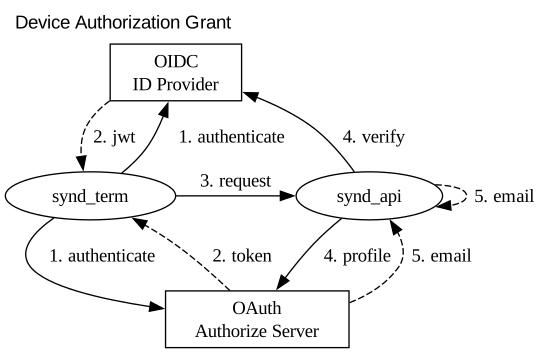
Syndicationd maintains state (such as subscribed feeds) on the backend, and therefore requires authentication to make requests.
Currently, GitHub and Google are supported as authorize server/id provider.
The only scope required by syndicationd to authenticate users is the email address. please refer to the table below for details on the scopes for each provider.
| GitHub | [`user:email`](https://docs.github.com/en/apps/oauth-apps/building-oauth-apps/scopes-for-oauth-apps) |
| Google | [`email`](https://developers.google.com/identity/gsi/web/guides/devices#obtain_a_user_code_and_verification_url) |
> [!IMPORTANT]
> **The user's email address is used only as an identifier after being hashed and never stored**.
for more info, please refer to the [privacy policy](https://docs.syndicationd.ymgyt.io/synd-term/book/privacy_policy.html)
If you'd like support for additional ID providers, please feel free to request it.
### Keymap
| `k/j` | Move up/down |
| `gg` | Go to first |
| `ge` | Go to end |
| `Tab` | Switch Tab |
| `Enter` | Open entry/feed with web browser |
| `Space` | Open entry with text browser(`$SYND_BROWSER`) |
| `a` | Add feed subscription(on Feeds Tab) |
| `e` | Edit subscribed feed(on Feeds Tab) |
| `d` | Delete subscribed feed(on Feeds Tab) |
| `r` | Reload entries/feeds |
| `h/l` | Change requirement filiter |
| `c` | Activate category filiter(Esc to deactivate) |
| `+` | Activate all category(on Category filter) |
| `-` | Deactivate all category(on Category filter) |
| `/` | Activate keyword search(Esc to deactivate) |
| `q` | Quit app |
#### GitHub Notification
| `d` | Mark as done |
| `D` | Mark all as done |
| `u` | Unsubscribe |
| `f` | Open notification filter(Esc to apply) |
for more details, refer to [`keymap/default.rs`](https://github.com/ymgyt/syndicationd/blob/main/crates/synd_term/src/keymap/default.rs)
### Subscribe feed
To subscribe a feed, type "Tab" to move to Feeds tab and then press "a".
`synd` uses [edit](https://docs.rs/edit/latest/edit/) to launch the user's editor(like a git commit).
The feed to subscribe to should be entered in the format:
`Requirement` `Category` `URL`
When you close the editor, the subscription request is sent to the API.
#### Requirement
`Requirement` indicates the importance of the feed.
This uses an analogy to [RFC2119](https://datatracker.ietf.org/doc/html/rfc2119) and can take one of the following values:
* `MUST`: Most important, must be read.
* `SHOULD`: Next in importance, should be read unless there is a special reason not to.
* `MAY`: Lowest importance, may be read.
#### Category
`Category` represents the category of the feed. You can specify any value as a category. The values that `synd` recognizes as categories are defined in [`categories.toml`](./categories.toml). Default values and additional categories can be added from the configuration file.
### Edit subscribed feed
To change the requirement or category of a feed you have already subscribed to, select the target feed in the Feeds tab and then press "e".
### Unsubscribe feed
To unsubscribe from a feed, select the target feed and press "d".
### Filter feeds/entries
Feeds and entries can be filtered as follows.
#### By requirement
To filter bases on the specified requirement, press "h/l(Left/Right)".
If you set the filter to `MUST`, only those marked as MUST will be displayed. Setting it to SHOULD will display feeds and entries marked as MUST and SHOULD. If set to MAY, all feeds and entries will be displayed.
#### By categories
To filter bases on categories, presess "c". This will display a label with keys to control the activation/deactivation of each category, allowing you to toggle the visibility of categories.
Pressing "-" will deactivate all categories, and pressing "+" will activate all categories.
You can exit the filter category mode by pressing the "Esc" key.
The icons for categories can be specified in `categories.toml`
### Open feed entry
To open a feed entry in a web browser, select the entry and press Enter.
To view the entry in a text browser within the terminal, press the Space.
The command that is triggered by pressing the Space can be specified using the `$SYND_BROWSER` environment variable, or through related flags or configuration files.
The command is executed as `$SYND_BROWSER $SYND_BROWSER_ARGS <entry url>`.
### Export subscribed feeds
To export subscribed feeds, execute the `synd export` command.
You can check the JSON schema of the data to be exported with `synd export --print-schema`
<details>
<summary>Click to show a export json schema</summary>
```json
{
"$schema": "http://json-schema.org/draft-07/schema#",
"title": "Export",
"type": "object",
"required": [
"feeds"
],
"properties": {
"feeds": {
"type": "array",
"items": {
"$ref": "#/definitions/ExportedFeed"
}
}
},
"definitions": {
"ExportedFeed": {
"type": "object",
"required": [
"url"
],
"properties": {
"title": {
"type": [
"string",
"null"
]
},
"url": {
"type": "string"
}
}
}
}
}
```
</details>
### Import feeds
You can subscribe to multiple feeds at once using the `synd import` command.
The input schema is the same as that of `synd export`. You can also check it with `synd import --print-schema`.
```sh
# from stdin
echo '{"feeds": [ {"url": "https://this-week-in-rust.org/atom.xml", "category": "rust", "requirement": "Must" } ]}'
| synd import -
# read from file
synd export > feeds.json
synd import feeds.json
```
### GitHub Notifications
<img alt="github notification screent shot" src="https://raw.githubusercontent.com/ymgyt/syndicationd/main/etc/demo/ss/github_notification_ss.png" width="425"/>
To enable GitHub notifications feature, specify the `--enable-github-notification | -G` flag or set the environment variable `SYND_ENABLE_GH=true`.
When enabling the GitHub notifications feature, GitHub personal access token (PAT) is required. Specify the PAT using the `--github-pat` flag or the environment variable `SYND_GH_PAT`.
> [!TIP]
> For GitHub notifications, unlike feeds, the synd-api is not used.
#### PAT Scope
##### Classic token
The `repo` scope is required. For more details, see [about github notifications](https://docs.github.com/en/rest/activity/notifications?apiVersion=2022-11-28#about-github-notifications).
##### Fine grained access token
"Metadata" repository permissions (read) and "Notifications" user permissions (read) are required.
For more details, see [list notifications for the authenticated user](https://docs.github.com/en/rest/activity/notifications?apiVersion=2022-11-28#list-notifications-for-the-authenticated-user).
Since the Mark notification as done API does not support fine grained access token, classic token is required to use this feature.
### Log
The default log file path is based on [`ProjectDirs::data_dir()`](https://docs.rs/directories/latest/directories/struct.ProjectDirs.html#method.data_dir).
Please refer to the `synd check` command for the output destination.
You can modify the [log directives](https://docs.rs/tracing-subscriber/latest/tracing_subscriber/filter/struct.EnvFilter.html#directives) using the environment variable `SYND_LOG`. (for example, `SYND_LOG=synd=debug`)
### Theme
The theme can be changed using the `--theme` flag. Please refer to the help for the values that can be specified.
### Backend api
By default, `synd` use `https://api.syndicationd.ymgyt.io` as the [backend api](./crates/synd_api)([hosted on my home Raspberry Pi](https://github.com/ymgyt/mynix/blob/main/homeserver/modules/syndicationd/default.nix)).
To change the endpoint, specify the `--endpoint` flag
The hosted api is instrumented with OpenTelemetry. Basic signals(traces,metrics,logs) are published on the public [Grafana dashboard][grafana-url]
Dashboards are managed with [terraform](https://github.com/ymgyt/syndicationd/tree/main/hosting/terraform/grafana)
<details>
<summary>Click to show a public dashboard image</summary>
<img alt="grafana dashboard" src="https://raw.githubusercontent.com/ymgyt/syndicationd/main/etc/demo/grafana-dashboard.png">
</details>
### Remove cache and logs
Authentication credentials are cached. to remove them, execute `synd clean`.
### Check application status
`synd check [--format (human|json)]` return current application status.
```sh
synd check
Api Health: pass
Api Version: 0.2.4
Config: /home/ferris/.config/syndicationd/config.toml
Cache: /home/ferris/.cache/syndicationd
Log: /home/ferris/.local/share/syndicationd/synd.log
```
```sh
# open log file
## Development
Please refer to [CONTRIBUTING.md](/CONTRIBUTING.md) to get started with development.
## Project Goals
* **A terminal-first, self-hostable feed service**. Create a simple, self-hostable feed service for terminal users that does not involve curation, recommendations, or user behavior analysis.
* **Longevity**. Maintain this project for as long as possible, with a minimu maintenance period of at lease 5 yeas.
## License
This project is available under the terms of either the [Apache 2.0 license](./LICENSE-APACHE) or the [MIT license](./LICENSE-MIT).
## Feed tips
Some tips about feed that I know.
* Add [`openrss.org/`](https://openrss.org/) to the beginning of the URL to get its RSS feed. for example, for `https://example.ymgyt.io`, it would be `https://openrss.org/example.ymgyt.io`
* You can retrieve various updates as feeds on GitHub.
* To obtain releases of a repository, specify `releases.atom`. for example, to obtain releases of syndicationd, specify `https://github.com/ymgyt/syndicationd/releases.atom`
* For tags, it's `https://github.com/ymgyt/syndicationd/tag.atom`
* crates.io have introduced a couple of experimental [RSS feeds](https://blog.rust-lang.org/2024/07/29/crates-io-development-update.html#rss-feeds)
* Adding `.rss` to the end of a Reddit URL allows you to retrieve the feed. for example, for `https://www.reddit.com/r/HelixEditor/`, it would be `https://www.reddit.com/r/HelixEditor.rss`