# Switchgear
**By [Bitshock](https://bitshock.com) | [info@bitshock.com](mailto:info@bitshock.com)**
> "The impediment to action advances action. What stands in the way becomes the way." – Marcus Aurelius
Switchgear is a high availability LNURL balancer for enterprise Bitcoin Lightning payment providers. It is designed to scale massive multi-region Lightning Node fleets at five nines uptime.
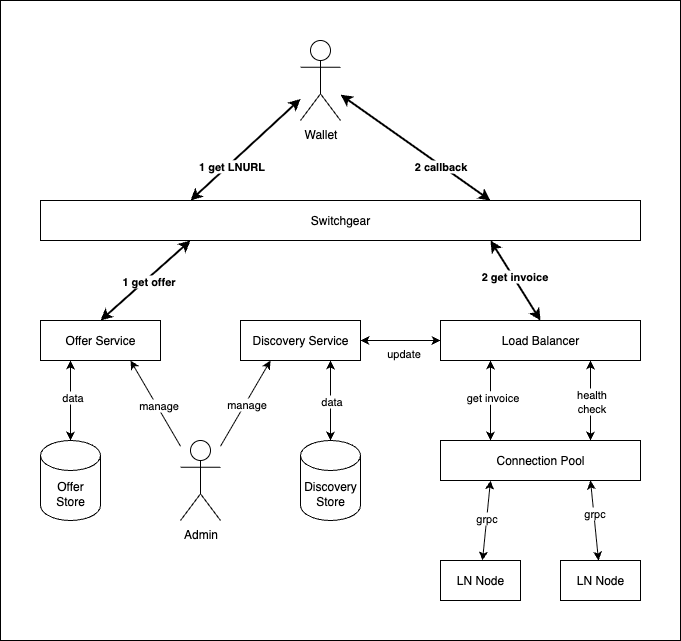
## Features
Professional LNURL load balancing for your enterprise:
* CLN Lightning Node support with gRPC
* LND Lightning Node support with gRPC
* built on CloudFlare's [Pingora](https://github.com/cloudflare/pingora) Load Balancer
* Three balancing algorithms: Round Robin, Random and [Consistent](https://en.wikipedia.org/wiki/Consistent_hashing) (Ketama)
* Node health checks redirect invoice requests to healthy nodes
* Self-healing - if an unhealthy node transitions to healthy, it will automatically start taking invoice requests again
* Weighting can shift invoice requests to preferred nodes
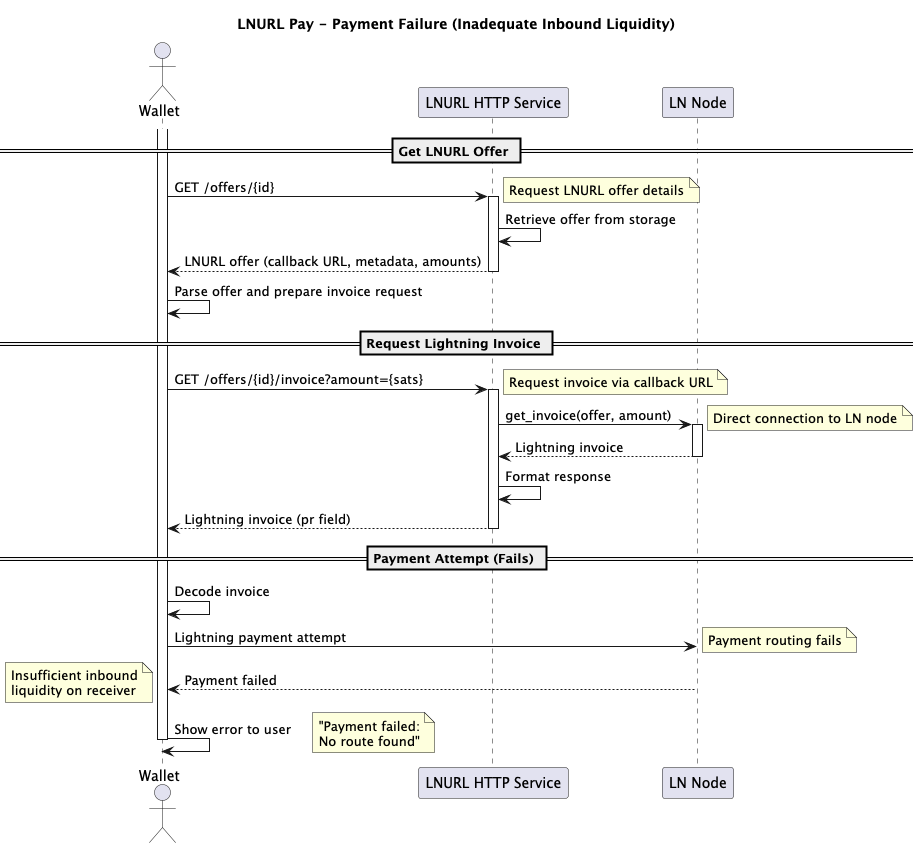
* Liquidity biasing with inbound capacity checks will favor nodes most likely to accept payment
* Timed retries with exponential backoff for spurious node failures
* Partitions bind inbound invoice requests to subset of nodes
* Add nodes in seconds with REST Discovery API - new nodes will automatically start taking invoice requests
* Drop nodes in seconds with REST Discovery API - the balancer will safely direct invoices to remaining healthy nodes
* Publish new LNURLs in seconds with Offer API
* `bech32` and QR code generation endpoints
* Sqlite, MySql and Postgres database support for both Discovery and Offer data stores
* Remote REST stores for both Discovery and Offer
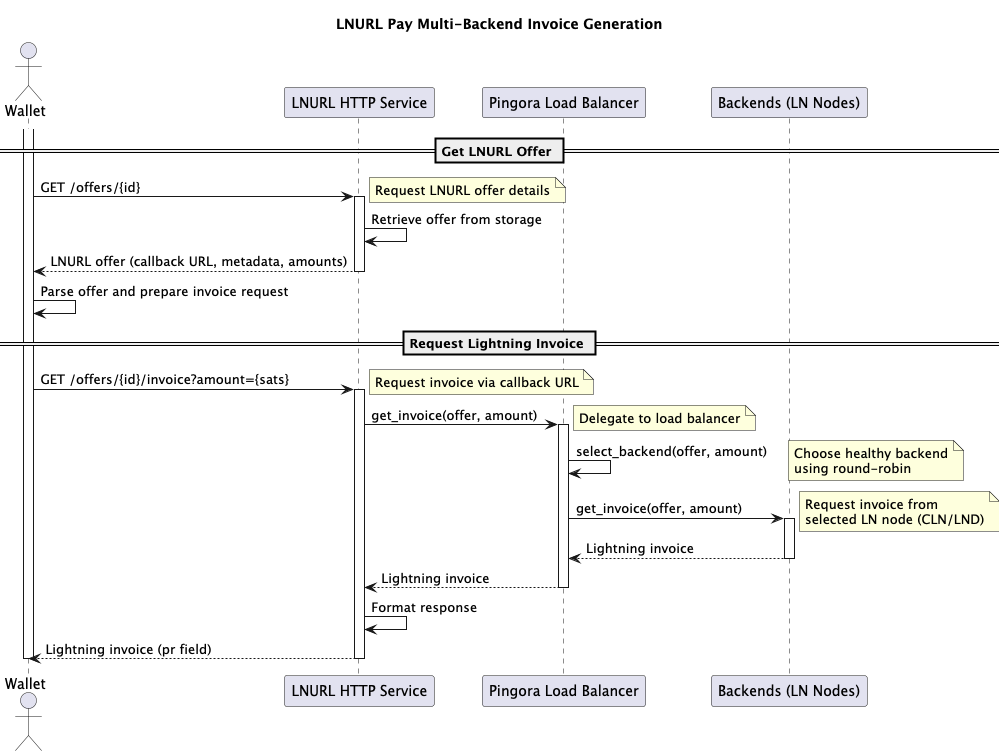
## Status
Switchgear is in **ALPHA** status:
* Critical features are implemented and work as designed
* Integration tests are complete
* APIs may change without warning
See [ROADMAP.md](https://github.com/bitshock-src/switchgear/blob/HEAD/ROADMAP.md) for the Switchgear release roadmap.
## Why Bitcoin Lightning Payments Fail
### Single Points Of Failure
Failure with a standard LNURL service configuration is highly-probable:
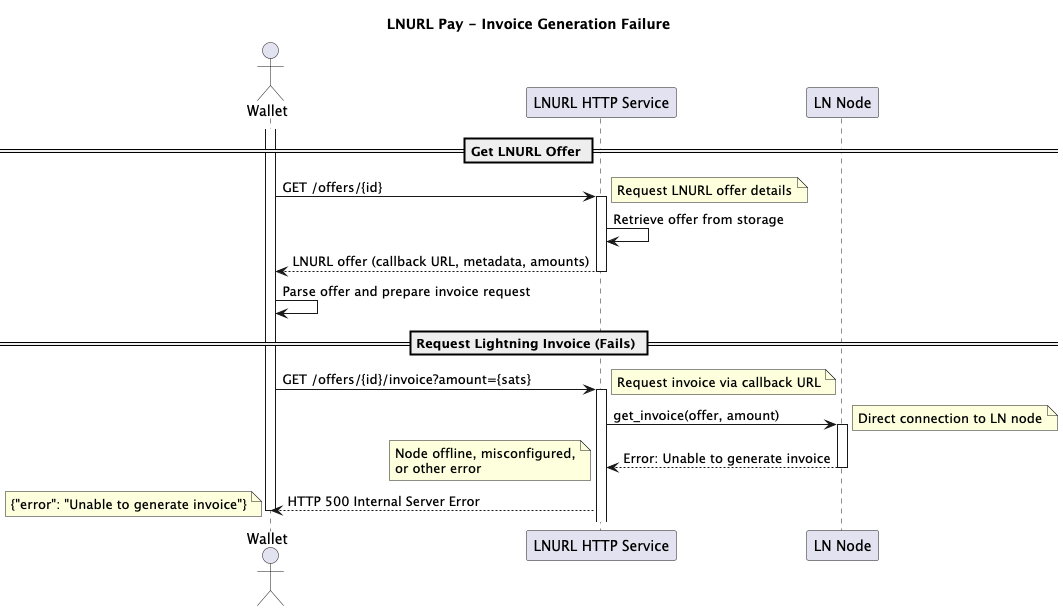
### No Liquidity Bias
Single LNURL + Lightning Node deployments make Liquidity Bias impossible. Liquidity bias deprioritizes nodes for invoice requests that have low inbound capacity, which make payment success unlikely.
### External Load Balancer Resource Exhaustion
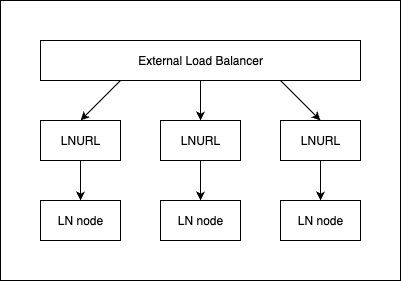
Load balancing multiple LNURL instances with a single fixed Lightning Node will exhaust resources:
* If a node fails, it makes the entire LNURL instance useless
* If a LNURL instance fails, it makes the Lightning Node unreachable
* Duplicating the entire LNURL instance just to attach it to a single Lightning Node raises cost, reducing feasibility of reaching scale
* High latency increases chances of catastrophic retry loop or flooding single node with failover requests
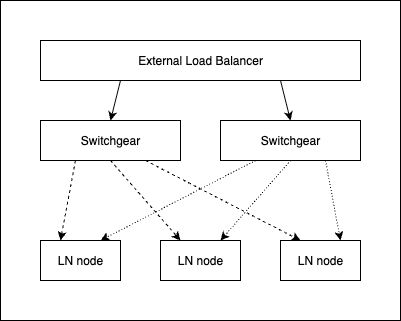
By contrast, every instance of Switchgear in a region can share the Lightning Node fleet, making scale feasible:
* A single Switchgear instance failure does not make a Lightning Node unreachable
* Any Lightning Node failure does not affect the uptime of a Switchgear instance
* Switchgear instances and the Lightning Node fleet size can scale independently, reducing cost
* Health checks are low latency, keeping Lightning Node status accurate
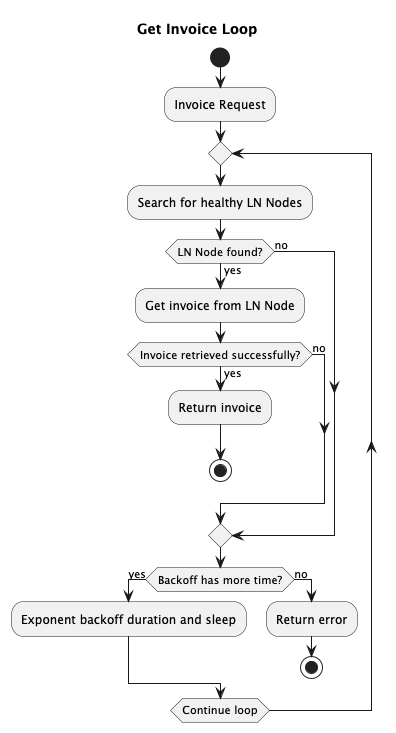
* Internal Backoff runs through entire Backend selection before returning 502 to external balancer, reducing latency and wallet retry cascade
The internal backoff can be entered under two conditions:
1. No healthy Lightning Nodes are available
2. A Lightning Node spurious failure or node failure between health checks
## Install
The Switchgear binary runs all services as well as the CLI admin interface.
### Host
```shell
cargo install switchgear-server
```
### Docker
The docker image is multi-platform for:
* linux/amd64
* linux/arm64
```shell
docker pull bitshock/switchgear
```
## Starting Switchgear Services
``` shell
swgr service --config {path/to/config/file} {service enabledment list}
```
The configuration file is in YAML format, and controls settings for all services.
The service enablement list can be any of:
* `lnurl` - the public LNURL service
* `discovery` - the admin discovery service
* `offer` - the offer admin service
* `all` - all services
If left empty, all services will be enabled (same as `all`).
### Docker
To run the Docker image:
```shell
docker run bitshock/switchgear
```
The image is configured with a default configuration file path of `/etc/swgr/config.yaml` . Mount a volume on top of `/etc/swgr` to provide your own configuration file.
To build the Docker image:
```shell
docker buildx build --platform linux/arm64,linux/amd64 -t swgr .
```
Set the build arg `WEBPKI_ROOTS=true` if you need Mozilla's web PKI roots bundle installed on the image:
```shell
docker buildx build --platform linux/arm64,linux/amd64 --build-arg WEBPKI_ROOTS=true -t swgr .
```
## Administration
Switchgear can be configured by both the REST API and the CLI.
### REST Administration
Administration Service endpoints:
```
https://{host}/discovery
https://{host}/offers
```
See the [Manage Lightning Node Backends with Discovery Service](#manage-lightning-node-backends-with-discovery-service) and [Manage LNURLs with Offer Service](#manage-lnurls-with-offer-service) sections for complete REST API.
### CLI Administration
```shell
# Manage Lightning Node Backends
swgr discovery
# Manage LNURLs
swgr offer
```
See the [Manage Lightning Node Backends with Discovery Service](#manage-lightning-node-backends-with-discovery-service) and [Manage LNURLs with Offer Service](#manage-lnurls-with-offer-service) sections for complete CLI manual.
### Docker
To run the CLI administration from Docker:
```shell
docker run bitshock/switchgear {cli-options}
```
## Configuring Switchgear Services
All service configuration is controlled by a yaml file passed to the server at startup.
See [server/config](https://github.com/bitshock-src/switchgear/blob/HEAD/server/config) directory for more configuration examples.
Each service has a root entry the configuration file:
```yaml
# LNURL Service Configuration
lnurl-service:
# Discovery Service Configuration
discovery-service:
# Offer Service Configuration
offer-service:
# Persistence Settings for Discovery and Offer data
store:
```
See the service entries below for complete configuration manual.
#### Env Var Shell Expansion
Shell-style env var expansion is supported anywhere in the yaml configuration file.
Example config.yaml:
```yaml
lnurl-service:
address: "${MY_LNURL_SERVICE_ADDRESS:-127.0.0.1:8080}"
```
Run with:
```shell
MY_LNURL_SERVICE_ADDRESS=192.168.1.100:8080 swgr service --config ./config.yaml
```
The configuration would be parsed as:
```yaml
lnurl-service:
address: "192.168.1.100:8080"
```
If the env var is unset:
```shell
swgr service --config ./config.yaml
```
The configuration would be parsed as:
```yaml
lnurl-service:
address: "127.0.0.1:8080"
```
## Liquidity Bias
Optional Liquidity Bias will prioritize nodes with inbound capacity at the moment of selection. If no nodes are in range of the capacity bias, selection will fall back to standard weight selection.
#### Negative Capacity Bias example (restrictive):
```yaml
lnurl-service:
selection-capacity-bias: -0.2
```
Invoice request amount must be less than 20% of total inbound capacity of the node to be favored over other nodes that are not.
#### Positive Capacity Bias example (permissive):
```yaml
lnurl-service:
selection-capacity-bias: 0.1
```
Invoice request amount may be over inbound capacity by up to 10% of the node and still be favored over other nodes that are not.
#### Inbound Capacity Measurement
Capacity is measured in the same cycle as the Lightning Node health check. It is the sum of inbound capacity for all active channels on the node.
## Partitioning
An organization may have a global Offer database. A Switchgear instance may be configured to serve a portion of that database, using partitions. Furthermore, every Lightning Node is configured in Discovery to be bound to one or more partitions, insuring payments only land on nodes they belong to.
Each Switchgear instance is configured for the partitions it will serve.
Example:
```yaml
lnurl-service:
partitions: ["us", "it", "cr"]
```
Only Offers created in "us", "it" or "cr" partitions will be available on the Switchgear instance, even if the Offer exists the database:
```
https://example.com/offers/us/{id} - 200 success
https://example.com/offers/it/{id} - 200 success
https://example.com/offers/cr/{id} - 200 success
https://example.com/offers/ca/{id} - 404 not found
```
Each partition must have Discovery Backends configured for the invoice request to succeed. A single backend can serve multiple partitions.
See the [Manage Lightning Node Backends with Discovery Service](#manage-lightning-node-backends-with-discovery-service) and [Manage LNURLs with Offer Service](#manage-lnurls-with-offer-service) sections for creating Discovery Backends and Offers with partitions.
## Balancing Switchgear
Switchgear itself can be balanced. Balancing multiple switchgear instances within a region:

For multi-region Global Load Balancer deployment, use the full health check to signal to the downstream balancer that a Switchgear instance has no healthy Lightning Nodes:
```
https://{host}/health/full
```
The full health check will return 500 if no Lightning Nodes are available.
The regional balancer will forward the failing health status to the global balancer, which will send invoice requests to an alternate region:
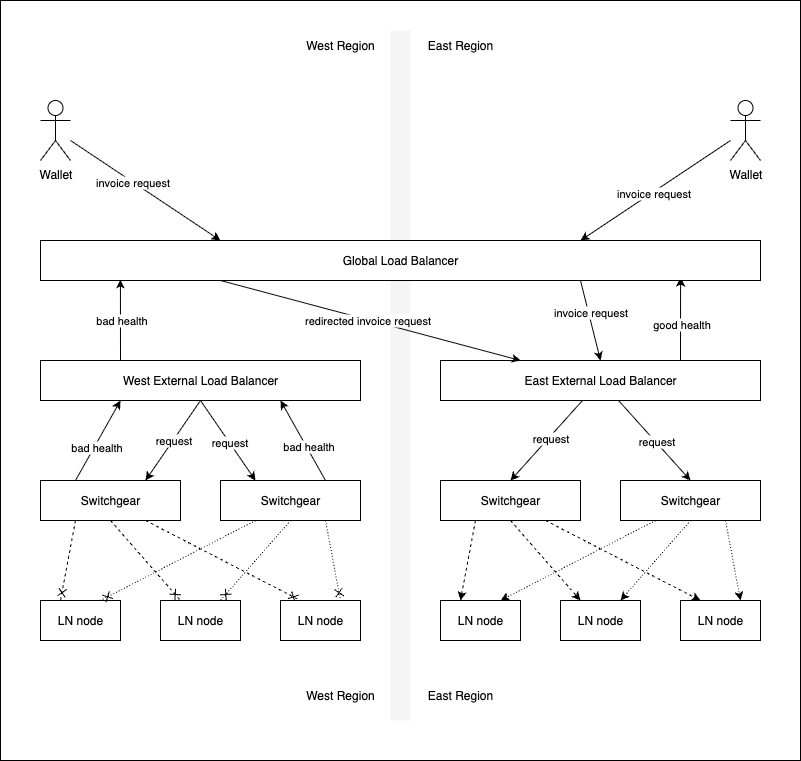
Switchgear partitions have predictable URLs. Use partitions and a global Application Load Balancer to map invoice requests to alternate regions that have Switchgear instances configured for the requested partition.
## LNURL Service
The OpenAPI LNURL Service specification: [doc/lnurl-service-openapi.yaml](https://github.com/bitshock-src/switchgear/blob/HEAD/doc/lnurl-service-openapi.yaml).
The LNURL Service is public facing, and implements the [LNURL LUD-06 specification.](https://github.com/lnurl/luds/blob/luds/06.md)
See the [Manage LNURLs with Offer Service](#manage-lnurls-with-offer-service) section for complete service manual.
All Switchgear LNURLs are formatted as:
```
https://{host}/offers/{partition}/{id}
```
Where:
* `partition` - the Offer partition
* `id` - the Offer id (Uuid)
The returned callback is always the LNURL, with the postfix `/invoice` :
```
https://{host}/offers/{partition}/{id}/invoice
```
The bech32 and QR variants are available with:
```
https://{host}/offers/{partition}/{id}/bech32
```
And:
```
https://{host}/offers/{partition}/{id}/bech32/qr
```
The QR image is in PNG format.
### LNURL Service Configuration
See [server/config](https://github.com/bitshock-src/switchgear/blob/HEAD/server/config) directory for more configuration examples.
```yaml
lnurl-service:
# List of partitions this service will handle
# Partitions allow you to segment different Lightning node groups
partitions: ["default"]
# Network address and port for the LNURL service to bind to
address: "127.0.0.1:8080"
# Frequency in seconds for health checking Lightning node backends (float)
health-check-frequency-secs: 1.0
# Whether to perform health checks in parallel across all backends
parallel-health-check: true
# Number of consecutive successful health checks needed to mark a backend as healthy
health-check-consecutive-success-to-healthy: 1
# Number of consecutive failed health checks needed to mark a backend as unhealthy
health-check-consecutive-failure-to-unhealthy: 1
# Frequency in seconds for updating backend node information (float)
backend-update-frequency-secs: 1.0
# Invoice expiry time in seconds (integer)
invoice-expiry-secs: 180
# Timeout in seconds for Lightning node client connections (float)
ln-client-timeout-secs: 2.0
# Optional trusted roots pem bundle for all LN clients
ln-trusted-roots: "/etc/ssl/certs/ln-ca.pem"
# List of allowed host headers for incoming requests
# Used for safely generating callback/invoice URLs.
allowed-hosts: ["lnurl.example.com"]
# Backoff configuration for retrying failed operations.
# Backoff is used when Lightning Node invoice request fails.
backoff:
# Type of backoff strategy: "stop" or "exponential"
type: "exponential"
# Optional: Initial interval in seconds for exponential backoff (float)
initial-interval-secs: 1.0
# Optional: Randomization factor (0.0 to 1.0)
randomization-factor: 0.5
# Optional: Multiplier for each retry attempt
multiplier: 2.0
# Optional: Maximum interval between retries in seconds (float)
max-interval-secs: 60.0
# Optional: Maximum total elapsed time before giving up in seconds (float)
max-elapsed-time-secs: 300.0
# Backend selection strategy for load balancing
# Options: "round-robin", "random", or "consistent"
backend-selection: "round-robin"
# For consistent hashing, specify max iterations (only used with "consistent")
# backend-selection:
# type: "consistent"
# max-iterations: 10000
# Optional: Bias factor for capacity-influenced selection
# Negative values are restrictive:
# prefer nodes with capacity higher than requested amount
# Positive values are lenient:
# refer nodes with capacity less than requested amount
selection-capacity-bias: -0.2
# Optional: Allow &comment query param in LNURL invoice request, sized in char len
# Used for Consistent backend selection
comment_allowed: 64,
# Optional: TLS configuration for HTTPS support
tls:
# Path to TLS certificate file
cert-path: "/etc/ssl/certs/lnurl-cert.pem"
# Path to TLS private key file
key-path: "/etc/ssl/certs/lnurl-key.pem"
# QR module width x height
bech32-qr-scale: 8
# QR light gray level
bech32-qr-light: 255
# QR dark gray level
bech32-qr-dark: 0
```
### Consistent Backend-Selection
Consistent uses the optional LNURL `comment` query parameter as a hash key, which guarantees the same node will always receive invoice requests for that key. The balancer will move on to the next closest key match if the node becomes unavailable. This is a specific use-case that provides optimized HTLC settlement between cooperating peers for high-frequency transactions.
## Discovery Service
The OpenAPI Discovery Service specification: [doc/discovery-service-openapi.yaml](https://github.com/bitshock-src/switchgear/blob/HEAD/doc/discovery-service-openapi.yaml).
The Discovery Service is an administrative service used to manage connections to individual Lightning Nodes.
The service is isolated from the LNURL Service and can be configured to run on any port. The service supports TLS. Access is protected by a bearer token. Do not run this service without TLS enabled if it is exposed to the public internet.
See the [Manage Lightning Node Backends with Discovery Service](#manage-lightning-node-backends-with-discovery-service) section for complete service manual.
### Discovery Service Configuration
See [server/config](https://github.com/bitshock-src/switchgear/blob/HEAD/server/config) directory for more configuration examples.
```yaml
discovery-service:
# Network address and port for the Discovery service to bind to
address: "127.0.0.1:8081"
# Path to the authentication authority certificate/key file
# This file contains the public key used to verify API access
auth-authority: "/etc/ssl/certs/discovery-auth-authority.pem"
# Optional: TLS configuration for HTTPS support
tls:
# Path to TLS certificate file
cert-path: "/etc/ssl/certs/discovery-cert.pem"
# Path to TLS private key file
key-path: "/etc/ssl/certs/discovery-key.pem"
```
#### Authentication Setup
Generate key pairs and tokens for Discovery service authentication:
```shell
# Generate a new key pair for token signing
swgr discovery token key --public discovery-public.pem --private discovery-private.pem
# The public key (discovery-public.pem) should be used as the auth-authority in the configuration
# The private key (discovery-private.pem) is used to mint authentication tokens
# Create a token (default 3600 seconds)
swgr discovery token mint --key discovery-private.pem --output discovery.token
```
## Offer Service
The OpenAPI Offer Service specification: [doc/offer-service-openapi.yaml](https://github.com/bitshock-src/switchgear/blob/HEAD/doc/offer-service-openapi.yaml).
The Offer Service is an administrative service used to manage Offers, which are used to generate LNURLs.
The service is isolated from the LNURL Service and can be configured to run on any port. The service supports TLS. Access is protected by a bearer token. Do not run this service without TLS enabled if it is exposed to the public internet.
See the [Manage LNURLs with Offer Service](#manage-lnurls-with-offer-service) section for complete service manual.
### Offer Service Configuration
See [server/config](https://github.com/bitshock-src/switchgear/blob/HEAD/server/config) directory for more configuration examples.
```yaml
offer-service:
# Network address and port for the Offers service to bind to
address: "127.0.0.1:8082"
# Path to the authentication authority certificate/key file
# This file contains the public key used to verify API access
auth-authority: "/etc/ssl/certs/offer-auth-authority.pem"
# Optional: TLS configuration for HTTPS support
tls:
# Path to TLS certificate file
cert-path: "/etc/ssl/certs/offer-cert.pem"
# Path to TLS private key file
key-path: "/etc/ssl/certs/offer-key.pem"
# max page size for get all queries
max-page-size: 100
```
#### Authentication Setup
Generate key pairs and tokens for Offer service authentication:
```shell
# Generate a new key pair for token signing
swgr offer token key --public offer-public.pem --private offer-private.pem
# The public key (offer-public.pem) should be used as the auth-authority in the configuration
# The private key (offer-private.pem) is used to mint authentication tokens
# Create a token (default 3600 seconds)
swgr offer token mint --key offer-private.pem --output offer.token
```
## Persistence
Both Discovery and Offer services support multiple storage backends. Configure persistence in the `store` section of your configuration file.
### Common Storage Types
Both Discovery and Offer stores support these storage backends:
#### Database Storage (SQLite/MySQL/PostgreSQL)
```yaml
store:
discover: # or 'offer'
type: "database"
# Database connection URL (SQLite/MySQL/PostgreSQL)
database-url: "connection-url"
# Maximum number of concurrent database connections
max-connections: 5
```
For `database-url` formats, see [Database Connection URLs](#database-connection-urls).
#### HTTP Storage (Remote Service)
Both Discovery and Offer can use a remote http store, making custom integrations straightforward. The store clients connect to the same REST API used for remote administration, making it possible for Switchgear to run headless as well, serving only as a database for other Switchgear instances.
```yaml
store:
discover: # or 'offer'
type: "http"
# Base URL of the remote service
base-url: "https://service.example.com"
# Timeout in seconds for establishing connection
connect-timeout-secs: 2.0
# Total timeout in seconds for complete request/response
total-timeout-secs: 5.0
# Optional pem bundle of trusted CA certificate paths for TLS verification
trusted-roots: "/etc/ssl/certs/ca.pem"
# Path to bearer token file for authentication
authorization: "/etc/ssl/certs/auth.token"
```
#### In-memory Storage
Volatile storage, data is lost on restart:
```yaml
store:
discover: # or 'offer'
type: "memory"
```
### Configuration Examples
#### Using Same Database for Both Stores
```yaml
store:
# Discovery backend storage
discover:
type: "database"
database-url: "postgres://user:password@localhost:5432/switchgear"
max-connections: 5
# Offer storage (sharing same database)
offer:
type: "database"
database-url: "postgres://user:password@localhost:5432/switchgear"
max-connections: 10
```
#### Mixed Storage Types
```yaml
store:
# Memory storage for Discovery
discover:
type: "memory"
# Database storage for Offers
offer:
type: "database"
database-url: "sqlite:///var/lib/switchgear/offers.db?mode=rwc"
max-connections: 5
```
#### Remote Service Configuration
```yaml
store:
# Connect to remote Discovery service
discover:
type: "http"
base-url: "https://discovery.internal:8081"
connect-timeout-secs: 2.0
total-timeout-secs: 5.0
trusted-roots: "/etc/ssl/certs/internal-ca.pem"
authorization: "/etc/ssl/certs/discovery.token"
# Local database for Offers
offer:
type: "database"
database-url: "sqlite:///data/offers.db?mode=rwc"
max-connections: 10
```
### Database Connection URLs
Both Discovery and Offer data stores have a `database-url` field to configure the database.
### Sqlite
```
sqlite:///path/to/file.db?{options}
```
See [https://www.sqlite.org/uri.html](https://www.sqlite.org/uri.html) for all connection URL options.
### MySQL
```
mysql://[host][/database][?properties]
```
Properties:
| `ssl-mode` | `PREFERRED` | Determines whether or with what priority a secure SSL TCP/IP connection will be negotiated. See [`MySqlSslMode`]. |
| `ssl-ca` | `None` | Sets the name of a file containing a list of trusted SSL Certificate Authorities. |
| `statement-cache-capacity` | `100` | The maximum number of prepared statements stored in the cache. Set to `0` to disable. |
| `socket` | `None` | Path to the unix domain socket, which will be used instead of TCP if set. |
### Postgres
```text
postgresql://[user[:password]@][host][:port][/dbname][?param1=value1&...]
```
See [https://www.postgresql.org/docs/current/libpq-connect.html](https://www.postgresql.org/docs/current/libpq-connect.html#LIBPQ-CONNSTRING) for all connection URL options.
## Manage Lightning Node Backends With Discovery Service
The Discovery Service manages Lightning Node backends that connect to Switchgear for invoice requests. The service supports dynamic registration, updates, enablement and removal of CLN and LND nodes.
The Discovery Service can be administered with both REST and the CLI.
To get started quickly, use the CLI to write a new JSON data model template to a file:
```shell
# Generate a template backend configuration
swgr discovery new cln-grpc --output cln-backend.json
swgr discovery new lnd-grpc --output lnd-backend.json
````
### REST API
The Discovery Service provides a REST API for backend management. All endpoints except `/health` require bearer token authentication.
#### Authentication
First, generate a token:
```shell
# Create a token (expires in 3600 seconds)
# Note: Requires private key from Authentication Setup (see Discovery Service Configuration)
swgr discovery token mint --key discovery-private.pem --expires 3600 --output discovery.token
# Set authorization header for curl commands
export AUTH_TOKEN=$(cat discovery.token)
```
#### Register A New Backend
```shell
# Register a CLN node
curl -X POST http://localhost:3001/discovery \
-H "Authorization: Bearer $AUTH_TOKEN" \
-H "Content-Type: application/json" \
-d '{
"partitions": ["default"],
"address": {
"publicKey": "0279be667ef9dcbbac55a06295ce870b07029bfcdb2dce28d959f2815b16f81798"
},
"name": "CLN Node 1",
"weight": 100,
"enabled": true,
"implementation": {
"type": "clnGrpc",
"url": "https://192.168.1.100:9736",
"domain": "cln-node.local",
"auth": {
"type": "path",
"caCertPath": "/path/to/ca.pem",
"clientCertPath": "/path/to/client.pem",
"clientKeyPath": "/path/to/client-key.pem"
}
}
}'
# Register an LND node
curl -X POST http://localhost:3001/discovery \
-H "Authorization: Bearer $AUTH_TOKEN" \
-H "Content-Type: application/json" \
-d '{
"partitions": ["default", "us", "eu"],
"address": {
"url": "https://lnd-node.example.com"
},
"name": "LND Node 1",
"weight": 50,
"enabled": true,
"implementation": {
"type": "lndGrpc",
"url": "https://192.168.1.101:10009",
"domain": "lnd-node.local",
"auth": {
"type": "path",
"tlsCertPath": "/path/to/tls.cert",
"macaroonPath": "/path/to/admin.macaroon"
},
"ampInvoice": false
}
}'
```
#### List All Backends
```shell
curl -X GET http://localhost:3001/discovery \
-H "Authorization: Bearer $AUTH_TOKEN"
```
#### Get A Specific Backend
```shell
# By public key
curl -X GET "http://localhost:3001/discovery/pk/0279be667ef9dcbbac55a06295ce870b07029bfcdb2dce28d959f2815b16f81798" \
-H "Authorization: Bearer $AUTH_TOKEN"
# By URL (base64 encoded)
curl -X GET "http://localhost:3001/discovery/url/aHR0cHM6Ly9sbmQtbm9kZS5leGFtcGxlLmNvbS8" \
-H "Authorization: Bearer $AUTH_TOKEN"
```
#### Update A Backend
```shell
curl -X PUT "http://localhost:3001/discovery/pk/0279be667ef9dcbbac55a06295ce870b07029bfcdb2dce28d959f2815b16f81798" \
-H "Authorization: Bearer $AUTH_TOKEN" \
-H "Content-Type: application/json" \
-d '{
"partitions": ["default", "us"],
"weight": 200,
"enabled": false,
"implementation": {
"type": "clnGrpc",
"url": "https://192.168.1.100:9736",
"domain": "cln-node.local",
"auth": {
"type": "path",
"caCertPath": "/path/to/ca.pem",
"clientCertPath": "/path/to/client.pem",
"clientKeyPath": "/path/to/client-key.pem"
}
}
}'
```
#### Delete A Backend
```shell
curl -X DELETE "http://localhost:3001/discovery/pk/0279be667ef9dcbbac55a06295ce870b07029bfcdb2dce28d959f2815b16f81798" \
-H "Authorization: Bearer $AUTH_TOKEN"
```
#### Health Check
```shell
# No authentication required
curl http://localhost:3001/health
```
### CLI
The `swgr discovery` command provides the same functionality as the REST interface for remote management of Lightning Node backends.
#### Token Management
```shell
# Create a token (default 3600 seconds)
# Note: Requires a private key generated during Authentication Setup (see Discovery Service Configuration)
swgr discovery token mint --key discovery-private.pem --output discovery.token
# Create a token with custom expiration (86400 seconds = 24 hours)
swgr discovery token mint --key discovery-private.pem --expires 86400 --output discovery-24h.token
# Verify a token
swgr discovery token verify --public discovery-public.pem --token discovery.token
```
#### Backend Management
```shell
# Generate a template backend configuration
swgr discovery new cln-grpc --output cln-backend.json
swgr discovery new lnd-grpc --output lnd-backend.json
# Set connection parameters (via environment or flags)
export DISCOVERY_STORE_HTTP_BASE_URL="https://discovery.example.com"
export DISCOVERY_STORE_HTTP_AUTHORIZATION="/path/to/discovery.token"
export DISCOVERY_STORE_HTTP_TRUSTED_ROOTS="/path/to/ca.pem"
# List all backends (simple table format)
swgr discovery ls
# Get backend details (JSON output)
swgr discovery get pk/0279be667ef9dcbbac55a06295ce870b07029bfcdb2dce28d959f2815b16f81798 --output backend-details.json
# Get all backends (JSON output)
swgr discovery get
# Register a new backend from JSON file
swgr discovery post --input cln-backend.json
# Update an existing backend
swgr discovery put pk/0279be667ef9dcbbac55a06295ce870b07029bfcdb2dce28d959f2815b16f81798 --input updated-backend.json
# Patch an existing backend
swgr discovery patch pk/0279be667ef9dcbbac55a06295ce870b07029bfcdb2dce28d959f2815b16f81798 --input backend-patch.json
# Enable an existing backend
swgr discovery enable pk/0279be667ef9dcbbac55a06295ce870b07029bfcdb2dce28d959f2815b16f81798
# Disable an existing backend
swgr discovery disable pk/0279be667ef9dcbbac55a06295ce870b07029bfcdb2dce28d959f2815b16f81798
# Delete a backend
swgr discovery delete pk/0279be667ef9dcbbac55a06295ce870b07029bfcdb2dce28d959f2815b16f81798
```
### Discovery Data Model
Discovery OpenAPI schema: [doc/discovery-service-openapi.yaml](https://github.com/bitshock-src/switchgear/blob/HEAD/doc/discovery-service-openapi.yaml).
Example CLN backend configuration:
```json
{
"partitions": ["default"],
"address": {
"publicKey": "0279be667ef9dcbbac55a06295ce870b07029bfcdb2dce28d959f2815b16f81798"
},
"name": "CLN Node 1",
"weight": 1,
"enabled": true,
"implementation": {
"type": "clnGrpc",
"url": "https://127.0.0.1:9736",
"domain": "localhost",
"auth": {
"type": "path",
"caCertPath": "/path/to/ca.pem",
"clientCertPath": "/path/to/client.pem",
"clientKeyPath": "/path/to/client-key.pem"
}
}
}
```
Example LND backend configuration:
```json
{
"partitions": ["default", "us", "eu"],
"address": {
"publicKey": "0279be667ef9dcbbac55a06295ce870b07029bfcdb2dce28d959f2815b16f81798"
},
"name": "LND Node 1",
"weight": 1,
"enabled": true,
"implementation": {
"type": "lndGrpc",
"url": "https://127.0.0.1:10009",
"domain": "localhost",
"auth": {
"type": "path",
"tlsCertPath": "/path/to/tls.cert",
"macaroonPath": "/path/to/admin.macaroon"
},
"ampInvoice": false
}
}
```
## Manage LNURLs With Offer Service
The Offer service manages Lightning payment offers and their metadata. It provides storage and retrieval of LNURL Pay offers with configurable payment limits and display information.
The Offer Service can be administered with both REST and the CLI.
To get started quickly, use the CLI to write a new JSON data model template to a file:
```shell
# Generate a template offer configuration
swgr offer new --output offer-template.json
# Generate a template metadata configuration
swgr offer metadata new --output metadata-template.json
````
### LNURL
An Offer has two fields that combine to create a unique identifier:
* `partition`
* `id` (Uuid)
Both fields are used to make the final public LNURL:
```
https://{host}/offers/{partition}/{id}
```
### REST API
The Offer service provides a REST API for offer and metadata management. All endpoints except `/health` require bearer token authentication.
#### Authentication
First, generate a token:
```shell
# Create a bearer token (expires in 3600 seconds)
# Note: Requires private key from Authentication Setup (see Offer Service Configuration)
swgr offer token mint --key offer-private.pem --expires 3600 --output offer.token
# Set authorization header for curl commands
export AUTH_TOKEN=$(cat offer.token)
```
#### Create A New Offer
```shell
curl -X POST http://localhost:3002/offers \
-H "Authorization: Bearer $AUTH_TOKEN" \
-H "Content-Type: application/json" \
-d '{
"partition": "default",
"id": "6a38ebdd-83ef-4b94-b843-3b18cd90a833",
"maxSendable": 1000000,
"minSendable": 1000,
"metadataId": "88deff7e-ca45-4144-8fca-286a5a18fb1a",
"timestamp": "2024-01-01T00:00:00Z",
"expires": "2024-12-31T23:59:59Z"
}'
```
#### List All Offers In A Partition
```shell
curl -X GET http://localhost:3002/offers/default \
-H "Authorization: Bearer $AUTH_TOKEN"
```
#### Get A Specific Offer
```shell
curl -X GET "http://localhost:3002/offers/default/6a38ebdd-83ef-4b94-b843-3b18cd90a833" \
-H "Authorization: Bearer $AUTH_TOKEN"
```
#### Update An Offer
```shell
curl -X PUT "http://localhost:3002/offers/default/6a38ebdd-83ef-4b94-b843-3b18cd90a833" \
-H "Authorization: Bearer $AUTH_TOKEN" \
-H "Content-Type: application/json" \
-d '{
"maxSendable": 2000000,
"minSendable": 1000,
"metadataId": "88deff7e-ca45-4144-8fca-286a5a18fb1a",
"timestamp": "2024-01-01T00:00:00Z",
"expires": "2024-12-31T23:59:59Z"
}'
```
#### Delete An Offer
```shell
curl -X DELETE "http://localhost:3002/offers/default/6a38ebdd-83ef-4b94-b843-3b18cd90a833" \
-H "Authorization: Bearer $AUTH_TOKEN"
```
#### Create Metadata
```shell
curl -X POST http://localhost:3002/metadata \
-H "Authorization: Bearer $AUTH_TOKEN" \
-H "Content-Type: application/json" \
-d '{
"id": "88deff7e-ca45-4144-8fca-286a5a18fb1a",
"partition": "default",
"text": "Lightning Payment",
"longText": "Pay for premium services with Lightning Network",
"image": {
"png": "iVBORw0KGgoAAAANSUhEUgAAAAEAAAABCAYAAAAfFcSJAAAADUlEQVR42mNkYPhfDwAChwGA60e6kgAAAABJRU5ErkJggg=="
},
"identifier": {
"email": "payments@example.com"
}
}'
```
#### List All Metadata In A Partition
```shell
curl -X GET http://localhost:3002/metadata/default \
-H "Authorization: Bearer $AUTH_TOKEN"
```
#### Get Specific Metadata
```shell
curl -X GET "http://localhost:3002/metadata/default/88deff7e-ca45-4144-8fca-286a5a18fb1a" \
-H "Authorization: Bearer $AUTH_TOKEN"
```
#### Update Metadata
```shell
curl -X PUT "http://localhost:3002/metadata/default/88deff7e-ca45-4144-8fca-286a5a18fb1a" \
-H "Authorization: Bearer $AUTH_TOKEN" \
-H "Content-Type: application/json" \
-d '{
"text": "Updated Lightning Payment",
"longText": "Pay for premium services with Lightning Network - Updated",
"identifier": {
"email": "billing@example.com"
}
}'
```
#### Delete Metadata
```shell
curl -X DELETE "http://localhost:3002/metadata/default/88deff7e-ca45-4144-8fca-286a5a18fb1a" \
-H "Authorization: Bearer $AUTH_TOKEN"
```
#### Health Check
```shell
# No authentication required
curl http://localhost:3002/health
```
### CLI
The `swgr offer` command provides the same functionality as the REST interface for remote management of Lightning payment offers and metadata.
#### Token Management
```shell
# Create a token (default 3600 seconds)
# Note: Requires a private key generated during Authentication Setup (see Offer Service Configuration)
swgr offer token mint --key offer-private.pem --output offer.token
# Create a token with custom expiration (86400 seconds = 24 hours)
swgr offer token mint --key offer-private.pem --expires 86400 --output offer-24h.token
# Verify a token
swgr offer token verify --public offer-public.pem --token offer.token
```
#### Offer Management
```shell
# Generate a template offer configuration
swgr offer new --output offer-template.json
# Set connection parameters (via environment or flags)
export OFFER_STORE_HTTP_BASE_URL="https://offer.example.com"
export OFFER_STORE_HTTP_AUTHORIZATION="/path/to/offer.token"
export OFFER_STORE_HTTP_TRUSTED_ROOTS="/path/to/ca.pem"
# Get offer details (JSON output)
swgr offer get default 6a38ebdd-83ef-4b94-b843-3b18cd90a833 --output offer-details.json
# Get all offers in partition (JSON output)
swgr offer get default
# Create a new offer from JSON file
swgr offer post --input offer.json
# Update an existing offer
swgr offer put default 6a38ebdd-83ef-4b94-b843-3b18cd90a833 --input updated-offer.json
# Delete an offer
swgr offer delete default 6a38ebdd-83ef-4b94-b843-3b18cd90a833
```
#### Metadata Management
```shell
# Generate a template metadata configuration
swgr offer metadata new --output metadata-template.json
# Get metadata details (JSON output)
swgr offer metadata get default 88deff7e-ca45-4144-8fca-286a5a18fb1a --output metadata-details.json
# Get all metadata in partition (JSON output)
swgr offer metadata get default
# Create new metadata from JSON file
swgr offer metadata post --input metadata.json
# Update existing metadata
swgr offer metadata put default 88deff7e-ca45-4144-8fca-286a5a18fb1a --input updated-metadata.json
# Delete metadata
swgr offer metadata delete default 88deff7e-ca45-4144-8fca-286a5a18fb1a
```
### Offer Data Model
Offer OpenAPI schema: [doc/offer-service-openapi.yaml](https://github.com/bitshock-src/switchgear/blob/HEAD/doc/offer-service-openapi.yaml).
Example offer configuration:
```json
{
"partition": "default",
"id": "6a38ebdd-83ef-4b94-b843-3b18cd90a833",
"maxSendable": 1000000,
"minSendable": 1000000,
"metadataId": "88deff7e-ca45-4144-8fca-286a5a18fb1a",
"timestamp": "1970-01-01T00:00:00Z",
"expires": null
}
```
Example metadata configuration:
```json
{
"id": "88deff7e-ca45-4144-8fca-286a5a18fb1a",
"partition": "default",
"text": "mandatory offer text",
"longText": "optional long offer text",
"image": {
"png": "base64_encoded_png_data"
},
"identifier": {
"email": "optional@email.com"
}
}
```
#### Image Support
Metadata can include images in PNG or JPEG format, base64 encoded:
- PNG: `{"png": "base64_encoded_data"}`
- JPEG: `{"jpeg": "base64_encoded_data"}`
#### Identifier Types
Metadata identifiers can be:
- Email: `{"email": "contact@example.com"}`
- Text: `{"text": "contact@example.com"}`
## SDK
### Service
The [switchgear-service](https://github.com/bitshock-src/switchgear/blob/HEAD/service) crate defines all services and their trait dependencies. See the `api` module for trait definitions and data models: [service/src/api](https://github.com/bitshock-src/switchgear/blob/HEAD/service/src/api)

### Pingora
`PingoraLnBalancer` is the default `LnBalancer` implementation. The [switchgear-pingora](https://github.com/bitshock-src/switchgear/blob/HEAD/pingora) crate holds the complete implementation, plus trait definitions it uses for itself.

### Components
The `components` module in [switchgear-service](https://github.com/bitshock-src/switchgear/blob/HEAD/service/src/components) is a collection self-defined traits and implementations useful for implementing a complete `LnBalancer`. The module also holds different implementations of `DiscoveryBackendStore`, `OfferStore` and `OfferMetadataStore`.
#### Service Components

#### Data Store Implementations

