[](https://crates.io/crates/substudy) [](https://crates.io/crates/substudy) [](https://travis-ci.org/emk/substudy)
This is an experimental tool to help language-learners exploit parallel
subtitles in various ways. Among other things, it can generate bilingual
subtitles:
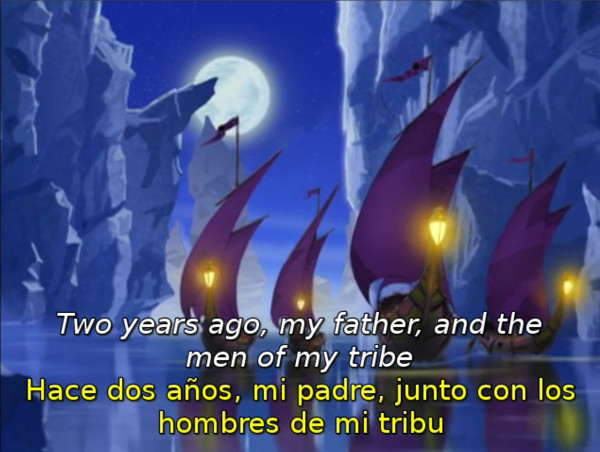
(_Avatar: The Last Airbender_, season 1, episode 1, with English and
Spanish subtitles.)
Features include:
1. Automatically detects and converts common encodings.
2. Given subtitles in two different languages, tries to find the best
alignment.
3. Adjusts subtitle timings to make subtitles visible sooner and keep them
around longer, so you have more time to read and listen.
4. Tries to remove sound effects, speaker names and other common clutter.
This is recommended for beginner and low-intermediate students of a foreign
language, and it's especially useful in conjunction with [subs2srs][] and
[Anki][], which can be used to create highly effective (and rather
entertaining) audio cards.
[subs2srs]: http://learnanylanguage.wikia.com/wiki/Subs2srs
[Anki]: http://ankisrs.net/
## Installing `substudy`
The easiest way to install `substudy` is using the `cargo install` command.
To get access to this, you'll need a nightly build of Rust. The easiest
way to to this is to install [`multirust`][multirust] by running:
```sh
```
Follow any extra installation instructions printed by `multirust`. You
will also need to have a working copy of `cmake`, which you might be able
to install as follows:
```sh
# MacOS X with `brew` installed.
brew install cmake
# Ubuntu.
sudo apt-get install cmake
```
Once all that is set up, you can then install `substudy` by running:
```sh
multirust run nightly cargo install substudy
```
[multirust]: https://github.com/brson/multirust
## Running `substudy`
To get a list of supported commands, run `target/substudy --help`:
```
Subtitle processing tools for students of foreign languages
Usage: substudy clean <subs>
substudy combine <foreign-subs> <native-subs>
substudy export review <video> <foreign-subs> [<native-subs>]
substudy tracks <video>
substudy --help
For now, all subtitles must be in *.srt format. Many common encodings
will be automatically detected, but try converting to UTF-8 if you
have problems.
```
So, for example, you could run:
``` sh
substudy combine foreign.srt native.srt > bilingual.srt
```
## Finding & preparing subtitles
The simplest tool for extracting subtitles from DVDs is [Handbrake][]. If
you can't find what you need on the DVD, another good source of subtitles
is [opensubtitles.org][]. To OCR, convert, realign and otherwise clean up
subtitles, the open source Windows application [Subtitle Edit][] is an
excellent choice, and it runs fine in a Windows VM.
[Handbrake]: https://handbrake.fr/
[opensubtitles.org]: http://www.opensubtitles.org/en/search
[Subtitle Edit]: http://www.nikse.dk/subtitleedit/
## Watching video with bilingual SRT subtitles
My favorite tools are [VLC][], for watching on my computer, and
[Videostream][], for streaming videos to my TV using a [Chromecast][]. The
same subtitle file should work fine with both.
[VLC]: http://www.videolan.org/vlc/
[Videostream]: http://www.getvideostream.com/
[Chromecast]: http://www.google.com/chrome/devices/chromecast/
## Building `substudy`
Assuming you have `multirust` installed as described above, you can run:
```sh
git clone https://github.com/emk/substudy.git
cd substudy
cargo build
```
If this fails, please feel free to submit an issue.
## Using substudy as a library
You can find [API documentation on the Rust CI site][apidoc]. Note that
all APIs are experimental and subject to change. If you want to use
`substudy` as a library in your own tools, you're encouraged to do so, but
it might be worth letting me know which APIs you're using so that I can
stabilize them.
[apidoc]: http://emk.github.io/substudy/substudy/index.html
## EXPERIMENTAL: Building with video file support
We have experimental support for extracting audio and images from video
files!
You'll need to install [version 2.8.1 or newer of `ffmpeg`][ffmpeg]. You
probably don't want to try older versions, or to use `libav` (which has a
bad memory leak that may cause it to take up 10+ GB of memory before
crashing your system). If you're running Ubuntu 14.04 LTS, you could run:
```sh
sudo apt-add-repository ppa:mc3man/trusty-media
sudo apt-get update
sudo apt-get install ffmpeg
```
You might want to remove this external package repository before applying
other updates to your system, to avoid conflicts:
```sh
sudo apt-add-repository -r ppa:mc3man/trusty-media
```
Once `ffmpeg` is installed, you should be able to access the video-related
features of `substudy`.
**Note:** In this version of substudy, we always use the default audio
track chosen by ffmpeg. We plan to get smarter about this soon.
We tried linking to a very nice Rust `ffmpeg` library, but it turns out
that there are two forks of the underlying `ffmpeg`, each with several
different incompatible versions of key data structures, and getting it to
work on common Ubuntu systems was [far too annoying][ffmpeg-issue]. So we
decided to just call the command-line utilities.
[ffmpeg]: https://ffmpeg.org/download.html
[ffmpeg-issue]: https://github.com/meh/rust-ffmpeg-sys/issues/12
## Contributing
Please feel welcome to send me a pull request or submit an issue!
Things which I'd love to see `substudy` support include:
- Creating various sorts of parallel media: subtitles, Anki cards, etc.
- Exracting audio and images corresponding to individual subtitles.
- Automatic vobsub to `*.srt` conversion, using OCR and character
databases. There are several open source Windows tools which tackle
this, but it should be theoretically possible to do a lot better.
Things which I'll probably merge if they come with clean code and solid
test suites:
- Better character set conversion.
- Various sorts of subtitle cleanups.
- Formats other than `*.srt`.
- Better algorithms for repairing timings and alignment.
I'm happy to leave serious, interactive subtitle editing to
[Subtitle Edit][], and to focus on cases related to language learning, and
to things which are convenient to call from the command line. I'd also be
happy to have implementations of the most useful [subs2srs][] features in
command-line form—it's a wonderful and useful program, but it has too many
configuration options and it requires too much work using external
utilities.
[Subtitle Edit]: http://www.nikse.dk/subtitleedit/
## License
This program is released into the public domain using the [Unlicense][].
Our test suites contain a half-dozen lines of subtitles from copyrighted TV
shows, which should presumably fall under _de minimis_, fair use or
equivalent exceptions in most jurisdictions.
[Unlicense]: http://unlicense.org/