# stuart
stuart - **S**imple **T**erminal **UART** is a TUI for communicating with serial ports
## Features
- **Keep Open** - Ports are kept open when a device disconnects and automatically reconnect when the device is back
- **VT100/ANSI emulation** - full color and cursor support
- **Local Echo** - show typed text for devices that don't return it themselves
- **Scrollback buffer** - up to 10,000 lines, mouse and keyboard scrolling
- **Insert / Control modes** - vim-inspired controls
- **Port Selection** - Select available ports and view information about them
- **Clipboard copy** - copy entire scrollback with `c`
- **Flush scrollback** - clear the screen with `f`
- **Settings dialogue** - baud rate, data bits, stop bits, parity, flow control; changes apply immediately
- **Shell completions** - bash, zsh, fish, elvish, powershell
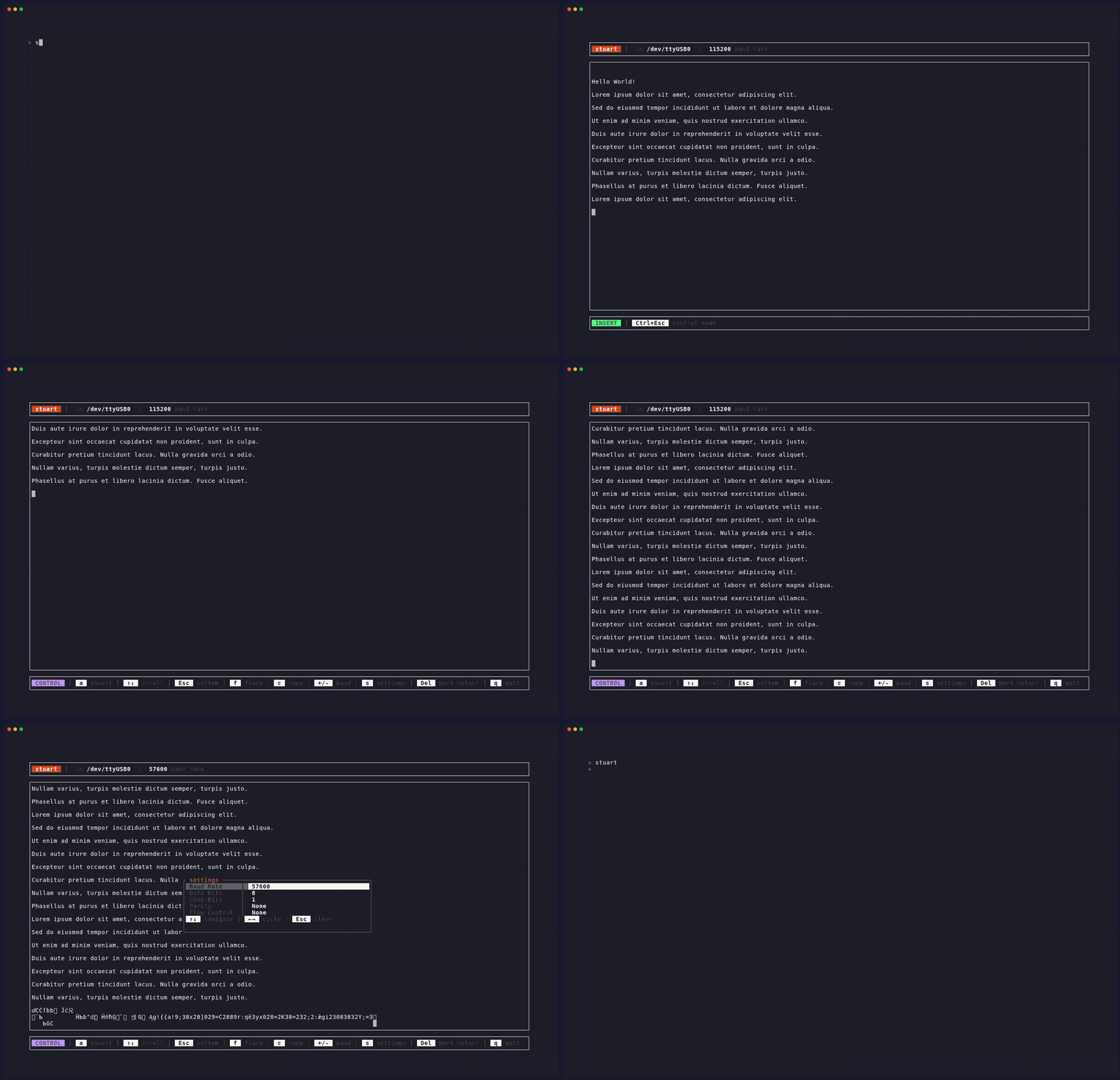
### Demo
## Install
### Arch Linux (AUR)
```sh
# Binary package
yay -S stuart-bin
# Build from source
yay -S stuart
```
### Cargo
```sh
# will install 'stuart' binary
cargo install stuart-cli
```
### Prebuilt binaries
Download from the [releases page](https://github.com/mroetsc/stuart/releases) for Linux, Windows (x86_64) and macOS (aarch64).
## Usage
```sh
Usage: stuart [OPTIONS] [PORT]
Arguments:
[PORT] Serial port to open
Serial Settings:
-b, --baud <BAUDRATE> Baud rate [default: 115200]
-d, --data-bits <BITS> Data bits [default: 8] [possible values: 5, 6, 7, 8]
-s, --stop-bits <BITS> Stop bits [default: 1] [possible values: 1, 2]
-p, --parity <PARITY> Parity [default: none] [possible values: none, even, odd]
-f, --flow-control <FLOW> Flow control [default: none] [possible values: none, software, hardware]
Behavior:
-e, --local-echo
Echo typed characters locally (for devices that don't echo)
--outgoing-newline <NEWLINE_ENCODING>
Encoding to send to the device when pressing Enter [default: cr] [possible values: cr, lf, crlf]
[unix only]
--no-lock
Don't lock the port
-k, --keep-open
Keep terminal open and reconnect if the device disconnects [default]
--no-keep-open
Exit to port select when device disconnects
Extra:
--completions <SHELL> Generate shell completions [possible values: bash, elvish, fish, powershell, zsh]
Options:
-h, --help Print help
-V, --version Print version
```
**Examples:**
```sh
# open port selection screen
stuart
# connect directly
stuart /dev/ttyACM0
# connect at 9600 baud
stuart /dev/ttyUSB0 -b 9600
stuart -b 9600 /dev/ttyUSB0
```
## Key Bindings
### Port Selection
| `↑` / `↓` / `j` / `k` | Navigate |
| `Enter` | Open port |
| `s` | Settings |
| `r` | Refresh port list |
| `q` | Quit |
### Terminal - Control Mode
Enter control mode with `Ctrl+Esc` or `Ctrl+Space`.
> [!NOTE]
> For `Ctrl+Esc` to work, your terminal emulator has to support the [kitty keyboard protocol](https://sw.kovidgoyal.net/kitty/keyboard-protocol/), which most modern emulators do. If not, only `Ctrl+Space` will work.
| `a` / `i` | Enter insert mode |
| `↑` / `↓` / `j` / `k` | Scroll |
| `Esc` | Scroll to bottom |
| `f` | Flush screen |
| `c` | Copy scrollback to clipboard |
| `+` / `-` | Cycle baud rate |
| `s` | Settings |
| `Del` | Disconnect → port select |
| `q` | Quit |
### Terminal - Insert Mode
All keypresses are forwarded to the device. Press `Ctrl+Esc` to return to control mode.
### Settings
| `↑` / `↓` | Navigate |
| `←` / `→` | Cycle value |
| `Enter` | Edit baud rate (type custom value) |
| `Esc` | Close |
## Building from Source
```sh
git clone https://github.com/yourusername/stuart
cd stuart
cargo build --release
# binary at target/release/stuart
```
## Shell Completions
```sh
# zsh
stuart --completions zsh > ~/.zfunc/_stuart
# bash
stuart --completions bash > /etc/bash_completion.d/stuart
# fish
stuart --completions fish > ~/.config/fish/completions/stuart.fish
# elvish and powershell also supported
```
## Roadmap
- [ ] **0.2.0** - config file support
## Contributing
Contributions are welcome, but make sure to file an [issue](https://github.com/mroetsc/stuart/issues) first to discuss features and implementation.