# Steganography Online Codec — Rust SDK
[](https://crates.io/crates/steganography-online-codec)
[](https://docs.rs/steganography-online-codec)
[](https://opensource.org/licenses/Apache-2.0)
[](https://doc.rust-lang.org/cargo/reference/manifest.html#the-rust-version-field)
[](https://github.com/PELock/Steganography-Online-Codec-Rust/stargazers)
**Steganography Online Codec** allows you to hide a password encrypted message within the images & photos using [AES](https://www.youtube.com/watch?v=O4xNJsjtN6E)
encryption algorithm with a 256-bit [PBKDF2](https://en.wikipedia.org/wiki/PBKDF2) derived key.
You can use it for free at:
https://www.pelock.com/products/steganography-online-codec
This SDK provides programming access to the codec and its encoding and decoding functions through a WebAPI interface.
## What is steganography & how it works?
Steganography is a term describing the art and science of hiding information by embedding messages within other, seemingly harmless image files.
In this case, the individual bits of the encrypted hidden message are saved as the least significant (LSB) bits in the
RGB color components in the pixels of the selected image.
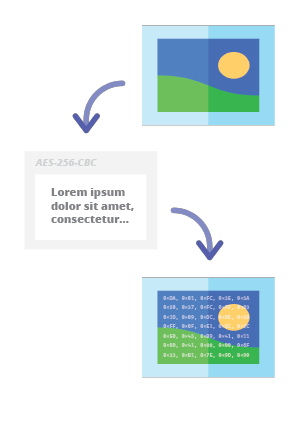
With our steganographic encoder you will be able to conceal any text message in the image in a secure way and
send it without raising any suspicion. It will only be possible to read the message after providing valid, decryption
password.
## Installation
The crate is on [crates.io](https://crates.io/crates/steganography-online-codec). Add it from the registry (recommended):
```
cargo add steganography-online-codec
```
Or add a version requirement to your `Cargo.toml` (use `"1"` to stay on compatible 1.x releases, or pin e.g. `"1.0.0"`):
```toml
steganography-online-codec = "1"
```
**From Git** (only if you need unreleased changes from this repository):
```
cargo add steganography-online-codec --git https://github.com/PELock/Steganography-Online-Codec-Rust
```
```toml
steganography-online-codec = { git = "https://github.com/PELock/Steganography-Online-Codec-Rust" }
```
**Path** dependency if you vendor the crate next to your project:
```toml
steganography-online-codec = { path = "../Steganography-Online-Codec-Rust" }
```
## Packages for other programming languages
The installation packages have been uploaded to repositories for several popular programming languages and their source codes have been published on GitHub:
|  | Python | Run `pip install steganography-online-codec` | [PyPI](https://pypi.org/project/steganography-online-codec/) | [Sources](https://github.com/PELock/Steganography-Online-Codec-Python) |
|  | JavaScript, TypeScript | Run `npm i steganography-online-codec` or add `"steganography-online-codec": "latest"` under `dependencies` in `package.json` | [NPM](https://www.npmjs.com/package/steganography-online-codec) | [Sources](https://github.com/PELock/Steganography-Online-Codec-JavaScript) |
|  | Rust | Run `cargo add steganography-online-codec` or add `steganography-online-codec = "1"` to `Cargo.toml` (optional: `git` / `path` for unreleased or vendored builds) | [crates.io](https://crates.io/crates/steganography-online-codec) | [Sources](https://github.com/PELock/Steganography-Online-Codec-Rust) |
### How to hide a secret message within an image file
```rust
// Example: hide an encrypted secret message in an image via the Web API.
use steganography_online_codec::SteganographyOnlineCodec;
#[tokio::main]
async fn main() {
let my_steganography_online_codec =
SteganographyOnlineCodec::new(Some("YOUR-WEB-API-KEY".to_string()));
let input_file = "input_file.jpg";
let secret_message = "Secret message";
let password = "Pa$$word";
let output_file = "output_file_with_hidden_secret_message.png";
match my_steganography_online_codec
.encode(input_file, secret_message, password, output_file)
.await
{
Ok(_result) => {
println!("Secret messaged encoded and saved to the output PNG file.");
}
Err(err) => {
eprintln!("Encoding failed: {}", err.error_message());
}
}
}
```
### More complex example with better explanation and proper error codes checking
```rust
// Example: encode with error-code handling (demo vs full limits).
use steganography_online_codec::{errors, SteganographyOnlineCodec};
#[tokio::main]
async fn main() {
let my_steganography_online_codec =
SteganographyOnlineCodec::new(Some("YOUR-WEB-API-KEY".to_string()));
// full version image size limit is set to 10 MB (demo 50 kB max)
// supported image formats are PNG, JPG, GIF, BMP, WBMP, GD2, AVIF, WEBP (mail me for more)
let input_file_path = "input_file.webp";
// full version message size is unlimited (demo 16 chars max)
let secret_message = "Secret message";
// full version password length is 128 characters max (demo 8 chars max)
let password = "Pa$$word";
// where to save encoded image with the secret message
let output_file_path = "output_file_with_hidden_secret_message.png";
match my_steganography_online_codec
.encode(
input_file_path,
secret_message,
password,
output_file_path,
)
.await
{
Ok(result) => {
let version_type = result
.license
.as_ref()
.and_then(|l| l.activation_status)
.unwrap_or(false);
println!(
"You are running in {} version",
if version_type { "full" } else { "demo" }
);
println!(
"Secret messaged encoded and saved to {}",
output_file_path
);
if let Some(ref lic) = result.license {
if let Some(c) = lic.usages_count {
println!("Remaining number of usage credits - {c}");
}
}
}
Err(err) => {
let error_code = err.code();
match error_code {
errors::INVALID_INPUT => {
println!(
"Invalid input file {} or file doesn't exist",
input_file_path
);
}
errors::MESSAGE_TOO_LONG => {
println!(
"Message is too long for the provided image file, use larger file"
);
}
errors::IMAGE_TOO_BIG => {
let lim = err
.raw()
.and_then(|j| j.get("limits"))
.and_then(|l| l.get("maxFileSize"))
.map(|v| v.to_string())
.unwrap_or_else(|| "unknown".to_string());
println!("Image file is too big, current limit is set to {lim}");
}
errors::LIMIT_MESSAGE => {
let lim = err
.raw()
.and_then(|j| j.get("limits"))
.and_then(|l| l.get("maxMessageLen"))
.map(|v| v.to_string())
.unwrap_or_else(|| "unknown".to_string());
println!("Message is too long, current limit is set to {lim}");
}
errors::LIMIT_PASSWORD => {
let lim = err
.raw()
.and_then(|j| j.get("limits"))
.and_then(|l| l.get("maxPasswordLen"))
.map(|v| v.to_string())
.unwrap_or_else(|| "unknown".to_string());
println!("Password is too long, current limit is set to {lim}");
}
errors::INVALID_PASSWORD => {
println!("Invalid password");
}
_ => {
println!("An error occurred: {}", err.error_message());
}
}
}
}
}
```
### How to extract encoded secret message from the image file
```rust
// Example: decode (extract) a hidden message from a PNG.
use steganography_online_codec::{errors, SteganographyOnlineCodec};
#[tokio::main]
async fn main() {
let my_steganography_online_codec =
SteganographyOnlineCodec::new(Some("YOUR-WEB-API-KEY".to_string()));
// full version image size limit is set to 10 MB (demo 50 kB max)
// supported image format is PNG and only PNG!
let input_file_path = "output_file_with_hidden_secret_message.png";
// full version password length is 128 characters max (demo 8 chars max)
let password = "Pa$$word";
match my_steganography_online_codec
.decode(input_file_path, password)
.await
{
Ok(result) => {
let full = result
.license
.as_ref()
.and_then(|l| l.activation_status)
.unwrap_or(false);
println!(
"You are running in {} version",
if full { "full" } else { "demo" }
);
let msg = result.message.as_deref().unwrap_or("");
println!("Secret message is \"{msg}\"");
if let Some(ref lic) = result.license {
if let Some(c) = lic.usages_count {
println!("Remaining number of usage credits - {c}");
}
}
}
Err(err) => match err.code() {
errors::INVALID_INPUT => {
println!(
"Invalid input file {} or file doesn't exist",
input_file_path
);
}
errors::IMAGE_TOO_BIG => {
let lim = err
.raw()
.and_then(|j| j.get("limits"))
.and_then(|l| l.get("maxFileSize"))
.map(|v| v.to_string())
.unwrap_or_else(|| "unknown".to_string());
println!("Image file is too big, current limit is set to {lim}");
}
errors::LIMIT_MESSAGE => {
let lim = err
.raw()
.and_then(|j| j.get("limits"))
.and_then(|l| l.get("maxMessageLen"))
.map(|v| v.to_string())
.unwrap_or_else(|| "unknown".to_string());
println!(
"Extracted message is too long, current limit is set to {lim}"
);
}
errors::LIMIT_PASSWORD => {
let lim = err
.raw()
.and_then(|j| j.get("limits"))
.and_then(|l| l.get("maxPasswordLen"))
.map(|v| v.to_string())
.unwrap_or_else(|| "unknown".to_string());
println!("Password is too long, current limit is set to {lim}");
}
errors::INVALID_PASSWORD => {
println!("Invalid password");
}
_ => {
println!("An error occurred: {}", err.error_message());
}
},
}
}
```
### How to check the license key status & current limits
```rust
// Example: check license status and current API limits (`login`).
use steganography_online_codec::SteganographyOnlineCodec;
#[tokio::main]
async fn main() {
let my_steganography_online_codec =
SteganographyOnlineCodec::new(Some("YOUR-WEB-API-KEY".to_string()));
match my_steganography_online_codec.login().await {
Ok(result) => {
let version_type = result
.license
.as_ref()
.and_then(|l| l.activation_status)
.unwrap_or(false);
println!(
"You are running in {} version",
if version_type { "full" } else { "demo" }
);
if let Some(ref lic) = result.license {
if lic.activation_status.unwrap_or(false) {
if let Some(ref name) = lic.user_name {
println!("Registered for - {name}");
}
let license_type = if lic.license_type == Some(0) {
"personal"
} else {
"company"
};
println!("License type - {license_type}");
if let Some(t) = lic.usages_total {
println!("Total number of purchased usage credits - {t}");
}
if let Some(c) = lic.usages_count {
println!("Remaining number of usage credits - {c}");
}
}
}
if let Some(ref limits) = result.limits {
if let Some(m) = limits.max_password_len {
println!("Max. password length - {m}");
}
if let Some(ml) = limits.max_message_len {
let msg_len = if ml == -1 {
"unlimited".to_string()
} else {
ml.to_string()
};
println!("Max. message length - {msg_len}");
}
if let Some(fs) = limits.max_file_size {
println!(
"Max. input image file size - {}",
SteganographyOnlineCodec::convert_size(fs)
);
}
}
}
Err(err) => {
eprintln!("Login failed: {}", err.error_message());
}
}
}
```
## Got questions?
If you are interested in the Steganography Online Codec Web API or have any questions regarding SDK packages, technical or if something is not clear, [please contact me](https://www.pelock.com/contact). I'll be happy to answer all of your questions.
Bartosz Wójcik
* Visit my site at — https://www.pelock.com
* X — https://x.com/PELock
* GitHub — https://github.com/PELock