1
2
3
4
5
6
7
8
9
10
11
12
13
14
15
16
17
18
19
20
21
22
23
24
25
26
27
28
29
30
31
32
33
34
35
36
37
38
39
40
41
42
43
44
45
46
47
48
49
50
51
52
53
54
55
56
57
58
59
60
61
62
63
64
65
66
67
68
69
70
71
72
73
74
75
76
77
78
79
80
81
82
83
84
85
86
87
88
89
90
91
92
93
94
95
96
97
98
99
100
101
102
103
104
105
106
107
108
109
110
111
112
113
114
115
116
117
118
119
120
121
122
123
124
125
126
127
128
129
130
//! ANSI terminal handling for Stakker
//!
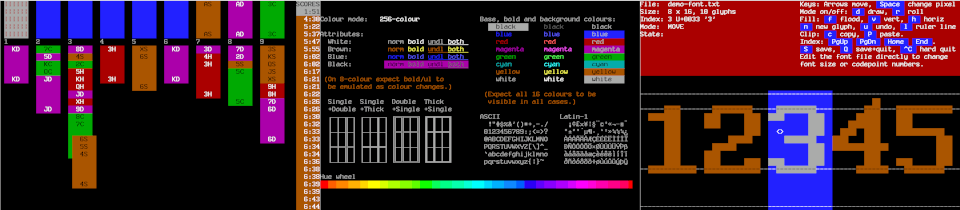
//! 
//!
//! **This is a work-in-progress.** Only UNIX and the first three
//! levels described below are supported for now.
//!
//! This provides several levels of abstraction at which the
//! application may interface to the terminal, from lowest to highest:
//!
//! ## Output buffering, input decoding, resizes and features
//!
//! This can be used for applications which prefer to generate the
//! ANSI output sequences themselves directly, for example a pager or
//! a simple editor. The application has maximum control and can use
//! specific ANSI features to optimise its output (for example scroll
//! regions).
//!
//! The input handling decodes keypress sequences and forwards them to
//! application code. Terminal resizes are detected and notified as
//! soon as they occur. Terminal features such as 256 colour support
//! are detected and notified to the application. Terminal raw mode
//! and input handling can be paused and resumed to allow external
//! tools to be called.
//!
//! ## Full-screen page buffering and minimised updates
//!
//! The application code keeps one or more full-screen pages in memory
//! which it updates locally, and the terminal code keeps its own page
//! which represents what is currently displayed on the terminal.
//! When the application code wishes to update the terminal, the
//! terminal code compares the two pages and sends a minimised update.
//!
//! Input handling, resizes and features are handled the same as
//! above.
//!
//! ## Tile-based distributed updates
//!
//! On resize or relayout, the application splits the display into
//! non-overlapping tiles, and may pass different tiles to different
//! actors. Those actors are then free to draw on those tiles
//! whenever they like without any central coordination. Updates from
//! the tiles to the terminal are done automatically in the background
//! via a `lazy!` handler, batched up and optimised using the
//! page-update mechanism. On the next relayout, old tiles become
//! non-functioning, and the app top-level code must send out new
//! tiles to the actors that require them.
//!
//! ## Fields and widgets (NYI)
//!
//! Possibly this could be layered on top of tiles.
//!
//! # How to use
//!
//! - In your app's main actor's `init` method, create a [`Terminal`]
//! actor, and provide it with callbacks to handle input and to accept
//! a [`TermShare`] into your application once output has been set up.
//!
//! - On receiving a [`TermShare`] store it somewhere and do output
//! via that [`TermShare`] whenever necessary according to your
//! application's logic, for example in response to receiving input
//! keys or other events.
//!
//! There are various levels of output from the most low-level to the
//! highest level:
//!
//! - For simple direct ANSI output, use [`TermShare::output`] to get
//! access to the [`Output`] instance and use it to build up your
//! output byte by byte or with predefined ANSI calls, and then flush
//! it to the terminal using [`Output::flush`].
//!
//! - For direct page-based output (like `curses`), use
//! [`TermShare::page`] to create one or more [`Page`] instances, and
//! then use [`Region`] instances derived from the page (using
//! [`Page::full`] or [`Page::region`]) to draw onto the page. Then
//! finally write the [`Page`] you want to display to the terminal
//! using [`TermShare::update`], which will send only the minimum
//! changes required to update the terminal.
//!
//! - To split the display up into various tiles which can be then
//! passed to other actors and updated independently of each other,
//! use [`TermShare::tile`] to create a new top-level tile each time
//! you need to resize or relayout. Then break that tile up according
//! to the layout of your application, and pass the resulting tiles to
//! where they are needed. To draw, get a [`Region`] instance from
//! the tile using [`Tile::full`] or [`Tile::region`]. This allows
//! writing to the [`Page`] which backs the tiles, and automatically
//! schedules an update via Stakker's `lazy!` queue which groups
//! updates from various tiles which are made at the same time.
//!
//! # Examples
//!
//! There are several examples available. See `cargo run --example`
//! in a checkout to get a list.
//!
//! [`Output::flush`]: struct.Output.html#method.flush
//! [`Output`]: struct.Output.html
//! [`Page::full`]: struct.Page.html#method.full
//! [`Page::region`]: struct.Page.html#method.region
//! [`Page`]: struct.Page.html
//! [`Region`]: struct.Region.html
//! [`TermShare::output`]: struct.TermShare.html#method.output
//! [`TermShare::page`]: struct.TermShare.html#method.page
//! [`TermShare::tile`]: struct.TermShare.html#method.tile
//! [`TermShare::update`]: struct.TermShare.html#method.update
//! [`TermShare`]: struct.TermShare.html
//! [`Terminal`]: struct.Terminal.html
//! [`Tile::full`]: struct.Tile.html#method.full
//! [`Tile::region`]: struct.Tile.html#method.region
pub use ;
pub use ;
pub use ;
pub use Terminal;
pub use Tile;
use os_mio_unix as os_glue;
compile_error!;