# Sqlitex
Sqlitex is a sqlite library for rust which aims to be simple and powerful. It offers
- Compile time guarantees
- Ergonomic with excellent IDE support
- Very Fast
- Automatically caches and reuses prepared statements for you
- Automatically applies optimal PRAGMA settings for performance and reliability
## Overview
- [Sqlitex](#sqlitex)
- [Overview](#overview)
- [Quickstart](#quickstart)
- [Feature showcase](#feature-showcase)
- [Connection methods](#connection-methods)
- [1. Inline Schema](#1-inline-schema)
- [2. SQL File](#2-sql-file)
- [Tiny quirk with IDEs](#tiny-quirk-with-ides)
- [3. Live Database](#3-live-database)
- [Tiny quirks with IDEs](#tiny-quirks-with-ides)
- [4. Migrations](#4-migrations)
- [Query helper functions](#query-helper-functions)
- [Postgres `::` type casting syntax](#postgres--type-casting-syntax)
- [`all()` and `first()` methods for iterators](#all-and-first-methods-for-iterators)
- [Advanced](#advanced)
- [BLOB, Transactions, Runtime options etc.](#blob-transactions-runtime-options-etc)
- [`sql_escape_hatch!`](#sql_escape_hatch)
- [How to use `sql_escape_hatch!`](#how-to-use-sql_escape_hatch)
- [a. `SELECT` statements](#a-select-statements)
- [b. No Return Type](#b-no-return-type)
- [Why `sql_escape_hatch!` was created](#why-sql_escape_hatch-was-created)
- [References](#references)
- [Default PRAGMA Settings.](#default-pragma-settings)
- [Strict INSERT Validation](#strict-insert-validation)
- [Supported Type mappings](#supported-type-mappings)
- [Supported type casting](#supported-type-casting)
- [Row mappings for unknown column name](#row-mappings-for-unknown-column-name)
- [Comparison with other libraries](#comparison-with-other-libraries)
## Quickstart
Install it via
```bash
cargo add sqlitex@0.4.0
```
Simple usage example:
```rust
use sqlitex::{Connection, sqlitex};
#[sqlitex]
struct App {
init: sql!("
CREATE TABLE IF NOT EXISTS users (
id INTEGER PRIMARY KEY NOT NULL,
username TEXT NOT NULL,
is_active BOOL NOT NULL
)
"),
add_user: sql!("INSERT INTO users (id, username, is_active) VALUES (?, ?, ?);"),
get_active_users: sql!("SELECT id, username, is_active as active FROM users WHERE is_active = ?"),
}
fn main() -> Result<(), Box<dyn std::error::Error>> {
let conn = Connection::open_memory()?;
let mut db = App::new(conn);
db.init()?;
db.add_user(0, "Alice", true)?;
db.add_user(1, "Bob", false)?;
let active_users = db.get_active_users(true)?;
for user in active_users {
let user = user?;
println!("{}, {}, {}", user.id, user.username, user.active);
}
Ok(())
// prints out "0, Alice, true"
}
```
_A more detailed version of this exact quickstart can be found_ [here](./examples/quick_start.rs)
For more examples and features, look at the [examples](./examples/) folder or read the [documentations](https://docs.rs/sqlitex/latest/sqlitex/).
## Feature showcase
1. Auto generate method signatures with correct types and
Hover over to see sql code

(Note: `LazyConnection` has been renamed to `Connection` in newer version. library name was previously called LazySql which has now been renamed to Sqlitex)
2. Compile time errors with good error messages


## Connection methods
`sqlitex` supports 3 ways to define your schema, depending on your workflow.
### 1. Inline Schema
As seen in the Quick Start. Define tables inside the struct.
```rust
#[sqlitex]
struct App { ... }
```
Since `sql!()` macro only accepts one sql stmt at a time, it can get tedious quickly if you have mulitple tables as u need to name them and intilaise them.
The next 2 methods are often recommended in real world projects since they are more flexible.
### 2. SQL File
Point to a `.sql` file. The compile time checks will be done against this sql file (ensure that there is `CREATE TABLE`). `sqlitex` watches this file; if you edit it, rust recompiles automatically to ensure type safety.
**Make sure that the sql file is placed at the root of your cargo.toml file** Else, there will be a compile time error which will help you navigate on where to place the file
```rust
#[sqlitex("schema.sql")]
// you dont have to create tables. Any read/write sql queries gets compile time guarantees.
struct App { ... }
```
`init` method is generated automatically and becomes a reserved keyword. You can use it to run all the sql stmts in the file given.
For example
```rust
#[sqlitex("schema.sql")]
struct App {
//...
}
fn main() {
let conn = Connection::open_memory().unwrap();
let mut db = App::new(conn);
// init is auto generated when we connect to an external sql file.
// by running this, it will run all the sql queries on that file,
//which in this case is `schema.sql`
db.init()?;
//...
}
```
#### Tiny quirk with IDEs
If you use IDE extensions such as rust-analyser and it does not pick up changes like showing old errors, you may have to type anything on that rust file (e.g. spacebar) to immediately trigger the ide extension for it to pick up the changes in the sql file.
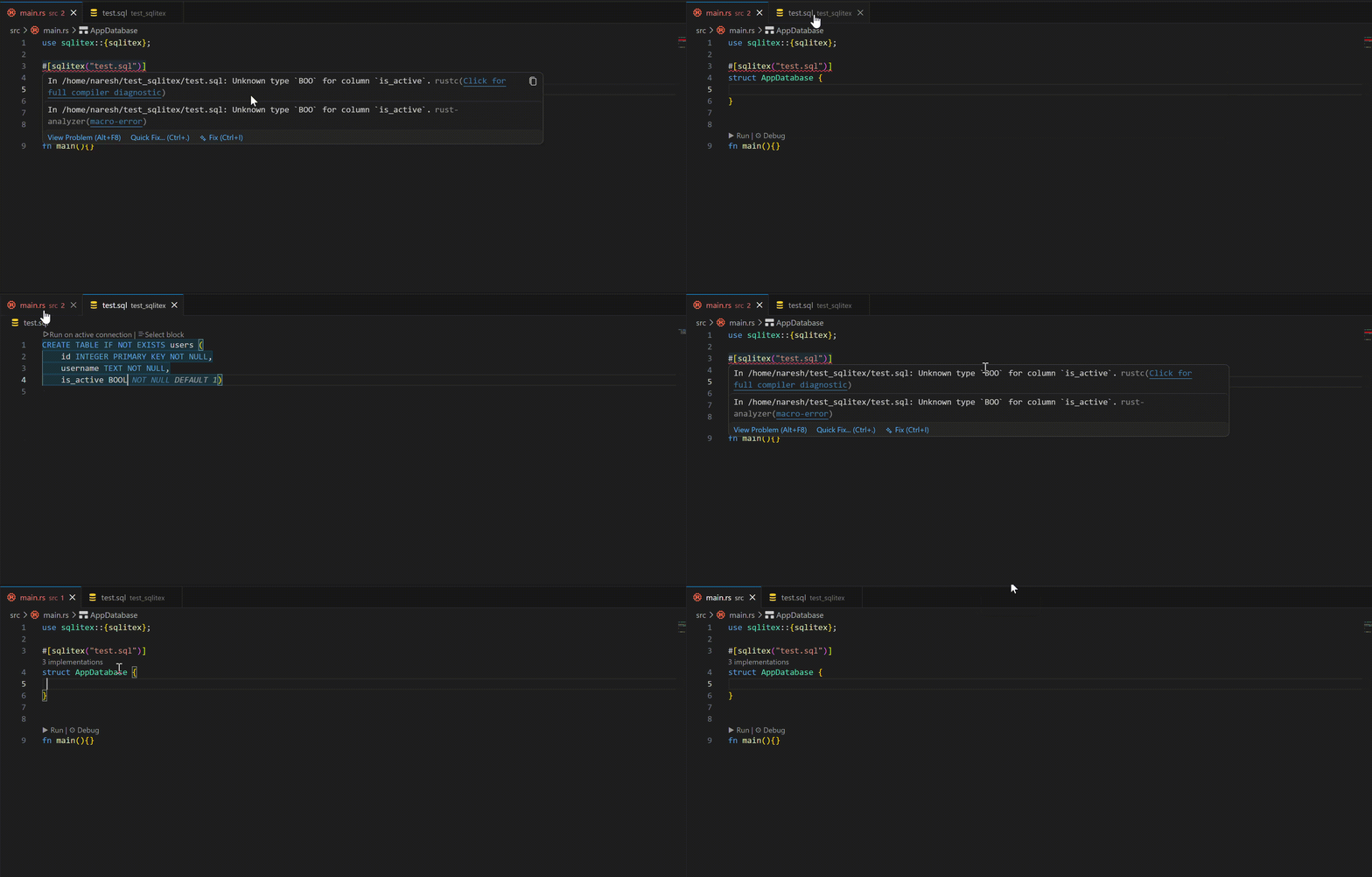
If it still does not work, you may have to restart ur rust lsp server. On VSCode, its `Ctrl` + `Shift` + `p` and type in restart rust server
This issue can be avoided in the future when [tracked_path](https://github.com/rust-lang/rust/issues/99515) gets stabilised
### 3. Live Database
Point to an existing `.db` or equivalent binary file. `sqlitex` inspects the live metadata to validate your queries at compile time. No additional method is generated.
Similar to connection via sql file, **ensure that the db file is placed at the root of your cargo.toml file** Else, there will be a compile time error which will help you navigate on where to place the file
The struct automatically generates a `open_connected_db` method that allows u to easily open that file you pointed to
For example,
```rust
use sqlitex::sqlitex;
#[sqlitex("test.db")]
struct Db {
//...
}
fn main() {
// open_connected_db is autogenerated which would open
// whatever file `sqlitex` connects it to, which in this case is "test.db"
let db = Db::open_connected_db().unwrap();
// ...
}
```
#### Tiny quirks with IDEs
Same issue as connecting via a `sql` file mentioned above. If you use IDEs, rust analsyer error would usually emit `DATABASE BASE IS LOCKED`. This **does not affect** the integrity of your database during development. You would need to either type something on ur rust file or restart your rust lsp server to make the false positive to go away.
#### 4. Migrations
Point to a folder containing numbered `.sql` files (e.g., `01_init.sql`, `02_add_users.sql`). `sqlitex` will validate all of them at compile time and automatically generate a `migrate()` method to apply them safely and atomically at runtime.
```rust
#[sqlitex("migrations/")]
struct App {
// queries...
}
fn main() -> Result<(), Box<dyn std::error::Error>> {
let conn = Connection::open("app.db")?;
let mut db = App::new(conn);
// Auto-generated. It is indempotent.
db.migrate()?;
Ok(())
}
```
## Query helper functions
### Postgres `::` type casting syntax
```rust
sql!("SELECT price::text FROM items")
// Compiles to:
// "SELECT CAST(price AS TEXT) FROM items"
```
### `all()` and `first()` methods for iterators
- `all()` collects the iterator into a vector. Just a lightweight wrapper around .collect() to prevent adding type hints (Vec<\_>) in code
```rust
let results = db.get_active_users(false)?;
let collected_results =results.all()?; ```
- `first()` Returns the first row if available, or None if the query returned no results.
```rust
let results = db.get_active_users(false)?;
let first_result = results.first()?.unwrap(); ```
## Advanced
### BLOB, Transactions, Runtime options etc.
They all are in the [examples](https://github.com/Nareshix/sqlitex/tree/main/examples) folder in github. They are short, simple and self-explanatory.
### `sql_escape_hatch!`
`#[sqlitex]` not only brings `sql!()` macro, but also `sql_escape_hatch!()`. It is used for stmts that compiles fine at runtime but fails at compile time, and you still want to get that compile time benefits. This is almost never an issue in practice. For more info you can read [the section below](#why-sql_escape_hatch-was-created)
you will most likely **never** need to use this.
#### How to use `sql_escape_hatch!`
The usage is very similar to how [rusqlite](https://github.com/rusqlite/rusqlite) works except that you get compile time benefits as well.
##### a. `SELECT` statements
Note: This also works for `INSERT... RETURNING`
You can map a query result to any struct by deriving `SqlMapping`.
`SqlMapping` maps columns by **index**, not by name. The order of fields in your struct **must** match the order of columns in your `SELECT` statement exactly.
```rust
use sqlitex::{SqlMapping, Connection, sqlitex};
#[derive(Debug, SqlMapping)]
pub struct UserStats { // must be pub
total: i64, // Maps to column index 0
status: String, // Maps to column index 1
}
#[sqlitex]
struct Analytics {
get_stats: sql_escape_hatch!(
UserStats, // pass in the struct so you can access the fields later
"SELECT count(*) as total, status
FROM users
WHERE id > ? AND login_count >= ?
GROUP BY status",
i64, // Maps to 1st '?'
i64 // Maps to 2nd '?'
)
}
fn foo{
let conn = Connection::open_memory()?;
let mut db = Analytics::new(conn);
let foo = db.get_stats(100, 5)?;
for i in foo{
// i.total and i.status is accessible
}
}
```
##### b. No Return Type
For `INSERT`, `UPDATE`, or `DELETE` statements
```rust
#[sqlitex]
struct Logger {
log: sql_escape_hatch!("INSERT INTO logs (msg, level) VALUES (?, ?)", String, i64)
}
// can continue to use it normally.
```
### Why `sql_escape_hatch!` was created
This section covers basic explanation of library internals and won't affect how you use sqlitex. Feel free to skip it.
For some context, sqlite does not expose any api for type inference and schema awareness validation. Hence, I had to build a custom sql parser and implement type inference and schema awareness myself in order to provide compile time guarantees. The tests for compile time checks of various sql queries are [here](https://github.com/Nareshix/sqlitex/tree/main/sqlitex_type_inference/tests)
In theory, there might be some edge cases for **extremely complex sql queries** that I might have missed, meaning the sql query should work perfectly fine in runtime but the compile time checks fail. In practice however, most SQL queries are straightforward enough that one will **_almost never_** get close to hitting it. It is also important to clarify that there will **never** be a case when a sql query passes compile time check but fails at runtime. If it compiles, it works.
This might sound like a perfect candidate for sql runtime features. While you can perfectly use it for this use case, u will miss out on the compile time guarantees.
Since the sql is correct but compiler fails to catch it, u can use `sql_escape_hatch!` to define the sql itself. The code would seem abit more verbose but u can still secure that compile time guarantees.
If you do somehow encounter this _false positive_, I would really appreicate it if you could open an issue on the [github repo](https://github.com/nareshix/sqlitex/issues).
## References
### Default PRAGMA Settings.
The default settings are
```sql
PRAGMA busy_timeout = 5000;
PRAGMA foreign_keys = ON;
PRAGMA journal_mode = WAL;
PRAGMA synchronous = NORMAL;
```
To override these settings or add more PRAGMA statements, u can use the `execute()` . They are simple enough that it doesn't warrant placing them in a `sql!()` macro for compile time checks, although nothing is stopping u from doing that
### Strict INSERT Validation
- Although standard SQL allows inserting any number of columns to a table, sqlitex checks INSERT statements at compile time. If you omit any column (except for `AUTOINCREMENT` and `DEFAULT`), code will fail to compile. This means you must either specify all columns explicitly, or use implicit insertion for all columns. This is done to prevent certain runtime errors such as `NOT NULL constraint failed` and more.
### Supported Type mappings
| `TEXT` / `CHARACTER` / `VARCHAR` / `CHARVARYING` / `CHARACTERVARYING` / `NVARCHAR` / `CLOB` | `String` / |
| `INTEGER` / `INT` / `TINYINT` / `SMALLINT` / `MEDIUMINT` / `BIGINT` / `BIGINTUNSIGNED` / `INT2` / `INT8` | `i64` |
| `REAL` / `DOUBLE` / `DOUBLEPRECISION` / `FLOAT` / `NUMERIC` / `DECIMAL` | `f64` |
| **`BOOLEAN`** / **`BOOL`** | `bool` |
| `BLOB` / `BYTEA` | `Vec<u8>` / |
| `INTEGER` / `INT` | `i64` |
| `REAL` | `f64` |
| `TEXT` | `String` |
| `BLOB` | `Vec<u8>` |
| `ANY` | `-` |
### Supported type casting
only these are supported for now to avoid unexpected behaviour.
Integer -> Real
Real -> Integer (note it gets truncated)
Integer -> Text
Real -> Text
Bool -> Integer (true -> 1, false -> 0)
Bool -> Real (true -> 1.0, false -> 0.0)
### Row mappings for unknown column name
There will be some sql stmts where there will be no name specified to it. For instance
```rust
#[sqlitex("test.db")]
struct Db {
count_users: sql!("SELECT COUNT(*) FROM users"),
}
fn main() -> Result<(), Box<dyn std::error::Error>> {
let mut db = Db::open_connected_db()?;
let count = db.count_users()?.first()?.unwrap();
// COUNT(*) has no column name, so sqlitex defaults to `col_0`.
// Subsequent unnamed columns follow the same pattern: col_1, col_2, etc.
assert_eq!(count.col_0, 3);
// ...
}
```
## Comparison with other libraries
[Look here](./COMPARISON.md)