
spritebox



2D pixel art as plain text, in safe Rust with zero dependencies: palettes, sprites, procedural textures, animations, autotiled tilesets, tilemaps and pixel fonts written as text, validated with exact diagnostics, and rendered to RGBA images, PNG files, atlases with their metadata, TrueType fonts and preview sheets.
No C libraries, build scripts or unsafe: only the standard library, with its own
PNG encoder and decoder, DEFLATE, CRC-32, Adler-32 and TrueType writer. The same text gives the same
pixels and the same PNG bytes on every platform.
spritebox is designed first for AI-assisted development. An assistant cannot draw with a mouse, but it can write precise text, render it, look at the PNG and correct the text. Everything here serves that loop: a readable format, diagnostics with a line, a column and a stable code, deterministic output, and preview sheets that show a whole file at a glance. People read and edit the same files, and diffs show which pixels changed. It is a sibling of audiobox, which does the same for game audio.
Capabilities
| Capability | Status |
|---|---|
Palettes: one-character keys, #rrggbb, #rrggbbaa, transparent, copies with from= |
Available |
| Sprites: grids of keys with a declared size, in layers | Available |
| Derived sprites: flip, rotate, offset, pad, palette swap, outline | Available |
| Animations: frames with ticks, looping or once | Available |
| Diagnostics with line, column and stable code; all errors at once | Available |
| RGBA8 output, PNG writing and reading | Available |
| Tilesets, with 16- and 47-variant autotiling from 4 or 5 hand-drawn pieces | Available |
| Tilemaps: grids of tile indices from a legend, autotiled, with solid tiles | Available |
| Atlases: packed sprites and frames with padding; metadata as Rust structs and JSON | Available |
| Pixel fonts: glyph grids, text drawing, and TrueType export | Available |
| Preview sheets | Available (sprites, animations) |
| Imports of other files through a loader; no file system needed | Available |
WebAssembly (wasm32-unknown-unknown) |
Available |
Command-line tool: check, render, font |
Available |
| Seeded procedural textures: value noise and ordered dithering | Available |
Install
[]
= "0.2"
Rust 1.85 or newer. The command-line tool installs with
cargo install spritebox.
Example
use ;
The command-line tool does the same for a file:
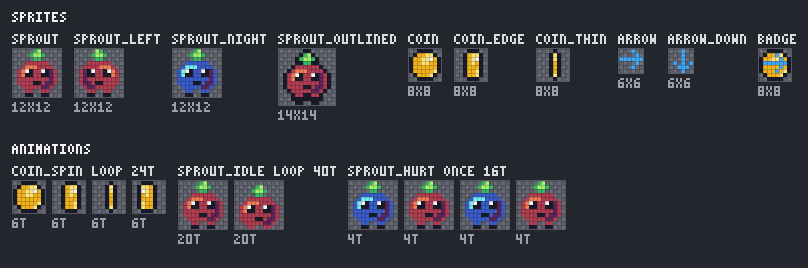
The text format
A file is a list of definitions. Each starts at the first column with a directive
and a name, and the lines under it are indented with spaces: any number, the same
for every line of the block. Tabs are not allowed in indentation. ; starts a
comment that runs to the end of the line, and blank lines are ignored. Names use
ASCII letters, digits, _ and -. Files are UTF-8; the extension .spritebox is
a convention.
; A sprout in two layers, sprites derived from it, and animations.
palette field
  .  transparent
  k  #1a1c2c
  w  #f4f4f4
  g  #38b764
  G  #a7f070
  b  #5d275d
  p  #b13e53
  P  #ef7d57
  o  #f4b41b
  y  #ffe478

palette dusk from=field   ; field's keys; these replace or add
  p  #3b5dc9
  P  #73eff7

sprite sprout 12x12 palette=field
  layer body
    .....gG.....
    ....gGGg....
    .....gg.....
    ...pppppp...
    ..pPPPpppp..
    .pPPpppppbp.
    .pPppppppbp.
    .ppppppppbp.
    .pppppppbbp.
    ..pppppbbp..
    ...pp..pp...
    ...kk..kk...
  layer face
    ............
    ............
    ............
    ............
    ............
    ...wk..wk...
    ...kk..kk...
    ............
    .....kk.....
    ............
    ............
    ............

sprite sprout_left = sprout:flip_x
sprite sprout_outlined = sprout:pad(1):outline(k)

sprite coin 8x8 palette=field
  ..kkkk..
  .kooyyk.
  kooyywok
  kooyyook
  kooooook
  koooooyk
  .koooyk.
  ..kkkk..

animation sprout_idle loop
  sprout              20
  sprout:offset(0,1)  20

animation sprout_hurt once
  sprout:swap(dusk)   4
  sprout              4
The full file, with a spinning coin, is examples/showcase.spritebox.
Imports
import NAME brings in the definitions of another file, as if they were written in
place of the line: a palette shared by several files, say.
import shared/palettes.spritebox

sprite coin 8x8 palette=dawn
  ...
- Names. A name has no spaces. It resolves from the importing file's directory,
with
/between parts and.and..resolved; a name that starts with/does not. - Loading. The crate reads no files itself:
Document::parse_with_loadertakes a loader, a function from a name to the file's text. The command-line tool reads from disk, relative to the file it checks; a game can read from assets embedded in its build.Document::parse, which has no loader, reports eachimportas an error. - Rules. A file is imported once, however many files import it. Circles are a
cycleerror, imports nest at mostmax_nestingdeep, and all the files together stay withinmax_text_bytes. An error in an imported file names it inError::file.
Palettes
palette NAME [from=OTHER], then one line per color: a key and a color.
- Keys are one character: any character but spaces, control characters and
; ( ) , =. Keys are case-sensitive, and need not be ASCII. - Colors are
#rrggbb,#rrggbbaaortransparent: sRGB, with alpha that is not premultiplied. Hex digits may be either case. from=OTHERstarts the palette with the keys and colors ofOTHER, which may be defined anywhere in the file. The palette's own lines replace colors of keys it shares and add new keys. Chains of copies are allowed; circles are not.
Sprites
sprite NAME WxH [palette=PALETTE], then H rows of W keys each.
- Each row is one word: no spaces between keys. A comment may follow it.
- Every key must be in the palette.
palette=may be left out when the file defines exactly one palette. - A key's color is drawn as is, so a key whose color is
transparentgives a transparent pixel.
Panels. slice=N, or slice=LEFT,TOP,RIGHT,BOTTOM, marks a sprite as a
nine-slice panel: the borders, in pixels from each edge, whose corners keep their size
while the edges and the middle stretch. The borders must fit in the sprite. A sprite
derived from a panel keeps its borders through flips, rotations, padding and palette
swaps (they follow the pixels), loses them through an offset, and may write its own:
sprite button_pressed = button:swap(dark) slice=3.
Layers. Instead of rows, a sprite may have layers, drawn bottom first:
sprite hero 16x16 palette=field
  layer body          ; rows of keys, as above, indented under the layer
    ...
  layer shadow = blob:offset(1,1)   ; or another sprite, through a modifier chain
Every layer has the sprite's size; a layer made from another sprite must have the same size and palette. Layers are composited with the "over" operator on sRGB values, in integer arithmetic, so translucent colors blend the same on every platform.
Procedural textures
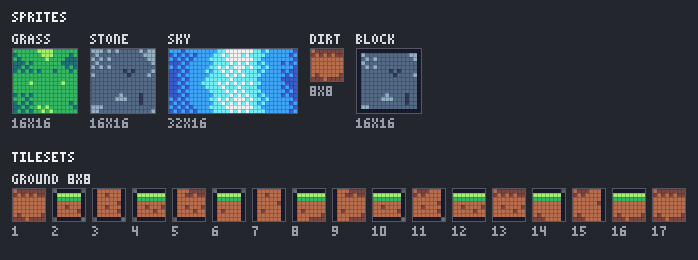
texture NAME WxH [palette=PALETTE] [seed=N] draws seeded noise with a ramp of
palette keys, for grass, stone, sky and the like:
texture grass 16x16 palette=ground seed=7
  noise cell=8 octaves=3 roughness=60
  ramp h g g G        ; keys from low noise to high; repeat one to widen its band
  dither bayer4       ; none (default), bayer2, bayer4 or bayer8
- Noise. Value noise: random values on a lattice of points
cellpixels apart, eased between them. Each further octave (1 to 8, default 1) halves the cell, and weighsroughnesspercent (default 50) of the one before. The cell must divide the width and the height, and the noise wraps around them, so a texture tiles with itself without a seam. - Seed.
seed=(default 0) picks the lattice values, through the crate's own hash; the same seed gives the same pixels on every platform. - Ramp. The noise is stretched to its full range, then mapped onto the keys.
dither nonetakes the nearest key;bayer2,bayer4andbayer8mix neighboring keys in an ordered pattern, in proportion to where the value falls. - A texture is a sprite. Use it as one, as a layer (
layer face = stone), a tile (tile dirt = dirt), a terrain's piece (fill = dirt), the start of a modifier chain (grass:flip_x) or an animation frame.
Derived sprites and modifiers
sprite NAME = CHAIN defines a sprite from another through a modifier chain: a
sprite's name and :modifiers, applied left to right, written without spaces. The
same chains name the frames of animations and the layers of sprites.
| Modifier | Result |
|---|---|
flip_x, flip_y |
Mirrored left to right, or top to bottom |
rot90, rot180, rot270 |
Rotated clockwise; a quarter turn swaps width and height |
offset(dx,dy) |
Pixels moved right and down (negative: left and up) within the same size; pixels moved out are lost |
pad(n) |
n empty pixels added on every side |
swap(PALETTE) |
The same keys colored by another palette, which must have every key the sprite uses |
outline(KEY) |
A one-pixel outline of KEY on the transparent pixels that share an edge with visible ones, as a new bottom layer; pad first if the shape touches the edges |
sprite coin_night = coin:swap(dusk)
sprite arrow_down = arrow_right:rot90
sprite gem_glow = gem:pad(1):outline(y)
Sprites may be derived from derived sprites, in any order in the file, but not in a circle.
Animations
animation NAME [loop|once], then one frame per line: a sprite's name or a modifier
chain, and how many ticks it shows, 1 to 65535. Diamon steps at 60 ticks a
second, so 6 is a tenth of a second. loop (the default) starts again after the
last frame; once stays on it.
animation coin_spin loop
  coin              6
  coin_edge         6
  coin_thin         6
  coin_edge:flip_x  6
Flipped frames. An engine flips a sprite when it draws it, so a frame states its
flips instead of storing flipped pixels: the trailing flip_x, flip_y and rot180
of a frame's chain become its flip_x and flip_y (rot180 is both), and the frame's
sprite is the chain without them. coin_edge:flip_x is coin_edge, drawn with
flip_x. Any other chain builds a sprite named by the chain, such as
coin:swap(dusk); Document::sprite finds it, and Document::frame_sprites lists
them.
Tilesets
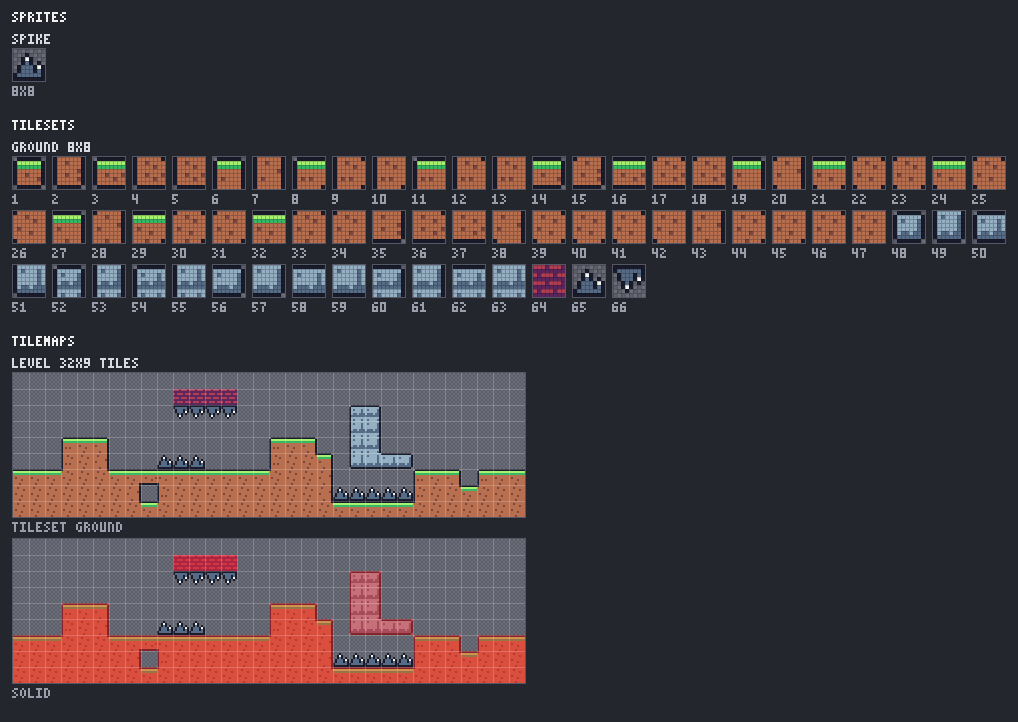
tileset NAME WxH [palette=PALETTE] [columns=N], then its tiles: plain tiles, and
terrains whose variants spritebox builds.
tileset ground 8x8 palette=ground
  tile brick            ; rows of keys, as for a sprite
    rrrRrrrR
    ...
  tile spikes = spike   ; or a sprite of the tile's size and palette, through a chain
  terrain dirt 47       ; five pieces; spritebox builds the 47 variants
    island
      .kkkkkk.
      ...
    h_strip
      ...
    v_strip
      ...
    inner
      ...
    fill
      ...
  terrain stone 16      ; four pieces; spritebox builds the 16 variants
    island = stone_island
    h_strip
      ...
    v_strip
      ...
    fill
      ...
Tile indices start at 1, so that 0 can mean an empty cell. Tiles are numbered in
the order written, and a terrain takes 16 or 47 consecutive indices, its variants in
order; variant v of terrain dirt is named dirt/v. The tileset's texture is a
grid columns tiles wide (8 by default, fewer for fewer tiles), tile 1 at the top
left, row by row, with no spacing.
Autotiling
A terrain is drawn as a few whole tiles, its pieces, each the tile as it looks with certain neighbours of the same terrain:
| Piece | The tile when it connects to | It shows |
|---|---|---|
island |
nothing | edges on all four sides, outer corners |
h_strip |
east and west | edges at the top and the bottom |
v_strip |
north and south | edges at the left and the right |
inner |
north, east, south and west, but no corner | no edges, an inner corner in each corner (47 only) |
fill |
all eight neighbours | no edges |
A 16 terrain needs island, h_strip, v_strip and fill; a 47 terrain needs
inner too. Pieces may be rows or PIECE = CHAIN. The tile size must be even.
Each variant is assembled from quarters. A quarter looks at the two edge neighbours beside it (north or south, and west or east) and the corner between them, and is copied from the same quarter of one piece:
| Edge neighbour north/south | Edge neighbour west/east | Corner | Quarter from |
|---|---|---|---|
| no | no | any | island |
| no | yes | any | h_strip |
| yes | no | any | v_strip |
| yes | yes | no | inner |
| yes | yes | yes | fill |
So the north-west quarter of a tile with land to the north and west but not
north-west comes from inner, and shows its inner corner. A 16 terrain ignores
corners and treats them as connected, so it never needs inner.
Variant order. Neighbours are bits, clockwise from north: N = 1, NE = 2, E = 4, SE = 8, S = 16, SW = 32, W = 64, NW = 128.
-
A
16terrain's variant isN + 2·E + 4·S + 8·W, with each letter 1 when that neighbour connects: variant 0 is an island, 15 is surrounded. -
A
47terrain first clears each corner bit unless both edge bits beside it are set, since a corner matters only then. The variant is the position of that mask among the 47 such masks in ascending order:0, 1, 4, 5, 7, 16, 17, 20, 21, 23, 28, 29, 31, 64, 65, 68, 69, 71, 80, 81, 84, 85, 87, 92, 93, 95, 112, 113, 116, 117, 119, 124, 125, 127, 193, 197, 199, 209, 213, 215, 221, 223, 241, 245, 247, 253, 255Variant 0 is an island, and 46 (mask 255) is surrounded.
Scheme::variant and Terrain::index compute this in Rust, and BLOB_MASKS is the
list. The tests check all 256 neighbour masks against these rules, for both schemes.
Tilemaps
tilemap NAME [tileset=TILESET] [outside=same|empty], then a legend and a map:
tilemap level tileset=ground
  legend
    .  empty
    #  dirt    solid    ; a terrain: autotiled
    b  brick   solid    ; a tile
    5  dirt/5           ; one variant of a terrain, fixed
    ^  spikes
  map
    ..........bbbb....
    ...###............
    ...###...^^^......
    ##################
- Legend. One line per key: one character, then
empty, a tile, a terrain or a terrain's variantTERRAIN/N, thensolidif those tiles are solid. - Map. Rows of legend keys, all of the same width.
- Autotiling. A terrain cell takes the variant for its neighbours of the same
terrain, fixed variants of that terrain included. Different terrains do not
connect to each other. With
outside=same, the default, cells beyond the map's edges connect, so ground runs off the screen;outside=emptycloses the edges. - Solid tiles. The map's solid set holds the indices of every solid legend entry,
all the variants of a solid terrain included. An index cannot be solid under one
key and not under another.
tileset=may be left out when the file has one tileset.
Pixel fonts
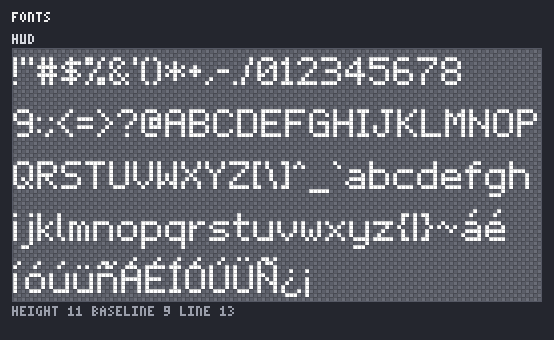
font NAME height=H [baseline=B] [line_height=L] [spacing=S] [space=N] [covers=SETS],
then a
glyph for each character, with rows of # (ink) and . (none):
font hud height=11 baseline=9 line_height=13 space=3 covers=ascii,spanish
  glyph A
    .....
    .....
    .###.
    #...#
    #...#
    #####
    #...#
    #...#
    #...#
    .....
    .....
  glyph U+003B             ; `;` starts comments, so write it by its code
    ..
    ..
    ..
    ..
    .#
    ..
    ..
    .#
    #.
    ..
    ..
- Metrics. Every glyph has
heightrows; their widths may differ.baselineis how many rows are above the baseline (defaultheight: no descent), andline_heightthe distance between baselines (defaultheight + 1). - Advance. A glyph's advance is its width plus
spacing(default 1), unless it saysadvance=N. A glyph may have no rows: a blank of width 0, such as a space. Without a glyph for the space, the font gets one whose advance isspace(default half the height, rounded up). - Characters are written as themselves, or as
U+and 4 to 6 hexadecimal digits. - Coverage.
covers=ascii,spanishmakescheckreport every character of those sets that has no glyph. The sets areascii(printable ASCII, U+0020 to U+007E),latin1(U+00A0 to U+00FF) andspanish(á é í ó ú ü ñ Á É Í Ó Ú Ü Ñ ¿ ¡). examples/font.spritebox covers ASCII and Spanish: 11 pixels tall, with 2 rows for accents above the capitals and 2 for descenders.
Font::render draws text, with \n for new lines, and Font::to_ttf writes the font
as TrueType:
- Outlines. Each glyph's outline is its pixels as squares, merged where they share
an edge, with corners only: outer contours clockwise, holes counter-clockwise, and
pixels that touch only at a corner in separate contours.
Font::outlinereturns it. - Metrics. The em is the glyph height, at 128 font units a pixel (fewer for fonts
taller than 128 pixels or glyphs wider than 250). Ascent is the rows above the
baseline, descent the rows below, and the line gap
line_height - height; advances are the glyphs'. - Crisp sizes. Draw the font at a whole multiple of its height in pixels: an
11-pixel font at 11, 22 or 33 pixels (
PxScale::from(22.0)inab_glyph), with the pen on whole pixels. Every font pixel is then a whole square of screen pixels. - Tables. The ten tables TrueType requires:
cmap(formats 4 and, beyond the Basic Multilingual Plane, 12),glyf,loca,head,hhea,hmtx,maxp,name,OS/2(version 4) andpost. Glyph 0,.notdef, is a hollow box. There is no hinting and no kerning, and the file holds no time stamp, so the same font gives the same bytes. - Checked. The tests read the file back table by table. With
SPRITEBOX_FONT_TESTS=1, FreeType (fc-scan) reads it and finds Spanish covered, and macOS Core Text draws every glyph exactly as its grid.cargo run --manifest-path scripts/ab-glyph-check/Cargo.tomlloads it withab_glyph, as Diamon'sFontLibrarydoes, and checks every glyph at 1×, 2× and 3×: each pixel is fully covered or not at all.
Output
RGBA8. Every Image the crate makes, from Sprite::render to the atlas, is
RGBA8: four bytes a pixel in the order red, green, blue, alpha; sRGB-encoded colors;
straight alpha, not premultiplied; rows tightly packed, without stride padding, top
row first. A 50% translucent blue is [0, 0, 255, 128], and a transparent pixel is
[0, 0, 0, 0]. That is what GPU texture uploads take, and exactly what Diamon's
TextureStore::register takes.
PNG. png::encode writes an indexed PNG (1, 2, 4 or 8 bits a pixel, with
tRNS for colors that are not opaque) when the image has at most 256 colors, which
pixel art almost always does, and 8-bit RGBA otherwise. Both are lossless. The file
holds no time stamp, so the same image gives the same bytes. png::decode reads
every standard PNG: all color types and bit depths, interlaced or not, with tRNS.
It returns RGBA8, rounding 16-bit samples and ignoring gamma and color-space chunks.
It checks CRCs and rejects unknown critical chunks. Compatibility is tested against
files written by FFmpeg and macOS Image I/O, and FFmpeg reads the crate's files.
Atlases. Document::atlas packs every sprite, and every sprite that animation
frames build, into one texture. AtlasOptions sets how it samples cleanly on a GPU:
- Padding. Each sprite gets
paddingpixels on every side (1 by default), so neighbors are2 * paddingapart andpaddingfrom the edges. Use 0 for textures sampled only with nearest filtering. - Extrusion.
extrude(on by default) fills the padding with copies of each sprite's edge pixels, so linear filtering and mipmaps do not mix in transparent texels or neighbors. Off, the padding is transparent. - Size.
max_sidebounds the texture's width and height: 2048 by default, the largest side that every WebGPU device supports. Art that does not fit is aLimitExceedederror, never a second texture.
Tileset textures get the same padding and extrusion. Sprites with identical pixels share one rectangle. Packing is a skyline, tallest first, trying several widths and keeping the smallest area; it depends only on the sprites, so the same file gives the same atlas.
The Atlas holds the image, each sprite's Rect in texels, and the animations with
each frame's rectangle, ticks and flips. Atlas::to_json writes the same as JSON, in
this form (shortened):
The metadata reference below lists every field.
Export. Document::export gives everything a game needs: the atlas, a texture
for each tileset, the tilemaps, and a TrueType file for each font. Export::files
names them atlas.png, tileset-NAME.png, font-NAME.ttf and spritebox.json,
and Export::to_json adds tilesets, tilemaps and fonts to the atlas's JSON:
"tilesets": ,
"tilemaps": ,
"fonts":
(Shortened; the file writes every tile name, row and index, one string or row a line.)
tiles lists the tile names in index order, so tiles[0] is tile 1, which is at
(padding, padding); tile i is at column (i - 1) % columns and row
(i - 1) / columns, each cell tile_size + 2 * padding texels a side. A map's tiles
are its rows from the top, each a list of indices, 0 for an empty cell. solid is
ascending.
Metadata reference
spritebox.json is one object. Its members appear in this order, and objects keep
the order of the file: definitions in the order written.
All coordinates are in texels (pixels of a texture) from the texture's
top-left corner, with x to the right and y down. Rectangles are
[x, y, width, height] and cover the sprite or tile alone, never its padding.
| Field | Type | Meaning |
|---|---|---|
format |
"spritebox" |
Identifies the file. |
version |
integer | The form's version, now 1. It changes only when a change would break a reader, who should reject a version it does not know; members may be added without a change. |
atlas.image |
string | The atlas texture's file name: atlas.png. |
atlas.size |
[width, height] |
The atlas's size in texels. |
atlas.padding |
integer | Texels around each sprite, extruded or transparent. |
atlas.sprites |
object | For each named sprite, then each frame sprite, its rectangle. Sprites with identical pixels share one. |
atlas.panels |
object | For each sprite with slice=, its nine-slice borders {left, top, right, bottom}, in texels inward from each edge of its rectangle. |
animations.NAME.loop |
boolean | true: after the last frame, start again; false: stay on it. |
animations.NAME.frames |
array | The frames in order: sprite (a key of atlas.sprites), rect (its rectangle), ticks (how many fixed steps it shows, at least 1; 60 a second in Diamon), and flip_x and flip_y (draw the rectangle mirrored). |
tilesets.NAME.image |
string | The tileset's texture: tileset-NAME.png. |
tilesets.NAME.size |
[width, height] |
Its size in texels. |
tilesets.NAME.tile_size |
[width, height] |
A tile's size in texels. |
tilesets.NAME.columns |
integer | Tiles in a row of the texture. |
tilesets.NAME.padding |
integer | Texels around each tile. Tile i (from 1) has its top-left corner at x = padding + ((i - 1) % columns) * (tile_width + 2 * padding) and y = padding + ((i - 1) / columns) * (tile_height + 2 * padding). |
tilesets.NAME.tiles |
array of strings | The tiles' names in index order: tiles[0] is tile 1. A terrain's variants are TERRAIN/VARIANT. |
tilesets.NAME.terrains |
object | For each terrain, variants (16 or 47) and first, the index of its variant 0. |
tilemaps.NAME.tileset |
string | The tileset whose indices the map holds. |
tilemaps.NAME.size |
[columns, rows] |
The map's size in tiles. |
tilemaps.NAME.tiles |
array of arrays | The rows from the top, each the indices of its cells from the left; 0 is an empty cell and 1 the tileset's first tile. |
tilemaps.NAME.solid |
array | The indices of solid tiles, ascending. |
fonts.NAME.file |
string | The TrueType file: font-NAME.ttf. |
fonts.NAME.height |
integer | Pixels from the top of a glyph's grid to its bottom. |
fonts.NAME.baseline |
integer | Pixels of the grid above the baseline. |
fonts.NAME.line_height |
integer | Pixels from one baseline to the next. |
fonts.NAME.units_per_pixel |
integer | TrueType font units per pixel; the em is height * units_per_pixel. |
For Diamon. Register atlas.png with TextureStore::register under a URI. A
sprite's rectangle is the region of diamon.sprite2d, and a panel's borders are
the insets of a nine-slice panel. An animation's frames, a rectangle, ticks and flips
each, are a clip of diamon.sprite_animation2d, whose sprites flip when drawn. A tilemap is a diamon.tilemap2d: its tileset's texture
and tile_size, its rows of indices with 0 as empty, and its solid indices for
collision. A font needs nothing new: FontLibrary takes the TrueType file, and text
drawn at a multiple of the font's height stays crisp.
Preview sheets. Document::preview draws every sprite; every animation's frames
in a row with their ticks; every tileset's tiles with their indices; and the top-left
64 × 36 tiles of each tilemap, beside a copy with its solid tiles tinted red. Sprites
and tiles are scaled up by an integer factor (4 by default), maps by half of it, on a
checkerboard that shows transparency, with lines between pixels or tiles, labelled
with names, sizes and ticks in a small built-in pixel font.
From memory, and in WebAssembly
Everything from text to PNG, JSON and TrueType bytes works in memory: no file system
is touched unless a caller asks, through png::read_file, png::write_file or its
own loader. The library builds for wasm32-unknown-unknown, and a game running in a
browser parses art embedded in its build or fetched by the page:
Command-line tool
spritebox check <file> [--json]
spritebox render <file> --out <dir> [--scale <n>] [--padding <n>] [--no-extrude]
                 [--max-side <n>] [--json]
spritebox font <file> --out <font.ttf> [--font <name>] [--family <name>] [--json]
checkvalidates a file and prints every diagnostic, asfile:line:column: error[code]: messageon standard error, or as JSON.rendervalidates a file, then writesatlas.png,tileset-NAME.pngfor each tileset,font-NAME.ttffor each font, the metadataspritebox.json, andpreview.pngto<dir>. Nothing is written when the file has errors.--scalesets the preview's scale, and--paddingand--extrudethe atlas's.fontvalidates a file, then writes one of its fonts as TrueType: the only one, or the one--fontnames.--familysets the family name in the file.<file>may be-for standard input.
Exit statuses are stable: 0 success, 1 the file has errors, 2 bad usage
(including a --font that is missing or unknown), 3 an I/O error. With --json, standard output is one JSON object:
Each diagnostic has a code and a message; line and column when it concerns a
place in the text; and file when that place is in an imported file. written lists the files that render wrote.
Errors
Errors are Result<T, spritebox::Error> values with a stable ErrorCode, a message,
and for text a Position: a 1-based line, and a 1-based column counted in
characters. Document::parse returns the first error; spritebox::check returns all
of them, ordered by position. Malformed input gives an error, never a panic.
| Code | JSON | Meaning |
|---|---|---|
Syntax |
syntax |
Malformed text: an unknown directive, a missing value, bad indentation |
InvalidArgument |
invalid_argument |
A value out of range, such as a color or a size |
UnknownName |
unknown_name |
A palette, sprite or key that is not defined |
DuplicateName |
duplicate_name |
A name or key defined twice |
SizeMismatch |
size_mismatch |
A grid whose rows or columns do not match its size |
Cycle |
cycle |
Definitions that refer to each other in a circle |
LimitExceeded |
limit_exceeded |
Input or output beyond Limits |
DecodeError |
decode_error |
A malformed or truncated PNG file |
EncodeError |
encode_error |
Output that cannot be encoded |
UnsupportedFormat |
unsupported_format |
Binary input that is not a PNG, or a PNG feature not read |
Io |
io |
A file that cannot be read or written |
Limits
Limits bound the work that a file or a PNG can cause. The defaults suit
hand-written files and untrusted input; raise them for trusted input.
| Limit | Default |
|---|---|
max_text_bytes |
4 MiB |
max_definitions |
4096 |
max_palette_colors |
256 keys |
max_sprite_side |
1024 pixels |
max_layers |
16 layers in a sprite |
max_frames |
1024 frames in an animation |
max_tiles |
4096 tiles in a tileset, terrain variants included |
max_map_side |
1024 tiles |
max_glyphs |
4096 glyphs in a font |
max_nesting |
32 levels of palettes copied from= others, or of sprites derived from sprites |
max_image_side |
8192 pixels, for any image created or decoded |
max_image_pixels |
16 Mi pixels, for any image, and for all sprites together |
use ;
Limitations
What spritebox does not do, as of this release:
- No drawing tools or editor: art is text, reviewed through preview sheets.
- Fonts are one weight and style, without kerning, ligatures or hinting; outlines are exact squares, so they are crisp at integer multiples of the pixel size and blur in between, like any pixel font.
- Terrains connect only to themselves: there are no transitions between terrains, such as grass meeting sand, and no animated tiles.
- An atlas is one texture; when the sprites do not fit within
max_side, building it fails rather than spilling into a second. - Color is sRGB throughout, and alpha is composited in sRGB with integer arithmetic.
There is no color management: gamma, ICC and
sRGBchunks of PNG input are ignored. - The PNG encoder writes no interlaced, 16-bit, grayscale or metadata chunks, and the decoder does not read APNG animation.
- The preview's label font has uppercase letters, digits and common punctuation; lowercase letters are drawn as uppercase.
Development and releases
CI runs only when a release is published (or on demand from the Actions tab), so run the checks locally before each pull request:
RUSTDOCFLAGS="-D warnings"
SPRITEBOX_FFMPEG_TESTS=1 SPRITEBOX_FONT_TESTS=1
scripts/make-png-fixtures.py regenerates the PNG fixtures with FFmpeg and, on
macOS, sips; see tests/fixtures/README.md.
To release: update CHANGELOG.md and the version in Cargo.toml, run the checks,
merge to main, run cargo publish, then tag vX.Y.Z and publish a GitHub release,
which runs CI on Linux, macOS and Windows, the MSRV, the WebAssembly build, and FFmpeg
and FreeType interoperability.
License
MIT