# Spreadsheet MCP
[](https://crates.io/crates/spreadsheet-mcp)
[](https://docs.rs/spreadsheet-mcp)
[](https://github.com/PSU3D0/spreadsheet-mcp/blob/main/LICENSE)
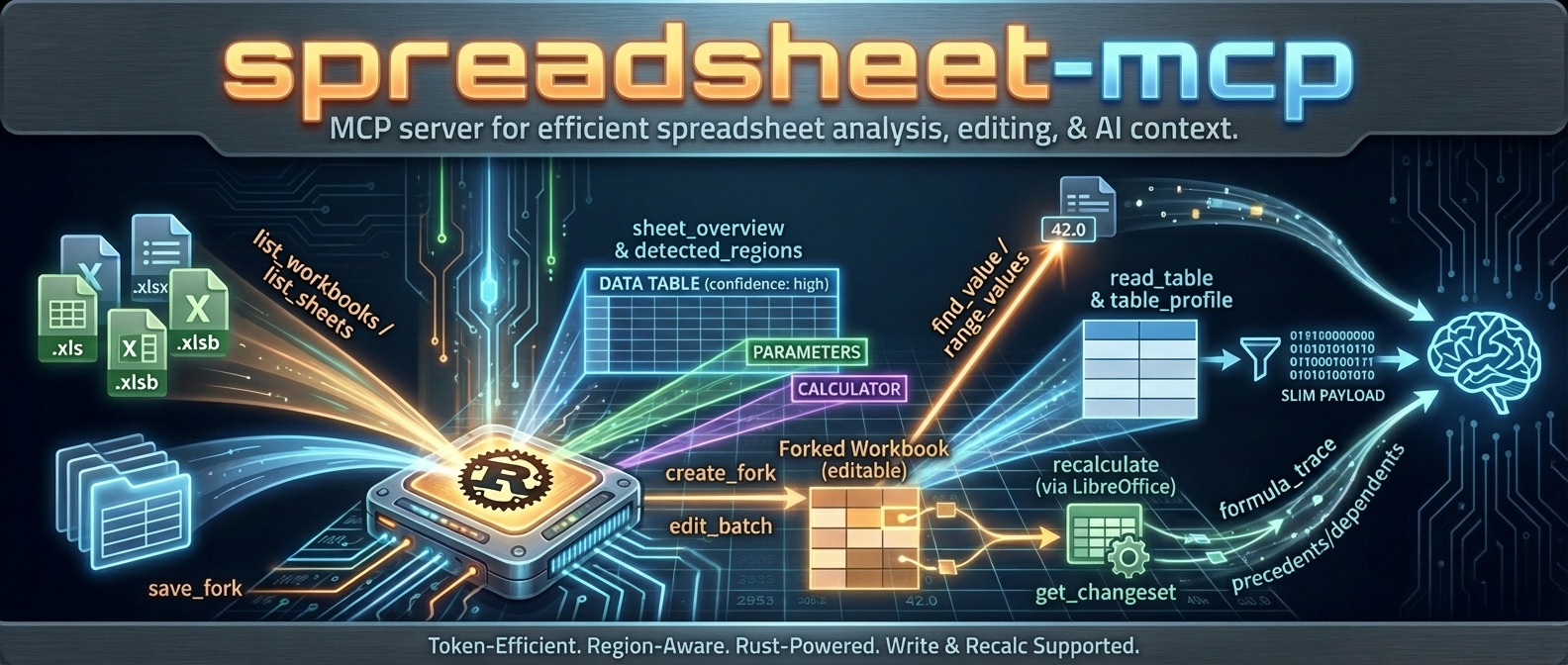
MCP server for spreadsheet analysis and editing. Slim, token-efficient tool surface designed for LLM agents.
## Why?
Dumping a 50,000-row spreadsheet into an LLM context is expensive and usually unnecessary. Most spreadsheet tasks need surgical access: find a region, profile its structure, read a filtered slice. This server exposes tools that let agents **discover → profile → extract** without burning tokens on cells they don't need.
- **Full support:** `.xlsx`, `.xlsm` (via `umya-spreadsheet`)
- **VBA source inspection (optional):** `.xlsm` via `SPREADSHEET_MCP_VBA_ENABLED=true` / `--vba-enabled` (parses embedded `xl/vbaProject.bin` via `ovba`)
- **Discovery only:** `.xls`, `.xlsb` (enumerated, not parsed)
## Architecture
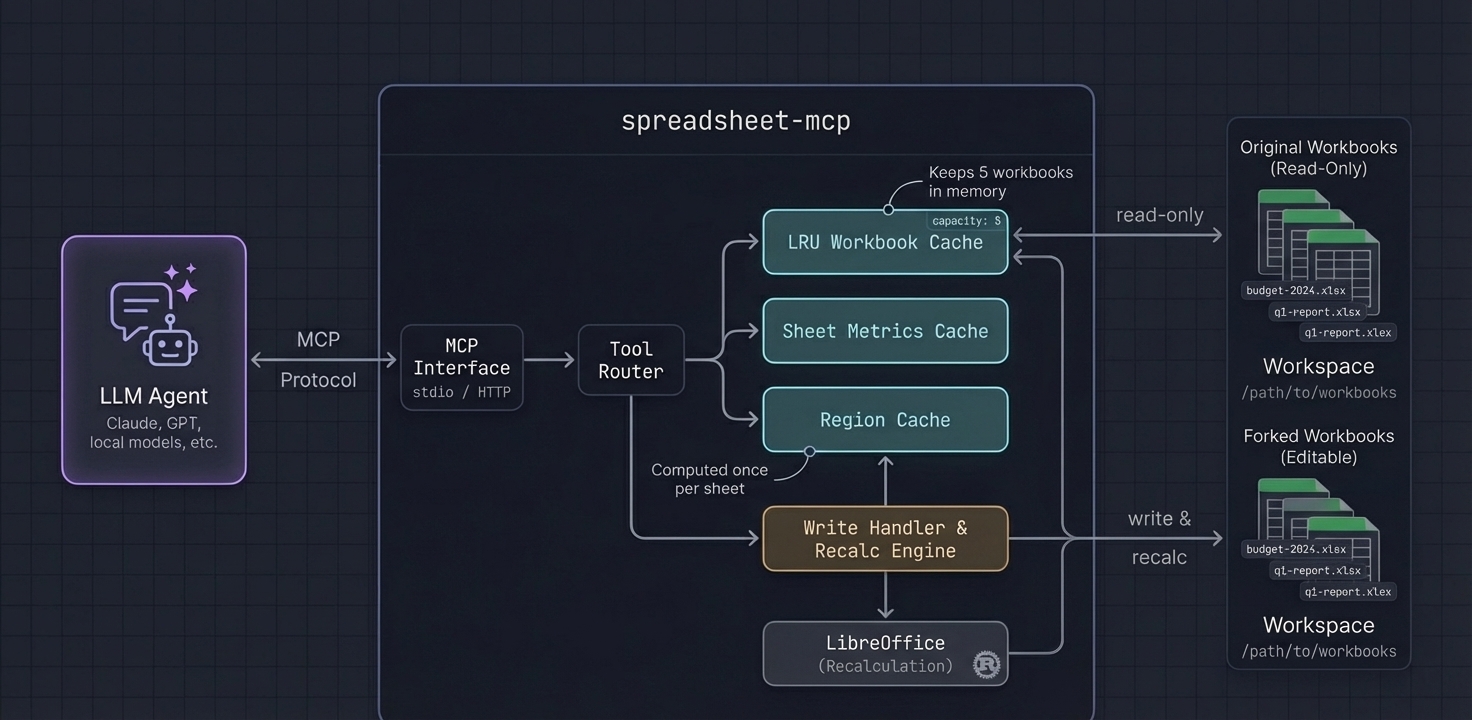
- **LRU cache** keeps recently-accessed workbooks in memory (configurable capacity)
- **Lazy sheet metrics** computed once per sheet, reused across tools
- **Region detection on demand** runs for `sheet_overview` and is cached for `region_id` lookups (`find_value`, `read_table`, `table_profile`)
## Tool Surface
| `list_workbooks`, `describe_workbook`, `list_sheets` | Discover workbooks/sheets and metadata |
| `workbook_summary`, `sheet_overview` | Orientation + region detection |
| `read_table`, `table_profile` | Structured reads and lightweight profiling |
| `range_values`, `sheet_page` | Targeted spot checks / raw paging fallback |
| `find_value`, `find_formula` | Search values/labels or formulas |
| `sheet_statistics` | Quick sheet stats (density, nulls, duplicates hints) |
| `sheet_formula_map`, `formula_trace`, `scan_volatiles` | Formula analysis and tracing |
| `sheet_styles`, `workbook_style_summary` | Style inspection (sheet-scoped + workbook-wide) |
| `named_ranges` | List defined names + tables |
| `vba_project_summary`, `vba_module_source` | Read VBA project metadata + module source (disabled by default; `.xlsm`) |
| `get_manifest_stub` | Generate manifest scaffold |
| `close_workbook` | Evict workbook from cache |
## VBA Support (Read-Only)
VBA tools are **disabled by default**. When enabled, the server can extract and parse the embedded VBA project from `.xlsm` files and return module source code.
Enable via:
- CLI: `--vba-enabled`
- Env: `SPREADSHEET_MCP_VBA_ENABLED=true`
Tools:
- `vba_project_summary`: Lists modules + basic project metadata
- `vba_module_source`: Returns paged source for a single module
Notes:
- This does **not** execute macros; it only reads and returns text.
- Responses are size-limited; page through module source.
## Write & Recalc Support
Write tools allow "what-if" analysis: fork a workbook, edit cells, recalculate formulas via LibreOffice, and diff the results. For safety, you can create checkpoints for high‑fidelity rollback and apply previewed (staged) changes explicitly.
### Enabling Write Tools
**Always use the `:full` Docker image for write/recalc features:**
```bash
docker run -v /path/to/workbooks:/data -p 8079:8079 ghcr.io/psu3d0/spreadsheet-mcp:full
```
The Docker image includes LibreOffice with pre-configured macros required for reliable recalculation. Running outside Docker requires manual LibreOffice setup (macro trust, headless config) and is not recommended.
### Write Tools
| `create_fork` | Create a temporary editable copy for "what-if" analysis |
| `checkpoint_fork`, `restore_checkpoint` | High-fidelity snapshot + rollback |
| `edit_batch` | Apply values or formulas to cells in a fork |
| `transform_batch` | Range-first clear/fill/replace (prefer for bulk edits) |
| `style_batch` | Batch style edits (range/region/cells) |
| `apply_formula_pattern` | Autofill-like formula fill over a target range |
| `structure_batch` | Batch structural edits (rows/cols/sheets + copy/move ranges) |
| `recalculate` | Trigger LibreOffice to update formula results |
| `get_changeset` | Diff the fork against the original (cells, tables, named ranges) |
| `screenshot_sheet` | Render a sheet range to a cropped PNG screenshot |
| `save_fork` | Save fork to a new path (or overwrite original with `--allow-overwrite`) |
| `list_staged_changes`, `apply_staged_change`, `discard_staged_change` | Manage previewed/staged changes |
| `get_edits`, `list_forks`, `discard_fork` | Inspect / list / discard forks |
### Token-Efficient Write Workflows
**find_formula paging**
```json
{
"tool": "find_formula",
"arguments": {
"workbook_or_fork_id": "wb-23456789ab",
"sheet_name": "Calc",
"query": "SUM(",
"include_context": false,
"limit": 20,
"offset": 0
}
}
```
**get_changeset summary + filters**
```json
{
"tool": "get_changeset",
"arguments": {
"fork_id": "fork-23456789abcd",
"summary_only": true,
"exclude_subtypes": ["recalc_result"],
"limit": 200,
"offset": 0
}
}
```
### Docker Paths (Exports + Screenshots)
When running in Docker with `--workspace-root /data` and a host mount like `-v /path/to/workbooks:/data`:
- Fork working files live under `/tmp/mcp-forks` inside the container (not visible on host).
- `save_fork.target_path` is resolved under `workspace_root` (Docker default: `/data`).
Use a relative path like `out.xlsx` (or `exports/out.xlsx`) to write back into the mounted folder on the host.
- `screenshot_sheet` writes PNGs under `screenshots/` in `workspace_root` (Docker default: `/data/screenshots/`).
### Screenshot Tool
`screenshot_sheet` captures a visual PNG of a rectangular range, rendered headless via LibreOffice in the `:full` image. The PNG is auto‑cropped to remove page whitespace and saved under `screenshots/` in the workspace. Note: the tool returns a `file://` URI on the server filesystem; when running via Docker, treat it as a container path and look for the PNG under your mounted workspace folder (e.g. `screenshots/<name>.png`).
Arguments:
- `workbook_or_fork_id` (required; accepts a workbook_id or fork_id)
- `sheet_name` (required)
- `range` (optional, default `A1:M40`)
Limits and behavior:
- Max range per screenshot: **100 rows × 30 columns**. If exceeded, the tool fails with suggested tiled sub‑ranges to request instead.
- After export/crop, a pixel guard rejects images that are too large for reliable agent use (default max **4096px** on a side or **12MP** area). On rejection, the tool returns smaller range suggestions.
- Override pixel guard via env vars: `SPREADSHEET_MCP_MAX_PNG_DIM_PX`, `SPREADSHEET_MCP_MAX_PNG_AREA_PX`.
See [docs/RECALC.md](docs/RECALC.md) for architecture details.
## Example
**Request:** Profile a detected region
```json
{
"tool": "table_profile",
"arguments": {
"workbook_id": "wb-23456789ab",
"sheet_name": "Q1 Actuals",
"region_id": 1,
"sample_size": 10,
"sample_mode": "distributed"
}
}
```
**Response:**
```json
{
"sheet_name": "Q1 Actuals",
"headers": ["Date", "Category", "Amount", "Notes"],
"column_types": [
{"name": "Date", "inferred_type": "date", "nulls": 0, "distinct": 87},
{"name": "Category", "inferred_type": "text", "nulls": 2, "distinct": 12, "top_values": ["Payroll", "Marketing", "Infrastructure"]},
{"name": "Amount", "inferred_type": "number", "nulls": 0, "min": 150.0, "max": 84500.0, "mean": 12847.32},
{"name": "Notes", "inferred_type": "text", "nulls": 45, "distinct": 38}
],
"row_count": 1247,
"samples": [...]
}
```
The agent now knows column types, cardinality, and value distributions—without reading 1,247 rows.
## Recommended Agent Workflow
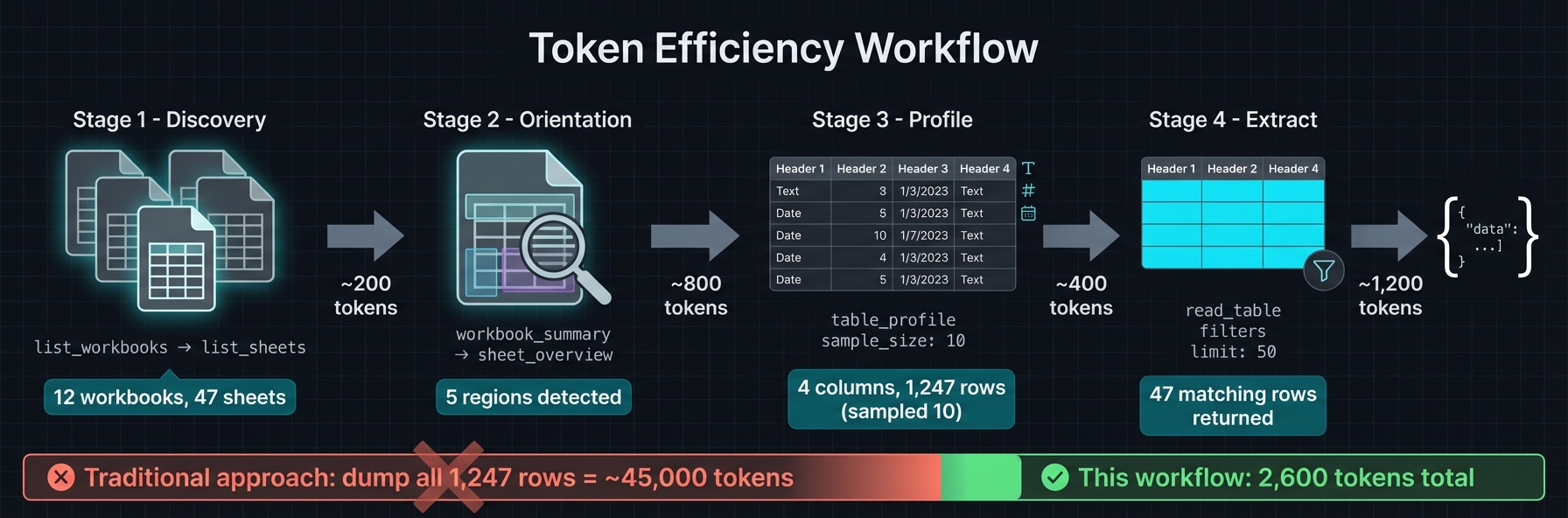
1. `list_workbooks` → `list_sheets` → `workbook_summary` for orientation
2. `sheet_overview` to get `detected_regions` (ids/bounds/kind/confidence)
3. `table_profile` → `read_table` with `region_id`, small `limit`, and `sample_mode` (`distributed` preferred)
4. Use `find_value` (label mode) or `range_values` for targeted pulls
5. Reserve `sheet_page` for unknown layouts or calculator inspection; prefer `compact`/`values_only`
6. Keep payloads small; page/filter rather than full-sheet reads
## Region Detection
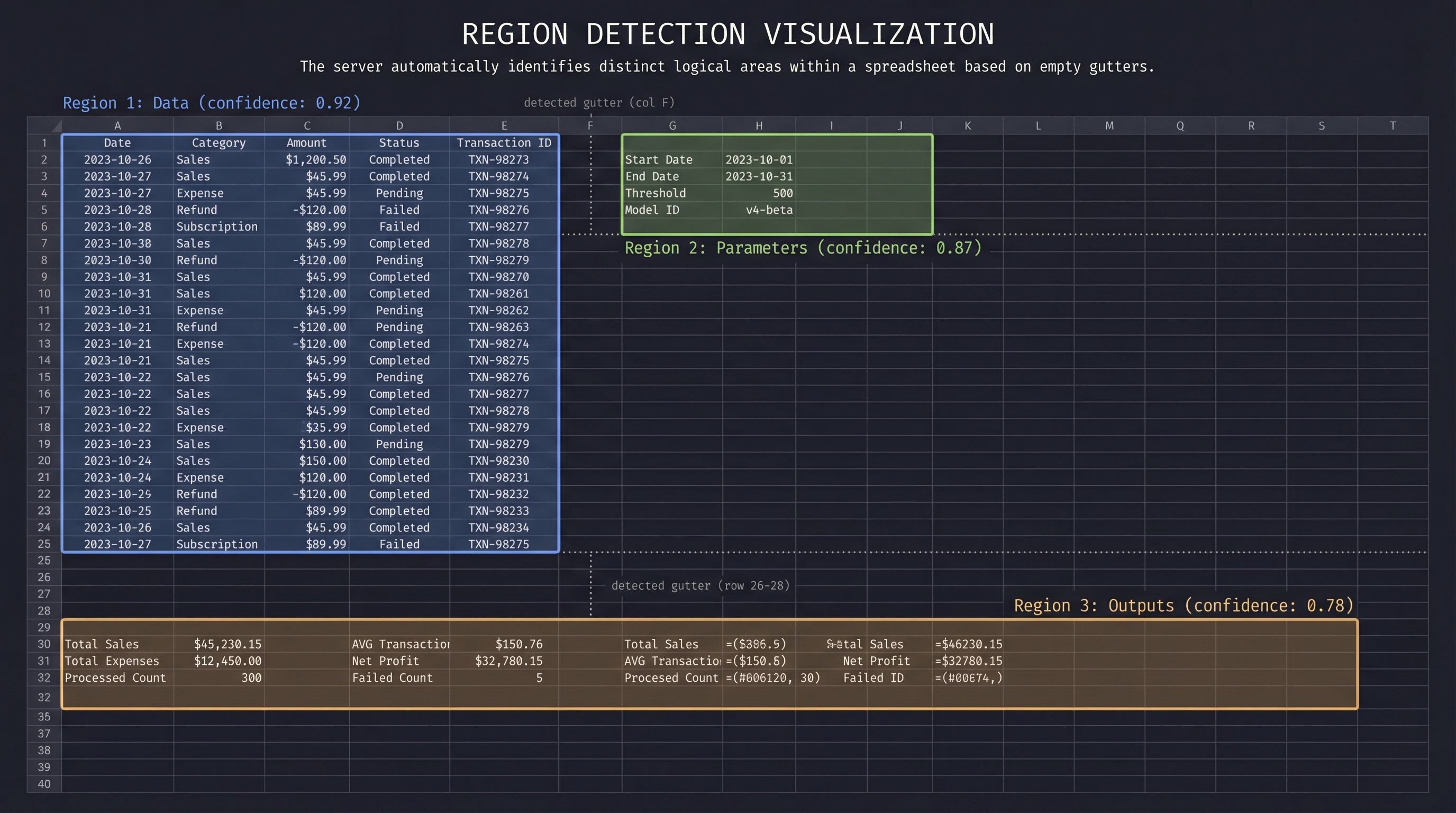
Spreadsheets often contain multiple logical tables, parameter blocks, and output areas on a single sheet. The server detects these automatically:
1. **Gutter detection** — Scans for empty rows/columns that separate content blocks
2. **Recursive splitting** — Subdivides large areas along detected gutters
3. **Border trimming** — Removes sparse edges to tighten bounds
4. **Header detection** — Identifies header rows (including multi-row merged headers)
5. **Classification** — Labels each region: `data`, `parameters`, `outputs`, `calculator`, `metadata`
6. **Confidence scoring** — Higher scores for well-structured regions with clear headers
Regions are cached per sheet. Tools like `read_table` accept a `region_id` to scope reads without manually specifying ranges.
## Quick Start
### Docker (Recommended)
Two image variants are published:
| `ghcr.io/psu3d0/spreadsheet-mcp:latest` | ~15MB | No |
| `ghcr.io/psu3d0/spreadsheet-mcp:latest-full` | ~800MB | Yes (includes LibreOffice) |
```bash
# Read-only (slim image)
docker run -v /path/to/workbooks:/data -p 8079:8079 ghcr.io/psu3d0/spreadsheet-mcp:latest
# Read-only + VBA tools enabled
docker run -v /path/to/workbooks:/data -p 8079:8079 -e SPREADSHEET_MCP_VBA_ENABLED=true ghcr.io/psu3d0/spreadsheet-mcp:latest
# With write/recalc support (full image)
docker run -v /path/to/workbooks:/data -p 8079:8079 ghcr.io/psu3d0/spreadsheet-mcp:full
```
### Cargo Install
```bash
# Read-only
cargo install spreadsheet-mcp
spreadsheet-mcp --workspace-root /path/to/workbooks
# Enable VBA tools
SPREADSHEET_MCP_VBA_ENABLED=true spreadsheet-mcp --workspace-root /path/to/workbooks
```
**Note:** For write/recalc features, use the `:full` Docker image instead of cargo install. The Docker image includes LibreOffice with required macro configuration.
### Build from Source
```bash
cargo run --release -- --workspace-root /path/to/workbooks
```
Default transport: HTTP streaming at `127.0.0.1:8079`. Endpoint: `POST /mcp`.
Use `--transport stdio` for CLI pipelines.
## MCP Client Configuration
### Claude Code / Claude Desktop
Add to `~/.claude.json` or project `.mcp.json`:
**Read-only (slim image):**
```json
{
"mcpServers": {
"spreadsheet": {
"command": "docker",
"args": ["run", "-i", "--rm", "-v", "/path/to/workbooks:/data", "ghcr.io/psu3d0/spreadsheet-mcp:latest", "--transport", "stdio"]
}
}
}
```
**Read-only + VBA tools enabled:**
```json
{
"mcpServers": {
"spreadsheet": {
"command": "docker",
"args": ["run", "-i", "--rm", "-v", "/path/to/workbooks:/data", "ghcr.io/psu3d0/spreadsheet-mcp:latest", "--transport", "stdio", "--vba-enabled"]
}
}
}
```
**With write/recalc (full image):**
```json
{
"mcpServers": {
"spreadsheet": {
"command": "docker",
"args": ["run", "-i", "--rm", "-v", "/path/to/workbooks:/data", "ghcr.io/psu3d0/spreadsheet-mcp:latest-full", "--transport", "stdio", "--recalc-enabled"]
}
}
}
```
**Binary (no Docker):**
```json
{
"mcpServers": {
"spreadsheet": {
"command": "spreadsheet-mcp",
"args": ["--workspace-root", "/path/to/workbooks", "--transport", "stdio"]
}
}
}
```
### Cursor / VS Code
**Read-only (slim image):**
```json
{
"mcp.servers": {
"spreadsheet": {
"command": "docker",
"args": ["run", "-i", "--rm", "-v", "${workspaceFolder}:/data", "ghcr.io/psu3d0/spreadsheet-mcp:latest", "--transport", "stdio"]
}
}
}
```
**With write/recalc (full image):**
```json
{
"mcp.servers": {
"spreadsheet": {
"command": "docker",
"args": ["run", "-i", "--rm", "-v", "${workspaceFolder}:/data", "ghcr.io/psu3d0/spreadsheet-mcp:latest-full", "--transport", "stdio", "--recalc-enabled"]
}
}
}
```
**Binary (no Docker):**
```json
{
"mcp.servers": {
"spreadsheet": {
"command": "spreadsheet-mcp",
"args": ["--workspace-root", "${workspaceFolder}", "--transport", "stdio"]
}
}
}
```
### HTTP Mode
```bash
docker run -v /path/to/workbooks:/data -p 8079:8079 ghcr.io/psu3d0/spreadsheet-mcp:latest
```
Connect via `POST http://localhost:8079/mcp`.
## Local Development
To test local changes without rebuilding Docker:
```bash
cargo build --release
```
Then point your MCP client to the binary:
```json
{
"mcpServers": {
"spreadsheet": {
"command": "/path/to/spreadsheet-mcp/target/release/spreadsheet-mcp",
"args": ["--workspace-root", "/path/to/workbooks", "--transport", "stdio"]
}
}
}
```
## Configuration
| `--workspace-root <DIR>` | `SPREADSHEET_MCP_WORKSPACE` | Workspace root to scan (default: cwd) |
| `--cache-capacity <N>` | `SPREADSHEET_MCP_CACHE_CAPACITY` | Workbook cache size (default: 5) |
| `--extensions <list>` | `SPREADSHEET_MCP_EXTENSIONS` | Allowed extensions (default: `xlsx,xls,xlsb`) |
| `--workbook <FILE>` | `SPREADSHEET_MCP_WORKBOOK` | Single-workbook mode |
| `--enabled-tools <list>` | `SPREADSHEET_MCP_ENABLED_TOOLS` | Whitelist exposed tools |
| `--transport <http\|stdio>` | `SPREADSHEET_MCP_TRANSPORT` | Transport selection (default: http) |
| `--http-bind <ADDR>` | `SPREADSHEET_MCP_HTTP_BIND` | Bind address (default: `127.0.0.1:8079`) |
| `--recalc-enabled` | `SPREADSHEET_MCP_RECALC_ENABLED` | Enable write/recalc tools (default: false) |
| `--max-concurrent-recalcs <N>` | `SPREADSHEET_MCP_MAX_CONCURRENT_RECALCS` | Parallel recalc limit (default: 2) |
| `--tool-timeout-ms <MS>` | `SPREADSHEET_MCP_TOOL_TIMEOUT_MS` | Tool request timeout in milliseconds (default: 30000; 0 disables) |
| `--max-response-bytes <BYTES>` | `SPREADSHEET_MCP_MAX_RESPONSE_BYTES` | Max response size in bytes (default: 1000000; 0 disables) |
| `--allow-overwrite` | `SPREADSHEET_MCP_ALLOW_OVERWRITE` | Allow `save_fork` to overwrite original files (default: false) |
## Performance
- **LRU workbook cache** — Recently opened workbooks stay in memory; oldest evicted when capacity exceeded
- **Lazy metrics** — Sheet metrics computed on first access, cached for subsequent calls
- **Region detection on demand** — Runs on `sheet_overview` (or `region_id` lookups) and is cached thereafter
- **Sampling modes** — `distributed` sampling reads evenly across rows without loading everything
- **Output caps** — `sheet_overview` truncates regions/headers by default; use tool params to request more
- **Compact formats** — `values_only` and `compact` output modes reduce response size
## Testing
```bash
cargo test
```
Covers: region detection, region-scoped tools, `read_table` edge cases (merged headers, filters, large sheets), workbook summary.
### Local MCP Testing
To test local changes with an MCP client (Claude Code, Cursor, etc.), use the helper script that rebuilds the Docker image on each invocation:
```json
{
"mcpServers": {
"spreadsheet": {
"command": "./scripts/local-docker-mcp.sh"
}
}
}
```
Set `WORKSPACE_ROOT` to override the default test directory:
```bash
WORKSPACE_ROOT=/path/to/workbooks ./scripts/local-docker-mcp.sh
```
This ensures you're always testing against your latest code changes without manual image rebuilds.
## Behavior & Limits
- **Read-only by default**; write/recalc features require `--recalc-enabled` or the `:full` image
- **XLSX supported for write**; `.xls`/`.xlsb` are read-only
- Bounded in-memory cache honors `cache_capacity`
- Prefer region-scoped reads and sampling for token/latency efficiency
- `screenshot_sheet` requires write/recalc support and is capped to 100×30 cells per image (with split suggestions).