# Spreadsheet MCP
[](https://crates.io/crates/spreadsheet-mcp)
[](https://docs.rs/spreadsheet-mcp)
[](https://github.com/PSU3D0/spreadsheet-mcp/blob/main/LICENSE)

MCP server for spreadsheet analysis and editing. Slim, token-efficient tool surface designed for LLM agents.
## Why?
Dumping a 50,000-row spreadsheet into an LLM context is expensive and usually unnecessary. Most spreadsheet tasks need surgical access: find a region, profile its structure, read a filtered slice. This server exposes tools that let agents **discover → profile → extract** without burning tokens on cells they don't need.
- **Full support:** `.xlsx` (via `umya-spreadsheet`)
- **Discovery only:** `.xls`, `.xlsb` (enumerated, not parsed)
## Architecture
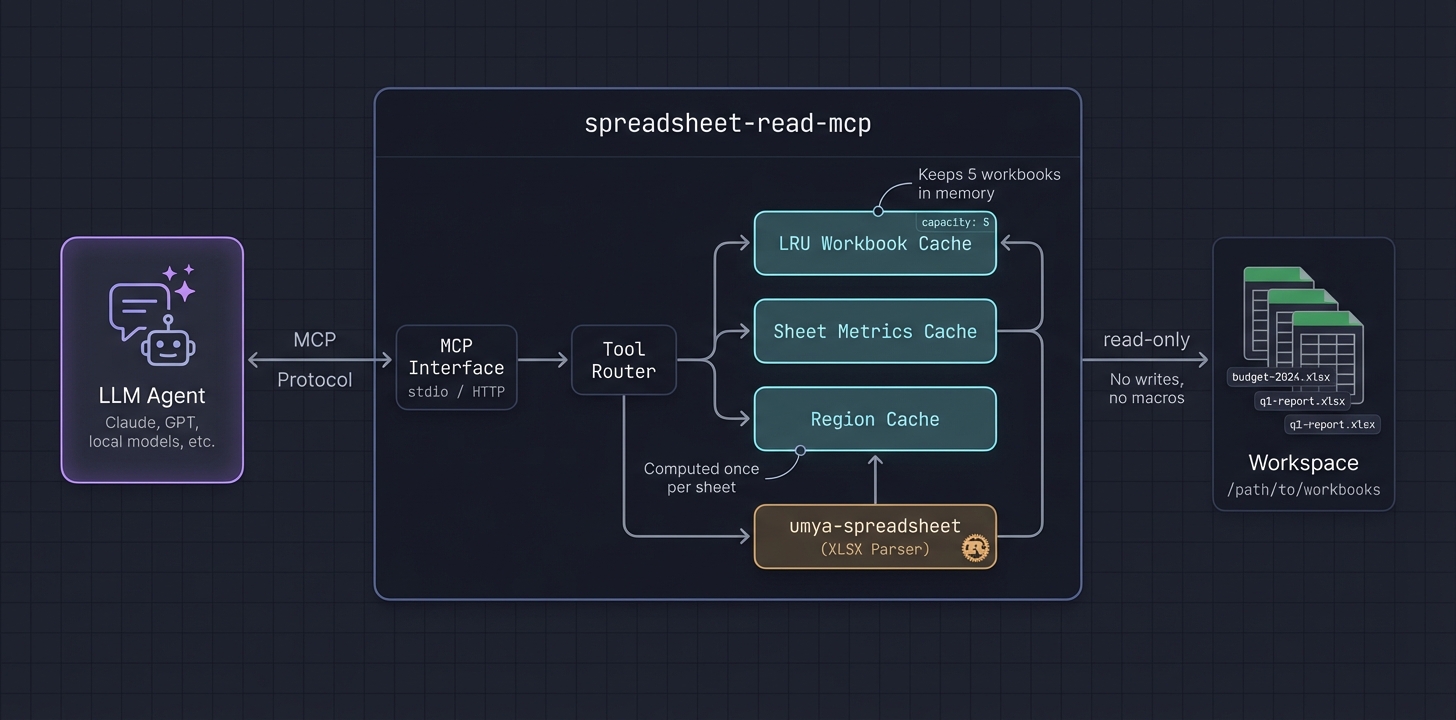
- **LRU cache** keeps recently-accessed workbooks in memory (configurable capacity)
- **Lazy sheet metrics** computed once per sheet, reused across tools
- **Region detection** runs once and caches bounds for `sheet_overview`, `find_value`, `read_table`, `table_profile`
## Tool Surface
| `list_workbooks`, `list_sheets` | Discover targets and get sheet summaries |
| `workbook_summary` | Region counts/kinds, named ranges, suggested entry points |
| `sheet_overview` | Detected regions (bounds/id/kind/confidence), narrative, key ranges |
| `find_value` | Value/label-mode lookup with region/table scoping, neighbors, row context |
| `read_table` | Structured read (range/region/table/named range), headers, filters, sampling |
| `table_profile` | Lightweight column profiling with samples and inferred types |
| `range_values` | Minimal range fetch for spot checks |
| `sheet_page` | Fallback pagination; supports `compact`/`values_only` |
| `formula_trace` | Precedents/dependents with paging |
## Write & Recalc Support (Experimental)
Enabled via `SPREADSHEET_MCP_RECALC_ENABLED=true` (requires `spreadsheet-mcp:full` image).
| `create_fork` | Create a temporary editable copy for "what-if" analysis |
| `edit_batch` | Apply values or formulas to cells in a fork |
| `recalculate` | Trigger LibreOffice to update formula results |
| `get_changeset` | Diff the fork against the original (cells, tables, named ranges) |
| `save_fork` | Commit changes to a file (overwrite or new path) |
| `discard_fork` | Delete the temporary fork |
See [docs/RECALC.md](docs/RECALC.md) for architecture details.
## Example
**Request:** Profile a detected region
```json
{
"tool": "table_profile",
"arguments": {
"workbook_id": "budget-2024-a1b2c3",
"sheet_name": "Q1 Actuals",
"region_id": 1,
"sample_size": 10,
"sample_mode": "distributed"
}
}
```
**Response:**
```json
{
"sheet_name": "Q1 Actuals",
"headers": ["Date", "Category", "Amount", "Notes"],
"column_types": [
{"name": "Date", "inferred_type": "date", "nulls": 0, "distinct": 87},
{"name": "Category", "inferred_type": "text", "nulls": 2, "distinct": 12, "top_values": ["Payroll", "Marketing", "Infrastructure"]},
{"name": "Amount", "inferred_type": "number", "nulls": 0, "min": 150.0, "max": 84500.0, "mean": 12847.32},
{"name": "Notes", "inferred_type": "text", "nulls": 45, "distinct": 38}
],
"row_count": 1247,
"samples": [...]
}
```
The agent now knows column types, cardinality, and value distributions—without reading 1,247 rows.
## Recommended Agent Workflow
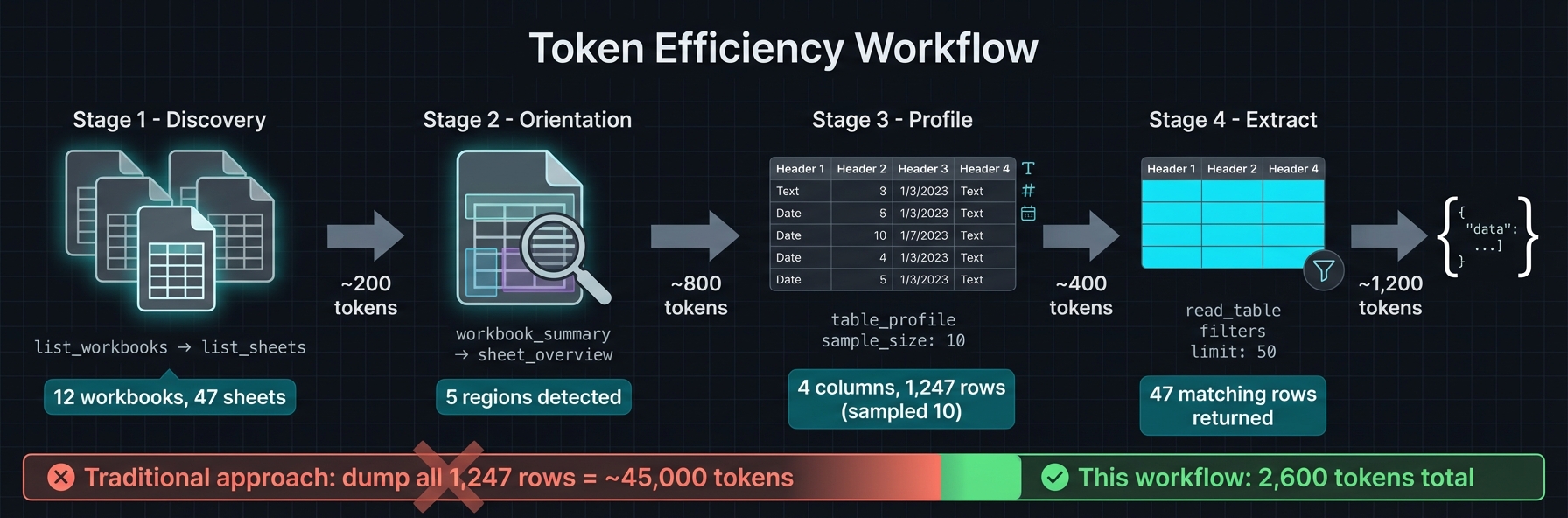
1. `list_workbooks` → `list_sheets` → `workbook_summary` for orientation
2. `sheet_overview` to get `detected_regions` (ids/bounds/kind/confidence)
3. `table_profile` → `read_table` with `region_id`, small `limit`, and `sample_mode` (`distributed` preferred)
4. Use `find_value` (label mode) or `range_values` for targeted pulls
5. Reserve `sheet_page` for unknown layouts or calculator inspection; prefer `compact`/`values_only`
6. Keep payloads small; page/filter rather than full-sheet reads
## Region Detection

Spreadsheets often contain multiple logical tables, parameter blocks, and output areas on a single sheet. The server detects these automatically:
1. **Gutter detection** — Scans for empty rows/columns that separate content blocks
2. **Recursive splitting** — Subdivides large areas along detected gutters
3. **Border trimming** — Removes sparse edges to tighten bounds
4. **Header detection** — Identifies header rows (including multi-row merged headers)
5. **Classification** — Labels each region: `data`, `parameters`, `outputs`, `calculator`, `metadata`
6. **Confidence scoring** — Higher scores for well-structured regions with clear headers
Regions are cached per sheet. Tools like `read_table` accept a `region_id` to scope reads without manually specifying ranges.
## Quick Start
### Docker (Recommended)
```bash
docker run -v /path/to/workbooks:/data -p 8079:8079 ghcr.io/psu3d0/spreadsheet-mcp:latest
```
For stdio mode (e.g., Claude Code):
```bash
docker run -i --rm -v /path/to/workbooks:/data ghcr.io/psu3d0/spreadsheet-mcp:latest \
--transport stdio
```
### Cargo Install
```bash
cargo install spreadsheet-mcp
spreadsheet-mcp --workspace-root /path/to/workbooks
```
### Build from Source
```bash
cargo run --release -- --workspace-root /path/to/workbooks
```
Default transport: HTTP streaming at `127.0.0.1:8079`. Endpoint: `POST /mcp`.
Use `--transport stdio` for CLI pipelines.
## Local Development Testing
To test local changes without rebuilding Docker, point your MCP client directly at the cargo build:
### Claude Code (Local Build)
Add to `~/.claude.json` or project `.mcp.json`:
```json
{
"mcpServers": {
"spreadsheet": {
"command": "cargo",
"args": ["run", "--release", "--manifest-path", "/path/to/spreadsheet-mcp/Cargo.toml", "--", "--workspace-root", "/path/to/workbooks", "--transport", "stdio"]
}
}
}
```
Or build once and run the binary directly:
```bash
cargo build --release
```
```json
{
"mcpServers": {
"spreadsheet": {
"command": "/path/to/spreadsheet-mcp/target/release/spreadsheet-mcp",
"args": ["--workspace-root", "/path/to/workbooks", "--transport", "stdio"]
}
}
}
```
### Cursor / VS Code (Local Build)
In `.vscode/settings.json` or user settings:
```json
{
"mcp.servers": {
"spreadsheet": {
"command": "cargo",
"args": ["run", "--release", "--manifest-path", "/path/to/spreadsheet-mcp/Cargo.toml", "--", "--workspace-root", "${workspaceFolder}", "--transport", "stdio"]
}
}
}
```
**Tip:** Use `cargo build --release` first, then point to the binary for faster startup.
## MCP Client Configuration
### Claude Desktop (Docker)
Add to `claude_desktop_config.json`:
```json
{
"mcpServers": {
"spreadsheet": {
"command": "docker",
"args": ["run", "-i", "--rm", "-v", "/path/to/workbooks:/data", "ghcr.io/psu3d0/spreadsheet-mcp:latest", "--transport", "stdio"]
}
}
}
```
### Claude Desktop (Binary)
```json
{
"mcpServers": {
"spreadsheet": {
"command": "spreadsheet-mcp",
"args": ["--workspace-root", "/path/to/workbooks", "--transport", "stdio"]
}
}
}
```
### Cursor / VS Code (Docker)
```json
{
"mcp.servers": {
"spreadsheet": {
"command": "docker",
"args": ["run", "-i", "--rm", "-v", "${workspaceFolder}:/data", "ghcr.io/psu3d0/spreadsheet-mcp:latest", "--transport", "stdio"]
}
}
}
```
### Cursor / VS Code (Binary)
```json
{
"mcp.servers": {
"spreadsheet": {
"command": "spreadsheet-mcp",
"args": ["--workspace-root", "${workspaceFolder}", "--transport", "stdio"]
}
}
}
```
### HTTP Mode
```bash
docker run -v /path/to/workbooks:/data -p 8079:8079 ghcr.io/psu3d0/spreadsheet-mcp:latest
```
Connect via `POST http://localhost:8079/mcp`.
## Configuration
| `--workspace-root <DIR>` | `SPREADSHEET_MCP_WORKSPACE` | Workspace root to scan (default: cwd) |
| `--cache-capacity <N>` | `SPREADSHEET_MCP_CACHE_CAPACITY` | Workbook cache size (default: 5) |
| `--extensions <list>` | `SPREADSHEET_MCP_EXTENSIONS` | Allowed extensions (default: `xlsx,xls,xlsb`) |
| `--workbook <FILE>` | `SPREADSHEET_MCP_WORKBOOK` | Single-workbook mode |
| `--enabled-tools <list>` | `SPREADSHEET_MCP_ENABLED_TOOLS` | Whitelist exposed tools |
| `--transport <http\|stdio>` | `SPREADSHEET_MCP_TRANSPORT` | Transport selection (default: http) |
| `--http-bind <ADDR>` | `SPREADSHEET_MCP_HTTP_BIND` | Bind address (default: `127.0.0.1:8079`) |
## Performance
- **LRU workbook cache** — Recently opened workbooks stay in memory; oldest evicted when capacity exceeded
- **Lazy metrics** — Sheet metrics computed on first access, cached for subsequent calls
- **Region caching** — Detection runs once per sheet; `region_id` lookups are O(1)
- **Sampling modes** — `distributed` sampling reads evenly across rows without loading everything
- **Compact formats** — `values_only` and `compact` output modes reduce response size
## Testing
```bash
cargo test
```
Covers: region detection, region-scoped tools, `read_table` edge cases (merged headers, filters, large sheets), workbook summary.
## Behavior & Limits
- **Read-only by default**; write/recalc features require `SPREADSHEET_MCP_RECALC_ENABLED=true`
- **XLSX supported for write**; `.xls`/`.xlsb` are read-only
- Bounded in-memory cache honors `cache_capacity`
- Prefer region-scoped reads and sampling for token/latency efficiency