
Spotatui
A Spotify client for the terminal written in Rust, powered by Ratatui.
Note: This is a fork of the original spotify-tui by Rigellute, which is no longer maintained. This fork aims to keep the project alive with updated dependencies and fixes.




A Spotify client for the terminal written in Rust.
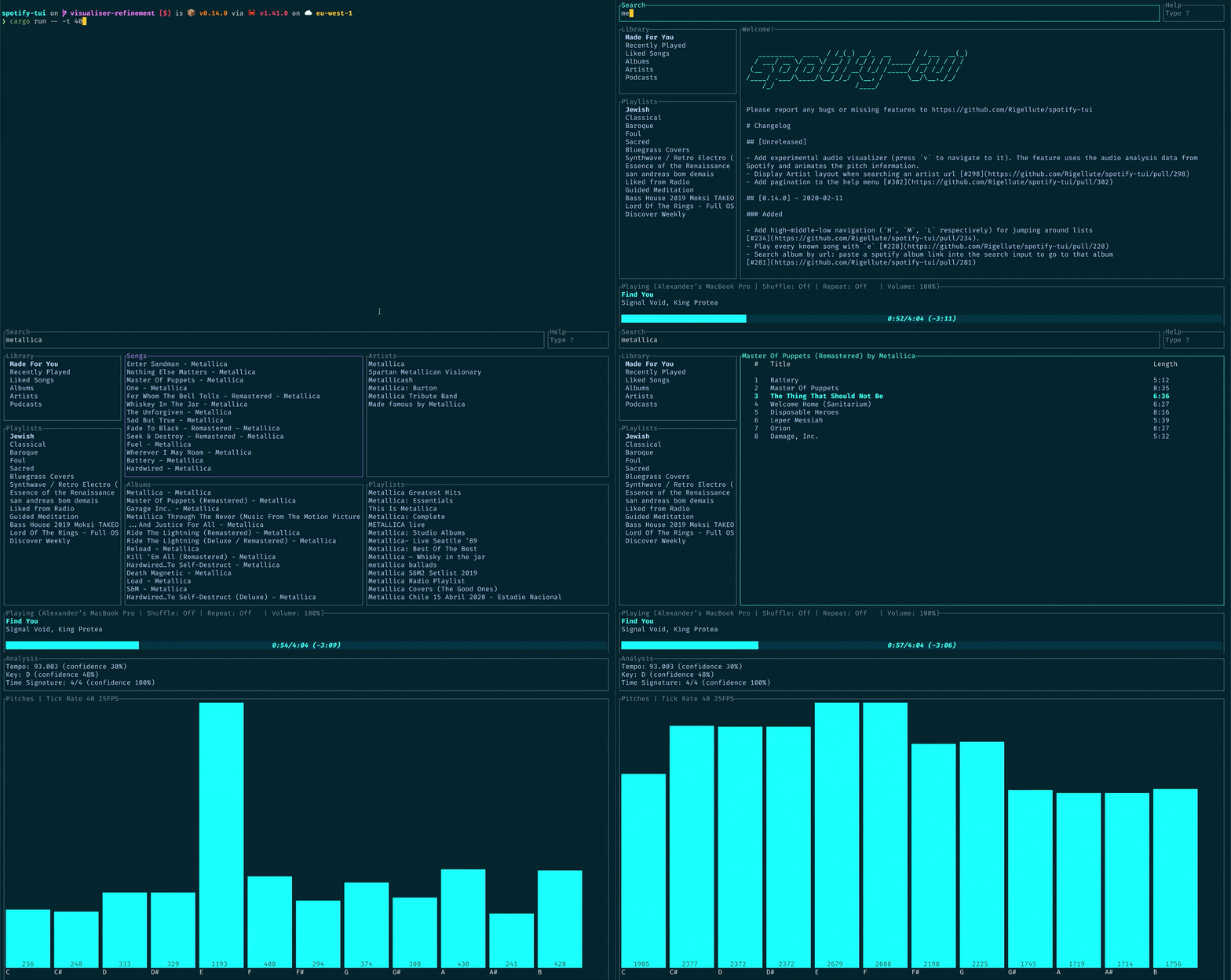
The terminal in the demo above is using the Rigel theme.
Privacy Notice
🔒 Anonymous Global Counter: Spotatui includes an opt-in feature that contributes to a global counter showing how many songs have been played by all users worldwide. This feature:
- Is completely anonymous - no personal information, song names, artists, or listening history is collected
- Only sends a simple increment when a new song starts playing
- Is enabled by default but can be opted out at any time
- Can be disabled by setting
enable_global_song_count: falsein~/.config/spotatui/config.yml
We respect your privacy. This is purely a fun community metric with zero tracking of individual users.
Migrating from spotify-tui
If you used the original spotify-tui before:
- The binary name changed from
spt→spotatui. - Config paths changed:
- Old:
~/.config/spotify-tui/ - New:
~/.config/spotatui/
- Old:
You can copy your existing config:
You may be asked to re-authenticate with Spotify the first time.
Installation
Arch Linux (AUR)
If you're on Arch Linux, install from the AUR:
# Using an AUR helper like yay
# Or manually
Pre-built Binaries
Download the latest release for your platform from GitHub Releases:
| Platform | File |
|---|---|
| Windows 10/11 (64-bit) | spotatui-windows-x86_64.zip |
| Linux (Ubuntu, Arch, Fedora, etc.) | spotatui-linux-x86_64.tar.gz |
| Linux (Alpine / musl) | spotatui-linux-alpine-x86_64.tar.gz |
| macOS (Intel) | spotatui-macos-x86_64.tar.gz |
| macOS (Apple Silicon M1/M2/M3) | spotatui-macos-aarch64.tar.gz |
Checksums (.sha256) are provided if you want to verify the download.
Cargo
If you have Rust installed:
Building from Source
Ensure you have Rust installed.
-
Clone the repository:
-
Install using Cargo:
Or build and run directly:
Connecting to Spotify’s API
spotatui needs to connect to Spotify’s API in order to find music by
name, play tracks etc.
Instructions on how to set this up will be shown when you first run the app.
But here they are again:
- Go to the Spotify dashboard
- Click
Create an app- You now can see your
Client IDandClient Secret
- You now can see your
- Now click
Edit Settings - Add
http://127.0.0.1:8888/callbackto the Redirect URIs (Note: use127.0.0.1instead oflocalhostas Spotify no longer allowslocalhostas a redirect URI) - Scroll down and click
Save - You are now ready to authenticate with Spotify!
- Go back to the terminal
- Run
spotatui - Enter your
Client ID - Enter your
Client Secret - Press enter to confirm the default port (8888) or enter a custom port
- You will be redirected to an official Spotify webpage to ask you for permissions.
- After accepting the permissions, you'll be redirected to localhost. If all goes well, the redirect URL will be parsed automatically and now you're done. If the local webserver fails for some reason you'll be redirected to a blank webpage that might say something like "Connection Refused" since no server is running. Regardless, copy the URL and paste into the prompt in the terminal.
And now you are ready to use spotatui 🎉
You can edit the config at anytime at ${HOME}/.config/spotatui/client.yml.
Usage
The binary is named spotatui.
Running spotatui with no arguments will bring up the UI. Press ? to bring up a help menu that shows currently implemented key events and their actions.
There is also a CLI that is able to do most of the stuff the UI does. Use spotatui --help to learn more.
Here are some example to get you excited.
spotatui --completions zsh # Prints shell completions for zsh to stdout (bash, power-shell and more are supported)

spotatui play --name "Your Playlist" --playlist --random # Plays a random song from "Your Playlist"
spotatui play --name "A cool song" --track # Plays 'A cool song'

spotatui playback --like --shuffle # Likes the current song and toggles shuffle mode
spotatui playback --toggle # Plays/pauses the current playback

spotatui list --liked --limit 50 # See your liked songs (50 is the max limit)

# Looks for 'An even cooler song' and gives you the '{name} from {album}' of up to 30 matches
spotatui search "An even cooler song" --tracks --format "%t from %b" --limit 30
Configuration
A configuration file is located at ${HOME}/.config/spotatui/config.yml.
(not to be confused with client.yml which handles spotify authentication)
The following is a sample config.yml file:
# Sample config file

# The theme colours can be an rgb string of the form "255, 255, 255" or a string that references the colours from your terminal theme: Reset, Black, Red, Green, Yellow, Blue, Magenta, Cyan, Gray, DarkGray, LightRed, LightGreen, LightYellow, LightBlue, LightMagenta, LightCyan, White.
theme:
  active: Cyan # current playing song in list
  banner: LightCyan # the "spotatui" banner on launch
  error_border: Red # error dialog border
  error_text: LightRed # error message text (e.g. "Spotify API reported error 404")
  hint: Yellow # hint text in errors
  hovered: Magenta # hovered pane border
  inactive: Gray # borders of inactive panes
  playbar_background: Black # background of progress bar
  playbar_progress: LightCyan # filled-in part of the progress bar
  playbar_progress_text: Cyan # song length and time played/left indicator in the progress bar
  playbar_text: White # artist name in player pane
  selected: LightCyan # a) selected pane border, b) hovered item in list, & c) track title in player
  text: "255, 255, 255" # text in panes
  header: White # header text in panes (e.g. 'Title', 'Artist', etc.)

behavior:
  seek_milliseconds: 5000
  volume_increment: 10
  # The lower the number the higher the "frames per second". You can decrease this number so that the audio visualisation is smoother but this can be expensive!
  tick_rate_milliseconds: 250
  # Enable text emphasis (typically italic/bold text styling). Disabling this might be important if the terminal config is otherwise restricted and rendering text escapes interferes with the UI.
  enable_text_emphasis: true
  # Controls whether to show a loading indicator in the top right of the UI whenever communicating with Spotify API
  show_loading_indicator: true
  # Disables the responsive layout that makes the search bar smaller on bigger
  # screens and enforces a wide search bar
  enforce_wide_search_bar: false
  # Contribute to the global song counter (completely anonymous, no PII collected)
  # Set to false to opt out of contributing to the global counter
  enable_global_song_count: true
  # Determines the text icon to display next to "liked" Spotify items, such as
  # liked songs and albums, or followed artists. Can be any length string.
  # These icons require a patched nerd font.
  liked_icon: ♥
  shuffle_icon: 🔀
  repeat_track_icon: 🔂
  repeat_context_icon: 🔁
  playing_icon: ▶
  paused_icon: ⏸
  # Sets the window title to "spotatui - Spotify TUI" via ANSI escape code.
  set_window_title: true

keybindings:
  # Key stroke can be used if it only uses two keys:
  # ctrl-q works,
  # ctrl-alt-q doesn't.
  back: "ctrl-q"

  jump_to_album: "a"

  # Shift modifiers use a capital letter (also applies with other modifier keys
  # like ctrl-A)
  jump_to_artist_album: "A"

  manage_devices: "d"
  decrease_volume: "-"
  increase_volume: "+"
  toggle_playback: " "
  seek_backwards: "<"
  seek_forwards: ">"
  next_track: "n"
  previous_track: "p"
  copy_song_url: "c"
  copy_album_url: "C"
  help: "?"
  shuffle: "ctrl-s"
  repeat: "r"
  search: "/"
  audio_analysis: "v"
  jump_to_context: "o"
  basic_view: "B"
  add_item_to_queue: "z"
Limitations
This app uses the Web API from Spotify, which doesn't handle streaming itself. So you'll need either an official Spotify client open or a lighter weight alternative such as spotifyd.
If you want to play tracks, Spotify requires that you have a Premium account.
Deprecated Spotify API Features
Note: As of November 2024, Spotify deprecated and removed access to certain API endpoints for new applications. The following features are included in this app but will only work if your Spotify Developer application was created before November 27, 2024:
- Audio Analysis Visualization (press
v): Real-time music visualization showing tempo, key, time signature, and animated pitch analysis synchronized to the currently playing track. - Related Artists: When viewing an artist page, the "Related Artists" section shows similar artists based on Spotify's recommendation algorithm.
If you created your Spotify app after this date, these features will display an error message explaining they are unavailable. All other functionality works normally.
For more information, see Spotify's announcement about API changes.
Using with spotifyd
Follow the spotifyd documentation to get set up.
After that there is not much to it.
- Start running the spotifyd daemon.
- Start up
spotatui - Press
dto go to the device selection menu and the spotifyd "device" should be there - if not check these docs
Libraries used
Development
- Install OpenSSL
- Install Rust
- Install
xorg-dev(required for clipboard support) - Clone or fork this repo and
cdto it - And then
cargo run
Windows Subsystem for Linux
You might get a linking error. If so, you'll probably need to install additional dependencies required by the clipboard package
Maintainer
Maintained by LargeModGames.
Original author: Alexander Keliris.
Contributors
Thanks goes to these wonderful people (emoji key):
This project follows the all-contributors specification. Contributions of any kind welcome!
Roadmap
The goal is to eventually implement almost every Spotify feature.
High-level requirements yet to be implemented
- Add songs to a playlist
- Be able to scroll through result pages in every view
This table shows all that is possible with the Spotify API, what is implemented already, and whether that is essential.
| API method | Implemented yet? | Explanation | Essential? |
|---|---|---|---|
| track | No | returns a single track given the track's ID, URI or URL | No |
| tracks | No | returns a list of tracks given a list of track IDs, URIs, or URLs | No |
| artist | No | returns a single artist given the artist's ID, URI or URL | Yes |
| artists | No | returns a list of artists given the artist IDs, URIs, or URLs | No |
| artist_albums | Yes | Get Spotify catalog information about an artist's albums | Yes |
| artist_top_tracks | Yes | Get Spotify catalog information about an artist's top 10 tracks by country. | Yes |
| artist_related_artists | Yes | Get Spotify catalog information about artists similar to an identified artist. Similarity is based on analysis of the Spotify community's listening history. | Yes |
| album | Yes | returns a single album given the album's ID, URIs or URL | Yes |
| albums | No | returns a list of albums given the album IDs, URIs, or URLs | No |
| search_album | Yes | Search album based on query | Yes |
| search_artist | Yes | Search artist based on query | Yes |
| search_track | Yes | Search track based on query | Yes |
| search_playlist | Yes | Search playlist based on query | Yes |
| album_track | Yes | Get Spotify catalog information about an album's tracks | Yes |
| user | No | Gets basic profile information about a Spotify User | No |
| playlist | Yes | Get full details about Spotify playlist | Yes |
| current_user_playlists | Yes | Get current user playlists without required getting his profile | Yes |
| user_playlists | No | Gets playlists of a user | No |
| user_playlist | No | Gets playlist of a user | No |
| user_playlist_tracks | Yes | Get full details of the tracks of a playlist owned by a user | Yes |
| user_playlist_create | No | Creates a playlist for a user | Yes |
| user_playlist_change_detail | No | Changes a playlist's name and/or public/private state | Yes |
| user_playlist_unfollow | Yes | Unfollows (deletes) a playlist for a user | Yes |
| user_playlist_add_track | No | Adds tracks to a playlist | Yes |
| user_playlist_replace_track | No | Replace all tracks in a playlist | No |
| user_playlist_recorder_tracks | No | Reorder tracks in a playlist | No |
| user_playlist_remove_all_occurrences_of_track | No | Removes all occurrences of the given tracks from the given playlist | No |
| user_playlist_remove_specific_occurrenes_of_track | No | Removes all occurrences of the given tracks from the given playlist | No |
| user_playlist_follow_playlist | Yes | Add the current authenticated user as a follower of a playlist. | Yes |
| user_playlist_check_follow | No | Check to see if the given users are following the given playlist | Yes |
| me | No | Get detailed profile information about the current user. | Yes |
| current_user | No | Alias for me |
Yes |
| current_user_playing_track | Yes | Get information about the current users currently playing track. | Yes |
| current_user_saved_albums | Yes | Gets a list of the albums saved in the current authorized user's "Your Music" library | Yes |
| current_user_saved_tracks | Yes | Gets the user's saved tracks or "Liked Songs" | Yes |
| current_user_followed_artists | Yes | Gets a list of the artists followed by the current authorized user | Yes |
| current_user_saved_tracks_delete | Yes | Remove one or more tracks from the current user's "Your Music" library. | Yes |
| current_user_saved_tracks_contain | No | Check if one or more tracks is already saved in the current Spotify user’s “Your Music” library. | Yes |
| current_user_saved_tracks_add | Yes | Save one or more tracks to the current user's "Your Music" library. | Yes |
| current_user_top_artists | No | Get the current user's top artists | Yes |
| current_user_top_tracks | No | Get the current user's top tracks | Yes |
| current_user_recently_played | Yes | Get the current user's recently played tracks | Yes |
| current_user_saved_albums_add | Yes | Add one or more albums to the current user's "Your Music" library. | Yes |
| current_user_saved_albums_delete | Yes | Remove one or more albums from the current user's "Your Music" library. | Yes |
| user_follow_artists | Yes | Follow one or more artists | Yes |
| user_unfollow_artists | Yes | Unfollow one or more artists | Yes |
| user_follow_users | No | Follow one or more users | No |
| user_unfollow_users | No | Unfollow one or more users | No |
| featured_playlists | No | Get a list of Spotify featured playlists | Yes |
| new_releases | No | Get a list of new album releases featured in Spotify | Yes |
| categories | No | Get a list of categories used to tag items in Spotify | Yes |
| recommendations | Yes | Get Recommendations Based on Seeds | Yes |
| audio_features | No | Get audio features for a track | No |
| audios_features | No | Get Audio Features for Several Tracks | No |
| audio_analysis | Yes | Get Audio Analysis for a Track | Yes |
| device | Yes | Get a User’s Available Devices | Yes |
| current_playback | Yes | Get Information About The User’s Current Playback | Yes |
| current_playing | No | Get the User’s Currently Playing Track | No |
| transfer_playback | Yes | Transfer a User’s Playback | Yes |
| start_playback | Yes | Start/Resume a User’s Playback | Yes |
| pause_playback | Yes | Pause a User’s Playback | Yes |
| next_track | Yes | Skip User’s Playback To Next Track | Yes |
| previous_track | Yes | Skip User’s Playback To Previous Track | Yes |
| seek_track | Yes | Seek To Position In Currently Playing Track | Yes |
| repeat | Yes | Set Repeat Mode On User’s Playback | Yes |
| volume | Yes | Set Volume For User’s Playback | Yes |
| shuffle | Yes | Toggle Shuffle For User’s Playback | Yes |