<p align="center">
<a href="https://github.com/efugier/smartcat/discussions">
<img src="https://img.shields.io/badge/commmunity-discussion-blue?style=flat-square" alt="community discussion">
</a>
<a href="https://github.com/efugier/smartcat/actions/workflows/ci.yml">
<img src="https://github.com/efugier/smartcat/actions/workflows/ci.yml/badge.svg?branch=main" alt="Github Actions CI Build Status">
</a>
<a href="https://crates.io/crates/smartcat">
<img src="https://img.shields.io/crates/v/smartcat.svg?style=flat-square" alt="crates.io">
</a>
<br>
</p>
<p align="center">
<img src="assets/sc_logo.png" width="200">
</p>
# smartcat (sc)
Puts a brain behind `cat`! CLI interface to bring language models in the Unix ecosystem and allow power users to make the most out of llms.
What makes it special:
- a set of partial prompts making the model play nice as a cli tool;
- good io handling to insert user input in said prompts and use the result in cli-based workflows.
Currently supports **ChatGPT** and **Mistral AI** but built to work with multiple ones seemlessly.
- [Installation](#installation-)
- [Usage](#usage)
- [A few examples to get started 🐈⬛](#a-few-examples-to-get-started-)
- [Manipulate file and text streams](#manipulate-file-and-text-streams)
- [Integrating with editors](#integrating-with-editors)
- [Configuration](#configuration) ← please read this carefully
- [Developping](#developping)
## Installation
With an **up to date** [rust and cargo](https://www.rust-lang.org/tools/install) setup (you might consider running `rustup update`):
```
cargo install smartcat
```
run this command again to update `smartcat`.
Or download directly the binary compiled for your platform from the [release page](https://github.com/efugier/smartcat/releases).
(the binary is named `sc`)
---
On the first run, `smartcat` will ask you to generate some default configuration files if it cannot find them.
More about that in the [configuration section](#Configuration).
A `default` prompt is needed for `smartcat` to know which api and model to hit.
## Usage
```text
Usage: sc [OPTIONS] [CONFIG_PROMPT]
Arguments:
[CONFIG_PROMPT] which prompt in the config to fetch [default: default]
Options:
-i, --input <INPUT>
skip reading from stdin and use that value instead
-p, --custom-prompt <CUSTOM_PROMPT>
custom prompt to append before the input
-e, --extend-conversation
whether to extend the previous conversation or start a new one
-r, --repeat-input
whether to repeat the input before the output, useful to extend instead of replacing
-c, --context <CONTEXT>
glob pattern to given the matched files' content as context
-s, --system-message <SYSTEM_MESSAGE>
system "config" message to send after the prompt and before the first user message
-a, --after-input <AFTER_INPUT>
suffix to add after the input and the custom prompt
-f, --file <FILE>
skip reading from the input and read this file instead
-t, --temperature <TEMPERATURE>
temperature between 0 and 2, higher means answer further from the average
--api <API>
overrides which api to hit [possible values: openai, mistral, another-api-for-tests]
-m, --model <MODEL>
overrides which model (of the api) to use
-h, --help
Print help
-V, --version
Print version
```
You can use it to **accomplish tasks in the CLI** but **also in your editors** (if they are good unix citizens, i.e. work with shell commands and text streams) to complete, refactor, write tests... anything!
The key to make this work seamlessly is a good default prompt that tells the model to behave like a CLI tool an not write any unwanted text like markdown formatting or explanations.
## A few examples to get started 🐈⬛
Ask anything without leaving the confort of your terminal! Use the `-i` flag so that it doesn't wait for piped input.
```
sc -i "write an overview of this project's usage" -c "src/**/*.rs"
```
> _This project is a smart version of the Unix cat command. It takes text and a prompt, then outputs text according to specifications. The output is clean and ready for further processing by other programs, making it useful for precise text control in toolchains or workflow automation._
```
sc -i "sed command to remove trailaing whitespaces at the end of all non-markdown files?"
sed -i '' 's/[ \t]*$//' *.* !(*.md)
```
continue the last conversation use `-e`
```
sc -e -i "and using awk?"
awk '{ sub(/[ \t]+$/, ""); print }' file.ext > file.tmp && mv file.tmp file.ext
```
```
sc -i "shell script to migrate a repository from pipenv to poetry" >> poetry_mirgation.sh
```
get another opinion
```
sc -i "shell script to migrate a repository from pipenv to poetry" --api mistral >> poetry_mirgation_mistral.sh
```
### Manipulate file and text streams
```
A file named package,
Holds the keys of a software's age.
With a name, version, and edition too,
The content speaks of something new.
[...]
```
```
sc -f Cargo.toml -p "translate the following file in json" >> save Cargo.json
```
```
cat my_stuff.py | \
sc -p "write a parametrized test suite for the following code using pytest" \
-s "output only the code, as a standalone file with the imports. \n" \
-a "" \
> test.py
```
If you find yourself reusing prompts often, you can create a dedicated config entries and it becomes the following:
```
sc write_tests -f my_file.py > test.py
```
see example in the [configuration section](#Configuration).
### Integrating with editors
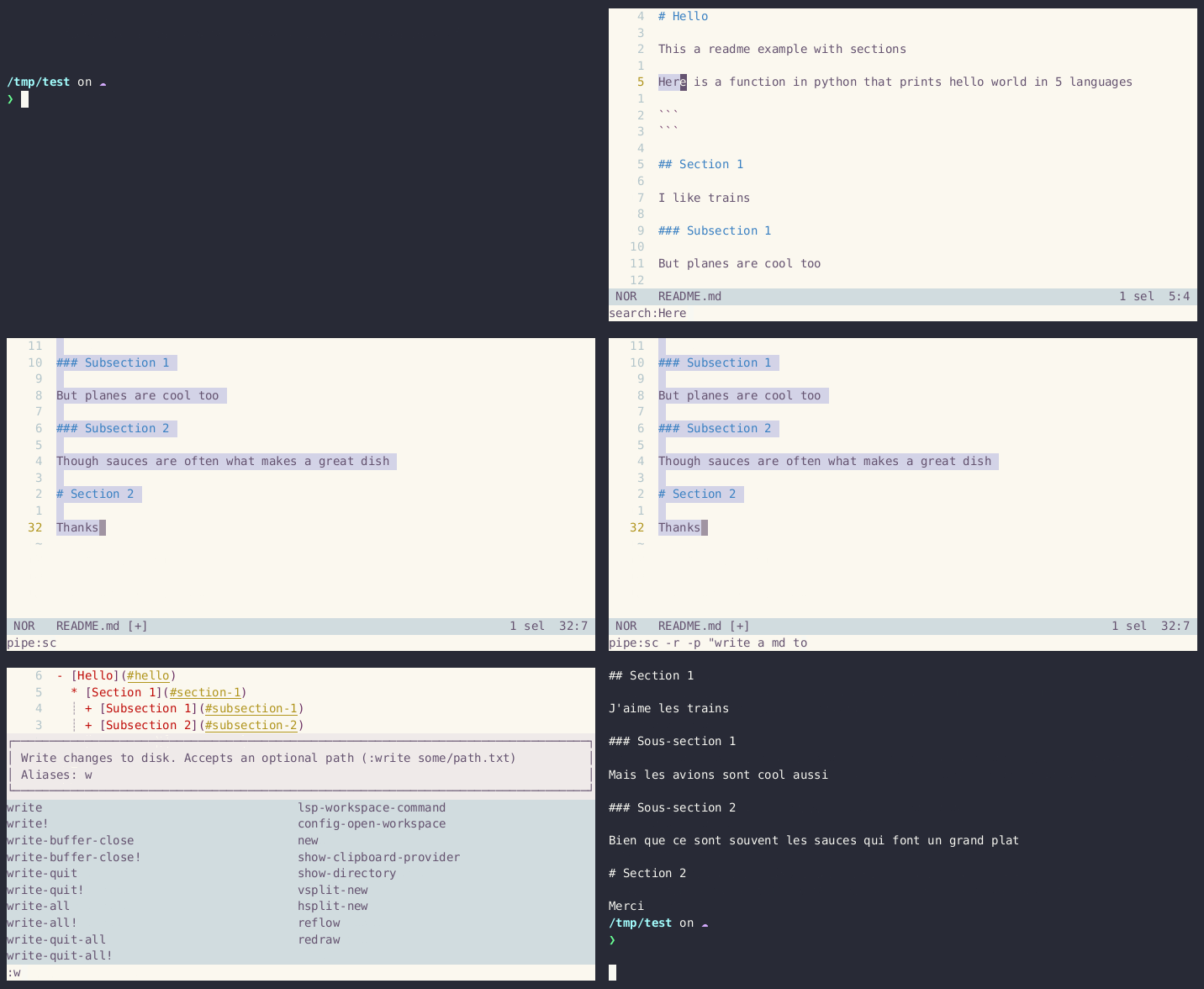
The key for a good integration in editors is a good default prompt (or set of) combined with the `-p` flag for precising the task at hand.
The `-r` flag can be used to decide whether to replace or extend the selection.
#### Vim
Start by selecting some text, then press `:`. You can then pipe the selection content to `smartcat`.
```
:'<,'>!sc -p "replace the versions with wildcards"
```
```
:'<,'>!sc -p "fix the typos in this text"
```
will **replace** the current selection with the same text transformed by the language model.
```
:'<,'>!sc -r write_test
```
will **append** at the end of the current selection the result of the language model.
#### Helix and Kakoune
Same concept, different shortcut, simply press the pipe key to redirect the selection to `smarcat`.
```
pipe:sc write_test -r
```
With some remapping you may have your most reccurrent action attached to few keystrokes e.g. `<leader>wt`!
#### Example Workflow
select a struct
```
:'<,'>!sc -r -p "implement the traits FromStr and ToString for this struct"
```
select the generated impl block
```
:'<,'>!sc -e -i "can you make it more concise?"
```
put the cursor at the bottom of the file and give example usage as input
```
:'<,'>!sc -e -p "now write tests for it knowing it's used like this" -f src/main.rs
```
...
These are only some ideas to get started, experiment for yourself!
# Configuration
- by default lives at `$HOME/.config/smartcat`
- the directory can be set using the `SMARTCAT_CONFIG_PATH` environement variable
- use `#[<input>]` as the placeholder for input when writing prompts
- the default model is `gpt-4` but I recommend trying the latest ones and see which one works best for you. I currently use `gpt-4-1106-preview`.
Three files are used:
`conversation.toml`
stores the latest chat if you need to continue it
`.api_configs.toml`
```toml
[openai] # each supported api has their own config section with api and url
api_key = "<your_api_key>"
default_model = "gpt-4-turbo-preview"
url = "https://api.openai.com/v1/chat/completions"
[mistral]
api_key_command = "pass mistral/api_key" # you can use a command to grab the key
default_model = "mistral-medium"
url = "https://api.mistral.ai/v1/chat/completions"
[anthropic]
api_key = "<yet_another_api_key>"
url = "https://api.anthropic.com/v1/messages"
default_model = "claude-3-opus-20240229"
```
`prompts.toml`
```toml
[default] # a prompt is a section
api = "openai" # must refer to an entry in the `.api_configs.toml` file
model = "gpt-4-1106-preview" # each prompt may define its own model
[[default.messages]] # then you can list messages
role = "system"
content = """\
You are an extremely skilled programmer with a keen eye for detail and an emphasis on readable code. \
You have been tasked with acting as a smart version of the cat unix program. You take text and a prompt in and write text out. \
For that reason, it is of crucial importance to just write the desired output. Do not under any circumstance write any comment or thought \
as you output will be piped into other programs. Do not write the markdown delimiters for code as well. \
Sometimes you will be asked to implement or extend some input code. Same thing goes here, write only what was asked because what you write will \
be directly added to the user's editor. \
Never ever write ``` around the code. \
Now let's make something great together!
"""
[empty] # always nice to have an empty prompt available
api = "openai"
messages = []
[write_tests]
api = "openai"
[[write_tests.messages]]
role = "system"
content = """\
You are an extremely skilled programmer with a keen eye for detail and an emphasis on readable code. \
You have been tasked with acting as a smart version of the cat unix program. You take text and a prompt in and write text out. \
For that reason, it is of crucial importance to just write the desired output. Do not under any circumstance write any comment or thought \
as you output will be piped into other programs. Do not write the markdown delimiters for code as well. \
Sometimes you will be asked to implement or extend some input code. Same thing goes here, write only what was asked because what you write will \
be directly added to the user's editor. \
Never ever write ``` around the code. \
Now let's make something great together!
"""
[[write_tests.messages]]
role = "user"
# the following placeholder string #[<input>] will be replaced by the input
# each message seeks it and replaces it
content ='''Write tests using pytest for the following code. Parametrize it if appropriate.
#[<input>]
'''
```
see [the config setup file](./src/config.rs) for more details.
## Developping
Some tests rely on environement variables and don't behave well with multi-threading. They are marked with `#[serial]` from the [serial_test](https://docs.rs/serial_test/latest/serial_test/index.html) crate.
### State of the project
Smartcat has reached an acceptable feature set. The focus is now on upgrading the codebase quality as I hadn't really touched rust since 2019 and it shows.
#### TODO
- [ ] make it available on homebrew