# slick - async ZSH prompt
[](https://crates.io/crates/slick)
[](https://github.com/nbari/slick/actions/workflows/build.yml)
[](https://codecov.io/gh/nbari/slick)
[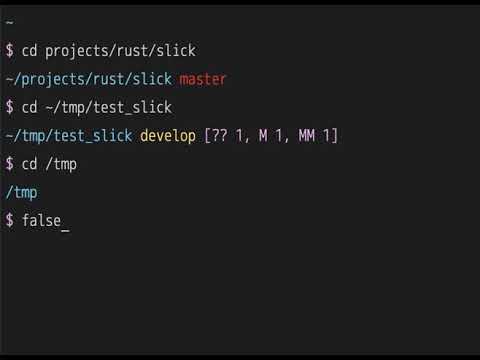](https://www.youtube.com/watch?v=ZFQ2bykpm6s)
## How to use
Install:
cargo install slick
To install cargo:
curl --proto '=https' --tlsv1.2 -sSf https://sh.rustup.rs | sh
If in Linux you may need install this:
apt install -y build-essential libssl-dev pkg-config
check your PATH `$HOME/.cargo/bin/slick`
### Quick Test (Development)
For quick testing or development:
```sh
# Build and test
cargo build --release
source load.zsh
```
`load.zsh` is the repo-local development wrapper. It prefers `./target/release/slick` and then sources [`slick.zsh`](slick.zsh).
### Production Setup
Source the reusable loader from your dotfiles:
```sh
source /path/to/slick/slick.zsh
```
`slick.zsh` is the canonical shell integration entrypoint. It:
- returns quietly in non-interactive shells
- honors `SLICK_PATH` if it is already set and executable
- otherwise resolves `slick` from `PATH` or `$HOME/.cargo/bin/slick`
- silently does nothing if the binary is not available
### Zinit
```sh
zinit light nbari/slick
```
Plugin managers can use [`slick.plugin.zsh`](slick.plugin.zsh), which simply delegates to [`slick.zsh`](slick.zsh).
### Dotfiles Example
If you already carry local `slick` customizations in your own `~/.zshrc` or `my-zsh.zsh`, keep the exports and replace the vendored loader block with one of these:
```sh
export SLICK_PROMPT_GIT_REMOTE_BEHIND=
export SLICK_PROMPT_GIT_REMOTE_AHEAD=
export SLICK_PROMPT_GIT_AUTH_SYMBOL=
source /path/to/slick/slick.zsh
```
```sh
export SLICK_PROMPT_GIT_REMOTE_BEHIND=
export SLICK_PROMPT_GIT_REMOTE_AHEAD=
export SLICK_PROMPT_GIT_AUTH_SYMBOL=
zinit light nbari/slick
```
If you already have your own `accept-line`, `zle-line-init`, or `zle-keymap-select` widgets, load them before `slick.zsh`. The loader preserves and chains existing widgets instead of replacing them.
### Cursor Shape Notes
`slick` emits a cursor-shape escape from the shell integration when Zsh regains control of the prompt. The default is `SLICK_PROMPT_CURSOR_SHAPE=4`, which selects a steady underline. Set `SLICK_PROMPT_CURSOR_SHAPE` to another supported value, or set it to an empty string to disable cursor-shape output entirely.
If you want to manage it yourself with the `DECSCUSR` escape sequence (`\e[Ps q`), these values are commonly supported:
```sh
# 0 blinking block
# 1 blinking block (default)
# 2 steady block
# 3 blinking underline
# 4 steady underline
# 5 blinking bar (xterm)
# 6 steady bar (xterm)
```
## 🔤 Font Setup
**Seeing boxes (□) instead of symbols?** You need a Nerd Font.
**Quick fix:**
1. Download a Nerd Font: https://www.nerdfonts.com/font-downloads
- Recommended: **Monoid Nerd Font** (clean, minimalist), JetBrainsMono Nerd Font, FiraCode Nerd Font
2. Install the font on your system
3. Configure your terminal to use it
4. Restart terminal
**Using Monoid Nerd Font?** Works great with slick's minimalist design!
**Don't want to install fonts?** Use Unicode or ASCII alternatives:
```bash
export SLICK_PROMPT_SYMBOL="→" # Unicode arrow
# or
export SLICK_PROMPT_SYMBOL=">" # ASCII
```
## Customizations
Slick can be customized using environment variables.
### Quick Start
```bash
# Disable git fetch for faster prompts (removes ~500ms auth check on first run)
export SLICK_PROMPT_GIT_FETCH=0
# Custom symbols
export SLICK_PROMPT_SYMBOL="❯"
export SLICK_PROMPT_VICMD_SYMBOL="❮"
# Custom colors
export SLICK_PROMPT_PATH_COLOR=blue
export SLICK_PROMPT_SYMBOL_COLOR=magenta
export SLICK_PROMPT_PYTHON_ENV_COLOR=7
export SLICK_PROMPT_DEVPOD_COLOR=7
export SLICK_PROMPT_AWS_COLOR=7
export SLICK_PROMPT_K8S_COLOR=7
# Toolbx marker
export SLICK_PROMPT_TOOLBOX_SYMBOL="▣"
export SLICK_PROMPT_TOOLBOX_COLOR=yellow
# Optional git branch prefix
export SLICK_PROMPT_GIT_BRANCH_SYMBOL=$'\ue0a0'
export SLICK_PROMPT_GIT_BRANCH_SYMBOL_COLOR=2
```
### All Environment Variables
#### General Settings
```bash
export SLICK_PROMPT_CMD_MAX_EXEC_TIME=5 # Max command time to display (seconds)
export SLICK_PROMPT_GIT_FETCH=1 # Enable git fetch (1=yes, 0/false/no/off=no)
export SLICK_PROMPT_NO_GIT_UNAME=0 # Hide git username (1=hide, 0=show)
export SLICK_PROMPT_NON_BREAKING_SPACE=$' ' # Non-breaking space character (default: U+00A0)
export SLICK_PROMPT_CURSOR_SHAPE=4 # Cursor shape sent by slick.zsh; empty disables
export SLICK_PROMPT_TRANSIENT=1 # Compact previous prompt in scrollback (0=disable)
export SLICK_PROMPT_SHORT_CONTEXT=0 # Shorten context markers like (aws prod) -> (aws)
export SLICK_PROMPT_SHORT_PATH=0 # Compact path like ~/p/r/slick (1=short, 0=full %~)
export SLICK_PROMPT_SHORT_TIMESTAMP=0 # Show only time in transient prompt (1=HH:MM:SS, 0=ISO8601)
```
#### Prompt Symbols
```bash
export SLICK_PROMPT_SYMBOL="$" # Main prompt symbol
export SLICK_PROMPT_VICMD_SYMBOL=">" # Vi command mode symbol
export SLICK_PROMPT_ROOT_SYMBOL="#" # Root user symbol
export SLICK_PROMPT_GIT_REMOTE_AHEAD="⇡" # Git ahead symbol
export SLICK_PROMPT_GIT_REMOTE_BEHIND="⇣" # Git behind symbol
export SLICK_PROMPT_GIT_AUTH_SYMBOL="🔒" # Git auth failed symbol
export SLICK_PROMPT_GIT_BRANCH_SYMBOL=$'\ue0a0' # Default; set to "" to disable
export SLICK_PROMPT_TOOLBOX_SYMBOL="▣" # Toolbx marker symbol
export SLICK_PROMPT_DEVPOD_SYMBOL=$'\uf487' # DevPod marker symbol
```
#### Colors
```bash
# Colors can be named (red, blue, etc.) or numbers (0-255)
export SLICK_PROMPT_AWS_COLOR=7 # AWS marker color
export SLICK_PROMPT_ERROR_COLOR=196 # Error message color
export SLICK_PROMPT_DEVPOD_COLOR=7 # DevPod marker color
export SLICK_PROMPT_K8S_COLOR=7 # Kubernetes marker color
export SLICK_PROMPT_PATH_COLOR=74 # Directory path color
export SLICK_PROMPT_PYTHON_ENV_COLOR=7 # Virtualenv/pyenv color
export SLICK_PROMPT_SYMBOL_COLOR=5 # Prompt symbol color
export SLICK_PROMPT_VICMD_COLOR=3 # Vi command mode color
export SLICK_PROMPT_ROOT_COLOR=1 # Root user color
export SLICK_PROMPT_SSH_COLOR=8 # SSH session color
export SLICK_PROMPT_TIME_ELAPSED_COLOR=3 # Command time color
export SLICK_PROMPT_TOOLBOX_COLOR=3 # Toolbx marker color
```
#### Git Colors
```bash
export SLICK_PROMPT_GIT_BRANCH_COLOR=3 # Branch name color
export SLICK_PROMPT_GIT_BRANCH_SYMBOL_COLOR=2 # Git branch symbol color
export SLICK_PROMPT_GIT_MAIN_BRANCH_COLOR=160 # main/master branch color
export SLICK_PROMPT_GIT_ACTION_COLOR=3 # Git action (merge, rebase) color
export SLICK_PROMPT_GIT_STATUS_COLOR=5 # Modified files color
export SLICK_PROMPT_GIT_STAGED_COLOR=7 # Staged files color
export SLICK_PROMPT_GIT_REMOTE_COLOR=6 # Remote status color
export SLICK_PROMPT_GIT_UNAME_COLOR=8 # Git username color
export SLICK_PROMPT_GIT_AUTH_COLOR=red # Git auth failed color
```
`SLICK_PROMPT_GIT_BRANCH_SYMBOL` is printed immediately before the branch name, for example ` main`. The default is ``. In `zsh`, you can set it safely with `export SLICK_PROMPT_GIT_BRANCH_SYMBOL=$'\ue0a0'`, or disable it with `export SLICK_PROMPT_GIT_BRANCH_SYMBOL=""`.
The branch symbol color comes from `SLICK_PROMPT_GIT_BRANCH_SYMBOL_COLOR`, which defaults to `2` (green). The branch text uses `SLICK_PROMPT_GIT_MAIN_BRANCH_COLOR` for `main`/`master`, and `SLICK_PROMPT_GIT_BRANCH_COLOR` for other branches. `SLICK_PROMPT_GIT_MASTER_BRANCH_COLOR` is still supported as a deprecated fallback alias for compatibility.
`PIPENV_ACTIVE_COLOR` is still honored as a legacy fallback, but `SLICK_PROMPT_PYTHON_ENV_COLOR` is the preferred setting for Python environments.
### Example Configurations
#### Minimal/Fast (no network calls)
```bash
export SLICK_PROMPT_GIT_FETCH=0 # No git fetch
export SLICK_PROMPT_NO_GIT_UNAME=1 # Hide username
export SLICK_PROMPT_SYMBOL=">" # Simple symbol
```
#### Colorful
```bash
export SLICK_PROMPT_SYMBOL="➜"
export SLICK_PROMPT_SYMBOL_COLOR=cyan
export SLICK_PROMPT_PATH_COLOR=blue
export SLICK_PROMPT_GIT_BRANCH_COLOR=yellow
export SLICK_PROMPT_ERROR_COLOR=red
```
#### Nerd Fonts (Monoid, JetBrainsMono, etc.)
⚠️ **Requires a Nerd Font** - Works great with Monoid Nerd Font, JetBrainsMono Nerd Font, FiraCode Nerd Font
```bash
# Example with Monoid Nerd Font or similar Nerd Fonts
export SLICK_PROMPT_SYMBOL="" # nf-oct-chevron_right
export SLICK_PROMPT_VICMD_SYMBOL="" # nf-oct-chevron_left
export SLICK_PROMPT_ROOT_SYMBOL="" # nf-fa-flash
export SLICK_PROMPT_GIT_AUTH_SYMBOL="" # nf-fa-lock
export SLICK_PROMPT_GIT_REMOTE_AHEAD="" # nf-md-arrow_up
export SLICK_PROMPT_GIT_REMOTE_BEHIND="" # nf-md-arrow_down
```
**Download Nerd Fonts:** https://www.nerdfonts.com/
These symbols work with any Nerd Font (Monoid, JetBrainsMono, FiraCode, Hack, etc.)
See more examples in [envrc](envrc).
## Prompt Preview
Use the preview helper to render the prompt with simulated Toolbx, DevPod, AWS, Kubernetes, and Python contexts while keeping your current `SLICK_PROMPT_*` settings:
```bash
just preview
just preview-watch
```
Optional overrides let you tune the sample names and branch data, including dedicated AWS profile/region and multi-kubeconfig previews:
```bash
SLICK_PREVIEW_BRANCH=main \
SLICK_PREVIEW_STATUS="M 2" \
SLICK_PREVIEW_TOOLBOX_NAME=toolbox \
SLICK_PREVIEW_DEVPOD_NAME=workspace \
SLICK_PREVIEW_AWS_PROFILE=prod \
SLICK_PREVIEW_AWS_REGION=eu-west-1 \
SLICK_PREVIEW_KUBECONFIG_PRIMARY=/tmp/dev-cluster \
SLICK_PREVIEW_KUBECONFIG_SECONDARY=/tmp/prod-cluster \
SLICK_PREVIEW_PYTHON_ENV=.venv \
just preview
```
The helper lives at `scripts/preview_prompt.zsh` and uses `print -P` so the prompt colors render as they would in `zsh`. It now shows dedicated AWS profile/region examples and both single-file and multi-file Kubernetes previews.
Additional control variables for the preview script:
| `SLICK_PREVIEW_BIN` | auto-detected | Path to the `slick` binary to use |
| `SLICK_PREVIEW_ELAPSED` | `0` | Simulated command elapsed time (seconds) |
| `SLICK_PREVIEW_INTERVAL` | `1` | Refresh interval in seconds for `preview-watch` |
## Transient Prompt
By default, slick rewrites the prompt you just used into a compact single-line form when you press Enter. The live prompt stays rich while you type; only the scrollback version is compacted. The transient form includes an RFC 3339 timestamp plus the key context markers, path, branch, and prompt symbol while omitting noisier git status details.
Use a shorter timestamp if you prefer:
```bash
export SLICK_PROMPT_SHORT_TIMESTAMP=1
```
Examples:
```text
2026-05-09T21:47:04+02:00 ~/p/r/slick sandbox $
21:47:04 ~/p/r/slick sandbox $
```
Disable it if you prefer the old behavior:
```bash
export SLICK_PROMPT_TRANSIENT=0
```
## Toolbx Detection
Slick detects when it is running inside Fedora Toolbx and shows the toolbox name before the path.
**Example:**
```bash
(▣ codex) ~/projects/slick main
❯
```
Configure the Toolbx marker:
```bash
export SLICK_PROMPT_TOOLBOX_SYMBOL="▣" # Default
export SLICK_PROMPT_TOOLBOX_COLOR=3 # Default
```
## DevPod Detection
Slick detects when `DEVPOD` is set and shows `DEVPOD_WORKSPACE_ID` before the path.
**Example:**
```bash
(<devpod-symbol> hfile) ~/projects/slick main
❯
```
If the default DevPod symbol does not render correctly in your README viewer, that is expected: `` is a Nerd Font private-use glyph. In `zsh`, set it safely with `export SLICK_PROMPT_DEVPOD_SYMBOL=$'\uf487'`, or disable it with `export SLICK_PROMPT_DEVPOD_SYMBOL=""`.
Configure the DevPod marker:
```bash
export SLICK_PROMPT_DEVPOD_SYMBOL=$'\uf487' # Default
export SLICK_PROMPT_DEVPOD_COLOR=7 # Default
```
## AWS Detection
Slick detects AWS context from environment variables. It prefers `AWS_PROFILE`, then `AWS_REGION`, then `AWS_DEFAULT_REGION`, and falls back to `(aws)` when only credential variables are present. The marker is text-only and rendered before the path.
**Examples:**
```bash
(aws prod) ~/projects/slick main
❯
(aws eu-central-1) ~/projects/slick main
❯
```
Configure the AWS marker color:
```bash
export SLICK_PROMPT_AWS_COLOR=7 # Default
```
## Kubernetes Detection
Slick detects Kubernetes context when `KUBECONFIG` is set. It uses the basename of the first kubeconfig path, so `/tmp/dev-cluster:/tmp/prod-cluster` renders as `(k8s dev-cluster)`. If the basename cannot be resolved, it falls back to `(k8s)`.
Configure the Kubernetes marker color:
```bash
export SLICK_PROMPT_K8S_COLOR=7 # Default
```
## 🔒 SSH Authentication Detection
Slick automatically detects when SSH remotes require authentication and displays a lock symbol (🔒).
**How it works (Streaming Async Prompts):**
- **Instant display**: Prompt shows immediately with cached auth status (from previous runs)
- **Async update**: If git fetch is enabled, auth check runs in background with 500ms grace period
- **Smart cache**: First run takes ~500ms to write cache, subsequent runs are instant with cached status
- **Cache-based**: Auth status is cached for 5 minutes in `~/.cache/slick/`
- **Non-blocking**: Uses tokio for true async I/O - no delays, no hanging
- **Smart timeout**: Git fetch has 5-second timeout to prevent indefinite waits
**Example:**
```bash
# cd into repo with SSH remote requiring auth
cd my-private-repo
# First time: ~500ms to check and write cache (shows auth_failed status)
# Subsequent prompts: instant 🔒 from cache (valid for 5 minutes)
# After cache expires (5 min): another ~500ms check to refresh cache
```
**Two-phase rendering:**
1. **Phase 1 (0ms)**: Display prompt immediately with all git info + cached auth status
2. **Phase 2 (async)**: Git status updates (~10-50ms), then git fetch checks auth (~500ms)
3. **Cache write**: Auth status written to cache for next prompt
Configure the lock symbol:
```bash
export SLICK_PROMPT_GIT_AUTH_SYMBOL="🔒" # Default
export SLICK_PROMPT_GIT_AUTH_COLOR=red # Default
```
See [TEST_README.md](TEST_README.md#test-auth-lock-detection) for testing instructions.
___
Inspired by:
* [pure](https://github.com/sindresorhus/pure)
* [purs](https://github.com/xcambar/purs)
* [zsh-efgit-prompt](https://github.com/ericfreese/zsh-efgit-prompt)