# slick - async ZSH prompt
[](https://crates.io/crates/slick)
[](https://github.com/nbari/slick/actions/workflows/build.yml)
[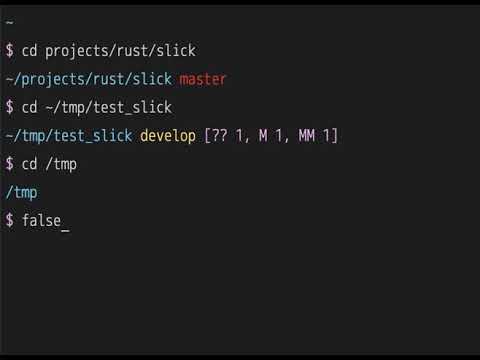](https://www.youtube.com/watch?v=ZFQ2bykpm6s)
## How to use
Install:
cargo install slick
To install cargo:
curl --proto '=https' --tlsv1.2 -sSf https://sh.rustup.rs | sh
If in Linux you may need install this:
apt install -y build-essential libssl-dev pkg-config
check your PATH `$HOME/.cargo/bin/slick`:w
Then add this to your `.zshrc`:
```sh
zle -N zle-keymap-select
zle -N zle-line-init
zmodload zsh/datetime
autoload -Uz add-zsh-hook
add-zsh-hook precmd slick_prompt_precmd
add-zsh-hook preexec slick_prompt_preexec
typeset -g slick_prompt_data
typeset -g slick_prompt_timestamp
SLICK_PATH=$HOME/.cargo/bin/slick
function slick_prompt_refresh {
local exit_status=$?
read -r -u $1 slick_prompt_data
PROMPT=$($SLICK_PATH prompt -k "$KEYMAP" -r $exit_status -d ${slick_prompt_data:-""} -t ${slick_prompt_timestamp:-$EPOCHSECONDS})
unset slick_prompt_timestamp
zle reset-prompt
# Remove the handler and close the fd
zle -F $1
exec {1}<&-
}
function zle-line-init zle-keymap-select {
PROMPT=$($SLICK_PATH prompt -k "$KEYMAP" -d ${slick_prompt_data:-""})
zle && zle reset-prompt
}
function slick_prompt_precmd() {
slick_prompt_data=""
local fd
exec {fd}< <($SLICK_PATH precmd)
zle -F $fd slick_prompt_refresh
}
function slick_prompt_preexec() {
slick_prompt_timestamp=$EPOCHSECONDS
# Set cursor style
# 0 ⇒ blinking block.
# 1 ⇒ blinking block (default).
# 2 ⇒ steady block.
# 3 ⇒ blinking underline.
# 4 ⇒ steady underline.
# 5 ⇒ blinking bar, xterm.
# 6 ⇒ steady bar, xterm.
echo -ne "\e[4 q";
}
```
## 🔤 Font Setup
**Seeing boxes (□) instead of symbols?** You need a Nerd Font.
**Quick fix:**
1. Download a Nerd Font: https://www.nerdfonts.com/font-downloads
- Recommended: **Monoid Nerd Font** (clean, minimalist), JetBrainsMono Nerd Font, FiraCode Nerd Font
2. Install the font on your system
3. Configure your terminal to use it
4. Restart terminal
**Using Monoid Nerd Font?** Works great with slick's minimalist design!
**Don't want to install fonts?** Use Unicode or ASCII alternatives:
```bash
export SLICK_PROMPT_SYMBOL="→" # Unicode arrow
# or
export SLICK_PROMPT_SYMBOL=">" # ASCII
```
## Customizations
Slick can be customized using environment variables.
### Quick Start
```bash
# Disable git fetch for faster prompts
export SLICK_PROMPT_GIT_FETCH=0
# Custom symbols
export SLICK_PROMPT_SYMBOL="❯"
export SLICK_PROMPT_VICMD_SYMBOL="❮"
# Custom colors
export SLICK_PROMPT_PATH_COLOR=blue
export SLICK_PROMPT_SYMBOL_COLOR=magenta
```
### All Environment Variables
#### General Settings
```bash
export SLICK_PROMPT_CMD_MAX_EXEC_TIME=5 # Max command time to display (seconds)
export SLICK_PROMPT_GIT_FETCH=1 # Enable git fetch (1=yes, 0=no)
export SLICK_PROMPT_NO_GIT_UNAME=0 # Hide git username (1=hide, 0=show)
export SLICK_PROMPT_NON_BREAKING_SPACE=" " # Non-breaking space character
```
#### Prompt Symbols
```bash
export SLICK_PROMPT_SYMBOL="$" # Main prompt symbol
export SLICK_PROMPT_VICMD_SYMBOL=">" # Vi command mode symbol
export SLICK_PROMPT_ROOT_SYMBOL="#" # Root user symbol
export SLICK_PROMPT_GIT_REMOTE_AHEAD="⇡" # Git ahead symbol
export SLICK_PROMPT_GIT_REMOTE_BEHIND="⇣" # Git behind symbol
export SLICK_PROMPT_GIT_AUTH_SYMBOL="🔒" # Git auth failed symbol
```
#### Colors
```bash
# Colors can be named (red, blue, etc.) or numbers (0-255)
export SLICK_PROMPT_ERROR_COLOR=196 # Error message color
export SLICK_PROMPT_PATH_COLOR=74 # Directory path color
export SLICK_PROMPT_SYMBOL_COLOR=5 # Prompt symbol color
export SLICK_PROMPT_VICMD_COLOR=3 # Vi command mode color
export SLICK_PROMPT_ROOT_COLOR=1 # Root user color
export SLICK_PROMPT_SSH_COLOR=8 # SSH session color
export SLICK_PROMPT_TIME_ELAPSED_COLOR=3 # Command time color
```
#### Git Colors
```bash
export SLICK_PROMPT_GIT_BRANCH_COLOR=3 # Branch name color
export SLICK_PROMPT_GIT_MASTER_BRANCH_COLOR=160 # master/main branch color
export SLICK_PROMPT_GIT_ACTION_COLOR=3 # Git action (merge, rebase) color
export SLICK_PROMPT_GIT_STATUS_COLOR=5 # Modified files color
export SLICK_PROMPT_GIT_STAGED_COLOR=7 # Staged files color
export SLICK_PROMPT_GIT_REMOTE_COLOR=6 # Remote status color
export SLICK_PROMPT_GIT_UNAME_COLOR=8 # Git username color
export SLICK_PROMPT_GIT_AUTH_COLOR=red # Git auth failed color
```
### Example Configurations
#### Minimal/Fast (no network calls)
```bash
export SLICK_PROMPT_GIT_FETCH=0 # No git fetch
export SLICK_PROMPT_NO_GIT_UNAME=1 # Hide username
export SLICK_PROMPT_SYMBOL=">" # Simple symbol
```
#### Colorful
```bash
export SLICK_PROMPT_SYMBOL="➜"
export SLICK_PROMPT_SYMBOL_COLOR=cyan
export SLICK_PROMPT_PATH_COLOR=blue
export SLICK_PROMPT_GIT_BRANCH_COLOR=yellow
export SLICK_PROMPT_ERROR_COLOR=red
```
#### Nerd Fonts (Monoid, JetBrainsMono, etc.)
⚠️ **Requires a Nerd Font** - Works great with Monoid Nerd Font, JetBrainsMono Nerd Font, FiraCode Nerd Font
```bash
# Example with Monoid Nerd Font or similar Nerd Fonts
export SLICK_PROMPT_SYMBOL="" # nf-oct-chevron_right
export SLICK_PROMPT_VICMD_SYMBOL="" # nf-oct-chevron_left
export SLICK_PROMPT_ROOT_SYMBOL="" # nf-fa-flash
export SLICK_PROMPT_GIT_AUTH_SYMBOL="" # nf-fa-lock
export SLICK_PROMPT_GIT_REMOTE_AHEAD="" # nf-md-arrow_up
export SLICK_PROMPT_GIT_REMOTE_BEHIND="" # nf-md-arrow_down
```
**Download Nerd Fonts:** https://www.nerdfonts.com/
These symbols work with any Nerd Font (Monoid, JetBrainsMono, FiraCode, Hack, etc.)
See more examples in [envrc](envrc).
___
Inspired by:
* [pure](https://github.com/sindresorhus/pure)
* [purs](https://github.com/xcambar/purs)
* [zsh-efgit-prompt](https://github.com/ericfreese/zsh-efgit-prompt)