
sks5










Lightweight Alpine-based Docker images. Rootless by default. Single static binary. Multi-user auth. Real-time dashboard.
Generated with VHS from
contrib/demo.tape. Regenerate locally:vhs contrib/demo.tape
flowchart LR
    Client["SSH Client<br/><code>ssh -D / -L</code>"]
    SOCKS["SOCKS5 Client"]
    Browser["Browser / curl"]

    Client --> SSH
    SOCKS --> SOCKS5
    Browser --> REST

    subgraph sks5["sks5 Server"]
        direction TB
        SSH["SSH :2222"]
        SOCKS5["SOCKS5 :1080"]
        REST["REST API + Dashboard :8080"]

        subgraph pipeline["Request Pipeline"]
            direction LR
            RateLimit["Rate Limit<br/>+ Ban Check"]
            Auth["Auth Engine<br/>Argon2 / PubKey / TOTP"]
            ACL["ACL Filter<br/>CIDR · FQDN · GeoIP"]
            Quota["Quota Guard<br/>BW + Conn Limits"]
        end

        SSH --> RateLimit
        SOCKS5 --> RateLimit
        RateLimit --> Auth
        Auth --> ACL
        ACL --> Quota

        Proxy["Proxy Engine<br/>Pool + Retry"]
        Quota --> Proxy

        Shell["Shell Emulator"]
        Auth -.->|shell session| Shell

        Metrics["Prometheus Metrics"]
        Audit["Audit Log + Webhooks"]
        Proxy -.-> Metrics
        Proxy -.-> Audit
    end

    Proxy --> T1["Target A"]
    Proxy --> T2["Target B"]
    Proxy --> TN["Target N"]
Dashboard
| Dark Theme | Light Theme |
|---|---|
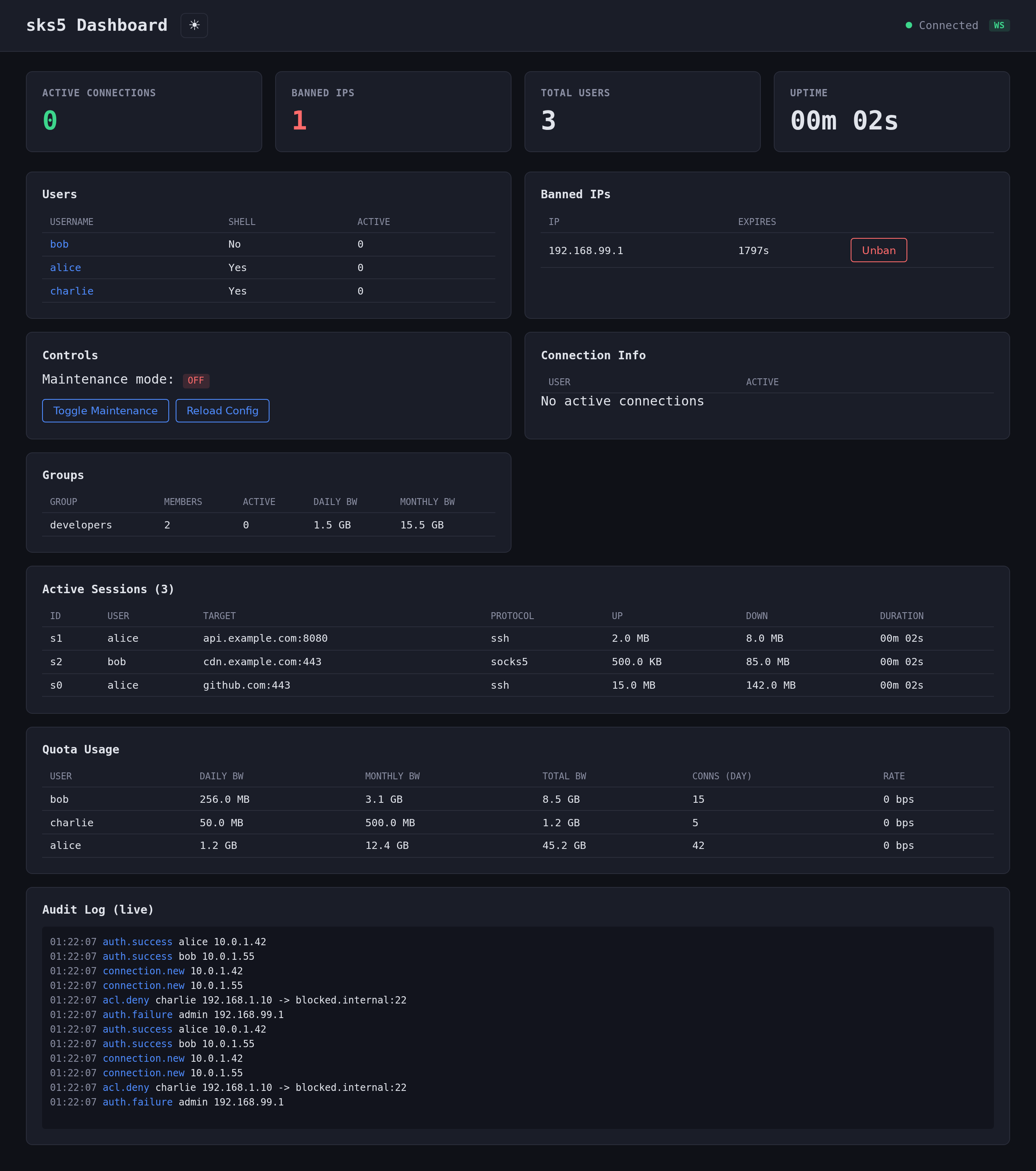 |
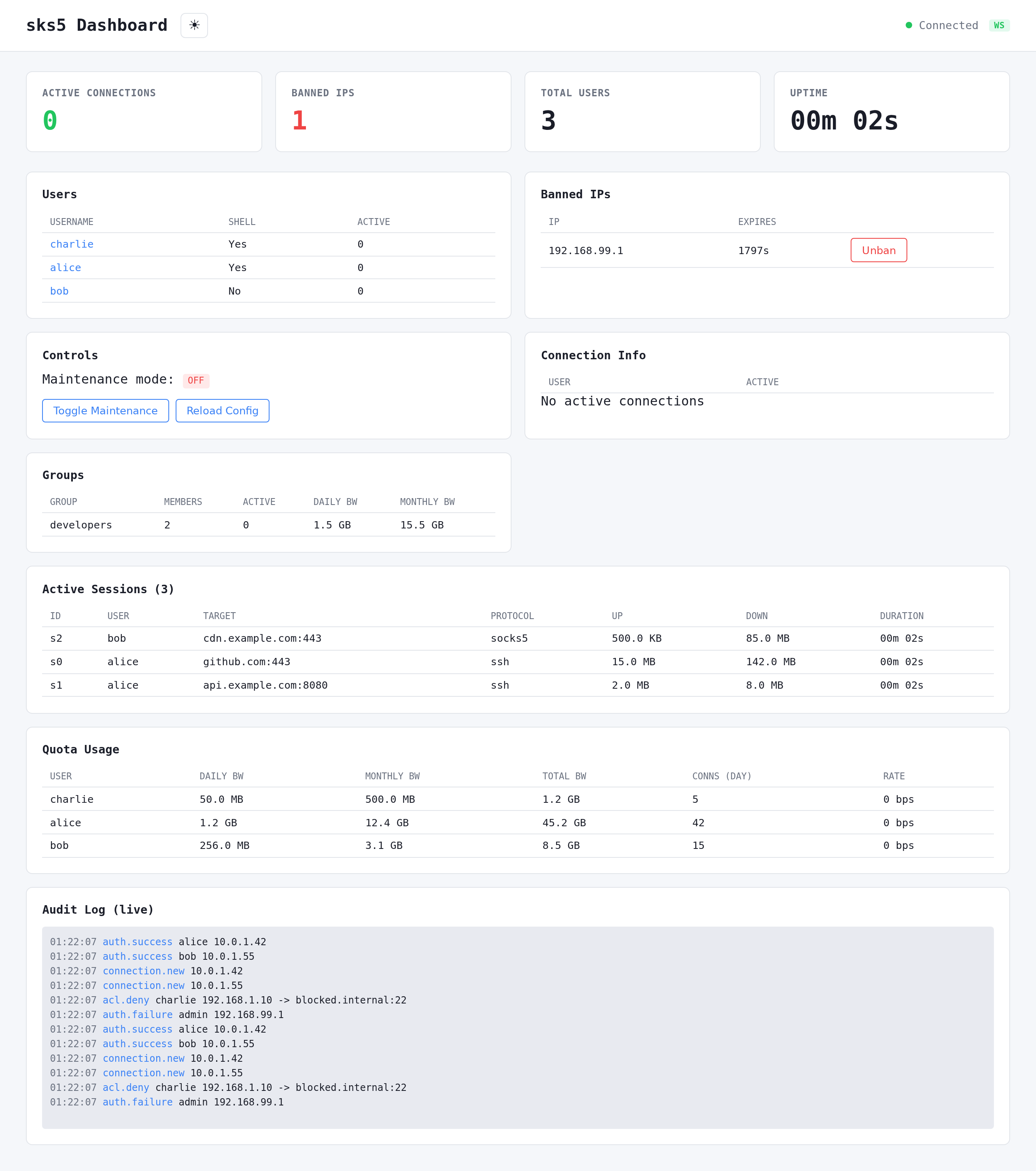 |
Feature Highlights
| Category | Features |
|---|---|
| :satellite: SSH & Proxy | SSH dynamic forwarding (-D), local forwarding (-L), standalone SOCKS5, TLS SOCKS5, connection pooling, smart retry with exponential backoff |
| :lock: Authentication | Argon2id passwords, SSH public keys, SSH certificates, TOTP 2FA, auth method chaining |
| :shield: Access Control | Per-user and global ACL, CIDR/FQDN wildcards, GeoIP country filtering, anti-SSRF guard, time-based access windows, account expiration |
| :no_entry: Security | Auto-ban (fail2ban-style), IP reputation scoring, pre-auth rate limiting, SFTP/SCP blocked, password zeroization, webhook SSRF protection |
| :computer: Shell | Virtual filesystem, show commands (status, bandwidth, connections, ACL, fingerprint, history), test/ping/resolve, bookmarks, aliases, tab completion, MOTD |
| :bar_chart: Observability | Prometheus metrics, structured audit logs, webhooks with HMAC (Slack/Discord/custom formats), alerting rules, real-time web dashboard with SSE |
| :wrench: Management | REST API, hot config reload, maintenance mode/windows, user groups and roles, quotas (bandwidth + connections), broadcast/kick |
| :whale: Container | Alpine image (~12 MB, default), scratch variant (~5 MB), rootless, static musl binary, multi-arch (amd64/arm64) |
| :rocket: Deployment | Docker, Podman, Kubernetes, bare metal, single static binary, cargo install |
Install
Docker / Podman (recommended)
sks5 ships as a ~12 MB Alpine image with shell access for easy debugging. A minimal scratch variant is also available.
# Docker
# Podman (rootless)
Available on both ghcr.io/galti3r/sks5 and dockerhubgalti3r/sks5:
| Tag | Base | Size | Shell | Use case |
|---|---|---|---|---|
latest / 0.x.x |
Alpine 3.21 | ~12 MB | Yes | Production (default) |
latest-alpine / 0.x.x-alpine |
Alpine 3.21 | ~12 MB | Yes | Alias for latest |
latest-scratch / 0.x.x-scratch |
scratch | ~5 MB | No | Minimal attack surface |
Cargo
Homebrew (macOS/Linux)
Binary (GitHub Releases)
Download pre-built static binaries from Releases:
sks5-x86_64-linux-gnu.tar.gzsks5-x86_64-linux-musl.tar.gz(static)sks5-aarch64-linux-gnu.tar.gzsks5-aarch64-linux-musl.tar.gz(static)
Quick Start
Zero config
# Auto-generated password
# With a chosen password
# With standalone SOCKS5 listener
# Save generated config for later
Interactive Wizard
Full-screen interactive wizard with 14 configuration sections (Server, Users, ACL, Security, Logging, Quotas, etc.). Navigate with arrow keys, configure all options, then save and validate.
For non-interactive use: sks5 wizard --non-interactive --output config.toml
Generate a config file
# Interactive (prompts for password)
# Non-interactive
Manual setup
# Edit config.toml with the generated hash
Connect
# SSH shell
# Dynamic forwarding (SOCKS5 via SSH)
# Local port forwarding
# Standalone SOCKS5
Configuration
See config.example.toml for a complete configuration reference.
Key sections
| Section | Required | Description |
|---|---|---|
[server] |
Yes | SSH/SOCKS5 listen addresses, host key, TLS, DNS cache, retry |
[[users]] |
Yes | User accounts (at least one required) |
[shell] |
No | Hostname, prompt, colors, autocomplete |
[limits] |
No | Connection limits, timeouts, idle warning |
[security] |
No | Auto-ban, IP guard, TOTP, IP reputation, CA keys |
[logging] |
No | Log level, format, audit log, flow logs, log_denied_connections |
[metrics] |
No | Prometheus endpoint |
[api] |
No | REST API listen address, bearer token |
[geoip] |
No | GeoIP country filtering |
[motd] |
No | Message of the Day template and colors |
[acl] |
No | Global ACL rules (inherited by all users) |
[[groups]] |
No | User groups for config inheritance |
[[webhooks]] |
No | HTTP webhooks with retry (Slack/Discord/custom formats) |
[alerting] |
No | Alert rules on bandwidth/connections/auth |
[[maintenance_windows]] |
No | Scheduled maintenance windows |
[connection_pool] |
No | TCP connection pooling |
[upstream_proxy] |
No | Upstream SOCKS5 proxy |
User groups
Groups allow shared configuration inheritance. Users reference groups by name:
[[]]
= "developers"
= 10240 # 10 Mbps
= true
= true
[]
= "allow"
= ["10.0.0.0/8:*"]
[[]]
= "alice"
= "$argon2id$..."
= "developers" # Inherits group settings
Inheritance order: user > group > global defaults. User fields override group, group overrides global.
MOTD templates
The MOTD supports variable substitution and ANSI colors:
[]
= true
= true
= """
Welcome {user}! Connected from {source_ip}
Role: {role} | Group: {group}
Bandwidth: {bandwidth_used}/{bandwidth_limit}
Server uptime: {uptime}
"""
Available variables: {user}, {auth_method}, {source_ip}, {connections}, {acl_policy}, {allowed}, {denied}, {expires_at}, {bandwidth_used}, {bandwidth_limit}, {last_login}, {uptime}, {version}, {group}, {role}.
Per-user/group MOTD overrides the global one.
| Command | Description | Permission |
|---|---|---|
ls / cd / pwd / cat |
Virtual filesystem navigation | Always |
whoami / id / hostname |
Identity commands | Always |
echo / env / uname |
Basic utilities | Always |
help / exit / clear |
Shell control | Always |
show connections |
Live active proxy connections count | show_connections |
show bandwidth |
Live bandwidth usage (daily/monthly/hourly/rate) | show_bandwidth |
show acl |
ACL rules for current user | show_acl |
show status |
Session info with live connection count | show_status |
show history |
Connection summary (today/this month) | show_history |
show fingerprint |
SSH key fingerprint (from auth) | show_fingerprint |
show quota |
Quota usage (daily/monthly bandwidth, connections) | show_quota |
test host:port |
TCP connectivity test | test_command |
ping host |
Simulated ICMP ping | ping_command |
resolve hostname |
DNS lookup | resolve_command |
bookmark add/list/del |
Manage host:port bookmarks | bookmark_command |
alias add/list/del |
Command aliases | alias_command |
Permissions are configured via shell_permissions at user, group, or global level. Additional MOTD visibility flags: show_role, show_group, show_expires, show_source_ip, show_auth_method, show_uptime, show_quota.
Quotas, rate limiting, and time-based access
[[]]
= "contractor"
= "$argon2id$..."
= "external"
= "2026-06-30T23:59:59Z"
= 5
[]
= 2
= 30
= 200
[]
= 1073741824 # 1 GB/day
= 1000
= 536870912 # 512 MB/hour rolling
[]
= "08:00-18:00"
= ["mon", "tue", "wed", "thu", "fri"]
= "Europe/Paris"
Server-level rate limiting in [limits]:
[]
= 100
= 50
= 500
Alerting
[]
= true
[[]]
= "high_bandwidth"
= "bandwidth_exceeded"
= 1073741824 # 1 GB
= 3600 # per hour
= "https://hooks.example.com/alert"
[[]]
= "brute_force"
= "auth_failures"
= 50
= 300
= [] # all users
Connection pooling and smart retry
[]
= true
= 10
= 60
[]
= 3 # retry 3 times on failure
= 500 # initial delay 500ms, doubles each retry, max 10s
sks5 supports full configuration via environment variables for Docker/Kubernetes deployments. See docker-compose.yml for complete examples.
| Variable | Description | Default |
|---|---|---|
SKS5_CONFIG |
Path to config file | -- |
SKS5_SSH_LISTEN |
SSH listen address | 0.0.0.0:2222 |
SKS5_SOCKS5_LISTEN |
Standalone SOCKS5 listen address | (disabled) |
SKS5_HOST_KEY_PATH |
SSH host key path | host_key |
SKS5_LOG_LEVEL |
Log level (trace/debug/info/warn/error) | info |
SKS5_LOG_FORMAT |
Log format (pretty/json) | pretty |
SKS5_SHUTDOWN_TIMEOUT |
Graceful shutdown timeout (seconds) | 30 |
SKS5_DNS_CACHE_TTL |
DNS cache TTL (-1=native, 0=off, N=seconds) | -1 |
SKS5_METRICS_ENABLED |
Enable Prometheus metrics | false |
SKS5_API_ENABLED |
Enable management API | false |
SKS5_API_TOKEN |
API bearer token | -- |
SKS5_BAN_ENABLED |
Enable auto-ban | true |
Multi-user mode (indexed):
| Variable | Description |
|---|---|
SKS5_USER_<N>_USERNAME |
Username (N = 0, 1, 2, ...) |
SKS5_USER_<N>_PASSWORD_HASH |
Argon2id password hash |
SKS5_USER_<N>_ALLOW_FORWARDING |
Allow forwarding (true/false) |
SKS5_USER_<N>_ALLOW_SHELL |
Allow shell access (true/false) |
SKS5_USER_<N>_TOTP_ENABLED |
Enable TOTP 2FA |
SKS5_USER_<N>_TOTP_SECRET |
Base32-encoded TOTP secret |
SKS5_USER_<N>_MAX_BANDWIDTH_KBPS |
Per-connection bandwidth cap |
SKS5_USER_<N>_MAX_AGGREGATE_BANDWIDTH_KBPS |
Total bandwidth cap |
Docker/K8s secrets (_FILE convention): append _FILE to read from a file path instead of the env var value directly.
| Variable | Supports _FILE |
|---|---|
SKS5_PASSWORD_HASH / SKS5_USER_<N>_PASSWORD_HASH |
Yes |
SKS5_API_TOKEN |
Yes |
SKS5_TOTP_SECRET / SKS5_USER_<N>_TOTP_SECRET |
Yes |
API
The HTTP API is protected by Bearer token (configured in api.token).
Usage
# Server status
# List users
# Toggle maintenance mode
# Open dashboard in browser (token is passed client-side for JS to use)
| Method | Endpoint | Description |
|---|---|---|
| GET | /api/health |
Health check with detail |
| GET | /api/status |
Server status (uptime, connections, users) |
| GET | /api/users |
List users (no password hashes) |
| GET | /api/users?details=true |
Extended user info with connection stats |
| GET | /api/users/{username} |
Full user detail (role, ACL, shell permissions, quotas, live stats) |
| GET | /api/connections |
Active connections per user |
| GET | /api/bans |
Banned IPs |
| DELETE | /api/bans/:ip |
Unban an IP |
| POST | /api/maintenance |
Toggle maintenance mode |
| POST | /api/reload |
Hot-reload config from disk |
| POST | /api/sse-ticket |
Generate short-lived HMAC ticket for SSE auth |
| POST | /api/kick/:username |
Disconnect all sessions for a user |
| POST | /api/broadcast |
Broadcast message to all connected users |
| GET | /api/quotas |
List all users' quota usage |
| GET | /api/quotas/:username |
Quota usage detail for a specific user |
| POST | /api/quotas/:username/reset |
Reset quota counters for a user |
| GET | /api/ssh-config |
Generate SSH config snippet (?user=&host=) |
| GET | /api/groups |
List user groups |
| GET | /api/groups/{name} |
Get group details |
| GET | /api/sessions |
List active sessions |
| GET | /api/sessions/{username} |
Get sessions for a user |
| GET | /api/backup |
Backup configuration |
| POST | /api/restore |
Restore configuration |
| GET | /api/events |
SSE stream (auth via ?ticket= HMAC ticket) |
| GET | /api/ws |
WebSocket real-time stream |
| GET | /dashboard |
Web dashboard (no auth required) |
Health Check
Returns exit code 0 if the SSH listener is accepting connections, 1 otherwise. Used in Docker healthchecks and monitoring.
Container
sks5 images are available in two variants, both multi-arch (amd64 + arm64):
| Variant | Image | Base | Size | Rootless |
|---|---|---|---|---|
| Alpine (default) | ghcr.io/galti3r/sks5:latest |
Alpine 3.21 | ~12 MB | UID 1000 |
| Scratch | ghcr.io/galti3r/sks5:latest-scratch |
scratch |
~5 MB | UID 65534 |
Quick Start with Docker / Podman
# Alpine (default) — production
# Shell access for debugging
# Scratch — minimal attack surface
# Podman (drop-in replacement)
Podman users: Replace
dockerwithpodmanin all commands. sks5 is fully compatible with rootless Podman.
Build Locally
Compose (Docker & Podman)
Multi-architecture builds
Build for both linux/amd64 and linux/arm64 (Apple Silicon, AWS Graviton, etc.).
Cross-compilation (fast, recommended):
QEMU emulation (slower, simpler):
Push to registry:
PUSH=true IMAGE_NAME=ghcr.io/user/sks5 IMAGE_TAG=v1.0.0
CI/CD
Multi-arch images are automatically built and pushed to GHCR on tag pushes via CI.
CI pipelines are provided for three platforms:
| Platform | Config | Pipeline |
|---|---|---|
| GitHub Actions | .github/workflows/ci.yml |
lint + test + coverage + security + SARIF + Docker |
| GitLab CI | .gitlab-ci.yml |
lint + test + coverage + security + Docker + Pages |
| Forgejo Actions | .forgejo/workflows/ci.yml |
lint + test + security + build + Docker |
All pipelines include:
cargo fmt --check+cargo clippy -D warnings+hadolintcargo test --all-targetscargo audit+cargo deny check- Multi-arch Docker build + push to registry
- Container vulnerability scanning (Trivy)
Testing
Test coverage
| Category | Tests | Description |
|---|---|---|
| Unit (lib) | 411 | Config, ACL, auth, shell, SOCKS5 protocol, proxy, security, show commands, session, alerting, quotas (split flow), groups, roles, connection pool, MOTD (allowed rules), IP reputation |
| Unit (standalone) | 1103 | Auth service, CLI, config validation, connectors, geoip, webhooks, pre-auth, source IP, audit, protocol fuzz, SSH keys, pubkey, DNS cache, metrics, SSE ticket, IP rate limiter, SOCKS5 TLS, webhook retry, API users, SOCKS5 timeout, proxy details, smart retry, time access |
| E2E - Auth | 5 | Password success/failure, unknown user, shell prompt, retry |
| E2E - Shell | 16 | Exec commands, dangerous commands blocked, interactive shell |
| E2E - Shell commands | 18 | show status/bandwidth/connections, help, echo, alias, unknown commands |
| E2E - ACL | 12 | FQDN, subnet/CIDR, combined rules, wildcard, IPv6 |
| E2E - Forwarding | 3 | Local forward, large data, denied user |
| E2E - Rejection | 8 | SFTP, reverse forward, bash/sh/nc/rsync blocked |
| E2E - SOCKS5 | 18 | Auth, forwarding, concurrency, anti-SSRF, standalone, timeout |
| E2E - API | 42 | Health, users, user detail, connections, bans, maintenance, auth, dashboard, SSE, groups, sessions, audit |
| E2E - Quota API | 10 | List quotas, user detail, reset, auth, enforcement, rate limiting, Prometheus metrics |
| E2E - Reload | 3 | Valid/invalid config reload, auth required |
| E2E - Status | 3 | Health, Prometheus metrics, maintenance mode |
| E2E - Autoban | 3 | Trigger after threshold, reject banned IP, no false positive |
| E2E - Audit | 2 | Auth success/failure audit events |
| E2E - Webhooks | 11 | Webhook delivery, retry logic, HMAC signatures |
| E2E - Performance | 5 | Throughput, latency, concurrent connections |
| E2E - SSH sessions | 3 | Session tracking and management |
| E2E - SSE/WS | 12 | SSE ticket auth, SSE payloads, WebSocket connections |
| E2E - Backup/Restore | 6 | Config backup and restore via API |
| E2E - CLI | 10 | CLI subcommands, completions, help output |
| E2E - Browser | 10 | Dashboard E2E with Chrome Headless (Podman), user detail modal |
| Total | ~1550+ | Unit + E2E test functions across all binaries |
Security
Hardening features
- Argon2id password hashing, SSH public key auth, SSH certificate auth
- TOTP 2FA (Google Authenticator / Authy compatible)
- Auth method chaining (e.g. require pubkey + password)
- Per-user ACL (CIDR, FQDN wildcard, port ranges)
- Auto-ban (fail2ban-style), global/per-user IP whitelist
- IP reputation scoring (dynamic, exponential decay)
- Per-IP pre-auth rate limiting (
max_new_connections_per_ip_per_minute) - Multi-window rate limiting (per-second/minute/hour, per-user and server-level)
- GeoIP country filtering
- Anti-SSRF IP guard (blocks RFC 1918, link-local, loopback, multicast)
- Webhook SSRF protection (private IP blocking + DNS rebinding guard)
- SOCKS5 password zeroization (secure memory handling)
- Pre-auth ban check (reject before auth attempt)
- Metrics cardinality protection (label cap prevents high-cardinality explosion)
- SSE ticket auth (HMAC-based short-lived tickets, no API token in URL)
- Virtual filesystem (zero real file exposure)
- SFTP/SCP/reverse forwarding blocked
- Time-based access control (per-user login hours/days)
- Account expiration with automatic denial
- Alpine-based container (~12 MB, default) and scratch variant (~5 MB, zero packages, no shell)
- Rootless container (runs as non-root UID)
- Static musl binary (no dynamic library dependencies)
- Multi-arch images signed with cosign (Sigstore keyless)
- SLSA provenance attestation via GitHub Actions
- CycloneDX SBOM included in releases
Security scanning
# Run all security checks
# Individual tools
Configuration: deny.toml (licenses, advisories, sources), .hadolint.yaml (Dockerfile lint).
Audit report
See docs/SECURITY-AUDIT.md for the full code security audit.
Architecture
See docs/ARCHITECTURE.md.
License
MIT