
Please check the build logs for more information.
See Builds for ideas on how to fix a failed build, or Metadata for how to configure docs.rs builds.
If you believe this is docs.rs' fault, open an issue.
Sidekick
Protects your unsaved Neovim work from Claude Code, Codex, opencode, pi, and Crush.
A conduit between Neovim and your AI agents — so they wait when you're typing.


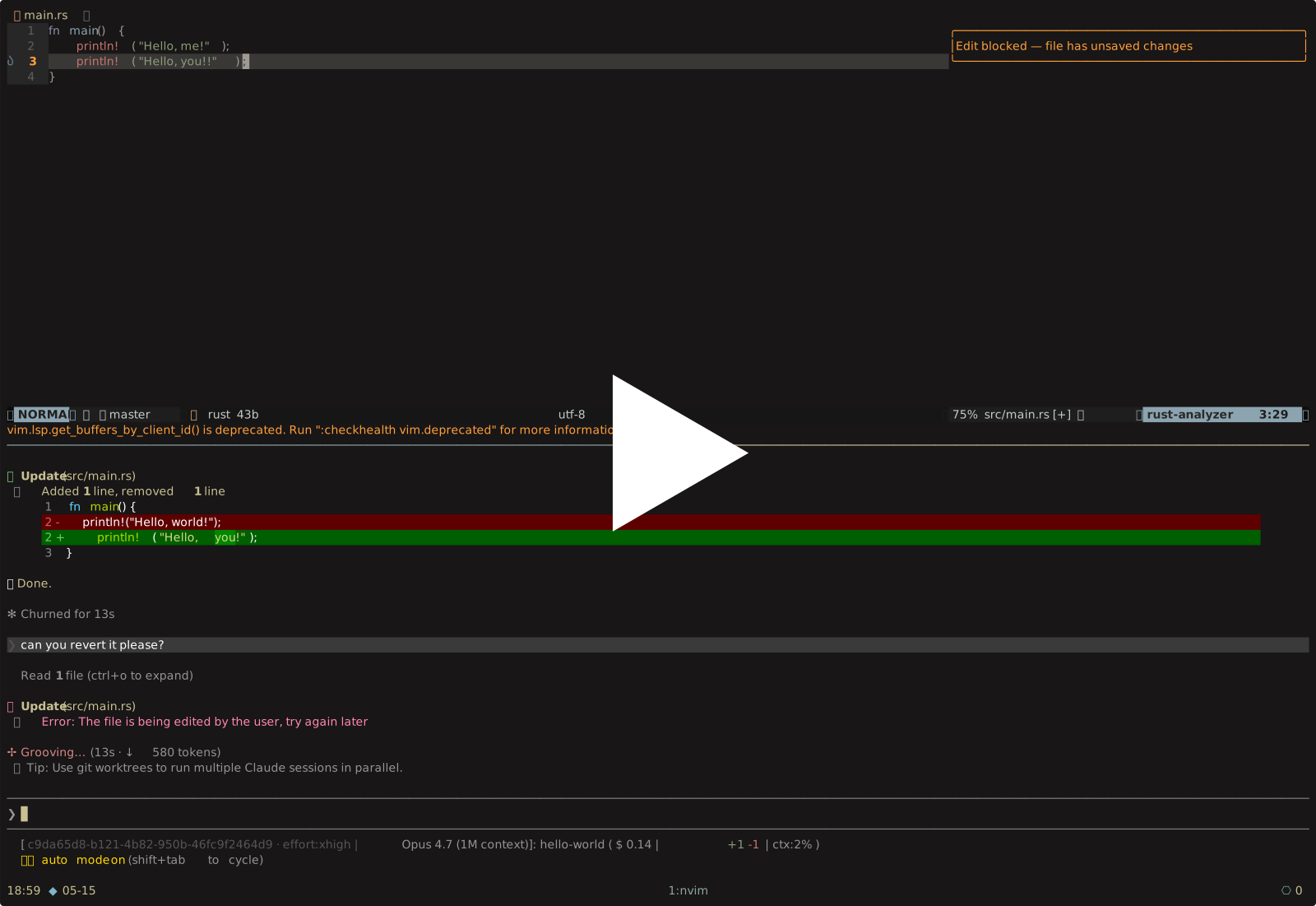
Skip to 1:20 to see a block. The same recording is bundled in the binary — run sidekick demo after install to play it back offline.
I do less and less coding by hand. The part I still do, I do very deliberately — pop open a new pane, open Neovim, start editing. It's a flow state I have to push myself into. The catch: Neovim is the only thing in the system that knows I'm typing. When the agent in the next pane decides the file I'm in needs editing, the buffer reloads, my work gone. So I decided to do something about it.
Sidekick is the conduit between the editor and the agents. When you have unsaved changes in a buffer, the agents wait — the edit is denied, your buffer is untouched. Save the file and the next attempt proceeds. No flags, no confirmation prompts, no policy file. The 99% of edits that don't conflict with you go through untouched.
The other direction works too: when the AI modifies a file you have open, Sidekick refreshes the buffer in every Neovim instance, cursor position preserved.
What changes in your workflow
- The AI waits on a file while you're editing it. You'll see this in Neovim:
Edit blocked — file has unsaved changes. - A file the AI edits while you have it open is auto-reloaded — no
:e!dance. - A current or recent visual selection in Neovim can be added to your next Claude Code, Codex, opencode, or pi prompt as context. Select code, type the prompt, hit enter.
Everything else stays the same. You keep using nvim like normal.
Install
sidekick init walks through every AI harness it finds on your machine, wires the hooks, sets up the nvim alias, and skips anything already done. Re-run any time — it's idempotent.
Verify with sidekick doctor. Want to wire things by hand? See docs/SETUP.md.
Harness support
| Harness | Edit deny | Buffer refresh | Selection injection |
|---|---|---|---|
| Claude Code | ✓ | ✓ | ✓ |
| Codex | ✓ | ✓ | ✓ |
| opencode | ✓ | ✓ | ✓ |
| pi | ✓ | ✓ | ✓ |
| Crush | ✓ | — | — |
A — is an upstream gap: the harness doesn't expose the hook event sidekick would need.
Usage
Just use nvim. The shell alias routes through sidekick so the hook can find your editor.
If you do not want the alias, run sidekick neovim <args> directly. You won't notice anything different until an agent tries to overwrite unsaved work, at which point sidekick denies the edit and tells the agent why.
Commands
| Command | What it does |
|---|---|
sidekick neovim <args> |
Launches Neovim with a per-directory socket the hook can find. Aliased as nvim. |
sidekick init |
Guided setup. Wires every detected AI harness and the nvim alias. |
sidekick doctor [--fix] [--no-color] |
Health check. --fix offers consent-gated repairs and shows the diff before writing. |
sidekick stats [--range week|month|year|all] |
Local activity dashboard from append-only JSONL events. Nothing leaves your machine. |
sidekick demo |
Plays the demo cast inline in a ratatui frame. Useful for showing a coworker. |
sidekick hook |
Internal. Your AI harness calls it; you don't. |
How it works
sidekick neovimlaunchesnvim --listen /tmp/<blake3(cwd)>-<pid>.sock. The socket path is deterministic per canonical working directory and unique per process, so the hook can find every Neovim instance opened from the same project.- Before file edits, the agent calls
sidekick hook. The hook globs/tmp/<blake3(cwd)>-*.sock, connects to reachable instances over msgpack-rpc with a short timeout, and asks whether each target is active with unsaved changes. If yes, the edit is denied; otherwise allowed. If no Neovim socket is found, sidekick degrades to allow. - After an edit lands, the hook tells every reachable Neovim instance with the file open to reload it. Cursor positions and visible windows are preserved.
- On prompt submission, if Neovim has a live visual selection or recent visual marks, sidekick returns fenced context blocks like
[Selected from path:start-end]. Claude Code and Codex receive them as additional context; the opencode and pi bridges append them to the submitted prompt text. - Decisions, refreshes, Neovim launches, and stats views are appended locally to
sidekick/events.jsonlunder your OS data directory. Writes are best-effort and never block the hook path.
No daemons, no background service. Just one CLI, Neovim RPC sockets in /tmp, and optional per-tool bridge files.
Requirements
Neovim with RPC + Lua support, a Unix-like system, and at least one supported AI harness: Claude Code, Codex, opencode, pi, or Crush. Rust/Cargo is required for cargo install.
What's next
Sidekick is Phase 1 — Neovim plus Claude Code, Codex, opencode, pi, and Crush. The longer arc is a small protocol any editor can expose and any AI tool can query before writing: is this file being edited by a human right now? PHILOSOPHY.md has the roadmap (Helix, Zed, VS Code; Aider, Goose, Continue) and the extension points.
Contributing
Issues and PRs welcome. New editor support starts at the Editor trait in src/editor.rs; new AI harness support starts at the Harness trait in src/harness.rs. PHILOSOPHY.md covers the architecture.