# Shell-AI
[](https://github.com/Deltik/shell-ai/releases)
[](https://crates.io/crates/shell-ai)
[](https://github.com/Deltik/shell-ai/releases)
[](https://crates.io/crates/shell-ai)
[](https://github.com/Deltik/shell-ai/actions/workflows/build.yaml)
[](https://opensource.org/licenses/MIT)
[](https://ko-fi.com/Deltik)
Describe what you want. Get shell commands. Or explain commands you don't understand.
## What It Does
**Suggest** (**`shell-ai suggest`** or **`shai`**) turns natural language into executable shell commands. Describe what you want in any language, and Shell-AI generates options you can run, copy, or refine.
**Explain** (**`shell-ai explain`**) breaks down shell commands into understandable parts, citing relevant man pages where possible. Useful for understanding unfamiliar commands or documenting scripts.
## Quick Start
```bash
# Install
cargo install shell-ai
ln -v -s shell-ai ~/.cargo/bin/shai # Optional: shorthand alias for `shell-ai suggest`
# Configure
export SHAI_API_PROVIDER=openai
export OPENAI_API_KEY=sk-...
# Generate commands from natural language
shai "ファイルを日付順に並べる" # Japanese: sort files by date
# Explain an existing command
shell-ai explain "tar -czvf archive.tar.gz /path/to/dir"
```
For guided configuration, run `shell-ai config init` to generate a documented config file.
## Installation
> [!TIP]
> After installing, [configure](#configuration) your AI provider. Then, consider adding [shell integrations](#shell-integration) for optional workflow enhancements.
### From GitHub Releases
Download prebuilt binaries from the [Releases page](https://github.com/Deltik/shell-ai/releases).
### From crates.io
```bash
cargo install shell-ai
ln -v -s shell-ai ~/.cargo/bin/shai
```
### From Source
```bash
git clone https://github.com/Deltik/shell-ai
cd shell-ai
cargo install --path .
# Installs to ~/.cargo/bin/shell-ai
ln -v -s shell-ai ~/.cargo/bin/shai
```
## Features
- **Single binary:** No Python, no runtime dependencies. Just one executable.
- **Shell integration:** Tab completions, aliases, and Ctrl+G keybinding via `shell-ai integration generate`.
- **Multilingual:** Describe tasks in any language the AI model understands. Responses adapt to your system locale.
- **Explain from `man`:** `shell-ai explain` includes grounding from man pages, not just AI knowledge.
- **Multiple providers:** OpenAI (including: Groq, Ollama, Mistral), Azure OpenAI, Anthropic (including: Claude API, Ollama v0.14.0+), and Claude Code CLI.
- **Interactive workflow:** Select a suggestion, then explain it, execute it, copy it, or revise it.
- **Vim-style navigation:** j/k keys, number shortcuts (1-9), arrow keys.
- **Scriptable:** `--frontend=noninteractive` and `--output-format=json` for automation. Pipe commands to `shell-ai explain` via stdin.
- **Configuration introspection:** `shell-ai config` shows current settings and their sources.
Run `shell-ai --help` for all options, or `shell-ai config schema` for the full configuration reference.
## Showcase
### Suggest: XKCD #1168 (tar)
| [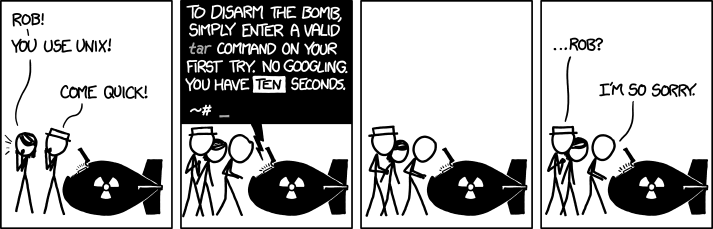](https://xkcd.com/1168/) |
### Explain: XKCD #1654 (Universal Install Script)
| [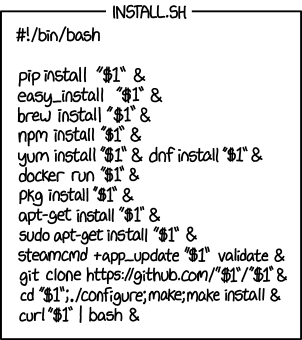](https://xkcd.com/1654/) |
### Multilingual
| [](docs/images/suggest-danish.gif) | [](docs/images/explain-french-sudo-last-command.png) |
### Challenging Tasks
| [](docs/images/suggest-perl.gif) | [](docs/images/explain-rsync.png) |
### JSON Output for Scripting
[](docs/images/explain-ls-lhtr.png)
### Configuration Introspection
[](docs/images/config.png)
## Configuration
Shell-AI loads configuration from multiple sources (highest priority first):
1. CLI flags (`--provider`, `--model`, etc.)
2. Environment variables (`SHAI_API_PROVIDER`, `OPENAI_API_KEY`, etc.)
3. Config file (see paths below)
4. Built-in defaults
Config file locations:
- **Linux**: `~/.config/shell-ai/config.toml`
- **macOS**: `~/Library/Application Support/shell-ai/config.toml`
- **Windows**: `%APPDATA%\shell-ai\config.toml`
Generate a documented config template:
```bash
shell-ai config init
```
Example config:
```toml
provider = "openai"
[openai]
api_key = "sk-..."
model = "gpt-4o"
```
### Providers
Set the provider in your config file:
- **Linux:** `~/.config/shell-ai/config.toml`
- **macOS:** `~/Library/Application Support/shell-ai/config.toml`
- **Windows:** `%APPDATA%\shell-ai\config.toml`
The provider-specific settings go in a section named after the provider.
```toml
provider = "openai" # or: anthropic, claudecode
```
Shell-AI may alternatively be configured by environment variables, which override the config file:
```bash
export SHAI_API_PROVIDER=openai # or: anthropic, claudecode
```
> [!TIP]
> Run `shell-ai config schema` to see all available settings and their defaults.
#### OpenAI-Compatible Providers
The providers `openai`, `groq`, `ollama`, and `mistral` all use the OpenAI chat completions API format.
They share the same configuration structure and support `temperature` and `max_tokens` settings.
| `openai` | `OPENAI_API_KEY`, `OPENAI_API_BASE`, `OPENAI_MODEL`, `OPENAI_MAX_TOKENS`, `OPENAI_ORGANIZATION` |
| `groq` | `GROQ_API_BASE`, `GROQ_API_KEY`, `GROQ_MODEL`, `GROQ_MAX_TOKENS` |
| `ollama` | `OLLAMA_API_BASE`, `OLLAMA_MODEL`, `OLLAMA_MAX_TOKENS` |
| `mistral` | `MISTRAL_API_KEY`, `MISTRAL_API_BASE`, `MISTRAL_MODEL`, `MISTRAL_MAX_TOKENS` |
> [!NOTE]
> `provider = "openai"` works with any OpenAI-compatible API.
>
> The main differences from other OpenAI-compatible providers are the default API base URLs and models.
<details>
<summary>OpenAI / Any OpenAI-compatible API</summary>
```toml
[openai]
api_key = "sk-..." # REQUIRED
# api_base = "https://api.openai.com" # change for compatible APIs
# model = ""
# max_tokens = ""
# organization = "" # for multi-org accounts
```
```bash
export OPENAI_API_KEY=sk-... # REQUIRED
# export OPENAI_API_BASE=https://api.openai.com
# export OPENAI_MODEL=
# export OPENAI_MAX_TOKENS=
# export OPENAI_ORGANIZATION=
```
</details>
<details>
<summary>Groq</summary>
```toml
[groq]
api_key = "gsk_..." # REQUIRED
# api_base = "https://api.groq.com/openai"
# model = ""
# max_tokens = ""
```
```bash
export GROQ_API_KEY=gsk_... # REQUIRED
# export GROQ_API_BASE=https://api.groq.com/openai
# export GROQ_MODEL=
# export GROQ_MAX_TOKENS=
```
</details>
<details>
<summary>Ollama</summary>
```toml
[ollama]
# api_base = "http://localhost:11434"
# model = ""
# max_tokens = ""
```
```bash
# export OLLAMA_API_BASE=http://localhost:11434
# export OLLAMA_MODEL=
# export OLLAMA_MAX_TOKENS=
```
</details>
<details>
<summary>Mistral</summary>
```toml
[mistral]
api_key = "your-key" # REQUIRED
# api_base = "https://api.mistral.ai"
# model = ""
# max_tokens = ""
```
```bash
export MISTRAL_API_KEY=your-key # REQUIRED
# export MISTRAL_API_BASE=https://api.mistral.ai
# export MISTRAL_MODEL=
# export MISTRAL_MAX_TOKENS=
```
</details>
#### Azure OpenAI
Azure OpenAI uses a different URL structure with deployment names instead of model selection.
<details>
<summary>Configuration</summary>
```toml
[azure]
api_key = "your-key" # REQUIRED
api_base = "https://your-resource.openai.azure.com" # REQUIRED
deployment_name = "your-deployment" # REQUIRED
# api_version = "2023-05-15"
# max_tokens = ""
```
```bash
export AZURE_API_KEY=your-key # REQUIRED
export AZURE_API_BASE=https://your-resource.openai.azure.com # REQUIRED
export AZURE_DEPLOYMENT_NAME=your-deployment # REQUIRED
# export OPENAI_API_VERSION=2023-05-15
# export AZURE_MAX_TOKENS=
```
</details>
#### Anthropic
Use the native Anthropic Messages API as an alternative to the OpenAI chat completions API.
> [!NOTE]
> `provider = "anthropic"` works with any Anthropic-compatible API, like [Ollama v0.14.0](https://github.com/ollama/ollama/releases/tag/v0.14.0).
<details>
<summary>Configuration</summary>
```toml
[anthropic]
api_key = "sk-ant-..." # REQUIRED
# api_base = "https://api.anthropic.com"
# model = ""
# max_tokens = ""
```
```bash
export ANTHROPIC_API_KEY=sk-ant-... # REQUIRED
# export ANTHROPIC_API_BASE=https://api.anthropic.com
# export ANTHROPIC_MODEL=
# export ANTHROPIC_MAX_TOKENS=
```
</details>
#### Claude Code
Uses the [Claude Code CLI](https://docs.anthropic.com/en/docs/claude-code) in non-interactive mode.
No API key or login configuration needed; Claude Code manages its own authentication.
<details>
<summary>Configuration</summary>
```toml
[claudecode]
# cli_path = "claude" # path to claude executable
# model = "" # e.g., haiku, sonnet, opus
```
```bash
# export CLAUDE_CODE_CLI_PATH=claude
# export CLAUDE_CODE_MODEL=
```
**Requirements:** Claude Code CLI installed and authenticated (`claude` command available in PATH, or specify full path via `cli_path`).
</details>
## Shell Integration
Shell-AI works well standalone, but integrating it into your shell enables any or all of these streamlined workflows:
- **Tab completion** for shell-ai commands
- **Aliases** as shorthands for shell-ai commands:
- **`??`** alias for `shell-ai suggest --`
- **`explain`** alias for `shell-ai explain --`
- **Ctrl+G** keybinding to transform the current line into a shell command
### Setup
Generate an integration file for your shell:
```bash
# Generate with default features (completions + aliases)
shell-ai integration generate bash
# Or with all features including Ctrl+G keybinding
shell-ai integration generate bash --preset full
```
Then add the source line to your shell config as instructed.
**Available presets:**
| Tab completions | ✓ | ✓ | ✓ |
| Aliases (`??`, `explain`) | | ✓ | ✓ |
| Ctrl+G keybinding for `suggest` | | | ✓ |
Default: `standard`
**Customization examples:**
```bash
# Standard preset plus keybinding
shell-ai integration generate zsh --preset standard --add keybinding
# Full preset without aliases
shell-ai integration generate fish --preset full --remove aliases
# Update all installed integrations after upgrading shell-ai
shell-ai integration update
# View available features and installed integrations
shell-ai integration list
```
**Alternative: eval on startup (not recommended)**
Instead of generating a static file, you can eval the integration directly in your shell config:
```bash
# Bash/Zsh
eval "$(shell-ai integration generate bash --preset=full --stdout)"
eval "$(shell-ai integration generate zsh --preset=full --stdout)"
# Fish
# PowerShell
This approach doesn't write files to your config directory and is always up to date after upgrading Shell-AI, but adds several milliseconds to shell startup (the time to spawn Shell-AI and generate the integration). The file-based approach above is recommended for faster startup.
### Performance
The shell integration file is pre-compiled to minimize shell startup overhead. Here are benchmark results comparing the overhead of each preset.
<details>
<summary>Benchmark Results</summary>
This is how much slower Shell-AI v0.5.1's shell integration makes shell startup:
#### Baseline: Sourcing an Empty File
| Bash | 1000 | 1.06ms | 1.18ms | 1.21ms | 1.31ms | 2.95ms | 1.27ms | 0.16ms |
| Zsh | 1000 | 1.17ms | 1.33ms | 1.37ms | 1.45ms | 4.87ms | 1.42ms | 0.23ms |
| Fish | 1000 | 0.78ms | 0.88ms | 0.91ms | 0.96ms | 2.69ms | 0.94ms | 0.12ms |
| PowerShell | 100 | 79.03ms | 81.09ms | 82.48ms | 84.91ms | 98.50ms | 83.32ms | 3.31ms |
#### Incremental Overhead (Above Baseline)
| Bash | minimal | +1.56ms |
| Bash | standard | +1.64ms |
| Bash | full | +2.11ms |
| Zsh | minimal | +1.98ms |
| Zsh | standard | +2.05ms |
| Zsh | full | +2.43ms |
| Fish | minimal | +2.42ms |
| Fish | standard | +2.56ms |
| Fish | full | +2.69ms |
| PowerShell | minimal | +20.30ms |
| PowerShell | standard | +21.67ms |
| PowerShell | full | +125.24ms |
#### Total Overhead (What Users Experience)
##### Bash
| blank (baseline) | 1000 | 1.06ms | 1.18ms | 1.21ms | 1.31ms | 2.95ms | 1.27ms | 0.16ms |
| minimal | 1000 | 2.55ms | 2.71ms | 2.78ms | 2.89ms | 3.85ms | 2.82ms | 0.17ms |
| standard | 1000 | 2.62ms | 2.76ms | 2.85ms | 2.98ms | 6.08ms | 2.91ms | 0.25ms |
| full | 1000 | 2.97ms | 3.22ms | 3.32ms | 3.47ms | 6.55ms | 3.38ms | 0.26ms |
##### Zsh
| blank (baseline) | 1000 | 1.17ms | 1.33ms | 1.37ms | 1.45ms | 4.87ms | 1.42ms | 0.23ms |
| minimal | 1000 | 3.03ms | 3.27ms | 3.35ms | 3.47ms | 5.07ms | 3.40ms | 0.20ms |
| standard | 1000 | 3.07ms | 3.32ms | 3.41ms | 3.55ms | 5.86ms | 3.47ms | 0.25ms |
| full | 1000 | 3.40ms | 3.69ms | 3.80ms | 3.94ms | 6.20ms | 3.85ms | 0.27ms |
##### Fish
| blank (baseline) | 1000 | 0.78ms | 0.88ms | 0.91ms | 0.96ms | 2.69ms | 0.94ms | 0.12ms |
| minimal | 1000 | 3.03ms | 3.19ms | 3.27ms | 3.44ms | 4.64ms | 3.36ms | 0.26ms |
| standard | 1000 | 3.15ms | 3.29ms | 3.40ms | 3.64ms | 5.50ms | 3.50ms | 0.29ms |
| full | 1000 | 3.30ms | 3.45ms | 3.53ms | 3.70ms | 5.58ms | 3.63ms | 0.27ms |
##### PowerShell
| blank (baseline) | 100 | 79.03ms | 81.09ms | 82.48ms | 84.91ms | 98.50ms | 83.32ms | 3.31ms |
| minimal | 100 | 96.98ms | 101.39ms | 103.04ms | 105.27ms | 118.27ms | 103.62ms | 3.95ms |
| standard | 100 | 99.77ms | 103.34ms | 104.47ms | 106.13ms | 115.67ms | 104.98ms | 3.12ms |
| full | 100 | 200.65ms | 205.15ms | 207.09ms | 209.94ms | 241.00ms | 208.55ms | 5.94ms |
#### Methodology
To reproduce these benchmarks, run `cargo run --package xtask -- bench-integration [sample_count]` from this repository.
</details>
## Migrating from Python Shell-AI
If you're coming from [ricklamers/shell-ai](https://github.com/ricklamers/shell-ai):
- **The provider is required.** Set `SHAI_API_PROVIDER` explicitly, as the default is no longer Groq.
- **`SHAI_SKIP_HISTORY` is removed.** Writing to shell history is no longer supported. The previous implementation made assumptions about the shell's history configuration. Shells don't expose history hooks to child processes, making this feature infeasible.
- **`SHAI_SKIP_CONFIRM` is deprecated.** Use `--frontend=noninteractive` or `SHAI_FRONTEND=noninteractive` as a more flexible alternative.
- **Context mode is deprecated.** The `--ctx` flag and `CTX` environment variable still work but are not recommended. The extra context from shell output tends to confuse the completion model rather than help it.
- **Model defaults differ.** Set `model` explicitly if you prefer a specific model.
## Contributing
Contributions welcome! Open an [issue](https://github.com/Deltik/shell-ai/issues) or [pull request](https://github.com/Deltik/shell-ai/pulls) at [Deltik/shell-ai](https://github.com/Deltik/shell-ai).
For changes to the original Python Shell-AI, head upstream to [ricklamers/shell-ai](https://github.com/ricklamers/shell-ai).
## Acknowledgments
This project began as a fork of [ricklamers/shell-ai](https://github.com/ricklamers/shell-ai) at [v0.4.4](https://github.com/Deltik/shell-ai/releases/tag/v0.4.4). Since [v0.5.0](https://github.com/Deltik/shell-ai/releases/tag/v0.5.0), it shares no code with the original—a complete [Ship of Theseus](https://en.wikipedia.org/wiki/Ship_of_Theseus) rebuild in Rust. The hull is new, but the spirit remains.
## License
Shell-AI is licensed under the MIT License. See [LICENSE](LICENSE) for details.