# shadowsocks
[](https://github.com/zonyitoo/shadowsocks-rust)
[](https://github.com/shadowsocks/shadowsocks-rust/actions/workflows/build-and-test.yml)
[](https://github.com/shadowsocks/shadowsocks-rust/actions/workflows/build-msrv.yml)
[](https://github.com/shadowsocks/shadowsocks-rust/actions/workflows/build-release.yml)
[](https://github.com/shadowsocks/shadowsocks-rust/actions/workflows/build-nightly-release.yml)
[](https://gurubase.io/g/shadowsocks)
[](https://crates.io/crates/shadowsocks-rust)
[](https://github.com/shadowsocks/shadowsocks-rust/releases)
[](https://archlinux.org/packages/extra/x86_64/shadowsocks-rust/)
[](https://aur.archlinux.org/packages/shadowsocks-rust-git)
[](https://github.com/NixOS/nixpkgs/tree/master/pkgs/tools/networking/shadowsocks-rust)
[](https://snapcraft.io/shadowsocks-rust)
[](https://formulae.brew.sh/formula/shadowsocks-rust#default)
[](https://ports.macports.org/port/shadowsocks-rust/)
This is a port of [shadowsocks](https://github.com/shadowsocks/shadowsocks).
shadowsocks is a fast tunnel proxy that helps you bypass firewalls.
| [**shadowsocks**](https://crates.io/crates/shadowsocks) | [](https://crates.io/crates/shadowsocks) [](https://docs.rs/shadowsocks) shadowsocks core protocol |
| [**shadowsocks-service**](https://crates.io/crates/shadowsocks-service) | [](https://crates.io/crates/shadowsocks-service) [](https://docs.rs/shadowsocks-service) Services for serving shadowsocks |
| [**shadowsocks-rust**](https://crates.io/crates/shadowsocks-rust) | [](https://crates.io/crates/shadowsocks-rust) Binaries running common shadowsocks services |
Related Projects:
- [spyophobia/shadowsocks-gtk-rs](https://github.com/spyophobia/shadowsocks-gtk-rs) A GUI on Linux for `sslocal` using GTK, [discussion](https://github.com/shadowsocks/shadowsocks-rust/issues/664)
- [honwen/openwrt-shadowsocks-rust](https://github.com/honwen/openwrt-shadowsocks-rust) OpenWRT solution for `sslocal`, [discussion](https://github.com/honwen/openwrt-shadowsocks-rust)
- [cg31/shadowsocks-windows-gui-rust](https://github.com/cg31/shadowsocks-windows-gui-rust) Windows GUI client, [discussion](https://github.com/shadowsocks/shadowsocks-rust/issues/375)
## Build & Install
### Optional Features
- `hickory-dns` - Uses [`hickory-resolver`](https://crates.io/crates/hickory-resolver) as DNS resolver instead of `tokio`'s builtin.
- `local-http` - Allow using HTTP protocol for `sslocal`
- `local-http-native-tls` - Support HTTPS with [`native-tls`](https://crates.io/crates/native-tls)
- `local-http-rustls` - Support HTTPS with [`rustls`](https://crates.io/crates/rustls)
- `local-tunnel` - Allow using tunnel protocol for `sslocal`
- `local-socks4` - Allow using SOCKS4/4a protocol for `sslocal`
- `local-redir` - Allow using redir (transparent proxy) protocol for `sslocal`
- `local-dns` - Allow using dns protocol for `sslocal`, serves as a DNS server proxying queries to local or remote DNS servers by ACL rules
- `local-fake-dns` - FakeDNS, allocating an IP address for each individual Query from a specific IP pool
- `local-tun` - [TUN](https://en.wikipedia.org/wiki/TUN/TAP) interface support for `sslocal`
- `local-online-config` - [SIP008](https://shadowsocks.org/doc/sip008.html) Online Configuration Delivery
- `stream-cipher` - Enable deprecated stream ciphers. WARN: stream ciphers are UNSAFE!
- `aead-cipher-extra` - Enable non-standard AEAD ciphers
- `aead-cipher-2022` - Enable AEAD-2022 ciphers ([SIP022](https://github.com/shadowsocks/shadowsocks-org/issues/196))
- `aead-cipher-2022-extra` - Enable AEAD-2022 extra ciphers (non-standard ciphers)
#### Memory Allocators
This project uses system (libc) memory allocator (Rust's default). But it also allows you to use other famous allocators by features:
- `jemalloc` - Uses [jemalloc](http://jemalloc.net/) as global memory allocator
- `mimalloc` - Uses [mi-malloc](https://microsoft.github.io/mimalloc/) as global memory allocator
- `tcmalloc` - Uses [TCMalloc](https://google.github.io/tcmalloc/overview.html) as global memory allocator. It tries to link system-wide tcmalloc by default, use vendored from source with `tcmalloc-vendored`.
- `snmalloc` - Uses [snmalloc](https://github.com/microsoft/snmalloc) as global memory allocator
- `rpmalloc` - Uses [rpmalloc](https://github.com/mjansson/rpmalloc) as global memory allocator
### **crates.io**
Install from [crates.io](https://crates.io/crates/shadowsocks-rust):
```bash
# Install from crates.io
cargo install shadowsocks-rust
```
then you can find `sslocal` and `ssserver` in `$CARGO_HOME/bin`.
### **Install using Homebrew**
For macOS and Linux, you can install it using [Homebrew](https://brew.sh/):
```bash
brew install shadowsocks-rust
```
### **Install using snap**
```bash
# Install from snapstore
snap install shadowsocks-rust
# List services
snap services shadowsocks-rust
# Enable and start shadowsocks-rust.sslocal-daemon snap service
snap start --enable shadowsocks-rust.sslocal-daemon
# Show generated systemd service status
systemctl status snap.shadowsocks-rust.sslocal-daemon.service
# Override generated systemd service (configure startup options)
systemctl edit snap.shadowsocks-rust.sslocal-daemon.service
## NOTE: you can pass args to sslocal:
## [Service]
## ExecStart=
## ExecStart=/usr/bin/snap run shadowsocks-rust.sslocal-daemon -b "127.0.0.1:1080" --server-url "ss://...."
# Restart generated systemd service to apply changes
systemctl restart snap.shadowsocks-rust.sslocal-daemon.service
# ... and show service status
systemctl status snap.shadowsocks-rust.sslocal-daemon.service
```
Default configuration file path probably is `/var/snap/shadowsocks-rust/common/etc/shadowsocks-rust/config.json`.
### **Download release**
Download static-linked build [here](https://github.com/shadowsocks/shadowsocks-rust/releases).
- Most of them are built with [cross](https://github.com/cross-rs/cross). Build environment details could be found in its README, such as glibc's version.
- `x86_64-apple-darwin`, `aarch64-apple-darwin` are built in github's `macos-latest` image. Information could be found in [here](https://docs.github.com/en/actions/using-github-hosted-runners/using-github-hosted-runners/about-github-hosted-runners).
- `x86_64-pc-windows-msvc` is built in github's `windows-latest` image. Information could be found in [here](https://docs.github.com/en/actions/using-github-hosted-runners/using-github-hosted-runners/about-github-hosted-runners).
### **Docker**
This project provided Docker images for the `linux/i386` and `linux/amd64` and `linux/arm64/v8` architectures.
> :warning: **Docker containers do not have access to IPv6 by default**: Make sure to disable IPv6 Route in the client or [enable IPv6 access to docker containers](https://docs.docker.com/config/daemon/ipv6/#use-ipv6-for-the-default-bridge-network).
#### Pull from GitHub Container Registry
Docker will pull the image of the appropriate architecture from our [GitHub Packages](https://github.com/orgs/shadowsocks/packages?repo_name=shadowsocks-rust).
```bash
docker pull ghcr.io/shadowsocks/sslocal-rust:latest
docker pull ghcr.io/shadowsocks/ssserver-rust:latest
```
#### Build on the local machine(Optional)
If you want to build the Docker image yourself, you need to use the [BuildX](https://docs.docker.com/buildx/working-with-buildx/).
```bash
docker buildx build -t shadowsocks/ssserver-rust:latest -t shadowsocks/ssserver-rust:v1.15.2 --target ssserver .
docker buildx build -t shadowsocks/sslocal-rust:latest -t shadowsocks/sslocal-rust:v1.15.2 --target sslocal .
```
#### Run the container
You need to mount the configuration file into the container and create an external port map for the container to connect to it.
```bash
docker run --name sslocal-rust \
--restart always \
-p 1080:1080/tcp \
-v /path/to/config.json:/etc/shadowsocks-rust/config.json \
-dit ghcr.io/shadowsocks/sslocal-rust:latest
docker run --name ssserver-rust \
--restart always \
-p 8388:8388/tcp \
-p 8388:8388/udp \
-v /path/to/config.json:/etc/shadowsocks-rust/config.json \
-dit ghcr.io/shadowsocks/ssserver-rust:latest
```
### **Deploy to Kubernetes**
This project provided yaml manifests for deploying to Kubernetes.
You can leverage k8s Service to expose traffic outside, like LoadBalancer or NodePort which gains more fine-grained compared with fixed host or port.
For a more interesting use case, you can use a Ingress(Istio, nginx, etc.) which routes the matched traffic to shadowsocks along with the real web service.
#### Using `kubectl`
`kubectl apply -f https://github.com/shadowsocks/shadowsocks-rust/raw/master/k8s/shadowsocks-rust.yaml`
You can change the config via editing the ConfigMap named `shadowsocks-rust`.
For more fine-grained control, use `helm`.
#### Using `helm`
`helm install my-release k8s/chart -f my-values.yaml`
Below is the common default values you can change:
```yaml
# This is the shadowsocks config which will be mount to /etc/shadowocks-rust.
# You can put arbitrary yaml here, and it will be translated to json before mounting.
servers:
- server: "::"
server_port: 8388
service_port: 80 # the k8s service port, default to server_port
password: mypassword
method: aes-256-gcm
fast_open: true
mode: tcp_and_udp
# plugin: v2ray-plugin
# plugin_opts: server;tls;host=github.com
# Whether to download v2ray and xray plugin.
downloadPlugins: false
# Name of the ConfigMap with config.json configuration for shadowsocks-rust.
configMapName: ""
service:
# Change to LoadBalancer if you are behind a cloud provider like aws, gce, or tke.
type: ClusterIP
# Bind shadowsocks port port to host, i.e., we can use host:port to access shawdowsocks server.
hostPort: false
replicaCount: 1
image:
repository: ghcr.io/shadowsocks/ssserver-rust
pullPolicy: IfNotPresent
# Overrides the image tag whose default is the chart appVersion.
tag: "latest"
```
### **Build from source**
Use cargo to build. NOTE: **RAM >= 2GiB**
```bash
cargo build --release
```
Then `sslocal` and `ssserver` will appear in `./target/(debug|release)/`, it works similarly as the two binaries in the official ShadowSocks' implementation.
```bash
make install TARGET=release
```
Then `sslocal`, `ssserver`, `ssmanager` and `ssurl` will be installed to `/usr/local/bin` (variable PREFIX).
For Windows users, if you have encountered any problem in building, check and discuss in [#102](https://github.com/shadowsocks/shadowsocks-rust/issues/102).
### **target-cpu optimization**
If you are building for your current CPU platform (for example, build and run on your personal computer), it is recommended to set `target-cpu=native` feature to let `rustc` generate and optimize code for the CPU running the compiler.
```bash
export RUSTFLAGS="-C target-cpu=native"
```
### **Build standalone binaries**
Requirements:
- Docker
```bash
./build/build-release
```
Then `sslocal`, `ssserver`, `ssmanager`, `ssservice` and `ssurl` will be packaged in
- `./build/shadowsocks-${VERSION}-stable.x86_64-unknown-linux-musl.tar.xz`
- `./build/shadowsocks-${VERSION}-stable.x86_64-pc-windows-gnu.zip`
Read `Cargo.toml` for more details.
For Linux with low GLIBC versions, set `CROSS_CONFIG` to CentOS based image:
```bash
export CROSS_CONFIG=Cross-centos.toml
```
## Getting Started
Generate a safe and secured password for a specific encryption method (`aes-128-gcm` in the example) with:
```bash
ssservice genkey -m "aes-128-gcm"
```
Create a ShadowSocks' configuration file. Example
```jsonc
{
"server": "my_server_ip",
"server_port": 8388,
"password": "rwQc8qPXVsRpGx3uW+Y3Lj4Y42yF9Bs0xg1pmx8/+bo=",
"method": "aes-256-gcm",
// ONLY FOR `sslocal`
// Delete these lines if you are running `ssserver` or `ssmanager`
"local_address": "127.0.0.1",
"local_port": 1080
}
```
Detailed explanation of the configuration file could be found in [shadowsocks' documentation](https://github.com/shadowsocks/shadowsocks/wiki). (Link to original project, not maintained anymore !)
> :warning: For snap installations, configuration file is most probably located in `/var/snap/shadowsocks-rust/common/etc/shadowsocks-rust/config.json` (see <https://github.com/shadowsocks/shadowsocks-rust/issues/621> / <https://github.com/shadowsocks/shadowsocks-rust/issues/1146>)
In shadowsocks-rust, we also have an extended configuration file format, which is able to define more than one server. You can also disable individual servers.
```jsonc
{
"servers": [
{
"server": "127.0.0.1",
"server_port": 8388,
"password": "rwQc8qPXVsRpGx3uW+Y3Lj4Y42yF9Bs0xg1pmx8/+bo=",
"method": "aes-256-gcm",
"timeout": 7200
},
{
"server": "127.0.0.1",
"server_port": 8389,
"password": "/dliNXn5V4jg6vBW4MnC1I8Jljg9x7vSihmk6UZpRBM=",
"method": "chacha20-ietf-poly1305"
},
{
"disabled": true,
"server": "eg.disable.me",
"server_port": 8390,
"password": "mGvbWWay8ueP9IHnV5F1uWGN2BRToiVCAWJmWOTLU24=",
"method": "chacha20-ietf-poly1305"
}
],
// ONLY FOR `sslocal`
// Delete these lines if you are running `ssserver` or `ssmanager`
"local_port": 1080,
"local_address": "127.0.0.1"
}
```
`sslocal` automatically selects the best server with the lowest latency and the highest availability.
Start Shadowsocks client and server with:
```bash
sslocal -c config.json
ssserver -c config.json
```
If you Build it with Cargo:
```bash
cargo run --bin sslocal -- -c config.json
cargo run --bin ssserver -- -c config.json
```
List all available arguments with `-h`.
## Usage
Start local client with configuration file
```bash
# Read local client configuration from file
sslocal -c /path/to/shadowsocks.json
```
### Socks5 Local client
```bash
# Pass all parameters via command line
sslocal -b "127.0.0.1:1080" -s "[::1]:8388" -m "aes-256-gcm" -k "hello-kitty" --plugin "v2ray-plugin" --plugin-opts "server;tls;host=github.com"
# Pass server with SIP002 URL
sslocal -b "127.0.0.1:1080" --server-url "ss://YWVzLTI1Ni1nY206cGFzc3dvcmQ@127.0.0.1:8388/?plugin=v2ray-plugin%3Bserver%3Btls%3Bhost%3Dgithub.com"
```
### HTTP Local client
```bash
sslocal -b "127.0.0.1:3128" --protocol http -s "[::1]:8388" -m "aes-256-gcm" -k "hello-kitty"
```
All parameters are the same as Socks5 client, except `--protocol http`.
### Tunnel Local client
```bash
# Set 127.0.0.1:8080 as the target for forwarding to
sslocal --protocol tunnel -b "127.0.0.1:3128" -f "127.0.0.1:8080" -s "[::1]:8388" -m "aes-256-gcm" -k "hello-kitty"
```
- `--protocol tunnel` enables local client Tunnel mode
- `-f "127.0.0.1:8080` sets the tunnel target address
### Transparent Proxy Local client
**NOTE**: It currently only supports
- Linux (with `iptables` targets `REDIRECT` and `TPROXY`)
- BSDs (with `pf`), such as OS X 10.10+, FreeBSD, ...
```bash
sslocal -b "127.0.0.1:60080" --protocol redir -s "[::1]:8388" -m "aes-256-gcm" -k "hello-kitty" --tcp-redir "redirect" --udp-redir "tproxy"
```
Redirects connections with `iptables` configurations to the port that `sslocal` is listening on.
- `--protocol redir` enables local client Redir mode
- (optional) `--tcp-redir` sets TCP mode to `REDIRECT` (Linux)
- (optional) `--udp-redir` sets UDP mode to `TPROXY` (Linux)
### Tun interface client
**NOTE**: It currently only supports
- Linux, Android
- macOS, iOS
- Windows
#### Linux
Create a Tun interface with name `tun0`
```bash
ip tuntap add mode tun tun0
ifconfig tun0 inet 10.255.0.1 netmask 255.255.255.0 up
```
Start `sslocal` with `--protocol tun` and binds to `tun0`
```bash
sslocal --protocol tun -s "[::1]:8388" -m "aes-256-gcm" -k "hello-kitty" --outbound-bind-interface lo0 --tun-interface-name tun0
```
#### macOS
```bash
sslocal --protocol tun -s "[::1]:8388" -m "aes-256-gcm" -k "hello-kitty" --outbound-bind-interface lo0 --tun-interface-address 10.255.0.1/24
```
It will create a Tun interface with address `10.255.0.1` and netmask `255.255.255.0`.
#### Windows
Download `wintun.dll` from [Wintun](https://www.wintun.net/), and place it in the folder with shadowsocks' runnable binaries, or in the system PATH.
```powershell
sslocal --protocol tun -s "[::1]:8388" -m "aes-256-gcm" -k "hello-kitty" --outbound-bind-interface "Ethernet 0" --tun-interface-name "shadowsocks"
```
### Local client for Windows Service
Compile it by enabling `--features "winservice"` (not included in the default build):
```bash
cargo build --release --bin "sswinservice" --features "winservice"
```
Install it as a Windows Service (PowerShell):
```powershell
New-Service -Name "shadowsocks-local-service" `
-DisplayName "Shadowsocks Local Service" `
-BinaryPathName "<Path\to>\sswinservice.exe local -c <Path\to>\local_config.json"
```
There are other ways to install `sswinservice` as a Windows Service, for example, the `sc` command.
As you may have noticed that the `-BinaryPathName` contains not only just the `sswinservice.exe`, but `local -c local_config.json`. These command line parameters will be used as the default parameter when the Windows Service starts. You can also start the service with customized parameters.
Learn more from [Microsoft's Document](https://learn.microsoft.com/en-us/dotnet/framework/windows-services/introduction-to-windows-service-applications).
The `sswinservice`'s parameter works exactly the same as `ssservice`. It supports `local`, `server` and `manager` subcommands.
### Server
```bash
# Read server configuration from file
ssserver -c /path/to/shadowsocks.json
# Pass all parameters via command line
ssserver -s "[::]:8388" -m "aes-256-gcm" -k "hello-kitty" --plugin "v2ray-plugin" --plugin-opts "server;tls;host=github.com"
```
### Server Manager
Supported [Manage Multiple Users](https://github.com/shadowsocks/shadowsocks/wiki/Manage-Multiple-Users) API:
- `add` - Starts a server instance
- `remove` - Deletes an existing server instance
- `list` - Lists all current running servers
- `ping` - Lists all servers' statistic data
NOTE: `stat` command is not supported. Because servers are running in the same process with the manager itself.
```bash
# Start it just with --manager-address command line parameter
ssmanager --manager-address "127.0.0.1:6100"
# For *nix system, manager can bind to unix socket address
ssmanager --manager-address "/tmp/shadowsocks-manager.sock"
# You can also provide a configuration file
#
# `manager_address` key must be provided in the configuration file
ssmanager -c /path/to/shadowsocks.json
# Create one server by UDP
echo 'add: {"server_port":8388,"password":"hello-kitty"}' | nc -u '127.0.0.1' '6100'
# Close one server by unix socket
echo 'remove: {"server_port":8388}' | nc -Uu '/tmp/shadowsocks-manager.sock'
```
For manager UI, check more details in the [shadowsocks-manager](https://github.com/shadowsocks/shadowsocks-manager) project.
Example configuration:
```jsonc
{
// Required option
// Address that ssmanager is listening on
"manager_address": "127.0.0.1",
"manager_port": 6100,
// Or bind to a Unix Domain Socket
"manager_address": "/tmp/shadowsocks-manager.sock",
"servers": [
// These servers will be started automatically when ssmanager is started
],
// Outbound socket binds to this IP address
// For choosing different network interface on the same machine
"local_address": "xxx.xxx.xxx.xxx",
// Other options that may be passed directly to new servers
}
```
## Configuration
```jsonc
{
// LOCAL: Listen address. This is exactly the same as `locals[0]`
// SERVER: Bind address for remote sockets, mostly used for choosing interface
// Don't set it if you don't know what's this for.
"local_address": "127.0.0.1",
"local_port": 1080,
// Extended multiple local configuration
"locals": [
{
// Basic configuration, a SOCKS5 local server
"local_address": "127.0.0.1",
"local_port": 1080,
// OPTIONAL. Setting the `mode` for this specific local server instance.
// If not set, it will derive from the outer `mode`
"mode": "tcp_and_udp",
// OPTIONAL. Authentication configuration file
// Configuration file document could be found in the next section.
"socks5_auth_config_path": "/path/to/auth.json",
// OPTIONAL. Instance specific ACL
"acl": "/path/to/acl/file.acl",
// OPTIONAL. macOS launchd activate socket
"launchd_tcp_socket_name": "TCPListener",
"launchd_udp_socket_name": "UDPListener"
},
{
// SOCKS5, SOCKS4/4a local server
"protocol": "socks",
// Listen address
"local_address": "127.0.0.1",
"local_port": 1081,
// OPTIONAL. Enables UDP relay
"mode": "tcp_and_udp",
// OPTIONAL. Customizing the UDP's binding address. Depending on `mode`, if
// - TCP is enabled, then SOCKS5's UDP Association command will return this address
// - UDP is enabled, then SOCKS5's UDP server will listen to this address.
"local_udp_address": "127.0.0.1",
"local_udp_port": 2081,
// OPTIONAL. macOS launchd activate socket
"launchd_tcp_socket_name": "TCPListener",
"launchd_udp_socket_name": "UDPListener"
},
{
// Tunnel local server (feature = "local-tunnel")
"protocol": "tunnel",
// Listen address
"local_address": "127.0.0.1",
"local_port": 5353,
// Forward address, the target of this tunnel
// In this example, this will build a `127.0.0.1:5353` -> `8.8.8.8:53` tunnel
"forward_address": "8.8.8.8",
"forward_port": 53,
// OPTIONAL. Customizing whether to start TCP and UDP tunnel
"mode": "tcp_only",
// OPTIONAL. macOS launchd activate socket
"launchd_tcp_socket_name": "TCPListener",
"launchd_udp_socket_name": "UDPListener"
},
{
// HTTP local server (feature = "local-http")
"protocol": "http",
// Listen address
"local_address": "127.0.0.1",
"local_port": 3128,
// OPTIONAL. macOS launchd activate socket
"launchd_tcp_socket_name": "TCPListener"
},
{
// DNS local server (feature = "local-dns")
// This DNS works like China-DNS, it will send requests to `local_dns` and `remote_dns` and choose by ACL rules
"protocol": "dns",
// Listen address
"local_address": "127.0.0.1",
"local_port": 53,
// OPTIONAL. DNS local server uses `tcp_and_udp` mode by default
"mode": "udp_only",
// Local DNS address, DNS queries will be sent directly to this address
"local_dns_address": "114.114.114.114",
// OPTIONAL. Local DNS's port, 53 by default
"local_dns_port": 53,
// Remote DNS address, DNS queries will be sent through ssserver to this address
"remote_dns_address": "8.8.8.8",
// OPTIONAL. Remote DNS's port, 53 by default
"remote_dns_port": 53,
// OPTIONAL. dns client cache size for fetching dns queries.
"client_cache_size": 5,
// OPTIONAL. macOS launchd activate socket
"launchd_tcp_socket_name": "TCPListener",
"launchd_udp_socket_name": "UDPListener"
},
{
// Tun local server (feature = "local-tun")
"protocol": "tun",
// Tun interface name
"tun_interface_name": "tun0",
// Tun interface address
//
// It has to be a host address in CIDR form
"tun_interface_address": "10.255.0.1/24"
},
{
// Transparent Proxy (redir) local server (feature = "local-redir")
"protocol": "redir",
// OPTIONAL: TCP type, may be different between platforms
// Linux/Android: redirect (default), tproxy
// FreeBSD/OpenBSD: pf (default), ipfw
// NetBSD/macOS/Solaris: pf (default), ipfw
"tcp_redir": "tproxy",
// OPTIONAL: UDP type, may be different between platforms
// Linux/Android: tproxy (default)
// FreeBSD/OpenBSD: pf (default)
"udp_redir": "tproxy"
},
{
// FakeDNS local server (feature = "local-fake-dns")
// FakeDNS is a DNS server that allocates an IPv4 / IPv6 address in a specific pool for each queries.
// Subsequence requests from the other local interfaces that the target addresses includes those allocated IP addresses,
// will be substituted back to their original domain name addresses.
// This feature is useful mostly for transparent proxy, which will allow the proxied domain names to be resolved remotely.
"protocol": "fake-dns",
// Listen address
"local_address": "127.0.0.1",
"local_port": 10053,
// IPv4 address pool (for A records)
"fake_dns_ipv4_network": "10.255.0.0/16",
// IPv6 address pool (for AAAA records)
"fake_dns_ipv6_network": "fdf2:e786:ab40:9d2f::/64",
// Persistent storage for all allocated DNS records
"fake_dns_database_path": "/var/shadowsocks/fakedns.db",
// OPTIONAL: Record expire duration in seconds, 10s by default
"fake_dns_record_expire_duration": 10
}
],
// Server configuration
// listen on :: for dual stack support, no need add [] around.
"server": "::",
// Change to use your custom port number
"server_port": 8388,
"method": "aes-256-gcm",
"password": "your-password",
"plugin": "v2ray-plugin",
"plugin_opts": "mode=quic;host=github.com",
"plugin_args": [
// Each line is an argument passed to "plugin"
"--verbose"
],
"plugin_mode": "tcp_and_udp", // SIP003u, default is "tcp_only"
// Server: TCP socket timeout in seconds.
// Client: TCP connection timeout in seconds.
// Omit this field if you don't have specific needs.
"timeout": 7200,
// Extended multiple server configuration
// LOCAL: Choosing the best server to connect dynamically
// SERVER: Creating multiple servers in one process
"servers": [
{
// Fields are the same as the single server's configuration
// Individual servers can be disabled
// "disabled": true,
"address": "0.0.0.0",
"port": 8389,
"method": "aes-256-gcm",
"password": "your-password",
"plugin": "...",
"plugin_opts": "...",
"plugin_args": [],
"plugin_mode": "...",
"timeout": 7200,
// Customized weight for local server's balancer
//
// Weight must be in [0, 1], default is 1.0.
// The higher weight, the server may rank higher.
"tcp_weight": 1.0,
"udp_weight": 1.0,
// OPTIONAL. Instance specific ACL
"acl": "/path/to/acl/file.acl",
},
{
// Same key as basic format "server" and "server_port"
"server": "0.0.0.0",
"server_port": 8388,
"method": "chacha20-ietf-poly1305",
// Read the actual password from environment variable PASSWORD_FROM_ENV
"password": "${PASSWORD_FROM_ENV}"
},
{
// AEAD-2022
"server": "::",
"server_port": 8390,
"method": "2022-blake3-aes-256-gcm",
"password": "3SYJ/f8nmVuzKvKglykRQDSgg10e/ADilkdRWrrY9HU=",
// For Server (OPTIONAL)
// Support multiple users with Extensible Identity Header
// https://github.com/Shadowsocks-NET/shadowsocks-specs/blob/main/2022-2-shadowsocks-2022-extensible-identity-headers.md
"users": [
{
"name": "username",
// User's password must have the same length as server's password
"password": "4w0GKJ9U3Ox7CIXGU4A3LDQAqP6qrp/tUi/ilpOR9p4="
}
],
// For Client (OPTIONAL)
// If EIH enabled, then "password" should have the following format: iPSK:iPSK:iPSK:uPSK
// - iPSK is one of the middle relay servers' PSK, for the last `ssserver`, it must be server's PSK ("password")
// - uPSK is the user's PSK ("password")
// Example:
// "password": "3SYJ/f8nmVuzKvKglykRQDSgg10e/ADilkdRWrrY9HU=:4w0GKJ9U3Ox7CIXGU4A3LDQAqP6qrp/tUi/ilpOR9p4="
},
{
"...": "Any other fields",
// Some optional fields for this specific server
// Outbound socket options
// Linux Only (SO_MARK)
"outbound_fwmark": 255,
// FreeBSD only (SO_USER_COOKIE)
"outbound_user_cookie": 255,
// `SO_BINDTODEVICE` (Linux), `IP_BOUND_IF` (BSD), `IP_UNICAST_IF` (Windows) socket option for outbound sockets
"outbound_bind_interface": "eth1",
// Outbound socket bind() to this IP (choose a specific interface)
"outbound_bind_addr": "11.22.33.44",
// Outbound UDP socket allows IP fragmentation (default false)
"outbound_udp_allow_fragmentation": false,
}
],
// Global configurations for UDP associations
"udp_timeout": 300, // Timeout for UDP associations (in seconds), 5 minutes by default
"udp_max_associations": 512, // Maximum UDP associations to be kept in one server, unlimited by default
// Options for Manager
"manager_address": "127.0.0.1", // Could be a path to UNIX socket, /tmp/shadowsocks-manager.sock
"manager_port": 5300, // Not needed for UNIX socket
// DNS server's address for resolving domain names
// For *NIX and Windows, it uses system's configuration by default
//
// Value could be IP address of DNS server, for example, "8.8.8.8".
// DNS client will automatically request port 53 with both TCP and UDP protocol.
//
// - system, uses system provided API (`getaddrinfo` on *NIX)
//
// It also allows some pre-defined well-known public DNS servers:
// - google (TCP, UDP)
// - cloudflare (TCP, UDP)
// - cloudflare_tls (TLS), enable by feature "dns-over-tls"
// - cloudflare_https (HTTPS), enable by feature "dns-over-https"
// - quad9 (TCP, UDP)
// - quad9_tls (TLS), enable by feature "dns-over-tls"
//
// The field is only effective if feature "hickory-dns" is enabled.
"dns": "google",
// Configure `cache_size` for "hickory-dns" ResolverOpts. Set to "0" to disable DNS cache.
"dns_cache_size": 0,
// Mode, could be one of the
// - tcp_only
// - tcp_and_udp
// - udp_only
"mode": "tcp_only",
// TCP_NODELAY
"no_delay": false,
// Enables `SO_KEEPALIVE` and set `TCP_KEEPIDLE`, `TCP_KEEPINTVL` to the specified seconds
"keep_alive": 15,
// Soft and Hard limit of file descriptors on *NIX systems
"nofile": 10240,
// Try to resolve domain name to IPv6 (AAAA) addresses first
"ipv6_first": false,
// Set IPV6_V6ONLY for all IPv6 listener sockets
// Only valid for locals and servers listening on `::`
"ipv6_only": false,
// Outbound socket options
// Linux Only (SO_MARK)
"outbound_fwmark": 255,
// FreeBSD only (SO_USER_COOKIE)
"outbound_user_cookie": 255,
// `SO_BINDTODEVICE` (Linux), `IP_BOUND_IF` (BSD), `IP_UNICAST_IF` (Windows) socket option for outbound sockets
"outbound_bind_interface": "eth1",
// Outbound socket bind() to this IP (choose a specific interface)
"outbound_bind_addr": "11.22.33.44",
// Outbound UDP socket allows IP fragmentation (default false)
"outbound_udp_allow_fragmentation": false,
// Balancer customization
"balancer": {
// MAX Round-Trip-Time (RTT) of servers
// The timeout seconds of each individual checks
"max_server_rtt": 5,
// Interval seconds between each check
"check_interval": 10,
// Interval seconds between each check for the best server
// Optional. Specify to enable shorter checking interval for the best server only.
"check_best_interval": 5
},
// SIP008 Online Configuration Delivery
// https://shadowsocks.org/doc/sip008.html
"online_config": {
"config_url": "https://path-to-online-sip008-configuration",
// Optional. Seconds between each update to config_url. Default to 3600s
"update_interval": 3600,
// Optional. Whitelist of plugins (RECOMMENDED for all users)
// SECURITY: To avoid executing untrusted commands loaded from config_url
"allowed_plugins": [
"v2ray-plugin"
]
},
// Service configurations
// Logger configuration
"log": {
// Default log level to use, if not overridden by `writers`, default is `0`
// Equivalent to `-v` command line option
"level": 1,
// Default log format to use, if not overridden by `writers`
"format": {
// Euiqvalent to `--log-without-time`, default is `false`
"without_time": false,
},
// Advanced logging configuration for configuring multiple writers
// A console writer will be configured by default.
// Set this to empty array `[]` to disable logging completely
"writers": [
{
// Configure a console writer
// The inner fields are optional, if not set, it will use the default values
// To minimally configure a console writer, simply write `"console": {}`.
"console": {
"level": 2,
"format": {
"without_time": false,
}
}
},
{
// Configure a file writer, useful when running as a Windows Service
"file": {
// `level` and `format` can also be set here, if not set, it will use the default values
// Required. Directory to store log files
"directory": "/var/log/shadowsocks-rust",
// Optional. Log rotation frequency, must be one of the following:
// - never (default): This will result in log file located at `directory/prefix.suffix`
// - daily: A new log file in the format of `directory/prefix.yyyy-MM-dd.suffix` will be created daily
// - hourly: A new log file in the format of `directory/prefix.yyyy-MM-dd-HH.suffix` will be created hourly
"rotation": "never",
// Optional. Prefix of log file, default is one of `sslocal`, `ssserver`, `ssmanager` depending on the service being run.
"prefix": "shadowsocks-rust",
// Optional. Suffix of log file, default is `log`
"suffix": "log",
// Optional. If set, keeps the last N log files
"max_files": 5
}
},
{
// Configure a syslog writer, only supported on *nix system
"syslog": {
// `level` and `format` can also be set here, if not set, it will use the default values
// Optional. Set the "identity" when calling openlog(). Use current service name by default.
"identity": "identity_name",
// Optional. Set the "facility" when calling openlog(). 1 (user-level messages) by default. See RFC5424.
"facility": 1
}
}
]
},
// Runtime configuration
"runtime": {
// `single_thread` or `multi_thread`
"mode": "multi_thread",
// Worker threads that are used in multi-thread runtime
"worker_count": 10
}
}
```
### SOCKS5 Authentication Configuration
The configuration file is set by `socks5_auth_config_path` in `locals`.
```jsonc
{
// Password/Username Authentication (RFC1929)
"password": {
"users": [
{
"user_name": "USERNAME in UTF-8",
"password": "PASSWORD in UTF-8"
}
]
}
}
```
### Environment Variables
- `SS_SERVER_PASSWORD`: A default password for servers that created from command line argument (`--server-addr`)
- `SS_SYSTEM_DNS_RESOLVER_FORCE_BUILTIN`: `"system"` DNS resolver force use system's builtin (`getaddrinfo` in *NIX)
## Supported Ciphers
### AEAD 2022 Ciphers
- `2022-blake3-aes-128-gcm`, `2022-blake3-aes-256-gcm`
- `2022-blake3-chacha20-poly1305`, `2022-blake3-chacha8-poly1305`
These Ciphers require `"password"` to be a Base64 string of key that have **exactly the same length** of Cipher's Key Size. It is recommended to use `ssservice genkey -m "METHOD_NAME"` to generate a secured and safe key.
### AEAD Ciphers
- `chacha20-ietf-poly1305`
- `aes-128-gcm`, `aes-256-gcm`
### Stream Ciphers
- `plain` or `none` (No encryption, only used for debugging or with plugins that ensure transport security)
<details><summary>Deprecated</summary>
<p>
- `table`
- `aes-128-cfb`, `aes-128-cfb1`, `aes-128-cfb8`, `aes-128-cfb128`
- `aes-192-cfb`, `aes-192-cfb1`, `aes-192-cfb8`, `aes-192-cfb128`
- `aes-256-cfb`, `aes-256-cfb1`, `aes-256-cfb8`, `aes-256-cfb128`
- `aes-128-ctr`
- `aes-192-ctr`
- `aes-256-ctr`
- `camellia-128-cfb`, `camellia-128-cfb1`, `camellia-128-cfb8`, `camellia-128-cfb128`
- `camellia-192-cfb`, `camellia-192-cfb1`, `camellia-192-cfb8`, `camellia-192-cfb128`
- `camellia-256-cfb`, `camellia-256-cfb1`, `camellia-256-cfb8`, `camellia-256-cfb128`
- `rc4-md5`
- `chacha20-ietf`
</p>
</details>
## ACL
`sslocal`, `ssserver`, and `ssmanager` support ACL file with syntax like [shadowsocks-libev](https://github.com/shadowsocks/shadowsocks-libev). Some examples could be found in [here](https://github.com/shadowsocks/shadowsocks-libev/tree/master/acl).
### Available sections
- For local servers (`sslocal`, `ssredir`, ...)
- Modes:
- `[bypass_all]` - ACL runs in `WhiteList` mode. Bypasses all addresses except those matched any rules.
- `[proxy_all]` - ACL runs in `BlackList` mode. Proxies all addresses except those matched any rules. (default)
- Rules:
- `[bypass_list]` - Rules for connecting directly
- `[proxy_list]` - Rules for connecting through proxies
- For remote servers (`ssserver`)
- Modes:
- `[reject_all]` - ACL runs in `WhiteList` mode. Rejects all clients except those matched any rules.
- `[accept_all]` - ACL runs in `BlackList` mode. Accepts all clients except those matched any rules. (default)
- `[outbound_block_all]` - Outbound ACL runs in `WhiteList` mode. Blockes all outbound addresses except those matched any rules.
- `[outbound_allow_all]` - Outbound ACL runs in `BlackList` mode. Allows all outbound addresses except those matched any rules. (default)
- Rules:
- `[white_list]` - Rules for accepted clients
- `[black_list]` - Rules for rejected clients
- `[outbound_block_list]` - Rules for blocking outbound addresses.
- `[outbound_allow_list]` - Rules for allowing outbound addresses.
### Example
```ini
# SERVERS
# For ssserver, accepts requests from all clients by default
[accept_all]
# Blocks these clients
[black_list]
1.2.3.4
127.0.0.1/8
# Disallow these outbound addresses
[outbound_block_list]
127.0.0.1/8
::1
# Using regular expression
^[a-z]{5}\.baidu\.com
# Match exactly
|baidu.com
# Match with subdomains
# |☃-⌘.com - WRONG
|xn----dqo34k.com
# ||джpумлатест.bрфa - WRONG
# CLIENTS
# For sslocal, ..., bypasses all targets by default
[bypass_all]
# Proxy these addresses
[proxy_list]
```
## Useful Tools
1. `ssurl` is for encoding and decoding ShadowSocks URLs (SIP002). Example:
```plain
ss://YWVzLTI1Ni1jZmI6cGFzc3dvcmQ@127.0.0.1:8388/?plugin=obfs-local%3Bobfs%3Dhttp%3Bobfs-host%3Dwww.baidu.com
```
## Notes
It supports the following features:
- [x] SOCKS5 CONNECT command
- [x] SOCKS5 UDP ASSOCIATE command (partial)
- [x] SOCKS4/4a CONNECT command
- [x] Various crypto algorithms
- [x] Load balancing (multiple servers) and server delay checking
- [x] [SIP004](https://github.com/shadowsocks/shadowsocks-org/issues/30) AEAD ciphers
- [x] [SIP003](https://github.com/shadowsocks/shadowsocks-org/issues/28) Plugins
- [x] [SIP003u](https://github.com/shadowsocks/shadowsocks-org/issues/180) Plugin with UDP support
- [x] [SIP002](https://github.com/shadowsocks/shadowsocks-org/issues/27) Extension ss URLs
- [x] [SIP022](https://github.com/shadowsocks/shadowsocks-org/issues/196) AEAD 2022 ciphers
- [x] HTTP Proxy Supports ([RFC 7230](http://tools.ietf.org/html/rfc7230) and [CONNECT](https://tools.ietf.org/html/draft-luotonen-web-proxy-tunneling-01))
- [x] Defend against replay attacks, [shadowsocks/shadowsocks-org#44](https://github.com/shadowsocks/shadowsocks-org/issues/44)
- [x] Manager APIs, supporting [Manage Multiple Users](https://github.com/shadowsocks/shadowsocks/wiki/Manage-Multiple-Users)
- [x] ACL (Access Control List)
- [x] Support HTTP/HTTPS Proxy protocol
## TODO
- [x] Documentation
- [x] Extend configuration format
- [x] Improved logging format (waiting for the new official log crate)
- [x] Support more ciphers without depending on `libcrypto` (waiting for an acceptable Rust crypto lib implementation)
- [x] Windows support.
- [x] Build with stable `rustc` ~~(blocking by `crypto2`)~~.
- [x] Support HTTP Proxy protocol
- [x] AEAD ciphers. (proposed in [SIP004](https://github.com/shadowsocks/shadowsocks-org/issues/30), still under discussion)
- [x] Choose server based on delay #152
## License
[The MIT License (MIT)](https://opensource.org/licenses/MIT)
Copyright (c) 2014 Y. T. CHUNG
Permission is hereby granted, free of charge, to any person obtaining a copy
of this software and associated documentation files (the "Software"), to deal
in the Software without restriction, including without limitation the rights
to use, copy, modify, merge, publish, distribute, sublicense, and/or sell
copies of the Software, and to permit persons to whom the Software is
furnished to do so, subject to the following conditions:
The above copyright notice and this permission notice shall be included in
all copies or substantial portions of the Software.
THE SOFTWARE IS PROVIDED "AS IS", WITHOUT WARRANTY OF ANY KIND, EXPRESS OR
IMPLIED, INCLUDING BUT NOT LIMITED TO THE WARRANTIES OF MERCHANTABILITY,
FITNESS FOR A PARTICULAR PURPOSE AND NONINFRINGEMENT. IN NO EVENT SHALL THE
AUTHORS OR COPYRIGHT HOLDERS BE LIABLE FOR ANY CLAIM, DAMAGES OR OTHER
LIABILITY, WHETHER IN AN ACTION OF CONTRACT, TORT OR OTHERWISE, ARISING FROM,
OUT OF OR IN CONNECTION WITH THE SOFTWARE OR THE USE OR OTHER DEALINGS IN
THE SOFTWARE.
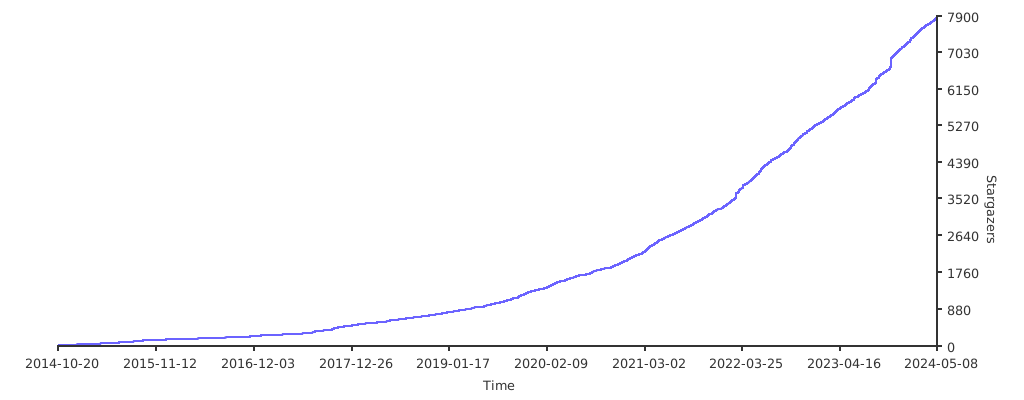
## Stargazers over time
[](https://starchart.cc/shadowsocks/shadowsocks-rust)