<div align="center">
<img src="https://raw.githubusercontent.com/SeaQL/sea-streamer/master/docs/SeaStreamer Banner.png"/>
<h1>SeaStreamer</h1>
<p>
<strong>🌊 A real-time stream processing toolkit for Rust</strong>
</p>
[](https://crates.io/crates/sea-streamer)
[](https://docs.rs/sea-streamer)
[](https://github.com/SeaQL/sea-streamer/actions/workflows/rust.yml)
</div>
SeaStreamer is a toolkit to help you build real-time stream processors in Rust.
## Features
1. Async
SeaStreamer provides an async API, and it supports both `tokio` and `async-std`. In tandem with other async Rust libraries,
you can build highly concurrent stream processors.
2. Generic
We provide integration for Redis & Kafka / Redpanda behind a generic trait interface, so your program can be backend-agnostic.
3. Testable
SeaStreamer also provides a set of tools to work with streams via unix pipes, so it is testable without setting up a cluster,
and extremely handy when working locally.
4. Micro-service Oriented
Let's build real-time (multi-threaded, no GC), self-contained (aka easy to deploy), low-resource-usage, long-running stream processors in Rust!
## Quick Start
Add the following to your `Cargo.toml`
```toml
sea-streamer = { version = "0", features = ["kafka", "redis", "stdio", "socket", "runtime-tokio"] }
```
Here is a basic [stream consumer](https://github.com/SeaQL/sea-streamer/tree/main/examples/src/bin/consumer.rs):
```rust
#[tokio::main]
async fn main() -> Result<()> {
env_logger::init();
let Args { stream } = Args::parse();
let streamer = SeaStreamer::connect(stream.streamer(), Default::default()).await?;
let mut options = SeaConsumerOptions::new(ConsumerMode::RealTime);
options.set_auto_stream_reset(SeaStreamReset::Earliest);
let consumer: SeaConsumer = streamer
.create_consumer(stream.stream_keys(), options)
.await?;
loop {
let mess: SeaMessage = consumer.next().await?;
println!("[{}] {}", mess.timestamp(), mess.message().as_str()?);
}
}
```
Here is a basic [stream producer](https://github.com/SeaQL/sea-streamer/tree/main/examples/src/bin/producer.rs):
```rust
#[tokio::main]
async fn main() -> Result<()> {
env_logger::init();
let Args { stream } = Args::parse();
let streamer = SeaStreamer::connect(stream.streamer(), Default::default()).await?;
let producer: SeaProducer = streamer
.create_producer(stream.stream_key()?, Default::default())
.await?;
for tick in 0..100 {
let message = format!(r#""tick {tick}""#);
eprintln!("{message}");
producer.send(message)?;
tokio::time::sleep(Duration::from_secs(1)).await;
}
producer.end().await?; // flush
Ok(())
}
```
Here is a [basic stream processor](https://github.com/SeaQL/sea-streamer/tree/main/examples/src/bin/processor.rs).
See also other [advanced stream processors](https://github.com/SeaQL/sea-streamer/tree/main/examples/).
```rust
#[tokio::main]
async fn main() -> Result<()> {
env_logger::init();
let Args { input, output } = Args::parse();
let streamer = SeaStreamer::connect(input.streamer(), Default::default()).await?;
let options = SeaConsumerOptions::new(ConsumerMode::RealTime);
let consumer: SeaConsumer = streamer
.create_consumer(input.stream_keys(), options)
.await?;
let streamer = SeaStreamer::connect(output.streamer(), Default::default()).await?;
let producer: SeaProducer = streamer
.create_producer(output.stream_key()?, Default::default())
.await?;
loop {
let message: SeaMessage = consumer.next().await?;
let message = process(message).await?;
eprintln!("{message}");
producer.send(message)?; // send is non-blocking
}
}
```
Now, let's put them into action.
With Redis / Kafka:
```shell
STREAMER_URI="redis://localhost:6379" # or
STREAMER_URI="kafka://localhost:9092"
# Produce some input
cargo run --bin producer -- --stream $STREAMER_URI/hello1 &
# Start the processor, producing some output
cargo run --bin processor -- --input $STREAMER_URI/hello1 --output $STREAMER_URI/hello2 &
# Replay the output
cargo run --bin consumer -- --stream $STREAMER_URI/hello2
# Remember to stop the processes
kill %1 %2
```
With Stdio:
```shell
# Pipe the producer to the processor
```
## Architecture
The architecture of [`sea-streamer`](https://docs.rs/sea-streamer) is constructed by a number of sub-crates:
+ [`sea-streamer-types`](https://docs.rs/sea-streamer-types)
+ [`sea-streamer-socket`](https://docs.rs/sea-streamer-socket)
+ [`sea-streamer-kafka`](https://docs.rs/sea-streamer-kafka)
+ [`sea-streamer-redis`](https://docs.rs/sea-streamer-redis)
+ [`sea-streamer-stdio`](https://docs.rs/sea-streamer-stdio)
+ [`sea-streamer-file`](https://docs.rs/sea-streamer-file)
+ [`sea-streamer-runtime`](https://docs.rs/sea-streamer-runtime)
All crates share the same major version. So `0.1` of `sea-streamer` depends on `0.1` of `sea-streamer-socket`.
### `sea-streamer-types`: Traits & Types
This crate defines all the traits and types for the SeaStreamer API, but does not provide any implementation.
### `sea-streamer-socket`: Backend-agnostic Socket API
Akin to how SeaORM allows you to build applications for different databases, SeaStreamer allows you to build
stream processors for different streaming servers.
While the `sea-streamer-types` crate provides a nice trait-based abstraction, this crates provides a concrete-type API,
so that your program can stream from/to any SeaStreamer backend selected by the user *on runtime*.
This allows you to do neat things, like generating data locally and then stream them to Redis / Kafka. Or in the other
way, sink data from server to work on them locally. All _without recompiling_ the stream processor.
If you only ever work with one backend, feel free to depend on `sea-streamer-redis` / `sea-streamer-kafka` directly.
A small number of cli programs are provided for demonstration. Let's set them up first:
```shell
# The `clock` program generate messages in the form of `{ "tick": N }`
alias clock='cargo run --package sea-streamer-stdio --features=executables --bin clock'
# The `relay` program redirect messages from `input` to `output`
alias relay='cargo run --package sea-streamer-socket --features=executables,backend-kafka,backend-redis --bin relay'
```
Here is how to stream from Stdio ➡️ Redis / Kafka. We generate messages using `clock` and then pipe it to `relay`,
which then streams to Redis / Kafka:
```shell
# Stdio -> Redis
# Stdio -> Kafka
```
Here is how to stream between Redis ↔️ Kafka:
```shell
# Redis -> Kafka
relay -- --input redis://localhost:6379/clock --output kafka://localhost:9092/clock
# Kafka -> Redis
relay -- --input kafka://localhost:9092/clock --output redis://localhost:6379/clock
```
Here is how to *replay* the stream from Kafka / Redis:
```shell
relay -- --input redis://localhost:6379/clock --output stdio:///clock --offset start
relay -- --input kafka://localhost:9092/clock --output stdio:///clock --offset start
```
### `sea-streamer-kafka`: Kafka / Redpanda Backend
This is the Kafka / Redpanda backend implementation for SeaStreamer.
This crate provides a comprehensive type system that makes working with Kafka easier and safer.
First of all, all API (many are sync) are properly wrapped as async. Methods are also marked `&mut` to eliminate possible race conditions.
`KafkaConsumerOptions` has typed parameters.
`KafkaConsumer` allows you to `seek` to point in time, `rewind` to particular offset, and `commit` message read.
`KafkaProducer` allows you to `await` a send `Receipt` or discard it if you are uninterested. You can also flush the Producer.
`KafkaStreamer` allows you to flush all producers on `disconnect`.
See [tests](https://github.com/SeaQL/sea-streamer/blob/main/sea-streamer-kafka/tests/consumer.rs) for an illustration of the stream semantics.
This crate depends on [`rdkafka`](https://docs.rs/rdkafka),
which in turn depends on [librdkafka-sys](https://docs.rs/librdkafka-sys), which itself is a wrapper of
[librdkafka](https://docs.confluent.io/platform/current/clients/librdkafka/html/index.html).
Configuration Reference: <https://kafka.apache.org/documentation/#configuration>
### `sea-streamer-redis`: Redis Backend
This is the Redis backend implementation for SeaStreamer.
This crate provides a high-level async API on top of Redis that makes working with Redis Streams fool-proof:
+ Implements the familiar SeaStreamer abstract interface
+ A comprehensive type system that guides/restricts you with the API
+ High-level API, so you don't call `XADD`, `XREAD` or `XACK` anymore
+ Mutex-free implementation: concurrency achieved by message passing
+ Pipelined `XADD` and paged `XREAD`, with a throughput in the realm of 100k messages per second
While we'd like to provide a Kafka-like client experience, there are some fundamental differences between Redis and Kafka:
1. In Redis sequence numbers are not contiguous
1. In Kafka sequence numbers are contiguous
2. In Redis messages are dispatched to consumers among group members in a first-ask-first-served manner, which leads to the next point
1. In Kafka consumer <-> shard is 1 to 1 in a consumer group
3. In Redis `ACK` has to be done per message
1. In Kafka only 1 Ack (read-up-to) is needed for a series of reads
What's already implemented:
+ RealTime mode with AutoStreamReset
+ Resumable mode with auto-ack and/or auto-commit
+ LoadBalanced mode with failover behaviour
+ Seek/rewind to point in time
+ Basic stream sharding: split a stream into multiple sub-streams
It's best to look through the [tests](https://github.com/SeaQL/sea-streamer/tree/main/sea-streamer-redis/tests)
for an illustration of the different streaming behaviour.
How SeaStreamer offers better concurrency?
Consider the following simple stream processor:
```rust
loop {
let input = XREAD.await;
let output = process(input).await;
XADD(output).await;
}
```
When it's reading or writing, it's not processing. So it's wasting time idle and reading messages with a higher delay, which in turn limits the throughput.
In addition, the ideal batch size for reads may not be the ideal batch size for writes.
With SeaStreamer, the read and write loops are separated from your process loop, so they can all happen in parallel (async in Rust is multi-threaded, so it is truely parallel)!
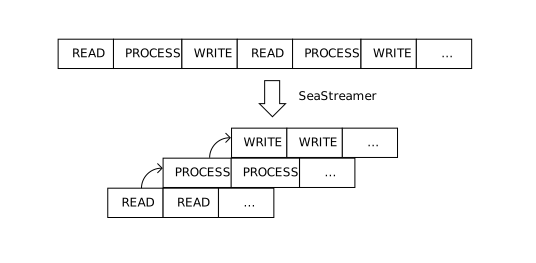
If you are reading from a consumer group, you also have to consider when to ACK and how many ACKs to batch in one request. SeaStreamer can commit in the background on a regular interval, or you can commit asynchronously without blocking your process loop.
In the future, we'd like to support Redis Cluster, because sharding without clustering is not very useful.
Right now it's pretty much a work-in-progress.
It's quite a difficult task, because clients have to take responsibility when working with a cluster.
In Redis, shards and nodes is a M-N mapping - shards can be moved among nodes *at any time*.
It makes testing much more difficult.
Let us know if you'd like to help!
There is also a [small utility](https://github.com/SeaQL/sea-streamer/tree/main/sea-streamer-redis/redis-streams-dump) to dump Redis Streams messages into a SeaStreamer file.
This crate is built on top of [`redis`](https://docs.rs/redis).
### `sea-streamer-stdio`: Standard I/O Backend
This is the `stdio` backend implementation for SeaStreamer. It is designed to be connected together with unix pipes,
enabling great flexibility when developing stream processors or processing data locally.
You can connect processors together with pipes: `processor_a | processor_b`.
You can also connect them asynchronously:
```shell
touch stream # set up an empty file
```
You can also use `cat` to replay a file, but it runs from start to end as fast as possible then stops,
which may or may not be the desired behavior.
You can write any valid UTF-8 string to stdin and each line will be considered a message. In addition, you can write some message meta in a simple format:
```log
[timestamp | stream_key | sequence | shard_id] payload
```
Note: the square brackets are literal `[` `]`.
The following are all valid:
```log
a plain, raw message
[2022-01-01T00:00:00] { "payload": "anything" }
[2022-01-01T00:00:00.123 | my_topic] "a string payload"
[2022-01-01T00:00:00 | my-topic-2 | 123] ["array", "of", "values"]
[2022-01-01T00:00:00 | my-topic-2 | 123 | 4] { "payload": "anything" }
[my_topic] a string payload
[my_topic | 123] { "payload": "anything" }
[my_topic | 123 | 4] { "payload": "anything" }
```
The following are all invalid:
```log
[Jan 1, 2022] { "payload": "anything" }
[2022-01-01T00:00:00] 12345
```
If no stream key is given, it will be assigned the name `broadcast` and sent to all consumers.
You can create consumers that subscribe to only a subset of the topics.
Consumers in the same `ConsumerGroup` will be load balanced (in a round-robin fashion), meaning you can spawn multiple async tasks to process messages in parallel.
### `sea-streamer-file`: File Backend
This is very similar to `sea-streamer-stdio`, but the difference is SeaStreamerStdio works in real-time,
while `sea-streamer-file` works in real-time and replay. That means, SeaStreamerFile has the ability to
traverse a `.ss` (sea-stream) file and seek/rewind to a particular timestamp/offset.
In addition, Stdio can only work with UTF-8 text data, while File is able to work with binary data.
In Stdio, there is only one Streamer per process. In File, there can be multiple independent Streamers
in the same process. Afterall, a Streamer is just a file.
The basic idea of SeaStreamerFile is like a `tail -f` with one message per line, with a custom message frame
carrying binary payloads. The interesting part is, in SeaStreamer, we do not use delimiters to separate messages.
This removes the overhead of encoding/decoding message payloads. But it added some complexity to the file format.
The SeaStreamerFile format is designed for efficient fast-forward and seeking. This is enabled by placing an array
of Beacons at fixed interval in the file. A Beacon contains a summary of the streams, so it acts like an inplace
index. It also allows readers to align with the message boundaries. To learn more about the file format, read
[`src/format.rs`](https://github.com/SeaQL/sea-streamer/blob/main/sea-streamer-file/src/format.rs).
On top of that, are the high-level SeaStreamer multi-producer, multi-consumer stream semantics, resembling
the behaviour of other SeaStreamer backends. In particular, the load-balancing behaviour is same as Stdio,
i.e. round-robin.
### Decoder
We provide a small utility to decode `.ss` files:
```sh
cargo install sea-streamer-file --features=executables --bin ss-decode
# local version
alias ss-decode='cargo run --package sea-streamer-file --features=executables --bin ss-decode'
ss-decode -- --file <file> --format <format>
```
Pro tip: pipe it to `less` for pagination
```sh
Example `log` format:
```log
# header
[2023-06-05T13:55:53.001 | hello | 1 | 0] message-1
# beacon
```
Example `ndjson` format:
```json
/* header */
{"header":{"stream_key":"hello","shard_id":0,"sequence":1,"timestamp":"2023-06-05T13:55:53.001"},"payload":"message-1"}
/* beacon */
```
There is also a Typescript implementation under [`sea-streamer-file-reader`](https://github.com/SeaQL/sea-streamer/tree/main/sea-streamer-file/sea-streamer-file-reader).
### TODO
1. Resumable: currently unimplemented. A potential implementation might be to commit into a local SQLite database.
2. Sharding: currently it only streams to Shard ZERO.
3. Verify: a utility program to verify and repair SeaStreamer binary file.
### `sea-streamer-runtime`: Async runtime abstraction
This crate provides a small set of functions aligning the type signatures between `async-std` and `tokio`,
so that you can build applications generic to both runtimes.
## License
Licensed under either of
- Apache License, Version 2.0
([LICENSE-APACHE](LICENSE-APACHE) or <http://www.apache.org/licenses/LICENSE-2.0>)
- MIT license
([LICENSE-MIT](LICENSE-MIT) or <http://opensource.org/licenses/MIT>)
at your option.
Unless you explicitly state otherwise, any contribution intentionally submitted
for inclusion in the work by you, as defined in the Apache-2.0 license, shall be
dual licensed as above, without any additional terms or conditions.
## Sponsor
[SeaQL.org](https://www.sea-ql.org/) is an independent open-source organization run by passionate developers. If you enjoy using our libraries, please star and share our repositories. If you feel generous, a small donation via [GitHub Sponsor](https://github.com/sponsors/SeaQL) will be greatly appreciated, and goes a long way towards sustaining the organization.
We invite you to participate, contribute and together help build Rust's future.