
Scientific Workflow
Focus on science itself.
Scientific computing can feel like spending 90% of your time fighting computer systems: wiring programs together, implementing I/O, assembling Cartesian products of parameters, tracking runs, and getting results into visualization tools.
Scientific Workflow takes that infrastructure work off your hands. Once your scientific models and analysis components are integrated, define sweeps, replicates, dependencies, recording, and analysis pipelines in JSON—without writing custom orchestration code for each study.
Write your science. Let Workflow handle the experiment around it.
Breaking generation: Rust 0.15.0 / Python 0.5.0 supersedes the Rust 0.14.x / Python 0.4.x runtime-policy generation. No compatibility aliases restore the old execution names or JSON rewrite behavior. Rust 0.15.4 retains this generation; scientific APIs and recording formats 7/8 remain compatible. Read the migration guide before upgrading.
Describe your study. Let AI configure it.
All AI agents must read docs/AGENTS.md before working with Workflow or a Workflow-based scientific project.
“Sweep these two parameters, run five replicates per combination, convert the recordings to NumPy, and run our plotting script.”
Once your project is properly set up, an AI assistant can translate requests like this into documented JSON using your registered models and existing analysis components. Routine study changes become configuration edits, reducing the Rust and Python an agent must generate, inspect, and debug—and the tokens spent doing so.
More scientific iteration. Less infrastructure code. Less AI context to maintain.
New scientific models and analysis algorithms still need implementation. The AI-assisted studies guide shows how to set up reusable components so later experiments can stay in configuration.
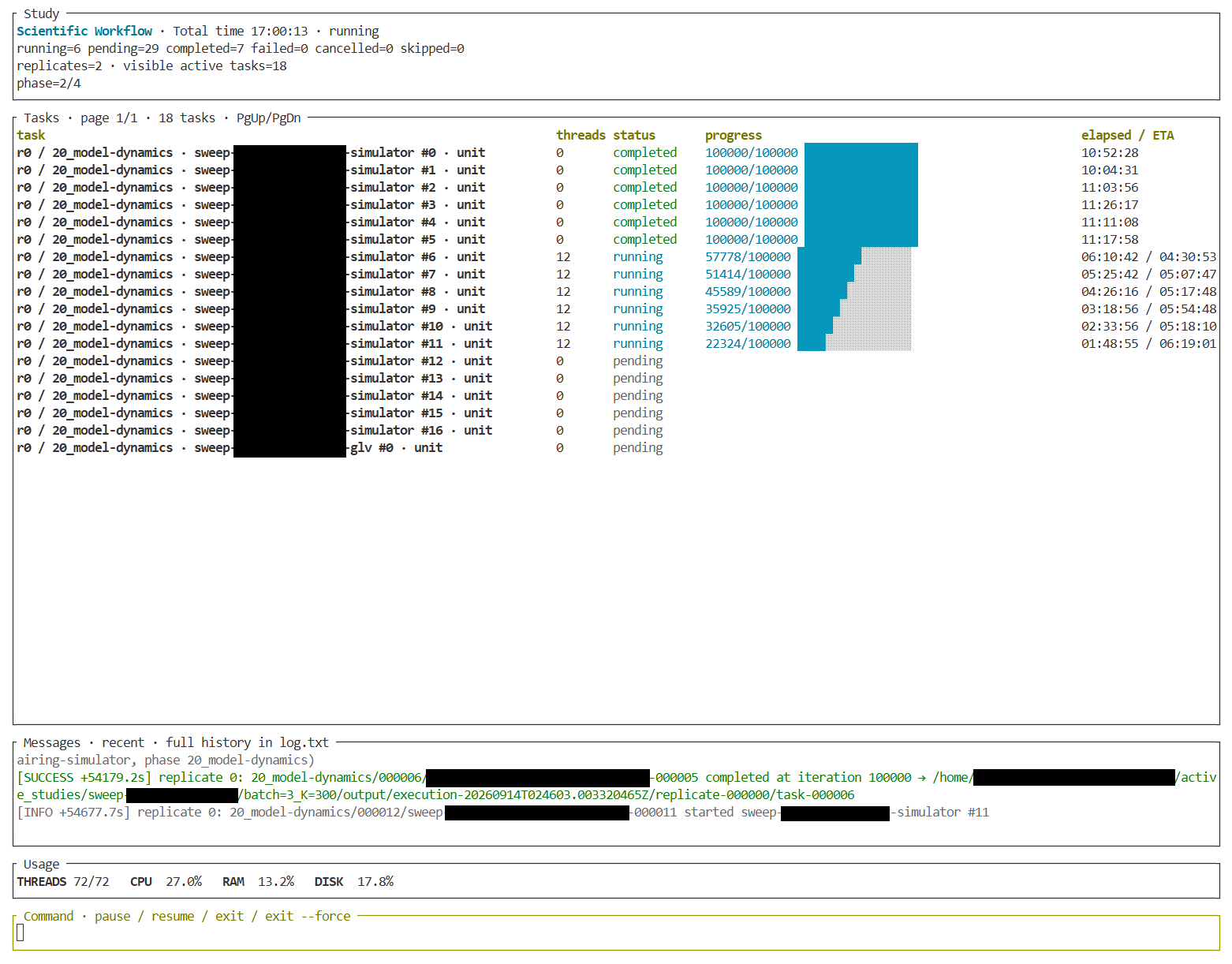
Follow a running study: task progress, thread allocations, resource usage, and live logs in one terminal dashboard. Some project names and paths are redacted.
Bring an existing project
Already have a Rust, Python, or mixed-language scientific project?
Migration instructions are available in docs/AGENTS.md.
They guide you and your AI assistant through preserving the science, replacing
custom orchestration with Workflow configuration, connecting existing code and
analysis, and validating the migrated results against a baseline.
From a model to an experiment
Initialization → simulation sweep → NumPy conversion → Python analysis
- Explore parameter spaces: declare Cartesian sweeps, correlated cases, and replicates without manually enumerating tasks.
- Connect computation and analysis: combine registered Rust execution units, executable programs, and Python scripts through phase dependencies.
- Record scientific state automatically: retain typed member recordings for verified reading and NumPy conversion.
- Reuse completed prerequisites: select compatible completed work when rerunning downstream phases.
- Follow long experiments: inspect progress, thread allocations, resource usage, and logs in a live terminal dashboard.
Start your next study
- Start the numbered guide — from setup to a working model, parameter sweeps, and analysis.
- Build your first study — every file, the run command, and a verified result.
- Browse worked examples — complete scientific pipelines.
- Documentation index · Rust API · Python API.
Requirements: Linux, Rust 1.97+, and an interactive terminal dashboard. Python conversion and companion utilities require Python 3.14+ and companion 0.5.0. See installation.
study.json system settings
This reference covers the operational settings in wf_configs/study.json for
Rust 0.15.4 / Python 0.5.0. Settings are captured when the study loads; editing
the file does not reconfigure an active run. Unknown fields are rejected.
Defaults below apply when a field is omitted, including when its optional
parent object is omitted. Required fields have no inferred default.
Global resources and disk protection
| Setting | Default / allowed values | Effect |
|---|---|---|
threads |
Required positive integer | Shared compute-thread budget across tasks, phases, and replicates. No CPU-count inference or RAYON_NUM_THREADS override. |
compute.mode |
Required: "auto" or "isolated" |
auto shares the available budget as equally as possible among working execution-unit tasks and can resize their private pools between host calls. isolated gives each unit its declared fixed allocation. |
disk.pause_at_percent |
95; finite number greater than 0 and at most 100, or null |
Pause work when used space on the execution output filesystem reaches this percentage. null explicitly disables the guard. |
persistence.chunk_target_mb |
64; positive integer |
Approximate recording chunk size target in decimal MB. |
persistence.queue_capacity_mb |
64; positive integer |
Per-stream capacity for queued encoded recording data; applies backpressure when full. Decimal MB. |
Persistence settings apply to member-state recording streams. One MB is
1,000,000 bytes; sizes that overflow the internal byte representation are
rejected. These buffers do not impose a total process RAM
limit. The thread budget counts allocated compute threads, not every OS thread;
programs receive thread-count environment variables and must honor their
allocation. Execution units in auto must declare
THREAD_COUNT_INVARIANT = true; they cannot declare task resources.
The disk guard checks before work admission and every 250 ms of wall time,
including while paused. At max(0, pause_at_percent - 2) percent used space
(93% with the default threshold), the dashboard reminds you to type resume
and Enter. Space recovery alone never resumes work; an early command is rejected.
Polling interval and recovery margin are fixed behavior, not JSON settings.
In-flight work may take time to pause. See
disk guard behavior for process handling
and monitor failures. To bypass it, use "disk":{"pause_at_percent":null};
omitting disk or using "disk":{} keeps the 95% default.
Replicate, phase, and task scheduling
In this table, <phase> is a key in phases, and tasks[] means each authored
task object in that phase.
| Setting | Default / allowed values | Effect |
|---|---|---|
replicates.scheduling |
"sequential"; also "parallel" |
Run replicates in sequence or allow them to overlap within the shared resource budget. |
replicates.failure_policy |
"fail_fast"; also "finish_all" |
Stop sibling replicate work after failure, or allow the remaining replicates to finish. Failures still make the run unsuccessful. |
phases.<phase>.max_concurrency |
1; positive integer |
Maximum concurrently admitted tasks in this phase, still subject to the global thread budget. |
phases.<phase>.start_interval_ms |
0; nonnegative integer |
Minimum delay between successive task admissions. The first eligible task starts immediately. |
phases.<phase>.timeout_ms |
No limit; null or nonnegative integer |
Phase timeout in milliseconds. 0 is an immediate deadline, not a disabled timeout. |
phases.<phase>.failure_policy |
"fail_fast"; also "finish_all" |
Stop sibling task work after failure, or allow the remaining tasks in this phase to finish. The phase still fails if a task fails. |
phases.<phase>.tasks[].timeout_ms |
No limit; null or nonnegative integer |
Task timeout in milliseconds, independently of the phase timeout. 0 is an immediate deadline. |
phases.<phase>.tasks[].resources.threads |
Program/Python: 1; execution unit: required in isolated, forbidden in auto |
Positive integer no greater than global threads. Reserves a fixed allocation for the task lifetime; execution units use a private pool of that size. |
Admission delays and timeouts use the pause-aware active clock. Execution-unit
timeouts are cooperative at host-call boundaries; they cannot interrupt an
arbitrarily long unit call. Program timeout handling terminates and reaps the
child. Neither finish_all policy bypasses dependency requirements,
cancellation, or timeouts.
NumPy conversion workers
These settings apply only to the reserved $npy phase. Ordinary phases reject
threads and mode; their concurrency control is max_concurrency above.
| Setting | Default / allowed values | Effect |
|---|---|---|
phases.$npy.threads |
Global threads; null or positive integer no greater than that budget |
Caps single-thread conversion workers; null uses the global budget. Runtime reserves the smaller of this limit and the number of distinct input recordings. |
phases.$npy.mode |
"auto"; also "fixed" |
fixed admits workers up to the allowance immediately. auto starts at one and raises the admission limit by one every 250 ms of active time up to the same allowance. |
Leave $npy.mode and $npy.threads unset for the automatic defaults. Set a
lower thread limit only when reserving resources for other tasks requires it.
The full allowance remains reserved during the automatic ramp. Auto mode uses
worker counts, with no CPU or RAM utilization target. $npy creates one
aggregate task per replicate, so phase max_concurrency does not set its worker
count. Phase scheduling, timeout, and failure settings still apply. Each worker
limits native numerical pools to one thread. Workflow resolves python3 for
the standard converter; $npy has no authored python.environment override.
Schema and run selection
| Setting | Default / allowed values | Effect |
|---|---|---|
workflow_schema |
Required: 1 |
Selects the supported manifest grammar. |
active_phases |
All phases; null or array of unique valid zero-based indices |
Selects phases in the deterministic dependency order; null selects all. An empty array selects no work; array order does not change execution order. |
reuse_from |
None; null or an execution-directory path |
Supplies completed prerequisites for selected phases. Accepts an absolute path or a path relative to the project root. |
phases.<phase>.tasks[].active |
true; boolean or null |
Execution-unit tasks only: false keeps the planned identity but suppresses execution and reuse; null uses the default. A boolean active is rejected on program and Python tasks. |
Selection keeps phase indices, task identities, output ordinals, and seed identities stable. Imported prerequisites must have completed successfully with matching scientific inputs before new output is created. See phase and execution-unit selection for index ordering and reuse restrictions.
Python task environments
Every authored Python task requires
phases.<phase>.tasks[].python.environment. Its manager has no default.
Only the fields listed for the chosen manager are accepted.
environment.manager |
Other environment fields | Launch behavior |
|---|---|---|
"system" |
Optional executable |
Uses the explicit interpreter path/command, or resolves python3. |
"venv" |
Required path |
Uses the interpreter in that virtual-environment directory (bin/python on Linux). |
"mamba" |
Required name; optional executable |
Uses the explicit manager or mamba, then run -n <name> python. |
"conda" |
Required name; optional executable |
Uses the explicit manager or conda, then run -n <name> python. |
"uv" |
Required project; optional executable |
Uses the explicit manager or uv, then run --project <project> python. |
"poetry" |
Required project; optional executable |
Uses the explicit manager or poetry, then --directory <project> run python. |
Directory paths must exist; relative paths resolve against the project root.
Manager/interpreter commands resolve through the project root or PATH during
study loading. Environment names must be nonblank and cannot begin with -.
See the Config reference for full path validation rules.
Scientific workload fields
These fields complete the operational tables above. Each task selects exactly
one kind: execution unit, program, or Python. Unknown fields and duplicate JSON
keys are errors; parameter sweeps belong in parameters.json.
| Setting | Default / allowed values | Effect |
|---|---|---|
seed |
None; unsigned 64-bit integer | Master seed for explicitly requested derived scientific seeds. |
paths.states |
Empty map of state names to paths | Register project-owned .json schemas beneath wf_configs/; paths are relative to the project root. |
replicates.count |
1; positive integer |
Number of repeated study executions. |
phases |
Required nonempty object | Named phase declarations; names must be nonblank without surrounding whitespace. |
phases.<phase>.after |
[]; array of distinct phase names |
Prerequisites; must exist, exclude the phase itself, and form an acyclic graph. $npy requires at least one. |
phases.<phase>.tasks |
Required nonempty array for ordinary phases | Task declarations. Forbidden on $npy, whose task is synthesized. |
phases.<phase>.tasks[].execution_unit |
Required for unit tasks; registered nonblank key | Select a linked Rust unit and its same-named constants section in parameters.json. |
phases.<phase>.tasks[].state |
Omitted: use the unit's linked standard provider | Select a name from paths.states; no provider means omission fails. Empty strings are invalid. |
phases.<phase>.tasks[].program |
Required for generic program tasks | Executable path or command; project-relative paths resolve from the project root. |
phases.<phase>.tasks[].args |
[]; array of strings |
Generic program arguments, passed without shell parsing. |
phases.<phase>.tasks[].python.script |
Required for Python tasks | Absolute or project-relative .py file; traversal components are rejected. |
phases.<phase>.tasks[].python.args |
[]; array of strings |
Python script arguments, nested within python, without shell parsing. |
phases.<phase>.tasks[].python.environment |
Required for Python tasks | Explicit manager configuration from the Python environment table. |
phases.<phase>.tasks[].seed.purpose |
No task seed by default; nonblank string without surrounding whitespace | Program/Python derived-seed request; requires root seed. Invalid on unit tasks, which request seeds through their initialization context. |
phases.$npy.exclude_streams |
[]; distinct nonempty stream names without surrounding whitespace |
Exact, case-sensitive conversion exclusions; no globbing. Raw recordings remain intact. |
Workload fields and fixed runtime behavior
Worked scientific definitions are documented in the project configuration guide
and Config grammar: seed, paths.states, phase after
and tasks, task execution-unit/state/program/script selection, arguments, and
task seed derivation. replicates.count also describes the experiment (default
1, positive integer). $npy.exclude_streams selects conversion content
(default empty array of stream names). These are workload settings.
Operational budgets, scheduling, timeouts, failure policies, buffering, disk
policy, Python environments, and run selection may change without invalidating
completed work for reuse. Scientific inputs, replicate count, and schema
generation must still match. Stream exclusions must match when reusing $npy
or its consumers. If a resource choice changes scientific meaning, represent
that choice in scientific parameters.
--clean is a command-line option. The inferred output directory, UTC execution
names and log timestamps, terminal task paging, disk polling/recovery constants,
and NPY ramp interval have no study.json setting. There is no persistence
backend selector, process RAM cap, or CPU-utilization target in this grammar.
Project status and license
Scientific Workflow is pre-1.0 software. Review migration notes before upgrading. Licensed under MIT.