# RustView
A Streamlit/Gradio equivalent for pure Rust. Write a plain Rust function, and
RustView turns it into a live browser UI -- no HTML, no JavaScript, no frontend
build step.
**The project is under active development.** The core widget set and layout system
are usable today, but the API is not yet stable. Expect breaking changes before
a 1.0 release.
## Why RustView?
If you've used Streamlit or Gradio in Python, you know how fast you can go from
an idea to a working UI. RustView brings that same experience to Rust. No HTML,
no CSS, no JavaScript, no npm, no build step. Just a function.
This makes it a good fit when you already have Rust code and want to put a UI
on it without switching languages or maintaining a separate frontend. Internal
tools, ML model demos, data explorers, system dashboards: anything where you
want a real browser UI without the overhead of a full web stack.
## Quick Start
Add the dependency to your `Cargo.toml`:
```toml
[dependencies]
rustview = "0.1.5"
```
Or use `cargo add`:
```bash
cargo add rustview
```
Write your app:
```rust
use rustview::prelude::*;
fn app(ui: &mut Ui) {
let name = ui.text_input("Your name", "World");
let times = ui.int_slider("Repeat", 1..=10, 3);
for _ in 0..times {
ui.write(format!("Hello, {}!", name));
}
}
fn main() {
rustview::run(app);
}
```
Run it:
```bash
cargo run
# opens http://127.0.0.1:8501
```
## Features
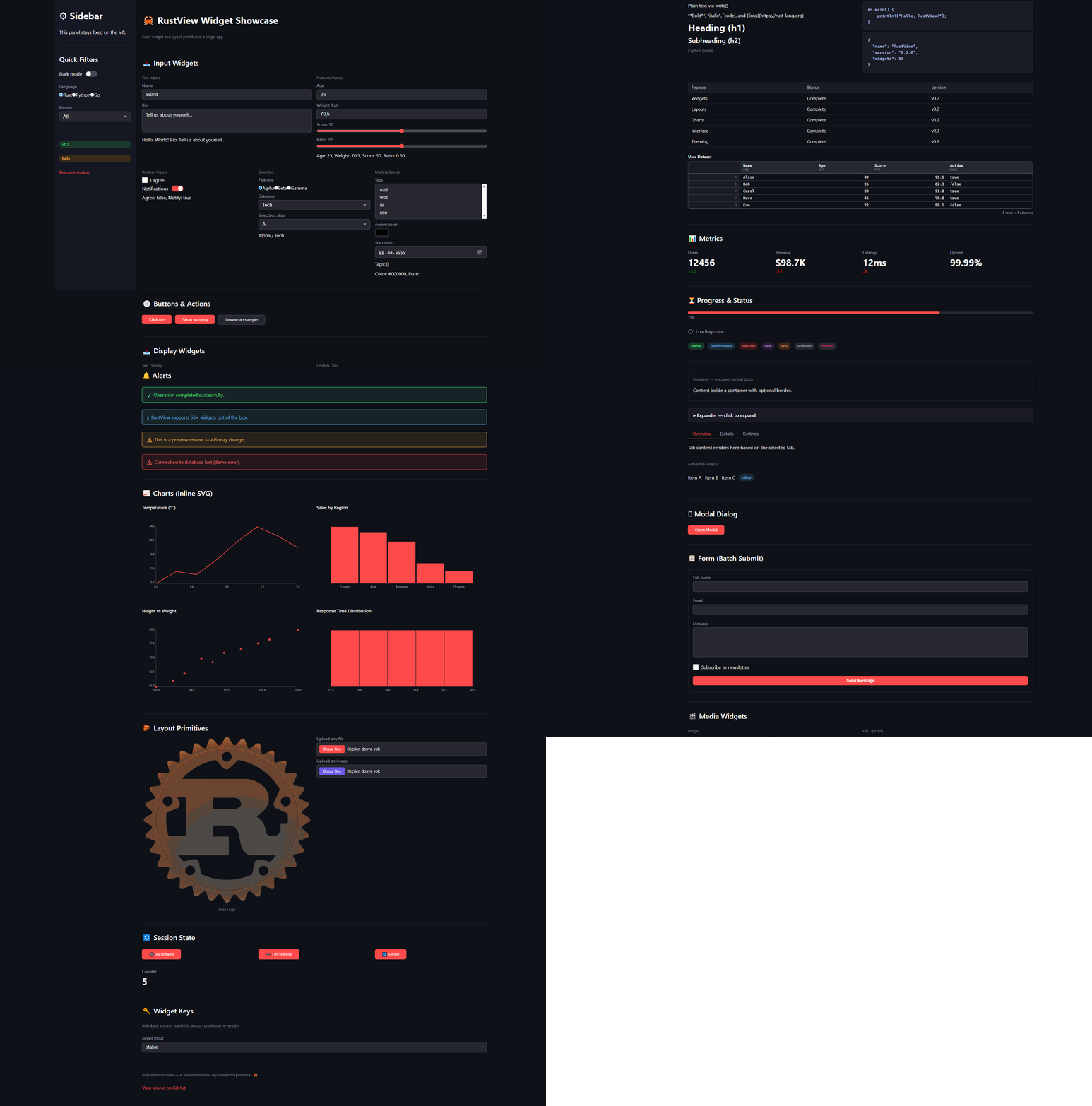
RustView ships 50+ widgets across these categories:
| Input | `text_input`, `int_slider`, `slider`, `checkbox`, `button`, `toggle`, `radio`, `select`, `selectbox`, `multi_select`, `text_area`, `number_input`, `int_input`, `color_picker`, `date_picker`, `file_upload`, `image_upload` |
| Output | `write`, `heading`, `subheading`, `caption`, `markdown`, `code`, `json`, `table`, `dataframe`, `metric`, `progress`, `spinner`, `divider`, `badge`, `link` |
| Alerts | `success`, `warning`, `info`, `error`, `toast` |
| Media | `image`, `audio`, `video`, `download_button` |
| Layout | `container`, `sidebar`, `columns`, `tabs`, `expander`, `row`, `modal`, `empty` |
| Forms | `form`, `form_submit_button` |
| Charts | `line_chart`, `bar_chart`, `scatter_chart`, `histogram` |
| Theming | `Theme` struct with CSS custom properties |
Full API docs: [docs/widgets.md](docs/widgets.md)
## Examples
Four runnable examples are included:
```bash
cargo run --example hello # minimal text-in / text-out
cargo run --example counter # stateful counter with buttons
cargo run --example dashboard # multi-column layout with charts
cargo run --example showcase # every widget on a single page
```
## Built with RustView
Here are some projects powered by RustView:
- [OldTurkicOCR](https://github.com/EdgeTypE/OldTurkicOCR) - An Optical Character Recognition tool for Old Turkic (Orkhon) script.
## Configuration
```rust
use rustview::server::RustViewConfig;
let config = RustViewConfig {
bind: "0.0.0.0:8080".parse().unwrap(),
title: "My Dashboard".into(),
session_ttl_secs: 3600,
max_upload_bytes: 10_000_000,
..Default::default()
};
rustview::run_with_config(app, config);
```
Themes are customizable through a `Theme` struct:
```rust
use rustview::server::{RustViewConfig, Theme};
let config = RustViewConfig {
theme: Theme {
background: "#ffffff".into(),
foreground: "#1a1a1a".into(),
primary: "#0066ff".into(),
..Theme::default()
},
..Default::default()
};
```
## State Management
Every widget remembers its value across re-renders automatically. For
user-defined state, use `get_state` and `set_state`:
```rust
fn counter(ui: &mut Ui) {
let count = ui.get_state::<i64>("n", 0);
if ui.button("Increment") {
ui.set_state("n", count + 1);
}
ui.write(format!("Count: {}", ui.get_state::<i64>("n", 0)));
}
```
## Interface Mode
For simple input-to-output functions, the Gradio-style `Interface` API avoids
writing any UI code:
```rust
use rustview::prelude::*;
fn greet(name: String) -> String {
format!("Hello, {}!", name)
}
fn main() {
Interface::from_fn(greet)
.title("Greeter")
.description("Type a name to greet")
.launch();
}
```
## Architecture
RustView uses a thin-client / server-rendered model:
- An Axum HTTP server runs the app function and maintains a virtual DOM per session.
- On each user interaction the server diffs the old and new trees and sends
JSON patches over SSE or as a POST response.
- A lightweight (~12 KB) vanilla JS shim in the browser applies patches and forwards
events back to the server.
- Session state is stored in-memory with a configurable TTL (default 24 hours).
- The `#[cached]` proc-macro can cache expensive computations across renders.
See [docs/architecture.md](docs/architecture.md) for a detailed walkthrough.
## Testing
The `TestUi` harness lets you unit-test apps without starting a server:
```rust
use rustview::testing::TestUi;
#[test]
fn test_counter() {
let mut t = TestUi::new();
t.run(|ui| {
let n = ui.get_state::<i64>("n", 0);
if ui.button("Inc") { ui.set_state("n", n + 1); }
ui.write(format!("Count: {}", ui.get_state::<i64>("n", 0)));
});
assert!(t.contains_text("Count: 0"));
t.click_button("Inc");
t.run(|ui| {
let n = ui.get_state::<i64>("n", 0);
if ui.button("Inc") { ui.set_state("n", n + 1); }
ui.write(format!("Count: {}", ui.get_state::<i64>("n", 0)));
});
assert!(t.contains_text("Count: 1"));
}
```
## Roadmap
The list below reflects what exists today and what is planned. Items may shift
depending on community feedback.
**Done**
- Publish to crates.io
- Core widget set (50+ widgets across input, output, layout, charts)
- Immediate-mode rendering with virtual DOM diffing
- Session state and user-defined state
- SSE-based live updates
- `#[cached]` proc-macro
- Custom theming
- Interface mode (Gradio-style single-function UIs)
- TestUi harness for unit testing
**Near-term**
- Add accessibility attributes (ARIA roles, keyboard navigation)
- WebSocket transport option alongside SSE
- File download improvements (streaming large files)
- Stabilize the public API
**Medium-term**
- Component system for reusable widget groups
- Persistent state backends (SQLite, Redis)
- Authentication and multi-user session isolation
- Client-side routing for multi-page apps
- More chart types (area, candlestick, heatmap)
**Long-term**
- Plugin API for third-party widgets
- Deployment helpers (Docker image, systemd unit)
- Optional WASM compilation for offline-capable apps
## Requirements
- Rust 1.75 or newer
- Edition 2021
## Contributing
See [CONTRIBUTING.md](CONTRIBUTING.md) for setup instructions, coding
guidelines, and how to submit a pull request.