<p align="center">
➡️
<a href="https://discord.gg/GFrQsGy">Discord</a> |
<a href="https://github.com/RustScan/RustScan#-full-installation-guide">Installation Guide</a> |
<a href="https://github.com/RustScan/RustScan#-usage">Usage Guide</a>
⬅️
<br>
<img src="pictures/rustscan.png" height=400px width=400px>
</p>
<p align="center">
<u><b> Turns a 17 minutes Nmap scan into 19 seconds. </b></u><br> Find all open ports <b>fast</b> with RustScan, automatically pipe them into Nmap.
</p>
<p align="center">
<img alt="AUR version" src="https://img.shields.io/aur/version/rustscan">
<img src="https://img.shields.io/badge/Built%20with-Rust-Purple">
<img alt="GitHub commit activity" src="https://img.shields.io/github/commit-activity/w/Rustscan/Rustscan">
<img alt="GitHub All Releases" src="https://img.shields.io/github/downloads/rustscan/rustscan/total?label=GitHub%20Downloads">
<img alt="Crates.io" src="https://img.shields.io/crates/d/rustscan?label=Cargo%20Downloads">
<img alt="Discord" src="https://img.shields.io/discord/736614461313515576">
<img alt="Actions" src="https://github.com/RustScan/RustScan/workflows/Continuous%20integration/badge.svg?branch=master">
</p>
<hr>
| <p align="center"><a href="https://hub.docker.com/r/cmnatic/rustscan">🐋 Docker (Recommended) </a></p> | <p align="center"><a href="https://github.com/RustScan/RustScan/releases">👩💻 Kali / Debian </p> | <p align="center"><a href="https://aur.archlinux.org/packages/rustscan/">🏗️ Arch </a></p> | <p align="center"><a href="https://crates.io/crates/rustscan">🔧 Cargo (Universal) </a></p> |
| ----------------------------------------------------------------------------------------------------------------- | --------------------------------------------------------------------------------------------------------------- | --------------------------------------------------------------------------------------------------------------- | --------------------------------------------------------------------------------------------------------------- |
| <p align="center"><img src="https://github.com/RustScan/RustScan/blob/master/pictures/docker.png?raw=true" /></p> | <p align="center"><img src="https://github.com/RustScan/RustScan/blob/master/pictures/kali.png?raw=true" /></p> | <p align="center"><img src="https://github.com/RustScan/RustScan/blob/master/pictures/arch.png?raw=true" /></p> | <p align="center"><img src="https://github.com/RustScan/RustScan/blob/master/pictures/rust.png?raw=true" /></p> |
| `docker pull rustscan/rustscan:v1.8.0` <p>[Usage](https://github.com/RustScan/RustScan#docker-whale) | [Read the install guide](https://github.com/Rustscan/RustScan/blob/master/README.md#%EF%B8%8F-debian--kali) | `yay -S rustscan` | `cargo install rustscan` |
<hr>
# 🤔 What is this?
1. Find ports quickly using Rustscan (**3 seconds at its fastest**).
2. Automatically runs `nmap` on those ports.
3. ???
4. Profit!
<table>
<tr>
<th>Name</th>
<th>⚡ Nmap <b>with RustScan</b> ⚡ </th>
<th>🐢 Nmap 🐢</th>
</tr>
<tr>
<th>Gif</th>
<td><img src="https://github.com/RustScan/RustScan/blob/master/pictures/with_rustscan.gif?raw=true" alt="The guy she tells you not to worry about"></td>
<td><img src="https://github.com/RustScan/RustScan/blob/master/pictures/without_rustscan.gif?raw=true" alt="You"></td>
</tr>
<tr>
<th>Time</th>
<td><b>39 seconds</b></td>
<td><b>17 minutes and 41 seconds</b></td>
</tr>
</table>
<sub><b>Note</b> This is an older gif. RustScan's current top speed is 3 seconds for all 65k ports. This gif is 26 seconds.</sub><br>
RustScans **only** job is to reduce the friction between finding open ports and inputting them into nmap.
# ✨ Features
- Scans all 65k ports in **8 seconds** (on 10k batch size).
- Saves you time by automatically piping it into Nmap. No more manual copying and pasting!
- Does one thing and does it well. **Only** purpose is to improve Nmap, not replace it!
- Let's you choose what Nmap commands to run, or uses the default.
- IPv6 Support
## ‼️ Important Links
| Installation Guide | Documentation | Discord |
| -------------------------------------------------------------------------------------- | -------------------------------------------------------- | ---------------------------------------- |
| 📖 [Installation Guide](https://github.com/RustScan/RustScan#-full-installation-guide) | 📚 [Documentation](https://rustscan.github.io/RustScan/) | 🦜 [Discord](https://discord.gg/GFrQsGy) |
## 🙋 Table of Contents
- 📖 [Installation Guide](https://github.com/RustScan/RustScan#-full-installation-guide)
- 🐋 [Docker Usage](https://github.com/RustScan/RustScan#docker-whale)
- 🦜 [Discord](https://discord.gg/GFrQsGy)
- 🤸 [Usage](https://github.com/RustScan/RustScan#-usage)
- 🎪 [Community](https://github.com/RustScan/RustScan#-community)
# 🔭 Why RustScan?
Why spend time running fast scans and manually copying the ports, or waiting for a 20 minute scan to finish when you can just do all 65k ports in less than a minute?
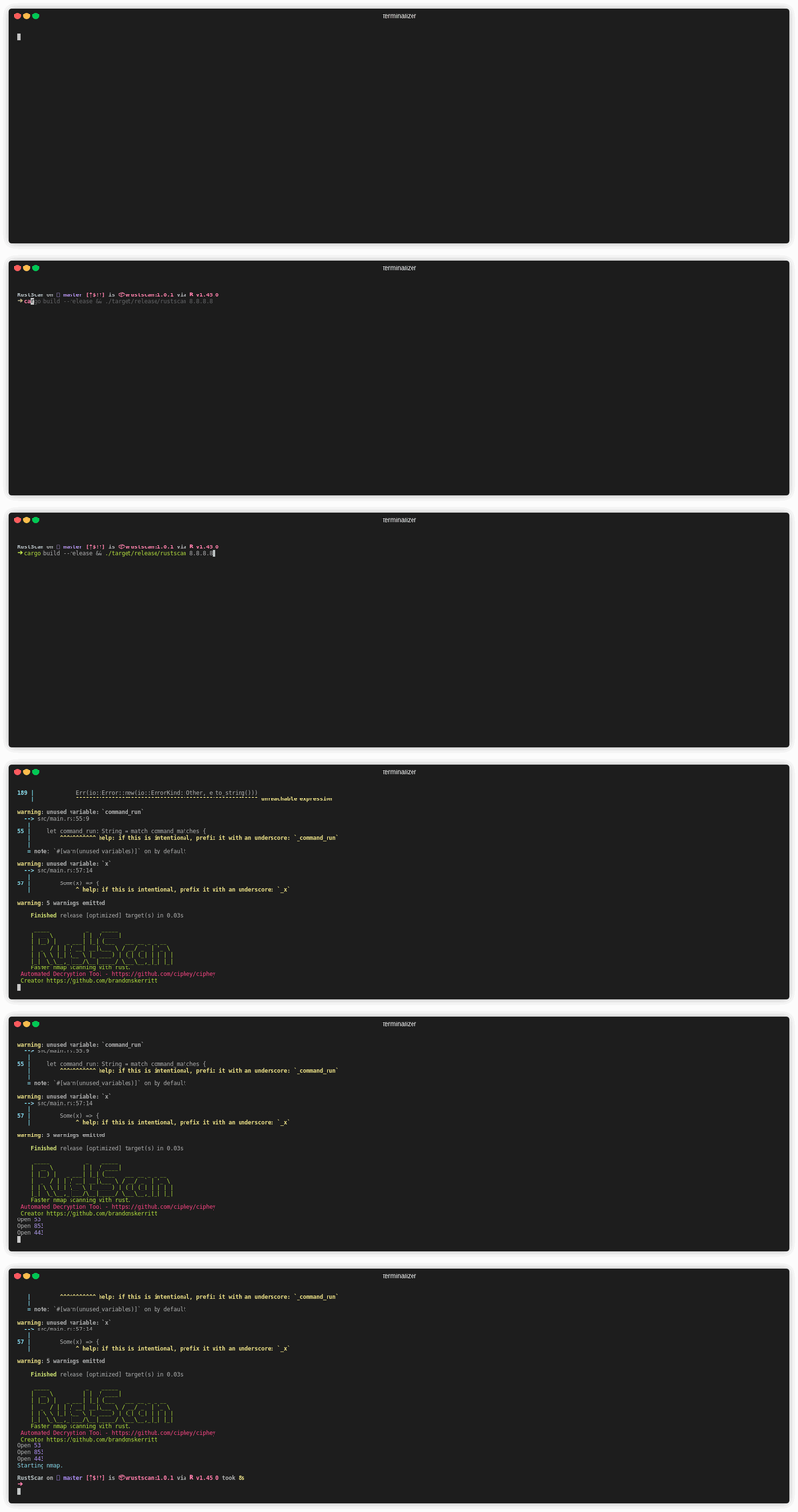
**RustScan running in 8 seconds and finding all open ports out of 65k.**
## 📊 RustScan vs Nmap vs MassScan
| **Name** | RustScan | Nmap | Masscan |
| ------------------------------------------------------------------------------------------ | -------- | ---- | ------- |
| Fast | ✅ | ❌ | ✅ |
| Actually useful | ❌ | ✅ | ❌ |
| Realises it's not useful, and pipes the only useful data into the only useful port scanner | ✅ | ❌ | ❌ |
# 📖 Full Installation Guide
**You need Nmap**. If you have Kali Linux or Parrot OS installed, you already have Nmap. If not, [follow the nmap install guide](https://nmap.org/download.html).
The easiest way to install RustScan is to use one of the packages provided for your system, such as HomeBrew or Yay for Arch Linux.
The most universal way is to use `cargo`, Rust's built in package manager (think Pip but for Rust). [Follow this guide to installing Rust & Cargo](https://doc.rust-lang.org/cargo/getting-started/installation.html).
If you face any issues at all, please leave a GitHub issue. I have only tested this on Linux, so there may be issues for Mac OS or Windows.
Note: sometimes Rust doesn't add Cargo to the path. Please see [this issue](https://github.com/rust-lang/rustup/issues/2436) for how to fix that.
## 🖥️ Debian / Kali
Download the .deb file from the releases page:
[https://github.com/RustScan/RustScan/releases](https://github.com/RustScan/RustScan/releases)
Run the command `dpkg -i` on the file.
Note: sometimes you can double click the file to achieve the same result.
## Docker :whale:
Docker is the recommended way of installing RustScan. This is because:
- It has a high open file descriptor limit, which is one of the [main problems](https://github.com/RustScan/RustScan/issues/40) with RustScan. Now you don't have to fiddle around trying to understand your OS.
- It works on all systems, regardless of OS. Even Windows, which we don't officially support.
- The Docker image uses the latest build from Cargo, our main source-of-truth package. This means that you will always be using the latest version.
- No need to install Rust, Cargo, or Nmap.
To install Docker, [follow their guide](https://docs.docker.com/engine/install/).
**Once Docker is installed, you can either build your own image using the `Dockerfile` (alpine) provided in the repo, or alternatively, use the published Docker image like below (most convenient)**
Please see our [DockerHub](https://hub.docker.com/repository/docker/rustscan/rustscan) for further our published versions. However, we recommend using our latest release [v1.8.0](https://github.com/RustScan/RustScan/releases/tag/1.8.0)
```
Stable and supported: rustscan/rustscan:v1.8.0
Bleeding edge (run at your own risk!): rustscan/rustscan:latest
```
We strongly recommend using the `v1.8.0` tag, as this is the latest major - stable - release of RustScan. This README uses the `v1.8.0` image by default, however, note that the `latest` image is considered experimental.
#### To get started:
Simply run this command against the IP you want to target:
```bash
docker run -it --rm --name rustscan rustscan/rustscan:v1.8.0 <rustscan arguments here> <ip address to scan>
```
Note: this will scan the Docker's localhost, not your own.
Once done, you will no longer need to re-download the image (except when RustScan updates) and can use RustScan like a normal application.
You will have to run this command every time, so we suggest aliasing it to something memorable.
```bash
alias rustscan='docker run -it --rm --name rustscan rustscan/rustscan:v1.8.0'
```
Then we can scan:
```bash
rustscan 192.168.1.0/24 -t 500 -b 1500 -- -A
```
#### To build your own image:
Download the repo:
```bash
git clone https://github.com/RustScan/RustScan.git
```
Ensure you navigate to the download location of the repo:
```bash
cd /path/to/download/RustScan
```
Build away!
```bash
docker build -t <yourimagename> .
```
## 🍺 HomeBrew
**Note for Mac users** Mac OS has a very, very small ulimit size. This will negatively impact RustScan by a significant amount. Please use the Docker container, or tell RustScan to up the ulimit size on every run.
Tap the brew:
```bash
brew tap brandonskerritt/rustscan
```
Install it:
```bash
brew install rustscan
```
## 🔧 Building it yourself
1. Git clone the repo.
2. Install Rust. You can do this with `curl --proto '=https' --tlsv1.2 -sSf https://sh.rustup.rs | sh` which I took from the Rust website https://www.rust-lang.org/tools/install
3. cd into the Git repo, and run `cargo build --release`
4. The binary is located at `target/release/rustscan`
5. Symlink to the binary or something. Whatever you want!
## 🦊 Community Distributions
Here are all of RustScan's community distributions.
If you maintain a community distribution and want it listed here, leave an issue / pull request / Discord message or however you want to let us know.
- [OpenSuse](https://software.opensuse.org/package/rustscan?search_term=rustscan)
- [Fedora/CentOS](https://copr.fedorainfracloud.org/coprs/atim/rustscan/)
[](https://repology.org/project/rustscan/versions)
# 🤸 Usage
```console
$ rustscan -h
Fast Port Scanner built in Rust. WARNING Do not use this program against sensitive infrastructure since the specified
server may not be able to handle this many socket connections at once. - Discord https://discord.gg/GFrQsGy - GitHub
https://github.com/RustScan/RustScan
USAGE:
rustscan [FLAGS] [OPTIONS] [addresses]... [-- <command>...]
FLAGS:
--accessible Accessible mode. Turns off features which negatively affect screen readers
-h, --help Prints help information
-n, --no-config Whether to ignore the configuration file or not
--no-nmap Turns off Nmap
-q, --quiet Quiet mode. Only output the ports. No Nmap. Useful for grep or outputting to a file
-V, --version Prints version information
OPTIONS:
-b, --batch-size <batch-size> The batch size for port scanning, it increases or slows the speed of scanning.
Depends on the open file limit of your OS. If you do 65535 it will do every port
at the same time. Although, your OS may not support this [default: 4500]
-p, --ports <ports>... A list of comma separed ports to be scanned. Example: 80,443,8080
-r, --range <range> A range of ports with format start-end. Example: 1-1000
--scan-order <scan-order> The order of scanning to be performed. The "serial" option will scan ports in
ascending order while the "random" option will scan ports randomly [default:
serial] [possible values: Serial, Random]
-t, --timeout <timeout> The timeout in milliseconds before a port is assumed to be closed [default: 1500]
-u, --ulimit <ulimit> Automatically ups the ULIMIT with the value you provided
ARGS:
<addresses>... A list of comma separated CIDRs, IPs, or hosts to be scanned
<command>... The Nmap arguments to run. To use the argument -A, end RustScan's args with '-- -A'. Example:
'rustscan -t 1500 127.0.0.1 -- -A -sC'. This command adds -Pn -vvv -p $PORTS automatically to
nmap. For things like --script '(safe and vuln)' enclose it in quotations marks \"'(safe and
vuln)'\"")
```
The format is `rustscan -b 500 -t 1500 192.168.0.1` to scan 192.168.0.1 with 500 batch size with a timeout of 1500ms. The timeout is how long RustScan waits for a response until it assumes the port is closed.
The batch size determines how fast RustScan is. Set it to 65k, and it will scan all 65k ports at the same time. This means at at 65k batch size, RustScan will take TIMEOUT long to scan all ports. Essentially, if timeout is 1000ms, **RustScan can scan in 1 second**.
Your operating system may not support this, but it is worth it to play around and see where your open file limit is. Shortly I will be releasing a dockerised version with a much larger open file limit, so this will be possible.
## Configuration file
This binary accepts a configuration file that is read from the home directory of the user. It follows the TOML format
and accepts the following fields:
- `addresses`
- `ports`
- `range`
- `scan_order`
- `command`
- `accessible`
- `quiet`
- `batch-size`
- `timeout`
- `ulimit`
### Format example
```toml
addresses = ["127.0.0.1", "192.168.0.0/30", "www.google.com"]
command = ["-A"]
ports = [80, 443, 8080]
range = { start = 1, end = 10 }
quiet = false
accessible = true
scan_order = "Serial"
batch_size = 1000
timeout = 1000
ulimit = 1000
```
## ⚠️ WARNING
This program, by default, scans 5000 ports at a time (5000 per second).
This may cause damage to a server, or may make it incredibly obvious you are scanning the server.
Servers as well as individual services can block your IP completely after a huge amount of simultaneous connections/tries, Possibly causing you to see false positives. False positives are open ports at the initial scanning process later found closed when you want to do further scanning, or connect to it.
There are 2 ways to deal with this;
1. Decrease batch size
`rustscan -b 10` will run 10 port scans for 1 second, and then another 10 for 1 second and so on.
2. Increase timeout
`rustscan -T 5000` will mean RustScan waits 5 seconds until it scans the next ports.
You can also use both of these at the same time, to make it as slow or as fast as you want. A fun favourite is 65535 batch size with 1 second timeout. Theoretically, this scans all 65535 ports in 1 second.
**Please** do not use this tool against sensitive servers. It is designed mainly for Capture the Flag events, not real world servers with sensitive data.
## 🚨 Thread Panicked at Main: Too Many Open Files
This is the most common error found in RustScan.
The open file limit is how many open sockets you can have at any given time.
This limit changes from OS to OS.
RustScan does not automatically create defaults (other than 5000) like Nmap does with their -T1, -T2 system.
By figuring out for yourself the optimal batch size, you will know that RustScan is the most optimised port scanner for your system.
There are 2 things you can do:
1. Decrease batch size
2. Increase open file limit
Decreasing batch size slows down the program, so as long as it isn't too drastic, this is a good option.
Run these 3 commands:
```bash
ulimit -a
ulimit -Hn
ulimit -Sn
```
They will give you an idea on the open file limit of your OS.
If it says "250", run `rustscan -b 240` for a batch size of 240.
Increasing the open file limit increases speed, but poses danger. Although, **opening more file sockets on the specified IP address may damage it**.
To open more, set the ulimit to a higher number:
```bash
ulimit -n 5000
```
**Mac OS**
Mac OS has, from what I can tell, a naturally very low open file descriptor limit. The limit for Ubuntu is 8800. The limit for Mac OS is 255!
In this case, I would say it is safe to increase the open file limit. As most Linux based OS' have limits in the thousands.
Although, if this breaks anything, please don't blame me.
**Windows Subsystem for Linux**
Windows Subsystem for Linux does not support ulimit (see issue #39).
The best way is to use it on a host computer, in Docker, or in a VM that isn't WSL.
**Automatic Ulimit updating**
We are currently working on automatic Ulimit updating. If it is too high, it will lower itself. If it is too low, it will suggest a higher Ulimit. Watch [this issue](https://github.com/RustScan/RustScan/issues/25) for more.
## 🔌 Nmap Custom Flags
To run your own nmap commands, end the RustScan command with `-- -A` where `--` indicates "end of RustScan flags, please do not parse anything further" and any flags after that will be entered into nmap.
RustScan automatically runs `nmap -vvv -p $PORTS $IP`. To make it run `-A`, execute the command `rustscan 127.0.0.1 -- -A`.
If you want to run commands such as `--script (vuln and safe)`, you will need to enclose it in quotations like so `--script '"(vuln and safe) or default"'`.
## 🎯 Increasing speed / accuracy
- Batch size
This increases speed, by allowing us to process more at once. Something experimental I am working on is changing the open file limit. You can do this manually with `ulimit -n 70000` and then running rustscan with `-b 65535`. This _should_ scan all 65535 ports at the exact same time. But this is extremely experimental.
For non-experimental speed increases, slowly increase the batch size until it no longer gets open ports, or it breaks.
- Accuracy (and some speed)
To increase accuracy, the easiest way is to increase the timeout. The default is 1.5 seconds, by setting it to 4 seconds (4000) we are telling RustScan "if we do not hear back from a port in 4 seconds, assume it is closed".
Decreasing accuracy gives some speed bonus, but my testing found that batch size dramatically changed the speed whereas timeout did, but not so much.
# 🎪 Community
Howdy Space Cow-Person 🤠🌌
RustScan is always looking for contributors. Whether that's spelling mistakes or major changes, your help is **wanted** and welcomed here.
Before contributing, read our [code of conduct](https://github.com/RustScan/RustScan/blob/master/CODE_OF_CONDUCT.md).
TL;DR if you abuse members of our community you will be **perma-banned** 🤗
RustScan has 2 major labels for GitHub issues you should look at:
- Good First issue
These are issues for newcomers to open source!
[https://github.com/RustScan/RustScan/issues?q=is%3Aopen+is%3Aissue+label%3A%22good+first+issue%22](https://github.com/RustScan/RustScan/issues?q=is%3Aopen+is%3Aissue+label%3A%22good+first+issue%22)
- Help wanted
These are issues that aren't really for newcomers, but we could still do wiht help!
[https://github.com/RustScan/RustScan/issues?q=is%3Aopen+is%3Aissue+label%3A%22good+first+issue%22+label%3A%22help+wanted%22](https://github.com/RustScan/RustScan/issues?q=is%3Aopen+is%3Aissue+label%3A%22good+first+issue%22+label%3A%22help+wanted%22)
If you want to, solve the issue or comment on the issue for help.
The flow for contributing to open source software is:
- Fork the repo
- Make changes
- Pull request to the repo
And then comment on the issue that you've done.
RustScan also has some `// TODO`'s in the codebase, which are meant more for the core team but we wouldn't say no to help with these issues.
If you have any feature suggestions or bugs, leave a GitHub issue. We welcome any and all support :D
We communicate over Discord. [Click here](https://discord.gg/GFrQsGy) to join our Discord community!
## Rewarding you
I cannot pay you :-( But, I can place your GitHub profile on the README under `#Contributors` as a thank you! :)
Please read the [contributing.md file](contributing.md)
## Contributors ✨
<!-- ALL-CONTRIBUTORS-BADGE:START - Do not remove or modify this section -->
[](#contributors-)
<!-- ALL-CONTRIBUTORS-BADGE:END -->
Thanks goes to these wonderful people ([emoji key](https://allcontributors.org/docs/en/emoji-key)):
<!-- ALL-CONTRIBUTORS-LIST:START - Do not remove or modify this section -->
<!-- prettier-ignore-start -->
<!-- markdownlint-disable -->
<table>
<tr>
<td align="center"><a href="https://skerritt.blog"><img src="https://avatars3.githubusercontent.com/u/10378052?v=4" width="100px;" alt=""/><br /><sub><b>Brandon</b></sub></a><br /><a href="#infra-brandonskerritt" title="Infrastructure (Hosting, Build-Tools, etc)">🚇</a> <a href="https://github.com/RustScan/RustScan/commits?author=brandonskerritt" title="Tests">⚠️</a> <a href="https://github.com/RustScan/RustScan/commits?author=brandonskerritt" title="Code">💻</a> <a href="#design-brandonskerritt" title="Design">🎨</a></td>
<td align="center"><a href="https://sakiir.ovh"><img src="https://avatars1.githubusercontent.com/u/9950578?v=4" width="100px;" alt=""/><br /><sub><b>SakiiR</b></sub></a><br /><a href="https://github.com/RustScan/RustScan/commits?author=SakiiR" title="Code">💻</a> <a href="https://github.com/RustScan/RustScan/issues?q=author%3ASakiiR" title="Bug reports">🐛</a></td>
<td align="center"><a href="https://github.com/smackhack"><img src="https://avatars2.githubusercontent.com/u/48143394?v=4" width="100px;" alt=""/><br /><sub><b>smackhack</b></sub></a><br /><a href="#ideas-smackhack" title="Ideas, Planning, & Feedback">🤔</a> <a href="#example-smackhack" title="Examples">💡</a></td>
<td align="center"><a href="http://bernardoamc.github.io/"><img src="https://avatars0.githubusercontent.com/u/428984?v=4" width="100px;" alt=""/><br /><sub><b>Bernardo Araujo</b></sub></a><br /><a href="https://github.com/RustScan/RustScan/commits?author=bernardoamc" title="Code">💻</a> <a href="https://github.com/RustScan/RustScan/issues?q=author%3Abernardoamc" title="Bug reports">🐛</a> <a href="#design-bernardoamc" title="Design">🎨</a></td>
<td align="center"><a href="https://github.com/Isona"><img src="https://avatars2.githubusercontent.com/u/11759523?v=4" width="100px;" alt=""/><br /><sub><b>Izzy Whistlecroft</b></sub></a><br /><a href="https://github.com/RustScan/RustScan/issues?q=author%3AIsona" title="Bug reports">🐛</a></td>
<td align="center"><a href="https://imlonghao.com"><img src="https://avatars1.githubusercontent.com/u/4951333?v=4" width="100px;" alt=""/><br /><sub><b>imlonghao</b></sub></a><br /><a href="https://github.com/RustScan/RustScan/issues?q=author%3Aimlonghao" title="Bug reports">🐛</a> <a href="#maintenance-imlonghao" title="Maintenance">🚧</a></td>
<td align="center"><a href="https://github.com/royharoush"><img src="https://avatars3.githubusercontent.com/u/8113056?v=4" width="100px;" alt=""/><br /><sub><b>royharoush</b></sub></a><br /><a href="#ideas-royharoush" title="Ideas, Planning, & Feedback">🤔</a> <a href="#design-royharoush" title="Design">🎨</a></td>
</tr>
<tr>
<td align="center"><a href="https://github.com/Atul9"><img src="https://avatars1.githubusercontent.com/u/3390330?v=4" width="100px;" alt=""/><br /><sub><b>Atul Bhosale</b></sub></a><br /><a href="https://github.com/RustScan/RustScan/commits?author=Atul9" title="Code">💻</a></td>
<td align="center"><a href="https://tgotwig.me"><img src="https://avatars0.githubusercontent.com/u/30773779?v=4" width="100px;" alt=""/><br /><sub><b>Thomas Gotwig</b></sub></a><br /><a href="#platform-TGotwig" title="Packaging/porting to new platform">📦</a></td>
<td align="center"><a href="https://github.com/remigourdon"><img src="https://avatars3.githubusercontent.com/u/2874133?v=4" width="100px;" alt=""/><br /><sub><b>Rémi Gourdon</b></sub></a><br /><a href="https://github.com/RustScan/RustScan/commits?author=remigourdon" title="Documentation">📖</a> <a href="https://github.com/RustScan/RustScan/commits?author=remigourdon" title="Code">💻</a></td>
<td align="center"><a href="https://cmnatic.co.uk"><img src="https://avatars3.githubusercontent.com/u/4163116?v=4" width="100px;" alt=""/><br /><sub><b>Ben (CMNatic)</b></sub></a><br /><a href="https://github.com/RustScan/RustScan/commits?author=cmnatic" title="Code">💻</a> <a href="https://github.com/RustScan/RustScan/commits?author=cmnatic" title="Documentation">📖</a> <a href="#design-cmnatic" title="Design">🎨</a></td>
<td align="center"><a href="https://github.com/Ferryistaken"><img src="https://avatars3.githubusercontent.com/u/47927670?v=4" width="100px;" alt=""/><br /><sub><b>Alessandro Ferrari</b></sub></a><br /><a href="#content-Ferryistaken" title="Content">🖋</a></td>
<td align="center"><a href="https://github.com/Phenomite"><img src="https://avatars2.githubusercontent.com/u/8285537?v=4" width="100px;" alt=""/><br /><sub><b>Phenomite</b></sub></a><br /><a href="#content-Phenomite" title="Content">🖋</a></td>
<td align="center"><a href="https://supersandro.de/"><img src="https://avatars2.githubusercontent.com/u/7258858?v=4" width="100px;" alt=""/><br /><sub><b>Sandro</b></sub></a><br /><a href="#content-SuperSandro2000" title="Content">🖋</a> <a href="https://github.com/RustScan/RustScan/issues?q=author%3ASuperSandro2000" title="Bug reports">🐛</a> <a href="https://github.com/RustScan/RustScan/commits?author=SuperSandro2000" title="Code">💻</a></td>
</tr>
<tr>
<td align="center"><a href="https://swag.lgbt"><img src="https://avatars2.githubusercontent.com/u/25358963?v=4" width="100px;" alt=""/><br /><sub><b>Cass</b></sub></a><br /><a href="#platform-caass" title="Packaging/porting to new platform">📦</a> <a href="https://github.com/RustScan/RustScan/commits?author=caass" title="Code">💻</a> <a href="https://github.com/RustScan/RustScan/issues?q=author%3Acaass" title="Bug reports">🐛</a></td>
<td align="center"><a href="https://github.com/niklasmohrin"><img src="https://avatars0.githubusercontent.com/u/47574893?v=4" width="100px;" alt=""/><br /><sub><b>Niklas Mohrin</b></sub></a><br /><a href="https://github.com/RustScan/RustScan/commits?author=niklasmohrin" title="Documentation">📖</a></td>
<td align="center"><a href="https://liberapay.com/Artem4/"><img src="https://avatars0.githubusercontent.com/u/5614476?v=4" width="100px;" alt=""/><br /><sub><b>Artem Polishchuk</b></sub></a><br /><a href="#platform-tim77" title="Packaging/porting to new platform">📦</a></td>
<td align="center"><a href="https://github.com/buermarc"><img src="https://avatars2.githubusercontent.com/u/44375277?v=4" width="100px;" alt=""/><br /><sub><b>buermarc</b></sub></a><br /><a href="https://github.com/RustScan/RustScan/commits?author=buermarc" title="Code">💻</a></td>
<td align="center"><a href="https://github.com/bergabman"><img src="https://avatars1.githubusercontent.com/u/44554109?v=4" width="100px;" alt=""/><br /><sub><b>bergabman</b></sub></a><br /><a href="https://github.com/RustScan/RustScan/commits?author=bergabman" title="Code">💻</a> <a href="https://github.com/RustScan/RustScan/issues?q=author%3Abergabman" title="Bug reports">🐛</a> <a href="#design-bergabman" title="Design">🎨</a></td>
</tr>
</table>
<!-- markdownlint-enable -->
<!-- prettier-ignore-end -->
<!-- ALL-CONTRIBUTORS-LIST:END -->
This project follows the [all-contributors](https://github.com/all-contributors/all-contributors) specification. Contributions of any kind welcome!