# Rustpy 🦀🐍
**Seamless Python Integration for Rust with Focus on Machine Learning**
[](https://crates.io/crates/rustpy) [](https://docs.rs/rustpy) [](LICENSE)
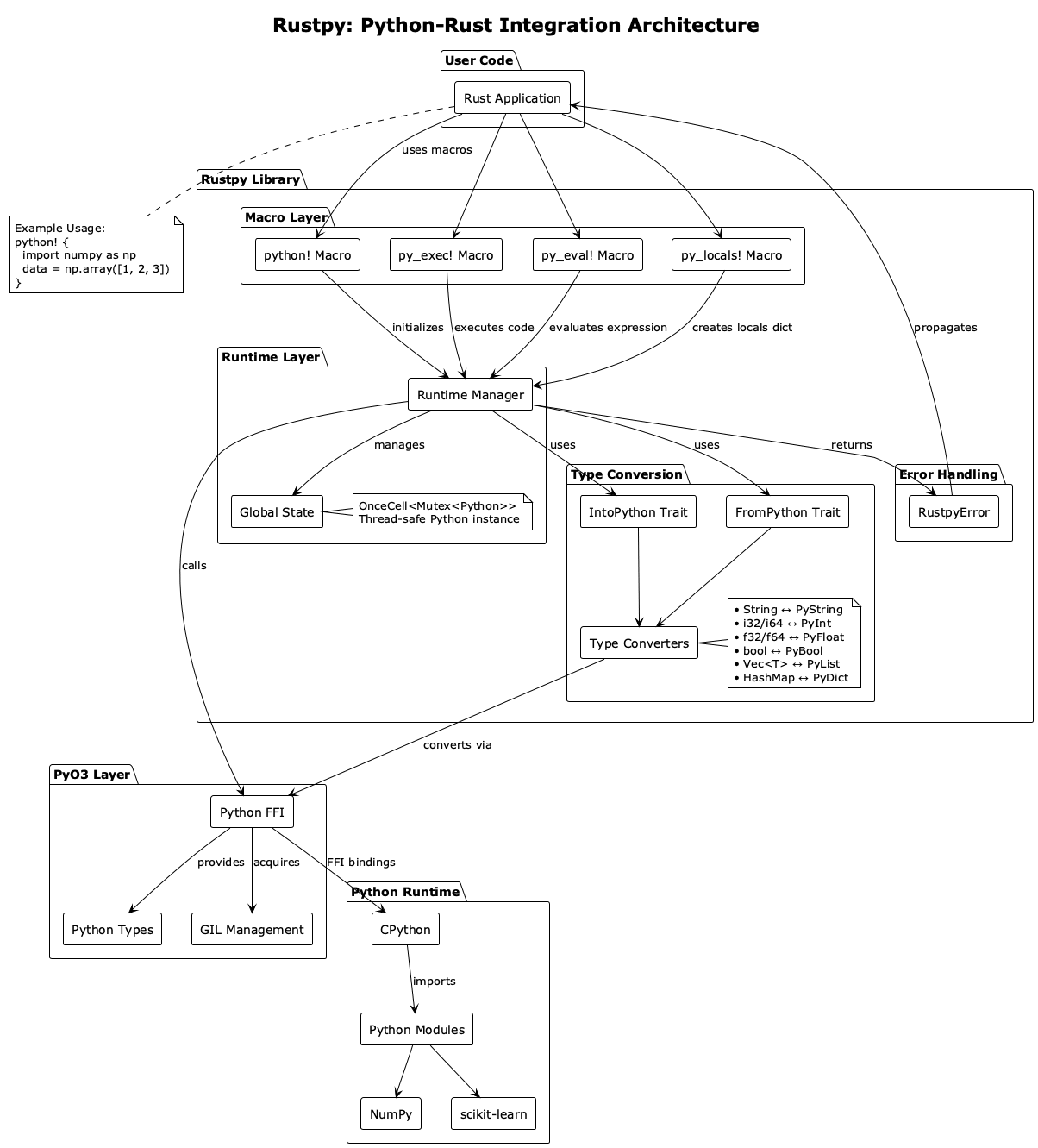
Rustpy is a Rust library that provides a simple and intuitive interface for embedding Python code in Rust applications. Built on top of [PyO3](https://github.com/PyO3/pyo3), it offers a lower learning curve while maintaining type safety and enabling seamless integration with Python's rich ML ecosystem.
## 🎯 Goals
- **Easy Python Integration**: Execute Python code directly in Rust with minimal boilerplate
- **ML-Friendly**: First-class support for NumPy, PyTorch, TensorFlow, and other ML libraries
- **Type Safety**: Leverage Rust's type system with automatic Python ↔ Rust conversions
- **Low Learning Curve**: Simple macros and intuitive API for Python developers transitioning to Rust
- **Debugging Support**: Comprehensive error handling with Python tracebacks
- **Performance**: Combine Python's ML ecosystem with Rust's performance and safety
## 🚀 Quick Start
### Installation
Add to your `Cargo.toml`:
```toml
[dependencies]
rustpy = "0.1"
```
### Basic Usage
```rust
use rustpy::prelude::*;
fn main() -> rustpy::Result<()> {
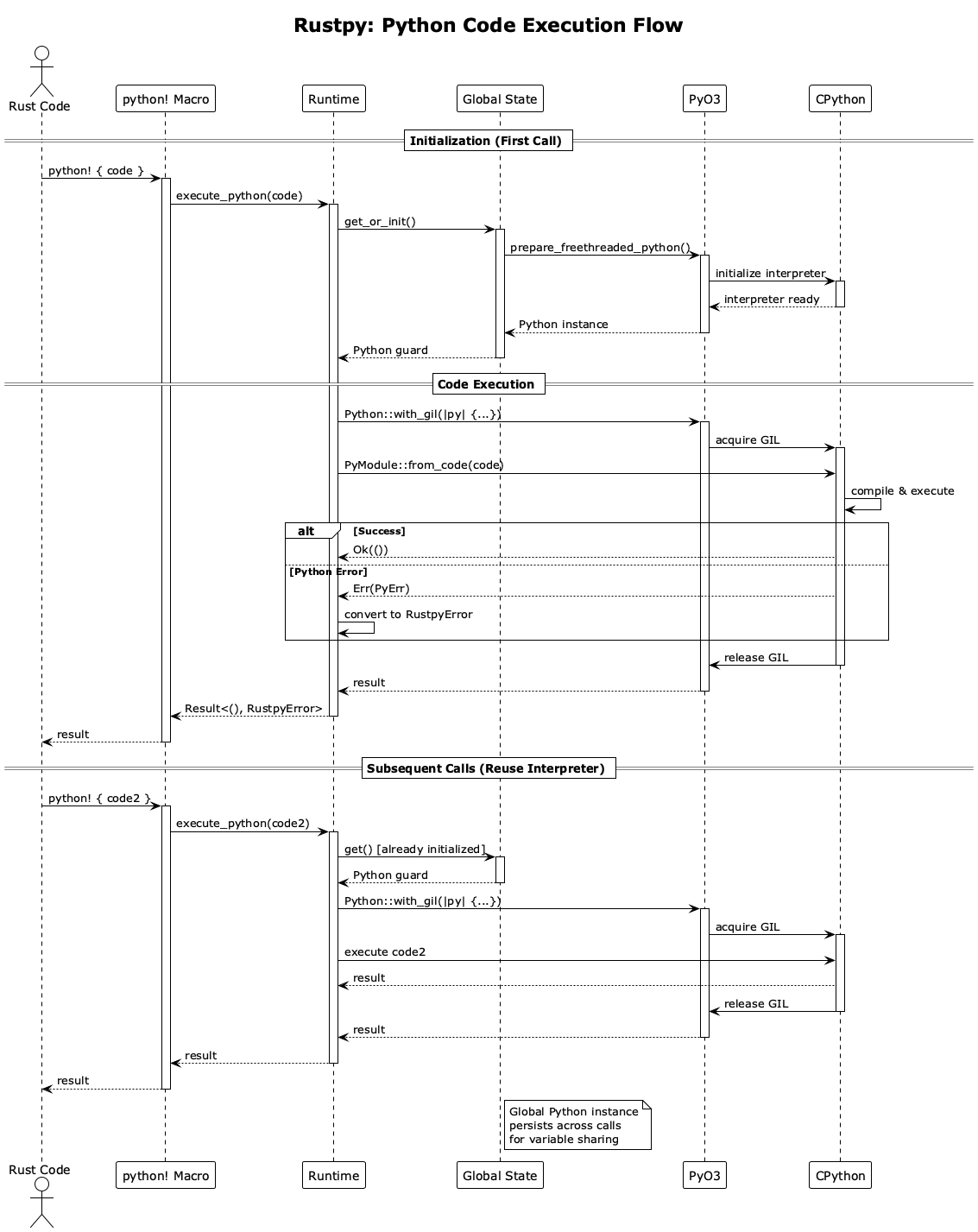
// Initialize Python runtime
rustpy::init()?;
// Execute Python code
let result: i32 = python!(-> i32, "2 + 2")?;
println!("2 + 2 = {}", result); // Output: 2 + 2 = 4
// Multi-line Python
py_exec!(r#"
def greet(name):
return f"Hello, {name}!"
print(greet("Rustacean"))
"#)?;
Ok(())
}
```
## 📚 Features
### 1. Simple Macro-Based Interface
```rust
use rustpy::prelude::*;
// Evaluate expressions with type inference
let x: i32 = python!(-> i32, "10 + 20")?;
let y: f64 = python!(-> f64, "3.14 * 2.0")?;
let s: String = python!(-> String, "'Hello' + ' World'")?;
// Execute statements
py_exec!("print('Hello from Python')")?;
// Work with collections
let numbers: Vec<i32> = python!(-> Vec<i32>, "[1, 2, 3, 4, 5]")?;
```
### 2. Pass Rust Variables to Python
```rust
use rustpy::prelude::*;
let x = 10;
let y = 20;
let locals = py_locals! {
"x" => x,
"y" => y,
};
let result: i32 = python!(locals, -> i32, "x + y")?;
println!("Result: {}", result); // Output: Result: 30
```
### 3. Machine Learning Support
```rust
use rustpy::prelude::*;
// Initialize with ML libraries
rustpy::init_with_ml(&["numpy", "pandas"])?;
// Use NumPy
py_exec!(r#"
import numpy as np
# Create and manipulate arrays
arr = np.array([1, 2, 3, 4, 5])
print(f"Mean: {arr.mean()}")
print(f"Std: {arr.std()}")
# Matrix operations
A = np.array([[1, 2], [3, 4]])
B = np.array([[5, 6], [7, 8]])
C = np.dot(A, B)
print(f"Matrix product:\n{C}")
"#)?;
// Get results back to Rust
let mean: f64 = python!(-> f64, "np.array([1, 2, 3, 4, 5]).mean()")?;
```
### 4. Data Processing Pipeline
```rust
use rustpy::prelude::*;
// Generate data in Rust
// Pass to Python for analysis
let locals = py_locals! {
"data" => data,
};
let stats: Vec<f64> = python!(locals, -> Vec<f64>, r#"
import numpy as np
arr = np.array(data)
[arr.mean(), arr.std(), arr.min(), arr.max()]
"#)?;
println!("Mean: {}, Std: {}, Min: {}, Max: {}",
stats[0], stats[1], stats[2], stats[3]);
```
### 5. Comprehensive Error Handling
```rust
use rustpy::prelude::*;
match python!(-> i32, "1 / 0") {
Ok(result) => println!("Result: {}", result),
Err(e) => {
println!("Error: {}", e);
if let Some(traceback) = e.traceback() {
println!("Traceback:\n{}", traceback);
}
}
}
```
## 🎓 Examples
### Basic Example
```bash
cargo run --example basic
```
### ML with NumPy
```bash
cargo run --example ml_numpy
```
### Advanced Data Processing
```bash
cargo run --example advanced
```
## 📖 API Overview
### Initialization
```rust
// Basic initialization
rustpy::init()?;
// Initialize with specific ML libraries
rustpy::init_with_ml(&["numpy", "torch", "pandas"])?;
```
### Macros
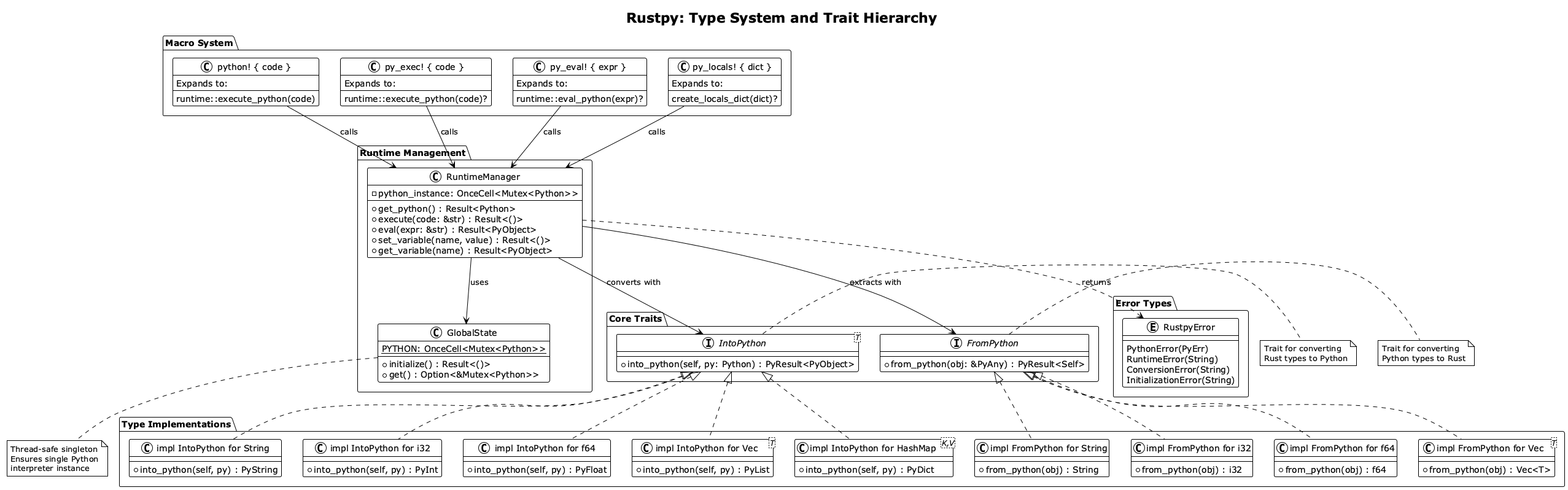
- `python!(-> Type, "code")` - Evaluate Python expression and return typed result
- `py_exec!("code")` - Execute Python statements
- `py_eval!("code")` - Evaluate expression with type inference
- `py_locals!{key => value}` - Create locals HashMap for variable passing
### Runtime Functions
```rust
// Execute Python code
rustpy::exec("print('Hello')")?;
// Evaluate expressions
let result: i32 = rustpy::eval("2 + 2")?;
// Import modules
let numpy = rustpy::import("numpy")?;
// Call Python functions
let result: f64 = rustpy::call("math", "sqrt", 16.0)?;
```
### Type Conversions
Rustpy supports automatic conversion between Rust and Python types:
| `i32`, `i64` | `int` |
| `f32`, `f64` | `float` |
| `bool` | `bool` |
| `String`, `&str` | `str` |
| `Vec<T>` | `list` |
| `HashMap<K, V>` | `dict` |
| `Option<T>` | `None` or value |
## 🔧 Advanced Usage
### Custom Type Conversions
```rust
use rustpy::prelude::*;
struct Point {
x: f64,
y: f64,
}
// Convert Point to Python dict
let point = Point { x: 3.0, y: 4.0 };
let locals = py_locals! {
"x" => point.x,
"y" => point.y,
};
let distance: f64 = python!(locals, -> f64, r#"
import math
math.sqrt(x**2 + y**2)
"#)?;
```
### Module Management
```rust
// Import and use modules
let json_module = rustpy::import("json")?;
py_exec!(r#"
import json
data = {"name": "Alice", "age": 30}
json_str = json.dumps(data)
print(json_str)
"#)?;
```
### Global Variables
```rust
// Store global variables
Python::with_gil(|py| {
let value = 42.into_py(py);
rustpy::set_global("my_var".to_string(), value)?;
});
// Retrieve global variables
if let Some(value) = rustpy::get_global("my_var")? {
Python::with_gil(|py| {
let val: i32 = value.extract(py)?;
println!("Global var: {}", val);
});
}
```
## 🎯 Use Cases
### 1. Python ML Scripts in Rust Applications
Perfect for embedding Python ML models in Rust backend services while maintaining type safety.
### 2. Rapid Prototyping
Use Python for quick experimentation and Rust for production code in the same project.
### 3. Data Science Workflows
Leverage Python's data science ecosystem (NumPy, Pandas, Matplotlib) with Rust's performance.
### 4. Gradual Migration
Migrate Python codebases to Rust incrementally while keeping critical Python components.
## 🧪 Testing
Run tests:
```bash
# Basic tests
cargo test
# ML tests (requires NumPy)
pip install numpy
cargo test --test ml_tests
```
## 📋 Requirements
- Rust 2021 edition or later
- Python 3.7+
- PyO3 compatible Python installation
### For ML Features
```bash
pip install numpy pandas torch tensorflow
```
## 🤝 Contributing
Contributions are welcome! Please feel free to submit a Pull Request.
## 📄 License
This project is licensed under the Apache-2.0 License - see the [LICENSE](LICENSE) file for details.
## 🙏 Acknowledgments
- Built on top of [PyO3](https://github.com/PyO3/pyo3)
- Inspired by the Python and Rust communities
- Special thanks to all contributors
## 🔗 Links
- [Documentation](https://docs.rs/rustpy)
- [Repository](https://github.com/amoschanGH/rustpy)
- [PyO3 Documentation](https://pyo3.rs)
## 🚧 Roadmap
- [ ] Async Python execution
- [ ] Better debugging tools
- [ ] PyTorch integration helpers
- [ ] TensorFlow integration helpers
- [ ] Jupyter notebook integration
- [ ] Performance benchmarks
- [ ] More examples and tutorials
---
Made with ❤️ for Python developers learning Rust and Rust developers using Python ML libraries.