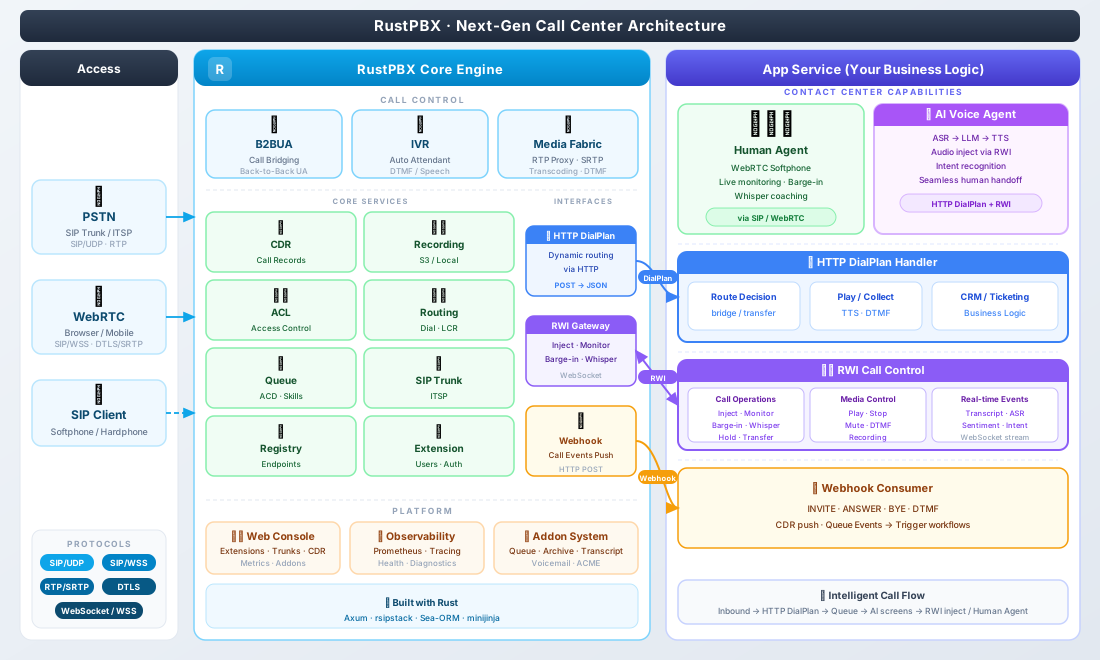
# RustPBX API Integration Guide
RustPBX provides a comprehensive set of HTTP APIs and Webhooks designed to make it a fully programmable **Software Defined PBX (SD-PBX)**. This guide details how to integrate your external business logic (CRM, ERP, AI assistants, billing systems) with RustPBX.
---
## 🏗️ Architecture Overview
RustPBX interacts with external systems in two ways:
1. **Inbound API (REST)**: Your system calls RustPBX to manage resources (extensions, trunks) or control active calls.
2. **Outbound Webhooks**: RustPBX calls your system to make routing decisions, report events, or authenticate users.
| **Console API** | Inbound | REST | CRUD extensions, download recordings, system config |
| **Active Call Control** | Inbound | REST | Live hangup, transfer, mute, force-accept |
| **AMI API** | Inbound | REST | Health checks, hot-reload, raw dialog inspection |
| **HTTP Router** | Outbound | Webhook | Dynamic call routing (per-INVITE decision) |
| **User Backend** | Outbound | Webhook | External SIP authentication (OAuth/LDAP proxy) |
| **Locator Webhook** | Outbound | Webhook | Real-time registration/unregistration events |
| **Call Record Push** | Outbound | Webhook | Push CDR JSON + Audio files to external server |
---
## 📡 1. Outbound Webhooks (RustPBX → Your Server)
### 1.1 HTTP Router (Dynamic Call Routing)
**The most powerful extension point.** Instead of static routing rules, RustPBX asks your API "Receive call from A to B, what should I do?".
- **Trigger**: Every incoming SIP INVITE.
- **Config**:
```toml
[proxy.http_router]
url = "https://your-api.com/pbx/route"
fallback_to_static = true # If your API fails, use internal routes
timeout_ms = 5000
[proxy.http_router.headers]
X-API-Key = "secret-token"
```
**Request (POST)**:
```json
{
"call_id": "ab39-551-229",
"from": "<sip:1001@pbx.com>",
"to": "<sip:200@pbx.com>",
"source_addr": "1.2.3.4:5060",
"uri": "sip:200@pbx.com",
"headers": {
"User-Agent": "Yealink T54W",
"X-Client-ID": "998877"
},
"body": "v=0\r\n..." // Full SDP body
}
```
**Response**:
```json
{
"sip:1001@192.168.1.50:5060", // Target 1 (Extension)
"sip:1002@192.168.1.51:5060" // Target 2 (Mobile App)
],
"timeout": 30, // Ring timeout in seconds
"media_proxy": "auto", // auto | always | none | nat
"headers": { // Inject custom SIP headers into the INVITE sent to B
"X-Call-Reason": "support-ticket-123"
}
}
```
### 1.2 User Backend (SIP Authentication)
Delegate SIP registration password checking to your external DB or API.
- **Trigger**: SIP REGISTER or INVITE with auth.
- **Config**:
```toml
[[proxy.user_backends]]
type = "http"
url = "https://your-api.com/pbx/auth"
username_field = "u"
realm_field = "r"
```
**Request (GET)**: `https://your-api.com/pbx/auth?u=1001&r=pbx.com`
**Response (200 OK)**:
```json
{
"id": 1001,
"username": "1001",
"password": "hashed_password_or_plaintext", // HA1 hash preferred
"display_name": "John Doe",
"email": "john@pbx.com",
"allow_guest_calls": false
}
```
**Response (403 Forbidden)**:
```json
{ "reason": "invalid_password", "message": "Account locked" }
```
### 1.3 Locator Webhook (Presence Events)
Real-time notification when devices come online or go offline.
- **Config**:
```toml
[proxy.locator_webhook]
url = "https://your-api.com/pbx/events"
events = ["registered", "unregistered", "offline"]
```
**Payload**:
```json
{
"event": "registered",
"timestamp": 1708201234,
"location": {
"aor": "sip:1001@pbx.com",
"destination": "1.2.3.4:12345",
"transport": "TLS",
"user_agent": "MicroSIP/3.21.3",
"expires": 3600
}
}
```
### 1.4 CDR Event Push and Recording Upload
Push call details immediately after a call ends. Recording media upload is configured separately.
- **Config**:
```toml
[recording]
enabled = true
auto_start = true
type = "http"
path = "./config/recorders"
url = "https://your-api.com/pbx/recording"
[callrecord]
type = "http"
url = "https://your-api.com/pbx/cdr"
# Maximum concurrent post-call CDR save/upload/hook tasks. Default: 64, minimum: 1.
max_concurrent = 64
# Accepted for compatibility, but ignored. Use [recording] for media upload.
with_media = true
```
**CDR format**: `multipart/form-data`
- Field `calllog.json`: The full CDR JSON (see next section).
**Recording format**: `multipart/form-data`
- File field `recording`: The recorded WAV file.
- Fields `call_id` and `track_id`: Recording metadata.
---
## 🔌 2. Inbound REST API (You → RustPBX)
**Base URL**: `http://<rustpbx-ip>:8080/console`
**Authentication**: Session cookie (login via `/console/login`) or API Token (future).
### 2.1 Active Call Control
Manage calls that are currently in progress.
**List Active Calls**:
`GET /console/calls/active`
**Control a Call**:
`POST /console/calls/active/{call_id}/commands`
**Payloads**:
1. **Hangup**:
```json
{ "action": "hangup", "reason": "admin_kick" }
```
2. **Blind Transfer**:
```json
{ "action": "transfer", "target": "sip:1002@pbx.com" }
```
3. **Mute/Unmute**:
```json
{ "action": "mute", "track_id": "audio-0" } ```
4. **Force Answer** (for ringing channels):
```json
{
"action": "accept",
"sdp": "v=0..." }
```
### 2.2 System Management (CRUD)
| **Extensions** | `/console/extensions` | `GET`, `POST`, `PUT`, `DELETE` | Manage SIP users |
| **Trunks** | `/console/sip-trunk` | `GET`, `POST`, `PUT`, `DELETE` | Manage upstream carriers |
| **Routes** | `/console/routing` | `GET`, `POST`, `PUT`, `DELETE` | Manage dial plan rules |
| **CDRs** | `/console/call-records` | `GET`, `POST` (Search) | Query history |
| **Recording** | `/console/call-records/{id}/recording` | `GET` | Stream audio file |
| **SIP Flow** | `/console/call-records/{id}/sip-flow` | `GET` | Get PCAP-like ladder diagram JSON |
### 2.3 AMI (Admin Interface)
Low-level system operations. Protected by IP whitelist (`[ami].allows` in config).
**Base URL**: `http://<rustpbx-ip>:8080/ami/v1`
- **Health**: `GET /health` - System vital stats (uptime, active calls, load).
- **Reload**: `POST /reload/trunks`, `/reload/routes`, `/reload/acl` - Hot reload config without restart.
- **Shutdown**: `POST /shutdown` - Graceful shutdown (stops accepting new calls, waits for active ones).
- **Dialogs**: `GET /dialogs` - Raw dump of internal SIP dialog states (for debugging).
- **SipFlow signaling**: `GET /sipflow/flow/{call_id}` - Query SIP ladder data.
- **SipFlow media**: `GET /sipflow/media/{call_id}` - Export call media as WAV.
SipFlow endpoints support optional time range query parameters:
- `start`: range start time
- `end`: range end time
Accepted formats:
- RFC3339 datetime, e.g. `2026-04-16T10:00:00+08:00`
- Unix timestamp (seconds), e.g. `1713232800`
Example:
```http
GET /ami/v1/sipflow/flow/abc123?start=2026-04-16T10:00:00%2B08:00&end=2026-04-16T10:30:00%2B08:00
GET /ami/v1/sipflow/media/abc123?start=1713232800&end=1713234600
```
---
## 🛠️ Integration Workflows
### Scenario A: CRM Click-to-Dial
1. User clicks phone number in CRM.
2. CRM backend sends `POST /api/v1/commands` (Future feature) OR uses AMI to originate call.
3. *Current workaround*: CRM sends SIP REFER to RustPBX or uses a dedicated "Click-to-Dial" SIP extension that the web-app registers as.
### Scenario B: AI Voice Assistant
1. Inbound call hits RustPBX.
2. **HTTP Router** sends INVITE details to AI backend.
3. AI Backend returns `{"action": "forward", "targets": ["sip:ai-bot-service@internal"]}`.
4. RustPBX routes audio to the AI bot via SIP/RTP.
### Scenario C: Billing System
1. **User Backend** authenticates user, checking balance > 0.
2. Call proceeds.
3. On hangup, **CDR Push** sends via HTTP POST to Billing System.
4. Billing system calculates duration * rate and deducts balance.
### Scenario D: Compliance Recording
Two recording backends are available — a traditional local file recorder (`[recording]`) and sipflow (`[sipflow]`). When both are configured, sipflow takes precedence for media capture and upload, avoiding duplicate local WAV files.
#### Option 1: SipFlow recording (recommended)
SipFlow captures raw RTP packets and SIP messages, then generates WAV / JSONL on export. No local WAV file is written.
```toml
[recording]
enabled = true
auto_start = true
[sipflow]
type = "local"
root = "./config/sipflow"
[sipflow.upload]
type = "s3"
vendor = "aliyun"
bucket = "my-bucket"
region = "oss-cn-hangzhou"
endpoint = "https://oss-cn-hangzhou.aliyuncs.com"
root = "recordings"
media = true
signaling = true
```
When sipflow backend is present, `[recording]` enables media anchoring only; media capture and upload are handled by sipflow. The WAV is generated on-demand from stored RTP packets via `GET /sipflow/media/{call_id}` and uploaded to the sipflow S3/HTTP target. Signaling is uploaded as JSONL to the same target.
#### Option 2: Local file recorder (legacy)
```toml
[recording]
enabled = true
auto_start = true
# No [sipflow] section — falls back to local .wav file
```
All calls are recorded locally to `./config/recorders/`, then asynchronously uploaded via `[callrecord]` S3 config.