# rust-animation [![Latest Version]][crates.io]
[Latest Version]: https://img.shields.io/crates/v/rust-animation.svg
[crates.io]: https://crates.io/crates/rust-animation
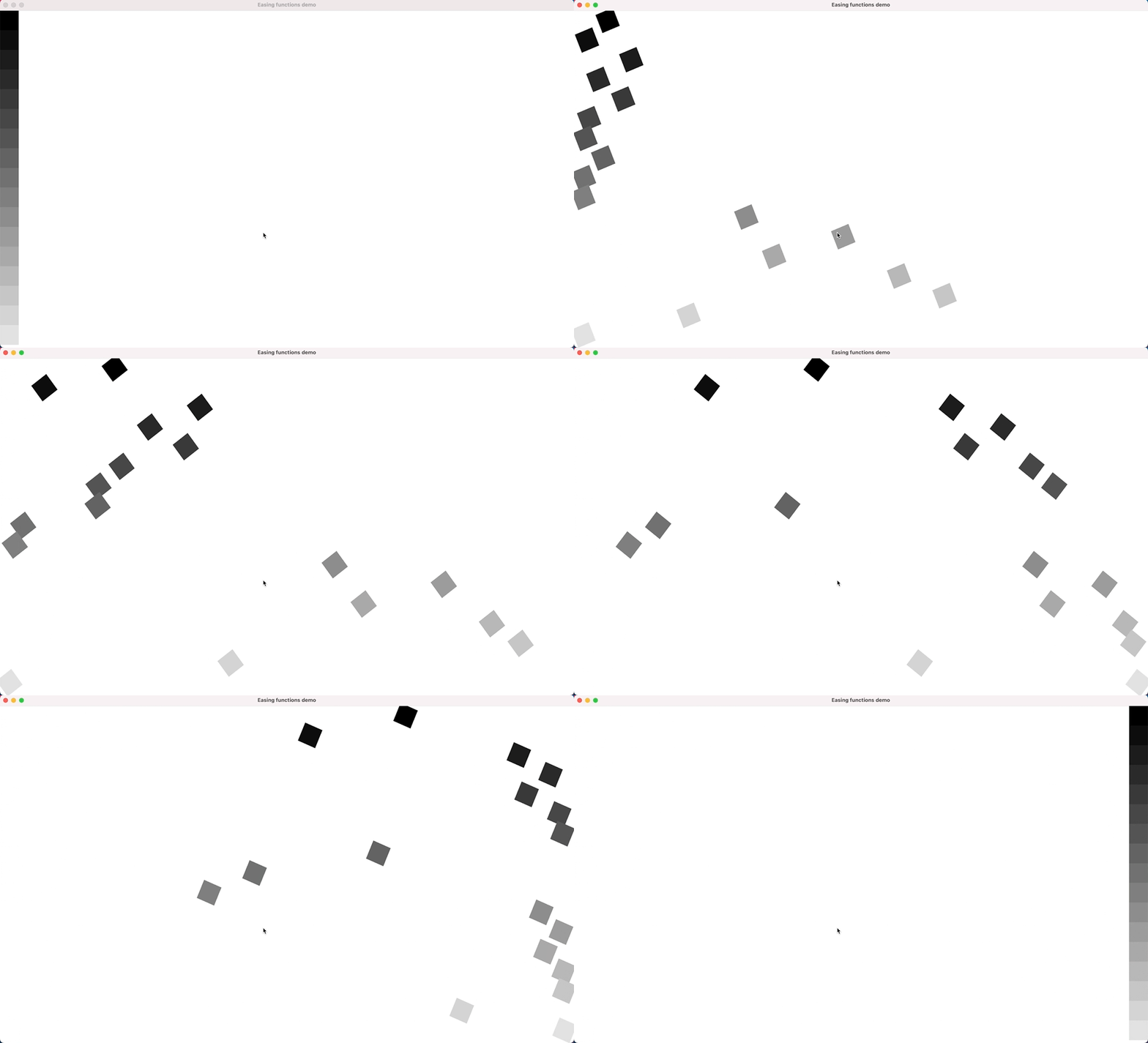
**rust-animation** is a wgpu-based graphics library written in Rust for creating hardware-accelerated user interfaces. It is designed to implement simple, animated UIs for embedded devices, inspired by the [GNOME Clutter project](https://en.wikipedia.org/wiki/Clutter_(software)) and [Apple Core Animation](https://en.wikipedia.org/wiki/Core_Animation).
## Table of Contents
- [Features](#features)
- [Prerequisites](#prerequisites)
- [Installation](#installation)
- [Quick Start](#quick-start)
- [Examples](#examples)
- [Easing Functions](#easing-functions)
- [Flex UI](#flex-ui)
- [Basic Animation](#basic-animation)
- [Picture Viewer](#picture-viewer)
- [API Overview](#api-overview)
- [Contributing](#contributing)
- [License](#license)
- [Acknowledgments](#acknowledgments)
## Features
- **2D Transforms**: Apply translate, scale, and rotate transformations to layers
- **Rich Animation System**: Support for multiple easing functions (Linear, EaseIn, EaseOut, EaseInOut, and various polynomial variants)
- **Flex Layout**: CSS Flexbox-like layout system using the [Stretch](https://github.com/vislyhq/stretch) library
- **Hardware Acceleration**: wgpu-based rendering for high performance across multiple backends (Vulkan, Metal, D3D12, OpenGL)
- **Layer Hierarchy**: Support for nested layers with parent-child relationships
- **Event Handling**: Built-in event system for keyboard input and focus management
- **Image Support**: Load and display images as textures
- **Text Rendering**: Font rendering capabilities for displaying text
- **Cross-Platform**: Works on Windows, macOS, Linux, and can target WebAssembly
> **Note**: rust-animation is in early development. Some features may be incomplete or have bugs. Please [report any issues](https://github.com/joone/rust-animation/issues) you encounter.
## Prerequisites
Before using rust-animation, ensure you have the following installed:
### Required
- **Rust** (stable): Install from [rust-lang.org](https://www.rust-lang.org/tools/install)
```bash
curl --proto '=https' --tlsv1.2 -sSf https://sh.rustup.rs | sh
```
### Platform-Specific Requirements
#### Ubuntu/Debian
```bash
sudo apt-get update
sudo apt-get install build-essential cmake pkg-config
```
#### macOS
```bash
brew install cmake
```
#### Windows
- Install [CMake](https://cmake.org/download/) from the official website
- Ensure you have the Visual Studio Build Tools or Visual Studio installed
### Tested Platforms
- Ubuntu 20.04 and later
- Windows 10 and later
- macOS (Intel and Apple Silicon)
## Installation
### Using as a Library
Add rust-animation to your `Cargo.toml`:
```toml
[dependencies]
rust-animation = "0.2.7"
```
### Building from Source
Clone the repository and build:
```bash
git clone https://github.com/joone/rust-animation.git
cd rust-animation
cargo build --release
```
## Quick Start
Here's a minimal example to get started:
```rust
use winit::{
event::{Event, WindowEvent, KeyEvent},
event_loop::{ControlFlow, EventLoop},
keyboard::{KeyCode, PhysicalKey},
window::WindowBuilder,
};
use rust_animation::{layer::Layer, animation::Animation, play::Play};
use rust_animation::layer::LayoutMode;
use rust_animation::animation::EasingFunction;
fn main() {
// Create event loop and window
let event_loop = EventLoop::new().unwrap();
let window = WindowBuilder::new()
.with_title("My First Animation")
.with_inner_size(winit::dpi::LogicalSize::new(800, 600))
.build(&event_loop)
.unwrap();
// Create a Play (the main container)
let mut play = Play::new(
"My First Animation".to_string(),
800,
600,
LayoutMode::UserDefine,
);
// Initialize wgpu context
play.init_wgpu();
// Create a stage (the root layer)
let mut stage = Layer::new("stage".to_string(), 800, 600, None);
stage.set_visible(true);
// Create a layer (a visual element)
let mut layer = Layer::new("my_layer".to_string(), 100, 100, None);
layer.x = 50;
layer.y = 50;
layer.set_color(1.0, 0.0, 0.0); // Red
// Create and apply an animation
let mut animation = Animation::new();
animation.apply_translation_x(50, 400, 2.0, EasingFunction::EaseInOut);
layer.set_animation(Some(animation));
// Add layer to stage and stage to play
stage.add_sub_layer(layer);
play.add_stage(stage);
// Event loop
event_loop.run(move |event, elwt| {
elwt.set_control_flow(ControlFlow::Poll);
match event {
Event::WindowEvent { event, .. } => match event {
WindowEvent::CloseRequested => elwt.exit(),
WindowEvent::KeyboardInput {
event: KeyEvent {
physical_key: PhysicalKey::Code(KeyCode::Escape),
..
},
..
} => elwt.exit(),
WindowEvent::RedrawRequested => {
play.render();
window.request_redraw();
}
_ => {}
},
Event::AboutToWait => {
window.request_redraw();
}
_ => {}
}
}).unwrap();
}
```
For complete working examples, see the [Examples](#examples) section below.
## Examples
rust-animation includes several examples to demonstrate its capabilities. All examples can be run using `cargo`:
```bash
# General format
cargo run --example <example_name>
```
## Easing Functions
**Example file:** `easing_functions.rs`
Demonstrates all available easing functions with visual animations.
**Run:**
```bash
cargo run --example easing_functions
```
**What it does**: Creates 17 animated layers, each using a different easing function, moving horizontally across the screen while rotating.
**Key concepts demonstrated:**
- Multiple easing functions (Linear, EaseIn, EaseOut, EaseInOut, and polynomial variants)
- Combining multiple animations (translation + rotation)
- Layer positioning and coloring
**Code snippet:**
```rust
let mut play = Play::new(
"Easing functions demo".to_string(),
1920,
1080,
LayoutMode::UserDefine,
);
// Initialize wgpu context
play.init_wgpu();
let mut stage = Layer::new("stage".to_string(), 1920, 1080, None);
stage.set_visible(true);
let easing_functions = vec![
EasingFunction::EaseIn,
EasingFunction::EaseInCubic,
EasingFunction::EaseInOut,
EasingFunction::EaseInOutCubic,
EasingFunction::EaseInOutQuad,
EasingFunction::EaseInOutQuart,
EasingFunction::EaseInOutQuint,
EasingFunction::EaseInQuad,
EasingFunction::EaseInQuart,
EasingFunction::EaseInQuint,
EasingFunction::EaseOut,
EasingFunction::EaseOutCubic,
EasingFunction::EaseOutQuad,
EasingFunction::EaseOutQuart,
EasingFunction::EaseOutQuint,
EasingFunction::Linear,
EasingFunction::Step,
];
let mut y = 0;
let time = 5.0;
let width = 63;
let height = width;
for i in 0..17 {
let layer_name = format!("layer_{}", i + 1);
let mut layer = Layer::new(layer_name.to_string(), width, height, None);
layer.x = 0;
layer.y = y;
y += height as i32;
layer.set_color(i as f32 / 18.0, i as f32 / 18.0, i as f32 / 18.0);
let mut animation = Animation::new();
animation.apply_translation_x(0, (1920 - width) as i32, time, easing_functions[i]);
animation.apply_rotation(0, 360, time, EasingFunction::Linear);
layer.set_animation(Some(animation));
stage.add_sub_layer(layer);
}
play.add_stage(stage);
// Event loop with winit (see full example for complete implementation)
```
## Flex UI
**Example file:** `flex_ui.rs`
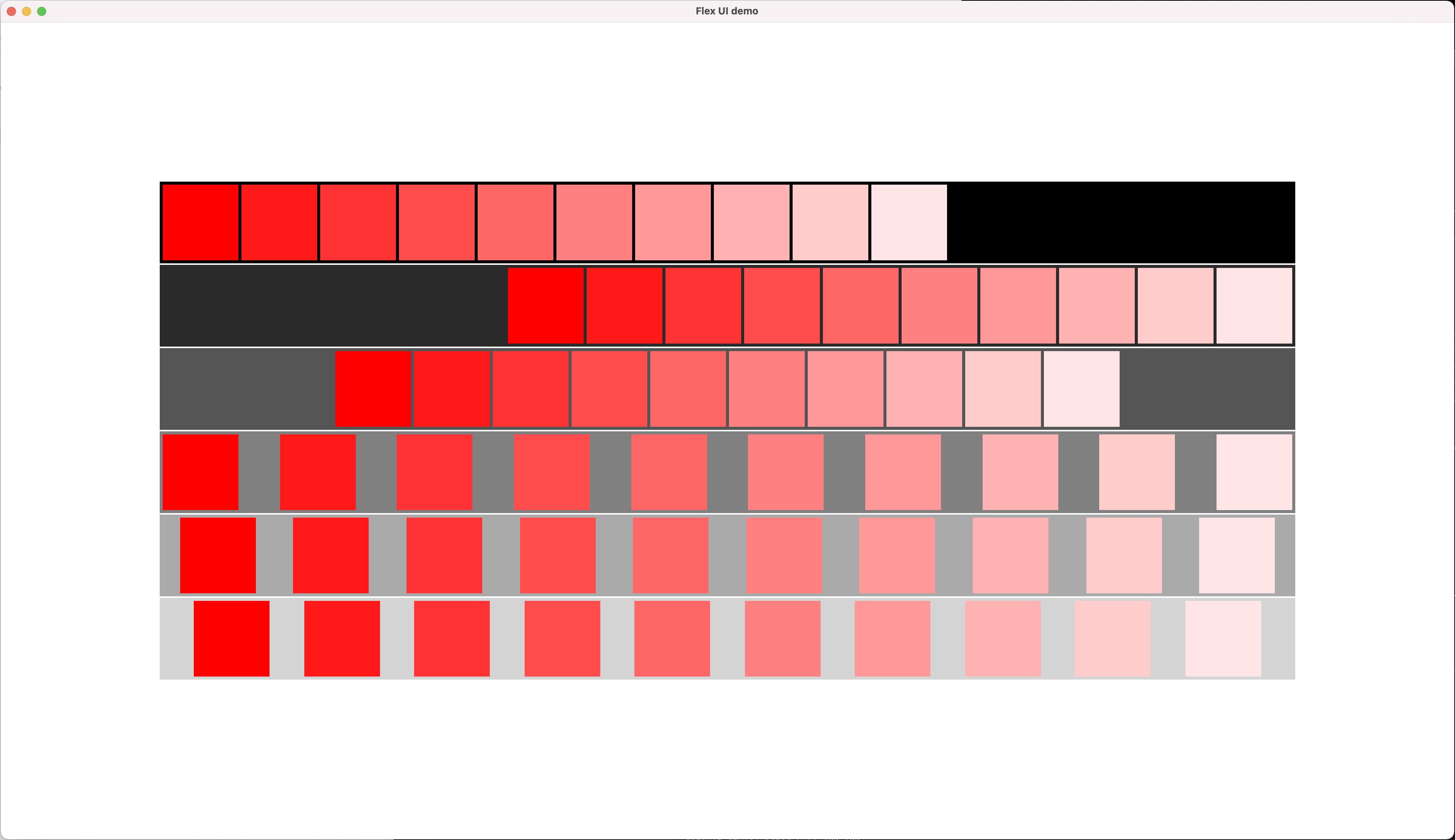
Demonstrates CSS Flexbox-like layout capabilities using the Stretch library.
**Run:**
```bash
cargo run --example flex_ui
```
**What it does**: Creates a responsive layout with multiple containers, each demonstrating different flexbox alignment properties (FlexStart, FlexEnd, Center, SpaceBetween, SpaceAround, SpaceEvenly).
**Key concepts demonstrated:**
- Flex layout system
- Custom layout implementation using the `Layout` trait
- Justify content and align items properties
- Nested layers with flex positioning
See the full implementation in `examples/flex_ui.rs`.
## Basic Animation
**Example file:** `ani.rs`
Demonstrates basic animation features including transforms and image loading.
**Run:**
```bash
cargo run --example ani
```
**What it does**: Shows multiple animations running simultaneously - scaling, translating, and rotating layers, including image-based layers and colored shapes with nested sub-layers.
**Key concepts demonstrated:**
- Multiple simultaneous animations (scale, translate, rotate)
- Loading and animating images
- Nested layer hierarchies
- Different easing functions
**Code snippet:**
```rust
let mut play = Play::new(
"Animation test".to_string(),
1920,
1080,
LayoutMode::UserDefine,
);
// Initialize wgpu context
play.init_wgpu();
let mut stage = Layer::new("stage".to_string(), 1920, 1080, None);
stage.set_visible(true);
let mut layer_1 = Layer::new("layer_1".to_string(), 400, 225, None);
layer_1.x = 100;
layer_1.y = 100;
layer_1.set_image("examples/splash.png".to_string());
let mut animation_1 = Animation::new();
// 1X -> 2X for 5 sec.
let time = 5.0;
animation_1.apply_scale(1.0, 2.0, time, EasingFunction::Linear);
animation_1.apply_translation_x(100, 1000, time, EasingFunction::EaseInOut);
animation_1.apply_translation_y(100, 300, time, EasingFunction::EaseInOut);
animation_1.apply_rotation(0, 360, time, EasingFunction::EaseInOut);
layer_1.set_animation(Some(animation_1));
let mut layer_2 = Play::new_layer("layer_2".to_string(), 120, 120, None);
layer_2.x = 100;
layer_2.y = 100;
layer_2.scale_x = 1.5;
layer_2.scale_y = 1.5;
layer_2.set_color(0.0, 0.0, 1.0);
let mut animation_2 = Animation::new();
animation_2.apply_rotation(0, 360, 5.0, EasingFunction::EaseInOut);
layer_2.set_animation(Some(animation_2));
let mut layer_3 = Play::new_layer("layer_3".to_string(), 50, 50, None);
layer_3.x = 10;
layer_3.y = 10;
layer_3.set_color(1.0, 0.0, 0.0);
layer_2.add_sub_layer(layer_3);
stage.add_sub_layer(layer_1);
stage.add_sub_layer(layer_2);
play.add_stage(stage);
// Event loop with winit (see full example for complete implementation)
```
## Picture Viewer
**Example file:** `picture_viewer.rs`
Demonstrates event handling and custom user-defined layouts.
**Run:**
```bash
cargo run --example picture_viewer
```
**What it does**: Creates a thumbnail grid viewer with keyboard navigation and focus animations. Currently implements thumbnail view functionality.
**Key concepts demonstrated:**
- Custom event handlers (EventHandler trait)
- Keyboard input handling (arrow keys for navigation)
- Focus management (key_focus_in/out events)
- Custom layout implementation (Layout trait)
- Grid-based positioning
> **Note**: This example is a work in progress. Currently, only the thumbnail view is fully functional.
**Code snippet:**
```rust
pub struct LayerEvent {
name: String,
}
impl LayerEvent {
pub fn new() -> Self {
LayerEvent {
name: "layer_event".to_string(),
}
}
}
impl EventHandler for LayerEvent {
fn key_focus_in(&mut self, layer: &mut Layer) {
let mut animation = Animation::new();
animation.apply_scale(1.0, 1.1, 0.3, EasingFunction::EaseInOut);
layer.set_animation(Some(animation));
}
fn key_focus_out(&mut self, layer: &mut Layer) {
layer.scale_x = 1.0;
layer.scale_y = 1.0;
}
fn key_down(&mut self, key: rust_animation::layer::Key, layer: &mut Layer) {
if key == rust_animation::layer::Key::Right {
// right cursor
layer.select_next_sub_actor();
} else if key == rust_animation::layer::Key::Left {
// left cursor
layer.select_prev_sub_actor();
}
}
}
pub struct ActorLayout {
name: String,
cur_x: i32,
}
impl ActorLayout {
pub fn new() -> Self {
ActorLayout {
name: "actor_layout".to_string(),
cur_x: 0,
}
}
}
impl Layout for ActorLayout {
fn layout_sub_layers(
&mut self,
layer: &mut Layer,
parent_layer: Option<&Layer>,
stretch: &mut Option<Stretch>,
) {
println!("layout_sub_layer {}", self.name);
let mut index: i32 = 0;
for sub_actor in layer.sub_actor_list.iter_mut() {
self.cur_x += sub_actor.width as i32;
sub_actor.x = index % 5 * IMAGE_WIDTH as i32;
let col = index / 5;
sub_actor.y = col * IMAGE_HEIGHT as i32;
index += 1;
}
}
fn update_layout(&mut self, layer: &mut Layer, stretch: &mut Option<Stretch>) {
println!("update_layout {}", self.name);
}
fn finalize(&mut self) {
println!("finalize {}", self.name);
}
}
```
## API Overview
### Core Concepts
**Play**: The main container and render manager
- Manages the rendering loop
- Holds one or more stages
- Handles projection matrices and wgpu context setup
**Layer**: Visual elements in the scene graph
- Can have position (x, y, z), size (width, height)
- Supports transforms: translate, scale, rotate
- Can have colors or textures
- Supports nested hierarchies (parent-child relationships)
- Can have animations, event handlers, and custom layouts
**Animation**: Defines time-based property changes
- Apply transformations over time with easing functions
- Supports: translation (x, y), scaling, rotation
- Multiple animations can run simultaneously on one layer
**Easing Functions**: Control animation timing curves
- Linear, Step
- EaseIn, EaseOut, EaseInOut (sine-based)
- Quad, Cubic, Quart, Quint variants (polynomial-based)
### Main APIs
```rust
// Create a Play (main container)
let play = Play::new(name, width, height, layout_mode);
// Create layers
let mut layer = Layer::new(name, width, height, event_handler);
layer.x = x;
layer.y = y;
layer.set_color(r, g, b);
layer.set_image(path);
// Create animations
let mut animation = Animation::new();
animation.apply_translation_x(from, to, duration, easing);
animation.apply_translation_y(from, to, duration, easing);
animation.apply_scale(from, to, duration, easing);
animation.apply_rotation(from_deg, to_deg, duration, easing);
layer.set_animation(Some(animation));
// Build scene graph
parent_layer.add_sub_layer(child_layer);
stage.add_sub_layer(layer);
play.add_stage(stage);
// Render
play.render();
```
## Contributing
Contributions are welcome! Here's how you can help:
1. **Fork** the repository
2. **Create** a feature branch (`git checkout -b feature/amazing-feature`)
3. **Commit** your changes (`git commit -m 'Add some amazing feature'`)
4. **Push** to the branch (`git push origin feature/amazing-feature`)
5. **Open** a Pull Request
### Development Guidelines
- Run `cargo fmt` before committing to ensure consistent code style
- Use the provided `run-check-style.sh` script for formatting
- Write examples to demonstrate new features
- Update documentation for API changes
### Releasing
For information about publishing new versions to crates.io, see [RELEASING.md](RELEASING.md).
### Reporting Issues
Found a bug or have a feature request? Please [open an issue](https://github.com/joone/rust-animation/issues) with:
- Clear description of the problem/feature
- Steps to reproduce (for bugs)
- Expected vs. actual behavior
- System information (OS, Rust version)
## License
This project is licensed under the BSD-3-Clause License - see the [LICENSE](LICENSE) file for details.
## Acknowledgments
This project was inspired by:
- [GNOME Clutter](https://en.wikipedia.org/wiki/Clutter_(software)) - A GObject-based graphics library
- [Apple Core Animation](https://en.wikipedia.org/wiki/Core_Animation) - Animation infrastructure for macOS and iOS
### Dependencies
rust-animation uses several excellent open-source libraries:
- [cgmath](https://crates.io/crates/cgmath) - Linear algebra and mathematics for graphics
- [wgpu](https://crates.io/crates/wgpu) - Modern cross-platform graphics API
- [image](https://crates.io/crates/image) - Image encoding and decoding
- [keyframe](https://crates.io/crates/keyframe) - Keyframe animation library
- [stretch](https://crates.io/crates/stretch) - Flexbox layout engine
- [ab_glyph](https://crates.io/crates/ab_glyph) - Font rendering
- [winit](https://crates.io/crates/winit) - Window creation and event loop (examples only)
---
**Author**: [Joone Hur](https://github.com/joone)
**Repository**: [https://github.com/joone/rust-animation](https://github.com/joone/rust-animation)