# Russell Lab - Scientific laboratory for linear algebra and numerical mathematics <!-- omit from toc -->
[](https://docs.rs/russell_lab/)
_This crate is part of [Russell - Rust Scientific Library](https://github.com/cpmech/russell)_
## Contents <!-- omit from toc -->
- [Introduction](#introduction)
- [Documentation](#documentation)
- [External crates](#external-crates)
- [Installation](#installation)
- [Setting Cargo.toml up](#setting-cargotoml-up)
- [Optional features](#optional-features)
- [🌟 Examples](#-examples)
- [Running an example with Intel MKL](#running-an-example-with-intel-mkl)
- [Sorting small tuples](#sorting-small-tuples)
- [Check first and second derivatives](#check-first-and-second-derivatives)
- [Bessel functions](#bessel-functions)
- [Linear fitting](#linear-fitting)
- [Chebyshev adaptive interpolation (given function)](#chebyshev-adaptive-interpolation-given-function)
- [Chebyshev adaptive interpolation (given data)](#chebyshev-adaptive-interpolation-given-data)
- [Chebyshev adaptive interpolation (given noisy data)](#chebyshev-adaptive-interpolation-given-noisy-data)
- [Lagrange interpolation](#lagrange-interpolation)
- [Solution of a 1D PDE using spectral collocation](#solution-of-a-1d-pde-using-spectral-collocation)
- [Numerical integration: perimeter of ellipse](#numerical-integration-perimeter-of-ellipse)
- [Finding a local minimum and a root](#finding-a-local-minimum-and-a-root)
- [Finding all roots in an interval](#finding-all-roots-in-an-interval)
- [Computing the pseudo-inverse matrix](#computing-the-pseudo-inverse-matrix)
- [Matrix visualization](#matrix-visualization)
- [Computing eigenvalues and eigenvectors](#computing-eigenvalues-and-eigenvectors)
- [Cholesky factorization](#cholesky-factorization)
- [Read a table-formatted data file](#read-a-table-formatted-data-file)
- [About the column major representation](#about-the-column-major-representation)
- [Benchmarks](#benchmarks)
- [Chebyshev polynomial evaluation](#chebyshev-polynomial-evaluation)
- [Jacobi Rotation versus LAPACK DSYEV](#jacobi-rotation-versus-lapack-dsyev)
- [Notes for developers](#notes-for-developers)
## Introduction
This library implements specialized mathematical functions (e.g., Bessel, Erf, Gamma) and functions to perform linear algebra computations (e.g., Matrix, Vector, Matrix-Vector, Eigen-decomposition, SVD). This library also implements a set of helpful function for comparing floating-point numbers, measuring computer time, reading table-formatted data, and more.
The code shall be implemented in *native Rust* code as much as possible. However, light interfaces ("wrappers") are implemented for some of the best tools available in numerical mathematics, including [OpenBLAS](https://github.com/OpenMathLib/OpenBLAS) and [Intel MKL](https://www.intel.com/content/www/us/en/docs/onemkl/developer-reference-c/2023-2/overview.html).
The code is organized in modules:
* `algo` — algorithms that depend on the other modules (e.g, Lagrange interpolation)
* `base` — "base" functionality to help other modules
* `check` — functions to assist in unit and integration testing
* `math` — mathematical (specialized) functions and constants
* `matrix` — [NumMatrix] struct and associated functions
* `matvec` — functions operating on matrices and vectors
* `vector` — [NumVector] struct and associated functions
For linear algebra, the main structures are `NumVector` and `NumMatrix`, that are generic Vector and Matrix structures. The Matrix data is stored as [column-major](#col-major). The `Vector` and `Matrix` are `f64` and `Complex64` aliases of `NumVector` and `NumMatrix`, respectively.
The linear algebra functions currently handle only `(f64, i32)` pairs, i.e., accessing the `(double, int)` C functions. We also consider `(Complex64, i32)` pairs.
There are many functions for linear algebra, such as (for Real and Complex types):
* Vector addition, copy, inner and outer products, norms, and more
* Matrix addition, multiplication, copy, singular-value decomposition, eigenvalues, pseudo-inverse, inverse, norms, and more
* Matrix-vector multiplication, and more
* Solution of dense linear systems with symmetric or non-symmetric coefficient matrices, and more
* Reading writing files, `linspace`, grid generators, Stopwatch, linear fitting, and more
* Checking results, comparing floating point numbers, and verifying the correctness of derivatives; see `russell_lab::check`
### Documentation
* [](https://docs.rs/russell_lab/) — [russell_lab documentation](https://docs.rs/russell_lab/)
### External crates
A few other third-party crates related to numerical mathematics and associated disciplines are listed below:
* [lambert_w](https://github.com/JSorngard/lambert_w) — Computes the [Lambert W function](https://mathworld.wolfram.com/LambertW-Function.html)
## Installation
This crate depends on some non-rust high-performance libraries. [See the main README file for the steps to install these dependencies.](https://github.com/cpmech/russell)
### Setting Cargo.toml up
[](https://crates.io/crates/russell_lab)
👆 Check the crate version and update your Cargo.toml accordingly:
```toml
[dependencies]
russell_lab = "*"
```
### Optional features
The following (Rust) features are available:
* `intel_mkl`: Use Intel MKL instead of OpenBLAS
Note that the [main README file](https://github.com/cpmech/russell) presents the steps to compile the required libraries according to each feature.
## 🌟 Examples
This section illustrates how to use `russell_lab`. See also:
* [More examples on the documentation](https://docs.rs/russell_lab/)
* [Examples directory](https://github.com/cpmech/russell/tree/main/russell_lab/examples)
### Running an example with Intel MKL
Consider the following [code](https://github.com/cpmech/russell/tree/main/russell_lab/examples/base_auxiliary_blas.rs):
```rust
use russell_lab::*;
fn main() -> Result<(), StrError> {
println!("Using Intel MKL = {}", using_intel_mkl());
println!("BLAS num threads = {}", get_num_threads());
set_num_threads(2);
println!("BLAS num threads = {}", get_num_threads());
Ok(())
}
```
First, run the example without Intel MKL (default):
```bash
cargo run --example base_auxiliary_blas
```
The output looks like this:
```text
Using Intel MKL = false
BLAS num threads = 24
BLAS num threads = 2
```
Second, run the code with the `intel_mkl` feature:
```bash
cargo run --example base_auxiliary_blas --features intel_mk
```
Then, the output looks like this:
```text
Using Intel MKL = true
BLAS num threads = 24
BLAS num threads = 2
```
### Sorting small tuples
[See the code](https://github.com/cpmech/russell/tree/main/russell_lab/examples/base_sort_small_tuples.rs)
```rust
use russell_lab::base::{sort2, sort3, sort4};
use russell_lab::StrError;
fn main() -> Result<(), StrError> {
// sorting slices with the standard function
let mut u2 = vec![2.0, 1.0];
let mut u3 = vec![3.0, 1.0, 2.0];
let mut u4 = vec![3.0, 1.0, 4.0, 2.0];
u2.sort_by(|a, b| a.partial_cmp(b).unwrap());
u3.sort_by(|a, b| a.partial_cmp(b).unwrap());
u4.sort_by(|a, b| a.partial_cmp(b).unwrap());
println!("u2 = {:?}", u2);
println!("u3 = {:?}", u3);
println!("u4 = {:?}", u4);
assert_eq!(&u2, &[1.0, 2.0]);
assert_eq!(&u3, &[1.0, 2.0, 3.0]);
assert_eq!(&u4, &[1.0, 2.0, 3.0, 4.0]);
// sorting small tuples
let mut v2 = (2.0, 1.0);
let mut v3 = (3.0, 1.0, 2.0);
let mut v4 = (3.0, 1.0, 4.0, 2.0);
sort2(&mut v2);
sort3(&mut v3);
sort4(&mut v4);
println!("v2 = {:?}", v2);
println!("v3 = {:?}", v3);
println!("v4 = {:?}", v4);
assert_eq!(v2, (1.0, 2.0));
assert_eq!(v3, (1.0, 2.0, 3.0));
assert_eq!(v4, (1.0, 2.0, 3.0, 4.0));
Ok(())
}
```
### Check first and second derivatives
Check the implementation of the first and second derivatives of f(x) (illustrated below).
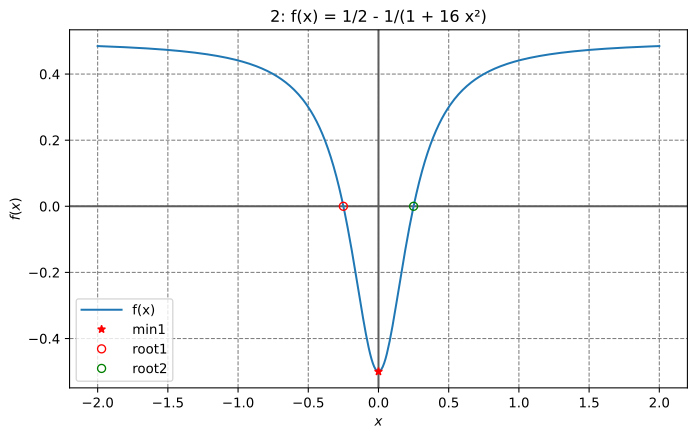
[See the code](https://github.com/cpmech/russell/tree/main/russell_lab/examples/check_1st_and_2nd_derivatives.rs)
```rust
use russell_lab::algo::NoArgs;
use russell_lab::check::{deriv1_approx_eq, deriv2_approx_eq};
use russell_lab::{StrError, Vector};
fn main() -> Result<(), StrError> {
// f(x)
let f = |x: f64, _: &mut NoArgs| Ok(1.0 / 2.0 - 1.0 / (1.0 + 16.0 * x * x));
// g(x) = df/dx(x)
let g = |x: f64, _: &mut NoArgs| Ok((32.0 * x) / f64::powi(1.0 + 16.0 * f64::powi(x, 2), 2));
// h(x) = d²f/dx²(x)
let h = |x: f64, _: &mut NoArgs| {
Ok((-2048.0 * f64::powi(x, 2)) / f64::powi(1.0 + 16.0 * f64::powi(x, 2), 3)
+ 32.0 / f64::powi(1.0 + 16.0 * f64::powi(x, 2), 2))
};
let xx = Vector::linspace(-2.0, 2.0, 9)?;
let args = &mut 0;
println!("{:>4}{:>23}{:>23}", "x", "df/dx", "d²f/dx²");
for x in xx {
let dfdx = g(x, args)?;
let d2dfx2 = h(x, args)?;
println!("{:>4}{:>23}{:>23}", x, dfdx, d2dfx2);
deriv1_approx_eq(dfdx, x, args, 1e-10, f);
deriv2_approx_eq(d2dfx2, x, args, 1e-9, f);
}
Ok(())
}
```
Output:
```text
x df/dx d²f/dx²
-2 -0.01514792899408284 -0.022255803368229403
-1.5 -0.03506208911614317 -0.06759718081851025
-1 -0.11072664359861592 -0.30612660289029103
-0.5 -0.64 -2.816
0 0 32
0.5 0.64 -2.816
1 0.11072664359861592 -0.30612660289029103
1.5 0.03506208911614317 -0.06759718081851025
2 0.01514792899408284 -0.022255803368229403
```
### Bessel functions
Plotting the Bessel J0, J1, and J2 functions:
```rust
use plotpy::{Curve, Plot};
use russell_lab::math::{bessel_j0, bessel_j1, bessel_jn, GOLDEN_RATIO};
use russell_lab::{StrError, Vector};
const OUT_DIR: &str = "/tmp/russell_lab/";
fn main() -> Result<(), StrError> {
// values
let xx = Vector::linspace(0.0, 15.0, 101)?;
let j0 = xx.get_mapped(|x| bessel_j0(x));
let j1 = xx.get_mapped(|x| bessel_j1(x));
let j2 = xx.get_mapped(|x| bessel_jn(2, x));
// plot
if false { // <<< remove this condition
let mut curve_j0 = Curve::new();
let mut curve_j1 = Curve::new();
let mut curve_j2 = Curve::new();
curve_j0.set_label("J0").draw(xx.as_data(), j0.as_data());
curve_j1.set_label("J1").draw(xx.as_data(), j1.as_data());
curve_j2.set_label("J2").draw(xx.as_data(), j2.as_data());
let mut plot = Plot::new();
let path = format!("{}/math_bessel_functions_1.svg", OUT_DIR);
plot.add(&curve_j0)
.add(&curve_j1)
.add(&curve_j2)
.grid_labels_legend("$x$", "$J_0(x),\\,J_1(x),\\,J_2(x)$")
.set_figure_size_points(GOLDEN_RATIO * 280.0, 280.0)
.save(&path)?;
}
Ok(())
}
```
Output:

### Linear fitting
Fit a line through a set of points. The line has slope `m` and intercepts the y axis at `x=0` with `y(x=0) = c`.
```rust
use russell_lab::algo::linear_fitting;
use russell_lab::{approx_eq, StrError};
fn main() -> Result<(), StrError> {
// model: c is the y value @ x = 0; m is the slope
let x = [0.0, 1.0, 3.0, 5.0];
let y = [1.0, 0.0, 2.0, 4.0];
let (c, m) = linear_fitting(&x, &y, false)?;
println!("c = {}, m = {}", c, m);
approx_eq(c, 0.1864406779661015, 1e-15);
approx_eq(m, 0.6949152542372882, 1e-15);
Ok(())
}
```
Results:

### Chebyshev adaptive interpolation (given function)
This example illustrates the use of `InterpChebyshev` to interpolate data given a function.
[See the code](https://github.com/cpmech/russell/tree/main/russell_lab/examples/algo_interp_chebyshev_adapt.rs)
Results:

### Chebyshev adaptive interpolation (given data)
This example illustrates the use of `InterpChebyshev` to interpolate discrete data.
[See the code](https://github.com/cpmech/russell/tree/main/russell_lab/examples/algo_interp_chebyshev_data.rs)
Results:

### Chebyshev adaptive interpolation (given noisy data)
This example illustrates the use of `InterpChebyshev` to interpolate noisy data.
[See the code](https://github.com/cpmech/russell/tree/main/russell_lab/examples/algo_interp_chebyshev_noisy_data.rs)
Results:

### Lagrange interpolation
This example illustrates the use of `InterpLagrange` with at Chebyshev-Gauss-Lobatto grid to interpolate Runge's equation.
[See the code](https://github.com/cpmech/russell/tree/main/russell_lab/examples/algo_interp_lagrange.rs)
Results:

### Solution of a 1D PDE using spectral collocation
This example illustrates the solution of a 1D PDE using the spectral collocation method. It employs the InterpLagrange struct.
```text
d²u du x
——— - 4 —— + 4 u = e + C
dx² dx
-4 e
C = ——————
1 + e²
x ∈ [-1, 1]
```
Boundary conditions:
```text
u(-1) = 0 and u(1) = 0
```
Reference solution:
```text
x sinh(1) 2x C
u(x) = e - ——————— e + —
sinh(2) 4
```
[See the code](https://github.com/cpmech/russell/tree/main/russell_lab/examples/algo_lorene_1d_pde_spectral_collocation.rs)
Results:

### Numerical integration: perimeter of ellipse
```rust
use russell_lab::algo::Quadrature;
use russell_lab::math::{elliptic_e, PI};
use russell_lab::{approx_eq, StrError};
fn main() -> Result<(), StrError> {
// Determine the perimeter P of an ellipse of length 2 and width 1
//
// 2π
// ⌠ ____________________
// P = │ \╱ ¼ sin²(θ) + cos²(θ) dθ
// ⌡
// 0
let mut quad = Quadrature::new();
let args = &mut 0;
let (perimeter, _) = quad.integrate(0.0, 2.0 * PI, args, |theta, _| {
Ok(f64::sqrt(
0.25 * f64::powi(f64::sin(theta), 2) + f64::powi(f64::cos(theta), 2),
))
})?;
println!("\nperimeter = {}", perimeter);
// complete elliptic integral of the second kind E(0.75)
let ee = elliptic_e(PI / 2.0, 0.75)?;
// reference solution
let ref_perimeter = 4.0 * ee;
approx_eq(perimeter, ref_perimeter, 1e-14);
Ok(())
}
```
### Finding a local minimum and a root
This example finds the local minimum between 0.1 and 0.3 and the root between 0.3 and 0.4 for the function illustrated below
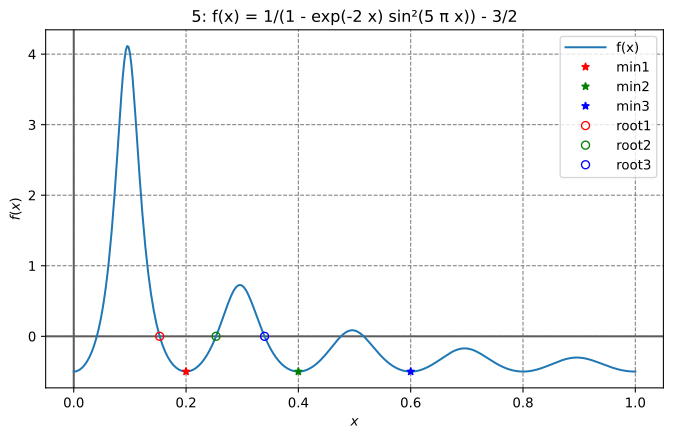
[See the code](https://github.com/cpmech/russell/tree/main/russell_lab/examples/algo_min_and_root_solver_brent.rs)
The output looks like:
```text
x_optimal = 0.20000000003467466
Number of function evaluations = 18
Number of Jacobian evaluations = 0
Number of iterations = 18
Error estimate = unavailable
Total computation time = 6.11µs
x_root = 0.3397874957748173
Number of function evaluations = 10
Number of Jacobian evaluations = 0
Number of iterations = 9
Error estimate = unavailable
Total computation time = 907ns
```
### Finding all roots in an interval
This example employs a Chebyshev interpolant to find all roots of a function in an interval. The method uses adaptive interpolation followed by calculating the eigenvalues of the companion matrix. These eigenvalues equal the roots of the polynomial. After that, a simple Newton refining (polishing) algorithm is applied.
[See the code](https://github.com/cpmech/russell/tree/main/russell_lab/examples/algo_root_finding_chebyshev.rs)
The output looks like:
```text
N = 184
roots =
┌ ┐
│ 0.04109147217011577 │
│ 0.1530172326889439 │
│ 0.25340124027487965 │
│ 0.33978749525956276 │
│ 0.47590538542276967 │
│ 0.5162732673126048 │
└ ┘
f @ roots =
┌ ┐
│ 1.84E-08 │
│ -1.51E-08 │
│ -2.40E-08 │
│ 9.53E-09 │
│ -1.16E-08 │
│ -5.80E-09 │
└ ┘
refined roots =
┌ ┐
│ 0.04109147155278252 │
│ 0.15301723213859994 │
│ 0.25340124149692184 │
│ 0.339787495774806 │
│ 0.47590538689192813 │
│ 0.5162732665558162 │
└ ┘
f @ refined roots =
┌ ┐
│ 6.66E-16 │
│ -2.22E-16 │
│ -2.22E-16 │
│ 1.33E-15 │
│ 4.44E-16 │
│ -2.22E-16 │
└ ┘
```
The function and the roots are illustrated in the figure below.

**References**
1. Boyd JP (2002) Computing zeros on a real interval through Chebyshev expansion
and polynomial rootfinding, SIAM Journal of Numerical Analysis, 40(5):1666-1682
2. Boyd JP (2013) Finding the zeros of a univariate equation: proxy rootfinders,
Chebyshev interpolation, and the companion matrix, SIAM Journal of Numerical
Analysis, 55(2):375-396.
3. Boyd JP (2014) Solving Transcendental Equations: The Chebyshev Polynomial Proxy
and Other Numerical Rootfinders, Perturbation Series, and Oracles, SIAM, pp460
### Computing the pseudo-inverse matrix
```rust
use russell_lab::{mat_pseudo_inverse, Matrix, StrError};
fn main() -> Result<(), StrError> {
// set matrix
let mut a = Matrix::from(&[
[1.0, 0.0], //
[0.0, 1.0], //
[0.0, 1.0], //
]);
let a_copy = a.clone();
// compute pseudo-inverse matrix
let mut ai = Matrix::new(2, 3);
mat_pseudo_inverse(&mut ai, &mut a)?;
// compare with solution
let ai_correct = "┌ ┐\n\
│ 1.00 0.00 0.00 │\n\
│ 0.00 0.50 0.50 │\n\
└ ┘";
assert_eq!(format!("{:.2}", ai), ai_correct);
// compute a ⋅ ai
let (m, n) = a.dims();
let mut a_ai = Matrix::new(m, m);
for i in 0..m {
for j in 0..m {
for k in 0..n {
a_ai.add(i, j, a_copy.get(i, k) * ai.get(k, j));
}
}
}
// check: a ⋅ ai ⋅ a = a
let mut a_ai_a = Matrix::new(m, n);
for i in 0..m {
for j in 0..n {
for k in 0..m {
a_ai_a.add(i, j, a_ai.get(i, k) * a_copy.get(k, j));
}
}
}
let a_ai_a_correct = "┌ ┐\n\
│ 1.00 0.00 │\n\
│ 0.00 1.00 │\n\
│ 0.00 1.00 │\n\
└ ┘";
assert_eq!(format!("{:.2}", a_ai_a), a_ai_a_correct);
Ok(())
}
```
### Matrix visualization
We can use the fantastic tool named [vismatrix](https://github.com/cpmech/vismatrix/) to visualize the pattern of non-zero values of a matrix. With `vismatrix`, we can click on each circle and investigate the numeric values as well.
The function `mat_write_vismatrix` writes the input data file for `vismatrix`.
[See the code](https://github.com/cpmech/russell/tree/main/russell_lab/examples/matrix_visualization.rs)
After generating the "dot-smat" file, run the following command:
```bash
vismatrix /tmp/russell_lab/matrix_visualization.smat
```
Output:

### Computing eigenvalues and eigenvectors
```rust
use russell_lab::*;
fn main() -> Result<(), StrError> {
// set matrix
let data = [[2.0, 0.0, 0.0], [0.0, 3.0, 4.0], [0.0, 4.0, 9.0]];
let mut a = Matrix::from(&data);
// allocate output arrays
let m = a.nrow();
let mut l_real = Vector::new(m);
let mut l_imag = Vector::new(m);
let mut v_real = Matrix::new(m, m);
let mut v_imag = Matrix::new(m, m);
// perform the eigen-decomposition
mat_eigen(&mut l_real, &mut l_imag, &mut v_real, &mut v_imag, &mut a)?;
// check results
assert_eq!(
format!("{:.1}", l_real),
"┌ ┐\n\
│ 11.0 │\n\
│ 1.0 │\n\
│ 2.0 │\n\
└ ┘"
);
assert_eq!(
format!("{}", l_imag),
"┌ ┐\n\
│ 0 │\n\
│ 0 │\n\
│ 0 │\n\
└ ┘"
);
// check eigen-decomposition (similarity transformation) of a
// symmetric matrix with real-only eigenvalues and eigenvectors
let a_copy = Matrix::from(&data);
let lam = Matrix::diagonal(l_real.as_data());
let mut a_v = Matrix::new(m, m);
let mut v_l = Matrix::new(m, m);
let mut err = Matrix::filled(m, m, f64::MAX);
mat_mat_mul(&mut a_v, 1.0, &a_copy, &v_real, 0.0)?;
mat_mat_mul(&mut v_l, 1.0, &v_real, &lam, 0.0)?;
mat_add(&mut err, 1.0, &a_v, -1.0, &v_l)?;
approx_eq(mat_norm(&err, Norm::Max), 0.0, 1e-15);
Ok(())
}
```
### Cholesky factorization
```rust
use russell_lab::*;
fn main() -> Result<(), StrError> {
// set matrix
let sym = 0.0;
#[rustfmt::skip]
let mut a = Matrix::from(&[
[ 4.0, sym, sym],
[ 12.0, 37.0, sym],
[-16.0, -43.0, 98.0],
]);
// perform factorization
mat_cholesky(&mut a, false)?;
// define alias (for convenience)
let l = &a;
// compare with solution
let l_correct = "┌ ┐\n\
│ 2 0 0 │\n\
│ 6 1 0 │\n\
│ -8 5 3 │\n\
└ ┘";
assert_eq!(format!("{}", l), l_correct);
// check: l ⋅ lᵀ = a
let m = a.nrow();
let mut l_lt = Matrix::new(m, m);
for i in 0..m {
for j in 0..m {
for k in 0..m {
l_lt.add(i, j, l.get(i, k) * l.get(j, k));
}
}
}
let l_lt_correct = "┌ ┐\n\
│ 4 12 -16 │\n\
│ 12 37 -43 │\n\
│ -16 -43 98 │\n\
└ ┘";
assert_eq!(format!("{}", l_lt), l_lt_correct);
Ok(())
}
```
### Read a table-formatted data file
The goal is to read the following file (`clay-data.txt`):
```text
# Fujinomori clay test results
sr ea er # header
1.00000 -6.00000 0.10000
2.00000 7.00000 0.20000
3.00000 8.00000 0.20000 # << look at this line
# comments plus new lines are OK
4.00000 9.00000 0.40000
5.00000 10.00000 0.50000
# bye
```
The code below illustrates how to do it.
Each column (`sr`, `ea`, `er`) is accessible via the `get` method of the [HashMap].
```rust
use russell_lab::{read_table, StrError};
use std::collections::HashMap;
use std::env;
use std::path::PathBuf;
fn main() -> Result<(), StrError> {
// get the asset's full path
let root = PathBuf::from(env::var("CARGO_MANIFEST_DIR").unwrap());
let full_path = root.join("data/tables/clay-data.txt");
// read the file
let labels = &["sr", "ea", "er"];
let table: HashMap<String, Vec<f64>> = read_table(&full_path, Some(labels))?;
// check the columns
assert_eq!(table.get("sr").unwrap(), &[1.0, 2.0, 3.0, 4.0, 5.0]);
assert_eq!(table.get("ea").unwrap(), &[-6.0, 7.0, 8.0, 9.0, 10.0]);
assert_eq!(table.get("er").unwrap(), &[0.1, 0.2, 0.2, 0.4, 0.5]);
Ok(())
}
```
## About the column major representation
Only the COL-MAJOR representation is considered here.
```text
┌ ┐ row_major = {0, 3,
│ 0 3 │ 1, 4,
A = │ 1 4 │ 2, 5};
│ 2 5 │
└ ┘ col_major = {0, 1, 2,
(m × n) 3, 4, 5}
Aᵢⱼ = col_major[i + j·m] = row_major[i·n + j]
↑
COL-MAJOR IS ADOPTED HERE
```
The main reason to use the **col-major** representation is to make the code work better with BLAS/LAPACK written in Fortran. Although those libraries have functions to handle row-major data, they usually add an overhead due to temporary memory allocation and copies, including transposing matrices. Moreover, the row-major versions of some BLAS/LAPACK libraries produce incorrect results (notably the DSYEV).
## Benchmarks
Need to install:
```bash
cargo install cargo-criterion
```
Run the benchmarks with:
```bash
bash ./zscripts/benchmark.bash
```
### Chebyshev polynomial evaluation
Comparison of the performances of `InterpChebyshev::eval` implementing the Clenshaw algorithm and `InterpChebyshev::eval_using_trig` using the trigonometric functions.


### Jacobi Rotation versus LAPACK DSYEV
Comparison of the performances of `mat_eigen_sym_jacobi` (Jacobi rotation) versus `mat_eigen_sym` (calling LAPACK DSYEV).


## Notes for developers
* The `c_code` directory contains a thin wrapper to the BLAS libraries (OpenBLAS or Intel MKL)
* The `c_code` directory also contains a wrapper to the C math functions
* The `build.rs` file uses the crate `cc` to build the C-wrappers