<p align="center">
<img src="https://raw.githubusercontent.com/auswm85/rung/main/assets/logo.png" alt="rung logo" width="120">
</p>
# rung
[](https://crates.io/crates/rung-cli)
[](https://github.com/auswm85/rung/actions/workflows/ci.yml)
[](LICENSE)
[](https://www.rust-lang.org)
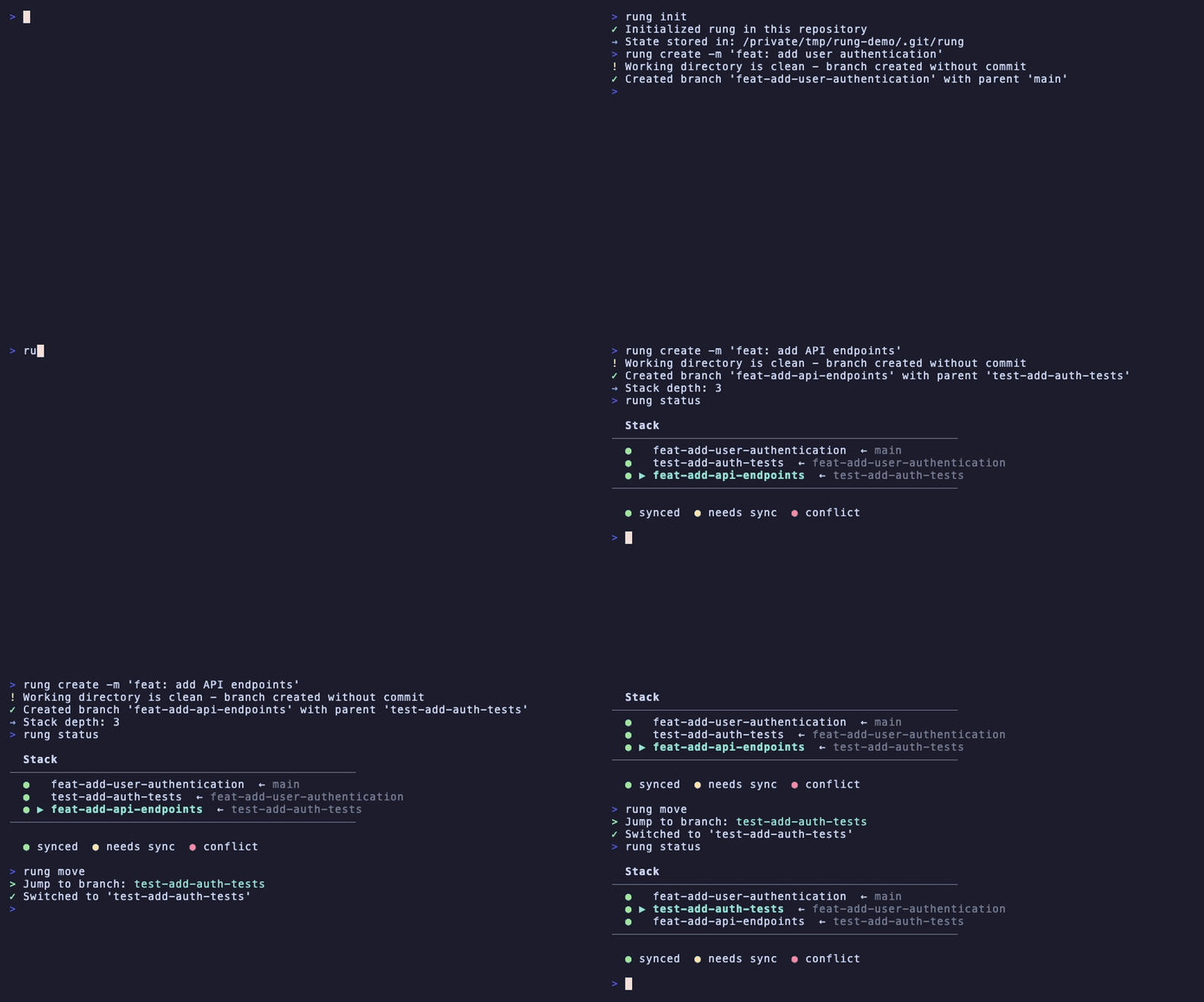
A Git workflow tool for managing stacked PRs (pull request chains).
## Overview
Rung helps you work with dependent branches by:
- Tracking branch relationships in a stack
- Syncing child branches when parents are updated
- Managing PR chains on GitHub with automatic stack comments
- Handling merges with automatic descendant rebasing
## Installation
### Pre-built binaries (recommended)
Download the latest release for your platform from [GitHub Releases](https://github.com/auswm85/rung/releases).
**macOS (Apple Silicon):**
```bash
```
**macOS (Intel):**
```bash
```
**Linux (x86_64):**
```bash
```
**Windows:** Download the `.zip` from [releases](https://github.com/auswm85/rung/releases) and add to your PATH.
### Homebrew (macOS/Linux)
```bash
brew tap auswm85/rung https://github.com/auswm85/rung
brew install rung
```
### From crates.io
```bash
cargo install rung-cli
```
### With cargo-binstall (faster, no compilation)
```bash
cargo binstall rung-cli
```
### From source
```bash
cargo install --path crates/rung-cli
```
## Quick Start
```bash
# Initialize rung in a repository
rung init
# Create a branch and commit in one step
rung create -m "feat: add user authentication"
# → Creates branch 'feat-add-user-authentication' and commits
# Create another branch on top
rung create -m "feat: add auth tests"
# → Creates branch 'feat-add-auth-tests' and commits
# Submit all branches as PRs
# (branches created with -m use their commit message as PR title)
rung submit
# View stack status
rung status
```
## Commands
### Global Options
- `--json` - Output as JSON (for tooling integration). Supported by: `status`, `doctor`, `sync`, `submit`, `merge`, `log`
- `-q, --quiet` - Suppress informational output. Only errors and essential results (like PR URLs) are printed. Exit code 0 indicates success. Cannot be used with `--json`.
### `rung init`
Initialize rung in the current repository. Creates a `.git/rung/` directory to store stack state.
```bash
rung init
```
### `rung create [name]`
Create a new branch with the current branch as its parent. This establishes the branch relationship in the stack.
```bash
rung create feature/new-feature # Explicit branch name
rung create -m "feat: add authentication" # Derive name from message, commit changes
rung create my-branch -m "feat: add auth" # Explicit name with commit
rung create feature/test --dry-run # Preview without making changes
```
When using `-m`, rung will:
1. Derive the branch name from the message (if not provided explicitly)
2. Create and checkout the new branch
3. Stage all changes
4. Commit with the provided message
The branch name is derived from the message by slugifying it (e.g., "feat: add auth" becomes `feat-add-auth`). The commit message is then used as the PR title when you run `rung submit`.
**Options:**
- `-m, --message <message>` - Commit message. Stages all changes and creates a commit. If no branch name is provided, derives it from the message.
- `--dry-run` - Preview what would happen without making changes
### `rung status`
Display the current stack as a tree view with sync state and PR status.
```bash
rung status # Basic status
rung status --fetch # Fetch from remote first for fresh divergence info
rung status --json # Output as JSON for tooling
```
**Options:**
- `--fetch` - Fetch latest remote state before showing status
**Remote Divergence Indicators:**
The status display shows how local branches compare to their remote counterparts:
- `(2↑)` - Branch is 2 commits ahead of remote (safe to push)
- `(1↓)` - Branch is 1 commit behind remote (remote has changes)
- `(2↑ 1↓)` - Branch has diverged (2 ahead, 1 behind) - force push needed
When branches have diverged, a warning is shown with guidance to use `rung submit --force` (which uses `--force-with-lease` for safety).
### `rung sync`
Sync the stack by rebasing all branches when the base moves forward.
```bash
rung sync # Sync all branches
rung sync --dry-run # Preview what would happen
rung sync --base develop # Sync against a different base branch
```
If conflicts occur:
```bash
# Resolve conflicts, then:
git add .
rung sync --continue
# Or abort and restore:
rung sync --abort
```
**Options:**
- `--dry-run` - Show what would be done without making changes
- `--continue` - Continue after resolving conflicts
- `--abort` - Abort and restore from backup
- `-b, --base <branch>` - Base branch to sync against (default: repository's default branch)
### `rung submit`
Push all stack branches and create/update PRs on GitHub. Each PR includes a stack comment showing the branch hierarchy.
```bash
rung submit # Submit all branches
rung submit --dry-run # Preview what would happen without updating anything
rung submit --draft # Create PRs as drafts
rung submit --force # Force push (uses --force-with-lease)
rung submit --title "My PR title" # Custom title (overrides commit message)
```
**Options:**
- `--draft` - Create PRs as drafts
- `--force` - Force push using `--force-with-lease` for safety, even if remote has changes
- `-t, --title <title>` - Custom PR title for current branch (overrides commit message)
### `rung merge`
Merge the current branch's PR via GitHub API. Automatically:
- Rebases all descendant branches onto the new base
- Updates PR bases on GitHub
- Removes the branch from the stack
- Deletes local and remote branches
- Pulls latest changes to keep local up to date
```bash
rung merge # Squash merge (default)
rung merge --method merge # Regular merge commit
rung merge --method rebase # Rebase merge
rung merge --no-delete # Keep remote branch after merge
```
**Options:**
- `-m, --method <method>` - Merge method: `squash` (default), `merge`, or `rebase`
- `--no-delete` - Don't delete the remote branch after merge
### `rung undo`
Undo the last sync operation, restoring all branches to their previous state.
```bash
rung undo
```
### `rung nxt`
Navigate to the next (child) branch in the stack.
```bash
rung nxt
```
### `rung prv`
Navigate to the previous (parent) branch in the stack.
```bash
rung prv
```
### `rung move`
Interactive branch picker for quick navigation. Opens a TUI list to select and jump to any branch in the stack.
```bash
rung move # or `rung mv`
```
Displays all branches and highlights the current branch. PR numbers are shown when available:
```
? Jump to branch:
feat/auth #41
> feat/api #42 ◀
feat/ui
```
### `rung restack`
Move a branch to a different parent in the stack by rebasing it onto a new base.
```bash
rung restack --onto main # Move current branch onto main
rung restack feature/api --onto main # Move specific branch
rung restack --onto feature/base --include-children # Also move descendants
rung restack --dry-run # Preview what would happen
```
If conflicts occur:
```bash
# Resolve conflicts, then:
git add .
rung restack --continue
# Or abort and restore:
rung restack --abort
```
**Options:**
- `--onto <branch>` - New parent branch to rebase onto (interactive selection if not specified)
- `--include-children` - Also rebase all descendant branches
- `--dry-run` - Show what would be done without making changes
- `--force` - Proceed even if branches have diverged from remote
- `--continue` - Continue after resolving conflicts
- `--abort` - Abort and restore from backup
**Note:** If any affected branches have diverged from their remote tracking branches (both local and remote have unique commits), restack will warn and abort. You can use `--force` to proceed anyway.
### `rung log`
Show commits on the current branch (commits between parent branch and HEAD). Helps visualize what's in the current stack branch.
```bash
rung log # Human-readable output
rung log --json # JSON output for tooling
```
Example output:
```text
a1b2c3d Add user authentication alice
e4f5g6h Fix login redirect alice
```
**Options:**
- `--json` - Output as JSON (includes branch name, parent, and commit details)
### `rung absorb`
Absorb staged changes into the appropriate commits in your stack. This analyzes staged hunks and automatically creates fixup commits targeting the commits that last modified those lines.
```bash
# Stage some changes first
git add -p
# Preview what would be absorbed
rung absorb --dry-run
# Absorb the changes (creates fixup commits)
# Use --base to specify the base branch if auto-detection fails
rung absorb --base <base-branch>
# Then apply the fixups with an interactive rebase
# IMPORTANT: Use the same base branch as the absorb command above
git rebase -i --autosquash <base-branch>
```
This is useful when you have small fixes or tweaks that should go into earlier commits in your stack rather than being new commits.
**Options:**
- `--dry-run` - Show what would be absorbed without making changes
- `-b, --base <branch>` - Base branch to determine rebaseable range (default: auto-detect). The same base should be used when running `git rebase --autosquash`.
**How it works:**
1. Parses your staged diff into hunks
2. Uses `git blame` to find which commit last modified each hunk's lines
3. Validates the target commit is in your stack (not already on the base branch)
4. Creates `fixup!` commits targeting the appropriate commits
**Limitations:**
- New files cannot be absorbed (no blame history)
- Hunks touching lines from multiple commits cannot be absorbed
- Only works with commits in the rebaseable range (between base and HEAD)
### `rung doctor`
Diagnose issues with the stack and repository. Checks:
- **Stack integrity**: Branches exist, parents are valid, no circular dependencies
- **Git state**: Clean working directory, not detached HEAD, no rebase in progress
- **Sync state**: Branches that need rebasing, sync operations in progress
- **GitHub connectivity**: Authentication, PR status (open/closed/merged)
```bash
rung doctor
```
Issues are reported with severity (error/warning) and actionable suggestions.
## Typical Workflow
```bash
# Start on main
git checkout main
# Initialize rung (first time only)
rung init
# Create first feature branch
rung create feature/api-client
# Make changes and commit
git add . && git commit -m "Add API client"
# Create dependent branch
rung create feature/api-tests
# Make more changes
git add . && git commit -m "Add API tests"
# Submit both as PRs
rung submit
# After review, merge from bottom of stack
rung prv # Go to parent branch
rung merge # Merge PR, rebase children automatically
# Continue with remaining PRs
rung merge # Merge the next PR
```
## Stack Comments
When you submit PRs, rung adds a comment to each PR showing the stack hierarchy:
```
* **#124** 👈
* **#123**
* `main`
---
*Managed by [rung](https://github.com/auswm85/rung)*
```
## Configuration
Rung stores its state in `.git/rung/`:
- `stack.json` - Branch relationships and PR numbers
- `config.json` - Repository-specific settings
- `backups/` - Sync backup data for undo
## Requirements
- Rust 1.85+
- Git 2.x
- GitHub CLI (`gh`) authenticated, or `GITHUB_TOKEN` environment variable
## Project Structure
```
crates/
rung-cli/ # Command-line interface
rung-core/ # Core logic (stack, sync, state)
rung-git/ # Git operations wrapper
rung-github/ # GitHub API client
```
## Development
```bash
# Clone and set up git hooks
git clone https://github.com/auswm85/rung
cd rung
git config core.hooksPath .githooks
# Run tests
cargo test
# Run with clippy
cargo clippy
# Build release
cargo build --release
```
## Authors
<a href="https://github.com/auswm85/rung/graphs/contributors">
<img src="https://contrib.rocks/image?repo=auswm85/rung" />
</a>
## License
MIT