---
description: "Compare rumdl with markdownlint, mdformat, Prettier, and other Markdown tools across speed, rules, fixes, flavors, configuration, and integrations."
icon: lucide/scale
---
# Comparison with Other Markdown Tools
This page compares rumdl with other Markdown linters and formatters. The goal is to help you evaluate which tool fits your workflow, not to declare a winner.
> **Last verified: June 2026.** Tool capabilities change over time. If you notice an inaccuracy, please [open an issue](https://github.com/rvben/rumdl/issues).
For detailed comparisons with specific tools, see:
- [Comparison with markdownlint](markdownlint-comparison.md) — rule compatibility, migration guide, behavioral differences
- [Comparison with mdformat](mdformat-comparison.md) — formatting capabilities, plugin vs flavor approach
- [Comparison with Obsidian Linter](obsidian-linter-comparison.md): rule mapping, starter configuration for Obsidian vaults, behavioral differences
## Overview
| **rumdl** | Lint + Format | Rust | 82 | Yes | Built in | TOML, JSON, YAML | No | Yes |
| **markdownlint-cli** | Lint | Node.js | 53 | Yes | No | JSON, JSONC, YAML, TOML | Yes (JS) | No |
| **markdownlint-cli2** | Lint | Node.js | 53 | Yes | No | JSONC, YAML, JS | Yes (JS) | No |
| **remark-lint** | Lint | Node.js | ~80 (via presets) | No | No | JS, JSON, YAML | Yes (JS) | No |
| **pymarkdown** | Lint | Python | 46 | Yes | No | JSON, YAML, TOML | Yes (Python) | No |
| **mdformat** | Format | Python | N/A | N/A | No | TOML | Yes (Python) | No |
| **mado** | Lint | Rust | 38 | No | No | TOML | No | No |
| **Prettier** | Format | Node.js | N/A | N/A | No | JSON, YAML, JS | Yes (JS) | No |
## Linting Capability
**markdownlint-cli / markdownlint-cli2** share the same rule engine (53 rules). markdownlint-cli2 adds JSONC config and tighter VS Code integration. Both support custom rules written in JavaScript.
**remark-lint** takes a different approach: rules are distributed as individual npm packages, composed into presets. The `remark-preset-lint-recommended` and `remark-preset-lint-consistent` presets
cover common cases. No built-in auto-fix for lint violations (remark itself can transform Markdown, but lint rules only report).
**pymarkdown** implements 46 rules with its own GFM-compliant parser. It supports auto-fix and custom rule extensions in Python.
**mado** is a Rust-based linter with 38 rules (33 stable, 5 unstable). It has no auto-fix and no plugin system.
**rumdl** implements all 53 markdownlint rules plus <!-- RULE_COUNT_ADDITIONAL -->29<!-- /RULE_COUNT_ADDITIONAL --> additional rules (<!-- RULE_COUNT -->82<!-- /RULE_COUNT --> total). It supports
auto-fix for most rules and includes rules not found in other tools, such as relative link validation (MD057), footnote checks (MD066-MD068), nested code fence detection (MD070), and TOC validation
(MD073).
## Formatting Capability
**Prettier** is a widely adopted opinionated formatter. Its Markdown support normalizes whitespace, list markers, and emphasis style with minimal configuration. It does not lint.
**mdformat** is a Python formatter focused on producing consistent CommonMark output. Extended syntax (GFM tables, frontmatter) is supported through plugins.
**rumdl** provides formatting through `rumdl fmt` (formatter mode, always exits 0) and `rumdl check --fix` (linter mode, exits 1 if unfixable violations remain). It also supports `--diff` to preview
changes before applying them.
markdownlint-cli, markdownlint-cli2, and pymarkdown can fix certain lint violations but are not general-purpose formatters.
## Flavor and Dialect Support
Most tools treat Markdown as a single dialect and rely on configuration or plugins to handle extended syntax.
**rumdl** has built-in flavor support that adjusts rule behavior for specific documentation systems:
| standard | CommonMark + GFM | Baseline behavior (GFM extensions included by default) |
| mkdocs | MkDocs / Material | Admonitions, tabs, mkdocstrings |
| mdx | MDX | JSX components, ESM imports |
| obsidian | Obsidian | Callouts, wikilinks, Dataview |
| pandoc | Pandoc Markdown | Fenced divs, attribute lists, citations, definition lists, math, grid tables |
| quarto | Quarto / RMarkdown | Citations, shortcodes, executable blocks |
| kramdown | Jekyll / kramdown | Attribute lists, TOC markers |
| azure_devops | Azure DevOps wikis | Colon code fences (`:::mermaid … :::`) treated as opaque code blocks |
| myst | MyST / Jupyter Book | Directives (`:::{name}`), roles (`` {role}`text` ``), `%` comments |
| mdg | Markdown with Gherkin | Gherkin-safe headings, tag lines, Doc String fences, indented tables |
Note: `gfm`, `github`, and `commonmark` are accepted as aliases for `standard` since the parser includes GFM extensions by default.
Flavors can be set globally or per-file pattern:
```toml
[global]
flavor = "mkdocs"
[per-file-flavor]
"**/*.mdx" = "mdx"
```
### Pandoc and Quarto: see also panache
rumdl's `pandoc` and `quarto` flavors adjust its rules to avoid false positives on those dialects, and rumdl already covers some Quarto-specific structure: executable chunk labels (MD078, MD079),
link anchors (MD051), and footnotes (MD066-MD068). For documents where Pandoc, Quarto, or R Markdown is the primary format, [panache](https://github.com/jolars/panache) is a complementary Rust tool
worth knowing: a formatter, linter, and language server that parses Pandoc into a lossless concrete syntax tree. It goes further on Pandoc and Quarto semantics that rumdl does not check, such as
bibliography and citation-key validation against `.bib` files, cross-reference resolution, and lossless reformatting of those constructs. rumdl remains the broader Markdown style linter, while
panache focuses on Pandoc and Quarto document semantics.
## Editor Integrations
| **rumdl** | Yes (built-in) | Yes (via LSP) | Yes (`rumdl server`) | Yes (`--watch`) |
| **markdownlint-cli** | Via markdownlint extension | Via efm/null-ls | No | No |
| **markdownlint-cli2** | Yes (vscode-markdownlint) | Via efm/null-ls | No | No |
| **remark-lint** | Via remark extension | Via LSP/efm | Via remark-language-server | No |
| **pymarkdown** | No | No | No | No |
| **mdformat** | Via extension | Via conform.nvim | No | No |
| **mado** | No | No | No | No |
| **Prettier** | Yes (Prettier extension) | Via plugins | No | No |
## Installation and Runtime
| **rumdl** | None | Yes | Yes | Yes | Yes | Yes |
| **markdownlint-cli** | Node.js | No | No | Yes | Yes | No |
| **markdownlint-cli2** | Node.js | No | No | Yes | Yes | No |
| **remark-lint** | Node.js | No | No | Yes | No | No |
| **pymarkdown** | Python | Yes | No | No | No | No |
| **mdformat** | Python | Yes | No | No | Yes | No |
| **mado** | None | No | No | No | Yes | Yes |
| **Prettier** | Node.js | No | No | Yes | Yes | No |
## Performance
The published February 2026 cold-start snapshot checks the Rust Book repository with
application caches disabled. It measures full command latency, including runtime
and launcher overhead.
<p class="rm-table-hint" aria-hidden="true">Swipe horizontally to compare all columns.</p>
<div class="rm-table-scroll" role="region" aria-label="Markdown tool benchmark comparison" tabindex="0" markdown>
| **mado** | Lint | 77 ms | 0.4x |
| **rumdl** | Lint | 217 ms | 1.0x |
| **pymarkdown** | Lint | 240 ms | 1.1x |
| **remark-lint** | Lint | 671 ms | 3.1x |
| **markdownlint-cli2** | Lint | 2.2 s | 10.2x |
| **markdownlint-cli** | Lint | 2.7 s | 12.5x |
| **mdformat** | Format | 4.0 s | 18.5x |
| **Prettier** | Format | 4.8 s | 22.3x |
</div>
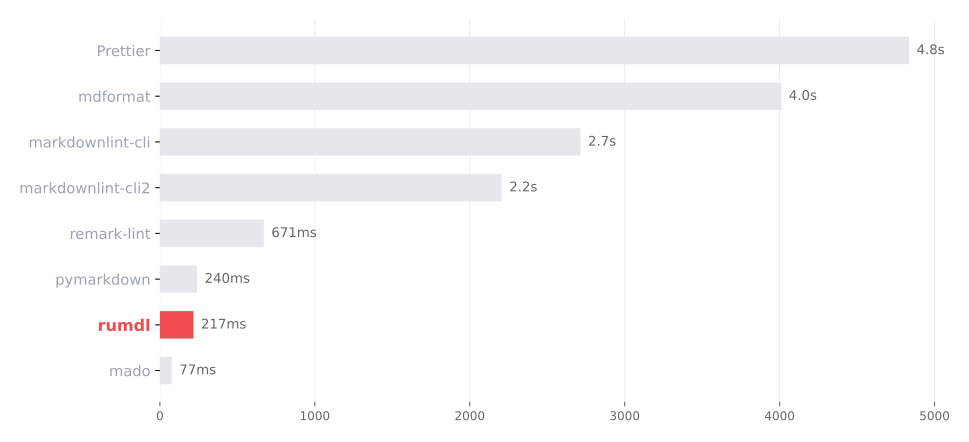
The most comparable results are those for rumdl and the two tested markdownlint
CLIs. mado completed the workload faster while providing a smaller feature
surface, and formatters do different work from linters. Read the [benchmark
methodology, reproduction steps, and limitations](benchmarks.md) before using
the values in a decision or publication.
## See Also
- [Comparison with markdownlint](markdownlint-comparison.md) — detailed rule-by-rule comparison and migration guide
- [Comparison with mdformat](mdformat-comparison.md) — formatting feature comparison and migration guide
- [Comparison with Obsidian Linter](obsidian-linter-comparison.md): rule-by-rule mapping and starter configuration for Obsidian vaults
- [Rules Reference](rules.md) — complete list of rumdl's 82 rules
- [Markdown Flavors](flavors.md) — flavor configuration and per-rule adjustments