# jet1090 and rs1090
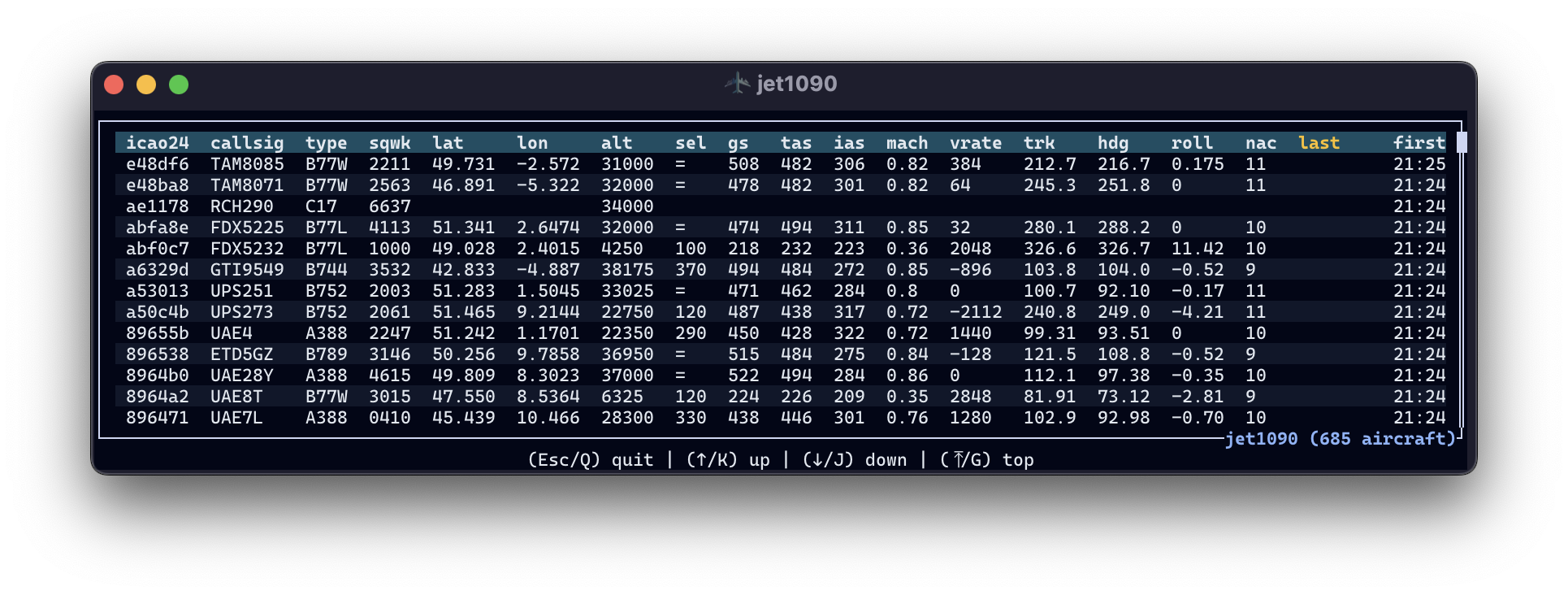
**jet1090** is a high-performance ADS-B decoder written in Rust, similar to dump1090, but with more capabilities. You may install it from the [Releases page](https://github.com/xoolive/jet1090/releases) but might want to read the [documentation](https://mode-s.org/jet1090) first.
**rs1090** is the underlying Rust library to decode Mode S, ADS-B and FLARM messages, with Python and WebAssembly bindings.
The project takes its inspiration from the Python [pyModeS](https://github.com/junzis/pyModeS) library, and uses [deku](https://github.com/sharksforarms/deku) in order to decode binary data in a clean declarative way.
The project started as a fork of a very similar project called [adsb-deku](https://crates.io/crates/adsb_deku), but modules have been refactored to match [pyModeS](https://github.com/junzis/pyModeS) design, implementations extensively reviewed, simplified, corrected, and completed.
The directions ambitioned by rs1090 include:
- improving the performance of Mode S decoding in Python;
- exporting trajectory data to cross-platform formats such as JSON, gRPC, arrow;
- providing efficient multi-receiver Mode S decoding;
- serving real-time enriched trajectory data to external applications.
The rs1090 library comes with:
- a companion application [decode1090](https://crates.io/crates/decode1090),
- a live decoder [jet1090](https://mode-s.org/jet1090),
- a Python binding [rs1090](https://pypi.org/project/rs1090).
- and a WebAssembly binding [rs1090-wasm](https://www.npmjs.com/package/rs1090-wasm).
## Documentation
The documentation for the jet1090 application is available on [https://mode-s.org/jet1090](https://mode-s.org/jet1090).
The documentation for the core library is available on [docs.rs](https://docs.rs/rs1090/latest/rs1090/), generated directly from the source code.
The [decode module](https://docs.rs/rs1090/latest/rs1090/decode/index.html) is probably the most useful part, in order to understand the content of various types of messages.
## Performance
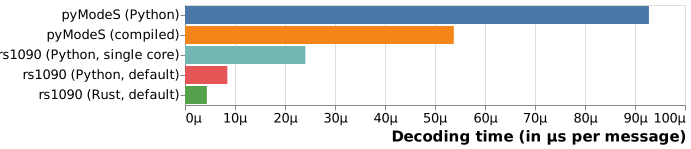
Benchmarking performed on the decoding of a gate-to-gate [European flight](./data/long_flight.csv):
- [pyModeS](https://github.com/junzis/pyModeS) in full Python mode;
- [pyModeS](https://github.com/junzis/pyModeS) with Cython compiled functions;
- `rs1090` with Python bindings on a single core (for a fair comparison);
- `rs1090` with Python bindings on many cores **(default)**;
- full Rust `rs1090` benchmark on many cores **(default)**.
The Python script for benchmarking is in [python/examples](python/examples/benchmark.py).
The Rust benchmark is executed with `cargo bench`.
Both scripts are run on an Intel(R) Core(TM) i7-10850H CPU @ 2.70GHz.
> [!NOTE]
> The default out-of-the-box mode of `rs1090` is an execution distributed on all your cores. This benchmark was performed on a regular laptop. It can be much faster on supercomputers, but considering that most laptops now have at least 4 cores, this benchmark yields the speed-up you should get on your own computer.
## Installation
Run the following Cargo command in your project directory:
```sh
cargo add rs1090
```
Or add the following line to your `Cargo.toml`:
```toml
rs1090 = "1.0.0" # check for the latest version, we are not there yet
```
## Usage
```rust
use hexlit::hex;
use rs1090::prelude::*;
fn main() {
let bytes: [u8; 14] = hex!("8c4841753a9a153237aef0f275be");
// ADS-B decoding
if let Ok(msg) = Message::try_from(bytes.as_slice()) {
// JSON output
let json = serde_json::to_string(&msg).expect("JSON error");
println!("{}", json);
}
}
```
See more examples in the `crates/rs1090/examples` folder.
## Python bindings
You may install the bindings compiled for most Python versions with:
```sh
pip install rs1090
```
The library provides a single do-it-all function called `decode()`:
```pycon
>>> import rs1090
>>> rs1090.decode("8c4841753a9a153237aef0f275be")
{'df': '17',
'icao24': '484175',
'bds': '06',
'NUCp': 7,
'groundspeed': 17.0,
'track': 92.8125,
'parity': 'odd',
'lat_cpr': 39195,
'lon_cpr': 110320}
```
For large sets of messages in Python (e.g. what you can download through [pyopensky](https://github.com/open-aviation/pyopensky)):
```pycon
>>> import rs1090
>>> rs1090.decode(msg_list, ts_list) # includes CPR to position decoding
...
>>> rs1090.decode(msg_list, ts_list, reference=(lat0, lon0)) # useful for surface messages
...
```
For FLARM messages (also as batches):
```pycon
>>> msg = "7bf2381040ccc7e2395ecaa28e033a655d47e1d91d0bf986e1b0"
>>> rs1090.flarm(msg, 1655279476, 43.61924, 5.11755)
{'timestamp': 1655279476,
'reference_lat': 43.61924,
'reference_lon': 5.11755,
'icao24': '38f27b',
'is_icao24': True,
'actype': 'Glider',
'latitude': 43.6812864,
'longitude': 5.150585599999999,
'geoaltitude': 970,
'vertical_speed': 1.0,
'groundspeed': 18.698261951315153,
'track': 29.655457935479006,
'no_track': False,
'stealth': False,
'gps': 129}
```
## WebAssembly bindings
Usage is documented on [https://observablehq.com/@xoolive/rs1090](https://observablehq.com/@xoolive/rs1090).
## decode1090
Prebuilt binaries are available on the [Releases page](https://github.com/xoolive/jet1090/releases?q=decode1090).
Usage is available with the help command.
```sh
decode1090 --help
```
## Nix platform
This repository provides a Nix flake configuration for building and managing this project.
You may run the following to get the `jet1090` and `decode1090` executables in your PATH
```sh
nix profile install
```
### Development commands
```sh
nix develop # open a shell with the proper environment to compile rs1090
nix build # build the jet1090 executable (default package)
nix run # run the jet1090 executable directly
```
### Available packages
```sh
nix build .#jet1090 # build the jet1090 executable (same as default)
```
### Code quality and testing
The flake provides several checks that you can run individually:
```sh
# Format checking and fixing
nix fmt # format Nix files with nixpkgs-fmt
nix run .#checks.fmt # check Rust code formatting with rustfmt
# Linting and static analysis
nix run .#checks.clippy-check # run Clippy lints with warnings as errors
nix run .#checks.rustdoc # generate and check documentation
# Testing
nix run .#checks.test-check # run tests with cargo-nextest
# Run all checks at once
nix flake check # run all defined checks
```