
hop



A fast, fuzzy-finder TUI to jump between your git repositories and folders - a Rust port of git-repo-jumper, built on ratatui.
Pick an entry and hop writes its path to a handoff file your shell reads to cd into it; for git repos it also launches your git tool (lazygit by default). On top of the original it adds in-app management, three tabs, slugs for a one-word jump, sort modes and repair for paths that have moved.
Screenshots
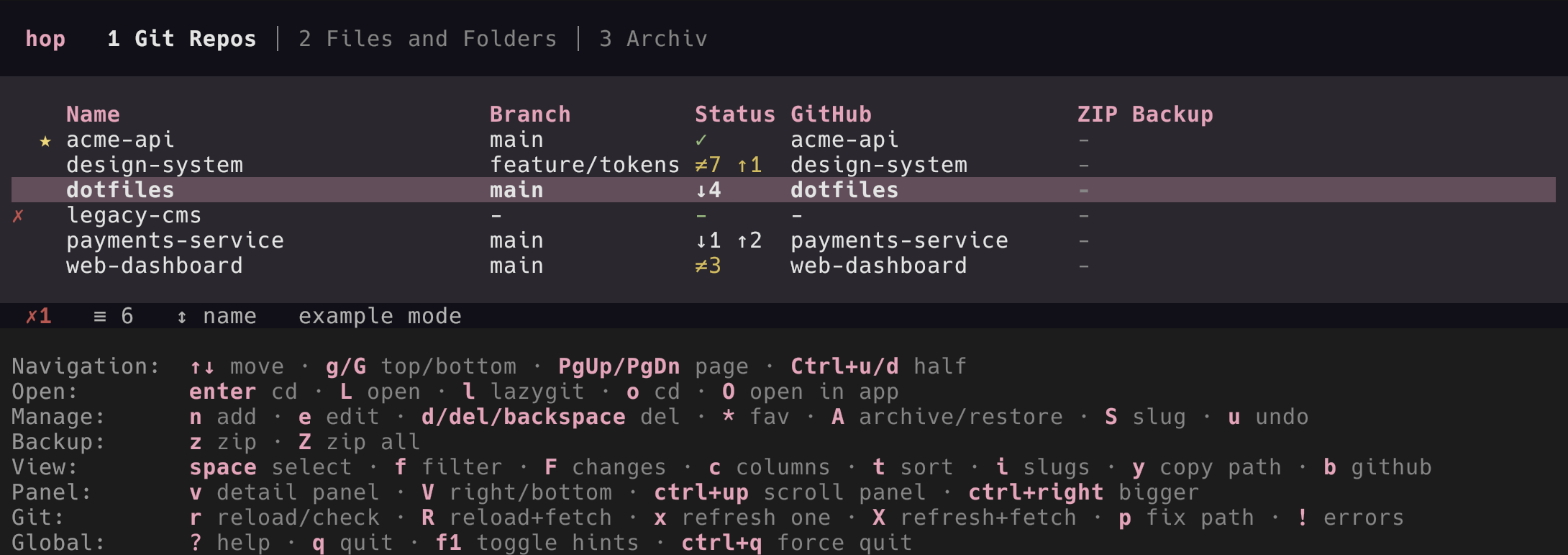
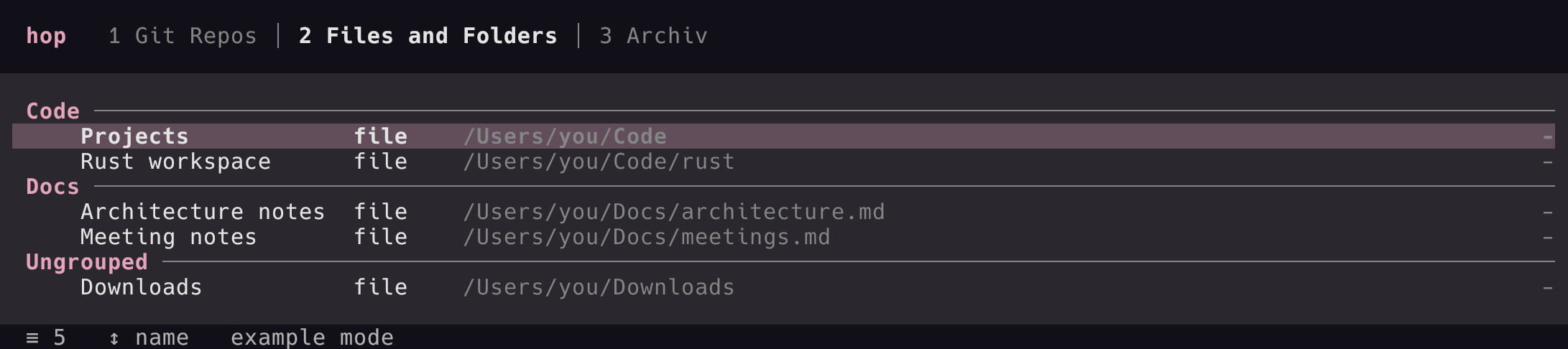
Features
- Fuzzy finder over all visible columns (name, branch, status, GitHub name, path).
- Live git status (branch, uncommitted changes, ahead/behind, GitHub repo name), gathered in the background and cached so the list shows instantly.
- Three tabs: Git Repos, Files and Folders, Archive.
- Sections on the Files and Folders tab: group folders/files under named, reorderable section headers;
sjumps to a section andMmanages them. - In-app management: add, edit, delete, favourite, archive/restore, set a slug - the config is written back preserving its comments.
- Content-aware open: a file/folder entry auto-detects its target – a folder
cds, a text file (by extension; configurable viaeditor_extensions) opens in the editor, and any other file (image, PDF, …) opens with the system's default app. - Slugs:
hop <slug>jumps straight to an entry from the shell;hop add [PATH]registers one without opening the TUI. - Bulk import:
hop scan [DIR]finds git repos recursively and offers them in a multi-select picker (--dry-runto preview,--nestedfor repos inside repos). - Sort modes: by name, most recently used, frecency (frequency weighted by recency), or a custom drag order; favourites are pinned to the top (except in the recent view).
- ZIP backups:
zzips the selected/cursor entry (git repo or folder) andZzips every entry opted into the backup intozip_backup_folder, excluding build artefacts (zip_exclude_dirs, matched as a name prefix sotargetalso coverstarget.nosync) but keeping.git. The backup membership is theBackuptoggle in the add/edit form: git repos are included by default, file/folder entries excluded by default;zignores it (an explicit target is always backed up). Excluded entries show a⊘marker in theZIP Backupcolumn. The archive is named after the entry (the slugified name, e.g.(rs) mdtask→rs-mdtask.zip); two entries with the same name each get a short path-hash suffix so neither is overwritten (hop doctorreports such name clashes). A repo is only (re)written when its content changed since the last backup (name + size + CRC32 comparison), so unchanged archives are left untouched and not re-uploaded by cloud sync. Progress shows in the header bar; all three tabs show aZIP Backupcolumn with each entry's last-backup date. - Detail panel (
v): an optional pane (right or bottom) with the entry's details and a recentgit log. - Missing-path marker (a red
!) with a picker that opens at the closest existing ancestor to repair the path, plus an error list (!) to repair / edit / delete all broken entries. - Status bar: a local status line (entry count, sort, last status time) and a remote line showing the last
git fetch(warns when over a day old); a progress bar replaces it while a refresh runs. - Two icon tiers (Unicode by default, or ASCII), selectable in the config.
Install
hop requires Rust 1.88 or newer (edition 2024).
From crates.io (the crate is rs-hop; the installed binary is hop):
cargo install rs-hop
Or from the project directory (puts hop in ~/.cargo/bin, which is on your PATH):
cargo install --path .
To update after code changes, re-run the install with --force (plain cargo install refuses to overwrite an existing binary):
cargo install --path . --force
cargo uninstall rs-hop removes it. (For a local build without installing, use cargo build --release; the binary is then at target.nosync/release/hop.)
Shell integration (zsh)
The binary alone writes the chosen path and exits - it cannot change your shell's directory. Wrap it in a shell function so your shell cds into the selected entry after hop exits. hop writes that path to $XDG_STATE_HOME/hop/selected-repo.txt (default ~/.local/state/hop/selected-repo.txt).
Add this to a sourced zsh file (e.g. ~/.zshrc, or a functions file it sources):
# Run hop, then cd into the selected entry after it exits.
# Optional short alias.
Clearing the file right after reading matters: commands that do not pick an entry (hop scan/add/list/doctor) leave it untouched, so without the reset a stale path from an earlier jump would cd you around unexpectedly.
The function is named hop and shadows the binary; it runs the real binary via command hop, so there is no conflict. Reload with source ~/.zshrc (or open a new shell).
Now hop (or hp) opens the TUI and drops you into the selected directory, and hop <slug> jumps directly.
Windows (PowerShell)
The handoff file is shell-agnostic; on Windows it lives under %LOCALAPPDATA%\hop\selected-repo.txt. Add this to your PowerShell profile ($PROFILE):
function hop {
    & hop.exe @args
    $stateHome = if ($env:LOCALAPPDATA) { $env:LOCALAPPDATA } else { $env:XDG_STATE_HOME }
    $f = Join-Path $stateHome 'hop\selected-repo.txt'
    if (Test-Path -LiteralPath $f -PathType Leaf) {
        $d = (Get-Content -LiteralPath $f -Raw).Trim()
        Clear-Content -LiteralPath $f   # clear so a stale path can't cd on the next non-jump run
        if ($d -and (Test-Path -LiteralPath $d -PathType Container)) {
            Set-Location -LiteralPath $d
        }
    }
}
Set-Alias hp hop
Configuration
hop reads $XDG_CONFIG_HOME/hop/config.toml (default ~/.config/hop/config.toml). It is created on first use; add entries from the TUI (n) or with hop add <path>.
= "lazygit" # tool launched for git repos; omit to disable
= "you" # stripped from displayed remote names
= false # show example_git_info instead of real status
= false # git fetch in the background when hop starts
= false # ask before quitting with `q` (Ctrl+Q never asks)
# editor = "nvim" # for opening text files; else $VISUAL / $EDITOR
# editor_extensions = ["rs", "md", "txt"] # override the built-in text list
# zip_backup_folder = "~/Backups/repos" # where z / Z write ZIP backups
# zip_exclude_dirs = ["target", "node_modules"] # omit for the built-in list
[]
= "default" # default | monochrome | <your [themes.*] name>
= "unicode" # unicode | ascii
# colors = { accent = "#f7a3bd" } # override individual palette colours
# [themes.midnight] # a custom theme, selected via [appearance].theme
# accent = "#8899ff"
# background = "#0b0b14"
# [keys] # rebind an action; a value may be a list
# add = "n"
# delete = ["d", "backspace"]
[]
= 30
= 6
= 20
[]
= 10
= 14
[[]]
= "(rs) hop" # optional; defaults to the path's basename
= "/Users/you/Code/hop"
= "git" # git | path (path = file or folder, auto-detected)
= "hop" # optional; enables `hop hop`
= true # favourites sort first
# section = "Work" # groups path entries on the Files tab
# archived = false # archived entries live in the Archive tab
See examples/config.toml for a fuller sample. Try it without touching your real config:
HOP_CONFIG=examples/config.toml cargo run
Commands
hop                 open the TUI
hop <slug>          jump to a slug: write the path (cd only; no tool/editor)
hop <slug> -s       deprecated no-op (jumping only cd's anyway)
hop add [PATH]      add an entry (default: the current dir; --slug/--section/--name/--kind)
hop scan [DIR]      find git repos under DIR and import the chosen ones (--depth N / --nested / --dry-run)
hop doctor          report problems (missing paths, bad/duplicate slugs); non-zero exit on issues
hop list            list entries as plain text
hop config-path     print the resolved config file path
-C / --config PATH  use a specific config file (also via HOP_CONFIG)
--fetch             git fetch first (TUI: on start; hop <slug>: before the jump)
--cached            TUI: show only cached status, run no git
--demo              open the TUI with built-in demo data (for screenshots; no real git/config)
hop scan needs a terminal to show its picker; when its output is piped, use --dry-run to only list what it found.
Environment overrides
Each takes precedence over config.toml:
HOP_CONFIG          the config file to use (same as -C / --config)
HOP_GIT_PROGRAM     the tool launched for git repos
HOP_EDITOR          the editor for text files
HOP_THEME           the active theme name
HOP_GLYPHS          unicode | ascii
HOP_CONFIRM_QUIT    true | false: ask before quitting with `q`
Keyboard shortcuts
| Key | Action |
|---|---|
1 / 2 / 3 |
switch tab (Git Repos / Files / Archive) |
Tab / Shift+Tab |
cycle to the next / previous tab |
↑ / ↓ |
move cursor (wraps) |
g / G · PgUp/PgDn · Ctrl+u/Ctrl+d |
top / bottom · page · half page |
Space |
toggle selection · Shift+↑/↓: extend range · Esc: clear |
Enter |
jump only: write path and exit (folder → cd, file → its parent) |
L |
open: git → tool · folder → cd · text file → editor · other file → default app |
l |
git repo: open the git tool (lazygit) as an overlay, then return to the list |
o |
jump only: write path and exit (folder → cd, file → its parent) |
O |
force open with the default app (regardless of kind) |
b |
open the selected repo on GitHub in the browser |
v |
show or hide the detail panel |
V |
move the detail panel: right ↔ bottom |
Ctrl+↑/↓ |
scroll the detail panel |
Ctrl+←/→ |
make the detail panel smaller / bigger |
c |
cycle the table's columns (Standard → Code → Activity) |
t |
pick the column to sort by (picking the active one flips the direction) |
f |
live fuzzy filter (Esc clears; matched characters are highlighted) |
F |
toggle showing only git repos with a status change |
s |
Files tab: jump to a section |
M |
Files tab: manage sections (add / rename / delete / reorder) |
Alt+↑/↓ |
reorder the entry (custom sort, or within a Files section; favourites stay on top) |
n |
add an entry (fill the form; ^O opens the path picker) |
e |
edit the selected entry |
d / Del / Backspace |
delete (acts on the selection, else the cursor; confirm) |
u |
undo the last change |
* |
toggle favourite (selection or cursor) |
z |
zip the selected/cursor entry (repo or folder) to the backup folder |
Z |
zip every entry opted into backup (the form's Backup toggle) |
A |
archive / restore (selection or cursor) |
S |
set or change the slug |
i |
toggle showing slugs (dim, italic) after the name |
y |
copy the selected entry's path to the clipboard |
p |
repair a missing path |
! |
list entries with path errors, then repair / edit / delete |
r |
git tabs: reload status (R: + git fetch) · Files tab: check that paths still exist |
x |
refresh selection/cursor · X: with git fetch |
? |
toggle the help overlay |
F1 |
show / hide the shortcut-hint footer (remembered across runs) |
q |
quit (asks first when confirm_quit = true) |
Ctrl+Q |
force quit, no questions (from any state) |
Development
cargo build
cargo test
cargo clippy --all-targets -- -D warnings
cargo fmt --check
See CLAUDE.md for the architecture and coding rules, and CONTRIBUTING.md for the contribution workflow.
License
Licensed under the MIT License.