


```rpick``` is a command line tool that helps you to pick items from a list, using
configurable algorithms.
An example use case for this is picking a restaurant. You might want to generally go to restaurants
you haven't visited in a while, but you also might not want to use a strict least recently used
model and spice things up with some element of chance, with restaurants you've least recently
visited getting a boost in their chances.
# Install
You can install ```rpick``` in Fedora:
```
$ sudo dnf install rpick
```
Or in Gentoo:
```
$ sudo emerge app-misc/rpick
```
Or in MacOS, assuming you have installed [brew](https://brew.sh/):
```
$ brew install rust
# Be sure to read the output of this command and adjust your PATH as instructed.
$ cargo install rpick
```
If you are not using one of the systems described above, ```rpick``` is also
[available on crates.io](https://crates.io/crates/rpick). You can install rpick this way by first
[installing Rust](https://www.rust-lang.org/tools/install), and then using Rust's cargo tool to
install rpick:
```
# Be sure to read the output of this command and adjust your PATH as instructed.
$ cargo install rpick
```
# Quick start
```rpick``` keeps its state in a [YAML](https://yaml.org/) file in your home config directory called
```rpick.yml```. For now, users must create this file by hand, and ```rpick``` will manage it from
there. To get started with some examples, create ```~/.config/rpick.yml``` in Linux,
```~/Library/Preferences/rpick.yml``` on MacOS, or ```C:\Users\Alice\AppData\Roaming\rpick.yml``` on
Windows, like this:
```
---
prs:
model: even
choices:
- paper
- rock
- scissors
restaurant:
model: gaussian
choices:
- Spirits
- Lucky 32
- Centro
- Sitti
- Cookout
```
Then you can ask ```rpick``` to pick a game of paper rock scissors for you:
```
$ rpick prs
Choice is scissors. Accept? (Y/n)
```
Note that it would be bad to use the Gaussian model for paper rock scissors, because you have a
statistical advantage of guessing that model's results. Let's take a look at the Gaussian model:
```
$ rpick restaurant
Choice is Lucky 32. Accept? (Y/n)
```
If you say yes, it will rewrite the yaml file like this since we used the Gaussian model:
```
---
prs:
model: even
choices:
- paper
- rock
- scissors
restaurant:
model: gaussian
stddev_scaling_factor: 3.0
choices:
- Spirits
- Centro
- Sitti
- Cookout
- Lucky 32
```
Note that we passed ```prs``` and then ```restaurant``` as arguments when we called ```rpick``` -
this told ```rpick``` to look for those objects in ```rpick.yml``` to find out which models to use
and which choices were available. This parameter is required, but its possible values are defined by
you in your config file.
The ```model``` field in the config file defines which mathematical
model to use to pick from the given choices. See the Models section below for more information about
which models are available and how you can configure them.
It added one setting to your restaurant object that wasn't there originally:
```stddev_scaling_factor```. You can read more about this setting in the Gaussian model
documentation below.
# Parameters
The CLI accepts a few parameters:
* ```-c/--config```: This can be used to specify an alternate path for a config file for ```rpick```
to use. You can also set the ```RPICK_CONFIG``` environment variable.
* ```-h/--help```: Print help text.
* ```-v/--verbose```: Print more information about the pick.
* ```-V/--version```: Print the rpick version.
# Models
```rpick``` is capable of a few different algorithms for picking choices: even, gaussian, inventory,
lottery, lru, and weighted.
## Even
The ```even``` distribution model is the simplest available choice model. It will give an even
chance to each item in the list of strings to be chosen. It requires two keys:
* ```model```: This must be set to the string "even", in order to select this model.
* ```choices```: This is a list of strings that are the options for the model to choose from.
Example:
```
convertible_top:
model: even
choices:
- up
- down
```
You might want to consult the weather before using ```rpick``` for this use case…
## Gaussian
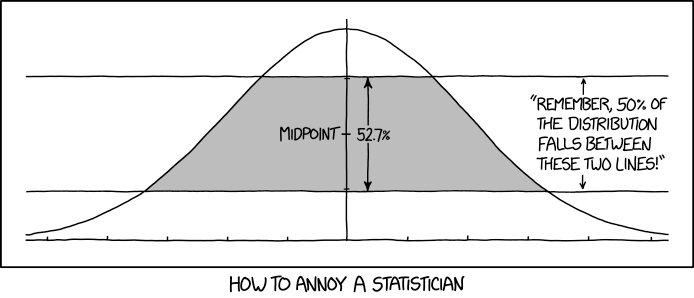
To understand the Gaussian distribution model, we need to first study
[this XKCD comic](https://xkcd.com/2118/):
[](https://xkcd.com/2118/)
The ```gaussian``` distribution model is more complex. It uses the
[Gaussian distribution](https://en.wikipedia.org/wiki/Normal_distribution) to prefer choices that
have been less recently chosen. Things near the top of the list of choices have the highest
probability of being chosen, while things at the end of the list have the lowest chance. Once an
item has been picked and the user has accepted the choice, the list is saved to disk with the picked
item moved to the end of the list. This model accepts three keys:
* ```model```: This must be set to the string "gaussian", in order to select this model.
* ```stddev_scaling_factor``` is used to derive the standard deviation; the standard deviation is
the length of the list of choices, divided by this scaling factor. Thus, a larger scaling factor
will result in a stronger preference for items near the top of the list, and a smaller scaling
factor will result in a more even distribution among the choices. Note that the smaller the
scaling factor is, the longer rpick will take to make a decision, on average. The default is
```3.0```, which is chosen because it places the last item on the list at three standard
deviations, giving it a 0.03% chance of being chosen. This key is optional, and defaults to 3.0.
* ```choices```: This is a list of strings that are the options for the model to choose from.
Example:
```
album:
model: gaussian
stddev_scaling_factor: 5.0
choices:
- Fountains of Wayne/Fountains Of Wayne
- Beck/Odelay
- "Townes Van Zandt/High, Low and In Between"
- Tori Amos/From The Choirgirl Hotel
- Zao/Parade Of Chaos
```
To show a visual representation of the relative frequencies of this model, here is a graph that was
generated by calling the Gaussian model 10,000 times with the choices set to the numbers 0 to 99
sequentially and a default ```stddev_scaling_factor``` of ```3.0```:

## Inventory
The ```inventory``` distribution model is a dynamic version of the ```weighted``` model. Each of the
choices has a certain number of lottery tickets that influence how likely they are to be picked that
round. Once an item is picked, it loses one ticket, i.e., dropping the inventory of that particular
item by one. It accepts two keys:
* ```model```: This must be set to the string "inventory", in order to select this model.
* ```choices```: This must be a list of objects. Each object accepts two keys:
- ```name```: This is required, and is the name of the choice.
- ```tickets```: The current number of lottery tickets that this choice has. This is optional, an
integer, and defaults to 1.
Example:
```
tea:
model: inventory
choices:
- name: "Tea… Earl Grey… Hot"
tickets: 15
- name: Black
tickets: 2
```
## Lottery
The ```lottery``` distribution model is also a dynamic version of the ```weighted``` model. Each of
the choices has a certain number of lottery tickets that influence how likely they are to be picked
that round. Once an item is picked, it loses all of its lottery tickets and every choice that wasn't
picked gains more lottery tickets. It accepts two keys:
* ```model```: This must be set to the string "lottery", in order to select this model.
* ```choices```: This must be a list of objects. Each object accepts three keys:
- ```name```: This is required, and is the name of the choice.
- ```tickets```: The current number of lottery tickets that this choice has. This is optional, an
integer, and defaults to 1.
- ```weight```: This is an integer expressing how many lottery tickets are given to this choice
when it is not chosen. You can use this to influence how often this item gets favored relative
to the other choices. It is optional, and defaults to 1.
Example:
```
activity:
model: lottery
choices:
- name: exercise
- name: read documentation
- name: watch tv
weight: 1000
```
## LRU
The ```lru``` (Least Recently Used) model is a simple ordered FIFO (First In, First Out) list. The
least recently chosen item is the first item in the list. On each pick, rpick simply picks the
first item in the list that the user says yes to, and then moves that item to the end of the
list. It accepts two keys:
* ```model```: This must be set to the string "lru", in order to select this model.
* ```choices```: This must be a list of strings. The least recently chosen item should be at the
beginning of the list.
Example:
```
code:
model: lru
choices:
- Add a feature
- Fix a bug
- Write some docs
```
## Weighted
The ```weighted``` distribution model is a more general version of the ```even``` model that allows
you to express different weights for each of the choices. It accepts two keys:
* ```model```: This must be set to the string "weighted", in order to select this model.
* ```choices```: This must be a list of objects. Each object accepts two keys:
- ```name```: This is required, and is the name of the choice.
- ```weight```: This is an integer expressing the weight for the choice. It is optional, and
defaults to 1.
Example:
```
cereal:
model: weighted
choices:
- name: generic bran flakes
- name: cracklin oat bran
weight: 1000
```
# Changelog
See the [Changelog](https://gitlab.com/bowlofeggs/rpick/blob/master/CHANGELOG.md).
# Contribute
If you would like to contribute to rpick, send me a patch!
There is a Makefile that is handy for development, if you have podman on your system. It's default
target is a help menu that describes the available targets.
```
# Note that root is not required.
$ make check
```
The podman development environment looks for an rpick config at ```config.yml```.