# romm-cli
[](https://crates.io/crates/romm-cli)
[](https://docs.rs/romm-cli)
[](https://opensource.org/licenses/MIT)
[](https://github.com/patricksmill/romm-cli/actions/workflows/ci.yml)
Rust CLI and TUI for managing a game library through the [ROMM API](https://github.com/romm-retro/romm). Use the CLI for scripting and automation, or the TUI for interactive browsing.
---
## Features
- **CLI and TUI**: Command-line interface for scripts plus an interactive terminal UI.
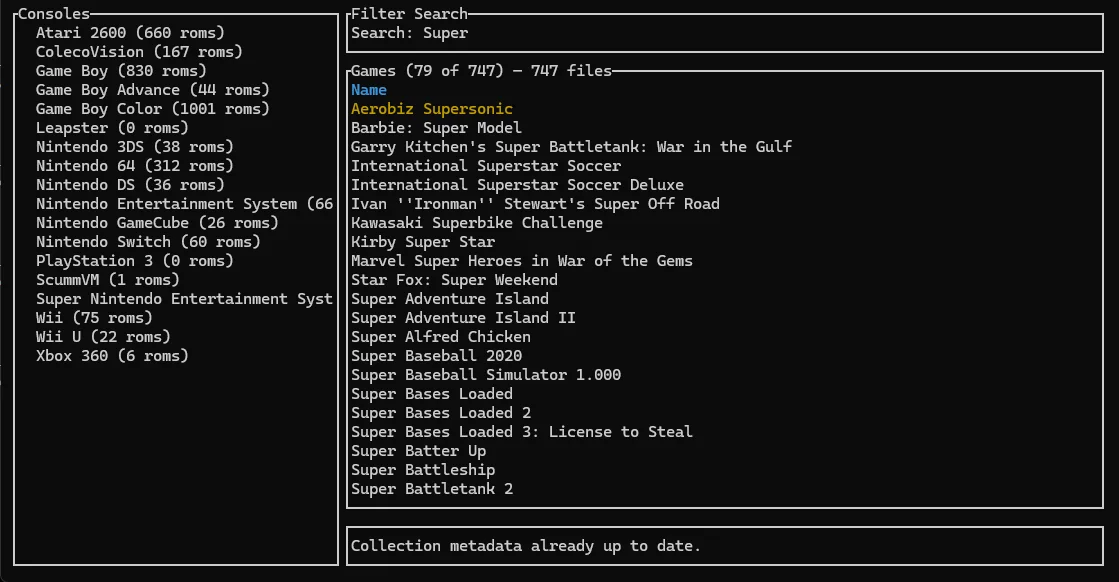
- **Library browsing**: Search, filter, and inspect game metadata.
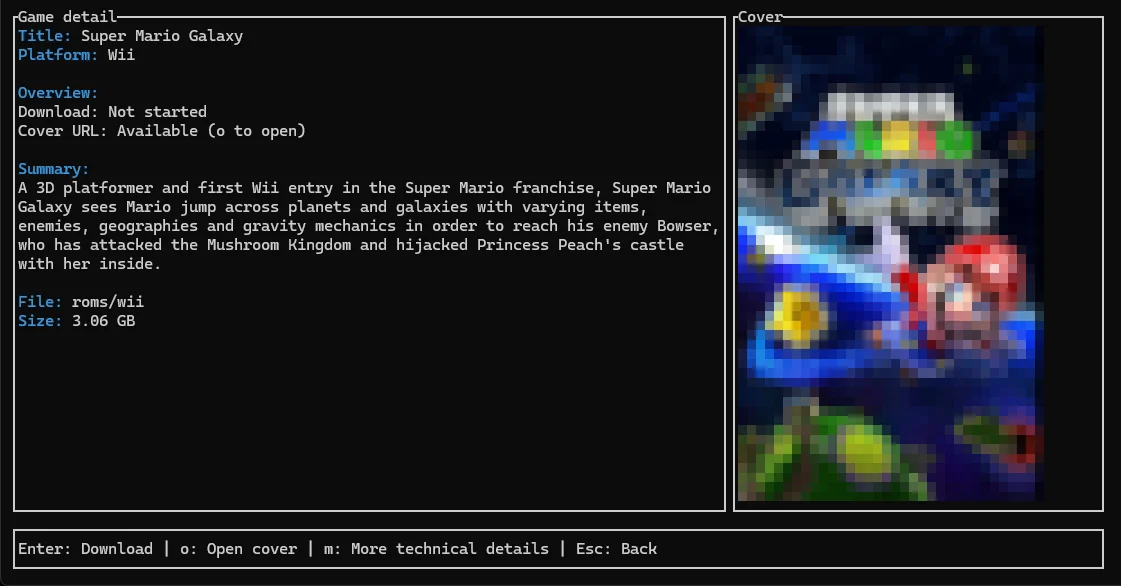
- **Cover-first game detail view**: ROM detail screen uses a two-column layout with optional inline cover rendering.
- **Background downloads**: Start downloads in the TUI and keep browsing while they run.
- **Authentication**: Basic Auth, Bearer tokens, custom-header API keys, and Web UI pairing codes.
- **Caching**: Game list caching for faster repeat loads.
- **Library scan**: Trigger a server `scan_library` task after uploads (`romm-cli roms upload … --scan`) or on demand (`romm-cli scan`), with optional `--wait` until the job finishes.
- **Save sync (API mode)**: Run one-shot sync planning/execution from a local manifest (`romm-cli sync plan` / `romm-cli sync run`), including device registration and session inspection.
- **Cross-platform**: Windows, Linux, and macOS (including ARM).
---
## Screenshots
### Game details view
### Search view
---
## Getting started
### Install with Cargo
If you have Rust installed:
```bash
cargo install romm-cli
```
The TUI is enabled by default. For a CLI-only build, use `--no-default-features`.
### Binary releases
Prebuilt binaries for Windows, Linux, and macOS are on the [Releases page](https://github.com/patricksmill/romm-cli/releases). Each archive includes:
- `romm-cli`: the full command-line tool, including `romm-cli tui`.
- `romm-tui`: a shortcut executable that opens the same TUI directly.
---
## Configuration
Run the setup wizard:
```bash
romm-cli init
```
This sets `API_BASE_URL` and authentication. Configuration is stored as `config.json` under your OS config directory (for example `~/.config/romm-cli/config.json` on Unix, or `%APPDATA%\romm-cli\config.json` on Windows).
`API_BASE_URL` should match the RomM **website** address from your browser (scheme, host, port only), for example `https://romm.example.com` or `http://my-server:1738`.
You can also set `API_BASE_URL` and auth-related variables in your **process environment**; env wins over `config.json` per field. The CLI does not auto-load a `.env` file.
**Auth problems (keyring, Docker, CI, Windows credentials):** see [docs/troubleshooting-auth.md](docs/troubleshooting-auth.md).
### API token (recommended)
If you have created an API token in the RomM web UI (under API tokens / developer settings), you can configure the CLI in one step without interactive prompts:
```bash
romm-cli init --url https://romm.example.com --token-file ~/.romm-token --check
```
*Note on security:* Prefer `--token-file` over `--token` to keep your secret out of shell history and process lists. The CLI stores the token in your OS keyring when available.
**Non-interactive flags:**
- `--url <URL>`: RomM origin (browser-style).
- `--token <TOKEN>`: Bearer token string.
- `--token-file <PATH>`: Read token from UTF-8 file. Use `-` for stdin.
- `--download-dir <PATH>`: Override the default ROMs directory.
- `--no-https`: Disable HTTPS (use HTTP instead).
- `--check`: Verify URL and token by fetching OpenAPI and calling the platforms endpoint after saving.
- `--force`: Overwrite existing configuration without asking.
- `--print-path`: Print the path to the user `config.json` and exit.
### Environment variables
Set these in your shell (or any tool that injects env vars into the process) for advanced use:
| `API_BASE_URL` | RomM site URL (browser address, no `/api`; e.g. `https://romm.example.com`) |
| `ROMM_ROMS_DIR` | Preferred. Base directory for stored ROMs (defaults to a `romm-cli` folder under the OS download directory, e.g. `~/Downloads/romm-cli` on typical Unix setups) |
| `ROMM_DOWNLOAD_DIR` | Legacy alias for `ROMM_ROMS_DIR` |
| `ROMM_ROMS_LAYOUT` | `auto` (default) or `manual`. In auto mode, ROMs go under `{ROMM_ROMS_DIR}/{console-slug}/`. In manual mode, use per-console paths from `config.json` (see below). |
| `API_USE_HTTPS` | Set to `false` to disable automatic upgrade to HTTPS (default: `true`) |
| `API_USERNAME` / `API_PASSWORD` | Basic Auth credentials |
| `API_TOKEN` | Bearer token |
| `ROMM_TOKEN_FILE` | Path to a UTF-8 file containing the bearer token (trimmed). Alias: `API_TOKEN_FILE`. Used when `API_TOKEN` is unset; for Docker/K8s secrets. Max 64 KiB. |
| `API_KEY_HEADER` / `API_KEY` | Custom API key header (e.g. `X-API-Key`) and its value |
| `ROMM_CACHE_PATH` | Optional. Override path for the persistent ROM list cache (default: OS local cache dir, e.g. `%LOCALAPPDATA%` on Windows). On first run after upgrading, a legacy `./romm-cache.json` is migrated automatically when no override is set. |
| `ROMM_LIBRARY_METADATA_SNAPSHOT_PATH` | Optional. Override path for the TUI library metadata snapshot (platforms + merged collections) used for fast startup (default: under the OS cache dir next to the ROM list cache). |
| `ROMM_OPENAPI_BASE_URL` | Optional. Only if OpenAPI must be fetched from a different origin than `API_BASE_URL`. |
| `ROMM_OPENAPI_PATH` | Optional. Override path for the downloaded OpenAPI cache (default: under the OS config dir). |
| `ROMM_USER_AGENT` | Optional. Override the HTTP `User-Agent` (some proxies block non-browser defaults). |
| `ROMM_VERBOSE` | Set to `1`/`true` to enable verbose mode for the standalone `romm-tui` binary (same as passing `--verbose` to `romm-cli`) |
| `ROMM_CHECK_UPDATES` | Optional. Set to `false`/`0`/`no`/`off` to disable startup update checks and prompts in CLI/TUI. |
| `ROMM_THEME` | Optional. TUI color theme ID (overrides `theme` in `config.json`). Built-in IDs include `terminal`, `catppuccin`, `dracula`, `nord`, `tokyo-night`, and others from Settings → Appearance. Default: `terminal`. Respects `NO_COLOR`. |
### Custom console paths
By default, downloads land in `{base Roms Dir}/{platform-slug}/` (for example `~/Downloads/romm-cli/nintendo-switch/`).
For multi-drive collections, map individual consoles to custom absolute paths in the TUI under **Settings → ROMs → Console paths**, during `romm-cli init`, or in `config.json`:
```json
{
"download_dir": "C:\\Games\\romm-cli",
"roms_layout": {
"platform_dirs": {
"7": "D:\\Roms\\Switch",
"3": "E:\\Roms\\NES"
}
}
}
```
Keys in `platform_dirs` are RomM platform IDs. Unmapped consoles use the base subfolder path. `romm-cli download` and TUI downloads both use this layout; `--output` replaces the base Roms Dir for that run but custom mappings stay absolute.
### Custom console save paths
By default, TUI save downloads land in `{Save Dir}/{platform-slug}/{game}/` (for example `~/Downloads/romm-cli/saves/nintendo-switch/Zelda/`).
For multi-drive layouts, map individual consoles to custom absolute save paths in the TUI under **Settings → Saves → Save console paths**, or in `config.json`:
```json
{
"save_sync": {
"save_dir": "C:\\Games\\romm-cli\\saves",
"platform_dirs": {
"7": "D:\\Saves\\Switch",
"3": "E:\\Saves\\NES"
}
}
}
```
Keys in `platform_dirs` are RomM platform IDs. Unmapped consoles use `{save_dir}/{platform-slug}/`. CLI `sync run` manifest paths are unchanged (explicit paths in the manifest file).
---
## Further documentation
- [Architecture](docs/architecture.md) — crate layout, layers, and TUI state machine.
- [TUI internals](docs/tui.md) — event loop, screens, scrolling.
- [HTTP client](docs/http-client.md) — `RommClient`, endpoints, streaming downloads.
- [Save sync](docs/save-sync.md) — manifest format, `sync` subcommands, conflict handling, and session lifecycle.
- [Troubleshooting authentication](docs/troubleshooting-auth.md) — keyring, Docker, CI, Windows.
- [Post-upload library scan](docs/scan-after-upload.md) — `--scan`, `scan --wait`, cache invalidation.
---
## Usage
Run `romm-cli --help` or `romm-cli <command> --help` for the full flag list (subcommands also support short aliases where configured).
### TUI
```bash
romm-cli tui
# or:
romm-tui
```
Game detail (`Enter` on a selected game) now prefers a cover-first layout:
- Inline cover rendering is attempted when terminal capabilities are detected (Kitty, iTerm2-compatible, or Sixel terminals).
- If advanced terminal image protocols are unavailable (for example in Windows Terminal), the detail view uses an inline halfblocks fallback; if image loading fails, it falls back to readable text and keeps `o` to open the cover in a browser.
### CLI
The CLI supports JSON output where applicable. Many commands have short aliases (e.g., `setup` for `init`, `call` for `api`, `p` for `platforms`, `r` for `roms`, `up` for `upload`, `dl` for `download`).
```bash
# List platforms
romm-cli platforms
# Search and print JSON
romm-cli roms list --search-term "zelda" --json
# Upload a ROM (file or directory), then optionally rescan the library on the server
romm-cli roms upload --platform <slug-or-name> path/to/rom.bin --scan
romm-cli roms upload --platform <slug-or-name> ./folder --scan --wait
# Download covers, manuals, and sibling updates/DLC for one game
romm-cli download extras <rom-id>
# Trigger a full library scan (e.g. after uploads outside the CLI); optional --wait
romm-cli scan
romm-cli scan --wait --wait-timeout-secs 3600
# Save sync (RomM 4.9.0-alpha.2+): plan from manifest, then execute
romm-cli sync device register --name "My Handheld" --sync-mode api
romm-cli sync plan --device-id <device-id> --manifest ./sync-manifest.json
romm-cli sync run --device-id <device-id> --manifest ./sync-manifest.json
# Self-update
romm-cli update
# Cache utilities
romm-cli cache path
romm-cli cache info
romm-cli cache clear
# Rotate credentials without re-entering ROM path/base URL
romm-cli auth status
romm-cli auth login --token-file ~/.romm-token
romm-cli auth logout
```
On interactive startup, `romm-cli` and `romm-tui` check for newer releases and can prompt to update now, open the online changelog, or skip.
After a chunked upload, RomM still needs a **library scan** before new games appear in search and the TUI. See [docs/scan-after-upload.md](docs/scan-after-upload.md) for batch uploads, `--wait`, JSON output, and cache behavior.
Save sync commands use RomM sync endpoints introduced in the `4.9.0-alpha.2` pre-release. For details and the full manifest schema, see [docs/save-sync.md](docs/save-sync.md).
---
## Project layout
- **`src/frontend`**: Routing between CLI and TUI execution.
- **`src/commands`**: CLI argument parsing and non-TUI command logic.
- **`src/endpoints`**: Typed RomM API routes (`Endpoint` trait).
- **`src/services`**: Thin helpers over endpoints (e.g. platform/ROM services).
- **`src/tui`**: Terminal UI (`ratatui`, `crossterm`) and state machine (`AppScreen`).
- **`src/core`**: ROM list cache, background downloads, and related utilities.
- **`src/client.rs`**: HTTP client wrapper around `reqwest`.
- **`src/config.rs`**: Layered environment loading and keyring integration.
---
## Contributing
Issues and pull requests are welcome. To build from source:
```bash
git clone https://github.com/patricksmill/romm-cli
cd romm-cli
cargo build --release
```
---
## License
This project is licensed under the [MIT License](LICENSE).
---
*Creation assisted with AI; content reviewed by the maintainers.*