# rlt
A **R**ust **L**oad **T**esting framework with real-time TUI support.
[](https://crates.io/crates/rlt)
[](https://docs.rs/rlt/)
[](https://github.com/wfxr/rlt/actions/workflows/check.yml)
[](https://github.com/wfxr/rlt?tab=MIT-1-ov-file)
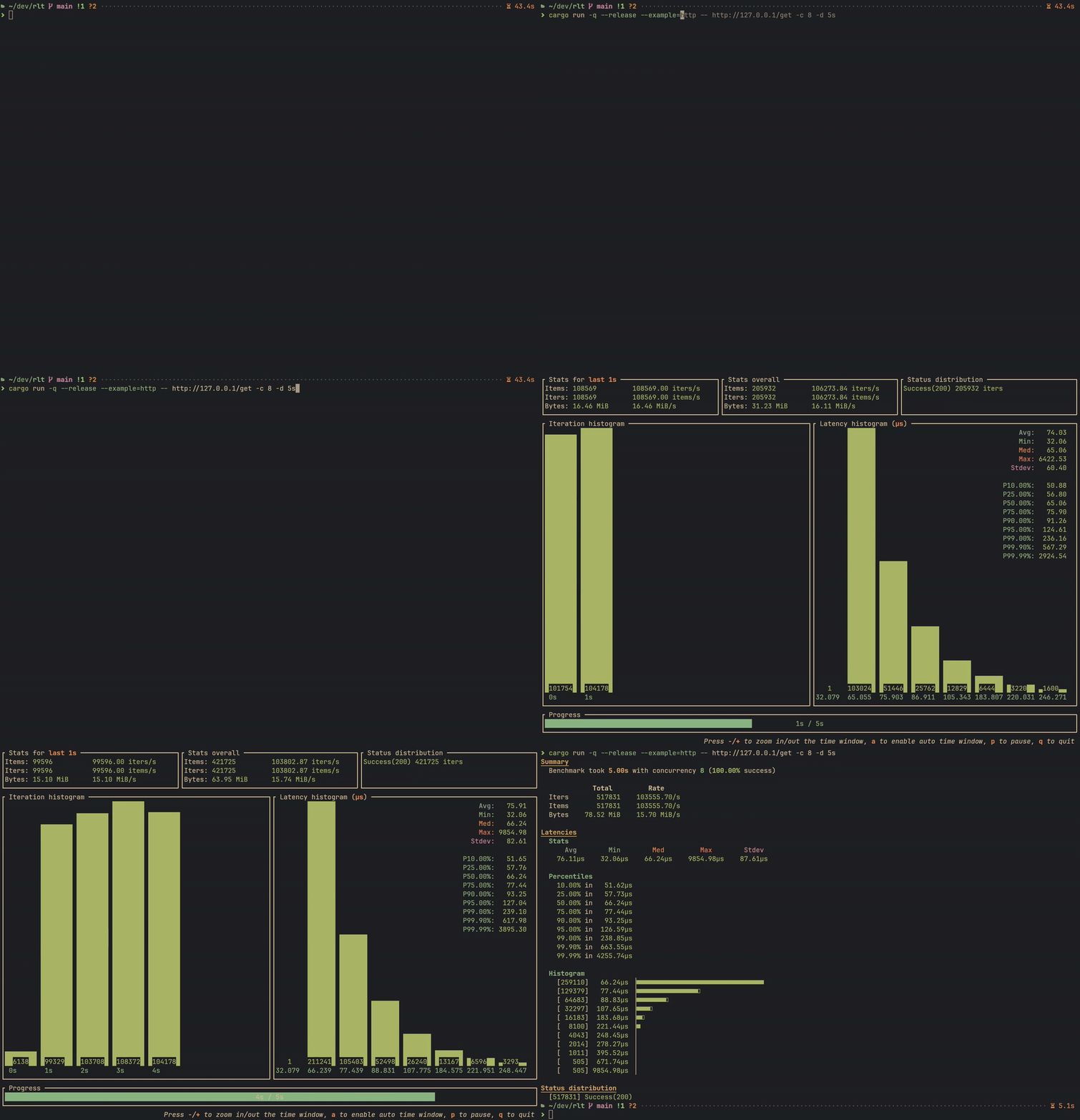
**rlt** provides a simple way to create load test tools in Rust.
It is designed to be a universal load test framework, which means you can use
rlt for various services, such as HTTP, gRPC, Thrift, Database, or other customized services.
### Features
- **Flexible**: Customize the workload with your own logic.
- **Easy to use**: Little boilerplate code, just focus on testing.
- **Rich Statistics**: Collect and display rich statistics.
- **High Performance**: Optimized for performance and resource usage.
- **Real-time TUI**: Monitor testing progress with a powerful real-time TUI.
- **Baseline Comparison**: Save and compare results to track performance changes.
### Quick Start
Run `cargo add rlt` to add `rlt` as a dependency to your `Cargo.toml`:
```toml
[dependencies]
rlt = "0.3"
```
#### Stateless Benchmark
For simple benchmarks without per-worker state, implement the `StatelessBenchSuite` trait:
```rust
use anyhow::Result;
use async_trait::async_trait;
use clap::Parser;
use rlt::{cli::BenchCli, IterInfo, IterReport, StatelessBenchSuite, Status};
use tokio::time::Instant;
#[derive(Clone)]
struct SimpleBench;
#[async_trait]
impl StatelessBenchSuite for SimpleBench {
async fn bench(&mut self, _: &IterInfo) -> Result<IterReport> {
let t = Instant::now();
// Your benchmark logic here
Ok(IterReport { duration: t.elapsed(), status: Status::success(0), bytes: 0, items: 1 })
}
}
#[tokio::main]
async fn main() -> Result<()> {
rlt::cli::run(BenchCli::parse(), SimpleBench).await
}
```
#### Stateful Benchmark
For benchmarks requiring per-worker state (e.g., HTTP clients, DB connections), implement `BenchSuite`.
The `bench_cli!` macro helps define CLI options:
```rust
bench_cli!(HttpBench, {
/// Target URL.
#[clap(long)]
pub url: Url,
});
#[async_trait]
impl BenchSuite for HttpBench {
type WorkerState = Client;
async fn state(&self, _: u32) -> Result<Self::WorkerState> {
Ok(Client::new())
}
async fn bench(&mut self, client: &mut Self::WorkerState, _: &IterInfo) -> Result<IterReport> {
let t = Instant::now();
let resp = client.get(self.url.clone()).send().await?;
let status = resp.status().into();
let bytes = resp.bytes().await?.len() as u64;
let duration = t.elapsed();
Ok(IterReport { duration, status, bytes, items: 1 })
}
}
```
*You can also create a separate struct to hold the CLI options for more flexibility.
There is an example in [examples/http_hyper.rs](examples/http_hyper.rs).*
Finally, create the main function to run the load test using the `bench_cli_run!` macro:
```rust
#[tokio::main]
async fn main() -> Result<()> {
bench_cli_run!(HttpBench).await
}
```
### CLI Reference
All benchmarks built with rlt include these CLI options:
#### Core Options
| `--concurrency` | `-c` | Number of concurrent workers |
| `--iterations` | `-n` | Stop after N iterations |
| `--duration` | `-d` | Stop after duration (e.g., `10s`, `5m`, `1h`) |
| `--warmup` | `-w` | Warmup iterations (excluded from results) |
| `--rate` | `-r` | Rate limit in iterations per second |
| `--quiet` | `-q` | Quiet mode (implies `--collector silent`) |
#### Output Options
| `--output` | `-o` | Output format: `text` or `json` |
| `--output-file` | `-O` | Write report to file instead of stdout |
| `--collector` | | Collector type: `tui` or `silent` |
| `--fps` | | TUI refresh rate (frames per second) |
| `--quit-manually` | | Require manual quit (TUI only) |
#### Baseline Options
| `--save-baseline <NAME>` | Save results as named baseline |
| `--baseline <NAME>` | Compare against named baseline |
| `--baseline-file <PATH>` | Compare against baseline JSON file |
| `--baseline-dir <PATH>` | Baseline storage directory |
| `--noise-threshold` | Noise threshold percentage |
| `--fail-on-regression` | Exit with error on regression (CI mode) |
| `--regression-metrics` | Metrics for regression detection |
### Cargo Features
| `tracing` | Yes | Logging support via [tui-logger](https://crates.io/crates/tui-logger) |
| `rate_limit` | Yes | Rate limiting via [governor](https://crates.io/crates/governor) |
| `http` | Yes | HTTP status code conversion |
To disable default features:
```toml
[dependencies]
rlt = { version = "0.3", default-features = false }
```
### Examples
| `simple_stateless` | Basic stateless benchmark | `cargo run --example simple_stateless -- -c 4 -d 10s` |
| `http_reqwest` | HTTP with [reqwest](https://crates.io/crates/reqwest) | `cargo run --example http_reqwest -- --url http://example.com -c 10` |
| `http_hyper` | HTTP with [hyper](https://crates.io/crates/hyper) | `cargo run --example http_hyper -- --url http://example.com -c 10` |
| `postgres` | PostgreSQL benchmark | `cargo run --example postgres -- --host localhost -c 10 -b 100` |
| `warmup` | Warmup phase demo | `cargo run --example warmup -- -w 10 -n 50` |
| `baseline` | Baseline comparison demo | `cargo run --example baseline -- -c 4 -d 5s --save-baseline v0` |
| `logging` | Tracing integration | `cargo run --example logging -- -c 2 -d 5s` |
### Baseline Comparison
rlt supports saving benchmark results as baselines and comparing future runs against them:
#### Save a Baseline
```bash
mybench --url http://localhost:8080 -c 10 -d 30s --save-baseline v1.0
```
Baselines are stored in `target/rlt/baselines/` by default.
Customize with `--baseline-dir` or the `RLT_BASELINE_DIR` environment variable.
#### Compare Against Baseline
```bash
mybench --url http://localhost:8080 -c 10 -d 30s --baseline v1.0
```
The comparison displays color-coded deltas:
- **Green**: Performance improved
- **Red**: Performance regressed
- **Yellow**: Within noise threshold (unchanged)
#### CI/CD Integration
```bash
# Fail the pipeline if performance regresses
mybench --baseline main --fail-on-regression
# Customize regression detection metrics
mybench --baseline main --fail-on-regression \
--regression-metrics latency-p99,success-ratio
```
#### Compare and Save
```bash
# Compare against v1, then save as v2
mybench --baseline v1 --save-baseline v2
```
### Credits
The TUI layout in rlt is inspired by [oha](https://github.com/hatoo/oha).
### License
`rlt` is distributed under the terms of both the MIT License and the Apache License 2.0.
See the [LICENSE-APACHE](LICENSE-APACHE) and [LICENSE-MIT](LICENSE-MIT) files for license details.